
oneydef/EarA-linux
oneydef/EarA-linux has 40 GitHub stars and 5 forks. GitHot measured +2 stars in 24 hours. Last checked 2026-11-15 17:38 UTC. Last push 2026-11-12.
What you can do
- Redesigned fixed 1200×720 interface with consistent typography, spacing, icons, and navigation
- Light connection and recovery screens with dark Device, Sound, Gestures, and Tools workspaces
- More reliable discovery, reconnection, service diagnostics, and state restoration
- Corrected equalizer presets and synchronized quick controls across Device and Sound
Measured star growth
- in 24h
- +2
- in 7 days
- Collecting history
- in 15 days
- Collecting history
- in 1 month
- Collecting history
Net star changes over overlapping periods, not daily totals. Missing measurements are left blank. Stars measure attention, not software quality.
About
Open-source GTK4 companion for Nothing and CMF earbuds on Linux.
Creative & MediaREADME.md
Original
Unofficial GTK4 companion for Nothing and CMF earbuds on Linux


Website · Downloads · Supported devices · Roadmap · Contribute
EarA brings battery status, noise control, EQ, gestures, Find My Earbuds, and Bluetooth audio controls to the Linux desktop through a native GTK4 interface and a scriptable command-line client.
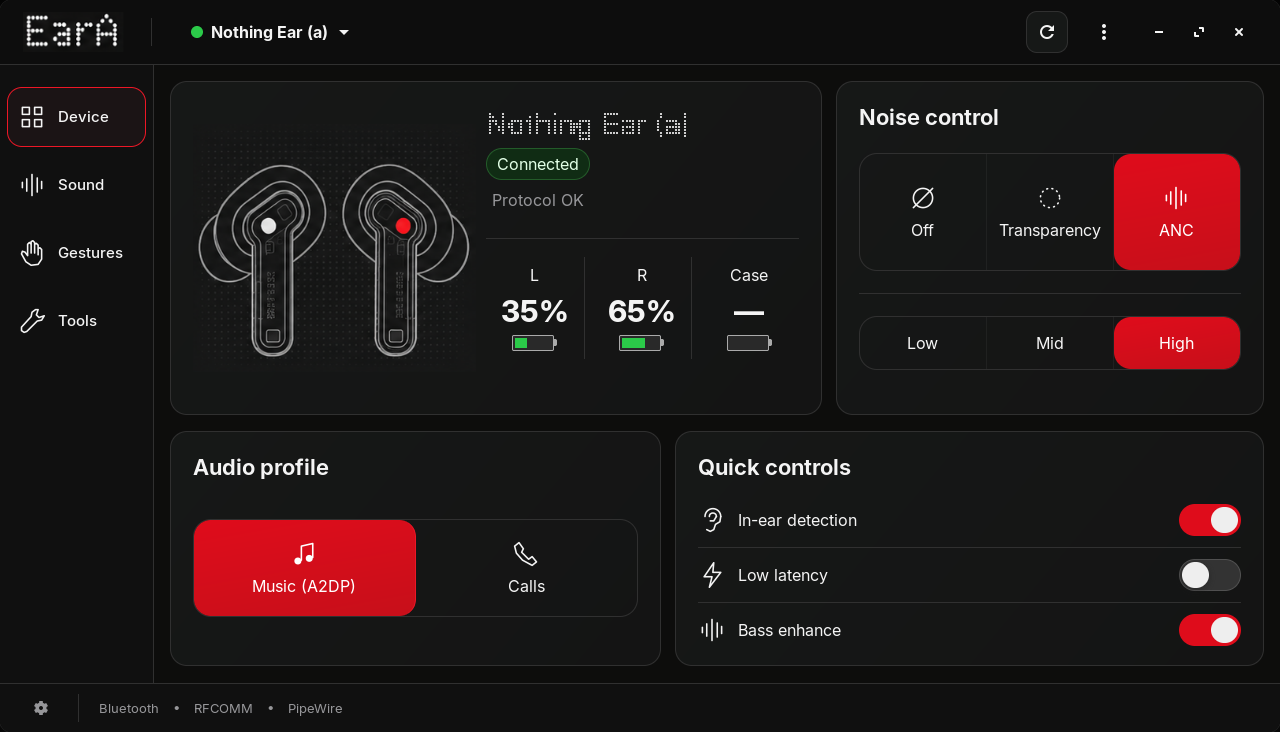
Device — connection, battery, audio profiles, noise control, and quick settings
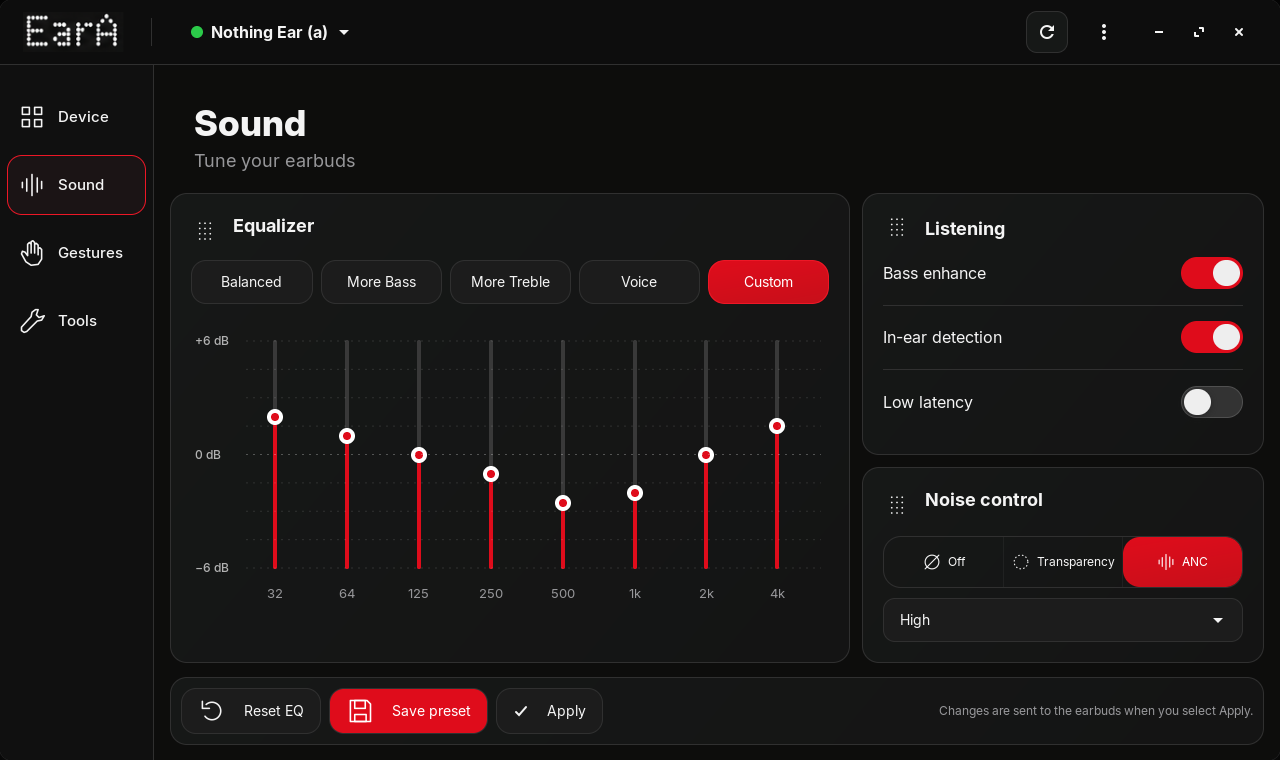
Sound — equalizer, listening controls, and synchronized settings
Highlights
- Redesigned fixed 1200×720 interface with consistent typography, spacing, icons, and navigation
- Light connection and recovery screens with dark Device, Sound, Gestures, and Tools workspaces
- More reliable discovery, reconnection, service diagnostics, and state restoration
- Corrected equalizer presets and synchronized quick controls across Device and Sound
Features
- Battery levels for the left earbud, right earbud, and case
- ANC, transparency, listening modes, bass, and equalizer controls
- Gesture remapping, in-ear detection, ear-tip fit test, and Find My Earbuds
- A2DP music playback with optional headset-microphone mode
- GTK4/libadwaita desktop app and a scriptable CLI
Install
Download the latest AppImage, DEB, RPM, or standalone Flatpak bundle from GitHub Releases.
Debian / Ubuntu
sudo dpkg -i eara_*_all.deb
eara gui
Flatpak bundle
flatpak install --user ./EarA-*.flatpak
flatpak run io.github.oneydef.eara
Install from source
sudo apt install python3 python3-gi python3-gi-cairo python3-cairo python3-dbus gir1.2-gtk-4.0 gir1.2-adw-1 bluez
git clone https://github.com/oneydef/EarA-linux.git
cd EarA-linux
./scripts/install-user.sh
eara gui
This installs eara to ~/.local/bin and adds EarA to the application menu.
Device support
Nothing Ear (a) is validated end to end. CMF Buds 2 has tested battery reporting, listening modes, EQ, and Bluetooth audio support.
EarA also includes profiles for other Nothing and CMF models that use the same RFCOMM protocol family. Their individual controls still need community testing. See the device matrix for the current status.
Command line
eara status
eara connect
eara anc transparency
eara eq more_bass
eara graphic-eq 0 0 0 0 0 0 0 0
eara audio mic
eara audio hfp
eara ring both
eara doctor
If Linux cannot claim the A2DP connection, disconnect the earbuds from the phone first.
Project
Linux is the primary platform. Native macOS and Windows support is planned after the shared protocol and platform-independent core are ready.
Featured
- OMG! Ubuntu — This App Lets You Manage Nothing & CMF Earbuds on Linux
- FOSSWire — EarA Open-Source GTK4 App Manages Nothing and CMF Earbuds on Linux
- Root.cz — Softwarová sklizeň: EarA for Nothing and CMF earbuds
- Mamá Libre — EarA: la app open source para manejar auriculares Nothing y CMF desde Linux
- LinuxFokus — Mit dieser App können Sie Nothing- und CMF-Ohrhörer unter Linux verwalten
- Hacks.gr — Νέο πρόγραμμα φέρνει τον πλήρη έλεγχο των ακουστικών Nothing και CMF στο Linux
Support
EarA is free and open-source. If it is useful to you, you can buy the developer a coffee.
License
GPL-3.0-or-later · Copyright © 2026 oneydef
Product names are trademarks of their owners; see TRADEMARKS.md and NOTICE.
Protocol reference
RFCOMM channel discovered through SDP (usually 15; newer CMF models may use 16) · UUID aeac4a03-dff5-498f-843a-34487cf133eb · frames 55 60 01 | cmd | dir | len | seq | payload | CRC-16/ARC.