
oheyek/VidGrabber
oheyek/VidGrabber has 29 GitHub stars and 1 forks. GitHot measured 0 stars in 24 hours, 0 in 7 days, and 0 in 15 days. Last checked 2026-11-14 07:17 UTC. Last push 2026-11-01.
What you can do
- Multi-Format Downloads: Download videos (MP4), audio (MP3/WAV), thumbnails (JPG), and tags (CSV).
- Quality Selection: Choose from available video qualities (144p to 2160p) with automatic detection.
- Queue Management: Add multiple downloads to queue and process them in batch (up to 5 concurrent downloads).
- Smart Path Management: Customize download locations for each file type with persistent settings.
Measured star growth
- in 24h
- 0
- in 7 days
- 0
- in 15 days
- 0
- in 1 month
- Collecting history
Net star changes over overlapping periods, not daily totals. Missing measurements are left blank. Stars measure attention, not software quality.
About
Desktop application for downloading and processing YouTube content
Creative & MediaREADME.md
Original VidGrabber





A powerful desktop application for downloading and processing YouTube content with an intuitive interface.
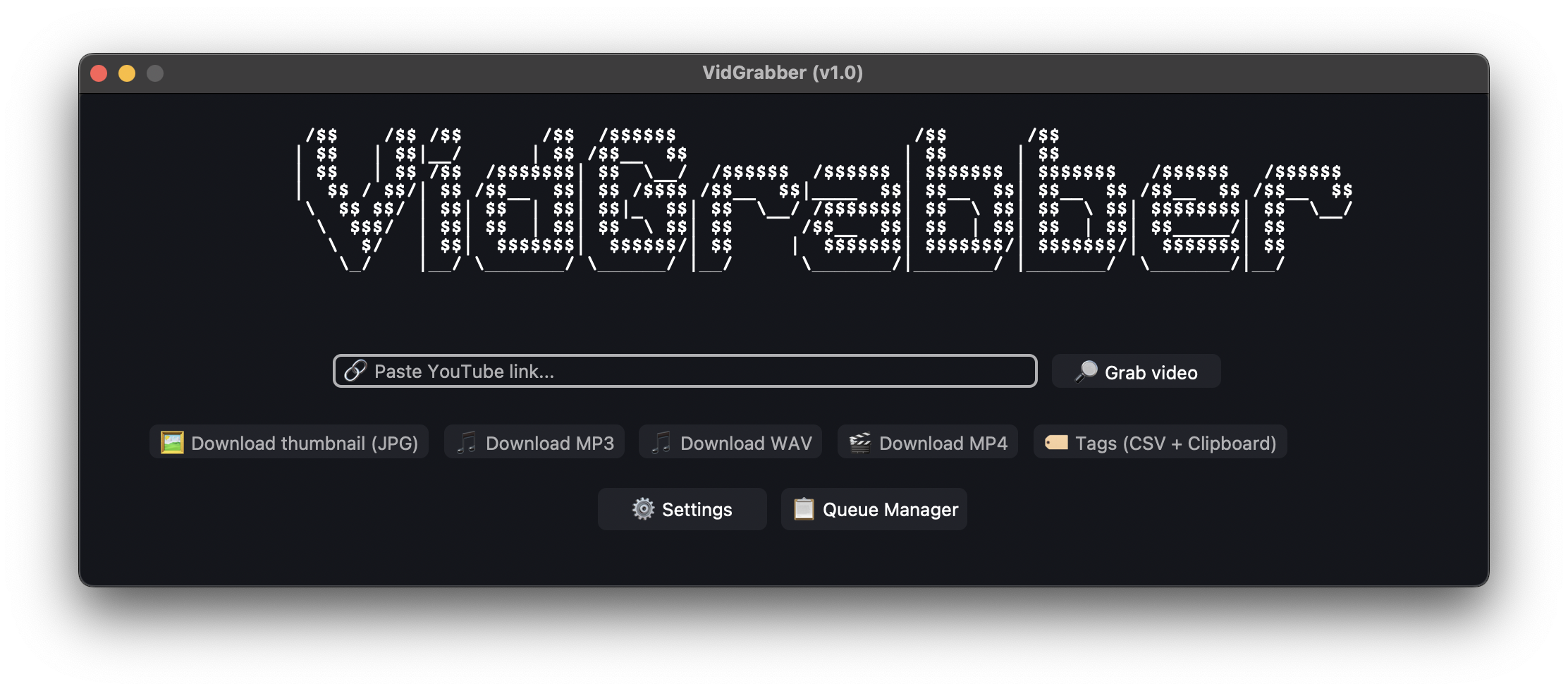
✨ Features
- Multi-Format Downloads: Download videos (MP4), audio (MP3/WAV), thumbnails (JPG), and tags (CSV).
- Quality Selection: Choose from available video qualities (144p to 2160p) with automatic detection.
- Queue Management: Add multiple downloads to queue and process them in batch (up to 5 concurrent downloads).
- Smart Path Management: Customize download locations for each file type with persistent settings.
- Theme Customization: Switch between Dark, Light, and System themes.
- Tag Extraction: Extract video tags and copy them directly to clipboard.
- Cross-Platform: Works seamlessly on Windows, macOS, and Linux.
- Auto-Updates: Automatically downloads and updates yt-dlp and ffmpeg binaries.
- Progress Tracking: Real-time download progress with visual indicators.
🛠️ Installation
Using the Pre-built Release
- Download the appropriate executable for your platform from
the Releases page:
- Windows:
VidGrabber.exe - macOS:
VidGrabber-macOS.zip - Linux:
VidGrabber-Linux.tar.gz
- Windows:
- Extract the archive (if applicable).
- On first launch, the app will automatically download required binaries (yt-dlp and ffmpeg)
🐧 Linux & 🍎 macOS Notes
Linux Users:
Download the .tar.gz file, extract it, and run the binary inside. No installation required.
tar -xzf VidGrabber-Linux.tar.gz
./VidGrabber
macOS Users: If you receive a message that the app is "damaged" or "cannot be opened" (Gatekeeper error), run the following command in Terminal to allow execution:
xattr -cr /path/to/VidGrabber.app
Running from Source
# Clone the repository
git clone https://github.com/oheyek/VidGrabber.git
cd VidGrabber

# Install dependencies
pip install -r requirements.txt

# Run the application
python main.py
🎯 Usage
Basic Download
- Paste a YouTube link into the input field.
- Click "🔎 Grab video" to fetch video information.
- Select your desired download option:
- 🖼️ Download thumbnail (JPG) - Get the video thumbnail
- 🎵 Download MP3/WAV - Extract audio only
- 🎬 Download MP4 - Download video (select quality)
- 🏷️ Tags (CSV + Clipboard) - Extract video tags
Queue Management
- Click "📋 Queue Manager" to open the queue window.
- When fetching video info, choose "➕ Add to Queue" instead of immediate download.
- Add multiple items to the queue (max 5 per category).
- Click "▶️ Download All" to process all queued downloads.
- Use "🗑️ Clear All" to remove all items from queue.
Customizing Settings
- Click "⚙️ Settings" button.
- Appearance Tab: Choose between Dark, Light, or System theme.
- Downloads Tab: Set custom download paths for each file type (MP4, MP3, WAV, JPG, Tags).
- Credits Tab: View app information and support links.
📋 Available Downloads
| Type | Format | Description |
|---|---|---|
| Video | MP4 | Download in multiple qualities (144p-2160p) |
| Audio | MP3 | Extract audio with 192K bitrate |
| Audio | WAV | Extract high-quality uncompressed audio |
| Thumbnail | JPG | Download video thumbnail image |
| Tags | CSV | Extract video tags to CSV and clipboard |
🔧 Technical Details
- Language: Python 3
- GUI Framework: CustomTkinter 5.2.2
- Download Engine: yt-dlp (auto-updated)
- Media Processing: ffmpeg (auto-downloaded)
- Async Support: asyncio for non-blocking operations
- Clipboard: pyperclip for tag copying
- Logging: Comprehensive logging system for debugging
Key Dependencies
customtkinter==5.2.2
pyperclip==1.11.0
pillow==12.0.0
pytest==8.4.2
pytest-asyncio==1.2.0
🏗️ Building from Source
Windows
pyinstaller win.spec
macOS
pyinstaller macos.spec
Linux
pyinstaller linux.spec
The built executables will be located in the dist/ directory.
🗂️ Project Structure
VidGrabber/
├── main.py                      # Application entry point
├── src/
│   ├── downloader.py           # Video/audio download logic
│   ├── video_info.py           # YouTube video information fetcher
│   ├── thumbnail_downloader.py # Thumbnail download handler
│   ├── tag_extractor.py        # Tag extraction and CSV export
│   ├── path_manager.py         # Download path management
│   ├── logger.py               # Logging functionality
│   ├── updater.py              # Binary updater (yt-dlp, ffmpeg)
│   ├── queue/
│   │   └── download_queue.py   # Queue management system
│   └── ui/
│       ├── interface.py        # Main application UI
│       ├── queue_window.py     # Queue manager window
│       ├── themes/
│       │   └── basalt.json     # Custom theme
│       └── icons/
│           ├── icon.ico        # Windows icon
│           ├── icon.icns       # macOS icon
│           └── icon.png        # Linux icon
├── tests/                       # Unit tests
│   ├── conftest.py             # Pytest configuration
│   ├── test_downloader.py      # Downloader tests
│   ├── test_video_info.py      # Video info tests
│   ├── test_thumbnail_downloader.py
│   ├── test_tag_extractor.py
│   └── test_download_queue.py
├── requirements.txt            # Python dependencies
├── win.spec                    # PyInstaller config for Windows
├── macos.spec                  # PyInstaller config for macOS
├── linux.spec                  # PyInstaller config for Linux
├── Doxyfile                    # Documentation configuration
└── README.md                   # This file
🧪 Testing
The project includes comprehensive unit tests for all core functionality.
Running Tests
# Install test dependencies
pip install pytest pytest-asyncio

# Run all tests
pytest

# Run specific test file
pytest tests/test_downloader.py

# Run with verbose output
pytest -v

# Run with coverage
pytest --cov=src tests/
Test Coverage
- Video Download Tests: URL validation, quality selection, error handling
- Audio Download Tests: MP3/WAV format validation, invalid input handling
- Thumbnail Tests: Download validation, error cases
- Tag Extraction Tests: CSV generation, clipboard copying
- Queue Management Tests: Adding items, queue limits, batch processing
- Video Info Tests: URL cleaning, metadata extraction
🤝 Contributions
Contributions are welcome! Here's how you can help:
- Fork the repository
- Create a new feature branch (
git checkout -b feature/amazing-feature) - Commit your changes (
git commit -m 'Add amazing feature') - Push to the branch (
git push origin feature/amazing-feature) - Open a Pull Request
📄 License
This project is open source and available under the MIT License.
Happy Downloading! 🎉
Author
Made with ❤️ by ohey

If you find this project useful, consider buying me a coffee! ☕
Explore related projects
ytdl-org/youtube-dl
Command-line program to download videos from YouTube.com and other video sites
141,559 starsexcalidraw/excalidraw
Virtual whiteboard for sketching hand-drawn like diagrams
135,666 starsgodotengine/godot
Godot Engine – Multi-platform 2D and 3D game engine
120,120 starsmrdoob/three.js
JavaScript 3D Library.
118,361 stars