
ognistik/macrowhisper
ognistik/macrowhisper has 228 GitHub stars and 19 forks. Star changes are not measured yet. Last checked 2026-11-15 23:53 UTC. Last push 2026-10-15.
Measured star growth
- in 24h
- Update delayed
- in 7 days
- Update delayed
- in 15 days
- Update delayed
- in 1 month
- Update delayed
Net star changes over overlapping periods, not daily totals. Missing measurements are left blank. Stars measure attention, not software quality.
About
Automation Helper for Superwhisper
ProductivityREADME.md
OriginalMacrowhisper
Macrowhisper is an automation helper for Superwhisper. Superwhisper turns your voice into text; Macrowhisper watches the resulting recording and decides what to do next.
It can paste or type the result, open a URL, run a macOS Shortcut, run a shell command or AppleScript, and chain several actions together. Actions can be selected by voice phrase, frontmost app, Superwhisper mode, browser URL, or a normal fallback action.


Before your first dictation: configure Superwhisper using the first-use checklist below. Its paste and clipboard settings need to work with Macrowhisper; leaving them at their defaults can cause conflicting clipboard changes or duplicate insertion.
Requirements
- macOS 12.4 or later. This is the deployment target configured for the current macOS executable.
- Superwhisper, configured to save recordings.
- Accessibility permission for the installed
macrowhisperexecutable. Macrowhisper uses it for insertion, key simulation, selected text, and app context. Grant it in System Settings → Privacy & Security → Accessibility when macOS prompts you. - Automation permission may be requested when you use Shortcuts, AppleScript, or System Events actions.
Install
Homebrew
brew install ognistik/formulae/macrowhisper
Install script
curl -L https://raw.githubusercontent.com/ognistik/macrowhisper/main/scripts/install.sh | sudo sh
The script installs the prebuilt release specified in the script and its JSON schema after checking the archive's SHA-256 hash. The release process updates that version and hash. It installs to /usr/local/bin by default; pass an absolute directory as the script argument when you need another location.
First use
Start with these settings in Superwhisper → Configuration → Text input, as shown below. Superwhisper supplies the dictation; Macrowhisper's insert actions handle pasting or typing it and restoring your clipboard.
| Superwhisper setting | Recommended value |
|---|---|
| Clipboard content | Replace with dictation |
| Clipboard history | On (recommended; see below) |
| Paste result text | Off |
| Simulate keypresses | Off |
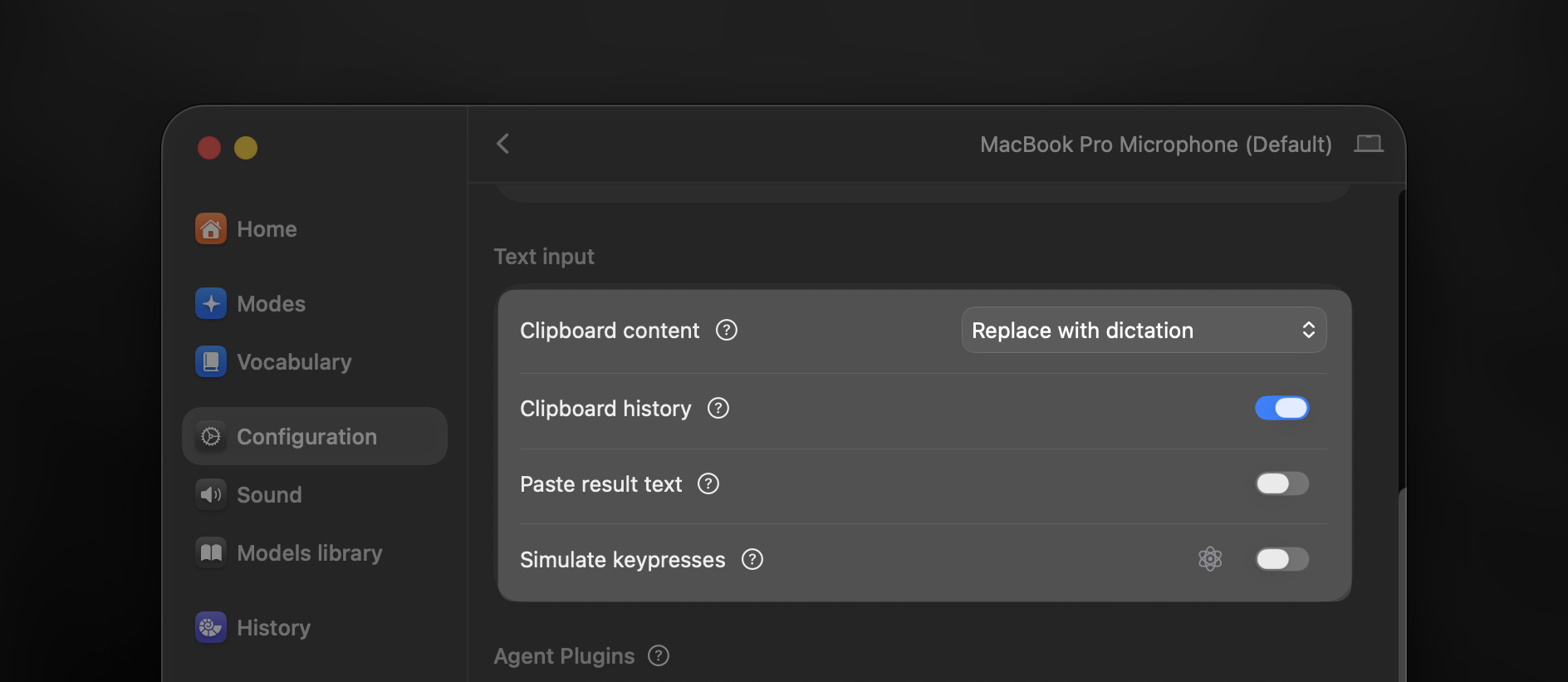
Clipboard history: On lets clipboard-history apps retain Superwhisper's dictations, making them easier to find and reuse. Off marks Superwhisper's writes as transient so those apps skip them. Macrowhisper handles transient clipboard activity too, so On is a convenience recommendation, not a requirement for detection. You can choose Off; it controls Superwhisper's writes, while Macrowhisper's own inserts can still produce clipboard-history entries.
Also set Superwhisper's Recording Window to Classic or Mini, its Cancel recording shortcut to Escape (Esc), and Always close to Off. Macrowhisper's default simEsc: true lets actions dismiss the recording window with Escape before running. The generated autoPaste action skips Escape outside text fields.
If you choose None for the recording window or enable Always close, set Macrowhisper's defaults.simEsc to false. See setup alternatives for matching options, clipboard restoration, and typing instead of pasting.
Then create the configuration, check its path, validate it, and start the background service:
macrowhisper --reveal-config
macrowhisper --get-config
macrowhisper --validate-config
macrowhisper --start-service
macrowhisper --service-status
--reveal-config creates the file when it does not exist and opens it in Finder. The default path is ~/.config/macrowhisper/macrowhisper.json. A generated configuration creates an autoPaste insert and uses it as defaults.activeAction, so you can dictate into a normal text field immediately after granting Accessibility permission and starting the service.
The generated defaults.watch value follows Superwhisper's configured folder when it can read that setting. A fresh installation normally uses ~/superwhisper; existing ~/Documents/superwhisper and custom locations are supported. The value is the Superwhisper folder containing recordings, rather than the recordings directory itself.
If the recording window does not close reliably, try a small defaults.actionDelay such as 0.05 to 0.2 seconds.
Configuration
configVersion: 3 is the current configuration format. It keeps version 2's
inheritance rules (null inherits defaults and "" means intentionally empty)
and makes Insert escaping unambiguous: Macrowhisper syntax
uses \n for a line break and \\n for the literal characters \n. Because the
configuration is JSON, those same values appear in the file as \\n and
\\\\n. The generated $schema reference is managed automatically when a local
schema is available. Version 1 and 2 files migrate automatically when
defaults.autoUpdateConfig is enabled, with a backup before each version change.
Set it to false to keep the existing file and run --update-config later.
Before using CLI commands that save changes to an older configuration, migrate
it with --update-config; ordinary action execution continues to work.
To use a different configuration location, pass a file or directory. A directory receives the default filename macrowhisper.json:
macrowhisper --set-config ~/my-configs/
macrowhisper --get-config

# Return to ~/.config/macrowhisper/macrowhisper.json
macrowhisper --reset-config
After editing, validate the file. --update-config migrates older files through
each configuration version while preserving your settings. A file already at
the current version is left unchanged:
macrowhisper --validate-config
macrowhisper --update-config
This small configuration makes ordinary dictation paste into the current text field and turns ask google ... into a browser search. Keep the generated watch path if it differs from the example because your Superwhisper folder is elsewhere.
{
  "configVersion": 3,
  "defaults": {
    "watch": "~/superwhisper",
    "activeAction": "pasteResult"
  },
  "inserts": {
    "pasteResult": {
      "action": "{{swResult}}"
    }
  },
  "urls": {
    "search": {
      "action": "https://www.google.com/search?q={{result}}",
      "triggerVoice": "ask google"
    }
  },
  "shortcuts": {},
  "scriptsShell": {},
  "scriptsAS": {}
}
{{swResult}} is the final transcription value. A plain triggerVoice phrase matches at the start of the spoken result; a leading * instead matches it at the end. Normal matched phrases are removed, so {{result}} receives the remaining voice text for the URL. See configuration, actions, and triggers and conditions for the complete behavior.
Action selection
For a recording, Macrowhisper evaluates actions in this order:
- one-shot
--auto-return - one-shot
--schedule-action - matching voice, app, mode, or URL triggers
defaults.activeAction
The first applicable level wins. Trigger matches are ranked by voice, Superwhisper mode, browser URL, then frontmost app; more-specific matches win within a level. defaults.bypassModes can skip Macrowhisper processing for selected Superwhisper modes.
Essential commands
Configuration and service commands do not require a running daemon:
macrowhisper --help
macrowhisper --version
macrowhisper --get-config
macrowhisper --validate-config
macrowhisper --update-config
macrowhisper --start-service
macrowhisper --service-status
macrowhisper --restart-service
Runtime and action commands use the running service:
macrowhisper --status
macrowhisper --action <name>          # set the fallback action
macrowhisper --action                 # clear the fallback action
macrowhisper --list-actions
macrowhisper --get-action [name]
macrowhisper --copy-action <name>
macrowhisper --exec-action <name>
macrowhisper --run-auto
macrowhisper --schedule-action <name> # use an action for the next session
macrowhisper --schedule-action       # cancel the scheduled action
macrowhisper --auto-return true       # enable one-shot Return behavior
macrowhisper --mute-triggers 10m     # mute triggers temporarily
--exec-action, --run-auto, and --copy-action use the latest valid result by default. Use --meta to target a recording folder, folder path, or compatible JSON file; the CLI reference covers those forms and the full command set.
Documentation
For complete feature explanations, configuration examples, and troubleshooting, start with the documentation index.
You can also share the index with an AI assistant and describe what you want Macrowhisper to do. Ask it to read the relevant linked pages to help you set up a workflow, understand a feature, or troubleshoot your configuration.
The Alfred workflow and issue tracker are also available.
If Macrowhisper is useful in your workflow, you can buy me a coffee. Macrowhisper is an independent project and is not affiliated with Superwhisper.