
octasoft-ltd/wsl-ui
octasoft-ltd/wsl-ui has 453 GitHub stars and 54 forks. GitHot measured +3 stars in 24 hours and +10 in 7 days. Last checked 2026-11-10 23:08 UTC. Last push 2026-11-02.
WSL2 Manager desktop application built with Tauri, Vite, React, and TypeScript
What you can do
- Dashboard - View all distributions with real-time status, CPU, memory, and disk usage
- Quick Actions - Terminal, file explorer, IDE, restart, export, clone
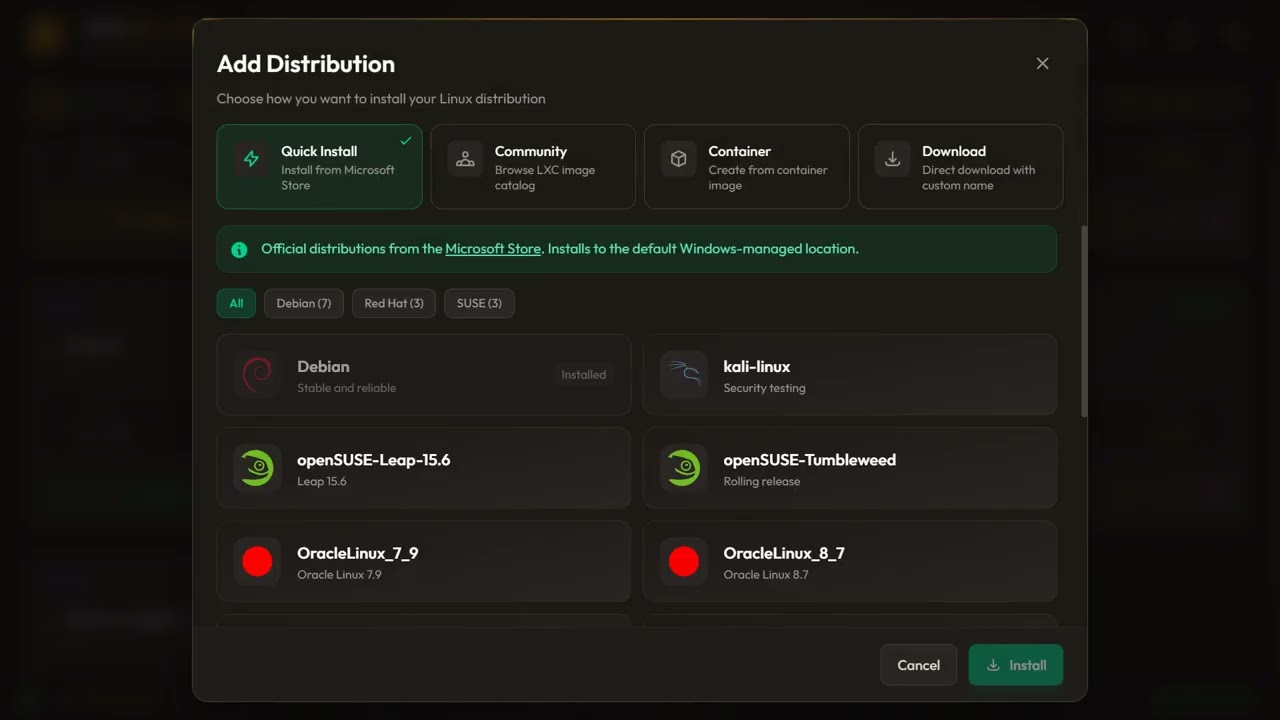
- Install from Anywhere - Microsoft Store, Docker/Podman images, LXC catalog, custom URLs
- Backup & Restore - Export, import, and clone distributions
Measured star growth
- in 24h
- +3
- in 7 days
- +10
- in 15 days
- Update delayed
- in 1 month
- Update delayed
Net star changes over overlapping periods, not daily totals. Missing measurements are left blank. Stars measure attention, not software quality.
README.md
OriginalWSL UI
A lightweight desktop application to manage Windows Subsystem for Linux (WSL) distributions.
Built with Tauri (Rust) and React (TypeScript).
Developed by Octasoft Ltd | Website
Features
- Dashboard - View all distributions with real-time status, CPU, memory, and disk usage
- Quick Actions - Terminal, file explorer, IDE, restart, export, clone
- Install from Anywhere - Microsoft Store, Docker/Podman images, LXC catalog, custom URLs
- Backup & Restore - Export, import, and clone distributions
- Custom Actions - Define reusable commands with variable substitution
- WSL Settings - Edit
.wslconfigandwsl.conffrom a visual interface - 17 Themes - Dark, light, and custom themes with live preview
- System Tray - Minimize to tray for quick access
- Disk Mounting - Mount VHD files and physical disks into WSL
See the User Guide for detailed features and screenshots.
Language Support
WSL UI is available in multiple languages. The app automatically detects your system language, or you can switch manually from the settings.
| Language | Native Name |
|---|---|
| English | English |
| Arabic | العربية |
| Chinese (Simplified) | 简体中文 |
| Chinese (Traditional) | 繁體中文 |
| French | Français |
| German | Deutsch |
| Hindi | हिन्दी |
| Japanese | 日本語 |
| Korean | 한국어 |
| Polish | Polski |
| Portuguese (Brazil) | Português (Brasil) |
| Russian | Русский |
| Spanish | Español |
| Turkish | Türkçe |
Don't see your language? Open an issue to request it.
Installation
From Microsoft Store

From Releases
Download the latest installer from the Releases page.
For MSIX installation outside the Store, download the signed .msix, matching
.cer, and Install-WSL-UI_<arch>.ps1. Follow the
MSIX installation instructions for the one-time certificate
trust step. Packages ending _store.msix are unsigned and intended for Store submission.
From Source
Prerequisites: Node.js 26 (Node 24 remains a tested fallback), Rust, Windows (not WSL)
git clone https://github.com/octasoft-ltd/wsl-ui.git
cd wsl-ui
npm install
npm run tauri dev
Documentation
- User Guide - Features, screenshots, and how-to guides
- Troubleshooting - Solutions to common issues
- Privacy Policy - How we handle your data (we don't collect any)
- Contributing - How to contribute to the project
Development
Project Structure
wsl-ui/
├── src/                    # React frontend
│   ├── components/         # UI components
│   ├── services/           # Tauri API wrappers
│   ├── store/              # Zustand state management
│   └── test/e2e/           # WebDriverIO E2E tests
├── src-tauri/              # Rust backend
│   └── src/                # Tauri commands and WSL logic
└── crates/wsl-core/        # Shared WSL parsing library
Tech Stack
| Layer | Technology | Purpose |
|---|---|---|
| Desktop | Tauri 2.x | Native window, system access |
| Frontend | React 19 + Vite | UI components |
| Styling | Tailwind CSS | Utility-first CSS |
| Backend | Rust | WSL command execution |
| State | Zustand | State management |
Scripts
npm run tauri dev       # Development mode
npm run tauri build     # Production build
npm run test:run        # Unit tests
npm run test:e2e:dev    # E2E tests (mock mode)
License
This project is licensed under the GNU General Public License v3.0 (GPL-3.0) - see the LICENSE file for details.
- Free and open source software
- Copyleft — derivative works must also be open source under GPL-3.0
- Source code must be provided with any distribution
Trademark Notice
"WSL UI" and "Octasoft" are trademarks of Octasoft Ltd. See the TRADEMARK file for usage requirements for forks and derivative works.
Links
Explore related projects
freeCodeCamp/freeCodeCamp
freeCodeCamp.org's open-source codebase and curriculum. Learn math, programming, and computer science for free.
459,005 starsdonnemartin/system-design-primer
Learn how to design large-scale systems. Prep for the system design interview. Includes Anki flashcards.
377,619 starsreact/react
The library for web and native user interfaces.
252,530 starsvuejs/vue
This is the repo for Vue 2. For Vue 3, go to https://github.com/vuejs/core
212,532 stars