
nvim-telescope/telescope-project.nvim
nvim-telescope/telescope-project.nvim has 669 GitHub stars and 55 forks. GitHot measured 0 stars in 24 hours. Last checked 2026-11-15 22:32 UTC. Last push 2025-04-23.
Measured star growth
- in 24h
- 0
- in 7 days
- Update delayed
- in 15 days
- Update delayed
- in 1 month
- Update delayed
Net star changes over overlapping periods, not daily totals. Missing measurements are left blank. Stars measure attention, not software quality.
About
An extension for telescope.nvim that allows you to switch between projects.
Developer ToolsREADME.md
Originaltelescope-project.nvim
An extension for telescope.nvim that allows you to switch between projects.
Demo
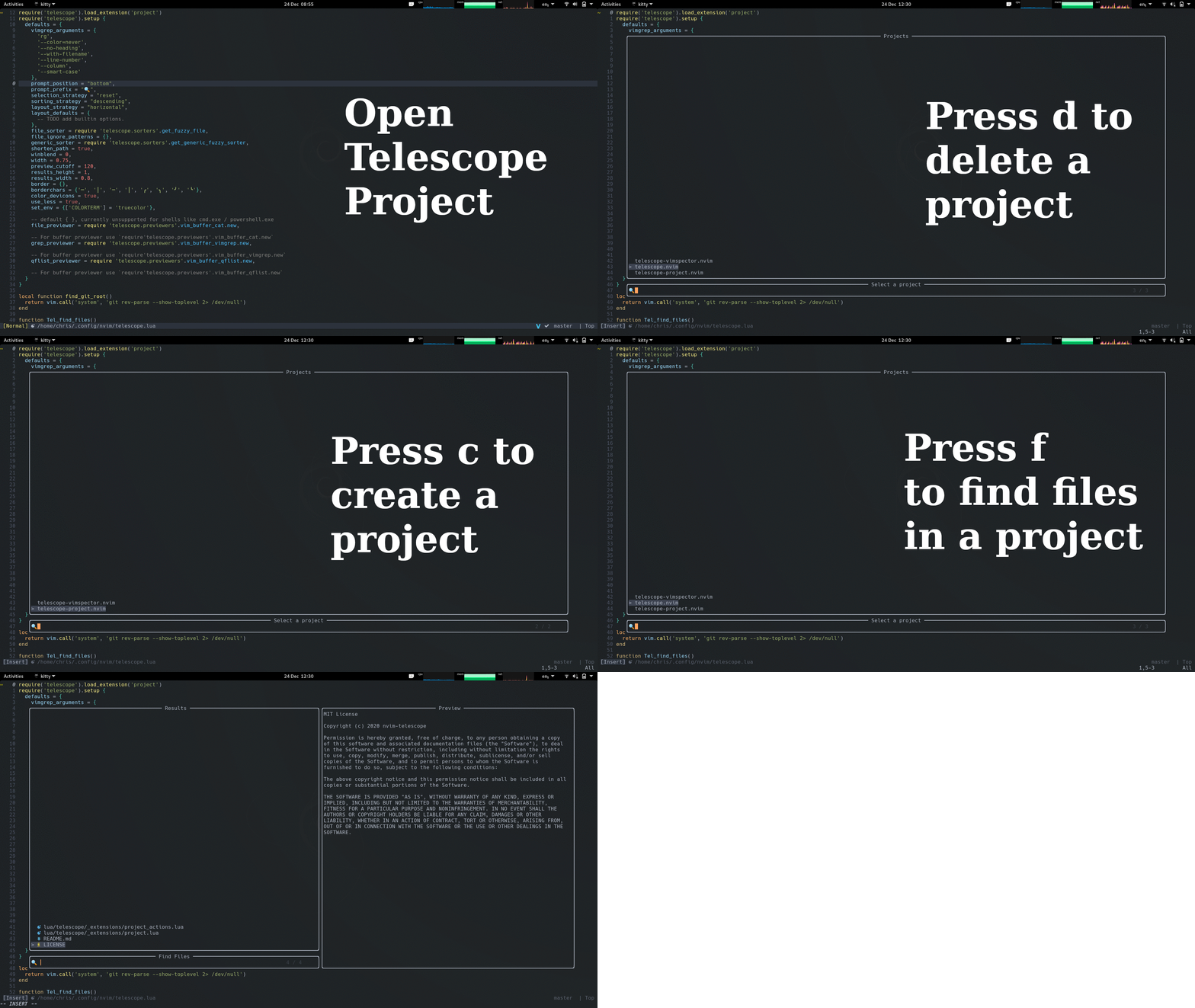
Requirements
- telescope.nvim (required)
- telescope-file-browser.nvim (optional, only for
file_browseraction)
Installation
Lazy.nvim
{
    'nvim-telescope/telescope-project.nvim',
    dependencies = {
        'nvim-telescope/telescope.nvim',
    },
}
packer.nvim
use {
    'nvim-telescope/telescope-project.nvim',
    requires = {
        'nvim-telescope/telescope.nvim',
    },
}
Setup
You can set up the extension by adding the following to your config:
require'telescope'.load_extension('project')
You may skip explicitly loading extensions (they will then be lazy-loaded), but tab completions will not be available right away.
Available functions:
Project
The projects picker:
require'telescope'.extensions.project.project{}
Default mappings (normal mode):
| Key | Description |
|---|---|
d |
delete currently selected project |
r |
rename currently selected project |
c |
create a project* |
s |
search inside files within your project |
b |
browse inside files within your project |
w |
change to the selected project's directory without opening it |
R |
find a recently opened file within your project |
f |
find a file within your project (same as <CR>) |
o |
change current cd scope |
Default mappings (insert mode):
| Key | Description |
|---|---|
<c-d> |
delete currently selected project |
<c-v> |
rename currently selected project |
<c-a> |
create a project* |
<c-s> |
search inside files within your project |
<c-b> |
browse inside files within your project |
<c-l> |
change to the selected project's directory without opening it |
<c-r> |
find a recently opened file within your project |
<c-f> |
find a file within your project (same as <CR>) |
<c-o> |
change current cd scope |
* defaults to your git root if used inside a git project, otherwise, it will use your current working directory
Example key map config:
vim.api.nvim_set_keymap(
        'n',
        '<C-p>',
        ":lua require'telescope'.extensions.project.project{}<CR>",
        {noremap = true, silent = true}
)
Available options:
| Keys | Description | Options |
|---|---|---|
display_type |
Show the title and the path of the project | 'full' or 'minimal' (default) |
hide_workspace |
Hide the workspace of the project | true or false (default) |
Options can be added when requiring telescope-project, as shown below:
lua require'telescope'.extensions.project.project{ display_type = 'full' }
Available setup settings:
| Keys | Description | Options |
|---|---|---|
base_dirs |
Array of project base directory configurations | table (default: nil) |
ignore_missing_dirs |
Don't show an error if base dirs are missing | bool (default: false) |
hidden_files |
Show hidden files in selected project | bool (default: false) |
order_by |
Order projects by asc, desc, recent |
string (default: recent) |
sync_with_nvim_tree |
Sync projects with nvim tree plugin | bool (default: false) |
search_by |
Telescope finder search by field (title/path) | string or table (default: title). Can also be a table {"title", "path"} to search by both title and path |
on_project_selected |
Custom handler when project is selected | function(prompt_bufnr) (default: find project files) |
cd_scope |
Array of cd scopes: tab, window, global |
table (default: {"tab", "window"}) |
mappings |
Sets the mappings inside the telescope view | table (default: the mappings described bellow) |
Setup settings can be added when requiring telescope, as shown below:
require('telescope').setup {
  local project_actions = require("telescope._extensions.project.actions")
  extensions = {
    project = {
      base_dirs = {
        '~/dev/src',
        {'~/dev/src2'},
        {'~/dev/src3', max_depth = 4},
        {path = '~/dev/src4'},
        {path = '~/dev/src5', max_depth = 2},
      },
      ignore_missing_dirs = true, -- default: false
      hidden_files = true, -- default: false
      theme = "dropdown",
      order_by = "asc",
      search_by = "title",
      sync_with_nvim_tree = true, -- default false
      -- default for on_project_selected = find project files
      on_project_selected = function(prompt_bufnr)
        -- Do anything you want in here. For example:
        project_actions.change_working_directory(prompt_bufnr, false)
        require("harpoon.ui").nav_file(1)
      end,
      mappings = {
        n = {
          ['d'] = project_actions.delete_project,
          ['r'] = project_actions.rename_project,
          ['c'] = project_actions.add_project,
          ['C'] = project_actions.add_project_cwd,
          ['f'] = project_actions.find_project_files,
          ['b'] = project_actions.browse_project_files,
          ['s'] = project_actions.search_in_project_files,
          ['R'] = project_actions.recent_project_files,
          ['w'] = project_actions.change_working_directory,
          ['o'] = project_actions.next_cd_scope,
        },
        i = {
          ['<c-d>'] = project_actions.delete_project,
          ['<c-v>'] = project_actions.rename_project,
          ['<c-a>'] = project_actions.add_project,
          ['<c-A>'] = project_actions.add_project_cwd,
          ['<c-f>'] = project_actions.find_project_files,
          ['<c-b>'] = project_actions.browse_project_files,
          ['<c-s>'] = project_actions.search_in_project_files,
          ['<c-r>'] = project_actions.recent_project_files,
          ['<c-l>'] = project_actions.change_working_directory,
          ['<c-o>'] = project_actions.next_cd_scope,
        }
      }
    }
  }
}
Roadmap :blue_car:
- order projects by last opened :heavy_check_mark:
- add all (git-enabled) subdirectories automatically :heavy_check_mark:
- workspaces :construction: