
nvidia-holoscan/holohub
nvidia-holoscan/holohub has 247 GitHub stars and 168 forks. GitHot measured +1 stars in 24 hours. Last checked 2026-11-15 23:31 UTC. Last push 2026-11-13.
Measured star growth
- in 24h
- +1
- in 7 days
- Collecting history
- in 15 days
- Collecting history
- in 1 month
- Collecting history
Net star changes over overlapping periods, not daily totals. Missing measurements are left blank. Stars measure attention, not software quality.
About
Central repository for the Holoscan Ecosystem
Developer ToolsREADME.md
OriginalHoloHub
HoloHub is the central registry for the NVIDIA Holoscan ecosystem. Find applications, reusable modules, tutorials, benchmarks, and agent skills for accelerated sensor-processing and AI pipelines.
Explore the Holoscan site or use the links below. Projects keep their code, documentation, tests, and releases in their own repositories. You can use those repositories directly without cloning HoloHub.
Start here
| I want to… | Start with | Use, contribute, and register |
|---|---|---|
| Run or adapt an application | holoscan-applications | Application guide |
| Reuse operators in my application | Registered modules | Module guide |
| Learn a development workflow | holoscan-tutorials | Tutorial guide |
| Measure or analyze performance | holoscan-benchmarks | Benchmark guide |
| Use a coding agent for Holoscan work | SDK agent skills | Skill guide |
How the ecosystem fits together
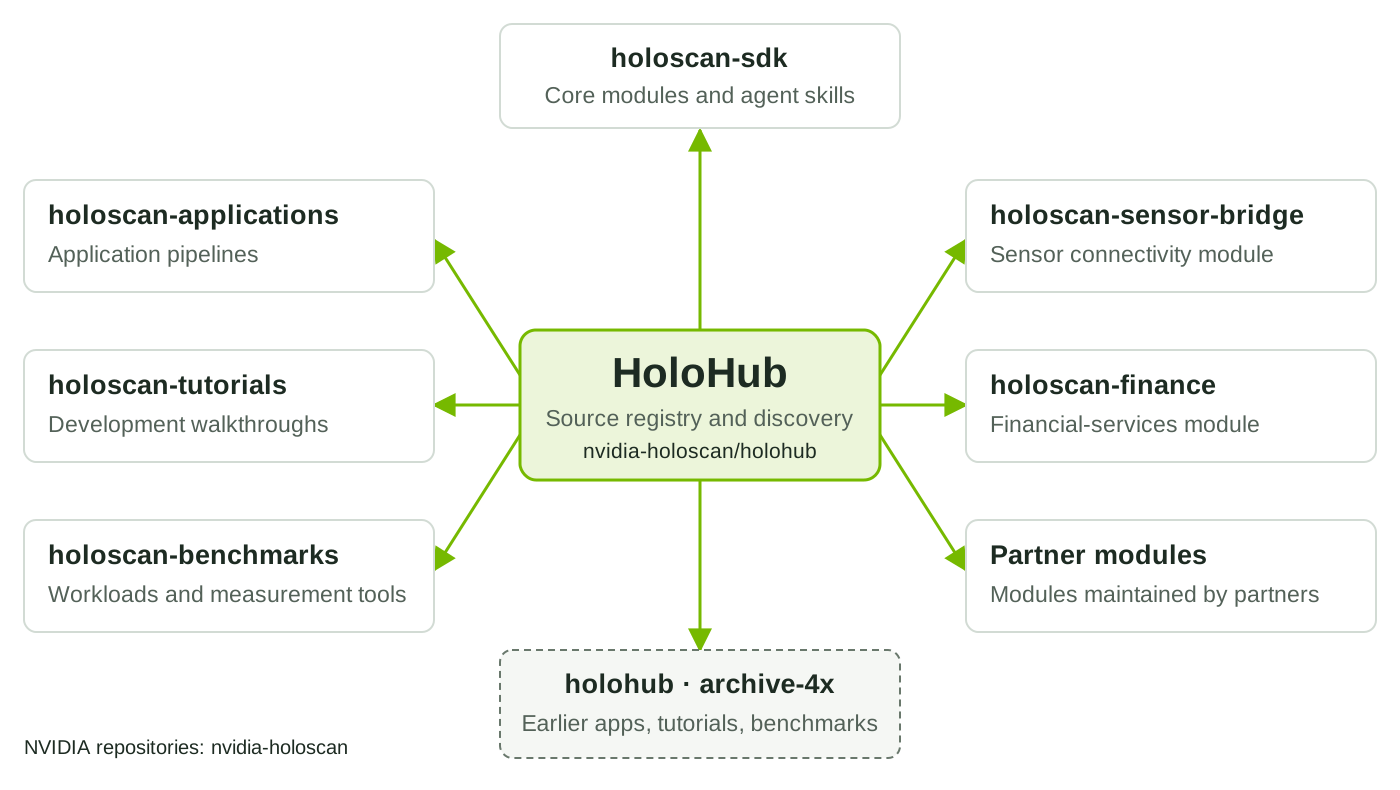
Selected ecosystem repositories and their roles. Arrows guide visitors to project sources; each application selects the modules it needs.
Alongside the application, tutorial, and benchmark repositories above, module sources include Holoscan SDK core modules, Holoscan Sensor Bridge, Holoscan Finance, and partner modules. Partners and community members can register their own projects.
| Component | Role |
|---|---|
| HoloHub | Find project sources and register contributions. |
| Holoscan CLI | Discover, create, build, run, test, and package supported projects using their configuration. |
| Holoscan SDK | Implement operators, compose graphs, and execute applications. |
See the module architecture for how applications combine SDK components and external modules.
Use a project
- Choose a project above or browse a category's registered sources. Each JSON record identifies the source URL and, for Git, its revision and optional directory.
- For Git sources, open the README at the registered revision (
ref) and directory (path, or the repository root if omitted). For hosted sources, open themetadata.jsonorSKILL.mdURL and follow its documentation links. Check the SDK version, hardware, dependencies, and data requirements before setting up your system. - Follow the project's setup and run instructions, checking out the registered revision for Git sources. Projects that use the CLI document its installation and supported commands. Use the SDK installation guide for the SDK version the project requires.
Contribute
- Choose a home. Submit code and documentation changes to the owning project. Start with the category guides above to create a new contribution.
- Develop and publish. Keep requirements, metadata, tests, releases, and a maintainer contact with the project. Verify its documented workflow.
- Register the source. Follow Contributing to submit a registration request or a JSON pull request. A project already covered by a registered collection does not need a separate record; a pinned collection may need a revision update.
Earlier HoloHub examples
The archive-4x branch
preserves the earlier applications, tutorials, and benchmarks and is closed to
new contributions. Guides that invoke ./holohub require that earlier source
collection or the matching release checkout. For new development, use the
repositories linked above and their supported SDK versions.
Get help
Report project problems to the source owner's issue tracker, linked in its
README or registration's issues_url. For missing or incorrect registrations,
documentation, or registry tooling, use HoloHub issues.
For security vulnerabilities, follow SECURITY.md.