
nv-tlabs/ASE has 1,128 GitHub stars and 152 forks. GitHot measured -1 stars in 24 hours, -3 in 7 days, and -3 in 15 days. Last checked 2026-11-23 20:55 UTC. Last push 2025-12-07.
Measured star growth
- in 24h
- -1
- in 7 days
- -3
- in 15 days
- -3
- in 1 month
- Collecting history
Net star changes over overlapping periods, not daily totals. Missing measurements are left blank. Stars measure attention, not software quality.
About
Adversarial skill embeddings for training reusable controllers for physically simulated characters.
Creative & MediaREADME.md
OriginalAdversarial Skill Embeddings
This codebase is now deprecated. Checkout MimicKit for much more up-to-date and easy-to-use implementations of our methods.
Code accompanying the paper:
"ASE: Large-Scale Reusable Adversarial Skill Embeddings for Physically Simulated Characters"
(https://xbpeng.github.io/projects/ASE/index.html) 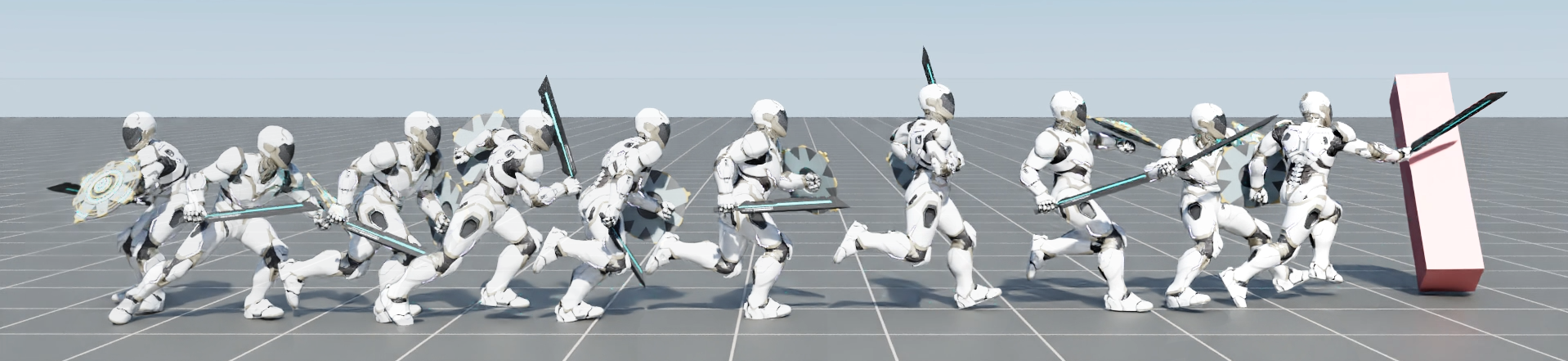
Installation
Download Isaac Gym from the website, then follow the installation instructions.
Once Isaac Gym is installed, install the external dependencies for this repo:
pip install -r requirements.txt
ASE
Pre-Training
First, an ASE model can be trained to imitate a dataset of motions clips using the following command:
python ase/run.py --task HumanoidAMPGetup --cfg_env ase/data/cfg/humanoid_ase_sword_shield_getup.yaml --cfg_train ase/data/cfg/train/rlg/ase_humanoid.yaml --motion_file ase/data/motions/reallusion_sword_shield/dataset_reallusion_sword_shield.yaml --headless
--motion_file can be used to specify a dataset of motion clips that the model should imitate.
The task HumanoidAMPGetup will train a model to imitate a dataset of motion clips and get up after falling.
Over the course of training, the latest checkpoint Humanoid.pth will be regularly saved to output/,
along with a Tensorboard log. --headless is used to disable visualizations. If you want to view the
simulation, simply remove this flag. To test a trained model, use the following command:
python ase/run.py --test --task HumanoidAMPGetup --num_envs 16 --cfg_env ase/data/cfg/humanoid_ase_sword_shield_getup.yaml --cfg_train ase/data/cfg/train/rlg/ase_humanoid.yaml --motion_file ase/data/motions/reallusion_sword_shield/dataset_reallusion_sword_shield.yaml --checkpoint [path_to_ase_checkpoint]
You can also test the robustness of the model with --task HumanoidPerturb, which will throw projectiles at the character.
Task-Training
After the ASE low-level controller has been trained, it can be used to train task-specific high-level controllers. The following command will use a pre-trained ASE model to perform a target heading task:
python ase/run.py --task HumanoidHeading --cfg_env ase/data/cfg/humanoid_sword_shield_heading.yaml --cfg_train ase/data/cfg/train/rlg/hrl_humanoid.yaml --motion_file ase/data/motions/reallusion_sword_shield/RL_Avatar_Idle_Ready_Motion.npy --llc_checkpoint [path_to_llc_checkpoint] --headless
--llc_checkpoint specifies the checkpoint to use for the low-level controller. A pre-trained ASE low-level
controller is available in ase/data/models/ase_llc_reallusion_sword_shield.pth.
--task specifies the task that the character should perform, and --cfg_env specifies the environment
configurations for that task. The built-in tasks and their respective config files are:
HumanoidReach: ase/data/cfg/humanoid_sword_shield_reach.yaml
HumanoidHeading: ase/data/cfg/humanoid_sword_shield_heading.yaml
HumanoidLocation: ase/data/cfg/humanoid_sword_shield_location.yaml
HumanoidStrike: ase/data/cfg/humanoid_sword_shield_strike.yaml
To test a trained model, use the following command:
python ase/run.py --test --task HumanoidHeading --num_envs 16 --cfg_env ase/data/cfg/humanoid_sword_shield_heading.yaml --cfg_train ase/data/cfg/train/rlg/hrl_humanoid.yaml --motion_file ase/data/motions/reallusion_sword_shield/RL_Avatar_Idle_Ready_Motion.npy --llc_checkpoint [path_to_llc_checkpoint] --checkpoint [path_to_hlc_checkpoint]
Pre-Trained Models
Pre-trained models are provided in ase/data/models/. To run a pre-trained ASE low-level controller,
use the following command:
python ase/run.py --test --task HumanoidAMPGetup --num_envs 16 --cfg_env ase/data/cfg/humanoid_ase_sword_shield_getup.yaml --cfg_train ase/data/cfg/train/rlg/ase_humanoid.yaml --motion_file ase/data/motions/reallusion_sword_shield/dataset_reallusion_sword_shield.yaml --checkpoint ase/data/models/ase_llc_reallusion_sword_shield.pth
Pre-trained models for the different tasks can be run using the following commands:
Heading:
python ase/run.py --test --task HumanoidHeading --num_envs 16 --cfg_env ase/data/cfg/humanoid_sword_shield_heading.yaml --cfg_train ase/data/cfg/train/rlg/hrl_humanoid.yaml --motion_file ase/data/motions/reallusion_sword_shield/RL_Avatar_Idle_Ready_Motion.npy --llc_checkpoint ase/data/models/ase_llc_reallusion_sword_shield.pth --checkpoint ase/data/models/ase_hlc_heading_reallusion_sword_shield.pth
Reach:
python ase/run.py --test --task HumanoidReach --num_envs 16 --cfg_env ase/data/cfg/humanoid_sword_shield_reach.yaml --cfg_train ase/data/cfg/train/rlg/hrl_humanoid.yaml --motion_file ase/data/motions/reallusion_sword_shield/RL_Avatar_Idle_Ready_Motion.npy --llc_checkpoint ase/data/models/ase_llc_reallusion_sword_shield.pth --checkpoint ase/data/models/ase_hlc_reach_reallusion_sword_shield.pth
Location:
python ase/run.py --test --task HumanoidLocation --num_envs 16 --cfg_env ase/data/cfg/humanoid_sword_shield_location.yaml --cfg_train ase/data/cfg/train/rlg/hrl_humanoid.yaml --motion_file ase/data/motions/reallusion_sword_shield/RL_Avatar_Idle_Ready_Motion.npy --llc_checkpoint ase/data/models/ase_llc_reallusion_sword_shield.pth --checkpoint ase/data/models/ase_hlc_location_reallusion_sword_shield.pth
Strike:
python ase/run.py --test --task HumanoidStrike --num_envs 16 --cfg_env ase/data/cfg/humanoid_sword_shield_strike.yaml --cfg_train ase/data/cfg/train/rlg/hrl_humanoid.yaml --motion_file ase/data/motions/reallusion_sword_shield/RL_Avatar_Idle_Ready_Motion.npy --llc_checkpoint ase/data/models/ase_llc_reallusion_sword_shield.pth --checkpoint ase/data/models/ase_hlc_strike_reallusion_sword_shield.pth
AMP
We also provide an implementation of Adversarial Motion Priors (https://xbpeng.github.io/projects/AMP/index.html). A model can be trained to imitate a given reference motion using the following command:
python ase/run.py --task HumanoidAMP --cfg_env ase/data/cfg/humanoid_sword_shield.yaml --cfg_train ase/data/cfg/train/rlg/amp_humanoid.yaml --motion_file ase/data/motions/reallusion_sword_shield/RL_Avatar_Atk_2xCombo01_Motion.npy --headless
The trained model can then be tested with:
python ase/run.py --test --task HumanoidAMP --num_envs 16 --cfg_env ase/data/cfg/humanoid_sword_shield.yaml --cfg_train ase/data/cfg/train/rlg/amp_humanoid.yaml --motion_file ase/data/motions/reallusion_sword_shield/RL_Avatar_Atk_2xCombo01_Motion.npy --checkpoint [path_to_amp_checkpoint]
Motion Data
Motion clips are located in ase/data/motions/. Individual motion clips are stored as .npy files. Motion datasets are specified by .yaml files, which contains a list of motion clips to be included in the dataset. Motion clips can be visualized with the following command:
python ase/run.py --test --task HumanoidViewMotion --num_envs 2 --cfg_env ase/data/cfg/humanoid_sword_shield.yaml --cfg_train ase/data/cfg/train/rlg/amp_humanoid.yaml --motion_file ase/data/motions/reallusion_sword_shield/RL_Avatar_Atk_2xCombo01_Motion.npy
--motion_file can be used to visualize a single motion clip .npy or a motion dataset .yaml.
This motion data is provided courtesy of Reallusion, strictly for noncommercial use. The original motion data is available at:
https://actorcore.reallusion.com/motion/pack/studio-mocap-sword-and-shield-stunts
https://actorcore.reallusion.com/motion/pack/studio-mocap-sword-and-shield-moves
If you want to retarget new motion clips to the character, you can take a look at an example retargeting script in ase/poselib/retarget_motion.py.
Explore related projects
Loading…