
ntasfi/PyGame-Learning-Environment
ntasfi/PyGame-Learning-Environment has 1,067 GitHub stars and 228 forks. GitHot measured 0 stars in 24 hours. Last checked 2026-11-09 10:44 UTC. Last push 2022-01-19.
PyGame Learning Environment (PLE) -- Reinforcement Learning Environment in Python.
Measured star growth
- in 24h
- 0
- in 7 days
- Collecting history
- in 15 days
- Collecting history
- in 1 month
- Collecting history
Net star changes over overlapping periods, not daily totals. Missing measurements are left blank. Stars measure attention, not software quality.
README.md
OriginalPyGame-Learning-Environment
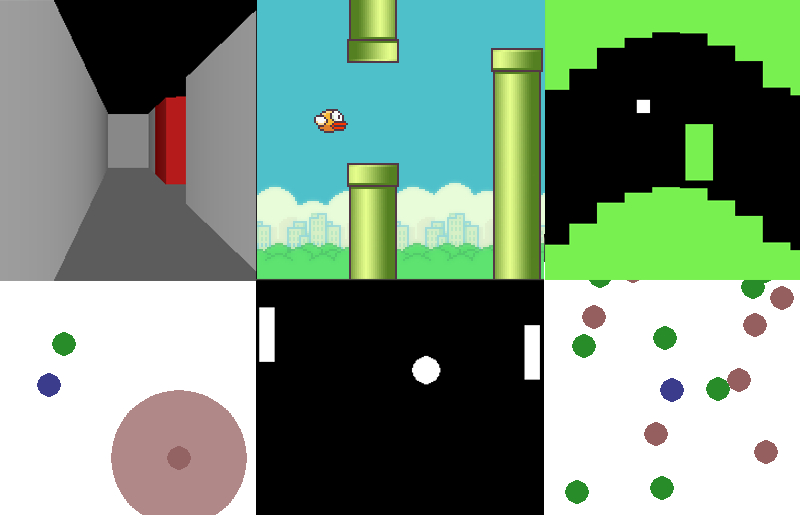
PyGame Learning Environment (PLE) is a learning environment, mimicking the Arcade Learning Environment interface, allowing a quick start to Reinforcement Learning in Python. The goal of PLE is allow practitioners to focus design of models and experiments instead of environment design.
PLE hopes to eventually build an expansive library of games.
Accepting PRs for games.
Documentation
Docs for the project can be found here. They are currently WIP.
Games
Available games can be found in the docs.
Getting started
A PLE instance requires a game exposing a set of control methods. To see the required methods look at ple/games/base.py.
Here's an example of importing Pong from the games library within PLE:
from ple.games.pong import Pong

game = Pong()
Next we configure and initialize PLE:
from ple import PLE

p = PLE(game, fps=30, display_screen=True, force_fps=False)
p.init()
The options above instruct PLE to display the game screen, with display_screen, while allowing PyGame to select the appropriate delay timing between frames to ensure 30fps with force_fps.
You are free to use any agent with the PLE. Below we create a fictional agent and grab the valid actions:
myAgent = MyAgent(p.getActionSet())
We can now have our agent, with the help of PLE, interact with the game over a certain number of frames:
nb_frames = 1000
reward = 0.0

for f in range(nb_frames):
	if p.game_over(): #check if the game is over
		p.reset_game()

	obs = p.getScreenRGB()
	action = myAgent.pickAction(reward, obs)
	reward = p.act(action)
Just like that we have our agent interacting with our game environment.
Installation
PLE requires the following dependencies:
- numpy
- pygame
- pillow
Clone the repo and install with pip.
git clone https://github.com/ntasfi/PyGame-Learning-Environment.git
cd PyGame-Learning-Environment/
pip install -e .
Headless Usage
Set the following in your code before usage:
os.putenv('SDL_VIDEODRIVER', 'fbcon')
os.environ["SDL_VIDEODRIVER"] = "dummy"
Thanks to @wooridle.
Updating
cd into the PyGame-Learning-Environment directory and run the following:
git pull
Todos
- Documentation is currently in progress.
- Tests
- Parallel Learning (One agent, many game copies)
- Add games
- Generalize the library (eg. add Pyglet support)
Citing PLE
If PLE has helped your research please cite it in your publications. Example BibTeX entry:
@misc{tasfi2016PLE,
  author = {Tasfi, Norman},
  title = {PyGame Learning Environment},
  year = {2016},
  publisher = {GitHub},
  journal = {GitHub repository},
  howpublished = {\url{https://github.com/ntasfi/PyGame-Learning-Environment}}
}
Explore related projects
affaan-m/ECC
The agent harness performance optimization system. Skills, instincts, memory, security, and research-first development for Claude Code, Codex, Opencode, Cursor and beyond.
300,117 starsNousResearch/hermes-agent
The agent that grows with you
262,021 starsmultica-ai/andrej-karpathy-skills
A single CLAUDE.md file to improve Claude Code behavior, derived from Andrej Karpathy's observations on LLM coding pitfalls.
231,272 starsfirecrawl/firecrawl
Supercharge your AI agents with data from the web and beyond. Building the library for superintelligence. 🔥
199,847 stars