
noxred-research/crawlx has 8 GitHub stars and 2 forks. GitHot measured 0 stars in 24 hours. Last checked 2026-11-15 20:58 UTC. Last push 2026-11-11.
What you can do
- 🎯 Attack-surface discovery - Chromium over CDP and accessibility-tree discovery of single-page and script-heavy apps; durable element identity, reversible state clustering and a learned enablement graph show what each action reveals; sitemaps, feeds and known files; URL canonicalization and shape filters keep large sites tractable
- 🔎 Form and endpoint discovery - Form and input extraction (--form-extraction), XHR extraction, JavaScript endpoint mining (regex and AST), technology detection, page-type classification, custom field rules, seeded and reproducible form input
- 🧠 AI/LLM-native - A constrained LLM planner, a typed-decision service and an ONNX ranker, LLM-assisted form values, LLM-ready Markdown and chunks, an MCP server; models advise and never authorize (details)
- 🔑 Secret detection - Nine secret kinds found in fetched content (cloud, source-host, chat and payment tokens, JWTs, private keys, generic keys), reported as kind, location and a keyed hash, never the value
Measured star growth
- in 24h
- 0
- in 7 days
- Collecting history
- in 15 days
- Collecting history
- in 1 month
- Collecting history
Net star changes over overlapping periods, not daily totals. Missing measurements are left blank. Stars measure attention, not software quality.
About
Next-generation AI/LLM-native crawler for authorized security research. Maps the attack surface of dynamic web apps (accessibility tree, state graph, endpoint and form discovery) under a hard safety kernel, authorization records and an audit journal. Rust. Only for systems you own or are authorized to test. https://crawlx.dev/
AIREADME.md
Original
Next-generation AI/LLM-native crawler for authorized security research.
Map the real attack surface of modern web applications, on systems you own or are explicitly authorized to test.




Why CrawlX · Features · Install · Quick start · Output · How it works · CLI · Responsible use · Security · Docs
[!IMPORTANT] Security research and authorized testing only. CrawlX is built for testing systems you own or have written authorization to test. It is not for unauthorized scraping, credential attacks, evading a site's protections, or any other abuse. Privileged modes require an authorization record, and a hard safety kernel refuses actions outside the run's profile. See Responsible use.
Two real crawlx crawl runs against the bundled CrawlerGym fixture (browser log lines condensed).
The second run shows the egress policy refusing the cloud metadata address.
Why CrawlX
Security testing of modern applications has two problems. Plain HTTP crawlers miss everything that only exists after JavaScript runs: routes, endpoints, forms and state behind clicks. Browser automation sees it, but is slow, fragile and one careless click away from "Delete account". CrawlX treats both as engineering problems under one set of rules.
- It maps the surface you cannot see from the HTML. A URL plane for documents plus a browser plane that
reads the accessibility tree, recognizes elements across page changes and groups page states, in one run
(
--mode hybrid, the default). - It is careful by construction. The default profile cannot change server state. An independent safety kernel classifies every browser action, and a deny-first egress policy covers every request.
- It leaves a trail you can defend. Every action is journaled before it is performed, crashes are reconciled rather than retried blindly, and runs replay from a seed.
- It is AI/LLM-native, with a leash. Models can plan and rank; they never authorize. Details below.
- It handles findings responsibly. Secrets are detected without storing their values, sensitive results can run under zero data retention, and retained artifacts are encrypted at rest.
Responsible use
CrawlX is built and intended for security research and authorized testing only: testing systems you own, or systems you have written authorization to test. This is the project's intended-use policy and a condition of community participation and support; the AGPL-3.0-only license itself is unchanged.
Do not use CrawlX for unauthorized scraping, credential attacks, evading a site's protections, or any other abuse. You are responsible for your use.
How the project enforces this in code, not just in words:
- Authorization records. Anything privileged (private-network access, the
test_environmentandauthorized_security_testprofiles, the robots override) needs an operator-created record naming the authorizer, the exact origins, the permitted risk classes and a validity window of at most 90 days. The record bounds every request of the run and is re-checked while it runs. It states what you are authorized to do; it does not verify that you are. - A hard safety kernel. The default
read_onlyprofile refuses actions that could change server state. Higher profiles still deny financial transactions and security-setting changes unlessauthorized_security_testand an explicit approval apply, and no model hint can loosen a decision. See the risk matrix. - Scope and robots by default. Robots is honored (overriding it needs an authorization record) and a host scope applies.
- Network guardrails. Loopback, private, link-local and cloud-metadata addresses are refused on every
redirect hop and browser request; crawling is rate-limited per origin (one request in flight, at least
250 ms apart, backing off on
429and503). - Opt-in features that touch a target's defenses (the stealth launch profile, captcha solving) exist for testing systems you own or are authorized to test. They are refused under the default profile and must not be used anywhere else.
Details: safety model · SECURITY.md.
Status: pre-1.0 (0.1.0). Production qualification is in progress. Do not deploy this checkout as a public service or use it for sensitive authenticated sessions. The first distribution is this repository and tagged source releases; no binaries, images or crates.io packages are published. Release-specific limitations are listed in the changelog, and open work in the roadmap.
Features
| Capability | What you get |
|---|---|
| 🎯 Attack-surface discovery | Chromium over CDP and accessibility-tree discovery of single-page and script-heavy apps; durable element identity, reversible state clustering and a learned enablement graph show what each action reveals; sitemaps, feeds and known files; URL canonicalization and shape filters keep large sites tractable |
| 🔎 Form and endpoint discovery | Form and input extraction (--form-extraction), XHR extraction, JavaScript endpoint mining (regex and AST), technology detection, page-type classification, custom field rules, seeded and reproducible form input |
| 🧠 AI/LLM-native | A constrained LLM planner, a typed-decision service and an ONNX ranker, LLM-assisted form values, LLM-ready Markdown and chunks, an MCP server; models advise and never authorize (details) |
| 🔑 Secret detection | Nine secret kinds found in fetched content (cloud, source-host, chat and payment tokens, JWTs, private keys, generic keys), reported as kind, location and a keyed hash, never the value |
| 🛡️ Guardrails | read_only default profile, an independent hard safety kernel, authorization records, robots and scope enforcement, a deny-first SSRF policy, per-origin politeness, an independent safety auditor |
| 🧾 Audit and replay | Intent journal with unknown-outcome reconciliation, a recorded safety verdict per action, fenced leases, checkpoints, seed-derived decisions and recorded-path replay |
| 🔒 Handling sensitive findings | Zero-data-retention mode, secret redaction in logs and exports, encrypted artifact custody, tenant row-level security |
| 📦 Output | JSONL, metadata.json, links.json, report.json, Markdown pages, templates, wordlists, bounded WARC/WACZ archives, a REST and SSE API |
| 🔌 Interoperability | A compatibility API (/compat) and a short-flag CLI dialect so existing tooling can plug in, plus a chat-completions compatible provider interface |
| 🚢 Operations | PostgreSQL and S3-compatible storage, Docker Compose, Helm chart, Prometheus metrics, OTLP, alert rules, runbooks |
AI/LLM-native, with a leash
Every AI feature is optional and off by default. The rule is the same everywhere: models advise, the safety kernel decides.
| Feature | What it does | Turn it on |
|---|---|---|
| LLM-guided planning | A constrained planner DSL: the model returns a bounded plan (at most 20 steps) of candidate indexes and value references, never free-form selectors or URLs; the plan is validated before use | --planner-endpoint, dynamic.llmPlanner (off, stalled_only, enabled) |
| Typed-decision service and ONNX ranker | Calibrated, abstaining rankings over a crawler-built shortlist of safe candidate actions; circuit-broken and time-boxed | --model-endpoint, --system1-mode shadow|advisory (advisory needs a signed gate), onnx cargo feature |
| LLM-assisted form values | A chat-completions compatible model proposes values for fields the form filler cannot classify; call-capped (default 100) and recordable for offline replay | --ai-url, --ai-model, --ai-record, --ai-replay |
| Extract, agent and search endpoints | The compatibility API serves /extract, /agent and /search over a chat-completions compatible provider you configure (and a metasearch JSON API for search) |
CRAWLX_LLM_BASE_URL, CRAWLX_LLM_MODEL, CRAWLX_SEARCH_ENDPOINT |
| LLM-ready output | Clean Markdown, structured metadata and optional word-window chunks of extracted text | extract.content.chunks |
| MCP server | Exposes crawl, scrape, map, search and extract tools to agent tooling over stdio | crawlx mcp |
| Understanding web apps | The accessibility tree gives roles, names and states, so elements keep a stable identity across re-renders and layout changes | built in (--mode dynamic) |
The guardrails around models are structural. The model crate does not depend on the safety kernel and cannot authorize anything; a model hint can only make a decision stricter. Page text reaches a model only inside provenance-tagged untrusted fields. Zero-data-retention runs keep to the default model and skip optional LLM refinement steps.
Capability highlights
--mode static |
--mode dynamic |
--mode hybrid (default) |
|
|---|---|---|---|
| Needs Chromium | no | yes | yes |
| Fetches with the HTTP client, writes Markdown pages | yes | no | yes |
| Executes page JavaScript | no | yes | yes |
Clicks and navigates (read_only profile) |
no | yes | yes |
| Element identity, state clusters, enablement graph | no | yes | yes |
| Journal and crash reconciliation for actions | n/a | yes | yes |
| Sitemaps, known files, content-similarity filters | yes | n/a | yes |
| Robots enforced | URL fetches | main-frame navigations | both |
| Egress (SSRF) policy | every hop | every browser request | both |
Install
From source: the CLI, development, one-shot crawls
git clone https://github.com/noxred-research/crawlx.git && cd crawlx
cargo build --release -p crawlx-cli          # binary: target/release/crawlx
The pinned Rust toolchain (1.97.1, see rust-toolchain.toml) installs through
rustup. Dynamic and hybrid crawls also need the pinned Chromium, below.
Docker Compose: a single-host stack with PostgreSQL, API, Chromium worker and MinIO
docker/init-compose.sh && docker compose -f docker/docker-compose.yml up -d --build --wait
init-compose.sh generates the secret files and a bootstrap API key in docker/.env. The images are
built locally. CRAWLX_COMPOSE_UP=1 ci/compose-smoke.sh checks the stack end to end, and
crawlx healthcheck --url <URL> is the probe its containers use.
Helm: Kubernetes
The chart is in deploy/helm/crawlx. Build the images from
docker/, push them to your registry, set image.registry and image.tag, and create the
Secrets described in operations before installing.
Plain manifests, network policies and a safety-auditor CronJob are in deploy/k8s.
No prebuilt binaries or images are published; build them from a tagged source release.
Chromium. Dynamic and hybrid crawls use the pinned Chrome for Testing build in
chromium-pin.toml. Fetch it with either command; both verify the pinned SHA-256:
export CRAWLX_CHROMIUM_PATH=$(ci/fetch-chromium.sh)    # downloads into .cache/chromium/
crawlx browser install                                  # or add --auto-download-chromium to a crawl
The launch check reads CRAWLX_PIN_FILE, else the nearest chromium-pin.toml from the working
directory upward, else the pin embedded in the binary. CRAWLX_ALLOW_UNPINNED=1 lets a different build
run and records pinned = false.
Quick start
Static crawl
Crawl a site you are authorized to crawl. It runs in-process with an in-memory store, no database:
crawlx crawl https://example.org --mode static --seed 20261019 --limit-urls 50 --output ./out
--seed makes the run reproducible. Results land in ./out (see Output).
Dynamic crawl
Observe a web application with the pinned Chromium, without interacting:
export CRAWLX_CHROMIUM_PATH=$(ci/fetch-chromium.sh)
crawlx crawl https://app.example.org --mode dynamic --observe-only --output ./out
A loopback or private-network target needs an authorization record. For a local fixture, see the walkthrough:
crawlx crawl http://127.0.0.1:8080/ --mode dynamic --observe-only \
  --allow-private-networks --authorization-record authz.local.json
Drop --observe-only to let the default read_only profile click and navigate. It still refuses
anything that could change server state.
API and worker
Start the single-host stack, then create a crawl with the bootstrap API key that init-compose.sh wrote
to docker/.env:
docker/init-compose.sh && docker compose -f docker/docker-compose.yml up -d --build --wait
KEY=$(sed -n 's/^CRAWLX_API_KEY_SPEC="default=\(.*\)"$/\1/p' docker/.env)

curl -s http://127.0.0.1:8080/v1/crawls -H "Authorization: Bearer $KEY" \
  -H 'content-type: application/json' \
  -d '{"seedUrl":"https://example.org/","mode":"static","limits":{"urls":50}}'
# 202 Accepted: {"id":"<run-id>","status":"queued", ...}

curl -s http://127.0.0.1:8080/v1/crawls/<run-id>        -H "Authorization: Bearer $KEY"   # status, counters
curl -s http://127.0.0.1:8080/v1/crawls/<run-id>/pages  -H "Authorization: Bearer $KEY"   # pages
The OpenAPI document is served at /v1/openapi.json. Without Compose, run crawlx migrate,
crawlx serve and crawlx worker against your own PostgreSQL; see the
walkthrough and operations.
Tooling interoperability: compatibility API
So that existing tooling can plug in, the API serves a compatibility layer with v2 scrape, crawl, map, search and extract routes under /compat/v2. With
the stack above, the same key works there:
curl -s http://127.0.0.1:8080/compat/v2/scrape -H "Authorization: Bearer $KEY" \
  -H 'content-type: application/json' \
  -d '{"url":"https://example.org","formats":["markdown","links"]}'
Node and Python client libraries, a command-line client and a document-loader integration are exercised against
the compatibility API by cargo test -p crawlx-cli --test sdk_python. To accept fc- keys, start the API with
crawlx serve --compat-keys --api-key acme=fc-<32 hex>. Base URLs per client, the endpoints each
integration calls and what is not served: docs/integrations.md.
MCP
crawlx mcp exposes MCP tools over stdio as a thin client of a CrawlX API. The client
configuration is in the reference.
Output
A CLI crawl prints a short summary and writes files under --output (default ./crawlx-out). This is the
real output of the first run in the demo above:
$ crawlx crawl http://127.0.0.1:34635/s1/ --mode static --seed 20261019 \
    --authorization-record authz.local.json --allow-private-networks --limit-urls 50 --output ./out
crawl 01a1b818-be89-7584-953e-8c1b094bf92f mode=static terminal_reason=frontier_exhausted
urls.discovered      90
urls.admitted        30
urls.deduplicated    55
urls.policy_blocked   3
urls.robots_blocked   2
urls.attempted       32
urls.succeeded       30
urls.failed           2
unknown_outcome       0
pages written: 30  -> ./out/pages/*.md  (+ metadata.json, links.json)

out/
├── pages/127-0-0-1-34635-s1-about.md   Markdown of each fetched page, named after its URL
├── metadata.json                       one entry per page
├── links.json                          outgoing links per page
├── report.json                         counters, states, actions; request with header and cookie values redacted
└── artifacts/                          sealed objects; not readable after the process exits (see data and secrets)
metadata.json (abbreviated; keys are sorted):
[
  {
    "contentType": "text/html; charset=utf-8",
    "fetchedAt": "...",
    "file": "pages/127-0-0-1-34635-s1.md",
    "metadata": { "...": "..." },
    "status": 200,
    "title": "...",
    "url": "http://127.0.0.1:34635/s1/"
  }
]
--jsonl also writes one record per page to results.jsonl (or -o FILE). Each record has a
timestamp, a request (method, endpoint, tag, attribute, source, ...) and a response
(status_code, headers, body, technologies, ...). --list-output-fields prints every field name,
--exclude-output-fields drops some, and --omit-raw and --omit-body shrink the records:
{"timestamp":"...","request":{"method":"GET","endpoint":"https://example.org/","source":"..."},"response":{"status_code":200,"headers":{"...":"..."},"technologies":[]}}
--output-template '{{url}}', --field and --store-field print or store selected values; see
wordlists. A dynamic crawl adds recorded states and
actions to report.json, and a stored run can be read back with crawlx inspect and crawlx export.
Native API responses are JSON. GET /v1/crawls/{id} returns (abbreviated):
{ "id": "<run-id>", "status": "queued", "terminalReason": null, "mode": "static", "seed": 20261019,
  "safetyProfile": "read_only", "counters": { "urls": { "...": 0 } }, "sessions": [],
  "coverage": { "unit": "ActionContextKey", "discovered": 0, "exercisedTrusted": 0 } }
The compatibility API's POST /compat/v2/scrape answers {"success": true, "data": {"markdown": "...", ...}}.
How it works
flowchart LR
    subgraph C["Clients"]
        CLI["crawlx CLI"]
        REST["REST + SSE clients"]
        SDK["Client libraries · MCP"]
    end
    subgraph A["API process"]
        ADM["Admission · auth · idempotency"]
    end
    subgraph W["Worker process"]
        LEASE["Lease loop"]
        URLP["URL plane"]
        ACT["Session Actors"]
        SAFE{{"Safety kernel"}}
        PROXY["Egress proxy"]
        CHR["Pinned Chromium"]
    end
    subgraph S["State"]
        PG[("PostgreSQL")]
        OBJ[("Object store")]
    end
    WEB(("The web"))
    CLI --> ADM
    REST --> ADM
    SDK --> ADM
    ADM --> PG
    PG --> LEASE
    LEASE --> URLP
    LEASE --> ACT
    ACT --> SAFE
    SAFE --> CHR
    URLP --> PROXY
    CHR --> PROXY
    PROXY --> WEB
    ACT --> PG
    URLP --> OBJ
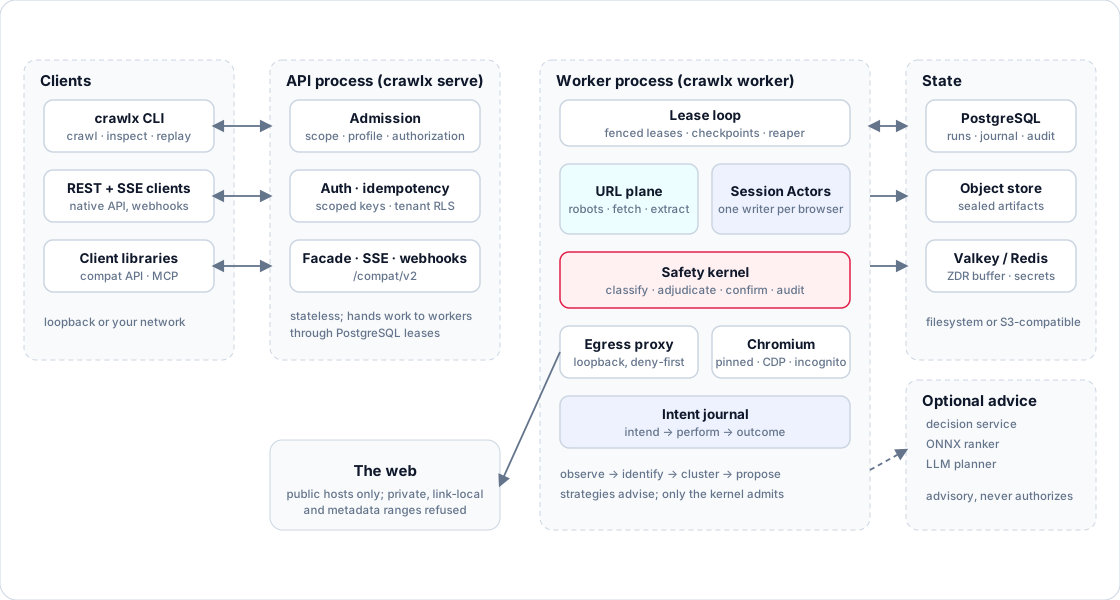
crawlx crawl runs the whole pipeline in-process. crawlx serve and crawlx worker split it: the API
validates and persists a run, and workers lease it from PostgreSQL. Strategies and models only propose
actions; the safety kernel alone decides which are admitted, and the Session Actor re-confirms each one
against the live page before performing it.
Polished diagram
Read more: architecture · crawl model · safety model · data and secrets.
Command-line overview
crawlx --help lists the commands. The common ones:
| Command | Purpose |
|---|---|
crawl |
Crawl in-process and write files |
serve, worker, migrate |
API (REST, SSE, facade), lease-loop worker, database migrations |
inspect, export, replay, replay-response |
Read a stored run, export JSON lines, re-execute a recorded path, replay a retained response offline |
extract, archive, corpus, source-import |
Local extraction, WARC/WACZ, operator-authorized local corpus, declarative source manifests |
authz |
Authorization records: create, show, revoke, verify against an API; sign, challenge offline |
admin, config check, healthcheck |
Operator commands, configuration validation, container probe |
mcp, browser |
MCP server over stdio; Chromium tooling |
Flags of crawlx crawl, by group
crawlx crawl --help is the full, authoritative list.
| Group | Flags |
|---|---|
| Input | URL..., -u/--url, --list FILE, - (stdin), --request JSON, --config FILE, --resume FILE, -p/--parallelism |
| Mode and safety | --mode static|dynamic|hybrid (default hybrid), --observe-only, --profile, --authorization-record, --allow-private-networks, --seed, --role |
| Scope and limits | --field-scope fqdn|rdn|dn|none, --no-scope, --crawl-scope, --crawl-out-scope, --exclude-hosts, -d/--depth, --strategy, --known-files, --max-pages-per-host, --extension-match, --extension-filter, --limit-urls, --limit-interactions, --crawl-duration |
| Filters | --filter-similar, --content-similar off|simhash|tfidf|bm25, --match-regex, --filter-regex, --match-condition, --filter-condition, --filter-page-type |
| Politeness and fetch | --rate-limit, --host-rate-limit, --concurrency, --delay-ms, --timeout, --retries, --max-response-size, --no-redirects, --proxy, --headers, --cookie, --user-agent |
| Extraction | --js-crawl, --javascript-mode off|regex|ast|both, --form-extraction, --detect-secrets, --tech-detect, --knowledge-base, --custom-field-config |
| Browser | --page-load-strategy, --dom-wait-time, --show-browser, --cdp-ws-url, --no-incognito, --auto-download-chromium, --interaction-depth, --interaction-max-actions |
| Output | --output DIR, -j/--jsonl, -o/--output-file, --output-template, --field, --store-field, --store-response, --omit-raw, --list-output-fields, --silent, --verbose |
Behavior of the less obvious options (source discovery, response cache and replay, adaptive extraction, the compatibility flag dialect, JavaScript endpoint mining, captcha solving) is in docs/reference.md.
Configuration
crawlx.toml(path inCRAWLX_CONFIG) andCRAWLX_*environment variables.crawlx config checkvalidates them and prints the effective values with secrets redacted.- Request bodies (API) and
crawlx crawl --request <json>or--config <file>share one request schema; command-line flags override the file. - Pass secrets as
*_FILEvariables orenv://andfile://references rather than literal command-line values. See data and secrets. - Safety profile:
read_only(default),test_environment,authorized_security_test. - Retention:
standard,extendedand zero-data-retention (ZDR) modes. - Milestone-gated strategies and model modes need signed gate files; see
gates/README.md.
Repository layout and development
Cargo.toml            workspace (21 crates under crates/)
chromium-pin.toml     pinned Chromium build and CDP revision
ci/                   layering and dependency lint, Chromium fetch/build scripts, gates
bench/                benchmarks, upstream differential harness, reference automation driver oracle
deploy/               Helm chart, Kubernetes manifests, systemd units, alert rules, dashboard
docker/               Dockerfiles, Compose stack, seccomp profile
docs/                 design documentation, integrations, reference, operations
cargo build --workspace
cargo fmt --all --check
cargo clippy --workspace --all-targets -- -D warnings
cargo test --workspace
ci/lint-deps.sh
PostgreSQL tests read CRAWLX_TEST_DATABASE_URL and Chromium tests read CRAWLX_CHROMIUM_PATH; both skip
when unset. See CONTRIBUTING.md.
Security
Report vulnerabilities in CrawlX privately through GitHub private vulnerability reporting, never in a public issue. SECURITY.md has the supported versions, response times, safe-harbor terms, scope and the intended-use statement.
Releases are built from a tag by a gated workflow that publishes a source archive, a CycloneDX SBOM and
SHA256SUMS as a draft for a maintainer to publish; verification steps are in
SECURITY.md. Workflows run only for code owners, every action is pinned
to a commit, and dependency, secret and static-analysis scans run in CI.
Getting help
- Documentation: docs/README.md. Operators: runbooks.
- Bugs and feature requests: open an issue with the matching form. Include the version or commit and a minimal reproduction, and remove credentials and captured third-party content first.
- Questions: use the question form after searching the docs and closed issues.
- Conduct concerns: CODE_OF_CONDUCT.md.
Contributing
Pull requests are welcome. Read CONTRIBUTING.md for the checks, coding standards and review flow. The roadmap lists open work that is a good place to start.
Support the project
If CrawlX saves you time, a star helps others find it.

License
CrawlX is licensed under the GNU AGPL version 3 only (AGPL-3.0-only), not “version 3 or
later.” Third-party dependencies, vendored sources and embedded resources keep their own licenses and
notices: THIRD_PARTY_NOTICES.md.
CrawlX is built and intended for security research and authorized testing only (see Responsible use); this is a project policy and does not change the license.
Project owners
CrawlX is owned and maintained by: