
niyamvora/ILoveNotch
niyamvora/ILoveNotch has 42 GitHub stars and 6 forks. GitHot measured 0 stars in 24 hours. Last checked 2026-11-15 01:59 UTC. Last push 2026-11-12.
Measured star growth
- in 24h
- 0
- in 7 days
- Collecting history
- in 15 days
- Collecting history
- in 1 month
- Collecting history
Net star changes over overlapping periods, not daily totals. Missing measurements are left blank. Stars measure attention, not software quality.
About
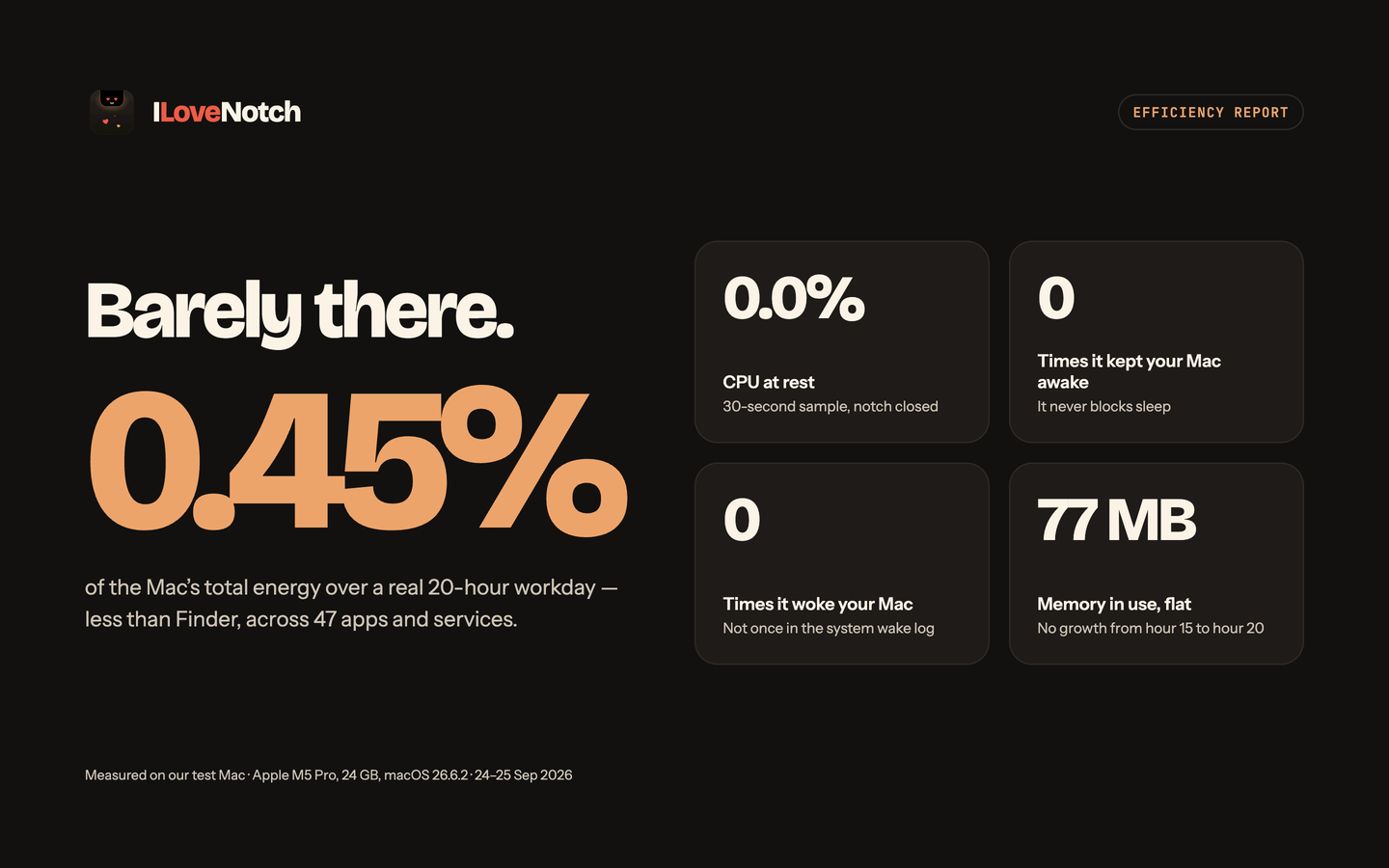
Free, open-source notch app for MacBooks: now playing, file shelf, calendar, Reminders, notes, shortcuts, timers, camera mirror, and your Claude, Codex, Cursor, and Copilot usage. Native SwiftUI, near-zero idle CPU.
ProductivityREADME.md
Originalhttps://github.com/user-attachments/assets/9d0c486c-5169-4297-b8b9-8fedbb9eadda
ILoveNotch
Your MacBook's notch, finally useful. Free and open source.




An original, open-source macOS menu-notch utility — turns the notch on Apple Silicon MacBooks into an interactive tray for media and sound, files, your calendar, tasks, notes, shortcuts, timers, your network speed, your camera, and how much of your AI plans you've used. Built native (SwiftUI + AppKit) with a hard focus on low RAM and near-zero idle CPU (measured).
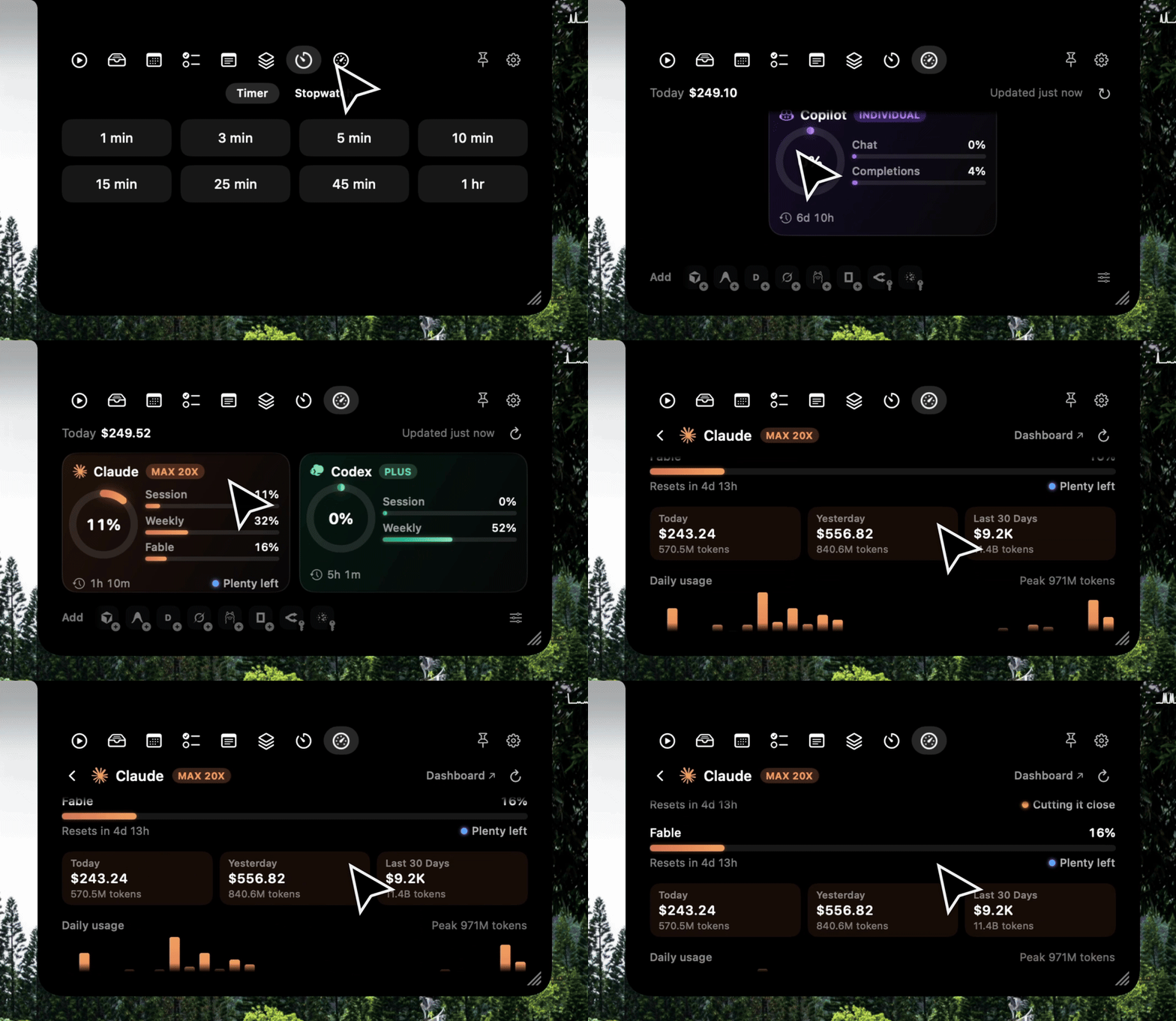
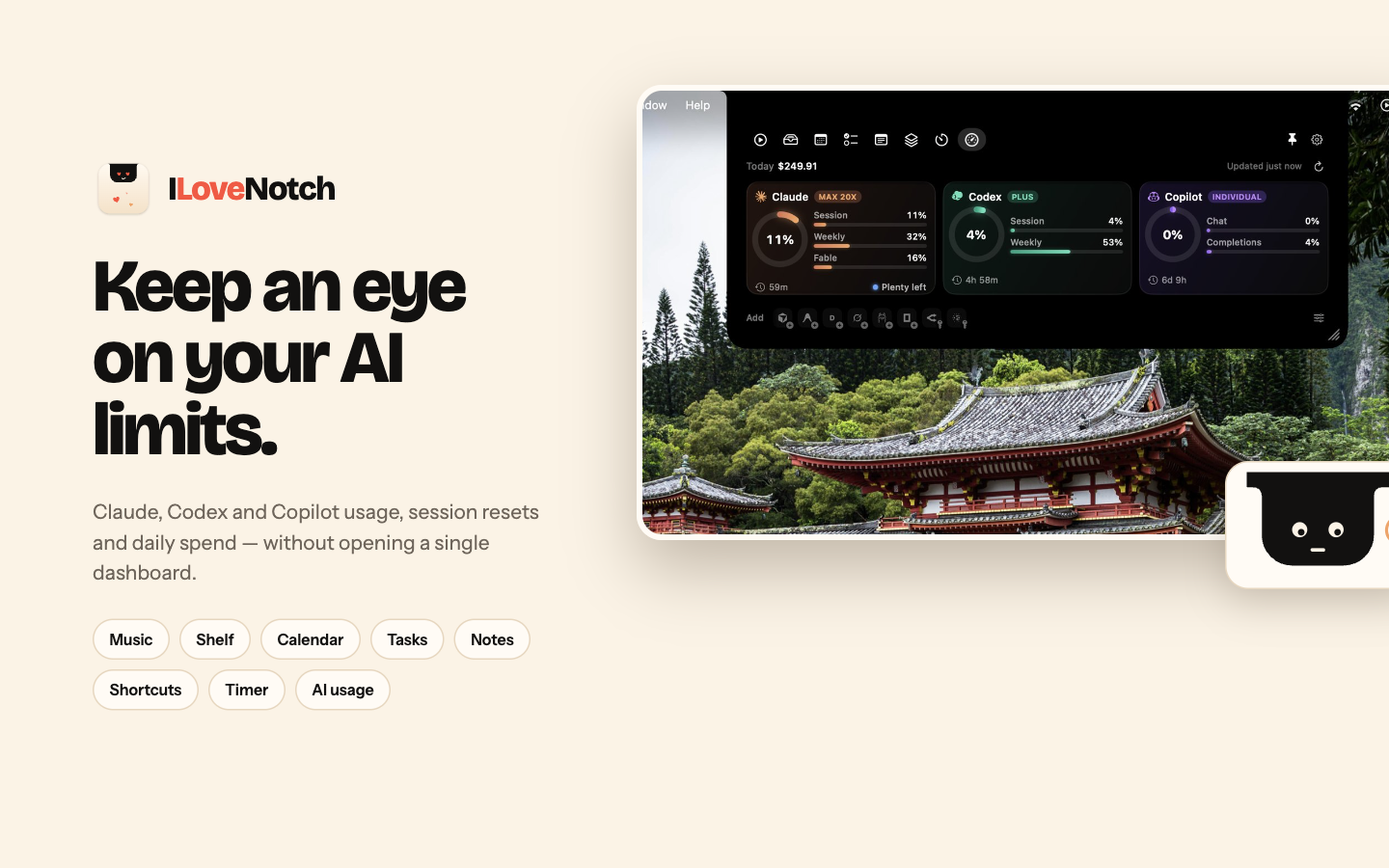
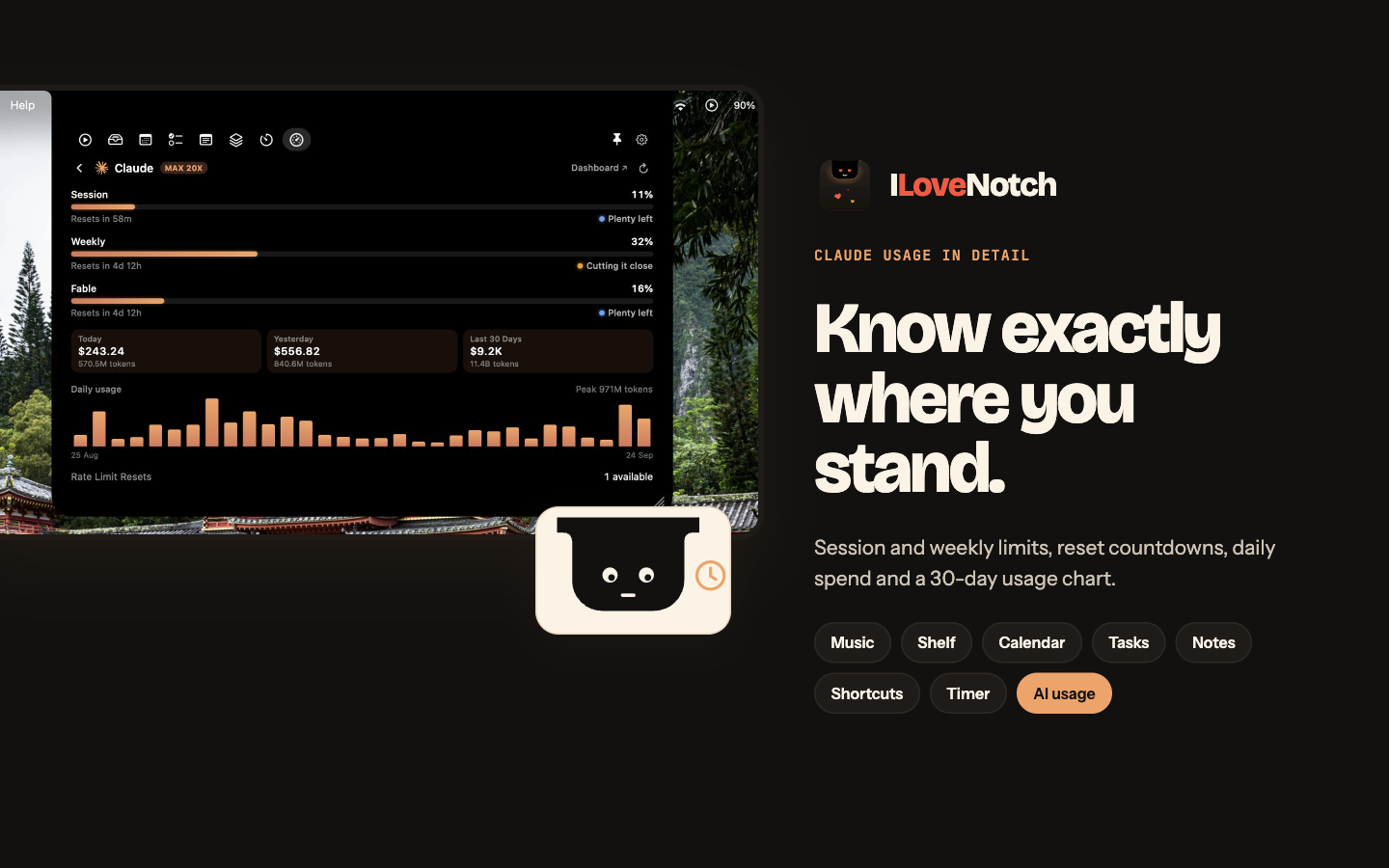
Not affiliated with, endorsed by, or derived from any commercial notch app. This is a clean-room implementation written from scratch. It contains no disassembled or decompiled code, and nothing from any commercial notch app. Features are common-idea reimplementations. Everything here is original or comes from permissively licensed open-source projects (MIT, BSD, CC0), listed in THIRD_PARTY_NOTICES.md.
Download
Download ILoveNotch (free, macOS 14.6 or later): open the download, drag ILoveNotch into Applications, and open it. It updates itself from then on. See what's new, and every version in the changelog.
- Homebrew:
brew install --cask niyamvora/tap/ilovenotch - Mac App Store: in review. The App Store edition has everything except AI Usage, Agents, the Sound tab, and sharing with Android. Try it now through the TestFlight beta.
- From source: see Build & run.
Coming from NotchNook?
NotchNook's license server went offline in September 2026, so paid licenses stopped activating, and lo.cafe told customers to use an alternative. ILoveNotch covers the everyday things: now playing and every app's volume, a file shelf, and your calendar, plus Reminders, notes, Shortcuts, timers, and your network speed. There's no license, account, or server that can go away, and it's MIT licensed, so the code stays public and buildable whatever happens to the project.
What it does
- The notch. Opens when you hover it, click it, pull down with two fingers, or press ⌃⌥O in any app, and closes when you move away. Closed, it hides behind the camera housing until it has something to tell you, like a meeting about to start. Pick how it opens and closes (spring, jelly, pop, smooth, snappy, or instant), drag its bottom-right corner to resize it, and pin it open. The grid button after the tabs opens every app in a drawer, like Launchpad: click one to open it, and the grid button takes you back. The drawer's Edit tile (or a right-click on the tabs) lets you drag the tabs into your own order and keep the ones you use less in the drawer, right in the notch. On macOS 26, open it in Liquid Glass instead of black. Works on every display: where there's no notch, it draws one inside the menu bar, or a floating pill if you'd rather.
- Media. What's playing in any app, with artwork, controls, shuffle and repeat, a seek bar, and a waveform that moves with the music. Music's up next and lyrics, Spotify's recently played, output and volume, swipe to skip, and the cover in the closed notch while it plays.
- Sound. Every app playing sound on a fader of its own, with its icon, to turn it down or mute it; your output's and microphone's volume; and a switch between your speakers, headphones, AirPods and other Bluetooth devices, AirPlay, and displays. More below.
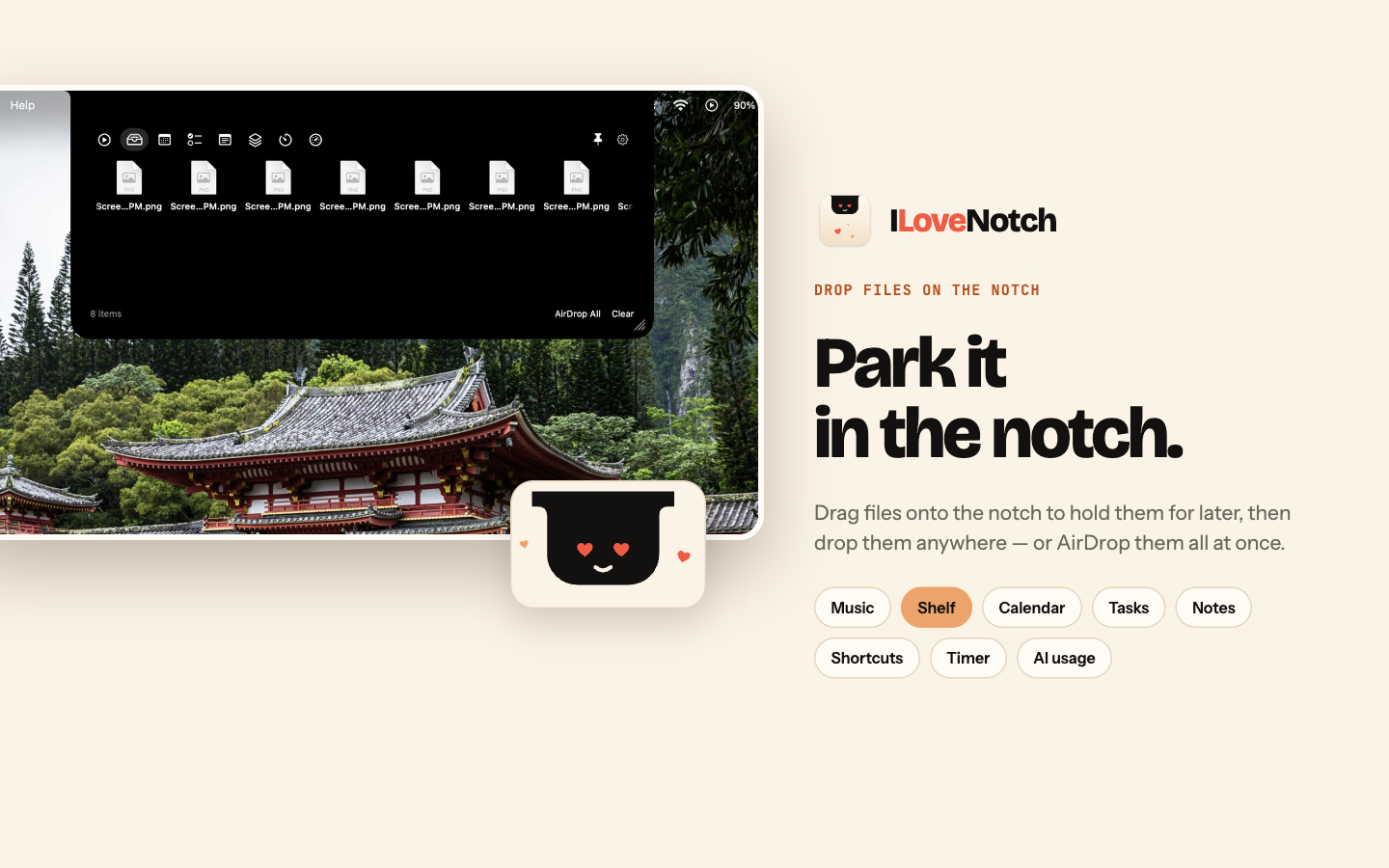
- Shelf. Drop files on the notch to keep them at hand; drag them back out, preview them with Quick Look, or send them with AirDrop. Android phones share with it too, over Quick Share on your Wi-Fi: send shelf files to a phone, and accept files and links from one right in the notch. More below.
- Clipboard. Turn on a history of what you copy (text, links, images, and files), search it with ⌃⌥V from any app, and copy anything again, with favorites that stay. Passwords and anything marked private are skipped.
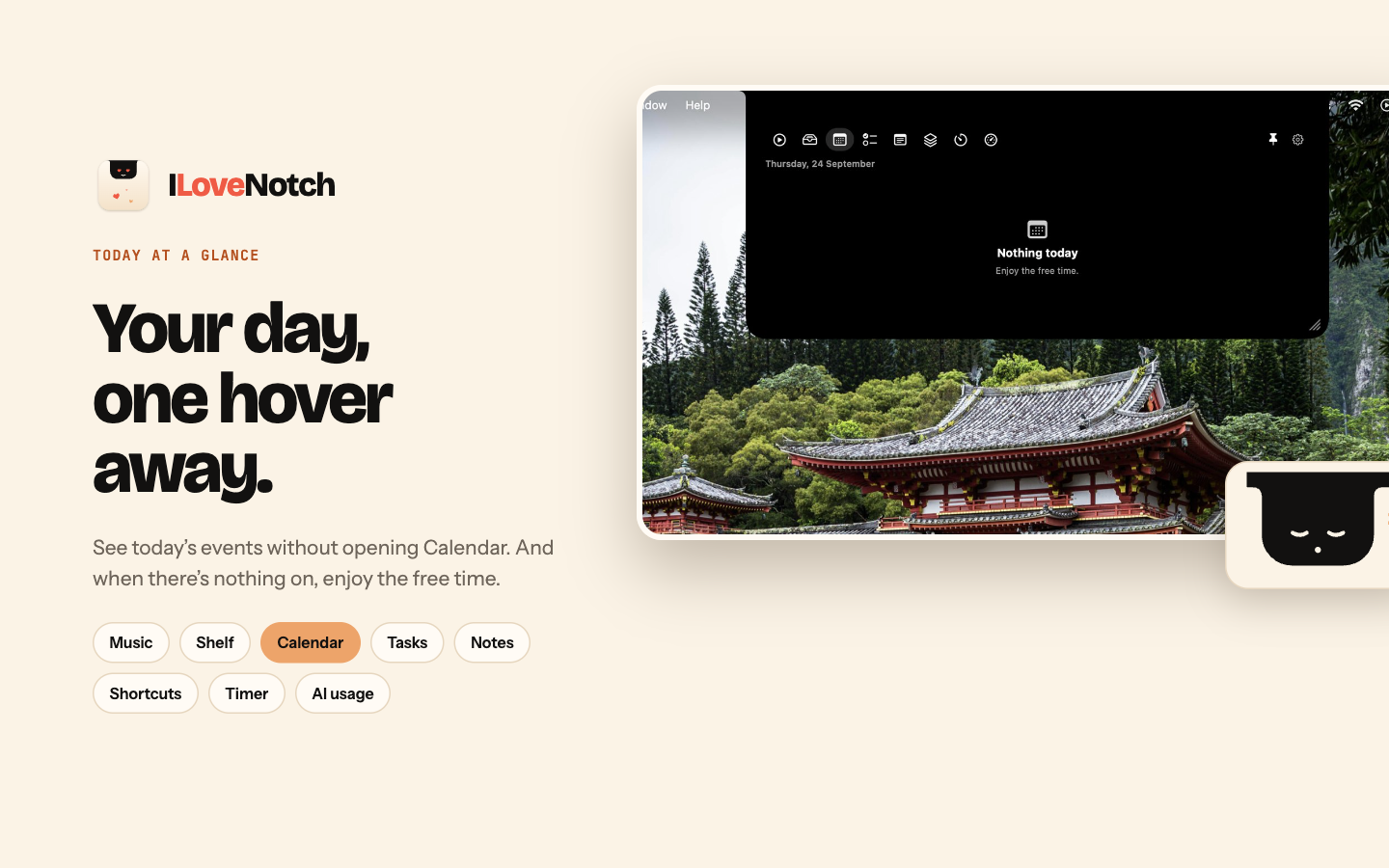
- Calendar and Tasks. Today's events with the tasks due today, an event field that understands "Lunch tomorrow 1pm", and your own events to edit or delete right in the notch. A Join button for Zoom, Google Meet, Teams, Webex, Whereby, Jitsi, and FaceTime calls, and a countdown in the closed notch for the five minutes before one starts. Your Apple Reminders, grouped by date or list, synced to your iPhone through iCloud: add them in plain words ("Pay rent fri 9am !! #Home"), set dates, priorities, lists, and alerts, block time for one in Calendar, and see it on the notch when it's due.
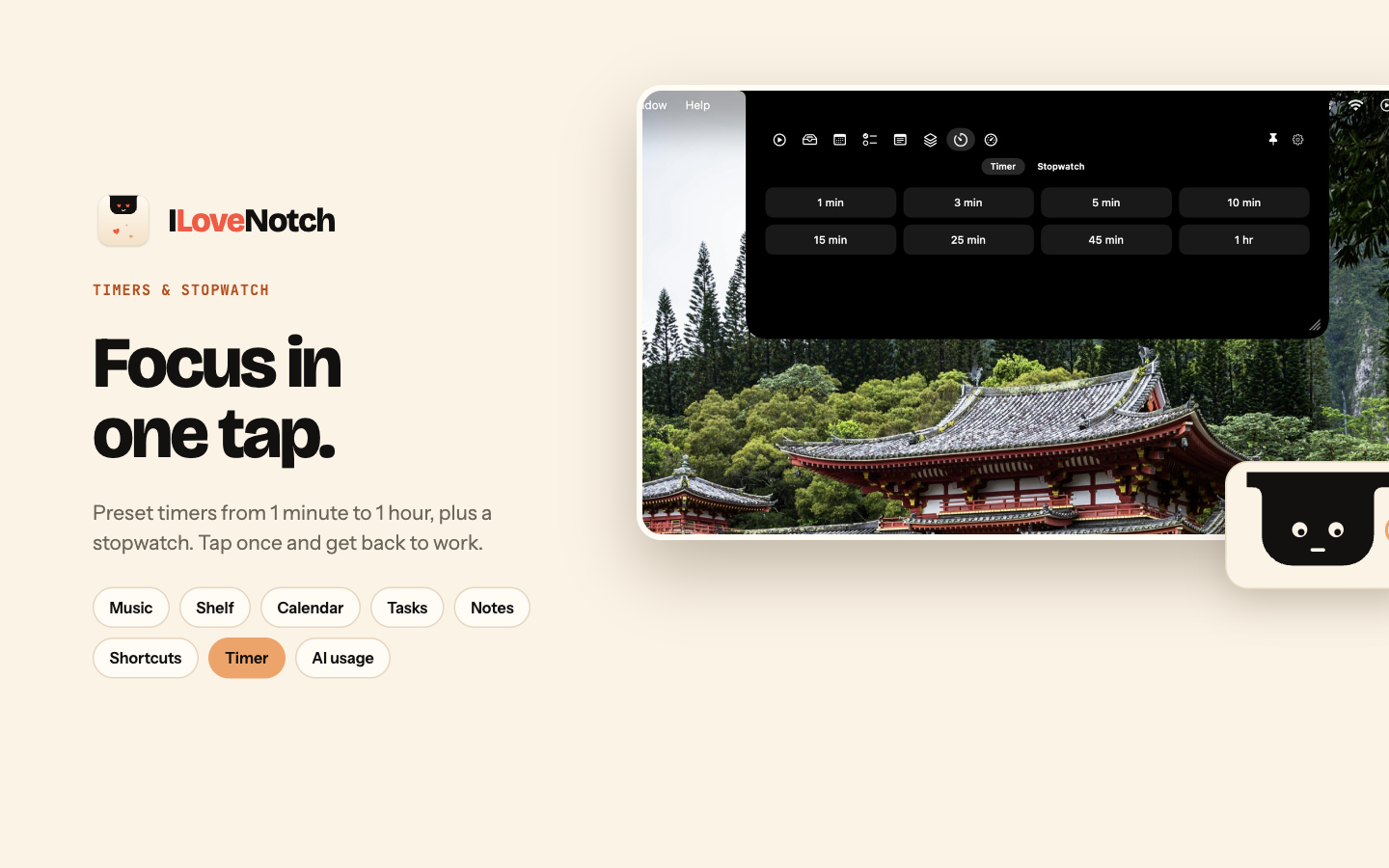
- Notes, Shortcuts, and Timer. Markdown notes that save as you type, with colors, pins, search, checklists you can send to Tasks, and a Control-Option-N shortcut; your shortcuts one click away; a timer and a stopwatch with laps; and Keep Awake, which stops your Mac sleeping for a while or until you turn it off, with the time left in the closed notch.
- Network. Your download and upload speed as it happens, over a graph of the last minute, and how much you've downloaded, uploaded, and both together, by the hour, day, or month. The menu bar beside the notch shows the speed while a download runs, and what it downloaded when it's done. More below.
- Mirror. Your camera, off until you turn it on, and on only while its tab is open.
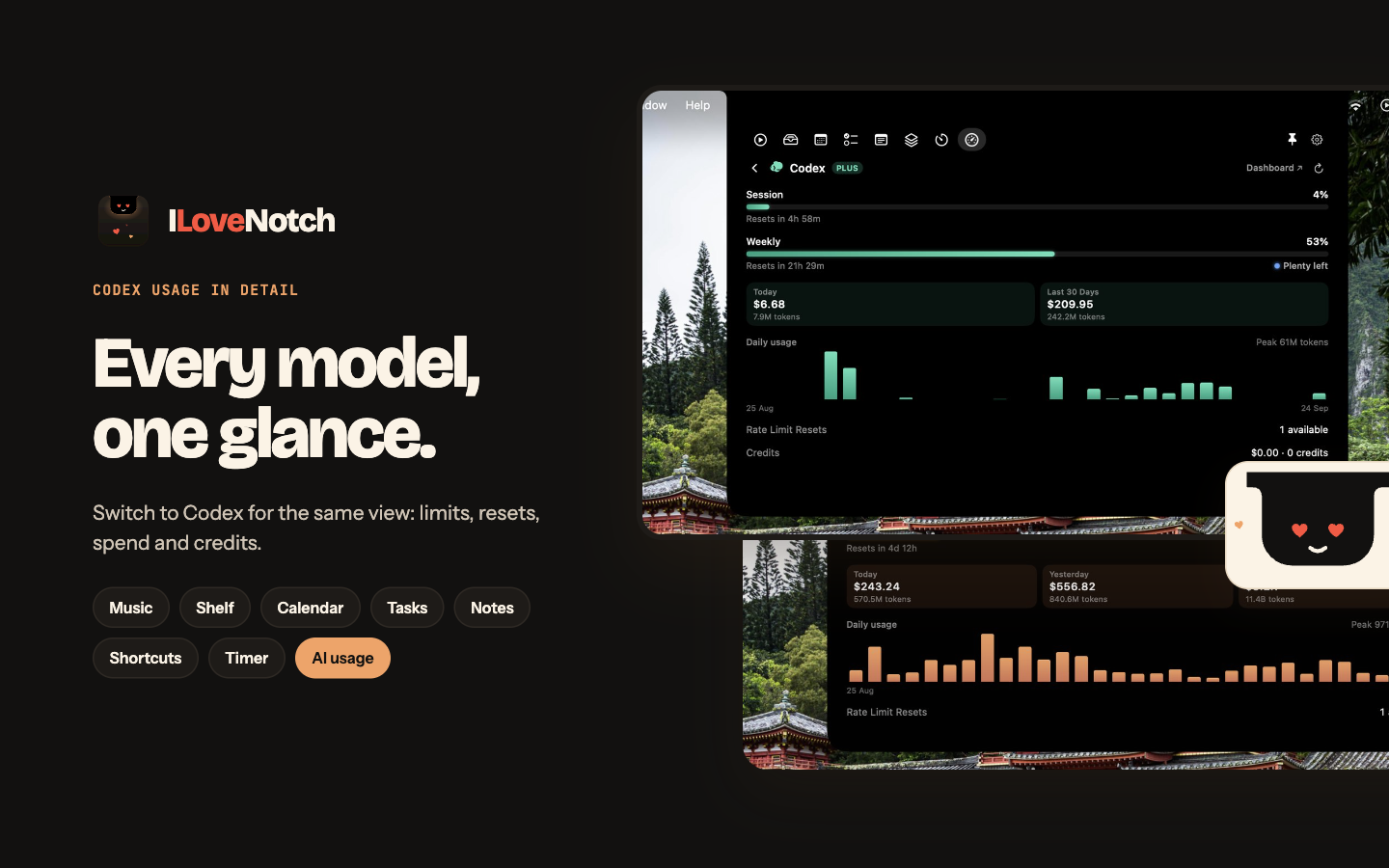
- AI Usage. How much of each AI coding plan you've used, as a card per tool, across 11 providers. More below.
- Agents. When Claude Code or Codex needs your approval, the closed notch says so until you answer, and it tells you when one finishes while you're in another app; one click takes you back to its terminal. More below.
- System activities. Volume, charging and battery, and Bluetooth accessory batteries show briefly in the notch, and it can stand in for the macOS volume display.
- Show in Notch. A Shortcuts action and an
ilovenotch://link put your own message in the notch, from any shortcut, automation, script, or app. More below. - Settings. Laid out like System Settings: a sidebar with a page for each part of the app and each tab, marked with colored icons, and each tab's switch at the top of its page. The notch's gear button or the menu bar item opens it.
- Updates. A build from this checkout updates itself from the menu bar; signed releases update through Sparkle. A sandboxed Mac App Store edition builds from the same code.
Why
Notch utilities are genuinely useful, but the popular closed-source one drew complaints about heavy RAM/CPU use, and in September 2026 its license server went offline, so paid licenses stopped working. ILoveNotch is a free, efficient alternative with nothing to switch off: no license, no account, no server, and code anyone can inspect, build, and improve.
Efficiency
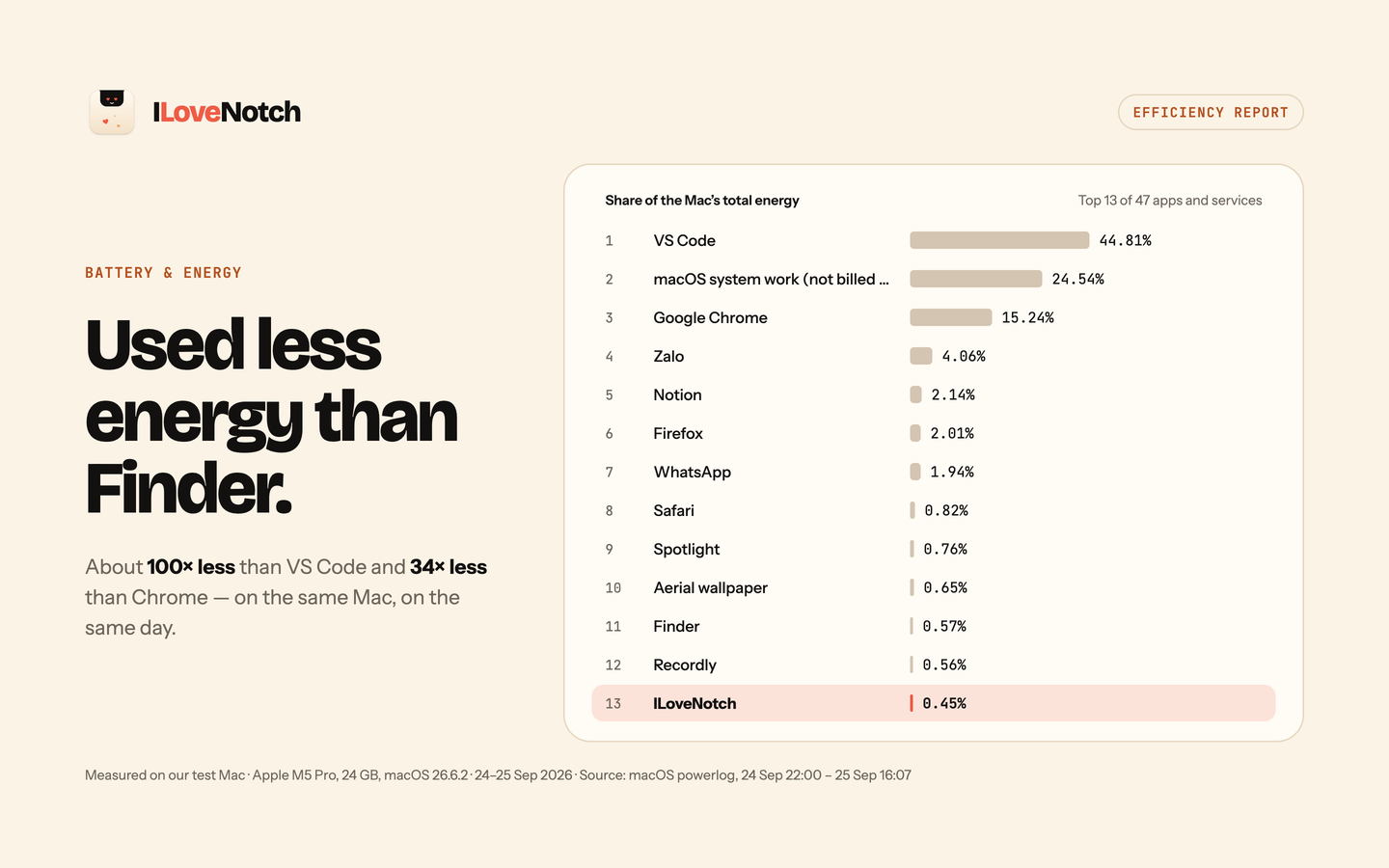
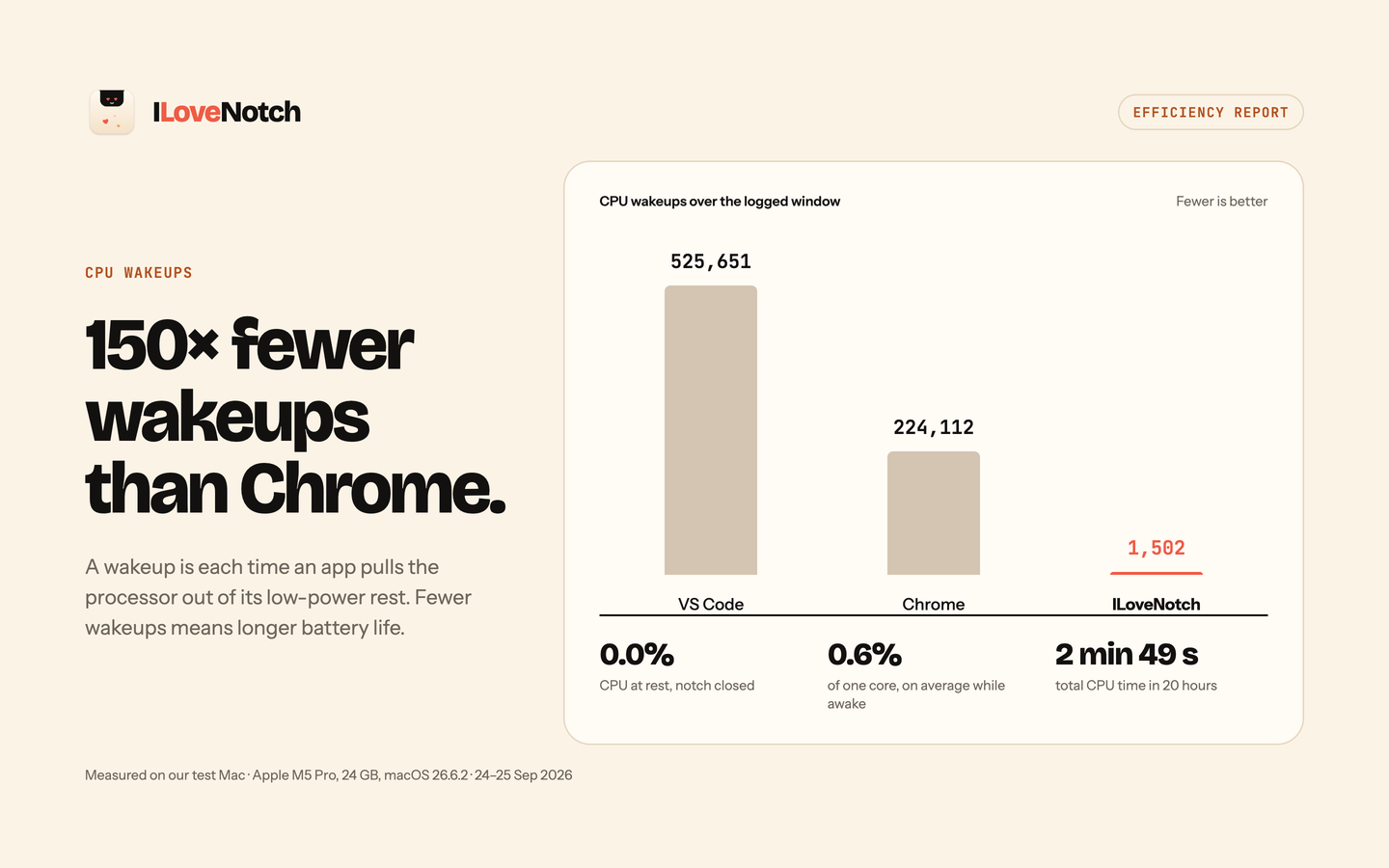
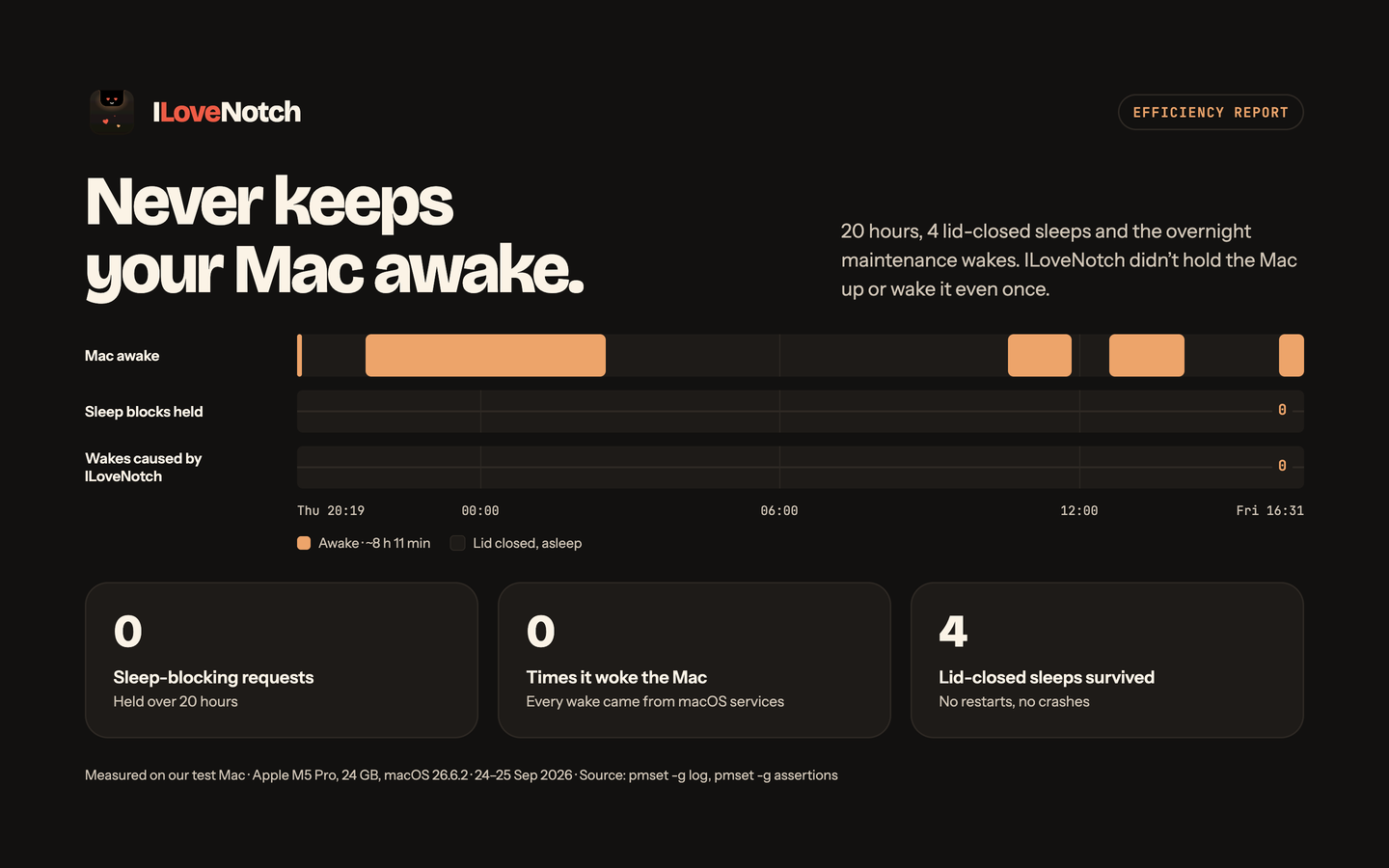
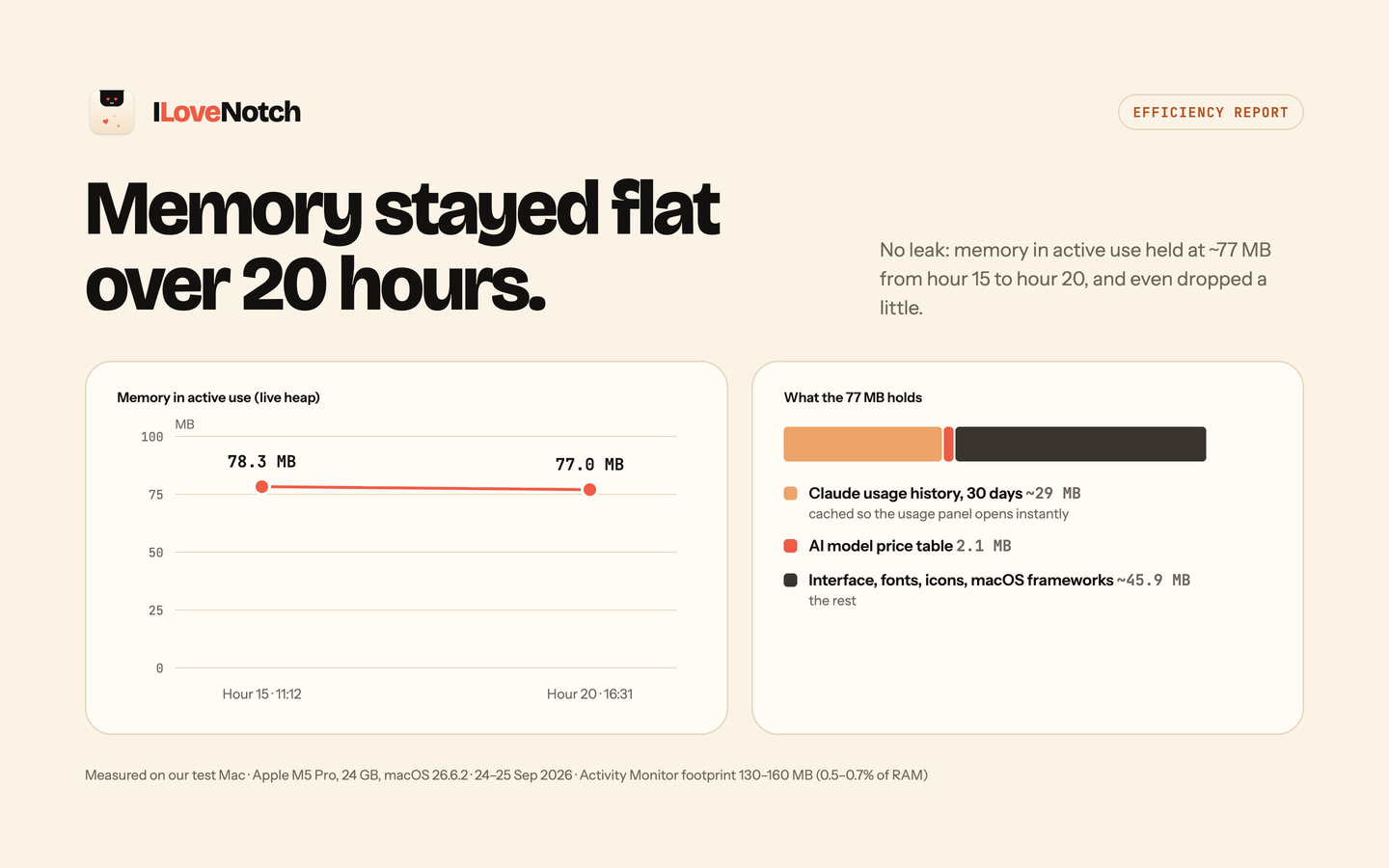
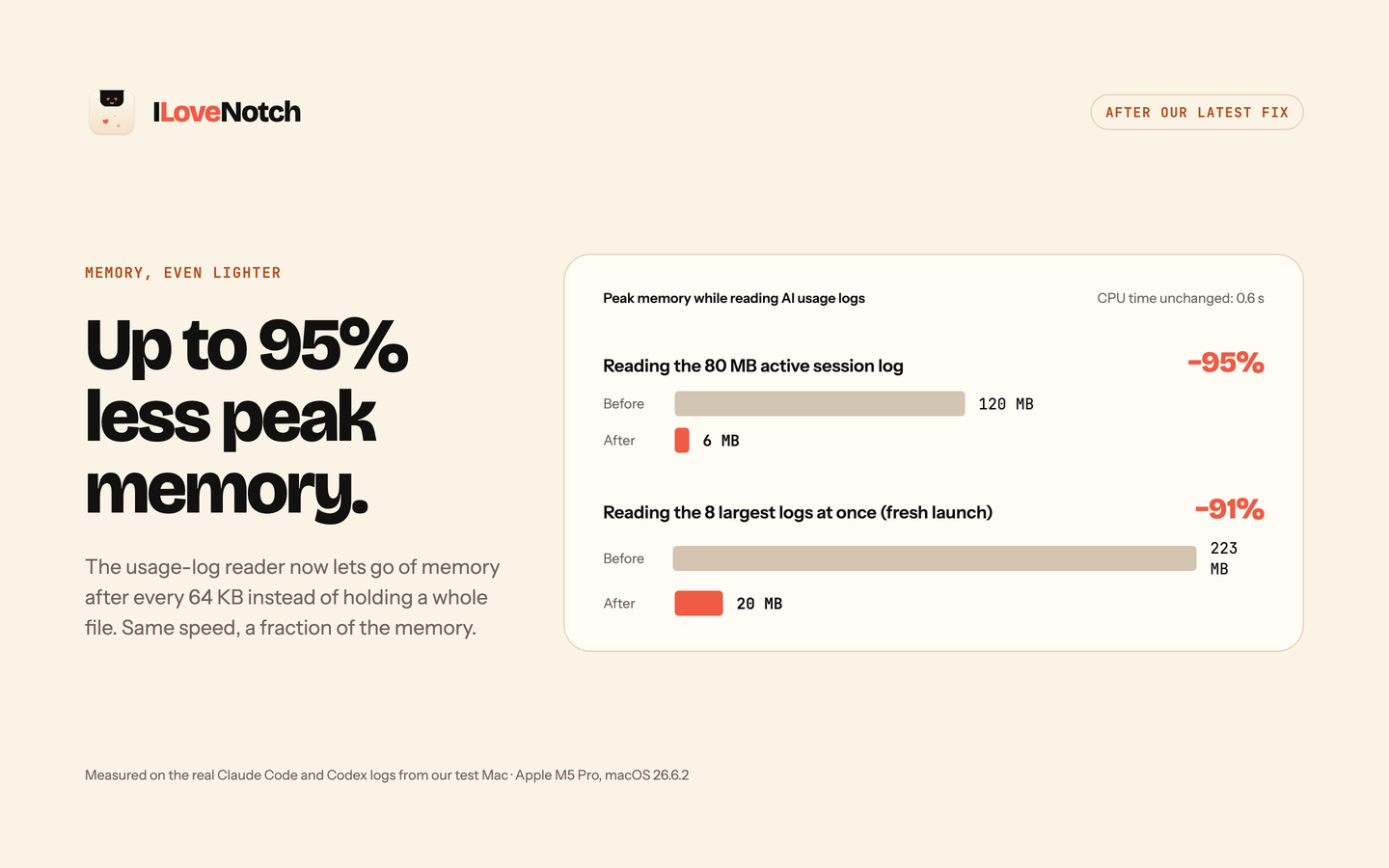
Measured over a real 20-hour workday on an Apple M5 Pro MacBook (24 GB, macOS 26.6.2), 24–25 September 2026.
Design principles (the efficiency story)
- No polling timers. State changes come from events (hover, clicks, system notifications). The only timers are one-shot deadlines, like the hover dwell, cancelled the moment they stop mattering. Idle app = idle CPU. The two exceptions are clipboard history, since macOS has no "clipboard changed" event: off until you turn it on, it then reads a counter twice a second; and the Network tab, since bytes moving raise no event either: it reads the network's byte counters every second only while a speed is on screen, every 3 seconds while the closed notch waits for a download, and otherwise once an hour (Network).
- Accessory app. No Dock icon (
LSUIElement), one small menu bar item for Settings and Quit, and the notch never steals focus (nonactivatingPanel). - Lazy features. Each feature module is
stopped,background(cheap event observers only), orforeground(on screen). Hidden tabs cost nothing. - Native, no Electron/webview. Pure SwiftUI/AppKit.
- Measured, not assumed. Signposts on every event, performance tests in CI, and an Instruments pass per feature against the performance budgets.
Architecture
hover, clicks, drags, sleep/lock, display changes
  → NotchEvent
  → NotchState.handle(_:)   pure reducer: next state + effects
  → NotchEngine             one per display: runs deadline timers
  → FeatureHost             runs each feature at the highest phase any display asks for
  → NotchView               one animatable notch shape inside a fixed panel
| Module | Role |
|---|---|
App/ |
App target generated from project.yml: wires features in, menu bar item, Settings |
NotchCore |
State machine, NotchEngine, FeatureHost lifecycle, preferences, typed logging and signposts. No AppKit. |
NotchSurface |
Fixed click-through NSPanel per display, animatable NotchShape, PanelCoordinator (displays, sleep, lock), notch geometry from public APIs (safeAreaInsets, auxiliaryTop*Area), and the tab row's editor (TabEditor) and app drawer (AppDrawer) |
NotchFeatures |
Feature modules (Media, Shelf, Clipboard, Calendar, Tasks, Notes, Shortcuts, Timer, Network, Mirror), each a NotchFeature with its views and settings, and the event-driven system monitors and hooks (volume, battery, accessories, volume keys, keyboard shortcuts, Show in Notch) |
NotchUsage |
The GitHub build's developer tabs: AI Usage (provider tiles, rings, pace, spend, and trends, over providers adapted from OpenUsage (MIT) in NotchUsage/OpenUsage) and Agents (Claude Code and Codex hooks, in NotchUsage/Agents) |
NotchTransfer |
The GitHub build's Android sharing: Quick Share on Apple's own frameworks (Bonjour, CryptoKit, Network.framework) in NotchTransfer/QuickShare, with the shelf's request card, the send window, and settings |
NotchMixer |
The GitHub build's Sound tab: output and input devices and their volume, and per-app volume on Core Audio process taps (macOS 14.2+), with a private aggregate device for each app turned down while it plays |
ThirdParty/ |
mediaremote-adapter (BSD-3-Clause) as a git submodule |
Tests/ |
Unit tests (reducer transitions and fuzzing, engine, feature host, preferences, geometry, features, the mixer, network counters and history), offscreen snapshot tests, XCTest performance tests, and OpenUsage's provider tests on its fixtures (OpenUsageTests) |
The full design is in the implementation plan and the architecture diagram.
Build & run
Requires macOS 14.6+, Xcode 16+, and Homebrew.
git clone --recurse-submodules https://github.com/niyamvora/ILoveNotch.git
cd ILoveNotch
make setup                        # installs XcodeGen (Brewfile) and fetches submodules
make run                          # generate the Xcode project, build, and launch ILoveNotch.app
make install                      # build a Release app into /Applications and launch it
make update                       # pull main when it's clean, then reinstall and relaunch
make test                         # unit, snapshot, and performance tests (plain SwiftPM)
make check                        # everything CI runs: secrets, lint, tests, build, licenses
make build-app-store              # the sandboxed App Store edition
scripts/soak.sh                   # sample the running app's CPU and memory against the budgets
make project generates OpenNotch.xcodeproj (git-ignored) for working in Xcode. The project,
its targets, and the code keep the original name OpenNotch; the app is ILoveNotch everywhere
people see it.
Watch the state machine live with:
log stream --level debug --predicate 'subsystem == "cafe.opennotch.app"'
Test it on your Mac
make installbuilds a Release app into/Applicationsand launches it. There's no Dock icon: look for the notch, and for the ILoveNotch item in the menu bar (Settings…, Update ILoveNotch, About, What's New, Sponsor, Quit).- Quit other notch apps first; two apps can't share the notch.
- Hover the notch (or click it, or pull down with two fingers), then try each tab. Calendar and Tasks ask for access the first time you tap Continue. Resize the open notch by dragging its bottom-right corner, keep it open with the pin beside Settings, and pick how it looks, opens, and closes in Settings › Appearance.
- To get the latest, choose Update ILoveNotch from the menu bar item (or run
make update). It pullsmainwhen your checkout is clean, rebuilds, and relaunches; see updates. - With an Apple Development certificate in your keychain (Xcode › Settings › Accounts), builds are signed with it and keep Calendar and Reminders access across updates. Without one they're ad-hoc signed, and macOS asks again after each rebuild.
- To start at login, turn on Settings › General › Launch at login.
- To uninstall, choose Quit from the menu bar item and delete
/Applications/ILoveNotch.app; data lives in~/Library/Application Support/OpenNotch.
Now playing
Since macOS 15.4, only Apple's own processes may read system-wide now-playing
information. ILoveNotch uses mediaremote-adapter,
which runs in the system perl (an Apple process) as a separate helper, so the
private framework never loads into ILoveNotch. If a future macOS breaks it, Media
falls back to Music and Spotify's public notifications and says so.
The waveform under the player moves with the music. It listens to your Mac's audio output only while Media is open and playing, so macOS asks once for permission to capture system audio. Nothing is recorded; see PRIVACY.md. Turn it off in Settings › Media.
Sound
The Sound tab (GitHub build) is a small mixing desk. On its left are the Mac's outputs, or with the switch above them its inputs: speakers, wired headphones, AirPods and other Bluetooth devices while they're connected, AirPlay, and displays. Click one to send sound there or record from it, as in Control Center. On its right are faders: your output's volume, your microphone's in orange, then one for each app playing sound, with its icon and a dot while it plays. Drag a fader to turn that app down, click its icon to mute it, and bring it back to 100% to leave it alone. Chrome and Safari count as one app however many helper processes they play from. Each app keeps its volume until you change it, including after a relaunch; Reset All in Settings › Sound undoes them all. The volume keys' level in the closed notch opens the tab when you hover it.
Per-app volume uses macOS 14.2's Core Audio process taps, the permission the waveform already asks for, and no audio driver. An app you turn down plays through ILoveNotch only while it plays, so its sound gains about 10 ms on the way to your speakers, and a muted app is silenced at its source with no audio work at all. With every app at 100% and the tab closed, nothing listens.
Network
The Network tab is NetSpeed, a menu bar app, moved into the notch. On its left is your download speed as it happens, with the upload's under it, over a glowing graph of the last minute. On its right is what you've downloaded, uploaded, and both together in the last 24 hours, 7 days, 30 days, or 12 months, over bars by the hour, day, or month; point at a bar for its own three numbers.
The closed notch shows the speed beside the camera while a download or upload runs at 1 MB/s or more for a few seconds, and when a big one finishes it says how much it moved. Hover the speed to open the tab. Show speed in the menu bar, in Settings › Network, picks Always (like NetSpeed's menu bar item), While Downloading, or Never. It stays under any other live activity, such as a meeting's countdown.
It counts the bytes your Mac's own network interfaces report (Wi-Fi, Ethernet, and iPhone tethering, leaving out VPN tunnels, which would count them twice), the way NetSpeed did, and needs no permission. The history keeps one row per hour on this Mac, about 250 KB a year, and the first time the tab runs it brings in NetSpeed's history. What moves while the Mac is locked or its display sleeps still counts, shared among those hours.
There's no event for bytes moving, so it reads the counters, 40 µs each time: every second while a speed is on screen, every 3 seconds while the closed notch waits for a transfer, and otherwise once an hour for the history. Measured with the kernel's own counters, waiting costs about 8 ms of CPU a minute (0.013% of one core), where NetSpeed averaged 146 ms a minute redrawing the menu bar every second; showing a download's speed on the closed notch costs about 0.3% of one core, and the open tab about 0.6%. The numbers change without rolling: rolled, they kept the open tab busy at 12–51% of a core. It adds about half a megabyte of memory.
AI usage
The AI Usage tab shows how much of your AI coding plans you've used, as a small dashboard card per tool:
- Claude, Codex, Cursor, Copilot, Antigravity, Devin, Grok, Ollama, OpenCode, OpenRouter, and Z.ai are supported.
- Each card shows its main limit as a ring, the others as bars, when they reset, and whether they'll last until then. Click a card for spend, the daily trend, and every limit.
- Alerts show in the notch when a limit passes 80% or 95%, or resets.
Each provider is off until you add it from the tray under the cards, where the tools signed in on this Mac are in color, or in Settings › AI Usage. OpenRouter and Z.ai have no sign-in to reuse, so they take an API key, pasted in Settings › AI Usage and kept in your keychain.
Each provider reads the sign-in its own tool keeps on this Mac and sends it only to its own service. What it reads and sends is in PRIVACY.md. The provider code is adapted from OpenUsage (MIT), and ILoveNotch isn't affiliated with it. The tab is in the GitHub build only: reading other tools' sign-ins doesn't fit the App Store's sandbox.
Agent status
The Agents tab shows what Claude Code and Codex are doing in your terminals: working, finished, or waiting for you to approve something. While one waits, the closed notch shows a raised hand and the project until you answer, and when one finishes while its app is in the background, the notch says so. Go brings its terminal forward.
Nothing is connected until you connect it, in the tab or in Settings ›
Agents. Connecting adds hooks to the tool's own settings
(~/.claude/settings.json, or ~/.codex/hooks.json, which Codex asks you to
trust the next time it starts), next to any hooks already there, and
disconnecting takes out exactly those. The hooks run in the background, so an
agent never waits on them, and they write one small file per session: its
state, project folder, terminal app, and what it's waiting for, never your
prompts or code. Nothing leaves your Mac; see PRIVACY.md.
Like AI Usage, it's in the GitHub build only, since hooks don't fit the App
Store's sandbox.
Show in Notch
Shortcuts has a Show in Notch action, with a message, an SF Symbol, and how many seconds to show it, so any shortcut or automation can put a message in the notch. Scripts and other apps can open a link instead:
open -g "ilovenotch://show?title=Build%20done&symbol=hammer.fill&seconds=5"
A message shows for 1 to 30 seconds (4 by default) and is never stored. It's only ever displayed: links in it aren't opened, line breaks and control characters are removed, and it's cut to 80 characters. Both editions have it, the App Store one too.
Android
The shelf shares with Android phones over Quick Share, Android's own AirDrop, on your Wi-Fi. Nothing gets installed on the phone, and nothing goes through the internet or a server.
- From a phone. On the phone, tap Share › Quick Share and pick your Mac. The notch opens on the shelf with the phone's name, what it's sending, and a 4-digit code that matches the phone's. Nothing is saved until you Accept. Files go to Downloads (or a folder you choose), each one only once it has arrived whole, and onto the shelf. A link or text goes to the clipboard, and a web link gets Open.
- To a phone. Right-click a shelf file and choose Send to Android…, or click Send to Android under the shelf. A window like AirDrop's lists the phones nearby; pick one and accept on the phone. If the phone isn't listed, scan the window's QR code with its camera: Quick Share opens and the files go straight to it.
Phones can't see your Mac until you say so. Receive from Android under the shelf makes it visible for 10 minutes, and Settings › Shelf has Off (the default), While the notch is open (and for a minute after), or Always, along with the name phones see and where files go. While the Mac is asleep or locked, it's never visible. macOS asks once for Local Network access.
Good to know:
- Same Wi-Fi only. Guest, hotel, and office networks that keep devices apart block it, and the speed is your router's.
- Phones that don't show up in the list. Most phones announce themselves on Wi-Fi only after a Bluetooth signal a Mac can't send, and Samsung's never do without it. The QR code works for all of them. Other phones show up while Quick Share's receive screen is open and set to Everyone.
- Everyone, not Contacts. Contacts-only sharing needs a Google account, so your Mac appears to anyone nearby while it's visible, and asks you first every time.
- Unofficial. Quick Share isn't an API Google offers for the Mac, so an
Android update could change it; the code lives in one module
(
NotchTransfer/QuickShare) to fix quickly. It's in the GitHub build for now.
If the phone doesn't see your Mac, check Visible shows under the shelf, that both are on the same Wi-Fi, and that ILoveNotch is on in System Settings › Privacy & Security › Local Network (and allowed through the firewall, if it asked). To see what happens during a transfer:
log stream --level debug --predicate 'subsystem == "cafe.opennotch.app" && category == "transfer"'
ILoveNotch's own implementation follows the message definitions in Google's open-source Quick Share code (google/nearby, Apache-2.0) and the protocol notes of NearDrop.
Tasks and notes
Tasks use Apple Reminders through EventKit, so they sync to your iPhone over
iCloud with no server to run, and alerts set in the notch ring on every device.
Notes are Markdown files named after their first line, in
~/Library/Application Support/OpenNotch/Notes by default. To read them on an
iPhone, pick a folder in iCloud Drive in Settings › Notes: they show
up in the Files app and in Markdown apps such as Obsidian. A note's color and
pin are kept in a small front matter block those apps understand, and a file you
named yourself keeps its name when you edit it in the notch. The Share button
sends a copy to Apple Notes; driving Apple Notes directly through Apple Events
was dropped as brittle and permission-heavy. (Google Keep is intentionally
not used: it has no official API.) Calendar and Reminders access is requested
only when you tap Continue in their tab.
Contributing
Questions and ideas go in Discussions; bugs and feature requests in Issues. See CONTRIBUTING.md. Report vulnerabilities privately as described in SECURITY.md; privacy commitments are in PRIVACY.md.
Sponsors
ILoveNotch is free and open source. If it's useful to you, sponsor the project to help keep it maintained, and star the repo so more people find it.
License
MIT — see LICENSE.