
nickrunning/wechat-selkies
nickrunning/wechat-selkies has 3,106 GitHub stars and 275 forks. GitHot measured +2 stars in 24 hours and +15 in 7 days. Last checked 2026-11-06 05:07 UTC. Last push 2026-10-12.
基于Selkies的Linux网页版微信/QQ/Telegram,支持本地中文输入法,支持三方应用,支持AMD64和ARM64。
Measured star growth
- in 24h
- +2
- in 7 days
- +15
- in 15 days
- Collecting history
- in 1 month
- Collecting history
Net star changes over overlapping periods, not daily totals. Missing measurements are left blank. Stars measure attention, not software quality.
README_en.md
OriginalWeChat Selkies









English | 中文
Docker-based WeChat/QQ Linux client with browser access support using Selkies WebRTC technology.
Project Overview
This project packages the official WeChat/QQ Linux client in a Docker container, enabling direct WeChat/QQ usage in browsers through Selkies technology without local installation. Suitable for server deployment, remote work, and other scenarios.
Upgrade Notes
If some features are missing after an upgrade, please clear the
openboxdirectory in the local mounted directory (e.g.,./config/.config/openbox).
This repository includes automatic upstream WeChat version detection: GitHub Actions periodically checks the official
.debpackages, updatesversions/upstream.envwhen changes are detected, and then triggers the image build workflow.
Features
- 🌐 Browser Access: Use WeChat directly through web browsers without local installation
- 🐳 Dockerized Deployment: Simple containerized deployment with environment isolation
- 🔒 Data Persistence: Supports persistent storage of configurations and chat records
- 🎨 Chinese Support: Complete Chinese fonts and localization support, including local Chinese input methods
- 🖼️ Image Copy: Support image copying through sidebar panel
- 📁 File Transfer: Support file transfer through sidebar panel
- 🖥️ AMD64 and ARM64 Architecture Support: Compatible with mainstream CPU architectures
- 🔧 Hardware Acceleration: Optional GPU hardware acceleration support
- 🪟 Window Switcher: Added a floating window switcher in the top left corner for easy switching to background windows, laying the foundation for adding other features in the future
- 🤖 Auto Start: Configurable auto-start for WeChat and QQ clients (optional)
- 📋 Desktop Shortcut Integration: Automatically scans
.desktopfiles in~/Desktop/and adds them to the right-click menu, making it easy to launch third-party applications (e.g., apps installed via proot-apps) - 📂 File Manager: Built-in PCManFM lightweight file manager, accessible from the right-click menu for easy file management inside the container
Screenshots
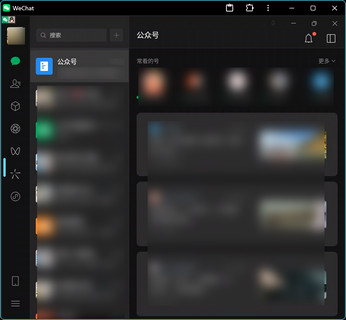
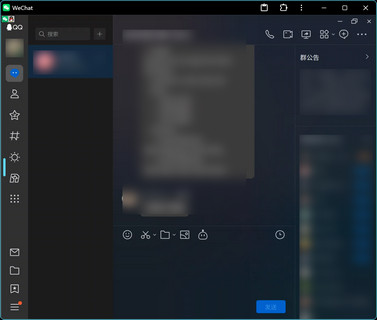
Quick Start
Requirements
- Docker
- Docker Compose
- Modern browser with WebRTC support (Chrome, Firefox, Safari, etc.)
Quick Deployment
- Direct deployment using pre-built images GitHub Container Registry image:
docker run -it -p 3001:3001 -v ./config:/config --device /dev/dri:/dev/dri ghcr.io/nickrunning/wechat-selkies:latest
Docker Hub image:
docker run -it -p 3001:3001 -v ./config:/config --device /dev/dri:/dev/dri nickrunning/wechat-selkies:latest
Minimal image: If you only need WeChat (without QQ and file manager), use the
minimaltag for a smaller image:docker run -it -p 3001:3001 -v ./config:/config --device /dev/dri:/dev/dri ghcr.io/nickrunning/wechat-selkies:minimalVersioned minimal tags are also available, e.g.
:1.2.3-minimal,:1.2-minimal, for pinning to a specific release.
Access WeChat
Open in browser:
https://localhost:3001orhttps://<server-ip>:3001Note: 3001 port is for HTTPS access. If you need HTTP access, please map port 3000 as well.
Docker Compose Deployment
Create project directory and navigate into it
mkdir wechat-selkies
cd wechat-selkies
Create
docker-compose.ymlfile with the following contentservices: wechat-selkies: image: nickrunning/wechat-selkies:latest # or ghcr.io/nickrunning/wechat-selkies:latest container_name: wechat-selkies ports: - "${HTTP_PORT:-3000}:3000" - "${HTTPS_PORT:-3001}:3001" restart: unless-stopped volumes: - ./config:/config devices: - /dev/dri:/dev/dri environment: - PUID=${PUID:-1000} - PGID=${PGID:-100} - TZ=Asia/Shanghai - LC_ALL=zh_CN.UTF-8 - AUTO_START_WECHAT=true - AUTO_START_QQ=false - CUSTOM_USER=${CUSTOM_USER:-} - PASSWORD=${PASSWORD:-} shm_size: "${SHM_SIZE:-1gb}"Create
.envfile (optional)Copy
.env.exampleand modify as needed. Variables not set will use default values:cp .env.example .env.envfile example:HTTP_PORT=3000 HTTPS_PORT=3001 PUID=1000 PGID=100 # CUSTOM_USER= # PASSWORD= SHM_SIZE=1gbStart the service
docker compose up -d
Source Code Deployment
Clone the repository
git clone https://github.com/nickrunning/wechat-selkies.git
cd wechat-selkies
Start the service
docker compose up -dAccess WeChat
Open in browser:
https://localhost:3001orhttps://<server-ip>:3001
Build minimal version: When building from source, use build-arg to create a WeChat-only image:
docker build --build-arg INSTALL_QQ=false --build-arg INSTALL_PCMANFM=false -t wechat-selkies:minimal .
Configuration
For more custom configurations, please refer to Selkies Base Images from LinuxServer.
Docker Hub Push Configuration
This project supports pushing to both GitHub Container Registry and Docker Hub. Docker Hub push is optional and requires manual configuration. Please add the following Environment Secrets and Environment Variables in your repository to enable Docker Hub push functionality:
Environment Secrets:
DOCKERHUB_USERNAME: Your Docker Hub usernameDOCKERHUB_TOKEN: Your Docker Hub Access Token
Environment Variables:
ENABLE_DOCKERHUB: Set totrueto enable Docker Hub push
Environment Variables
Configure the following environment variables in docker-compose.yml. Variables with ${VAR:-default} syntax can be overridden via a .env file:
| Variable | Default | Description |
|---|---|---|
TITLE |
WeChat Selkies |
Web UI title |
PUID |
1000 |
User ID |
PGID |
100 |
Group ID |
TZ |
Asia/Shanghai |
Timezone setting |
LC_ALL |
zh_CN.UTF-8 |
Locale setting |
CUSTOM_USER |
- | Custom username (recommended) |
PASSWORD |
- | Web UI access password (recommended) |
AUTO_START_WECHAT |
true |
Whether to automatically start the WeChat client |
AUTO_START_QQ |
false |
Whether to automatically start the QQ client |
ENABLE_WECHAT_NIGHTLY_RESTART |
false |
Whether to enable nightly auto-stop and auto-restart for WeChat |
WECHAT_NIGHTLY_STOP_TIME |
23:30 |
Daily scheduled stop time for WeChat (HH:MM format) |
WECHAT_NIGHTLY_START_TIME |
01:30 |
Daily scheduled restart time for WeChat (HH:MM format) |
ENABLE_WECHAT_AUTO_LOGIN |
true |
Whether to automatically detect and click the login button after WeChat starts/restarts |
AUTO_LOGIN_DELAY |
3 |
Delay in seconds after WeChat launch to wait for UI rendering before login action |
Port Configuration
3001: Web UI access port
Volume Mounts
./config:/config: WeChat configuration and data persistence directory
Note: If the right-click menu lacks
openboxdirectory in the local mounted directory (e.g.,./config/.config/openbox).
Installing Third-Party Applications (e.g., Telegram)
This project supports installing third-party Linux applications via proot-apps. Here's how to install Telegram as an example:
- Open the container desktop in your browser
- Click the Sidebar on the left → Applications
- Find Telegram in the application list
- Click the Install button and wait for the installation to complete
Once installed, the application shortcut will automatically appear in the ~/Desktop/ directory, and the right-click menu will auto-refresh — no container restart needed to launch the app from the menu.
Tip: To uninstall an application, go to Sidebar → Applications, select the app, and click Uninstall. The right-click menu will update automatically.
Advanced Configuration
Hardware Acceleration
If your system supports GPU hardware acceleration, the Docker Compose configuration includes relevant device mapping:
devices:
  - /dev/dri:/dev/dri
Directory Structure
wechat-selkies/
├── docker-compose.yml          # Docker Compose configuration file
├── .env.example                # Environment variables example file
├── Dockerfile                  # Docker image build file
├── LICENSE                     # License
├── README.md                   # Project documentation (Chinese)
├── README_en.md                # Project documentation (English)
├── config/                     # Configuration and data persistence directory
└── root/                       # Container initialization files
    ├── defaults/
    │   └── autostart           # Auto-start configuration
    └── wechat.png              # WeChat icon
Troubleshooting
Updating WeChat/QQ Version
When WeChat or QQ displays a "version outdated" message, simply pull the latest image and recreate the container. Your chat history and configurations will be preserved:
# Using pre-built images
docker compose pull && docker compose up -d

# Using source code build
git pull && docker compose up -d --build
Note: WeChat uses its official update URLs. QQ detection tries the latest official packages first, then the previously successful URLs and backup versions if downloads fail, and records the URLs actually used. CI builds use the URLs and SHA256 hashes in
versions/upstream.envto verify packages.
For maintainers, the current automation flow is:
Detect Upstream Package Updateschecks the official WeChat and QQ packages every 6 hours and can also be triggered manually- If a successful download URL, version, or package hash changes, the workflow updates
versions/upstream.env - After committing the changes to
master, detection explicitly triggersBuild and Publish Docker Imagewithworkflow_dispatch(GITHUB_TOKENpushes do not trigger other push workflows) - Builds receive package SHA256 hashes to refresh download caches when packages change and verify files before installation. Image publishing runs serially to reduce rate limits caused by concurrent pushes
The version state file is stored at versions/upstream.env and currently records:
- Successful WeChat and QQ amd64/arm64 download URLs
- Parsed WeChat and QQ amd64/arm64 package versions
- WeChat and QQ amd64/arm64 package SHA256 hashes
- The last detection time that actually changed the tracked state
Common Issues
- Unable to access Web UI
- Check if port 3001 is occupied
- Confirm Docker container is running normally:
docker ps
Log Viewing
View container runtime logs:
docker compose logs -f wechat-selkies
Technical Architecture
- Base Image:
ghcr.io/linuxserver/baseimage-selkies:ubuntunoble - WeChat Client: Official WeChat Linux version
- Web Technology: Selkies WebRTC
- Containerization: Docker + Docker Compose
Contributing
Issues and Pull Requests are welcome!
- Fork this project
- Create feature branch:
git checkout -b feature/your-feature - Commit changes:
git commit -am 'Add some feature' - Push branch:
git push origin feature/your-feature - Submit Pull Request
License
This project is licensed under MIT License. See the LICENSE file for details.
📜 License Statement
- Project License: MIT License - A permissive open source license
- Dependency Note: This project uses LinuxServer.io baseimage-selkies as base image
- License Compatibility: Since this project only uses the base image without modifying its source code, following containerized software licensing practices, it can adopt the MIT license
- Open Source: Complete project source code is publicly available on GitHub: https://github.com/nickrunning/wechat-selkies
Disclaimer and Copyright Notice
🚨 Important Statement
This project has no affiliation with Tencent and is an independent third-party open source project.
📋 Copyright Notice
- WeChat® is a registered trademark and copyrighted work of Tencent
- The copyright of WeChat-related icons, logos and other visual elements used in this project belongs to Tencent
- This project is for technical demonstration and learning purposes only, not for commercial use
- In case of copyright disputes, relevant content will be removed immediately
⚖️ Legal Compliance
- This project strictly complies with relevant laws, regulations and user agreements
- Users should comply with local laws and regulations when using this project
- This project assumes no legal responsibility for users' actions
- If Tencent believes there is infringement, please contact us for immediate resolution
🎯 Terms of Use
- This project is for learning, research and personal use only
- Prohibited for any commercial purposes or profit-making activities
- Users should bear the risks and legal responsibilities of use
- Please comply with WeChat user agreements and related terms of service
Related Links
Star History
Explore related projects
freeCodeCamp/freeCodeCamp
freeCodeCamp.org's open-source codebase and curriculum. Learn math, programming, and computer science for free.
458,651 starsdonnemartin/system-design-primer
Learn how to design large-scale systems. Prep for the system design interview. Includes Anki flashcards.
377,040 starsreact/react
The library for web and native user interfaces.
252,052 starsvuejs/vue
This is the repo for Vue 2. For Vue 3, go to https://github.com/vuejs/core
212,523 stars