
nicedreamzapp/browser-agent
nicedreamzapp/browser-agent has 29 GitHub stars and 8 forks. GitHot measured 0 stars in 24 hours. Last checked 2026-11-15 01:10 UTC. Last push 2026-11-09.
Measured star growth
- in 24h
- 0
- in 7 days
- Collecting history
- in 15 days
- Collecting history
- in 1 month
- Collecting history
Net star changes over overlapping periods, not daily totals. Missing measurements are left blank. Stars measure attention, not software quality.
About
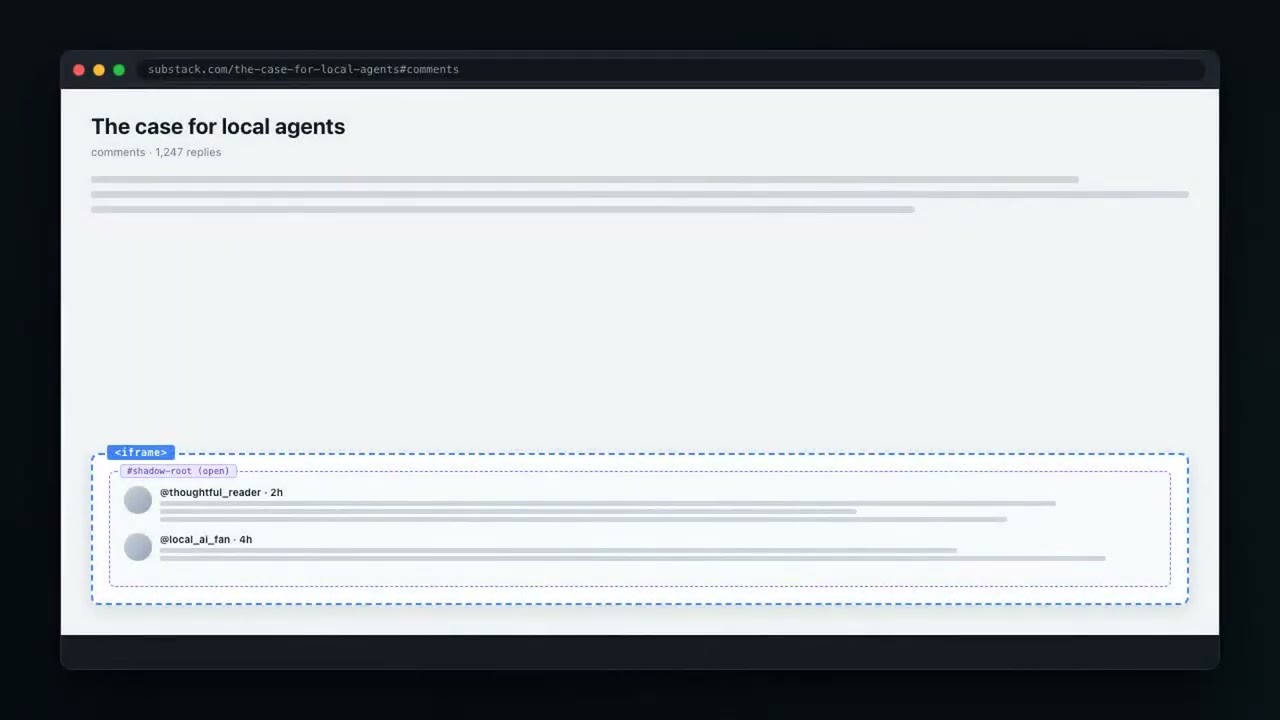
Local browser agent: MLX + Chrome DevTools Protocol. Handles cross-origin iframes, Shadow DOM, ProseMirror. Runs on Apple Silicon, no cloud.
AIREADME.md
Originalbrowser-agent
Lets an AI agent use your real, logged-in browser like a careful person would, without taking over your screen.
▶ Watch the agent demo on YouTube






What it is
browser-agent lets an AI agent use the web browser you already use, where you are already signed in, the way a careful person would. It works in its own background tabs, so your screen stays yours.
Who it is for: people who want an AI helper for chores on websites they are already logged in to, and beginner or experienced developers who run AI agents in their everyday browser.
Things it does:
- Fills out a privacy opt-out form on a people-search site, and notices if you step in to finish it yourself.
- Goes through a webmail inbox in a background tab while you keep working in your own tabs.
- Finds a news article and writes a comment on it, left as a draft for you to read. It does not post.
- Looks something up on the web, saves it to a file on your Mac and can send a screenshot to your phone.
- Lets two or three AI agents share one browser without bumping into each other or into you.
It has two parts. The broker runs quietly in the background and gives every agent its own tab, kept apart from yours. It runs on Mac, Windows and Linux, and works with other AI browser tools too. The agent is an AI assistant that runs on your own Apple Silicon Mac with a local model. No cloud service is involved.
Why it's different
- It uses your real logins. It works in your normal browser with your normal profile, so sites you are signed in to just work. There is no second, empty browser to sign in to again.
- It works in the background. Each agent gets an ordinary background tab. The broker blocks the commands that would pull a tab or window in front of you. When an agent really needs to show you a page, it waits its turn in a queue (
bb-show). - It never reloads or closes a tab you are working in. The broker notices real typing and clicking. While you have been active in a tab in the last 20 seconds, agent clicks and keystrokes there are refused, and nothing reloads or closes it.
- It clicks like a person and shows its work.
bb-clicktakes a screenshot, finds the button, sends a real mouse click at its center, takes another screenshot and says what changed. Many sites ignore clicks made by a script, so a script click that changes nothing in 3 seconds is retried as a real click. - It knows when it is stuck.
bb-click --checksays plainly when a background tab is blank, refused (401/403) or signed out.--visibleredoes that one step in a tab you can see, but only if you said "take over" or have been away for 10 minutes. - It stops and asks instead of looping. If an agent opens and closes the same page twice in 10 minutes, the third try is refused and it is told to ask you what is wrong.
- It closes the tabs it opens. When a job ends, its tabs close. Tabs you opened yourself are never closed by it.
Get started in 3 steps
1. Install. On a Mac, paste this into Terminal:
curl -fsSL https://raw.githubusercontent.com/nicedreamzapp/browser-agent/main/broker/get.sh | bash
It restarts your browser once (Brave by default) so the broker can sit in front of it. Your profile, logins and open tabs come back. To use Chrome instead, run curl -fsSL https://raw.githubusercontent.com/nicedreamzapp/browser-agent/main/broker/get.sh | BROWSER_APP="Google Chrome" bash.
Google Chrome 136 and newer: Chrome ignores the debug port when it runs on your normal profile (a security change Google made in 2025), so the broker can't reach it. Brave doesn't have this limit, which is one reason it's the default. To use Chrome, give it its own profile folder by adding --user-data-dir="$HOME/.chrome-agent" to its launch flags, then sign in to the sites you want your agents to use once in that window.
On Windows, paste this into PowerShell:
irm https://raw.githubusercontent.com/nicedreamzapp/browser-agent/main/broker/windows/get.ps1 | iex
On Linux there is no one-line installer yet; see Linux.
2. Check that it is running.
curl localhost:9223/health
You should see {"ok": true, "brave": true}. That means the broker is up and can reach your browser (the field is called brave even when you use Chrome). On Windows, type curl.exe http://127.0.0.1:9223/health.
3. Try it. On a Mac, show a page the way an agent would, then close it:
~/.browser-agent/broker/bb-show https://example.com my-first-try "just trying it out"
~/.browser-agent/broker/bb-close my-first-try
curl localhost:9223/status (on Windows, curl.exe http://127.0.0.1:9223/status) shows which agent holds which tab at any moment. Any AI browser tool you already use keeps connecting to port 9222 as before; it now gets its own tabs.
To run the agent itself on an Apple Silicon Mac, first set up the local model server from claude-code-local, then run browser-agent (the installer puts it in ~/.local/bin). Details are under The agent.
Words you'll see
- CDP (Chrome DevTools Protocol): the remote-control plug built into Chrome and Brave that lets a program drive the browser.
- Broker: the small background program that stands between AI agents and your browser and decides who may touch which tab.
- Lease: a tab lent to one agent for one job. Only that agent can use it, and it is closed when the job ends or the lease runs out.
- Hidden tab: an ordinary background tab in your own window, behind the one you are looking at. Agents work there.
- Trusted click: a click sent as real mouse input, which the page cannot tell apart from yours. A click made by page script is not trusted, and many sites ignore it.
- Owner name: the name an agent gives its job, like
my-first-tryabove.bb-closeuses it to close that job's tabs.
For developers: full details
Contents: The problem · Five rules · Install · The agent · The broker · Tests · Files · Help and community
The repo is two pieces built to work together. The agent (agent.py): you type a task in plain English, a model running on your own Mac picks the steps, and the agent carries them out in your real Brave browser and your shell, with no cloud APIs. The broker (broker/): a small local proxy that owns the browser's debug port (9222), gives each agent its own background tab, keeps agents out of your tabs and each other's, and keeps their hands off a tab while you are working in it.
The broker works with any tool that speaks the Chrome DevTools Protocol (Playwright, chrome-devtools-mcp, agent-browser, browser-use, raw websockets), not only this agent. The agent works without the broker too, but then it is one agent alone in your browser with nothing standing between it and your tabs.
The problem
Agents fighting the person over the same tab
On the night of October 22, 2026, agents fought the human over the same browser tab. An agent opened an opt-out form, started filling it in, closed the tab, opened it again and started over, more than ten times, right in front of him. When he stepped in to help, typing in the form or solving the captcha himself, the agent never noticed. It reloaded or re-showed the page and wiped his work, or opened the same link on top of the page he had just submitted. And it left the tabs open afterwards.
We found four causes. The agent hopped between a hidden copy and a visible copy of the same page. Its fix for anything odd was to show the page again, and showing an already-open page reloaded it in place. Several agents acted in the browser at once, and one restarted the broker mid-task. And no agent ever read what the page showed right now, which is the only way to know what the human had already done.
Agents fighting each other
If you have ever run a second browser agent and watched it navigate a tab out from under the first one, or reach for "the active tab" and grab the page you were reading, this is why. The Chrome DevTools Protocol has no concept of ownership. Every agent sees every tab, including yours, and none of them can tell that another one is already working in the tab it just grabbed. The usual advice is "run them on different ports," which means a different browser, which means losing the logins that made your real browser worth driving in the first place.
The broker adds the missing layer: a process that owns the debug port and hands each agent an exclusive lease on its own tab. Nothing else changes. Your tools keep dialing port 9222 exactly as they do today.
Tabs left open
Agents kept leaving tabs open after they finished their jobs. Every invoice, report and lookup they put up stayed there, and the tabs piled up in Matt's browser across all three machines (the M5, the mini and the Windows PC) until he had to keep asking for them to be cleared. The agent used to hold its tab for the whole interactive session, so a finished task's page sat there until you quit, and a page shown to the human with bb-show stayed open forever, because nothing in the tool ever closed it.
Five rules, and how they are enforced
Both halves keep the same five rules, each in code. The agent keeps them because it is written to; the broker enforces them from its side for every agent, including ones that were never written with these rules in mind. An agent does not have to remember them, and cannot talk its way around them.
| Rule | How the agent keeps it | How the broker enforces it |
|---|---|---|
| 1. One tab per job. | One broker lease per task: the same tab for the whole job, reconnects included. When a task stops to ask you something, the tab is kept, and your answer continues the job in that same tab instead of starting a new one. | The owner name an agent passes is its job. A job owns one tab, pinned to one site, until bb-close. Showing the same site again returns that same tab. Leasing a hidden tab on a site the job already shows returns the shown tab, and showing a site the agent already has a hidden tab on brings that tab forward. There is never a second copy to hop to. |
| 2. Look before every step. | look() reads the tab (URL, title, every filled-in field, passwords masked) before each model turn and again right before each click or keystroke. |
bb-show of an open page brings it forward as it is and prints what it shows: URL, title, text, filled-in fields, and whether the human is working in it. bb-peek reads the same state without showing anything (passwords and card numbers masked), for any tab, including the human's own. |
| 3. Notice when the human helps. | A listener records real keyboard and mouse input (event.isTrusted; the agent's own input is recognized and not counted). While you are typing or clicking in its tab, the agent pauses. When you stop, it tells the model exactly what you changed ("Email now holds ...", "the page moved to /success") and continues from there. It never goes back to a page you already moved past. |
Every tab the broker opens or shows gets a small listener for real keyboard and mouse input (event.isTrusted, which page scripts cannot fake). Input the agent itself sends through the broker is recognized and not counted. While the human has been active in the last 20 seconds, agent clicks and keystrokes in that tab are refused, and a refused bb-show exits 4 and hands back what he has done so far, so the agent continues from there. |
| 4. No reloading or closing mid-job. | Navigating to the page it is already on is refused in code (that is a reload, and a reload wipes your work). When the broker refuses a reload, close or input in a tab you are working in, the agent waits instead of treating that as an error. | A page that is already open is never reloaded unless the caller passes --reload, and never while the human is working in it. A tab on screen for an open job cannot be reloaded, re-navigated to the same page or closed through the proxy. A tab the human is working in is never closed by anything: not bb-close, not a released or expired lease, not a disconnecting client, not a restarted broker. It is handed to him instead. |
| 5. Stuck means ask, not retry. | One failure gets one clearly different try. A second failure in a row, clicking the same thing three times, reopening a page after a failure, or running out of steps stops the task with one short question (also texted to your phone in mobile mode). The model can call ask(question) itself. |
If the same job opens and closes (or reloads) the same page twice within 10 minutes, the third try is refused with HTTP 429 and bb-show exits 5 with one instruction: stop and ask the human in one line what is wrong. |
And close every tab you opened
The agent: each task gets its own tab, and run closes it in a finally the moment the task ends: done, out of steps, failed, or interrupted. Reconnects inside a task go back to the same tab instead of opening another. On exit, atexit plus SIGTERM/SIGHUP handlers close anything still open, and if the process is killed outright the broker lease expires and the broker closes the tab. Tabs you opened yourself are never touched.
The broker: hidden work tabs are closed outright (not just released) when their lease is released, when its TTL runs out, or when a browser-level client disconnects, and broker_client.lease() releases on exit, exceptions included. A page put on your screen with bb-show stays there until something closes it, so bb-show reminds the caller every time, and bb-close closes it:
bb-close my-agent              # by the owner name you gave bb-show
bb-close example.com/report    # or by any part of the page URL
bb-close only closes tabs the broker itself opened; a tab the human already had open, or is working in right now, is left to him.
The rule for any agent, this one or yours: close every tab you opened when the task is done.
What it looks like
The agent, when you step in:
  Step 3 click(uid='41')
  The human is working in the tab: pausing until he stops.
  The human helped: "Captcha" now holds "solved"; the human typed or clicked in this tab 3s ago
  Step 4 click(uid='57')
  ...
NEED YOU: I'm stuck on https://people.example/optout: Error: can't resolve. What should I do?

Your answer? use the second email
Any agent going through the broker:
$ bb-show https://people.example/optout tps
shown: https://people.example/optout
already open: brought forward AS IS, NOT reloaded (no duplicate opened)
  now at: https://people.example/optout/success
  title:  Request received
  shows:  Thank you. Your opt-out request has been submitted.
  filled: Email = [email protected]
  the human worked in it (last input 41s ago)
LOOK at that before acting: the human may already have filled, submitted or finished this page.

$ bb-show --reload https://people.example/optout tps
the human is working in that tab right now. Not reloaded, not reopened.     (exit 4)

$ bb-show https://people.example/optout tps
stop: "tps" has opened and closed https://people.example/optout 2 times in the last 10 minutes.
It was not opened again. Do not retry. Ask the human in one line what is wrong.   (exit 5)
From Python, broker_client.peek(owner) returns the same state, broker_client.human_active(owner) answers yes or no, and show() raises HumanIsWorking (with .page) or StopAndAsk. BROKER_HUMAN_QUIET (20 s), BROKER_CHURN_WINDOW (600 s) and BROKER_CHURN_LIMIT (2) tune it.
Every rule has its own tests on both sides: tests/test_five_rules.py for the agent (a fake tab and a scripted model, no browser needed) and broker/tests/test_five_rules.py for the broker. tests/live_hidden_tab_check.py checks the agent's listener against a real browser in a hidden tab.
One honest limit: a captcha inside a cross-site frame keeps its clicks to itself, so the broker counts the human's focus moving into that frame as activity rather than each click inside it.
Agent rules
Learned the hard way on 2026-11-07 (clicks hung for minutes in a hidden tab, two jobs opened the same site twice, and the human was told to press buttons his screen did not have). Every agent that drives a tab follows these:
- Screenshot, act in one tab, screenshot again. Look before the step, do it in the one tab you hold, look after.
click_exact()andclick_trusted()do both screenshots for you. - About 8 seconds per step, then ask. Every CDP step in
broker_clientgives up afterBB_STEP_TIMEOUTseconds (default 8). A click that hangs or gets no reaction raisesStuckAskHumanwith a screenshot and the visible buttons: ask the human in one line, do not retry. - One tab per site.
lease()on a site an agent tab already has hands you that tab (tab.reused_tab_of) instead of opening a second. A tab the human is working in is never handed over or closed; you getHumanIsWorking, which means ask him. - Quote only
visible_labels. Before telling the human what to click, take a fresh screenshot and runbb-labels <owner>(ortab.visible_labels()). Name only words from that list, exactly as written. - Destructive actions list what they touch first. Before deleting, restoring, overwriting or sending, print exactly what will be affected, with a count, and only then do it.
Install
macOS
1. The broker (one line). It relaunches your browser with remote debugging on a private port (9229, your real profile and logins, last session restored), then installs proxy.py as a LaunchAgent that owns 9222:
curl -fsSL https://raw.githubusercontent.com/nicedreamzapp/browser-agent/main/broker/get.sh | bash
It clones this repo into ~/.browser-agent (or keeps using an older ~/.browser-broker checkout), runs the broker from its broker/ folder and adds a browser-agent command for the agent in ~/.local/bin. If a broker already answers on 9223 it leaves that one alone, so it never installs a second one. BROKER_SKIP_BROWSER=1 skips the browser relaunch. To remove it (your browser and profile are not touched; --purge also deletes ~/.browser-agent):
curl -fsSL https://raw.githubusercontent.com/nicedreamzapp/browser-agent/main/broker/uninstall.sh | bash
By hand instead:
git clone https://github.com/nicedreamzapp/browser-agent && cd browser-agent/broker
pip3 install websockets websocket-client
./launch-browser.sh   # your real profile, CDP on :9229
./install.sh          # LaunchAgent for proxy.py: :9222 for tools, :9223 lease API
curl localhost:9223/status
Python 3.9+. Brave is the default; for Chrome: BROWSER_APP="Google Chrome" ./launch-browser.sh. Chrome 136+ also needs its own profile folder (--user-data-dir), see the note in "Get started in 3 steps". Already have something on 9222 you can't restart? Try it on another port first: BROKER_PROXY_PORT=9224 BROKER_UPSTREAM_PORT=9222 BROKER_PORT=9225 python3 proxy.py.
2. The agent. Needs Apple Silicon (32 GB+ unified memory recommended), Python 3.12+, and the local MLX server from claude-code-local:
browser-agent # installed by get.sh above (its own venv with websockets)
Or from your own clone: pip install websockets (the only third-party package agent.py imports), then python agent.py.
With the broker running, the agent leases its own background tab on its own (BROKER_URL, default http://127.0.0.1:9223). Without it, it falls back to raw CDP on 9222 and says so. Full setup, the launcher and settings are under Setup and usage.
Windows
The broker is verified on Windows 11 (Brave on Chromium 154, Python 3.14, logged-in real profile). One line in PowerShell clones this repo to %USERPROFILE%\browser-agent and runs the installer below (it does nothing if a broker already answers on 9223):
irm https://raw.githubusercontent.com/nicedreamzapp/browser-agent/main/broker/windows/get.ps1 | iex
Uninstall (keeps the checkout unless you add -Purge): powershell -ExecutionPolicy Bypass -File $HOME\browser-agent\broker\windows\uninstall.ps1
Or by hand:
git clone https://github.com/nicedreamzapp/browser-agent
cd browser-agent\broker
powershell -NoProfile -ExecutionPolicy Bypass -File windows\install.ps1
That installs the two Python dependencies, registers a Task Scheduler task browser-broker (at logon, your user, interactive session, no time limit) and starts it. The task runs windows\run-broker.ps1, which runs windows\launch-browser.ps1 once (exits if 9229 already answers, otherwise closes a CDP-less browser gracefully and relaunches it with the flags) and then keeps proxy.py alive under pythonw (no console window), restarting it 10s after any exit. Any CDP tool on that machine then gets its own background tab through port 9222. More detail in Windows and Linux.
The agent is macOS only in practice: it needs the MLX server (Apple Silicon), and its launcher, screen capture and phone tools assume a Mac. It has not been tested on Windows.
Linux
The broker's proxy is pure Python. Start your browser with --remote-debugging-port=9229 --remote-allow-origins=* --disable-backgrounding-occluded-windows --disable-renderer-backgrounding --disable-background-timer-throttling, then run python3 broker/proxy.py from a startup task. Isolation is verified on Ubuntu 26.04 / Chrome 153; see Windows and Linux.
The agent
An autonomous agent that runs entirely on Apple Silicon. It drives your real browser and your Mac. No cloud APIs, no Claude Code overhead, no MCP layer. Direct MLX inference + Chrome DevTools Protocol, plus a shell/file/media toolbelt for everything that isn't the web.
Started life as a pure browser agent. It has since grown a full system toolbelt (shell, files, screenshots, screen recording, send-to-phone), so it now handles end-to-end tasks like "find X on the web, run a script, and text me the result" in one session, all locally.
What I built
Matt Macosko wrote the agent itself, all of it in agent.py:
- The agent loop: model call, JSON tool-call parsing (single call or a batch of up to 5), step limit, loop detection (
run,parse_multi) - A raw CDP client with no Playwright or Selenium: connect, reconnect to the same tab, accessibility-tree snapshots, click, one-call typing, scroll, JS (
class CDP) - The iframe + Shadow DOM comment drafter that pierces cross-origin widgets like OpenWeb (
post_comment) - A prompt-injection guard in code that the model cannot switch off (
guard_check, notes at line 332) - The system toolbelt: shell, file read/write, screenshots, send-to-phone, Studio Record control (lines 29 to 245)
- Broker tab leasing so several agents can share one browser (
_broker_tab) - Working with the human: look before every step, notice and adopt what you typed or clicked, never reload or reopen mid-job, and stop and ask when stuck (the five rules)
And the broker, all of it in broker/ (file by file under The broker).
Upstream, not built here: MLX (Apple), the Gemma 4 model (Google DeepMind), the Chrome DevTools Protocol (Chromium), and the MLX server from the sibling claude-code-local repo. Full list in CREDITS.md.
How it works
User prompt → Local LLM (MLX) → ┬─ Chrome DevTools Protocol → broker :9222 → your browser
                   ↑             ├─ shell / read_file / write_file → macOS
             ~2–5s per step      ├─ screenshot / fullscreen_shot → send to phone
                                 └─ Studio Record → screen video → send to phone
Default model: Gemma 4 31B Instruct abliterated (4-bit quantized) via MLX on Apple Silicon Alternative models: any MLX-compatible model, chosen when you start the MLX server (see Swap Models). In our Sep 16 test (four jobs run one at a time, then the same four jobs in four tabs at once) Gemma 4 31B and Qwen 3.8 27B each got all 8 runs right, 4/4 in each mode; Gemma took 123 s one at a time and 110 s four at once, Qwen took 175 s and 176 s Browser: Brave with remote debugging on port 9222 (the broker's port when it is installed) Protocol: CDP WebSocket, no MCP. With the broker, the agent leases its own background tab and talks to it through the broker's proxy; without it, it connects to the browser directly.
Part of a local-first ecosystem
This agent shares its brain and plumbing with a few sibling projects, all running on-device:
- claude-code-local: the MLX inference server (Anthropic Messages API + tool parsing) this agent talks to, plus the desktop launchers. Set it up first.
- The broker (
broker/, in this repo): the traffic cop that leases each agent its own tab. - NarrateClaude: the same local stack wired for voice narration; this agent's "send to phone" and media tooling come from the same family.
You don't need the whole ecosystem to run the agent (just the MLX server from claude-code-local), but it's built to compose with them.
Cross-origin iframe + Shadow DOM control
Most news sites (Yahoo, etc.) load interactive widgets (e.g. OpenWeb/SpotIM comments) inside:
- A cross-origin iframe (JavaScript can't access it)
- A Shadow DOM (normal querySelector can't find elements)
- A ProseMirror rich text editor (innerHTML doesn't work)
Standard browser automation tools (Playwright, Selenium, MCP) fail at all three layers.
This agent uses CDP primitives that bypass all of them:
DOM.getDocument(depth: -1, pierce: true)    # Exposes everything across iframes + Shadow DOM
DOM.performSearch(".ProseMirror")            # Finds the editor in any context
DOM.focus(nodeId)                            # Focuses it regardless of origin
Input.insertText(text)                       # Types into the focused element
This works because CDP operates at the browser level, not the page level. Same-origin policy doesn't apply. Because it drives your real, logged-in Brave over CDP (not a fresh Playwright profile), authenticated sites just work.
Tools
The model controls everything through JSON tool calls — one per turn, or a batch: it can return a JSON array of up to 5 calls that execute back-to-back on a single model turn (fill three fields, click submit — one think instead of four). After navigate/click/type_text/scroll, the fresh page state is attached to the result automatically (once per batch, after the last action), so it rarely needs a separate snapshot.
Web
navigate(url)— go to a pagesnapshot()— get the page's elements with UIDs (rarely needed; auto-attached after actions)click(uid)— click an element by UIDtype_text(uid, text)— type into a field by UID (one-shotInput.insertText— instant, even for long text)scroll(direction)—"up"/"down"js(code)— run arbitrary JavaScript and return a value
System
shell(cmd, timeout?)— run any bash command (default cwd =$HOME). First choice for git, ssh, curl, wp-cli, python, npm, file ops — anything the terminal handles in one lineread_file(path)— read a file or list a directory (~expands)write_file(path, content)— overwrite a file, creating parent dirs
Media / send-to-phone
screenshot()— capture the current Brave tab and text itfullscreen_shot()— capture the whole Mac desktop (all displays) and text itsend_image(url)/send_video(url)— download a URL and text itrecord_start(mode)— start Studio Record (screen/face/screen_face)record_stop()— stop recording and auto-text the.mp4
Control
done(message)— task complete (also used for conversational answers)
The code also handles a comment(text) action (the iframe + Shadow DOM drafter above), but it is not listed in the model's tool prompt, so the model only uses it if it names it on its own.
Setup and usage
You need macOS on Apple Silicon (32 GB+ unified memory recommended), Brave or Chrome with remote debugging, and Python 3.12+. agent.py itself imports only websockets; the MLX server needs pip install mlx mlx-lm.
MLX Server
The agent talks to a local MLX inference server that speaks Anthropic's Messages API. It ships with the companion repo claude-code-local — set that up first. Once installed, the server lives at ~/.local/mlx-native-server/server.py and is auto-started by the desktop launcher.
Launcher
Double-click Gemma 4 Browser.command (from the claude-code-local repo's launchers/Browser Agent.command). It will:
- Start the MLX server with Gemma 4 31B if it isn't already running
- Start Brave with
--remote-debugging-port=9222if it isn't already running - Ensure at least one page tab exists
- Hand off to the Python agent
The media tools (screenshot, record_*, send_*) shell out to local helper scripts (~/.claude/imessage-*.sh, Studio Record on 127.0.0.1:17494). They only send when the flag file ~/.claude/imessage-agent-on exists; otherwise they return "mobile mode is off". They degrade gracefully — if a helper isn't present, that tool just reports it's unavailable; the rest of the agent runs fine.
Settings (env vars read by agent.py)
| Variable | Default | What it sets |
|---|---|---|
MLX_URL |
http://localhost:4000 |
MLX server (Anthropic Messages API) |
MLX_MODEL_NAME |
claude-sonnet-4-6 |
model name sent in each request |
CDP_URL |
http://127.0.0.1:9222 |
browser debugging endpoint |
BROKER_URL |
http://127.0.0.1:9223 |
browser-broker API (optional; falls back to raw CDP) |
BROWSER_AGENT_VISIBLE |
unset | set to 1 to ask browser-broker for a visible tab |
MAX_STEPS |
30 |
model turns per task before it gives up |
Usage
Interactive Mode (recommended)
python agent.py
# Prompts: "What should I do?"
# Type tasks, get results, stays open for the next task
# Type "quit" to exit
# Errors in one task no longer kill the session — you get a message and a fresh prompt
One-Shot Mode
python agent.py "Find an article about Iran on Yahoo and draft a comment"
python agent.py "cd into my site repo, run the build, and text me a screenshot when it's done"
Swap Models
agent.py does not load a model. It sends requests to the MLX server at MLX_URL, and the server decides which model answers. Choose the model when you start the server from claude-code-local, for example:
MLX_MODEL="lmstudio-community/Qwen3.8-27B-MLX-8bit" # set in the server's environment, not the agent's
Example Tasks
Web + system in one go
Find the newest release on the MLX GitHub, save the changelog to ~/Desktop/mlx-notes.txt, and text me a screenshot of the release page.
Comment on a news article (the original use case — leaves it in draft for review)
Find an article about Iran on Yahoo and make a comment. Don't post it, just leave it in draft.
The agent navigates, finds the article, and reads it. When it drafts through the comment action, the code pierces the cross-origin iframe + Shadow DOM to type the text, scrolls so you can see it, and does not click Send.
Pure terminal task (no browser opened)
Show me which of my LaunchAgents failed to load and tail the last 20 lines of each one's log.
Reliability
- Batched actions, guarded — a batch executes in order, stops at the first error (skipping the rest so a broken plan can't keep firing), and reports every action's result numbered so the model knows exactly how far it got.
- Auto-attached page state — the fresh DOM is returned with each action result (once per batch), so the model doesn't waste turns re-snapshotting.
- Loop detection — if the same UID is clicked a third time, the agent stops and asks you one question instead of trying again (see the five rules below).
- Error recovery — any exception during a task (MLX timeout, CDP websocket drop, malformed output) is caught by the main loop; you get the error and a fresh prompt instead of a crash.
Safety: web pages can't give orders
Page text is treated as data. These checks live in code (guard_check), so a page can't talk the model out of them:
- Text a human can't see (tiny, transparent, off-screen, same colour as the background) and hidden buttons or fields are dropped from the snapshot.
- Visible text that addresses an AI and gives an order is labelled untrusted.
- After a page has been read, shell, file and phone tools only run if your task asked for that kind of work, and commands or files built from page text are refused.
- Risky clicks (delete, buy, pay, send, post, sign in...) and password or card fields need the task to ask for them. Banking and payment sites must be named in the task. Text read on one site can't be sent to another.
js()can read the page but not send requests or change the page's location.
Performance
Two things are true at once: every individual browser action is near-instant, and a full task still takes tens of seconds — because the model reasons for 2–5s between each action. We profiled the whole pipeline against real pages (M-series Mac, isolated tab, warm cache) to find out exactly where the time goes.
Per-operation — the browser mechanics (all sub-second):
| Operation | Time | Notes |
|---|---|---|
Type text (Input.insertText) |
~1 ms | was ~108 ms char-by-char — 117× faster on a 300-char field |
| Page snapshot (a11y tree) | 2 ms → ~330 ms | near-instant on light pages, heavier on content-dense ones (Wikipedia) |
| Navigate + wait-for-ready | 150–370 ms | polls readyState instead of sleeping a fixed worst-case |
| Scroll | ~150 ms | |
js() eval |
<1 ms |
Per-step — where the time actually goes:
| Metric | Value |
|---|---|
| Model reasoning per step | 2,000–5,000 ms (≈99% of a step) |
| Comment generation | ~8 s |
| Total for a comment task | ~20–30 s |
The honest takeaway from profiling: the browser was never the bottleneck — the local model is. Typing, clicking, scrolling, and reading the page are all sub-second (typing is now effectively free). Total task time ≈ per-step model latency × number of steps, so the real speed levers are a faster local model or fewer steps per task — not faster browser plumbing.
That's exactly what batch mode attacks. The model can return an array of up to 5 tool calls that execute in sequence on one turn. A fill-two-fields-and-submit sequence that used to cost three model thinks (~6–15 s) now costs one (~2–5 s). The safety rules keep it honest: element uids only exist for a page the model has already seen, so it's told never to batch a click/type against a page it hasn't loaded yet; an error mid-batch stops the remaining actions immediately and hands control back to the model with the numbered results; and the auto-snapshot runs once after the batch's last action instead of after every action.
What got faster (and why)
- Typing is one call, not hundreds.
type_textused to dispatch akeyDown+keyUppair for every character — 400 WebSocket round-trips to type a 200-char comment. It now sends the whole string in a singleInput.insertText, with a one-key arrow nudge to wake up search-as-you-type/React listeners, and a per-character fallback for the rare field that rejects bulk insert. Works the same in plain inputs, textareas, and contenteditable/rich editors. Measured 117× faster. - No more blind sleeps. The fixed waits after
navigate/click/scrollwere trimmed hard (navigate settle 300→150 ms, scroll 500→150 ms, click 200→80 ms). Navigation still pollsreadyStatefor correctness — it just stops waiting the instant the page is genuinely ready instead of always sleeping the worst case.
Known limits
- macOS only in practice: the media tools, launcher and screen capture assume a Mac, and the agent needs the separate MLX server running.
- One model turn takes 2 to 5 seconds, so a full task takes tens of seconds (see Performance).
- A task stops after
MAX_STEPS(30) model turns. - The
commentdrafter is tuned for OpenWeb/SpotIM-style widgets and falls back to the first text box on the page. - Phone features depend on your own helper scripts and Studio Record; without them those tools report they're off.
The broker
The broker is a local proxy that sits on Chrome's debug port (9222) and gives each AI agent its own private tab in your real, logged-in browser, so agents cannot see or steal each other's tabs or yours. Its full reference, with every endpoint and setting, is broker/README.md, and the docs site source is in broker/docs/.
Proof: the Linux isolation check in browser-broker issue #1 (two clients, each blind to the other's tabs, checked in both directions), the stage timing run below, the manual test runs listed under Status, and the automated suite in broker/tests/, which CI runs on every push.
It is port 9222
proxy.py takes 9222. Your real browser moves to 9229 behind it. Every tool keeps its existing command line and gets a browser in which the only tabs that exist are the ones it was given:
agent-browser --cdp 9222           ┐
chrome-devtools-mcp --browser-url  ├──▶  proxy :9222  ──▶  your browser :9229
Playwright connectOverCDP          │     ownership +        real profile,
curl /json → first page            │     focus block        real logins
raw websockets, browser-use …      ┘
Target.getTargets,setDiscoverTargets,attachToTargetand auto-attach events are all filtered to the caller's own tabs. Your tabs and other agents' tabs are not merely off-limits: they do not exist from where that client stands.Target.activateTarget,Page.bringToFrontand/json/activateare answered with success and never forwarded. Nothing an agent does can put itself in front of you.Browser.close,Browser.crashandBrowser.setWindowBoundsare swallowed the same way. Puppeteer'sbrowser.close()sendsBrowser.close, and through a plain CDP port that quits your whole browser; here it just ends that client's connection and closes its tabs.PUT /json/new(what Chrome 111+ clients send) works: plain HTTP on :9222 is answered by the proxy itself, and websocket upgrades are piped to it byte for byte.- A tab from
/jsonis reserved for the caller that listed it, and only one page socket may hold it, so two legacy clients never end up driving the same tab. - The proxy writes down the tabs it opened (
tabs.json). If it crashes or restarts, it closes those leftovers on the way back up instead of leaving them in your window. Tabs your browser restores after it restarts come back with new ids and can't be told apart from yours, so those are left alone. - A legacy client that does
GET /jsonand grabs the first page gets its own fresh tab, because that is the only page in its list. - A browser-level websocket is one client for as long as it stays connected; its tabs go away when it does.
Verified with Playwright's connect_over_cdp, a raw first-page websocket client, two concurrent browser-level clients, and the REST lease API: Gmail, LinkedIn and Yahoo Mail all loaded logged in, with the human's tabs untouched throughout.
Agent tabs are ordinary background tabs
Each agent's tab is an ordinary background tab in the window you already have open, behind what you are looking at. No second window, nothing parked off-screen, nothing headless: headless can't use the profile that has your logins, and a stray window just shoves yours aside. Isolation was never the window's job: the ownership registry and the swallowed focus commands do all of it.
Those background tabs are why the browser is launched with the backgrounding flags above. Without them Chrome throttles a background tab's timers to roughly once a second, which is enough to mount zero rows in a modern SPA. What the flags do not do is make a hidden tab paint: requestAnimationFrame does not fire in a document whose visibilityState is hidden. A page that renders off timers or fetch callbacks fills in normally in an agent tab; a page that renders inside a rAF loop (canvas, animation-driven charts) sits at its initial frame. Page.captureScreenshot still returns a real PNG either way, so a screenshot is not proof the page is live.
Using it directly
from broker_client import lease

with lease("my-agent", url="https://mail.google.com", purpose="inbox sweep") as tab:
    tab.eval("document.title")   # you, alone, in a tab nobody else can touch
The lease auto-renews while you work and releases on exit, including on an exception. A crashed agent frees its tab instead of stranding it.
The rule is deliberately dumb. Agents only ever get tabs the broker opened. Anything you opened is invisible to every agent, permanently, with no heuristics. Focus detection was rejected on purpose: window checks false-negative across macOS Spaces, and a heuristic that is wrong once is worse than a rule that is boring. The proxy has no way around this: its /adopt answers 410. Only the older standalone broker/broker.py can adopt an existing tab, and only when asked by name.
Leases expire. 300 s by default, auto-renewed every 60 s by the client, reaped every 5 s. No deadlocks.
It reconnects. Browsers auto-update, crash, get quit. If the proxy's control socket to the browser drops, the next call opens a fresh one, and the LaunchAgent restarts the proxy if it exits.
It has a heartbeat. One log line an hour. A silent daemon is indistinguishable from a dead one.
The stage
Everything above is about keeping agents out of your way. Sometimes one genuinely has something to show you, and that is the opposite problem.
There is no CDP call to intercept for this. open -a "Brave Browser" <url> and AppleScript activate are macOS calls, so swallowing Target.activateTarget does nothing about them. Two Claude Code sessions ran open -a four minutes apart on this machine and threw the window back and forth between them while the proxy sat there with a clean log.
So the stage is a queue in front of the one door, and it is easier to use than the rude way:
bb-show https://example.com my-agent "why you are interrupting"
One agent holds the screen at a time. A second one waits its turn instead of yanking the window mid-sentence, and if the wait runs out it is told who has it and for how long, so it can print the link and move on rather than fight. Showing a page that is already open brings that tab forward as it is, never a second copy and never a reload, so there is never a row of half-current duplicates of the same page. Three agents asking at once:
A: HTTP 200 after 0.7s   shown
B: HTTP 409 after 0.0s   stage held by agent-A for another 7.0s
C: HTTP 200 after 7.9s   waited, then shown
BROKER_STAGE_DWELL (20s, how long a shown page is protected) and BROKER_STAGE_WAIT (30s, how long a caller queues) tune it. This is cooperative: it works because the polite path is one word shorter than the rude one. On a machine running Claude Code you can make it binding with a PreToolUse hook that denies open -a <browser> and points at bb-show instead; broker/hooks-example-focus-guard.py is one (its shebang and log path are from the author's machine, so adjust them). If the broker is down, bb-show falls back to a plain open -a, which is macOS only.
API
POST /lease |
{owner, url, purpose, ttl} → {lease_id, target_id, ws_url, expires_in, shared_with_shown_job} |
POST /renew |
{lease_id, ttl} |
POST /release |
{lease_id} → {released, tab_closed, left_open}. Closes the tab, unless it is a job tab on screen (bb-close finishes that) or the human is working in it |
POST /adopt |
returns 410 on the proxy. Only the older broker.py supports it |
POST /show |
{owner, url, purpose, wait, dwell, reload} → {shown, target_id, held_for, already_open, moved, reloaded, page}; 409 screen busy, 423 the human is working in that tab (with page), 429 stop and ask |
POST /unshow |
{match} (owner or URL part) → {closed, left_open}, what bb-close calls |
GET /peek?match= |
read-only state of matching tabs: url, title, text, fields, human, what bb-peek calls |
GET /human |
seconds since the human last typed or clicked in any watched tab, what bb-click --visible checks |
POST /unstage |
drop the hold early |
GET /stage |
who has the screen and what is on it |
GET /status |
who holds what, for how long, and whether the browser is alive |
GET /health |
ws_url is a normal CDP page socket on the proxy's port (ws://127.0.0.1:9222/devtools/page/<id>). Drive it with the bundled client, Playwright's connect_over_cdp, or raw websockets. The traffic goes through the proxy, which is how it enforces who is allowed in.
Everything is configured by environment: BROKER_PROXY_PORT (9222, what tools dial), BROKER_UPSTREAM_PORT (9229, your real browser), BROKER_PORT (9223, lease API), BROKER_TTL, BROKER_HEARTBEAT, BROKER_LOG, and BROKER_DEBUG=1 for a handshake trace. Python 3.9+. proxy.py needs websockets (13 or newer, for websockets.asyncio); broker_client.py and broker.py need websocket-client. install.sh picks one Python (/usr/bin/python3 first, or BROKER_PYTHON), makes sure it has both, and writes its full path into the LaunchAgent, because launchd does not see your shell's PATH.
Windows and Linux
proxy.py, broker.py and broker_client.py are pure Python and don't care about the OS; only the two shell scripts are macOS (Windows has its own in broker/windows/). bb-show's fallback and the hook example are macOS only. Developed on macOS.
Linux is verified for the browser-level CDP path (browser-broker #1): Ubuntu 26.04 / Chrome 153, two concurrent browser-level clients each saw only its own tabs, and cross-client Target.attachToTarget returned No target with given id found in both directions. Hidden-tab rendering was measured there too and reproduces on macOS: after 4s a hidden lease tab had fired 0 animation frames while its 100ms timer kept ticking, on both Ubuntu/Chrome 153 and macOS/Brave. Not yet covered there: a logged-in profile, Playwright connectOverCDP, the legacy /json first-page path, and multi-hour runs.
Windows is verified (2026-10-02, Windows 11, Brave on Chromium 154, Python 3.14, logged-in real profile). Verified on that box: /health returned {"ok": true, "brave": true}, /json/version answered on 9222, a REST lease of a hidden tab evaluated document.title and closed on release, a legacy /json client and a raw browser-level client each saw only their own tab and never the human's, the stage opened a page in the human's window, and killing proxy.py brought it back on 9222/9223 within 10s. On Windows the stage relies on Target.activateTarget alone (the macOS app-activation step is skipped). Not covered yet: the close-and-relaunch path when the browser is already running without CDP, and a cold reboot. Logs: launcher.log and broker.log in the broker directory, proxy.err for Python tracebacks. If the browser is closed and reopened from its normal shortcut it comes back without CDP; run windows\launch-browser.ps1 again (or sign out and back in).
Security
Localhost only, no auth. Anything that can reach 127.0.0.1:9223 can drive your logged-in browser, which is already true of 127.0.0.1:9222 the moment you enable remote debugging. Don't expose either.
Status
Built in one night and proven with four manual tests: a leased tab loading Gmail authenticated while the human's visible tab sat on a different account; two agents running concurrently on separate targets; a simulated agent crash whose lease expired and was reclaimed; the human's tabs untouched throughout. Those manual runs are not checked in.
Not yet built: a lane router that skips the browser entirely when a job is really an API call, and per-domain serialization so two agents never hammer one site as the same user.
What I built in the broker
Designed and written by Matt Macosko:
proxy.py: the transparent CDP proxy on :9222. FiltersTarget.*calls and events down to the caller's own tabs, swallows focus-stealing commands, ties tab ownership to the client connection, and serves the REST lease API and the stage on :9223. This is what the installer runs.broker_client.py: the Python client.lease()context manager with auto-renew and release-on-exit, a hard per-step timeout,click_exact()andvisible_labels(), plusshow(),unshow()andstage().bb-show: the shell command agents use to ask for the screen instead ofopen -a.bb-close: closes whatbb-showput up once the task is done (by owner or URL substring).bb-peek: reads a tab's state (URL, title, text, filled fields, whether the human is in it) without showing anything.bb-click: clicks like a person in a tab you hold, hidden or shown: screenshot, find the button, trusted mouse click at its center, screenshot again, and report what changed.--checksays when a hidden tab is stuck (blank, 401/403, signed out);--visibleredoes the step in a shown tab, only when the human said take over or has been idle 10+ minutes.bb-labels: a fresh screenshot plus the exact button, link and tab texts visible in a tab you hold. The only words an agent may quote to the human.hooks-example-focus-guard.py: an example Claude CodePreToolUsehook that redirectsopen -a <browser>and AppleScriptactivatetobb-show.broker.py: the first version, a standalone lease broker with/adopt. Kept for reference; the installer does not run it.get.sh,install.sh,launch-browser.sh,launchd/com.browser-broker.plist: the macOS one-line installer, browser launcher and LaunchAgent.windows/install.ps1,windows/launch-browser.ps1,windows/run-broker.ps1: the Windows installer (Task Scheduler at-logon task), browser launcher and the supervisor that keepsproxy.pyalive.
Tests
Two suites, each run by CI on every push that touches its half:
pip install -r requirements-dev.txt && python -m pytest                  # the agent: 54 tests
cd broker && pip install -r requirements-dev.txt && python -m pytest     # the broker: 252 tests
The agent's tests use a fake tab and a scripted model; nothing talks to a model, a browser, a broker or a phone. The broker's suite runs the real proxy.py, broker.py, broker_client.py, bb-show and the hook example against a small fake Chrome DevTools endpoint (broker/tests/fake_browser.py) on loopback ports. It covers the ownership rules end to end (two clients blind to each other and to the human's tabs, focus stealers and Browser.close swallowed, tabs released on disconnect), the /json legacy path, the REST lease API, the stage queue, the five rules, reaping and tabs.json. It needs no browser and no network and runs on Linux in about 30 seconds, on Python 3.9, 3.12 and 3.14. Two checks are macOS only (real osascript, plutil) and are skipped elsewhere. Neither suite drives a real Chrome, so the manual runs above still matter.
Files
agent.py: the agent (single file)tests/: the agent's five-rules tests and a live hidden-tab checkbroker/: the broker:proxy.py,broker_client.py,bb-show/bb-close/bb-peek/bb-click, the macOS and Windows installers, its tests, and its docs site~/.local/mlx-native-server/server.py: MLX inference server (ships with claude-code-local)launchers/Browser Agent.command: desktop launcher (ships with claude-code-local, surfaces asGemma 4 Browser.command)
The broker used to be its own repo, nicedreamzapp/browser-broker. Its full history was brought in here; that repo now points here.
Built With
- MLX: Apple's ML framework for Apple Silicon
- Gemma 4 31B: instruction-tuned, abliterated and 4-bit quantized
- Chrome DevTools Protocol: direct browser control via WebSocket
websocketsandwebsocket-client- No cloud APIs, no subscriptions, no data leaving your machine
Other ways to do this
Plenty of good people are working on agents that drive a browser. If this one doesn't fit, one of these might:
- browser-use is a Python library for building browser agents on top of whichever model you like. The most complete option if you want to build your own agent.
- chrome-devtools-mcp, from the Chrome DevTools team, gives coding agents like Claude Code direct control of Chrome over MCP, including performance traces.
- Playwright MCP does the same through Playwright and the page's accessibility tree, so the model works from structure instead of screenshots.
- agent-browser is a browser automation CLI built for AI agents to call.
This agent is small on purpose: one file, a local MLX model, and raw CDP, so nothing leaves your Mac.
The tab-sharing problem the broker solves is being attacked from several directions right now. These aren't competitors so much as pieces of the same puzzle, and the broker borrows from the ideas in them:
- vercel-labs/agent-browser:
--cdpmode with--pin-tabbinds a session to one tab; issue #1068 asks forTarget.createBrowserContextso parallel sessions get isolated cookies. - leeguooooo/chrome-use: per-session coloured tab groups in your real Chrome, never force-fronts a tab.
- mediar-ai/playwright-mcp-orchestrator: one Chrome, many
@playwright/mcpsessions, each scoped to its own tabs. - henu-wang/chrome-mcp-proxy and
chrome-devtools-mcp-mux: proxies in front ofchrome-devtools-mcpthat block focus-stealing and give each client its own tabs. - captivus/chrome-agent, pasky/chrome-cdp-skill, ofershap/real-browser-mcp: drive your real, logged-in browser over CDP or an extension.
What the broker adds is a layer that sits below all of them. It doesn't care which tool the agent is (a CLI, an MCP server, Playwright, raw websockets) because it hands out plain CDP page sockets. The ownership rule and the transparent 9222 endpoint are the parts that don't exist elsewhere yet. If you maintain one of the projects above and want a lease layer under yours, open an issue.
Something not working?
Open an issue with the task you gave it (or the tool you pointed at the broker), the site, and the last lines of output. Whose work this is built on is in CREDITS.md.
💬 Community
Builders running this stack hang out in the NiceDreamzApps Discord: quiet, builder-tone, no bots. Share what you're scraping, what's breaking, what local model worked for which site.
License
MIT. See LICENSE (the broker keeps its own copy in broker/LICENSE).
Site recipes
Real sites have quirks (LinkedIn's composer, opt-out forms, background tabs that ignore real input). The running list lives in SITE-RECIPES.md. When an agent learns a new one, it gets added there right away.