
neoromantic/telegram-sync-cli
neoromantic/telegram-sync-cli has 52 GitHub stars and 1 forks. GitHot measured 0 stars in 24 hours. Last checked 2026-11-15 06:59 UTC. Last push 2026-11-13.
What you can do
- Multi-account management (tg accounts, --account)
- Phone and QR login (tg auth)
- Read-only daemon for real-time sync and history backfill that keeps the contact list current; catch-up and history for large groups and channels on request (tg chats sync); the CLI does all mutations (tg send)
- Full Telegram API access through tg api <method>
Measured star growth
- in 24h
- 0
- in 7 days
- Collecting history
- in 15 days
- Collecting history
- in 1 month
- Collecting history
Net star changes over overlapping periods, not daily totals. Missing measurements are left blank. Stars measure attention, not software quality.
About
Agent-friendly Telegram CLI with a local cache, a read-only sync daemon and full MTProto API access.
Developer ToolsREADME.md
Originaltelegram-sync-cli
Agent-friendly Telegram CLI with a local cache, a read-only sync daemon and full MTProto API access. Website: tg.sergeybaus.com. Made by Sergey Baus.


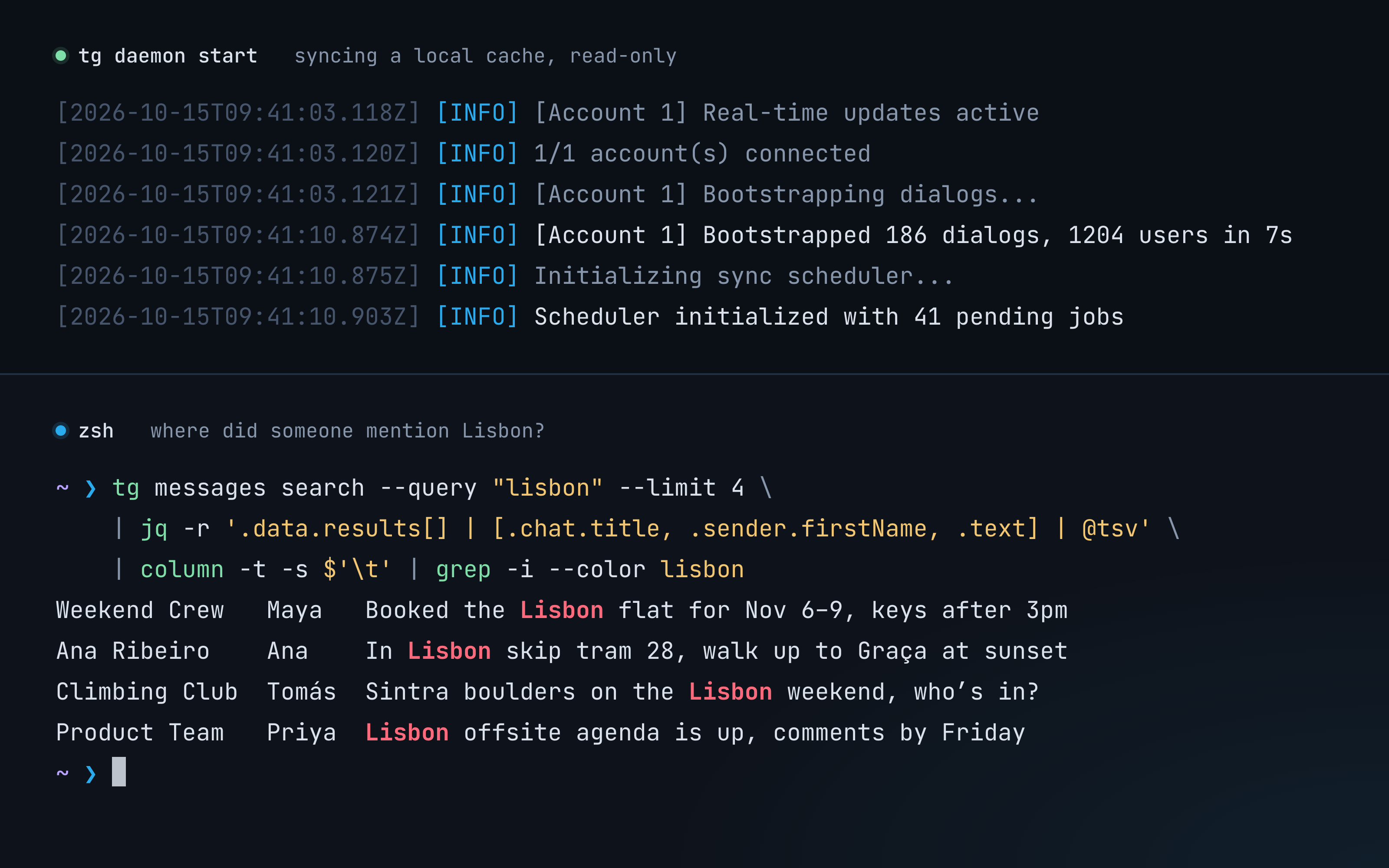
Install
With Homebrew on macOS or Linux, a standalone binary:
brew install neoromantic/tap/tg
With Bun >= 1.4:
bun i -g @goodit/telegram-sync-cli
The npm package runs the TypeScript source with Bun; nothing is compiled at install time.
npm i -g @goodit/telegram-sync-cli also works, as long as bun is on your PATH. Binaries
for every platform, Windows included, are attached to each
GitHub Release.
From source:
git clone https://github.com/neoromantic/telegram-sync-cli.git
cd telegram-sync-cli
bun install
bun run src/index.ts --help   # or: bun run build, then ./dist/tg
Quickstart
# Telegram API credentials from https://my.telegram.org/apps
export TELEGRAM_API_ID=123456
export TELEGRAM_API_HASH=your_api_hash

tg auth login --phone +15551234567   # or: tg auth login-qr
tg chats list --limit 20 --format pretty
tg daemon start                      # keep the cache in sync (foreground)
tg messages search --query "hello" --format pretty
tg --help and tg --version work before you set any credentials. When running from source,
Bun auto-loads .env, so you can cp .env.example .env and fill it in instead.
Features
- Multi-account management (
tg accounts,--account) - Phone and QR login (
tg auth) - Read-only daemon for real-time sync and history backfill that keeps the contact list current;
catch-up and history for large groups and channels on request (
tg chats sync); the CLI does all mutations (tg send) - Full Telegram API access through
tg api <method> - Cache-first reads (stale-while-revalidate) with
--freshto bypass the cache - Chat history with cursor paging (
tg messages list) and a message in context (tg messages get), cache-first - Full-text search (FTS5) over cached messages
- Files: send one with
tg send --file; download a message's file into a per-account media cache withtg media download(cached files need no network, partial downloads resume); every message item shows its attachment (kind, name, MIME type, size) - Contacts, chats and users (
tg contacts,tg chats,tg me,tg user) - Read-only SQL over the cache (
tg sql) with an annotated schema - Rate-limit tracking, config and status tooling (
tg config,tg status) - JSON output and a stable error schema for scripts and agents
How it compares
tg keeps your Telegram in a local SQLite cache for offline search and SQL;
telegram-mcp is an MCP server that makes one live call
per tool. Compared on 2026-10-21 from its README and tool list:
| Feature | tg | telegram-mcp |
|---|---|---|
| Interface | CLI, JSON output, fixed exit codes | MCP server (stdio, HTTP, SSE) |
| Agent integration | any agent with a shell | MCP clients, Claude Desktop bundle |
| Local cache, offline queries | ✅ SQLite, cache-first, --fresh |
❌ live calls only |
| Message search | ✅ full-text (FTS5) over cached messages | ✅ Telegram server search |
| SQL over your data | ✅ read-only tg sql |
❌ |
| Background sync | ✅ read-only daemon: real-time, catch-up after restarts and reconnects, history backfill; catch-up and history for large groups and channels on request (tg chats sync) |
partial: waits for events, stores nothing |
| Any MTProto method | ✅ tg api <method> |
❌ fixed tool set |
| Read chat history | ✅ tg messages list (paging) and tg messages get (context), cache-first, --fresh |
✅ |
| Send text | ✅ replies, silent | ✅ replies, Markdown/HTML |
| Edit, delete, forward, pin | partial: via tg api (#23) |
✅ |
| Send and download media | ✅ one file per message (tg send --file), cached downloads with resume (tg media download); sending albums and voice messages later |
✅ files, albums, voice, transcription |
| Wait for new messages | ❌ (#24) | ✅ |
| Groups, channels, admin rights | partial: via tg api |
✅ |
| Contacts | list, search, get; the rest via tg api |
✅ add, import, block, export |
| Reactions, polls, drafts, scheduled, folders | partial: via tg api |
✅ |
| Multi-account | ✅ --account; one cache per account, the daemon syncs each account with its own client |
✅ |
| Guardrails for agents | partial: daemon and SQL are read-only (#26) | ✅ read-only mode, chat allowlist |
| Install | Homebrew binary, or bun/npm with Bun | git clone + uv, pip from git, Docker |
| Runtime, license | TypeScript on Bun (mtcute), MIT | Python (Telethon), Apache-2.0 |
Usage
tg <command> [options]

tg accounts list
tg contacts list --limit 50
tg chats list --limit 20
tg chats sync @examplenews          # also sync a large group or channel
tg messages list --chat @username --limit 20
tg messages get --chat @username --id 42 --context 3
tg messages search --query "hello world" --since 7d   # both words, any order
tg send --to @username --message "Hi there"
tg send --to me --file ./report.pdf --caption "Q3"
tg media download --chat me --id 42 --out ./   # into the media cache, then copied here
tg api account.checkUsername --username=myuser
tg sql --query "SELECT * FROM users_cache LIMIT 10"
tg daemon start
tg status
tg db vacuum                         # give an account cache's free space back to the disk
tg config path
Global options: --format json|pretty|quiet, --verbose, --quiet. Many commands accept
--account (each account has its own cache; without the flag a command uses the active
account); cache-aware commands accept --fresh. See tg <command> --help. Upgrading from 0.3
with several accounts: see per-account caches.
| Variable | Description |
|---|---|
TELEGRAM_API_ID |
Your Telegram API ID |
TELEGRAM_API_HASH |
Your Telegram API hash |
TELEGRAM_PROXY |
Optional proxy URL for CLI and daemon connections |
TELEGRAM_SYNC_CLI_DATA_DIR |
Override the data directory (default ~/.telegram-sync-cli) |
TELEGRAM_SYNC_CLI_TELEMETRY |
0 turns usage stats off |
DO_NOT_TRACK |
1 turns usage stats off |
MTCUTE_LOG_LEVEL |
mtcute log level |
VERBOSE |
Verbose logging (1) |
For a proxy, set TELEGRAM_PROXY=socks5://127.0.0.1:1080. Supports socks4://,
socks5://, http://, https:// and MTProxy links, with credentials in the URL.
socks5h:// and addresses without a scheme are unsupported. See
proxy configuration.
Reference: CLI commands, authentication, configuration, architecture, daemon, sync strategy, caching, database schema, storage, SQL, search, media, rate limiting. Known gaps are tracked in issues.
For AI agents
- Output is JSON by default. Errors look like
{"success": false, "error": {"code": "RATE_LIMITED", "message": "…", "details": {"method": "messages.getHistory", "wait_seconds": 30}}}. - Exit codes:
0ok,1general error,2auth required,3invalid arguments,4network error,5Telegram error or rate limit,6account not found. tg sql --query "…"runs read-only SQL over the selected account's cache (--account, else the active account);tg sql print-schemaprints the annotated schema.tg skill manifestprints a skill manifest,tg skill validatechecks the environment andtg skill installwrites the manifest to the default location.- The daemon never sends or edits anything, so it is safe to leave running.
tg statusreports each account's cache size (--sizesadds each table's and the media cache's);tg db vacuumprunes old bookkeeping rows and gives free space back to the disk, and works while the daemon runs on a cache this version created.- After an upgrade that changes how rows are stored, the daemon rewrites the older rows in the
background, a little each second;
tg db migratefinishes that without it, andtg statusshows the progress. Reads work the same meanwhile.
Usage stats
tg sends usage stats to its author: how often it runs, which commands run (the command name,
such as chats list, never its arguments), which errors come up, the tg version, how it was
installed, the OS and CPU, and whether a terminal, a script, an AI agent or the daemon runs it,
tied to a random install ID. A Telegram error is sent by its name only (FLOOD_WAIT); an error
reading the config file or a cache also carries its message, with your home folder, a data
directory you set and your user name taken out. tg never sends messages, chat or contact names,
phone numbers, account, chat or user IDs, search queries or any other argument.
Nothing is sent until tg has shown you a one-line notice (in a terminal, or to an AI agent that runs it), and nothing from CI, tests or a source checkout. The daemon and runs from a script send each event at most once a day. A command never waits for them: as it exits, a background copy of tg sends its events and exits within a few seconds. Events go through usage.sergeybaus.com to PostHog, which stores them in its US Cloud as the author's processor and sees your IP address.
Turn it off with tg telemetry off (it also deletes the install ID),
TELEGRAM_SYNC_CLI_TELEMETRY=0 or DO_NOT_TRACK=1. tg telemetry status shows whether it's
on, why, and the install ID. Everything that is sent:
usage.sergeybaus.com; details in
configuration.
Contributing
See CONTRIBUTING.md and AGENTS.md. Security issues: SECURITY.md. License: MIT.