
ndgigliotti/shopify-spy
ndgigliotti/shopify-spy has 127 GitHub stars and 54 forks. GitHot measured 0 stars in 24 hours and +2 in 7 days. Last checked 2026-11-24 17:29 UTC. Last push 2026-11-15.
What you can do
- Automatic user-agent rotation. Requests use a random browser user-agent. If a server responds with 403, the tool swaps to a different UA and retries.
- Failure diagnostics. When a scrape returns 0 items, the tool explains why for each store (403, 404, robots.txt, 429 rate limits, 5xx errors, TLS errors, timeout, no response) and suggests flags to try, including the other --platform when a store looks like it runs on it. Malformed URLs are skipped with a warning instead of breaking the run.
- Python library. import shopify_spy gives the same scraping engine as the CLI; see Use as a library.
- Log files. Detailed logs go to a log file, keeping the terminal clean. Use --verbose to also print to the terminal.
Measured star growth
- in 24h
- 0
- in 7 days
- +2
- in 15 days
- Collecting history
- in 1 month
- Collecting history
Net star changes over overlapping periods, not daily totals. Missing measurements are left blank. Stars measure attention, not software quality.
About
Python library and CLI for scraping products, images and collections from Shopify and WooCommerce stores.
Developer ToolsREADME.md
Original
Shopify Spy
Product and collection scraper for Shopify and WooCommerce stores.




Shopify Spy is a command-line tool and Python library for scraping product and collection data from ecommerce stores. It supports Shopify and WooCommerce stores out of the box, using their public JSON endpoints.
To find Shopify stores to scrape, try searching Google with site:myshopify.com.
Installation
pipx and uv tool install CLI tools in isolated environments, so they won't conflict with other Python projects:
# pipx
pipx install shopify-spy

# uv
uv tool install shopify-spy

# Or run it once without installing
uvx shopify-spy scrape --peek https://www.example.com
Installing provides two identical commands, spy and shopify-spy; the examples below use spy. With uvx, name the package: uvx shopify-spy ... or uvx --from shopify-spy spy ... (uvx spy would fetch an unrelated package named spy).
To use it as a Python library (import shopify_spy), the package has to be in the environment the script runs in; a pipx or uv tool install only provides the command:
# In a project (this also installs the CLI)
uv add shopify-spy        # or: pip install shopify-spy

# A one-off script, no project or virtual environment needed
uv run --with 'shopify-spy>=0.4' python script.py
A script can also declare the dependency itself (inline script metadata), so uv run script.py works from any directory:
# /// script
# dependencies = ["shopify-spy>=0.4"]
# ///
import shopify_spy as spy
Excel output (--format xlsx) needs the excel extra: pipx install 'shopify-spy[excel]', uv tool install 'shopify-spy[excel]' or uv add 'shopify-spy[excel]'.
Requires Python 3.11+.
Nix
The repository is a flake. Its build runs the test suite.
# Run the CLI once
nix run github:ndgigliotti/shopify-spy -- scrape --peek https://www.example.com

# Install it into your profile, which adds spy and shopify-spy
nix profile add github:ndgigliotti/shopify-spy
spy scrape --peek https://www.example.com

# A shell whose Python can import shopify_spy
nix develop github:ndgigliotti/shopify-spy
The Nix package includes Excel support, so --format xlsx works without the excel extra. In your own flake, overlays.default adds python3Packages.shopify-spy (for every Python version) and a top-level shopify-spy.
Quick Start
Command line
# Scrape a Shopify store (default)
spy scrape https://www.example.com

# Scrape a WooCommerce store
spy scrape --platform woocommerce https://www.example.com

# Scrape multiple stores
spy scrape https://store1.com https://store2.com https://store3.com

# Download product images
spy scrape https://www.example.com --images

# Include collections (Shopify only)
spy scrape https://www.example.com --collections

# Scrape multiple stores from a file
spy scrape --url-file stores.txt

# Specify output directory
spy scrape https://www.example.com --output ./my-data

# Sample 10 items (useful for testing)
spy scrape https://www.example.com --limit 10

# Quick peek at a store (prints 1 item to stdout, no file output)
spy scrape --peek https://www.example.com

# Peek and pipe to jq
spy scrape --peek https://www.example.com 2>/dev/null | jq '.product.title'

# Bypass robots.txt restrictions
spy scrape --ignore-robots https://www.example.com
Results are saved as JSONL in the output directory (default: ./output). Use --format to choose JSON, CSV, Excel (XLSX) or XML instead, and --schema unified for one row per variant with the same columns on both platforms. A live item counter is displayed during scraping.
Python
The same engine is a library, so a script can scrape, filter and save in one pass:
import shopify_spy as spy

# Items are plain dicts, yielded while the stores are scraped
for item in spy.scrape("https://www.example.com", max_items_per_store=100):
    print(item["product"]["title"])

# Several stores to a file, then check which ones failed and why
run = spy.scrape(["store1.com", "store2.com"], on_failure="warn")
spy.write_items(run, "products.jsonl")
for store in run.result.failed:
    print(store.input_url, store.status, store.hint)
See Use as a library for the options, failure handling, images and async use. help(spy.scrape) documents every option.
Features
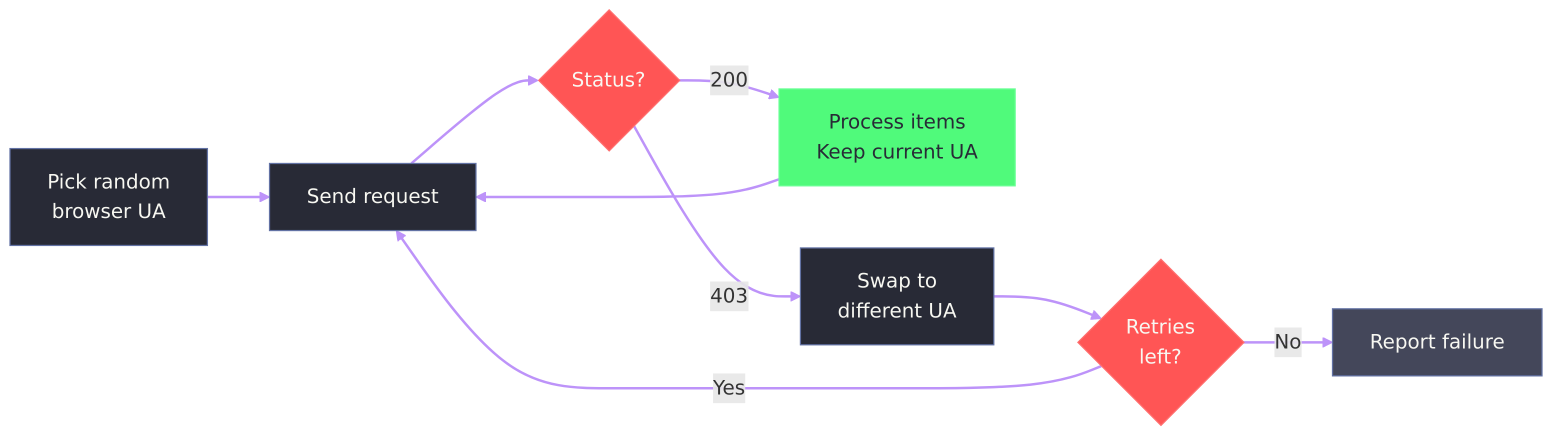
- Automatic user-agent rotation. Requests use a random browser user-agent. If a server responds with 403, the tool swaps to a different UA and retries.
- Failure diagnostics. When a scrape returns 0 items, the tool explains why for each store (403, 404, robots.txt, 429 rate limits, 5xx errors, TLS errors, timeout, no response) and suggests flags to try, including the other
--platformwhen a store looks like it runs on it. Malformed URLs are skipped with a warning instead of breaking the run. - Python library.
import shopify_spygives the same scraping engine as the CLI; see Use as a library. - Log files. Detailed logs go to a log file, keeping the terminal clean. Use
--verboseto also print to the terminal. - Status JSON. Each run writes a machine-readable status file with each URL's item count and status code, and the run's timing.
- Bail timeout. Automatically aborts if no items are scraped within
--bailseconds (default: 30). - Coding-agent friendly. Designed for use by AI coding agents (Claude Code, Cursor, etc.):
- Suggested workflow, with nothing to install:
uvx shopify-spy scrape --peek URLto see an item's shape, then a script run withuv run --with 'shopify-spy>=0.4' python script.pythat filters and saves only what the task needs. Use the CLI for whole-catalog dumps and image downloads. - Agents can write Python scripts against the library instead of driving the CLI: items are plain dicts with typed definitions (
ShopifyProductItem,ShopifyCollectionItem,WooCommerceProductItem),summarize()gives the same fields on both platforms, and every option is documented inhelp(spy.scrape) --peekpipes a single item to stdout for quick schema inspection; warnings and errors go to stderr, so stdout stays valid JSONL- Exit status 1 with a diagnostic message when no store produced items or the output couldn't be written (a run where only some stores failed exits 0 and lists their statuses)
- Status JSON with a machine-readable status code for each URL
--bailprevents dead runs from hanging indefinitely--quietsuppresses visual noise; log files capture the details separately- A Python API whose failures are explicit:
ScrapeFailedwhen every store fails, per-store statuses and hints
- Suggested workflow, with nothing to install:
Supported Platforms
| Platform | Mechanism | Notes |
|---|---|---|
| Shopify | /products.json bulk endpoint, then collection pages past 25,000 products, sitemap fallback; collections from the sitemap |
Products and collections |
| WooCommerce | /wp-json/wc/store/v1/products, then each page's variations (?type=variation); product pages' structured data as a fallback |
No authentication required |
Commands
scrape
Scrape products and collections from Shopify and WooCommerce stores.
spy scrape [URL] [OPTIONS]
Arguments:
URL...- One or more store URLs (optional if using--url-file)
Options:
--platform, -p PLATFORM- Ecommerce platform:shopify,woocommerce(default:shopify)--limit, -n INT- Stop each store after N items (per store; useful for sampling or testing)--url-file, -f FILE- File containing URLs (one per line; lines starting with#are comments)--products / --no-products- Scrape products (default: yes; Shopify only)--collections / --no-collections- Scrape collections (default: no; Shopify only)--images / --no-images- Download images (default: no)--output, -o PATH- Output directory (default:./output)--format, -F FORMAT- Output format:json,jsonl,csv,xlsx,xml(default:jsonl;xlsxneeds theexcelextra, see Excel output)--schema SCHEMA- Item shape:native(as scraped) orunified(a row per variant; see Unified schema). Default:native, except CSV and XLSX, which are alwaysunified--config, -c FILE- Path to YAML config file--concurrent INT- Concurrent requests per host (default: 16)--max-stores INT- Stores scraped at once (default: 16)--throttle / --no-throttle- Auto-throttle requests (default: yes)--user-agent, -A TEXT- Custom User-Agent header--ignore-robots, -i- Ignore robots.txt restrictions--insecure- Don't verify TLS certificates--bail INT- Abort if no items scraped within N seconds (default: 30, 0 to disable)--peek- Print 1 item to stdout as JSONL and exit (no files or directories created); with--schema unified, its unified rows--verbose, -v- Show debug output (logs to both file and terminal)--quiet, -q- Show only warnings and errors (no live item counter)
spy --version (-V) prints the installed version.
init
Create a default configuration file.
spy init [PATH]
Arguments:
PATH- Where to create the config file (default:./shopify-spy.yaml)
Options:
--force, -f- Overwrite existing file
Configuration
Shopify Spy can be configured via YAML file. Create one with spy init:
# shopify-spy.yaml
scrape:
  platform: shopify   # Platform: shopify, woocommerce
  products: true      # Scrape product data (Shopify only)
  collections: false  # Scrape collection data (Shopify only)
  images: false       # Download product images
  # limit: 100        # Stop each store after N items
  bail: 30            # Abort if no items scraped within N seconds (0 = off)

output:
  dir: ./output       # Output directory for results
  format: jsonl       # Output format: json, jsonl, csv, xlsx, xml
  # schema: unified   # native (as scraped) or unified (row per variant; csv and xlsx always)
  images_subdir: images  # Subdirectory for downloaded images

network:
  concurrent_requests: 16  # Concurrent requests per host
  timeout: 180             # Request timeout (seconds)
  retries: 2               # Retry failed requests
  # user_agent: MyBot/1.0 (+https://example.com)  # Custom user agent
  respect_robots_txt: true
  verify_tls: true         # Verify TLS certificates (false = --insecure)
  max_concurrent_stores: 16  # Stores scraped at once

throttle:
  enabled: true            # Auto-throttle based on server response
  start_delay: 1           # Initial download delay (seconds)
  max_delay: 60            # Maximum download delay (seconds)
  target_concurrency: 1.0  # Target concurrent requests (higher = faster)
Config file search order:
- Path specified with
--config ./shopify-spy.yaml~/.config/shopify-spy/config.yaml
CLI options override config file settings.
Output
Results are saved in the output directory (JSONL by default, configurable via --format). Two schemas decide what each record holds:
native(the default for JSONL, JSON and XML): each item as the store's API returned it, described under Shopify output and WooCommerce output. It keeps every field.unified(--schema unified, oroutput.schemain the config; CSV and XLSX are always unified): one record per variant with the same columns on both platforms, described under Unified schema. In XML each row is an<item>.--schema nativewith CSV or XLSX is an error.
The directory looks like this:
output/
  data/
    shopify_spider_2024-01-15T10-30-00+00-00.jsonl
  status/
    shopify_spider_2024-01-15T10-30-00+00-00_status.json
  images/
    full/
      <image files>
File names start with the platform and a UTC timestamp. A status JSON file is written for each run with metadata:
{
  "items_scraped": 47,
  "items_written": 47,
  "urls": [
    {"url": "https://store.com", "items": 47, "status": "ok", "code": "ok"}
  ],
  "finish_reason": "finished",
  "duration_seconds": 12.3,
  "log_file": "/home/user/.local/state/shopify-spy/logs/shopify_spider_2024-01-15T10-30-00+00-00.log",
  "output_error": null
}
status is a human-readable label; code is the matching StoreStatus value from the Python API:
status |
code |
Meaning |
|---|---|---|
ok |
ok |
Items were scraped |
ok |
partial |
Items were scraped, but part of the catalog couldn't be reached |
0 items |
empty |
The store answered but had no products |
timed out |
timed_out |
No items within --bail seconds |
403 Forbidden |
forbidden |
The store returned 403s and no successful response |
404 Not Found |
not_found |
The store returned 404s and no successful response; check the URL and --platform |
blocked by robots.txt |
robots_blocked |
robots.txt forbade the store's requests; try --ignore-robots |
rate limited (429) |
rate_limited |
The store answered 429 (Too Many Requests) after retries and no successful response, or a 429 its retries didn't get past held it until --bail fired with no items; retry later with a lower --concurrent |
unavailable (5xx) |
unavailable |
The store answered 5xx server errors (often an outage or maintenance) and no successful response; retry later |
TLS error |
tls_error |
The certificate failed verification; try --insecure |
no response |
no_response |
The store never answered (DNS, connection or network failure) |
failed |
error |
An unexpected error (details in the log file) |
stopped |
stopped |
Interrupted (Ctrl-C) before producing anything |
invalid URL |
invalid_url |
The URL was malformed and skipped before scraping |
finish_reason summarizes the run: finished, item_limit (a store reached --limit), bail (a store hit the --bail timeout), crawler_failed (a store raised an unexpected error), or shutdown (interrupted). items_written is how many items the data file holds. output_error is null unless writing the data file failed (such as a full disk or an unwritable directory), in any format. Then it holds the error and the command exits with status 1. If an item failed to write, the run stops early (finish_reason is shutdown) and the file keeps the whole items written before the error; a partly written item is cut off (in XLSX, rows of the failed item already handed to the workbook stay). items_written then falls short of items_scraped, which also counts the item that failed and any already fetched. If only finishing the file failed (the closing bytes of JSON or XML, or building an XLSX workbook), the run itself finished and finish_reason says how; an XLSX file is then removed and items_written is 0. A crash or a killed process writes no status file.
Detailed logs are written to a log file (not the terminal). Log files are stored in the platform-appropriate state directory (e.g., ~/.local/state/shopify-spy/logs/ on Linux). Use --verbose to also print logs to the terminal.
Shopify output
Each line contains the full product or collection JSON from Shopify's API, plus four added fields (platform tells it from a WooCommerce item; image_urls is empty unless --images is given):
{
  "product": { "title": "...", "variants": [...], "images": [...], ... },
  "url": "https://store.com/products/item.json",
  "store": "store.com",
  "platform": "shopify",
  "image_urls": ["https://cdn.shopify.com/.../product.jpg"]
}
With --collections, collection items have a collection object in place of product, with the same four added fields.
WooCommerce output
Each line contains the full product JSON from the WooCommerce Store API, plus three added fields (image_urls is empty unless --images is given):
{
  "id": 123,
  "name": "Product Name",
  "slug": "product-name",
  "permalink": "https://store.com/product/product-name/",
  "sku": "SKU-001",
  "prices": { "price": "5200", "currency_code": "USD", "currency_minor_unit": 2 },
  "images": [{ "id": 1, "src": "https://..." }],
  "store": "store.com",
  "platform": "woocommerce",
  "image_urls": ["https://..."]
}
Each entry in variations is the variation's own Store API record (its prices, sku, is_in_stock and so on), with the product listing's attributes for it. If the store refuses the variation listing, the entries keep only id and attributes, as the product listing gives them.
Note: WooCommerce prices are strings in minor currency units (divide by 10^currency_minor_unit to get the decimal value).
When a store's Store API is unavailable on its first page (an error status other than a 429 rate limit, a failed request, an answer that isn't a product list, or robots.txt disallows it), Shopify Spy reads its product pages instead. It finds them through the WordPress REST API's product list (/wp-json/wp/v2/product), or the product sitemaps (WordPress core's /wp-sitemap.xml, Yoast's or Rank Math's /sitemap_index.xml), and turns each page's schema.org Product data into a partial item in the same shape. These items have "source": "product_page", carry only id, name, slug, permalink, sku, description, images, prices, on_sale and is_in_stock (plus the added store, platform and image_urls), and keep the page's original structured data in json_ld. Names lose the site name an SEO plugin may append (Hat - My Shop), and a SKU that's really the product ID (WooCommerce's placeholder for a missing SKU) is set to null. A variable product also gets attributes and variations from the page's variation form, each variation with its own prices, sku and is_in_stock, so the unified schema has a row per variation; WooCommerce embeds that form's data only for products with up to 30 variations (by default), so larger ones keep just the price range. Pages without schema.org Product data are skipped, as are deleted (404 or 410) pages; other pages that fail to load mark the store partial. In XML output, keys that aren't valid element names (such as JSON-LD's @type) have their invalid characters replaced with _.
Image Metadata
When using --images, each item includes a scraped_images field with download info:
{
  "image_urls": ["https://cdn.shopify.com/.../product.jpg"],
  "scraped_images": [
    {
      "url": "https://cdn.shopify.com/.../product.jpg",
      "path": "full/abc123def.jpg",
      "checksum": "d41d8cd98f00b204e9800998ecf8427e",
      "status": "downloaded"
    }
  ]
}
Images are saved in their original format, named by the SHA-1 of their URL, with the extension of the format their bytes are in. The path is relative to the images directory (output/images/ by default), and files younger than 90 days are reused ("status": "uptodate"). Supported formats are JPEG, PNG, GIF, WebP, AVIF, HEIC/HEIF, JPEG XL, JPEG 2000, BMP, TIFF and ICO; anything else, such as an SVG or an error page served in place of an image, is logged and counted as a failed image instead of being saved.
Unified schema
The unified schema has one row per variant and a plain value in every cell (no embedded JSON), so you can sort and filter it in a spreadsheet or load it as a table. CSV and Excel (XLSX) always use it; JSONL, JSON and XML use it with --schema unified. The product's columns repeat on each of its variant rows; a product without variants still gets one row. Both platforms share the same columns, so one file can hold Shopify and WooCommerce items; a column only one platform has is blank for the other (empty in CSV and XML, null in JSON). The native schema keeps each platform's full item; the unified schema keeps these columns:
| Column | Shopify | WooCommerce |
|---|---|---|
platform |
shopify |
woocommerce |
kind |
product or collection (--collections) |
product |
store, id, sku, tags, image_count |
yes | yes |
handle |
handle |
slug |
title |
title |
name |
vendor |
vendor |
brand names |
product_type |
product_type |
|
categories |
category names | |
options |
option names, such as Color, Size |
names of the attributes that define variations |
created_at, updated_at, published_at |
yes | |
description |
body_html as plain text |
description as plain text |
short_description |
as plain text | |
html_url |
the product or collection page | permalink |
image_url |
the first image | the first image |
products_count |
collections only | |
currency |
currency_code |
|
min_price, max_price |
the lowest and highest variant price (products only) | the price range |
on_sale, is_purchasable, average_rating, review_count |
yes | |
variant_count |
variants | variations |
variant_id |
the variant's ID | the variation's ID |
variant_title |
such as Red / S |
the variation's attribute values, such as Red / S |
option1-option3 |
the variant's option values | the variation's attribute values, in the product's attribute order |
price |
the variant's price | price |
compare_at_price |
the variant's compare_at_price |
regular_price, only when price is below it |
available |
the variant's available |
is_in_stock |
grams, requires_shipping, taxable, variant_position, variant_image_url |
the variant's | |
url |
the scraped JSON document | |
source |
store_api, or product_page for the partial items read from product pages |
|
image_paths |
with --images: the downloaded files |
with --images: the downloaded files |
Prices are decimal amounts (WooCommerce's minor units are converted). min_price and max_price are the product's price range on each of its rows. A WooCommerce variation row's sku, price, compare_at_price and available are the variation's own; if the store refuses the variation listing, they're the product's. WooCommerce's type (simple, variable, ...) and descriptive attributes are only in the native schema. In JSON, prices are strings and booleans are true/false.
With --images, image_paths lists the downloaded files (relative to the images directory); without it the column is left out. In CSV and unified XML, booleans are true/false and an empty cell means no value. Appending to a CSV written by 0.3.0 or earlier, which had a column per item field, is refused; start a new file.
Excel output
--format xlsx (with the excel extra installed) writes the unified schema's rows to an Excel workbook, Shopify and WooCommerce in one sheet, avoiding the CSV's problems in Excel: text is UTF-8-safe and never evaluated as a formula, prices, counts and ratings are numbers, booleans are TRUE/FALSE, and created_at, updated_at and published_at are dates in UTC (Excel has no time zones). IDs stay text, since Excel would show them in scientific notation. The header row is frozen and has filters. Text longer than Excel's cell limit (32,767 characters) is cut, with a warning in the log. Past Excel's 1,048,576 rows, items continue on a new sheet (items 2, ...), keeping a product's variant rows together.
The file is written when the run ends, including after Ctrl-C (the CLI ignores Ctrl-C while it writes), so a killed process leaves no usable file and there is no append. If building the workbook fails, the partial file is removed. During the run, rows are kept in a temporary folder next to the output file (products.xlsx.tmp-…), which needs disk space for roughly the uncompressed data; it is deleted at the end, but a killed process leaves it behind, and it can be deleted. For long runs, write JSONL and convert it afterwards:
import json
import shopify_spy as spy

with open("products.jsonl", encoding="utf-8") as f:
    spy.write_items((json.loads(line) for line in f), "products.xlsx")
Parsing Output
With jq:
# Shopify: extract product titles
cat output/data/*.jsonl | jq 'select(.product) | .product.title'

# WooCommerce: extract product names and prices
cat output/data/*.jsonl | jq 'select(.prices) | {name: .name, price: .prices.price, currency: .prices.currency_code}'

# Unified schema (--schema unified): the same fields on both platforms, a line per variant
cat output/data/*.jsonl | jq -r '[.platform, .title, .variant_title, .price] | @tsv'
With DuckDB (no conversion needed; it reads JSONL and CSV directly). Each run writes a new timestamped file, so a glob over output/data/ queries every run at once, such as each variant's price over time. Point a query at files of one shape: a JSONL query that reads product fails if the glob also matches WooCommerce or unified files.
# Native JSONL from Shopify runs
duckdb -c "select regexp_extract(filename, '\d{4}-\d\d-\d\dT[\d-]+', 0) as run, v.id, v.price
           from (select filename, unnest(product.variants) as v
                 from read_json('output/data/shopify_spider_*.jsonl', filename=true))
           order by v.id, run"

# Unified CSV from any platform
duckdb -c "select platform, store, count(*) as variants, min(price), max(price)
           from read_csv('output/data/*.csv', union_by_name=true)
           group by all"
With Python:
import json

with open("output/data/shopify_spider_2024-01-15T10-30-00+00-00.jsonl", encoding="utf-8") as f:
    for line in f:
        item = json.loads(line)
        print(item["product"]["title"])  # Shopify
        # print(item["name"])            # WooCommerce
With pandas:
import glob
import pandas as pd

# Native JSONL: one item per row
df = pd.read_json("output/data/shopify_spider_2024-01-15T10-30-00+00-00.jsonl", lines=True)
products = pd.json_normalize(df["product"])  # Shopify

# Unified CSV: a row per variant, every run in one frame
runs = sorted(glob.glob("output/data/*.csv"))
df = pd.concat((pd.read_csv(f).assign(run=f) for f in runs), ignore_index=True)
df.groupby(["platform", "store"])["price"].agg(["count", "min", "max"])
With polars:
import polars as pl

df = pl.read_ndjson("output/data/shopify_spider_2024-01-15T10-30-00+00-00.jsonl")  # native Shopify
rows = pl.read_csv("output/data/shopify_spider_2024-01-15T10-30-00+00-00.csv")  # unified
Use as a library
The CLI is built on a Python API that scripts (and coding agents) can use directly:
import shopify_spy as spy

# Items arrive as plain dicts while stores are scraped
for item in spy.scrape("https://www.example.com", max_items_per_store=100):
    print(item["product"]["title"])

# Several stores; stream to a file and inspect failures afterwards
run = spy.scrape(["a.com", "b.com"], on_failure="warn")
spy.write_items(run, "products.jsonl")
for store in run.result.failed:
    print(store.input_url, store.status, store.hint)

# Learn the schema from one item
item = spy.scrape("a.com").first()
print(spy.summarize(item))  # title, prices as Decimal, URL: same fields on both platforms

# Filter across platforms and write a CSV
rows = (spy.summarize(i) for i in spy.scrape(urls))
spy.write_items((r.asdict() for r in rows if r.min_price and r.min_price < 50), "cheap.csv")

# Retry stores that robots.txt blocked
result = spy.scrape(spy.read_url_file("stores.txt"), on_failure="ignore").collect()
blocked = [s.input_url for s in result.failed if s.status == "robots_blocked"]
spy.write_items(spy.scrape(blocked, respect_robots_txt=False), "products.jsonl", append=True)
- How a run works.
scrape()returns a run without fetching anything; stores are scraped while something iterates it, one item at a time. Items aren't kept, so memory stays flat however big the catalog, and a run can be iterated only once (callscrape()again for another pass). Iterating it yourself, or passing it towrite_items(), streams;run.collect()andlist(run)hold every item in memory.run.result(per-store results) is available once iteration ends, andrun.storesgives a snapshot mid-run. Leaving early (break,run.close(), or the end of awith spy.scrape(...) as run:block) stops the run; stores that hadn't finished get thefinish_reasonclosed. - Failures are never silent. By default
scrape()raisesScrapeFailed(listing each store's status) when every store failed;on_failure="warn"or"ignore"relax that, andstrict=Trueraises when any store failed. EachStoreResulthas astatus, an item count and sometimes ahint, such as a likely wrongplatform. A store that only answered 429s, or that 429s held up untilbailfired, israte_limited, and one that only answered 5xx errors isunavailable; both are failures worth retrying later. - Options match the CLI:
platform,products,collections,images(withimages_dir),max_items_per_store(per store; useitertools.islicefor a total),bail,concurrent_requests,request_timeout,retries,user_agent,respect_robots_txt,verify_tls,max_concurrent_stores,throttleand thethrottle_*settings. - Images:
images=True, images_dir="images"saves files underimages/full/; each item'sscraped_imagesrecords have apathrelative toimages_dir, so the file isPath(images_dir) / record["path"]. - Schemas:
write_items(run, "products.jsonl")writes items as scraped;schema="unified"writes the same one-row-per-variant records as the CLI's--schema unified, shared by both platforms (see Unified schema), so items from Shopify and WooCommerce runs can go in one file. CSV and Excel are always unified (schema="native"raisesValueError).fields=[...]picks unified columns (a name that isn't one of them is logged and left empty). Other dicts, such assummarize(item).asdict(), get a column per key."products.xlsx"writes the unified rows as typed cells (see Excel output), keeping rows in a temporary folder next to the file until it closes. A write that fails partway leaves the file ending on the last whole item. - No side effects: nothing is written unless
images=True, no config file is read, and nothing is printed (logs go to theshopify_spylogger;on_failure="warn"issues aScrapeWarning, which Python shows on stderr). - Async code and notebooks use
scrape_async(), which takes the same options:
async for item in spy.scrape_async("https://www.example.com"):
    ...

result = await spy.scrape_async(urls, platform="woocommerce")  # RunResult with .items
scrape() runs its own event loop, so it raises a clear error inside an already running loop (Jupyter, async frameworks); use scrape_async() there.
Limitations
Large Shopify catalogs take more requests past 25,000 products. Shopify's products.json stops paging at 25,000 items (100 pages of 250). Past that, the scraper reads the sitemap's product list to see what's missing (not with --limit, which may need only a sliver of a huge catalog), then pages /collections/all and the store's collections, largest first, each with its own 25,000 limit. Collections are paged only while they can save requests: they're skipped when fewer products are missing than they have pages, and stop once every listed product is found or they find less than one new product per request. Whatever is still missing, including products in no collection, is fetched through the sitemap one product per request. On a 65,718-product store, bulk paging and collections together found 99.7% of the catalog and the whole scrape took about 1,700 requests, against about 41,000 with bulk paging and the sitemap alone (#30). Catalogs whose collections are far larger than 25,000 products (some print-on-demand stores list over a million) stay mostly out of reach; use --limit to sample them.
WooCommerce Store API preferred. WooCommerce scraping uses the public Store API (/wp-json/wc/store/v1/products), built into WooCommerce since version 6.4 (2022). When it's unavailable, products come from the product pages' structured data instead, which has no categories or tags, and variations only for products with up to 30 of them; stores whose pages have no schema.org Product data, or that broadly block crawlers, may not be scrapeable. When a scrape returns 0 items, the tool prints a diagnostic message explaining the likely cause (403 Forbidden, 404 Not Found, robots.txt blocking, a 429 rate limit, etc.) and exits with code 1.
Rate limiting. Stores rate-limit by IP address: past some request rate they answer 429 (Too Many Requests). Shopify also answers 429 to every request from a plain Linux browser user agent (X11; Linux x86_64, as Chrome on Linux and headless Chrome send), so the built-in pool leaves those out; avoid that token in a custom --user-agent. Auto-throttling is enabled by default: each host is slowed to match its response times, and a 429 or 503 pauses that host for its Retry-After time (at most 60 seconds, and never past --bail), even with --no-throttle. A store that stays rate-limited ends as rate_limited; retry it later, with a lower --concurrent and throttling on. You can adjust the throttle settings or disable it for faster scraping:
# Disable throttling (faster but riskier)
spy scrape https://example.com --no-throttle
Feedback
Found a bug or have a suggestion? Open an issue.
License
Explore related projects
Loading…