
nassim-arifette/jevgrep
nassim-arifette/jevgrep has 114 GitHub stars and 12 forks. GitHot measured +1 stars in 24 hours. Last checked 2026-11-15 15:55 UTC. Last push 2026-11-14.
Measured star growth
- in 24h
- +1
- in 7 days
- Update delayed
- in 15 days
- Update delayed
- in 1 month
- Update delayed
Net star changes over overlapping periods, not daily totals. Missing measurements are left blank. Stars measure attention, not software quality.
About
Jev-powered semantic code search for coding agents — find behavior across repositories via CLI or MCP, with exact source excerpts and line numbers.
Developer ToolsREADME.md
OriginalJevGrep




JevGrep finds code from a description of what it does. Ask something like "Where is session expiry handled?" and it returns the source lines that answer it, with file paths and line numbers. You can run it in a terminal or add it to Claude Code, Codex or another MCP client, so your coding agent can look things up instead of opening one file after another.

Full-quality video (44 s). The results in it come from a real search on this repository.
Why JevGrep
grep and rg work well when you know the name to search for. Often you only know
what the code is supposed to do:
- "Where do we check that a user can access this project?"
- "What happens when a payment webhook arrives twice?"
- "Which code decides whether a file is too big to index?"
JevGrep is built for that kind of question. Results are verbatim excerpts with
path:start-end, so you or your agent can open the file and carry on from there. For
an agent, one tool call stands in for a long walk through the repository, and the
answer stays within a token budget you set. Every eligible UTF-8 text file is scored,
configuration and tests included. Nothing is sent until you have authorized the
repository and had the chance to check what would leave your computer.
How it compares
We asked the same 55 real questions about six open-source repositories (21 in Python, 34 in Go and Rust) to JevGrep and to the alternatives an agent could use instead. R@5 is the share of questions where the expected code is in the first five results.
| Rank | Tool | R@5 Python | R@5 Go/Rust | Cost per question | Time per question |
|---|---|---|---|---|---|
| 1 | gpt-6.1-terra given the whole repository |
0.894 | 0.737 | $0.12–0.23 | 9–15 s |
| 2 | JevGrep | 0.877 | 0.827 | $0.005 | 4 s |
| 3 | gpt-6-luna given the whole repository |
0.803 | 0.688 | $0.01–0.02 | 3–4 s |
| 4 | CodeGraph | 0.491 | 0.339 | free, needs an index | 1 s |
| 5 | BM25 | 0.429 | 0.338 | free | < 0.1 s |
| 6 | ripgrep | 0.325 | 0.244 | free | 0.3 s |
JevGrep's row uses the current defaults: a response budget of 8000 tokens and whole declarations for split windows (0.851 and 0.687 before those two changes, see the response budget and whole declarations reports). Terra finds a little more, but it costs 25 to 50 times as much, takes three times as long and only works while the whole repository fits in its context window. JevGrep gives most of that quality at a fraction of the price on repositories of any size.
On repositories too large for any context window, JevGrep keeps the same recall. Six repositories of 1 to 7.6 million tokens, 50 questions from real issues, held-out half frozen before the run:
| Repository | Language | Tokens per scan | R@5 | Cost per question | Time per question |
|---|---|---|---|---|---|
| prometheus | Go | 1.1M | 0.83 | $0.05 | 6 s |
| hugo | Go | 1.0M | 0.86 | $0.04 | 20 s |
| lombok | Java | 1.0M | 0.78 | $0.04 | 30 s |
| nushell | Rust | 2.1M | 0.79 | $0.09 | — |
| ruff | Rust | 3.6M | 0.90 | $0.14 | 27 s |
| lucene | Java | 7.6M | 0.88 | $0.25 | 23 s |
Times are through the Vercel AI Gateway at concurrency 16. prometheus, ruff and lucene are measured with the current code (before the local batching, windowing and worker-pool fixes they took 20 s, 3 min and 7 min); hugo and lombok are from before those fixes; nushell was measured on a slower route only. Method, every number and the misses are in the hard set report.
We also kept JevGrep and swapped only the model that scores each fragment, on 65 searches. "No answer" is the share of questions with no answer in the repository where nothing is returned; "False premise" is the share of questions built on a wrong assumption where the code that contradicts it is found.
| Judge inside JevGrep | R@5 | No answer | False premise | Cost per search | Time per search |
|---|---|---|---|---|---|
| Jev 1.13 / 1.14 | 0.91 | 100 % | 100 % | $0.002 | 6–7 s |
| Luna Decisions | 0.93 | 67 % | 75 % | $0.005 | 4.6 s |
gpt-6-luna, no reasoning |
0.95 | 100 % | 77 % | $0.004 | 8 s |
gpt-6-luna, medium |
0.93 | 67 % | 100 % | $0.004 | 13 s |
gpt-6.1-terra, no reasoning |
0.96 | 50 % | 100 % | $0.042 | 12 s |
gpt-6.1-terra, medium |
0.96 | 33 % | 100 % | $0.043 | 13 s |
The OpenAI judges find slightly more, but they return code when the repository has no answer. Jev is the only judge that passes both checks, at 2 to 20 times lower cost. Those two checks rest on 6 and 14 questions.
The methodology, every number and the scripts to rerun them are in models alone, CodeGraph and judges. These are single runs on a modest question set, so treat small gaps as noise.
Getting started
You need Node.js 24 and an API key from one of the supported providers: TypeSafe AI, Vercel AI Gateway or OpenRouter.
1. Install
npm install -g @nassim-arifette/jevgrep
The unscoped
jevgreppackage on npm belongs to a different project. Install the scoped name above; the command is stilljevgrep.
2. Add your provider key (once per computer)
jevgrep init --global                       # TypeSafe AI (default)
jevgrep init --global --provider vercel     # or Vercel AI Gateway
jevgrep init --global --provider openrouter # or OpenRouter
The key goes in your user configuration directory, never in a repository.
3. Authorize a project (once per repository)
cd path/to/my-project
jevgrep init
JevGrep asks before it sends anything:
Allow sending eligible source excerpts from this repository to Vercel AI Gateway? [y/N]
Answer y to start searching. If you would rather check first, press Enter and run
jevgrep inspect to see which files would be sent (more in
Privacy).
4. Ask a question
jevgrep search --query "Where is session expiry handled?"
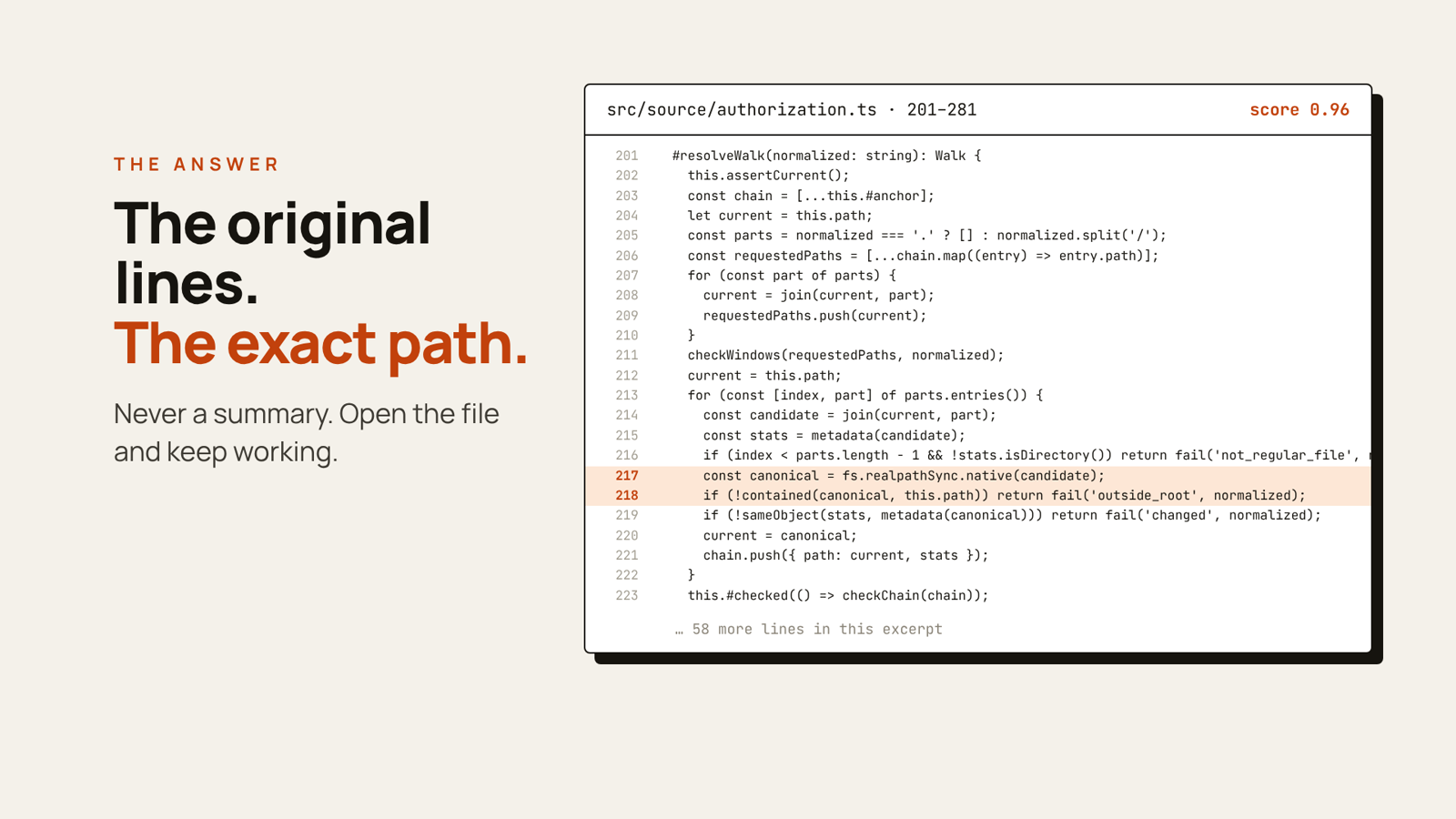
Each matching excerpt is printed with its location and a relevance score. Here is a real run on this repository:
$ jevgrep search --scope src --query "Where is filesystem access controlled, and what prevents path escapes?"
jevgrep: complete
coverage: scope src | files 45/45 eligible | 170 fragments | coverage complete

4 excerpts

src/source/authorization.ts:201-281 score 0.96
  #resolveWalk(normalized: string): Walk {
    this.assertCurrent();
    ...
      const canonical = fs.realpathSync.native(candidate);
      if (!contained(canonical, this.path)) return fail('outside_root', normalized);
    ...

src/cli-args.ts:57-108 score 0.95
...
Everyday use
# Look only in some folders
jevgrep search --query "How are permissions checked?" --scope src --scope tests

# Machine-readable JSON for scripts and agents
jevgrep search --query "Where is the cache invalidated?" --json

# Long, multi-line question
jevgrep search --query-file question.txt

# Check your setup without sending anything
jevgrep doctor

# See what a search would scan and roughly what it would cost
jevgrep inspect
You can run JevGrep from any folder inside an authorized project. Scores and file
preparation are cached outside the repository, so repeated searches cost less and
finish sooner; jevgrep cache clear resets the cache.
If you already know the function name or the exact string, rg will be quicker.
Connect your coding agent
JevGrep includes a local MCP server with two tools:
semantic_search_code for one question and semantic_search_code_many for several
questions that share one preparation of the repository. The agent gets the same
excerpts the CLI would print, as text and as structuredContent, with progress
notifications while a large repository is being scanned.
Authorize the repository with jevgrep init first. It prints the absolute path of the
project profile, which goes in the commands below. Each server handles one repository.
Claude Code
claude mcp add --transport stdio jevgrep -- jevgrep mcp --config "/absolute/path/to/config.json"
Check it with claude mcp get jevgrep, or /mcp inside Claude Code.
See the Claude Code MCP documentation.
Codex
Add to your Codex config.toml:
[mcp_servers.jevgrep]
command = "jevgrep"
args = ["mcp", "--config", "/absolute/path/to/config.json"]
tool_timeout_sec = 360
See the Codex MCP documentation.
Any other MCP client
For clients that use an mcpServers JSON configuration:
{
  "mcpServers": {
    "jevgrep": {
      "command": "jevgrep",
      "args": ["mcp", "--config", "/absolute/path/to/config.json"]
    }
  }
}
On Windows, if the client cannot start the jevgrep command, use the absolute paths of
node.exe and the installed dist/cli.js
(how).
On a large repository a search can take up to 5 minutes, so set the client's tool
timeout to about 6 minutes. Keep API keys out of MCP configuration files. When the
client runs as the same user, it picks up the key saved by jevgrep init --global.
Privacy: what leaves your computer
JevGrep reads your files locally. The provider you chose does the scoring, so each search sends it:
- the eligible source fragments of the authorized repository;
- your question;
- repository-relative paths and the name of the enclosing symbol, when there is one.
Line numbers stay on your machine: they are not needed to judge an excerpt, and leaving them out lets the cache keep the score of a function that only moved.
JevGrep leaves out .env files, common credential files, dependencies, build output,
generated and minified files, and files that look like they contain secrets. It
follows .gitignore, plus a .jevgrepignore file it creates for your own
exclusions. It does not follow links, and your API key never appears in a request
body, a result or the cache.
Secret detection will miss things sometimes. Run jevgrep inspect before your first
search and add anything sensitive to .jevgrepignore. Whatever the provider receives
is covered by its own privacy and retention policies.
Providers
| Provider | Setup | Model |
|---|---|---|
| TypeSafe AI | jevgrep init --global --provider typesafe |
jev-1.13.0 (pinned) |
| Vercel AI Gateway | jevgrep init --global --provider vercel |
typesafe-ai/jev |
| OpenRouter | jevgrep init --global --provider openrouter |
typesafe/jev-1.13 |
The environment variables TYPESAFE_API_KEY, AI_GATEWAY_API_KEY and
OPENROUTER_API_KEY override saved keys, which is useful in CI. To move a project to
another provider, run the global setup for that provider, then
jevgrep init --provider <name> inside the project. The
reference lists each provider's validation status and
API details.
Troubleshooting
| Message or symptom | What to do |
|---|---|
jevgrep: command not found |
check that npm's global bin folder is on your PATH |
REMOTE_DISABLED |
you have not allowed remote evaluation yet: run jevgrep inspect, then rerun jevgrep init and answer y |
CREDENTIAL_MISSING |
run jevgrep init --global, or set the provider's environment variable |
PROVIDER_AUTH |
check the key and that it has access to the Jev model |
No result, no_score_above_threshold |
rephrase the question or widen --scope; it does not prove the code is absent |
| MCP tool times out | raise the client timeout to about 6 minutes |
The installation guide covers more cases.
Exit codes: 0 complete, 2 invalid request or configuration, 3 partial result,
4 failure, 130 interrupted.
Learn more
- Installation and configuration guide: manual profiles, limits, cost caps, retries and Windows notes
- Reference: providers, JSON output, cache policy, request batching and development
- Benchmarks: retrieval quality and performance
- Report an issue
Contributing
git clone https://github.com/nassim-arifette/jevgrep.git
cd jevgrep
npm ci
npm run verify   # type check, offline tests, build and smoke checks
npm link         # use your checkout as the global `jevgrep` command
The test suite runs offline and needs no provider key.