
nMaroulis/sibyl
nMaroulis/sibyl has 79 GitHub stars and 18 forks. GitHot measured 0 stars in 24 hours and +2 in 7 days. Last checked 2026-11-15 13:02 UTC. Last push 2026-11-06.
Measured star growth
- in 24h
- 0
- in 7 days
- +2
- in 15 days
- Update delayed
- in 1 month
- Update delayed
Net star changes over overlapping periods, not daily totals. Missing measurements are left blank. Stars measure attention, not software quality.
About
AI-Powered Crypto Insights & Trading Dashboard using AI Agents
AIREADME.md
Original

Sibyl · Your connected crypto workspace
All your exchanges. Your research. An AI team that understands the context.
Sibyl brings your crypto accounts, market analysis, trading and strategy research into one workspace you run on your own machine. Connect multiple exchanges, see your holdings together, explore a market, test an idea and follow it through to execution, having specialist AI agents beside you at every step.
The legacy Python/Streamlit application is available at sibyl-streamlit.





Documentation · Getting started · Changelog · Implementation checklist
One workspace, from understanding to action
- See the whole picture. Combine accounts across exchanges or focus on one exchange, account or asset.
- Research before you trade. Inspect prices, statistics, news and historical strategy results in the same place.
- Ask a specialist. Open a contextual conversation on a page or let Sibyl consult the team for you.
- Keep control. Credentials are encrypted locally. Exchange execution needs explicit setup and approval. AI tools are read-only.
- Explore at your own pace. Start without credentials, connect your accounts when ready or use the clearly labeled Demo preview.
The interface pairs a floating navigation dock with focused workspaces, interactive charts and expandable advanced controls. React handles the experience a modular Python backend owns the data, calculations and execution.
Explore the modules
Account · Know what you own
Bring multiple exchange accounts into a combined portfolio and switch between exchange and individual-account views. Inspect allocations, free and reserved balances, valuation history and conversion evidence, with filters and CSV exports.
Measured performance periods separate investment gain from external contributions/withdrawals using fresh valuations and explicit cash-flow coverage review. Balance checks compare saved starting quantities with retained trades, fees and eligible funding. Missing prices and incomplete history stay visible. Production holdings, test funds and Demo are kept distinct.
Account guide · Investment performance · Balance checks
Markets · Look beyond the price
Search available spot pairs, manage source-specific watchlists and choose public exchange feeds, saved exchange accounts or supported data APIs. Explore line and candlestick charts with indicators, OHLCV inspection, volume, region zoom, panning and exports.
Python calculates returns, trend and momentum, volatility, drawdowns, volume statistics and correlations. An explainable technical-bias score shows its inputs and votes. Retained candles, resumable historical imports and immutable datasets give your research a reusable foundation.
Markets guide · Statistics and score · History and datasets
Trade · Follow an order through
Review spot market and GTC limit orders on supported exchanges, or practice with the persistent Demo wallet. Monitor orders, partial fills and cancellation evidence. Recover uncertain submissions by client ID without blindly submitting again.
Account history brings together selected-market fills, native-currency fees, supported funding imports and retained FIFO performance. Review possible transfers between your accounts, inspect observed funding corrections and opt into bounded recent-history or pending-record updates.
Execution, imports and recovery vary by provider. Each exchange card in Settings shows the capabilities actually implemented for that provider and environment.
Trading guide · Exchange support
Strategies · Test, compare, monitor
Build with six algorithms: EMA Crossover, RSI Reversion, Bollinger Bands, Bollinger Surge, Impulse Breakout and Quantum Momentum. Start with a simple configuration, then expand indicator, risk and execution settings.
- Backtest: model fees and slippage; inspect buys and sells on the price chart, equity against buy-and-hold, drawdowns and trade-level metrics.
- Validate: compare a small grid or sample a larger parameter space with a reproducible seed, then run chronological holdouts and expanding walk-forward tests. Inspect candidate coverage, save inputs and rerun exact studies.
- Monitor: follow paper or separately approved exchange runs through charts, execution markers and a persistent decision journal.
- Control: use account-bound budgets, order limits, a global strategy halt and optional shared exposure and observed daily-loss controls.
Strategy studio · Validation · Exchange execution
Sibyl & Agents · A team you can talk to
Ask Sibyl a question in its dedicated chat. Powered by ProtoLink, Sibyl discovers the registered specialists, chooses whom to consult and brings their evidence into one answer. Saved conversations, live activity, consultation trails and run details make the work inspectable.
Save reusable questions in Investigations and bring the team’s findings into a structured report with inspectable sources. Rerun a question as a new version, compare saved reports and export the evidence. Schedule daily/weekly briefings in your time zone, with optional delivery to your private Telegram bot chat. Saved investigations · Scheduled briefings.
Each specialist has its own prompt, typed tools and page guidance. The Ask button opens a conversation in the page you are using. Choose an API model or local inference, with optional model overrides per agent.
Developers can run repeatable native agent checks against local models and compare actual tool evidence and scores. Recorded model limitations remain visible.
| Agent | Focus |
|---|---|
| Sibyl | Coordinate the team and combine specialist findings |
| Accountant | Holdings, valuation, retained history and accounting evidence |
| Analyst | Markets, technical statistics and correlations |
| Broker | Trade, order evidence, backtests and strategy monitors |
| Chronos | Trained forecasts, held-out evaluation and baseline assumptions |
| Reporter | Source-linked news, article excerpts and text sentiment |
| Technician | Connections, settings, model setup and diagnostics |
| Wiki | Crypto concepts and project profiles |
| Explorer | Bitcoin transactions, output-spend checks, address activity, fees, confirmations and recent blocks |
| Equity Analyst | Equity prices, company information and statistics |
| Oracle | Portfolio context and an overview of the workspace |
Sibyl requires a configured language model; module specialists also offer factual tool mode. Telegram lets an explicitly configured private user talk to Sibyl through a bot. WhatsApp, Discord, Slack, Signal and Email setup previews are marked unavailable.
Sibyl guide · Model setup · Telegram
News · Read with context
Follow CoinDesk, Cointelegraph, Decrypt, The Block and CryptoSlate through public collectors, with optional NewsAPI access. Search a retained, deduplicated archive; filter by publisher, asset, date and text polarity; open full reporting at its original source.
Tone and trend views describe the wording of headlines and excerpts. The separately attributed Alternative.me Fear & Greed index adds broader market context. Reporter can explain the selected stories and their sources.
Forecast · Train, evaluate, inspect
Fit lightweight daily autoregressive ridge models from your current feed or immutable datasets. Inspect chronological held-out results against naïve and drift benchmarks, empirical bands, exact-input reruns and numbered model versions. Forecast retained input offline or explicitly refresh the original matching feed, with provenance and input-shift diagnostics.
Chronos explains the same evidence through native ProtoLink tools. The separate Statistical baseline tab retains the untrained drift/volatility projection. Future accuracy and coverage remain uncertain; neural model families and automated recalibration are pending.
Inspect a saved recipe across successive periods with expanding or fixed training windows, pooled benchmark errors and per-fold charts. Rolling reports retain their exact inputs and fitting evidence; evaluation never deploys or replaces a model.
Forecasting guide · Engine contracts
Research · Understand the wider picture
Browse 20 familiar crypto projects with backend-fetched fundamentals, history excerpts and source links. Look up concepts in the glossary, inspect Bitcoin transactions and address activity with source-linked fee/confirmation evidence and explicit output-spend checks, or explore optional equity quotes, adjusted history and company information. Bitcoin explorer guide.
Import PDFs, Markdown and text into My research, search uploads and retained news, and open exact cited passages. Add optional local Ollama embeddings for semantic or hybrid search with visible index coverage. Wiki and Reporter retrieve this evidence through native tools; keyword search and reading work without a model. Research library.
Wiki, Explorer and Equity Analyst help explain the same underlying evidence.
Alerts · Keep useful signals close
Create price-level and crossing rules, follow strategy lifecycle events, watch recorded connection failures, and monitor selected accounts for value floors, concentration or observed drawdowns. Per-account execution subscriptions also follow observed partial fills, cancellations, errors and imported fill corrections. A persistent local inbox retains the triggering evidence and unread state. Select Telegram per rule for future alerts, with cooldowns, freshness windows and inspectable delivery outcomes.
Settings & Coming soon · Make it yours
Inspect actual background-worker activity and fault history, then preserve your workspace with passphrase-encrypted backups. Restore into a separate directory with automatic work paused for review. Worker health · Backup and recovery.
Manage Exchanges, AI models, News, Market data, Messaging and Workspace in one place. Exchange cards expose implementation coverage; source diagnostics distinguish observed connectivity from quote freshness. Ollama setup can detect the server and installed models, with explicit controls for a server started by Sibyl.
More → Coming soon lists available foundations and pending work. Multi-user hosting is deferred; the current deployment is one user and one API worker.
Settings guide · Ollama · Feature coverage
Exchange connections
Sibyl includes adapters for 20 production exchanges, dedicated Binance Spot Testnet and Coinbase Exchange Sandbox clients, and an offline DemoClient:
Binance, Binance.US, Coinbase, Kraken, OKX, Bybit, KuCoin, Gate, Bitget, MEXC, HTX, Crypto.com Exchange, Bitstamp, Gemini, Bitfinex, CoinEx, BitMart, Phemex, Poloniex and Upbit.
Adapters share an ExchangeClient contract and explicit provider subclasses over CCXT. Available account, market-data, order and history methods depend on the provider. Implemented capability and authenticated acceptance are documented separately in the support matrix and acceptance results.
Architecture
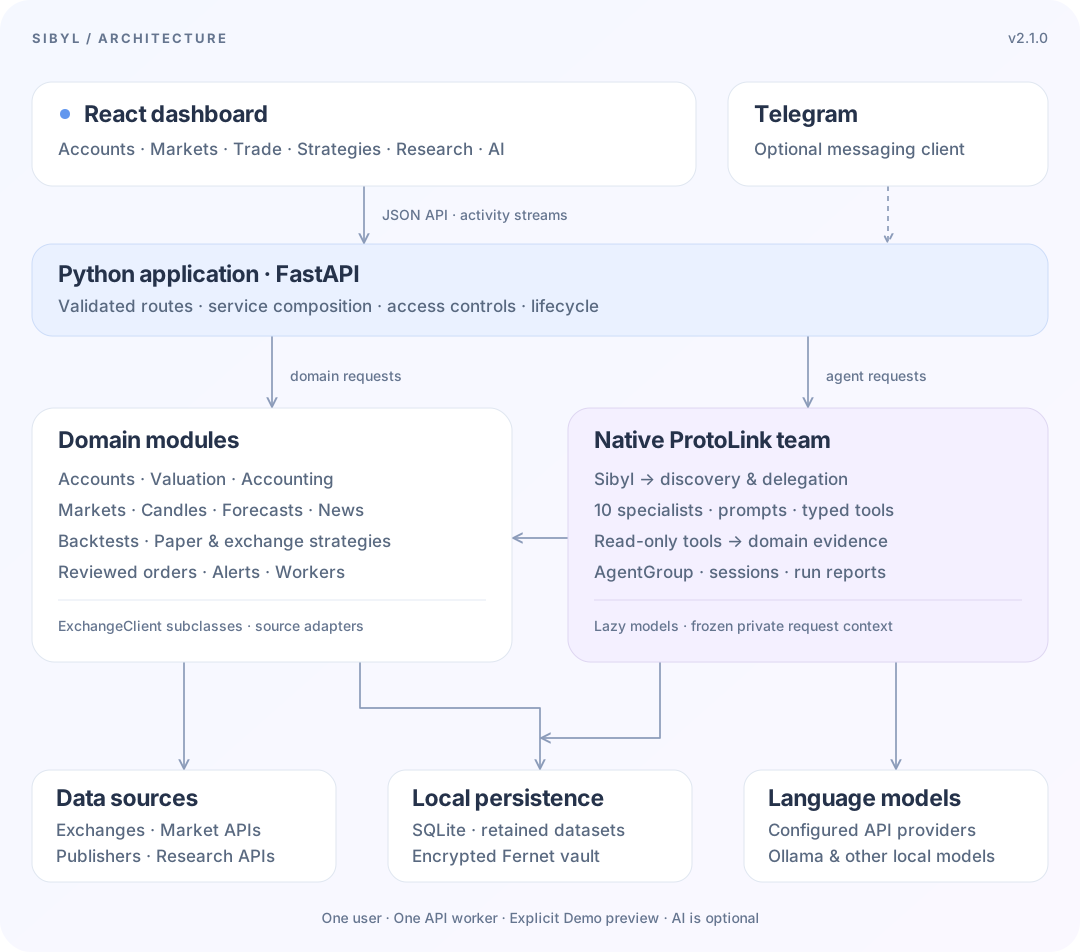
The Python application owns the dashboard API and the optional Telegram worker. Domain modules own calculations and state; native ProtoLink agents call their read-only functions. Sibyl uses registry discovery and native delegation to consult specialists. Exchange writes go through the separate reviewed trading pipeline.
SQLite retains accounts, ledgers, research inputs, runs, conversations and alerts. A local Fernet vault encrypts credentials. Ordinary typed Python tools, lazy model factories, private request context and native run reports keep the AI layer close to ProtoLink's API.
| Directory | Responsibility |
|---|---|
frontend/src/ |
React pages, charts, contextual chat and shared controls |
src/sibyl/api/ |
FastAPI routes, validation and application lifecycle |
src/sibyl/exchanges/ |
Shared client interface, provider adapters and Demo |
src/sibyl/accounting/ |
Funding, transfers, balance checks and accounting rules |
src/sibyl/forecasting/ |
Training, evaluation, JSON model registry and retained forecasts |
src/sibyl/strategies/ |
Signals, backtests, validation, paper and exchange runs |
src/sibyl/market_data/, src/sibyl/news/ |
Candle history, datasets and news collection |
src/sibyl/agents/ |
Agent declarations, prompts and tools; shared runtime/model helpers in utils/ and page help in guides/ |
src/sibyl/investigations/ |
Saved questions, structured research versions, calendar admission and report retention |
src/sibyl/alerts/, src/sibyl/messaging/ |
Alert rules, the local inbox and messaging clients |
src/sibyl/services/ |
Domain coordinators grouped into accounts, markets, portfolio, trading, funding, transfers, research, alerts and workspace packages |
docs/ |
Docusaurus user guides, API contracts and implementation checklist |
Architecture guide · Diagram source · API reference
Run Sibyl
The recommended starting point is a source checkout. You need Python 3.12+, uv and Node.js 22.12+:
git clone https://github.com/nMaroulis/sibyl.git
cd sibyl
uv sync --frozen --group dev
npm ci
npm run build
uv run sibyl --open-browser
Open http://127.0.0.1:8000. Later starts only need uv run sibyl --open-browser. The same process serves the dashboard and API. For frontend development with live reload, run uv run sibyl and npm run dev in separate terminals, then open port 5173.
New workspaces have no active accounts: connect one or several in Settings, or choose the smaller Preview with Demo option. Public market prices default to Binance; Demo prices and news sources are independently selectable.
AI is optional for data and trading workspaces. Configure a model in Settings → AI models for model-backed conversations and Sibyl. SDK-based providers need their optional extra, for example uv sync --frozen --group dev --extra openai. Ollama and supported OpenAI-compatible servers need no hosted-provider SDK.
Install a standalone package
A complete Python wheel includes the dashboard, so end users need no Node.js or checkout. To build one locally after installing dependencies:
npm run build
uv build
python scripts/distribution/release.py inspect-wheel
Install the resulting wheel with uv or pipx using the installation guide. GitHub download commands become available after a release is published. The package uses per-user application data; select --data-dir to open an existing source workspace. Source checkouts keep their repository .sibyl directory.
The existing Docker Compose setup builds from source. Homebrew, prebuilt registry images, PyPI publication and desktop installers are optional future work. No new repository is required to publish the Python package.
Credentials stay encrypted on the backend machine. Preserve the database and vault key together. Remote access needs a workspace API token. Exchange and automated strategy execution require separate server flags and reviewed approvals; see deployment.
Documentation & development
npm run docs:dev       # http://localhost:3000/sibyl/
npm run docs:build     # Static documentation in docs/build
uv run pytest
uv run ruff check src tests scripts/distribution hatch_build.py
npm run typecheck
npm run build
For release preparation, use the single version command documented in distribution and releases. It synchronizes package metadata and locks without upgrading dependencies.
Start with the user guides, explore the Python architecture, or use the extension guide to add a client, strategy or agent tool. The pending checklist tracks work beyond the v2.0.0 baseline.
Sibyl is released under the Apache License 2.0.