
myEvolv-Development-Community/myEvolvCode
myEvolv-Development-Community/myEvolvCode has 41 GitHub stars and 18 forks. GitHot measured 0 stars in 24 hours and 0 in 7 days. Last checked 2026-11-09 22:18 UTC. Last push 2026-09-16.
A place for code snippets that members of the NetSmart community may find helpful. Anyone may share code that they have found to be useful.
Measured star growth
- in 24h
- 0
- in 7 days
- 0
- in 15 days
- Collecting history
- in 1 month
- Collecting history
Net star changes over overlapping periods, not daily totals. Missing measurements are left blank. Stars measure attention, not software quality.
README.md
OriginalmyEvolv Code Repository
This repository contains code and code snippets submitted by the greater myEvolv community - JavaScript, SQL, etc. Anyone in the myEvolv community may reference code in this repository and/or submit new code examples. All submitted code will be reviewed by a group of volunteers from the myEvolv community, referred to as the Stewards. When creating an issue or a pull request, you may tag the Stewards using @Stewards.
Members of the myEvolv community are free to browse this code repository, but if they wish to contribute, a GitHub account is required. To contribute, follow the below guidelines.
By your participation in this repository, you accept and will abide by the Terms of Use.
Terms of Use
:no_entry: Do not post any PHI
- Self explanatory.
- This includes screenshots.
- If a contribution you would like to make (a pull request) has PHI in it, do not submit the pull request. Once it's on GitHub, assume that it cannot be taken off and that it's visible to anyone on the internet.
:no_entry: Do not post proprietary NetSmart content
- :heavy_check_mark: Example of non-proprietary code:
getFormElement('actual_date');- :x: Example of proprietary code:
getFormElement = function(columnName) {
    (... code that Netsmart wrote to define the getFormElement function ...)
}
:handshake: Be nice! Be patient!
- Community members who wish to make contributions are expected to follow guidelines to the best of their ability and submit a pull request, but they should not be expected to understand GitHub nearly as well as the Stewards.
- If community members have questions or comments about code on the repository, they should submit an issue. Questions about content on GitHub should be kept on GitHub. Contacting Stewards via any means other than communicating on GitHub is considered inappropriate and will result in a ban from participation.
:eye: When making contributions, format code in a way that a stranger five years from now will understand.
- Use comments and follow the style guidelines
- Example: Google JavaScript Style Guide
- Example: GitLab SQL Style Guide
- Each folder has a template markdown document for reference (e.g.
0-JavaScript Template.md)
Do not assume that code contained in the repository will work.
- All code submitted to the repository comes with the following disclaimer:
If the code you see here worked for someone else at some point in time, that does not mean it will work for you now. myEvolv is updated regularly thanks to the team at NetSmart. Functionality available in a prior version of myEvolv may not be available in a future version. If you plan to use code from here, be sure to test it on your systems in a development environment before using it in production.
How to submit code
If anyone wishes to submit new code to the repository, they should follow the below steps. In GitHub, each change to a repository is referred to as a "commit". A commit cannot be changed once it's made, so be sure your code is ready before you submit it.
A quick word about Markdown
Most of the code in this repository is stored in the Markdown format (formatting cheat sheet here). Submission templates are in each folder and start with
0so they appear at the top of the file list. The template file for SQL Views, for example, is located here. Click the button with brackets<>to view the raw text of the file. Feel free to use this template to format your submissions.
- Log into your GitHub account. You will need an account to make contributions to the repository.
- Navigate to the location in the file system that you want your code to be stored.
- Find the "Add file" button, then click "create new file"
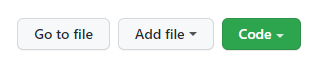
- You will be presented with a text editor of sorts. From there, you can:
- Enter a name for your file (javascript files should end in ".js", SQL files should end in ".sql", and text / documentation files should end in ".md")
- File endings determine the language and highlighting for the whole page. If you want to create a formatted page with code and images/descriptive text, end the file name with ".md" and use embedded code blocks
- Type out or paste in your code.
- Enter a name for your file (javascript files should end in ".js", SQL files should end in ".sql", and text / documentation files should end in ".md")
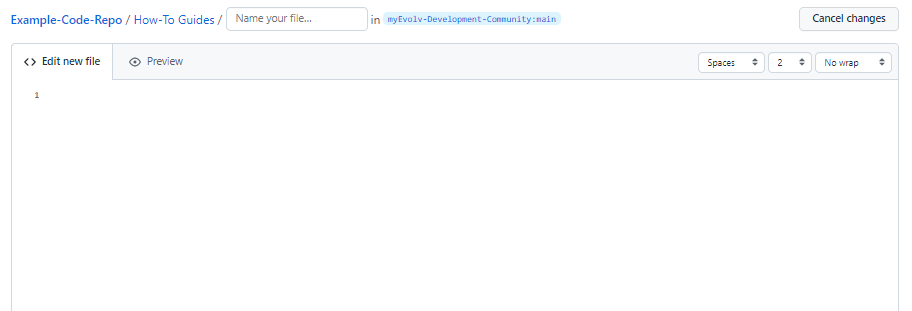
- Once your code is entered and formatted the way you want, enter a title (default is "Create new file") and an extended description of the change you are making.
- Remember that GitHub uses the word "commit" to represent the change you are making to the repository. In this case, the commit consists of adding a new file.
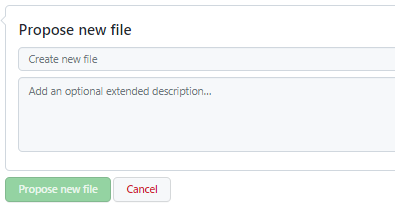
- "Create new file" is currently the default commit title. This is acceptable, but it's recommended to be a little more specific. A properly formed subject line should always be able to complete the following sentence: "If applied, this commit will ".
- While a commit description is optional, it's highly recommended that you add it. Don't assume that your code is self-evident / self-explanatory!
- When you're sure your commit is ready, hit the big green "Propose new file" button to notify the Stewards that you have a contribution to make!
- Note: At this point, a few extra steps may be required to propose your new file depending on the level of access to the repository you have. If you want to read more about what is going on behind the scenes, scroll down to the section labeled "On pull requests". If not, continue reading - you're almost done!
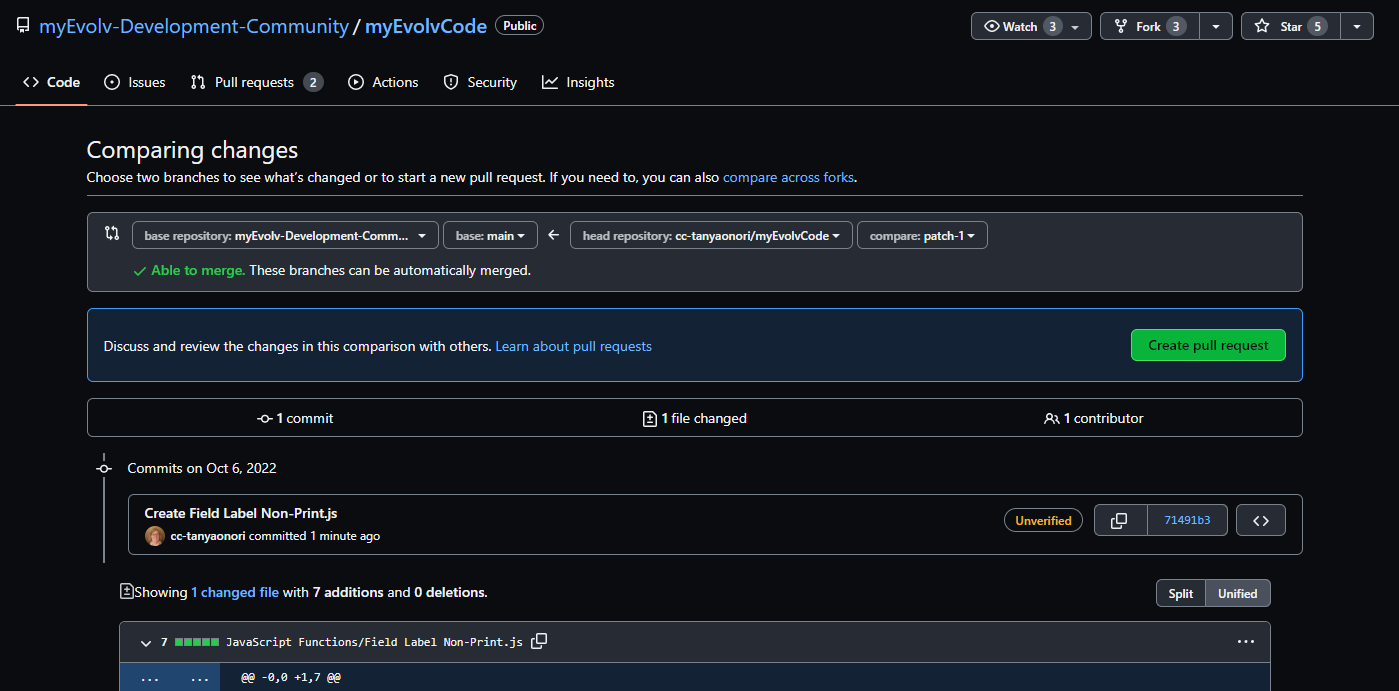
- If you are presented with a screen that looks like the one below, simply click "Create pull request".
- You should now be looking at the screen for creating a new pull request. Optionally, enter a title and description for your pull request, then click "Create pull request".
- Note: At this point, a few extra steps may be required to propose your new file depending on the level of access to the repository you have. If you want to read more about what is going on behind the scenes, scroll down to the section labeled "On pull requests". If not, continue reading - you're almost done!
How to edit a file
While browsing this repository, you may come across a file that you wish to make changes to. Adding new information, clarification, typos, or anything else you think will be helpful is certainly welcome. Follow the below steps to edit a file currently stored in this repository (you will need a GitHub account to do this).
- Navigate to the file. For this example, we'll be using the file located at myEvolvCode/SQL Views/Get Foreign and Primary Keys.md.
- Click the pencil icon at the top right of the file (next to
RawandBlame). - You will be presented with a text editor. Make the necessary changes.
- Most of the files in this repository will be Markdown files (with a file name ending in
.md). If the one you are editing is a Markdown file, you'll see a "Edit file" and a "Preview" tab. Switch between the two to see how raw Markdown text is rendered on GitHub.
- Most of the files in this repository will be Markdown files (with a file name ending in
- When you're done making changes, scroll to the bottom of the page to the section labeled "commit changes". In the two text boxes, describe the edit you are making.
- The first text box is for the title of your change (or commit)
- The second text box is for you to describe the edits you've made to the file.
- After describing your changes, click the big green button to notify the Stewards about your change and create a pull request.
- A member of the Stewards team will review your changes as soon as possible so they can be integrated with the rest of the repository.
How to create an issue
In most GitHub repositories, issues are used as a ticketing system. Here, they will be used to communicate problems and ask questions. Issues have full Markdown support, so feel free to format your issue however you like. You will need to be logged in to your GitHub account to submit an issue.
- First, find the "Issues" button on the top row of the repository (You should see a list like "Code, Issues, Pull requests, Actiona, Security, Insights").
- You will be presented with a list of issues (if there are any). Click the button "New issue" next to the "Labels" and "Milestones" buttons on the right of the screen.
- Enter a clear and concise issue title in the upper text box and leave your questions / comments in the lower text box (you have the option to tag the Stewards by writing
@Stewardsat this point). - When you're ready to send in your issue, press the big green button "Submit new Issue". A member of the Stewards team (or someone else in the myEvolv Development Community) will respond as soon as possible.
On pull requests
Those who built Git and GitHub thought carefully about how to protect repositories, especially public ones. Only those who have the right permissions can make direct changes to a repository.
What about those who do not have access? They should be allowed to at least suggest changes to a repository!
The solution is to allow anyone to create a copy of the repository they wish to modify and store the copy under their own account. This copy is referred to in GitHub language as a "fork". Users can then edit their fork of the repository as much as they want and suggest their changes to the primary repository when they are ready.
Current file structure (subject to change):
myEvolvCode
├── assets
│   └── img
├── Form Design
│   ├── Exports
│   └── Form Overview
├── How-To Guides
│   └── assets
│       └── images
├── JavaScript Functions
└── SQL Views
    └── assets
        └── images
Explore related projects
Asabeneh/30-Days-Of-Python
The 30 Days of Python programming challenge is a step-by-step guide to learn the Python programming language in 30 days. This challenge may take more than 100 days. Follow your own pace. These videos may help too: https://www.youtube.com/channel/UC7PNRuno1rzYPb1xLa4yktw
78,423 starsgrafana/grafana
The open and composable observability and data visualization platform. Visualize metrics, logs, and traces from multiple sources like Prometheus, Loki, Elasticsearch, InfluxDB, Postgres and many more.
77,790 starsredis/redis
For developers, who are building real-time data-driven applications, Redis is the preferred, fastest, and most feature-rich cache, data structure server, and document and vector query engine.
77,309 starsapache/superset
Apache Superset is a Data Visualization and Data Exploration Platform
75,455 stars