
muneeb-devp/reverb
muneeb-devp/reverb has 29 GitHub stars and 1 forks. GitHot measured +3 stars in 24 hours. Last checked 2026-11-18 17:04 UTC. Last push 2026-11-17.
Measured star growth
- in 24h
- +3
- in 7 days
- Collecting history
- in 15 days
- Collecting history
- in 1 month
- Collecting history
Net star changes over overlapping periods, not daily totals. Missing measurements are left blank. Stars measure attention, not software quality.
About
Reactive C# notebooks that are plain .cs files. Change a cell and everything downstream re-runs; the same file runs with dotnet run.
Developer ToolsREADME.md
Original




Reverb is a reactive notebook for C#. A notebook is an ordinary .cs file: change a cell and the cells that use its results run again. The same file runs with dotnet run, diffs cleanly in Git, and needs nothing else installed to work.

- Install
- Quickstart
- Writing notebooks: cells, output, widgets, charts, packages
- The editor: shortcuts, lazy mode, file watching
- Command line and using Reverb in CI
- Rules and diagnostics
- How it compares
- Building from source
Install
You need the .NET 10 SDK.
dotnet tool install -g Reverb.Notebooks
That gives you the reverb command. To update later, run dotnet tool update -g Reverb.Notebooks.
Quickstart
reverb new hello.cs # creates a starter notebook and opens it in your browser
Or try one of the samples:
git clone https://github.com/muneeb-devp/reverb
cd reverb/samples
reverb edit sales-explorer.cs
| Sample | What it shows |
|---|---|
| sales-explorer.cs | A year of sales loaded from a CSV, with a region dropdown, a smoothing slider and charts |
| loan-calculator.cs | Sliders for a loan: payment, balance chart, yearly table. Nice with reverb run |
| github-explorer.cs | Calls the public GitHub API for a repository and its releases |
| linq-tour.cs | LINQ, one idea per cell |
Writing notebooks
Here's a complete notebook:
#!/usr/bin/env dotnet
#:package [email protected]
// reverb-notebook v1

// %% setup
using Reverb;

// %% [markdown]
// # Sales explorer
// Drag the slider to change the minimum order size.

// %% id=data
var rng = new Random(42);
string[] regions = ["West", "East", "Central"];
var orders = Enumerable.Range(1, 500)
    .Select(i => new Order(i, regions[i % 3], Math.Round(rng.NextDouble() * 1000, 2)))
    .ToList();

// %% id=threshold
var threshold = Ui.Slider("Minimum order", min: 0, max: 1000, value: 400);

// %% id=summary
var big = orders.Where(o => o.Total >= threshold.Value).ToList();
big.GroupBy(o => o.Region)
   .Select(g => new { Region = g.Key, Count = g.Count(), Revenue = Math.Round(g.Sum(o => o.Total), 2) })
   .Dump("Orders above threshold");

// %% types
record Order(int Id, string Region, double Total);
In the editor, dragging the slider re-runs summary and nothing else. Outside the editor it's a normal program:
$ dotnet run sales.cs
== Orders above threshold ==
Region   Count  Revenue
-------  -----  --------
East     98     68284.24
Central  106    74980.33
West     91     65473.05
Widgets use their default values there, and output is printed as text.
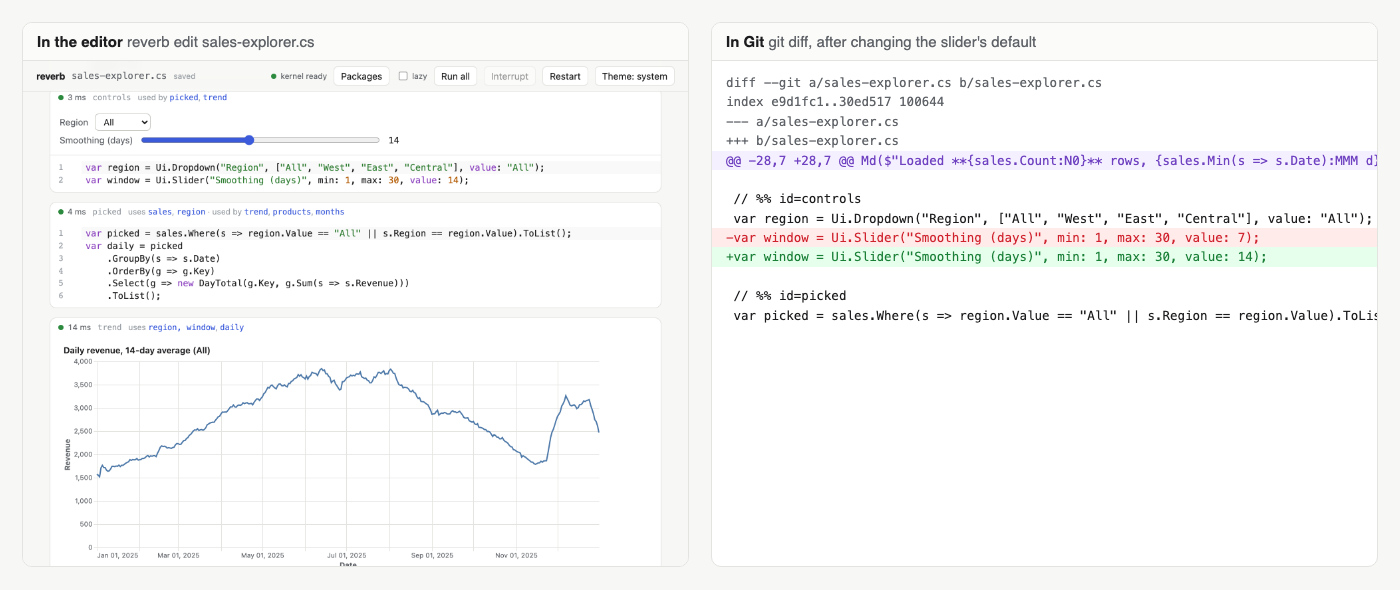
There's no JSON and no saved output in the file, so changing one line of code is a one-line diff:
Cells
Cells are separated by // %% lines (the "percent format" that Jupytext, VS Code and Spyder also read).
| Marker | Cell |
|---|---|
// %% setup |
using directives. There's one, and it comes first |
// %% id=name |
A code cell. name is how other cells and the editor refer to it |
// %% [markdown] |
Markdown, written as // comments |
// %% types |
Records, classes and other type declarations. There's one, and it comes last |
Code cells can carry a couple of extra attributes:
// %% id=report name="Monthly report" hide_code
name is the label shown in the editor, and hide_code folds the code away so only the output shows.
The top of the file holds #:package lines (see Packages) and the // reverb-notebook v1 header. Reverb adds anything missing, including cell ids, the first time it opens a file.
Output
orders.Dump();                  // tables for collections, property grids for objects
orders.Dump("Big orders");      // with a title; Dump returns its argument, so it can end a chain
Md($"**{orders.Count}** orders"); // Markdown
Html("<em>hi</em>");            // raw HTML
Display(image);                 // same as Dump, as a statement
Console.WriteLine("plain text");
Md, Html and Display come from using static Reverb.Notebook;, which reverb new puts in the setup cell.
Register a formatter to control how your own types display:
Formatters.Register<Money>(m => Output.FromHtml($"<b>{m.Amount:C}</b>", text: $"{m.Amount:C}"));
Widgets
A widget is a variable. Any cell that reads .Value runs again when the widget changes.
| Widget | .Value |
|---|---|
Ui.Slider("Size", min: 0, max: 100, value: 50, step: 5) |
double |
Ui.Dropdown("Region", ["West", "East"], value: "East") |
the selected item (any type) |
Ui.Text("Name", value: "Ada") |
string |
Ui.Checkbox("Show totals", value: true) |
bool |
Ui.Number("Years", 30, min: 1, max: 40) |
the number type you passed (int, decimal, ...) |
Ui.Button("Refresh") |
how many times it's been clicked |
A cell that reads a button's Value runs again on every click, which is handy for re-fetching data.
Charts
Chart.Line(sales, x: s => s.Date, y: s => s.Revenue);
Chart.Bar(byProduct, x: p => p.Product, y: p => p.Units, title: "Units by product");
Chart.Scatter(points, x: p => p.Height, y: p => p.Weight, series: p => p.Species);
Chart.VegaLite(json);           // any Vega-Lite spec
Axis titles default to the lambda bodies (Date, Revenue). Pass xTitle: and yTitle: to change them, and series: to split the data into colored series. Charts follow the editor's light or dark theme, and under dotnet run they print a one-line summary.
Packages
Add NuGet packages with #:package lines at the top of the file, or from the Packages panel in the editor:
#:package [email protected]
The first time a set of packages is used, Reverb builds a kernel with them, which takes a few seconds. After that the build is cached in ~/.reverb/kernels. Your nuget.config is respected.
Data files, arguments, long-running cells
var lines = File.ReadAllLines(Path.Combine(Notebook.Folder, "data.csv")); // relative to the notebook
var input = args.Length > 0 ? args[0] : "default.csv";                    // reverb exec nb.cs -- other.csv
await Task.Delay(5000, Notebook.CancellationToken);                       // stops when you press Interrupt
The editor
reverb edit notebook.cs starts a local server and opens the notebook in your browser. Saving writes the .cs file, and nothing else.
| Keys | Where | What it does |
|---|---|---|
| Ctrl/Cmd+Enter | anywhere | Run the cell |
| Shift+Enter | anywhere | Run the cell and move to the next one |
| Ctrl/Cmd+Shift+Enter | anywhere | Run all cells |
| Ctrl/Cmd+S | anywhere | Save now (edits are also saved automatically) |
| Esc | in a cell | Stop editing and select the cell |
| Enter | cell selected | Edit the cell |
| J / K or arrows | cell selected | Select the next or previous cell |
| A / B | cell selected | Add a cell above or below |
| D D | cell selected | Delete the cell |
Some other things worth knowing:
- Completions, hover and signature help are Roslyn's, and they see every earlier cell. Hovering a variable tells you which cell defines it.
- Errors show up as you type, under the cell they belong to. Some have a fix button, such as moving a stray
usinginto the setup cell. - With lazy ticked in the toolbar, an edit marks dependent cells as stale instead of running them, which helps when cells are slow. The setting is saved in the file's header (
// reverb-notebook v1 lazy). - The editor watches the file. Change it in VS Code or Vim, or let a coding agent edit it, and the notebook reloads and re-runs what changed.
- The theme button switches between light, dark and your system setting.
Command line
| Command | What it does |
|---|---|
reverb new <file.cs> |
Create a notebook and open it (--no-edit to just create it) |
reverb edit <file.cs> |
Open the editor |
reverb run <file.cs> |
Serve the notebook as an app: outputs and widgets, no code |
reverb exec <file.cs> [--json] [-- args] |
Run it in the terminal and print the outputs. Exits 1 if a cell fails |
reverb check <file.cs> |
Print compiler and notebook diagnostics. Exits 1 if there are errors |
reverb export <file.cs> --html [-o out.html] [--no-code] |
Run it and write a single HTML page that works offline |
reverb convert <file.ipynb | file.dib> [-o out.cs] [--force] |
Convert a Jupyter or Polyglot notebook |
new, edit and run also take --port <n> and --no-browser. run takes --host <address> to serve beyond localhost.
reverb convert turns #r "nuget: ..." into #:package, moves usings into the setup cell and types into the types cell, and prints a warning for anything it couldn't bring over, with the cell it came from.
Using Reverb in CI
- uses: actions/setup-dotnet@v4
  with:
    dotnet-version: 10.0.x
- run: dotnet tool install -g Reverb.Notebooks
- run: reverb check notebooks/report.cs
- run: reverb exec notebooks/report.cs
- run: reverb export notebooks/report.cs --html -o report.html
You don't even need the tool to check that a notebook still runs: dotnet run notebooks/report.cs does that.
Rules and diagnostics
Reverb works out what each cell reads and writes from Roslyn's semantic model. For that to be reliable there are a few rules, all reported while you type and by reverb check:
| Id | Rule | What to do |
|---|---|---|
| RVB001 | A variable can only be assigned in the cell that declares it | Declare a new variable instead: var count2 = ... |
| RVB002 | Anonymous types can't be used across cells | Use a record or a named tuple |
| RVB003 | No top-level return, and no goto into another cell |
Use if/else to skip the rest of a cell, or throw to stop it |
| RVB004 | Usings go in the setup cell, types in the types cell | Click the fix button, or move the line |
| RVB005 | Changing another cell's object (e.g. list.Add) won't re-run its readers (warning) |
Prefer records, with and LINQ |
| RVB006 | A local function can't be used above the cell that declares it | Move the function's cell up, or the function into an earlier cell |
| RVB007 | Some values can't be passed between cells (ref structs, pointers) | Keep that code in one cell, or use a static method in the types cell |
The C# compiler covers the rest. Top-level variables can't be declared twice or used before they're declared, so the order of cells in the file is always an order they can run in. One thing Reverb can't see is state you keep in static fields and singletons, which survives between runs. If something looks off, restart the kernel.
To check the whole thing actually holds, a fuzzer builds random notebooks, makes random edits, and compares the result with a fresh run after every step. CI runs 500 of those sequences on every push.
How it compares
| Reverb | Polyglot Notebooks | LINQPad | Verso | |
|---|---|---|---|---|
| Reactive (dependents re-run) | Yes | No | No | No |
Notebook is a plain .cs file |
Yes | No (.ipynb, .dib) |
No (.linq) |
No |
Runs with dotnet run, no tool installed |
Yes | No | No | No |
| Open source | Yes | Yes | No | Yes |
| Actively developed | Yes | Deprecated in 2026 | Yes | Yes |
Polyglot Notebooks (.NET Interactive) runs cells REPL-style, so what's in memory depends on the order you ran things. It does support many languages, which Reverb doesn't. Jupyter with a C# kernel uses the same engine. reverb convert brings the C# cells from either one over.
LINQPad is a great C# scratchpad with excellent database support, but it isn't reactive or open source, and its files need LINQPad to run.
Verso is an open-source notebook in the Jupyter style, with cells run in the order you choose and its own file format.
Security
The editor listens on 127.0.0.1 only, and the address it opens contains a random token. Connections without the token are refused, and so are requests from other websites, so a page you visit can't run code through your notebook.
reverb run --host <address> serves an app beyond localhost, for example to show it on your network. It prints a warning, because anyone who can reach that address can use the widgets, and the cells run as you.
Reverb sends no telemetry.
How it works
Every notebook is compiled twice. The whole file is compiled as one program, the way dotnet run sees it, and that gives the diagnostics and the dependency graph, so the editor never disagrees with the compiler. Then each cell is compiled on its own into a small assembly that reads its inputs from a value store and writes its outputs back. Cells you haven't changed aren't recompiled, so with a warm kernel a simple edit shows its output in about 27 ms (on an M1 Pro).
The cell assemblies load into collectible AssemblyLoadContexts, so an edited cell's old code is unloaded rather than piling up. Your code runs in a separate kernel process, so an infinite loop or a crash doesn't take the editor down.
Building from source
You'll need the .NET 10 SDK and Node.js 22 or newer.
git clone https://github.com/muneeb-devp/reverb
cd reverb
dotnet build Reverb.slnx
dotnet test Reverb.slnx
The build runs npm to bundle the editor and embeds it in the CLI. When you're only working on the engine, dotnet build -p:SkipFrontendBuild=true skips that step and reuses whatever is in frontend/dist.
Run the CLI straight from the repo:
dotnet run --project src/Reverb.Cli -- edit samples/sales-explorer.cs
dotnet run --project src/Reverb.Cli -- exec tests/fixtures/sales.cs
dotnet run --project src/Reverb.Cli -- check tests/fixtures/diag-errors.cs
The browser tests use Playwright against the real CLI, so build first:
cd tests/e2e
npm ci
npx playwright install chromium
npx playwright test
| Folder | What's in it |
|---|---|
src/Reverb.Format |
Reading and writing the .cs notebook format, upgrades, conversion |
src/Reverb.Analysis |
Roslyn analysis: dependencies, diagnostics, code fixes |
src/Reverb.Kernel |
Compiles and runs cells in the kernel process |
src/Reverb.Runtime |
The small library notebooks reference: Dump, Ui, Chart |
src/Reverb.Server |
The editor's web server |
src/Reverb.Cli |
The reverb command |
frontend |
The editor (React and CodeMirror) |
Releases are published from tags: pushing v1.2.3 runs the release workflow, which tests, packs, smoke-tests the installed tool and publishes both packages to NuGet.
Contributing
Issues and pull requests are welcome. If the consistency fuzzer finds a bug, the fix belongs in the engine, never in a looser check.