
mult1v4c/hestia-core
mult1v4c/hestia-core has 685 GitHub stars and 45 forks. GitHot measured 0 stars in 24 hours. Last checked 2026-11-09 15:53 UTC. Last push 2026-11-05.
A grid-based, modular dashboard built entirely from HTML, CSS, and JS with the ability to create your custom API integrations.
What you can do
- Full Base16 palette support (Dracula, Nord, Monokai, etc.).
- Customize every pixel: gap sizes, corner radii, fonts, and shadows.
- Create and save your own custom presets directly in the UI.
- Powered by the View Transitions API for butter-smooth animations when moving or resizing widgets.
Measured star growth
- in 24h
- 0
- in 7 days
- Update delayed
- in 15 days
- Update delayed
- in 1 month
- Update delayed
Net star changes over overlapping periods, not daily totals. Missing measurements are left blank. Stars measure attention, not software quality.
README.md
Original🔥 Project Hestia v0.1.0
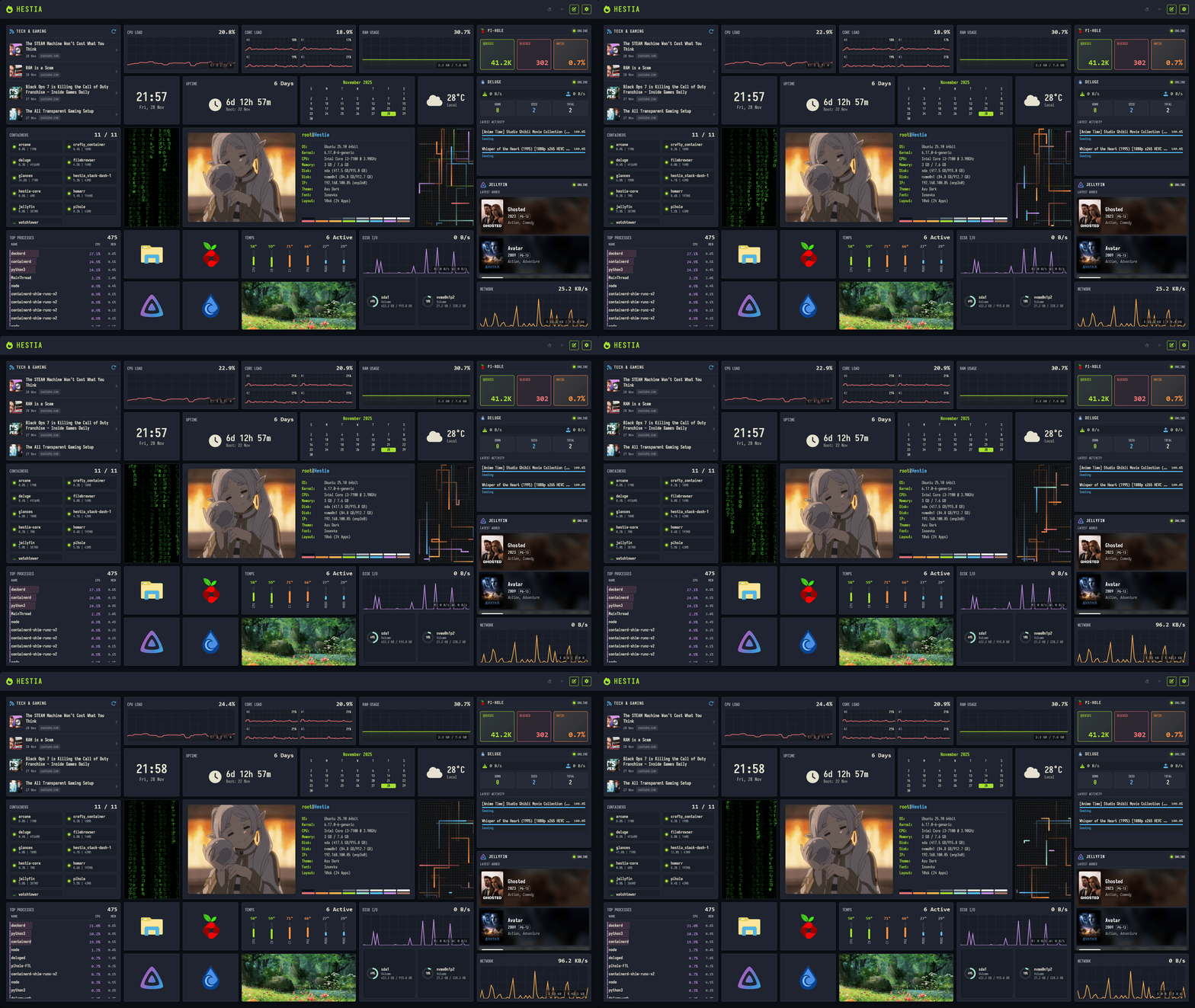
Welcome to Project Hestia! This is a modular, grid-based dashboard that runs entirely in the browser (no complex backend required) but includes powerful integrations for your homelab services.
This was made for personal use but as I made more features available, I thought this could be shared with anyone willing to learn how the framework operates.
Inspired by the likes of Homarr, Dash., and Homepage.
✨ Features
- 🎨 Deep Theming:
- Full Base16 palette support (Dracula, Nord, Monokai, etc.).
- Customize every pixel: gap sizes, corner radii, fonts, and shadows.
- Create and save your own custom presets directly in the UI.
- ⚡ Snappy Grid System:
- Powered by the View Transitions API for butter-smooth animations when moving or resizing widgets.
- Drag-and-drop layout with auto-saving.
- 💾 Smart Persistence:
- No Database Required: Configuration saves to
localStorage. - IndexedDB Support: Upload high-res images directly to the dashboard without hitting storage quotas.
- No Database Required: Configuration saves to
- 🐳 Homelab Integrations:
- Connects to Glances, Pi-hole, Deluge, and Jellyfin.
- Includes a pre-configured Nginx proxy to handle CORS issues automatically.
📦 Included Apps
Hestia comes with a suite of built-in apps. You can add as many as you like!
🏠 Essentials
- Clock: Digital clock with 12h/24h formats.
- Weather: Live local weather powered by Open-Meteo.
- Calendar: A simple monthly view.
- Notes: Sticky notes with full Markdown support (Lists, Checkboxes, Headers).
- Links: Bookmarks with "Cover" mode and "Colorize" options to match your theme.
📊 Data & Homelab
- Glances: Detailed server monitoring (CPU, Mem, Disk I/O, Network, Sensors). Supports Docker container lists!
- Pi-hole: View total queries, blocked count, and ratio.
- Deluge: Monitor download/upload speeds and active torrent queues.
- Jellyfin: Shows "Now Playing" backdrop or a shelf of "Latest Added" media.
- System Fetch: A "Neofetch-style" info card for your browser or server.
🎨 Visuals
- Image Frame: Display photos or logos (upload or URL).
- Matrix Rain: The classic falling code effect.
- Pipes: A retro 3D pipes screensaver widget.
🚀 Getting Started
Option 1: Docker (Recommended)
This is the best way to run Hestia if you plan to use the API integrations (Glances, Pi-hole, etc.), as the included Nginx config handles CORS permissions for you.
Clone the repository:
git clone https://github.com/mult1v4c/hestia-core
cd hestia-core
Build and Run:
docker build -t hestia-core .
docker run -d -p 8080:80 --name hestia hestia-core
Visit
http://localhost:8080!
Option 2: Static / Manual
Since Hestia is vanilla JavaScript, you can run it on any web server.
# Example using Python
python3 -m http.server 8000
Note: Without the Nginx proxy included in the Dockerfile, some external APIs (like Deluge or Pi-hole) might block connections due to CORS policies.
⚙️ Configuration Guide
Using the Proxy (Docker Only)
To make the integrations work smoothly, Hestia's default.conf sets up internal proxies. When configuring apps in the dashboard, use these relative paths:
- Glances URL:
/glances-api(choose the API version installed on your server) - Pi-hole v6 URL:
/pi-api/api(v5:/pi-api/admin/api.php) - Deluge URL:
/deluge-api/json - Jellyfin URL:
/jellyfin-api/
Note: You will need to update default.conf to point to your actual server IPs before building the Docker image!
Data Backup
You can export your entire theme and grid layout to a JSON file via the Settings Panel (Gear Icon). This is great for backing up your setup or sharing themes with friends!
[!Warning] CHECK YOUR JSON FILES BEFORE SHARING! The export function will export ALL of the dashboard settings, including themes, color palettes, and app data and settings. Which means API keys, IP addresses, and passwords included. I've included safeguards to clean keys, user IDs, and other sensitive information. But still check to make sure!
🛠️ Developer Guide
Want to build your own widget? Hestia uses a simple class-based system.
- Create a file:
js/apps/myApp.js - Extend BaseApp:
import { BaseApp } from "./baseApp.js";
import { registry } from "../registry.js";

class MyApp extends BaseApp {
    // 1. Render HTML
    async render(app) {
        return `
            <div class="my-app">
                Hello ${app.data.name || 'World'}!
            </div>
        `;
    }

    // 2. Logic after DOM insertion
    onMount(el, app) {
        console.log("I am alive!");
    }
}

// 3. Register
registry.register('my-app', MyApp, {
    label: 'My Cool App',
    category: 'static',
    defaultSize: { cols: 2, rows: 1 },
    settings: [
        { name: 'name', label: 'Who to greet?', type: 'text' }
    ],
    css: `.my-app { color: var(--brand-primary); font-weight: bold; }`
});
- Import it: Add
import './myApp.js';tojs/apps/appIndex.js.
📄 License
Project Hestia is open-source and licensed under the MIT License.
Widget fixes and troubleshooting
Data widgets share loading, setup, authentication, error and offline states, with automatic recovery and a Retry button. Temperature graphs overlay all temperature sensors with automatic colors; Disk I/O uses one color per device, solid reads and dashed writes. Storage rows describe deduplicated filesystems, not physical disk sizes. RSS public-proxy fallback is opt-in in widget settings.
The Nginx configuration uses Docker DNS (127.0.0.11). Connect Hestia and the services to the same user-defined Docker network, or update the upstream addresses in default.conf. Existing saved widget URLs are retained; switch Glances widgets to /glances-api if you want same-origin proxying. Rebuild/redeploy the container to apply source and Nginx changes.
The dashboard remains a static site with no Node.js runtime requirement.
Explore related projects
awesome-selfhosted/awesome-selfhosted
A list of Free Software network services and web applications which can be hosted on your own servers
335,549 starsimmich-app/immich
High performance self-hosted photo and video management solution.
118,645 starsStirling-Tools/Stirling-PDF
#1 PDF Application on GitHub that lets you edit PDFs on any device anywhere
96,149 starslouislam/uptime-kuma
A fancy self-hosted monitoring tool
93,425 stars