
mrgogo7/nzxt-esc
mrgogo7/nzxt-esc has 63 GitHub stars and 4 forks. GitHot measured +1 stars in 24 hours. Last checked 2026-11-18 12:44 UTC. Last push 2026-11-14.
What you can do
- Free-form layout editor - Drag, resize, rotate, layer, lock, rename, and precisely position every element.
- Live NZXT CAM sensor data - Build custom CPU, GPU, RAM, liquid-temperature, power, frequency, and fan-speed displays.
- Advanced graphics - Combine radial, linear, circular, and historical sensor graphics in one layout.
- Animated backgrounds - Use colors, gradients, local images, GIFs, MP4 video, direct media URLs, YouTube, and Pinterest sources.
Measured star growth
- in 24h
- +1
- in 7 days
- Collecting history
- in 15 days
- Collecting history
- in 1 month
- Collecting history
Net star changes over overlapping periods, not daily totals. Missing measurements are left blank. Stars measure attention, not software quality.
About
NZXT Kraken LCD screen customization editor for NZXT CAM Web Integration. Create custom display faces with drag-and-drop editing, images, GIFs, videos, CPU/GPU temperatures and system stats, infographics, clockfaces and date displays, Now Playing, album art, and audio visualizers.
Web & AppsREADME.md
OriginalNZXT-ESC - NZXT Kraken LCD Customization Editor for NZXT CAM Web Integration
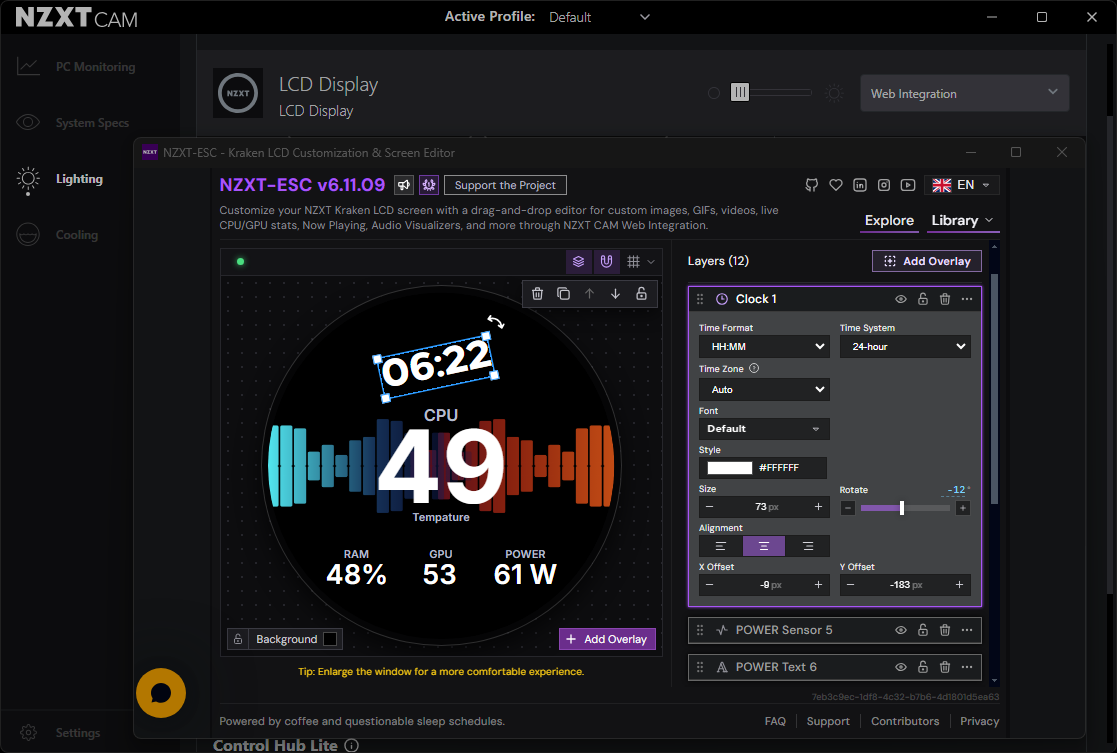
Enhanced Screen Customization Layout Editor for NZXT Kraken
Customize your NZXT Kraken LCD with drag-and-drop layouts, CPU/GPU temperatures and system stats, images, GIFs, videos, clock faces, date displays, graphs, Now Playing, album art, and audio visualizers through NZXT CAM Web Integration.




Open in NZXT CAM · Open Live Preview · Preset Gallery · Supported Kraken Models · Features · Quick Start · FAQ
Official Domain
NZXT-ESC now uses https://nzxt-esc.com/ as its official domain.
The previous nzxt-esc.pages.dev address permanently redirects to the new domain.
[!NOTE] NZXT-ESC is an independent community project. It is not affiliated with, sponsored by, or endorsed by NZXT.
If NZXT-ESC improved your setup, you can support its continued development:

NZXT Kraken LCD customization without fixed layouts
NZXT-ESC turns the NZXT Kraken display into a free-form canvas. Build a custom LCD screen by placing each sensor, graphic, clock, image, or media element exactly where you want it. Resize, rotate, reorder, rename, lock, and style elements while watching the result update live through NZXT CAM.
The core editor requires no account and no separate end-user installation. Presets and local media stay in browser storage. Optional music overlays use the local NowPlaying.WebSocket Windows companion app.
Supported NZXT Kraken LCD Models
NZXT-ESC supports NZXT Kraken AIO liquid coolers with LCD displays and NZXT CAM Web Integration, including current and previous-generation Kraken Elite, Kraken Plus, Kraken, and Kraken Z models.
NZXT One, NZXT Player Three, NZXT Player 3, NZXT Kraken Elite (2024), NZXT Kraken Elite 240, NZXT Kraken Elite 360, NZXT Kraken Elite 240 RGB, NZXT Kraken Elite 280 RGB, NZXT Kraken Elite 360 RGB, NZXT Kraken Elite 420 RGB, NZXT Kraken Plus (2025), NZXT Kraken Plus 240, NZXT Kraken Plus 280, NZXT Kraken Plus 360, NZXT Kraken Plus 240 RGB, NZXT Kraken Plus 360 RGB, NZXT Kraken Elite (2023), NZXT Kraken Elite 240 (2023), NZXT Kraken Elite 280 (2023), NZXT Kraken Elite 360 (2023), NZXT Kraken Elite 240 RGB (2023), NZXT Kraken Elite 280 RGB (2023), NZXT Kraken Elite 360 RGB (2023), NZXT Kraken (2023), NZXT Kraken 240, NZXT Kraken 280, NZXT Kraken 360, NZXT Kraken 240 RGB, NZXT Kraken 280 RGB, NZXT Kraken 360 RGB, NZXT Kraken Z Series, NZXT Kraken Z53, NZXT Kraken Z63, NZXT Kraken Z73, NZXT Kraken Z53 RGB, NZXT Kraken Z63 RGB, NZXT Kraken Z73 RGB are Supported
NZXT-ESC automatically adapts the layout to the Kraken LCD resolution, size, and display shape reported through the NZXT CAM API, allowing custom layouts, sensor overlays, animated backgrounds, graphics, and media to be rendered through NZXT CAM Web Integration.
Quick Start
Open directly in NZXT CAM

- Click Open NZXT-ESC in NZXT CAM.
- Allow your browser to open NZXT CAM.
- Confirm Load Web Integration.
- Open the new Web Integration card and select Configure.
- Create your layout; changes are synchronized with the Kraken display.
Manual setup inside NZXT CAM
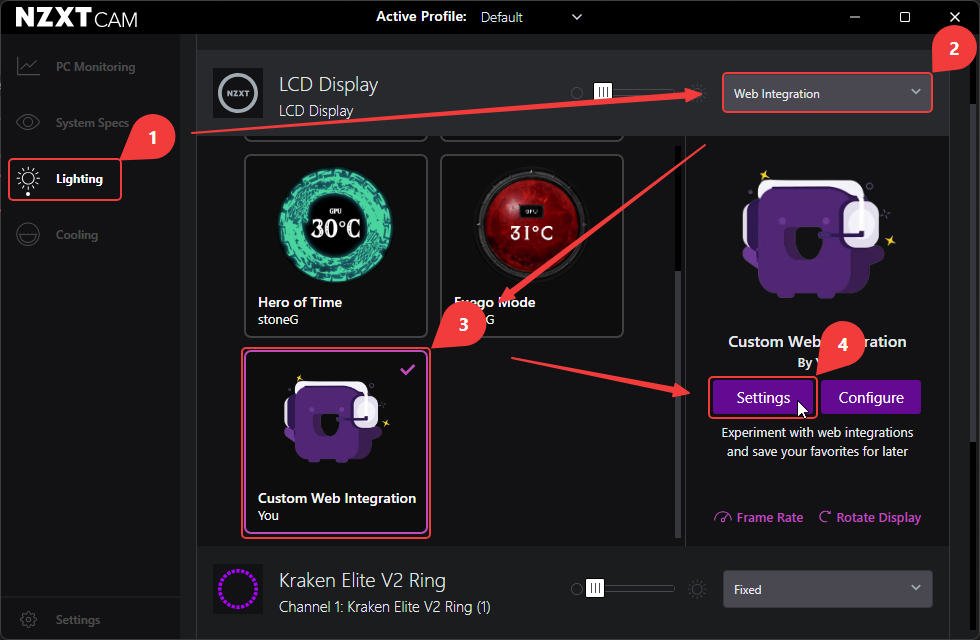
- Open NZXT CAM.
- Go to Lighting → Kraken → LCD Display.
- Select Web Integration.
- Open the Custom Web Integration settings.
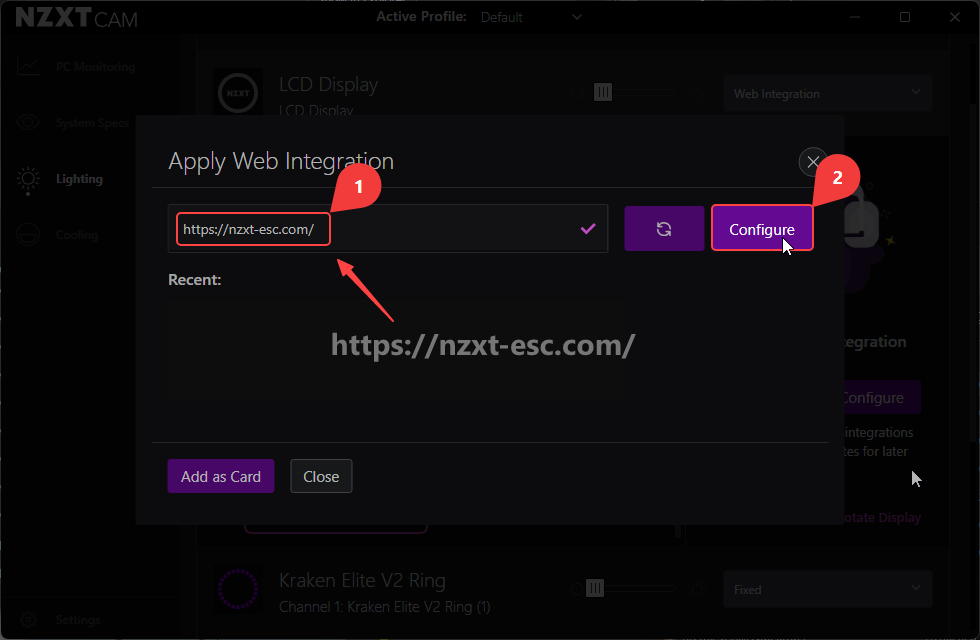
- Copy and paste the following URL::
https://nzxt-esc.com/
- Select Apply, then Add as Card.
- Open the new card and select Configure.
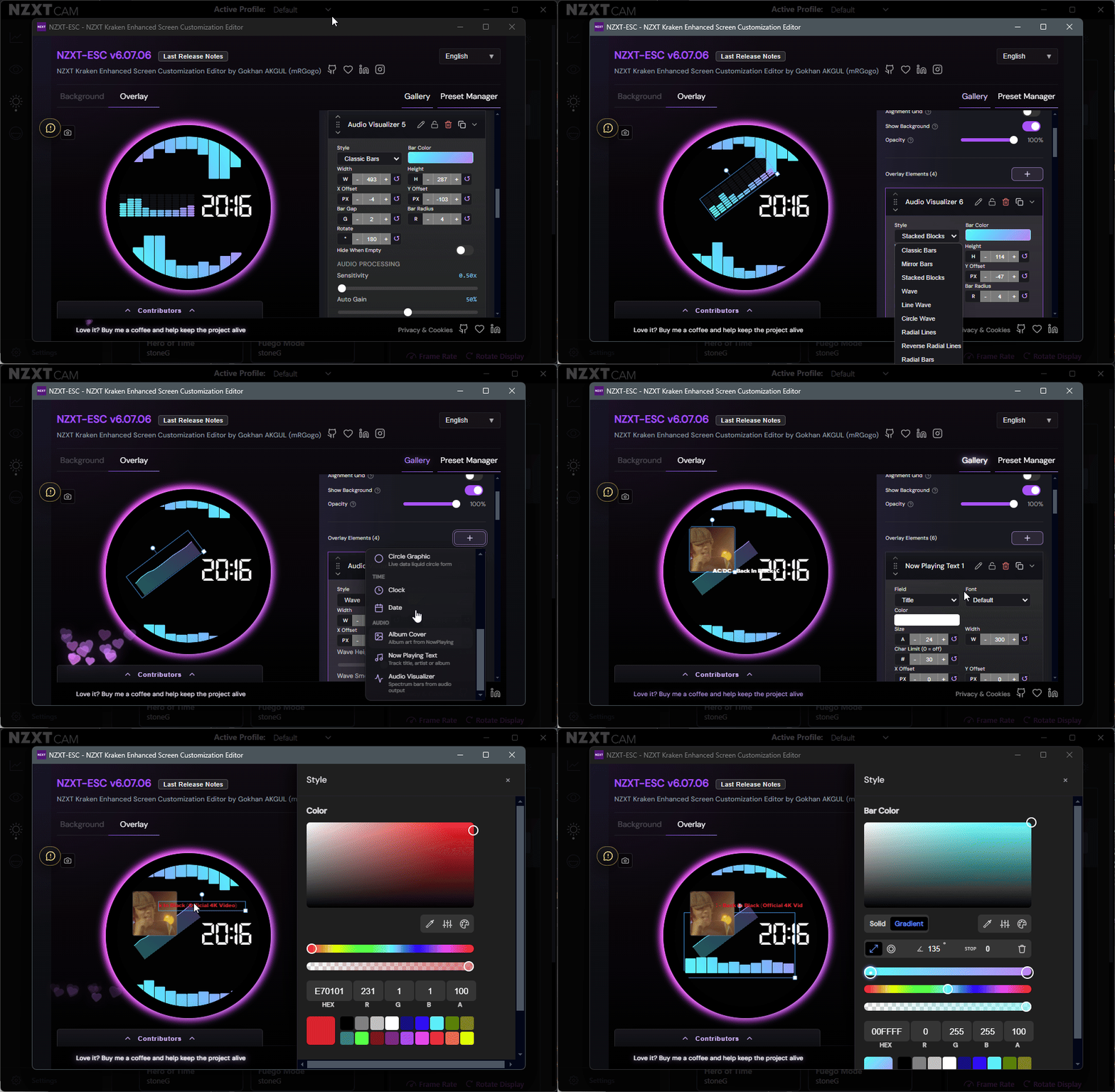
See it in action
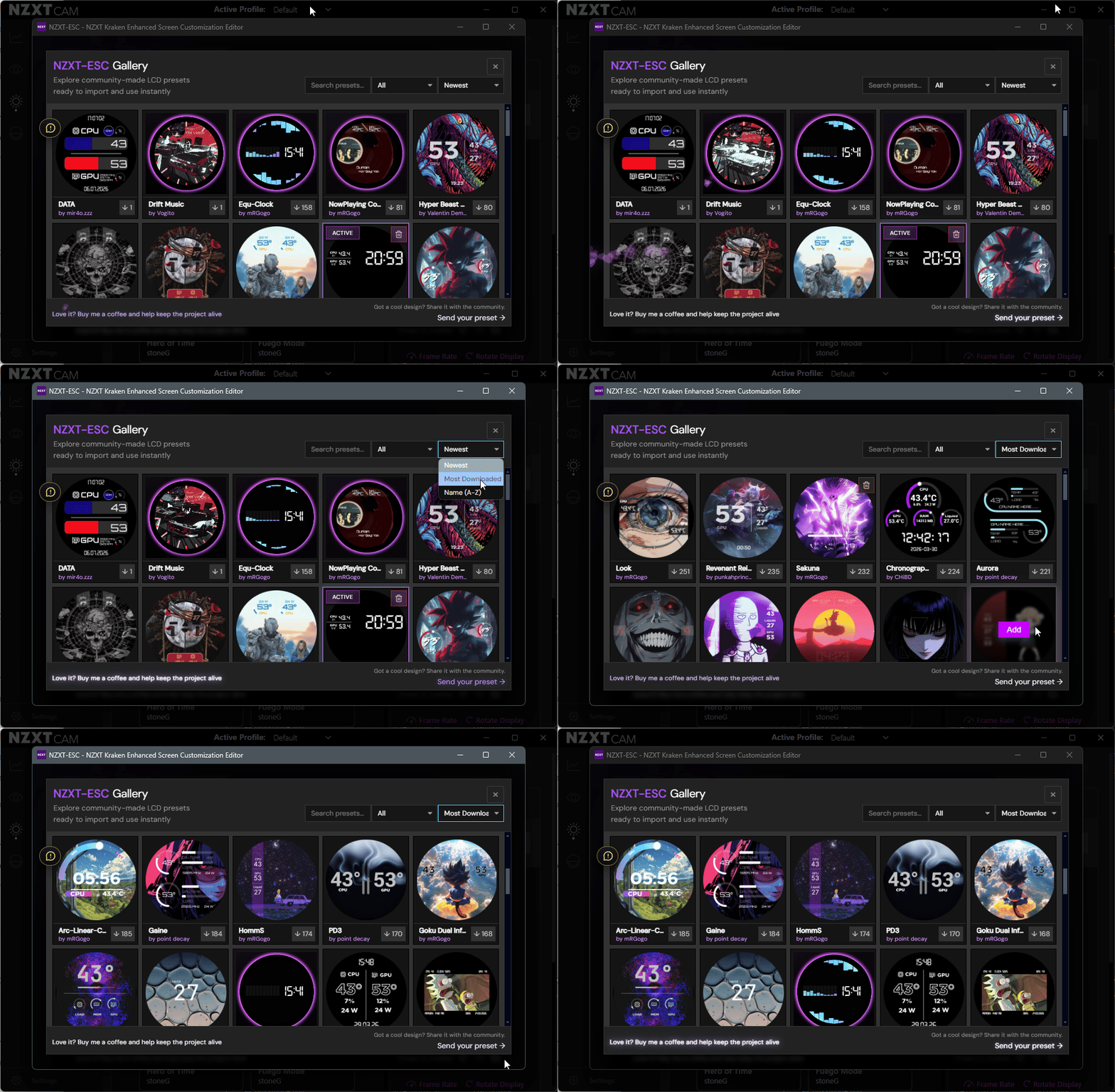
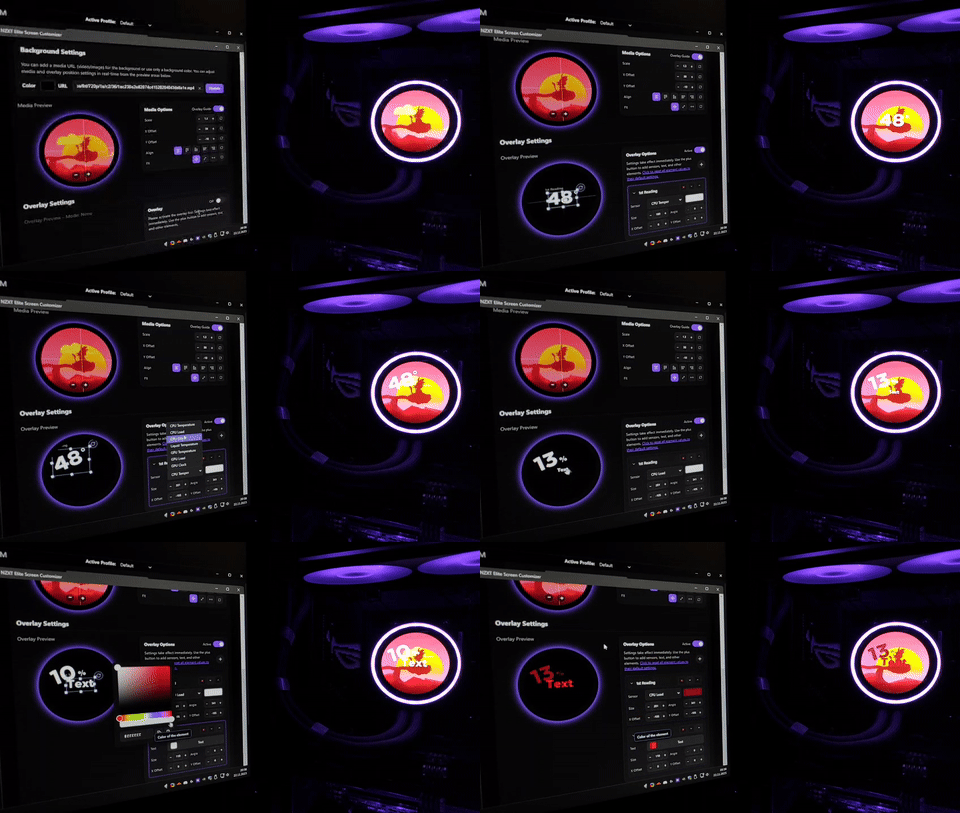
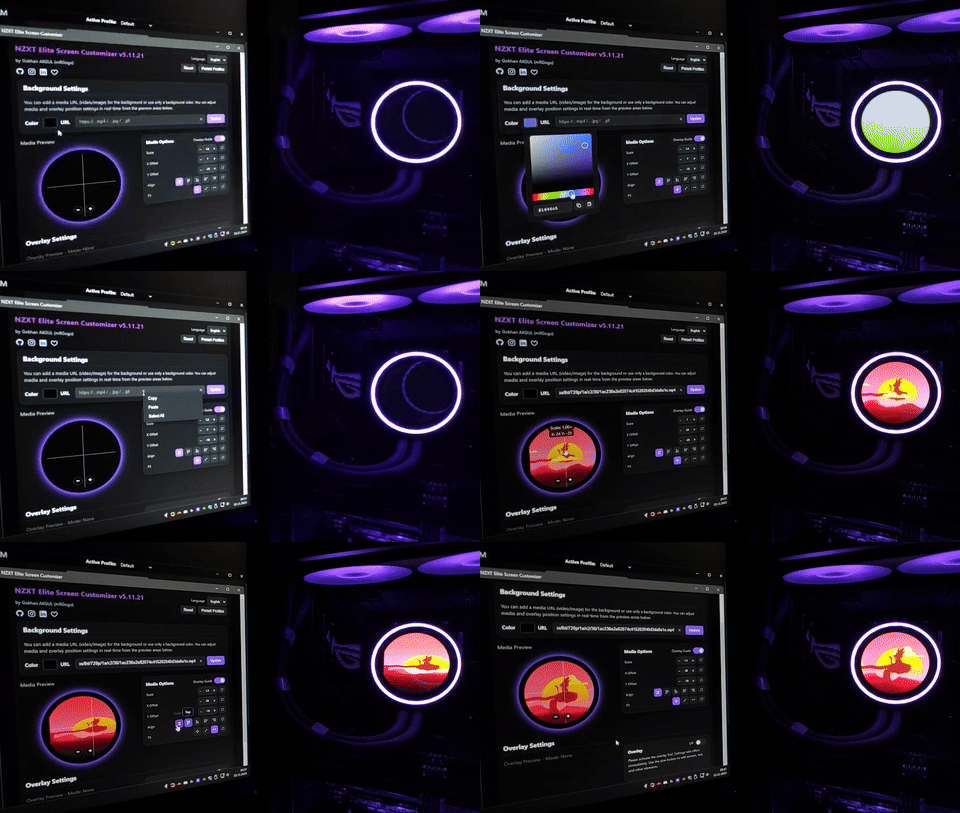
Features
| Capability | What it gives you |
|---|---|
| Free-form layout editor | Drag, resize, rotate, layer, lock, rename, and precisely position every element. |
| Live NZXT CAM sensor data | Build custom CPU, GPU, RAM, liquid-temperature, power, frequency, and fan-speed displays. |
| Advanced graphics | Combine radial, linear, circular, and historical sensor graphics in one layout. |
| Animated backgrounds | Use colors, gradients, local images, GIFs, MP4 video, direct media URLs, YouTube, and Pinterest sources. |
| Now Playing integration | Display album artwork, track information, and sound-reactive visuals from a local Windows client. |
| Explore and Library | Import community presets, edit every part, organize favorites, and maintain your own local preset collection. |
| Local-first storage | Presets use LocalStorage; local media uses IndexedDB and remains on your device. |
| Multilingual editor | Use the interface in 25 supported languages. |
Overlay elements
The current editor groups overlay elements into four clear categories:
| Content | Data | Time | Audio |
|---|---|---|---|
| Text | Sensor | Digital Clock | Album Cover |
| Shape | Radial Graphic | Analog Clock | Now Playing Text |
| Icon | Linear Graphic | Date | Audio Visualizer |
| Sticker | Circle Graphic | ||
| Image | Sensor Chart |
Each element uses the same visual workflow wherever possible: select it in the preview or layer list, then adjust its position, size, rotation, order, style, and type-specific settings.
Hardware monitoring
Create live layouts using available NZXT CAM monitoring data, including:
CPU temperature · CPU load · CPU frequency · CPU power · CPU fan speed · GPU temperature · GPU load · GPU frequency · GPU power · GPU fan speed · RAM usage · liquid temperature
Multi-GPU systems can automatically select the active GPU or use a specific GPU. The browser editor also provides mock values when the NZXT CAM API is unavailable, so layouts can still be designed and previewed.
Backgrounds and media
Use a solid color or gradient as the base, then add media from:
- Local PNG, JPG, GIF, WebP, or MP4 files
- Direct image and video URLs
- YouTube videos
- Pinterest media links
Background media can be positioned, scaled, fitted, and combined with any overlay layout. Local files are stored in IndexedDB and are not uploaded by NZXT-ESC.
Presets, Explore, and Library
- Save and organize up to 20 custom presets in the local Library.
- Build each preset with up to 40 overlay elements.
- Import and export editable preset files for backup or sharing.
- Browse community-made layouts through Explore.
- Add an Explore preset to the Library, customize it, and make it your own.
- Discover downloadable designs in the NZXT Kraken LCD Preset Gallery.
- Keep editing and Kraken rendering synchronized across the two NZXT CAM views.
NZXT Kraken LCD Preset Gallery
Looking for inspiration? Browse the NZXT Kraken LCD Gallery to discover community-created LCD layouts, animated screens, sensor designs, clock faces, and downloadable presets. Every preset can be added to NZXT-ESC and fully customized.
Now Playing and Audio Visualizer
The optional NowPlaying.WebSocket Windows client runs locally and sends media-session and audio-spectrum data to NZXT-ESC through a local WebSocket connection.
Use it to add:
- Album Cover current artwork with sizing, border, and corner controls
- Now Playing Text title, artist, or album with long-text scrolling
- Audio Visualizer customizable real-time spectrum and waveform visuals
It is not limited to Spotify. The companion app reads supported Windows media sessions and system audio output from browsers, media players, and other apps.
Languages
NZXT-ESC is available in 25 languages. Open the NZXT Kraken LCD customization editor in your language:
English · Türkçe · Bahasa Indonesia · Bahasa Melayu · Čeština · Deutsch · Español · Filipino · Français · Magyar · Italiano · Nederlands · Polski · Português · Svenska · Tiếng Việt · العربية · 繁體中文 · Ελληνικά · हिन्दी · 日本語 · 한국어 · Русский · ไทย · Українська
Translated documentation: English · Türkçe · Español · Deutsch · Português-BR · Français · Italiano · 日本語 · ไทย · Polski · Svenska · Nederlands · 한국어 · Русский · हिन्दी · Bahasa Indonesia · Čeština · Filipino · العربية · Bahasa Melayu · Ελληνικά · 繁體中文 · Tiếng Việt · Українська · Magyar
Privacy and local storage
NZXT-ESC is designed around local browser storage:
- Preset configuration is stored in LocalStorage.
- Local images and videos are stored in IndexedDB.
- NZXT CAM sensor readings and user-created presets are not sent to analytics.
- No personally identifiable information is intentionally collected by the app.
The production website uses Google Tag Manager and Google Analytics 4 for optional anonymous product analytics. CookieYes manages consent where required, and Google Analytics cookies are enabled according to the user's consent choices.
The deployed website also uses Cloudflare Web Analytics, enabled through Cloudflare Pages and operating independently of Google Tag Manager. It provides privacy-first website traffic and performance analytics without using cookies or LocalStorage.
Contributing
Contributions and focused pull requests are welcome. Before making architectural changes, read:
FAQ
Do I need to install NZXT-ESC?
The core editor does not require a separate installation. Open it through NZXT CAM Web Integration. Only the optional music overlays require the local NowPlaying.WebSocket Windows client.
Does NZXT-ESC work without NZXT CAM?
The editor can be opened in a regular browser and uses mock sensor values for design. Live hardware monitoring and output on the Kraken display require NZXT CAM Web Integration.
Which NZXT Kraken models are supported?
NZXT-ESC supports LCD-equipped NZXT Kraken Elite, Kraken Plus, Kraken (2023), and Kraken Z series coolers that provide the NZXT CAM Web Integration display mode.
See the complete list of Supported NZXT Kraken LCD Models.
Where are presets and local media stored?
Presets are stored in the browser's LocalStorage. Local images and videos are stored in IndexedDB. Export important presets regularly when moving to another browser, Windows installation, or computer.
Does Now Playing require Spotify?
No. NowPlaying.WebSocket uses supported Windows media sessions and system audio, so it can work with browsers and other compatible media applications.
Can community presets be edited?
Yes. Presets imported from Explore are fully editable after they are added to the Library.
How does Supporter Access work?
NZXT-ESC is independently developed and maintained. After you've had enough time to genuinely experience the project, NZXT-ESC may ask whether you'd like to support its continued development or take a little more time to decide.
Support doesn't have to mean money. Feedback, bug reports, ideas, sharing the project, helping others discover it, and other meaningful community contributions all help NZXT-ESC grow.
Supporter Access Codes are available to project supporters and may also be gifted to community members who meaningfully contribute to NZXT-ESC.
Usage time is counted only while NZXT-ESC is actively running on the Kraken display.
More FAQ: nzxt-esc.com/faq/
License
NZXT-ESC is released under a Personal Use License.
Allowed: personal use, personal modifications, and redistribution with clear credit to the original project.
Commercial use: selling, bundling, renting, integrating into a paid product, or other monetized use requires prior written permission from the project owner. See LICENSE for the complete terms.
Support and community
- Website: nzxt-esc.com
- FAQ: nzxt-esc.com/faq/
- Preset Gallery: NZXT Kraken LCD presets and community layouts
- YouTube: @nzxt-esc
- Instagram: @nzxtesc
- Latest release: GitHub Releases
- Bug reports and ideas: GitHub Issues
Follow NZXT-ESC on YouTube and Instagram for showcases, new features, tutorials, community setups, and project updates.
If NZXT-ESC has earned a place in your setup, there are many ways to support the project: share feedback and ideas, report bugs, help others discover NZXT-ESC, contribute to the community or simply buy me a coffee.
Every kind of contribution helps NZXT-ESC move forward, while coffee support helps cover server, API, hosting, and maintenance costs.
Built by Gökhan AKGÜL (mRGogo) - powered by coffee and questionable sleep schedules.