
mr-grj/ciphermoth
mr-grj/ciphermoth has 26 GitHub stars and 2 forks. GitHot measured 0 stars in 24 hours, 0 in 7 days, and 0 in 15 days. Last checked 2026-11-14 01:47 UTC. Last push 2026-11-02.
Measured star growth
- in 24h
- 0
- in 7 days
- 0
- in 15 days
- 0
- in 1 month
- Collecting history
Net star changes over overlapping periods, not daily totals. Missing measurements are left blank. Stars measure attention, not software quality.
About
A self-hosted password manager that speaks to nobody. One master password, no accounts, no cloud, no telemetry & your vault lives on your hardware.
Self-hostedREADME.md
OriginalCipherMoth
Your secrets stay in the dark.
A local-first desktop password manager with no accounts, no cloud, and no witnesses.



What is this?
I built this for myself because I was tired of every password manager wanting my email address, a subscription, a browser extension with access to everything, and ideally my soul too. Most of the big ones lean on a hosted account, a sync layer, or a monthly bill by default.
I wanted something that lives on my own machine, has no telemetry, and doesn't wake up one day to announce it's been acquired and migrating to some new platform. No Google. No OAuth. No analytics pinging home. Nothing.
So there's CipherMoth. It lives on your hardware and keeps your secrets in an encrypted local vault. One master password unlocks everything. The optional update check asks GitHub about releases; your vault stays put. If someone gets the vault file, they get encrypted blobs, not your passwords.
Screenshots
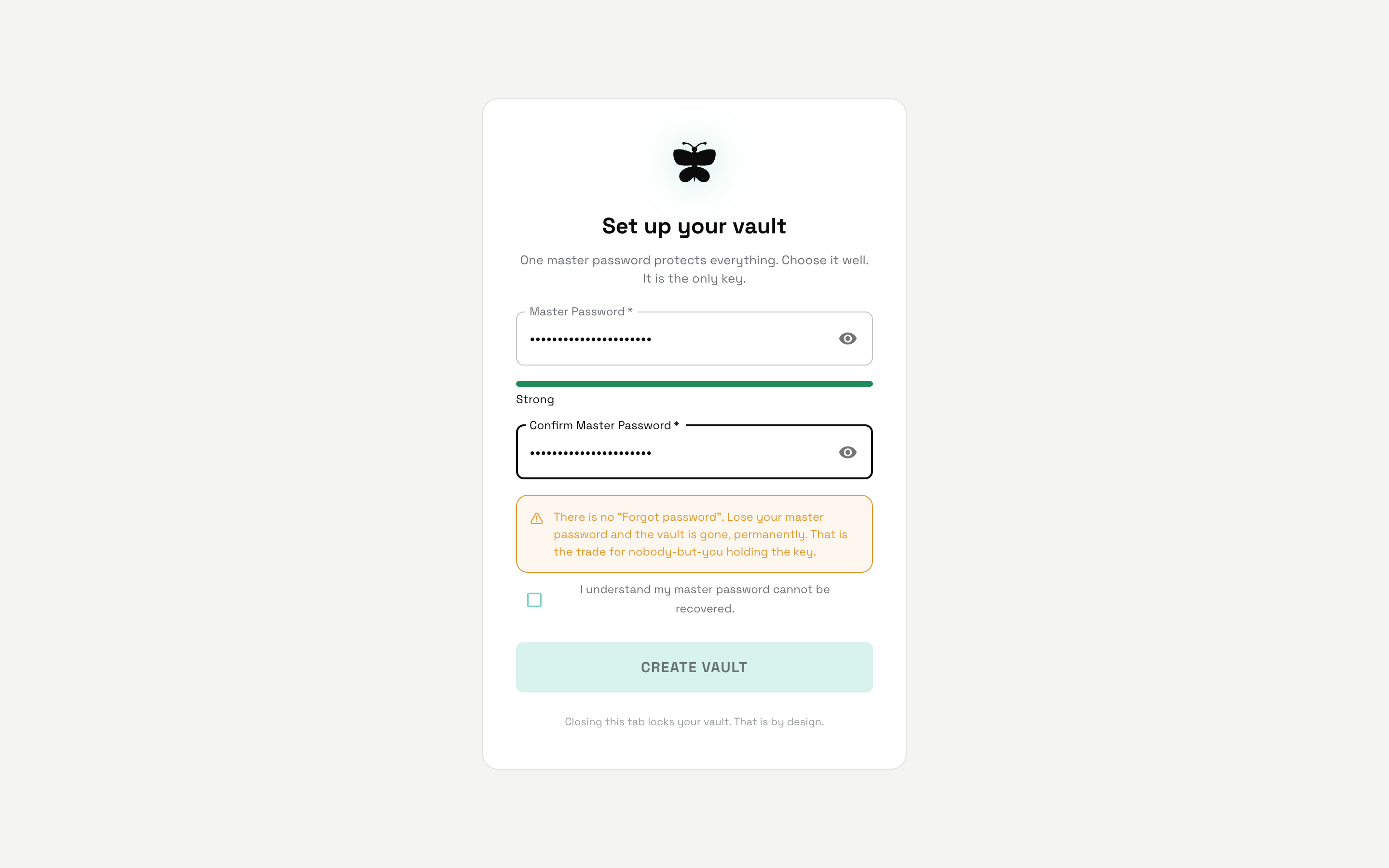
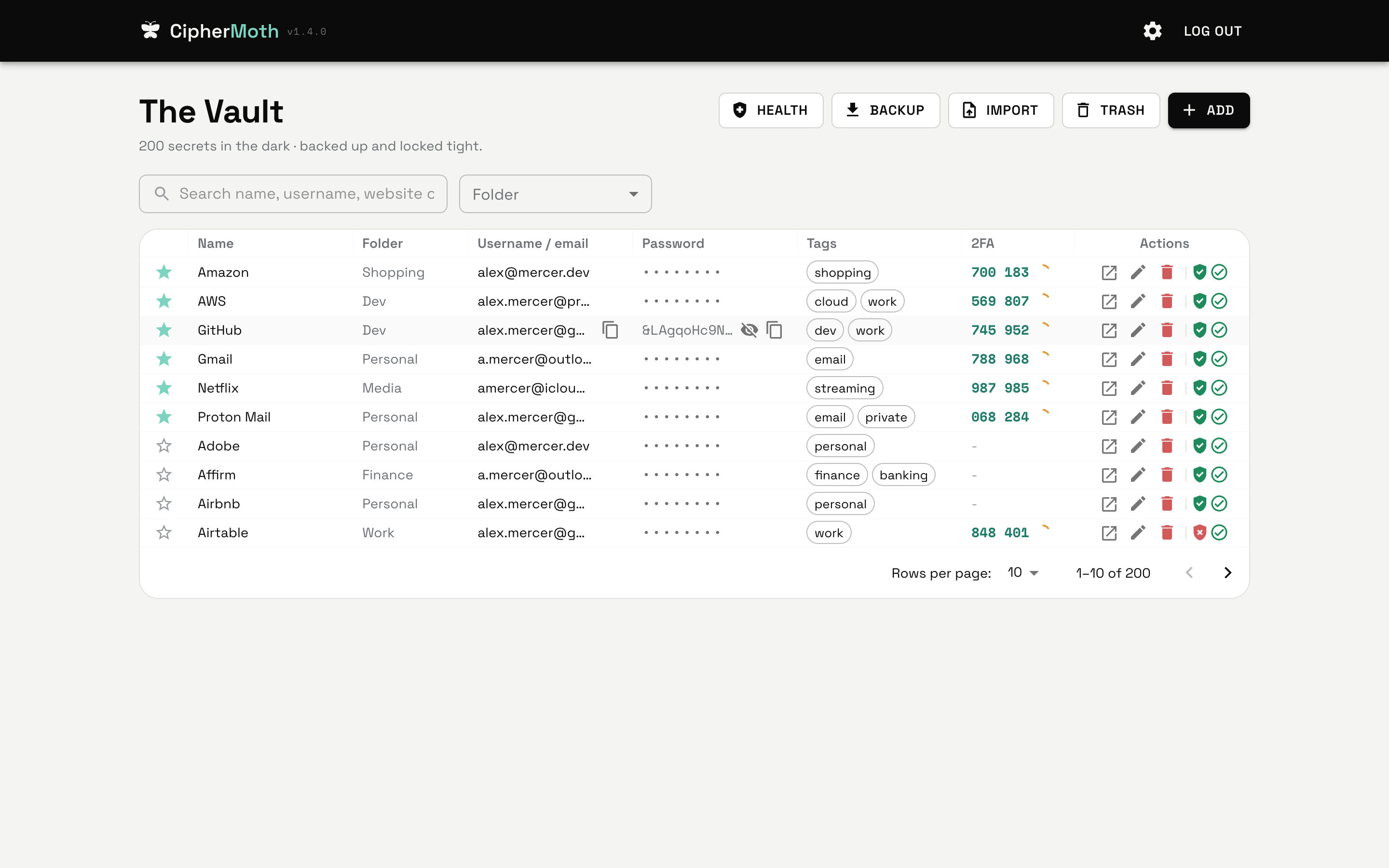
| First run: set up your master password | The vault |
 |
 |
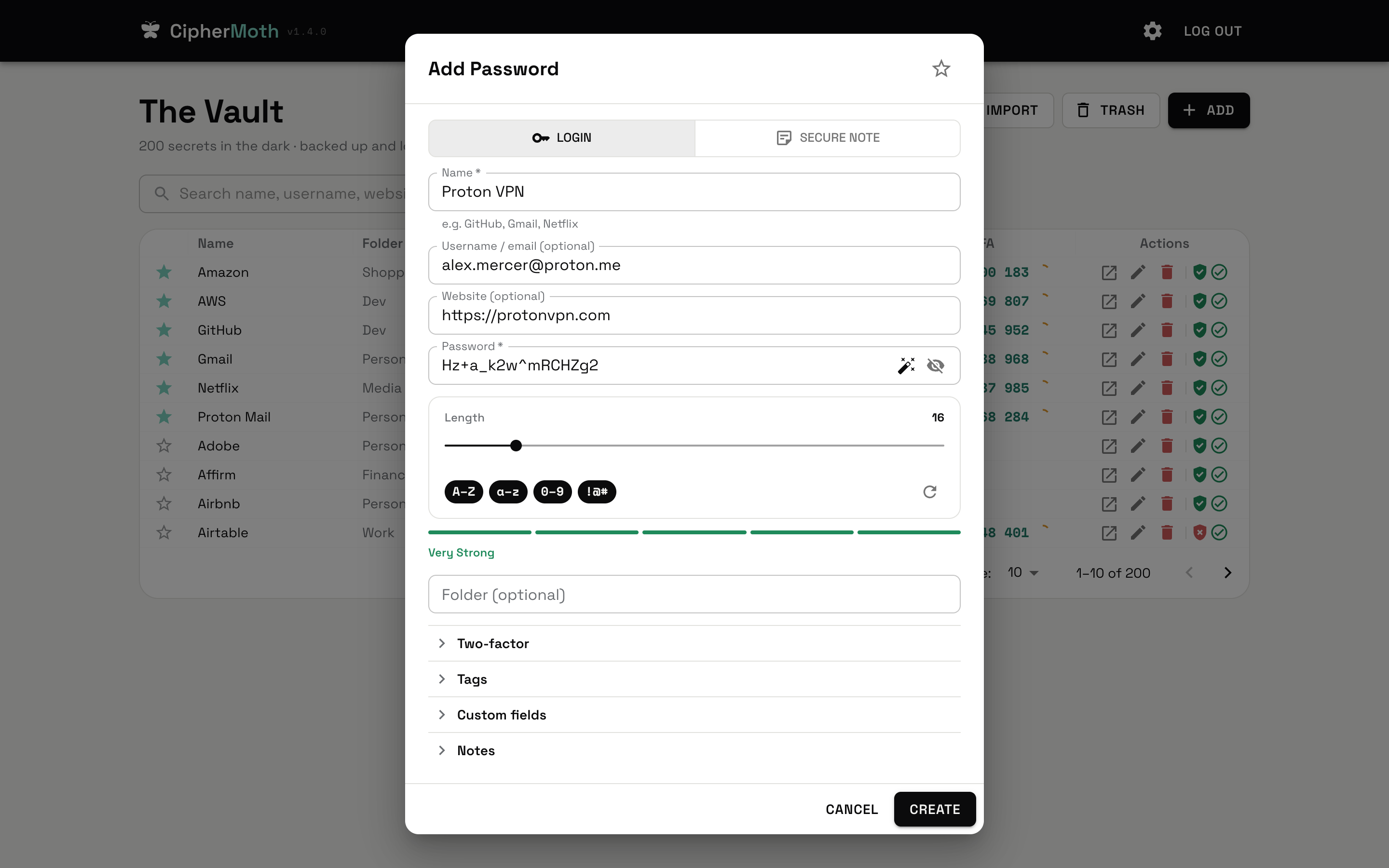
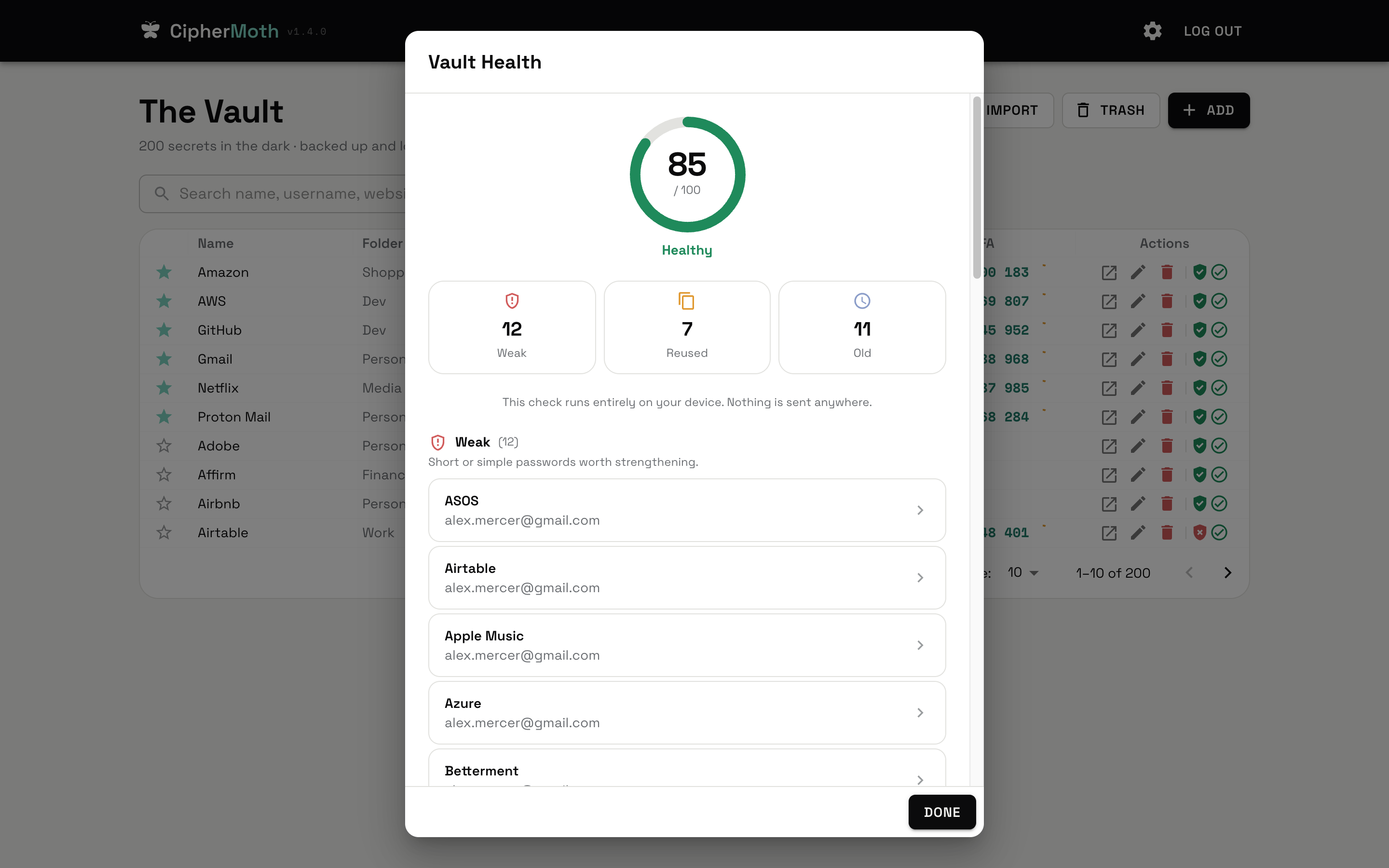
| Add a password, generate a strong one | Vault health, computed on your device |
 |
 |
Get started
Download the latest release. No Python, Docker, or developer tools needed.
| Your machine | Download |
|---|---|
| macOS, Apple Silicon (M-series) | darwin-aarch64.dmg |
| macOS, Intel | darwin-x86_64.dmg |
| Windows, Intel/AMD | windows-x86_64.exe |
| Windows, ARM64 | windows-aarch64.exe |
| Linux, Intel/AMD | linux-x86_64.AppImage or .deb |
| Linux, ARM64 | linux-aarch64.AppImage or .deb |
Open the DMG and drag CipherMoth to Applications, run the Windows installer, or make the Linux AppImage executable and open it. Debian/Ubuntu users can install the .deb with sudo apt install ./<downloaded-file>.deb.
Open CipherMoth, choose a strong master password, and add your first password. That's it. Your vault lives in your user data folder and survives app updates. The old Alpha app and Docker edition have separate vaults; nothing is moved automatically.
These are free, unsigned-publisher downloads: macOS may require System Settings → Privacy & Security → Open Anyway, and Windows may show a SmartScreen warning. Only approve a download you obtained from this project's release page. Organizational policies may prevent installation. Installation details and updates explain the limits; never disable OS protections globally.
Prefer Docker? The self-hosted edition is still here, with the same encrypted vault core:
curl -fsSL https://raw.githubusercontent.com/mr-grj/ciphermoth/master/install.sh | sh
Then open http://localhost:3000. CONTRIBUTING.md covers manual setup and servers. Coming from 2.0 or PostgreSQL? Read the upgrade procedure first; those vaults are never converted automatically.
⚠️ There is no password recovery. Losing your master password means losing your vault, permanently. No reset link, no support email, no backdoor. That's the trade for nobody-but-you holding the key. Write it down somewhere safe, and take a backup once you've added a few entries.
What it does
- one master password unlocks the vault, no account, no email, no recovery codes sent to a phone number you changed three years ago
- optional biometric unlock: Touch ID in the macOS app, a passkey in the browser. It works on that device only, and it asks for your master password every couple of weeks so you never forget it
- all entry contents encrypted at rest with a random vault key, stored only wrapped under a key derived from your master password
- store a username, website, tags, folders, a two-factor (TOTP) secret, and your own custom fields alongside each entry, all encrypted, entry names included (see Security)
- built-in two-factor: paste a 2FA secret, and CipherMoth shows the live rolling code, computed in the browser
- secure notes for free-form secrets (recovery codes, Wi-Fi, passport details), encrypted just like passwords
- attach files to any entry (recovery-code PDFs, license keys, key files), up to 5 MB each, encrypted with your vault key
- search, favorites, folders, tags, and password history to keep a growing vault tidy
- trash for deletions you can restore from or empty for good when you're sure
- light and dark themes that flip across the whole app, toggled by a moth that flutters off as the colours fade (and remembers your pick)
- vault health check that flags weak, reused, and old passwords, entirely on your device
- cryptographically secure password generator (not the
Math.random()kind) with a strength indicator on every entry - import from Chrome, Bitwarden, KeePass, Proton Pass, and friends via CSV
- complete encrypted backups (
.cmbackup): every entry, the trash, password history, attachments and settings, restorable into this vault or a new one - a CLI (
ciphermoth) for the self-hosted edition, and native desktop auto-lock plus clipboard-clearing (for the small things that matter ^^) - optional desktop update checks through GitHub Releases: you choose when to install, Tauri verifies the signature, and your local vault stays in place. No account or telemetry. AppImage supports built-in updates; Debian uses package updates. Docker images remain signed with cosign
Who it's for (and who it isn't)
CipherMoth is probably a good fit if you:
- want a password manager on your own computer, with no accounts or telemetry
- want it to work offline, with optional updates and backups you control
- like small, auditable software and are happy owning your own backups
It's probably not for you (yet) if you need browser autofill, a mobile app, family or team sharing, managed cloud sync, or a way to recover your vault if you forget your master password. No hard feelings, those are real needs, just not what this is trying to be.
Security
Straight up, because this is a password manager and you deserve it: CipherMoth has not been independently audited. It's a personal project I use myself and built carefully, with the crypto kept small and readable on purpose, but it has not been through a formal third-party security review. It's designed for personal use on hardware you trust, not as a public, multi-tenant service holding other people's secrets. Weigh that accordingly.
How it works (the full specification is docs/VAULT_FORMAT.md):
- each vault has a random 256-bit vault key. It is stored only wrapped (AES-256-GCM) under a key derived from your master password with Argon2id (OWASP 2024 interactive profile, a random salt per vault). A password commitment derived through the same Argon2id work rejects wrong passwords without a cheaper guessing path; a wrong password cannot unwrap the key. New vaults require a reasonably strong master password (12+ characters, mixed types), enforced by the Python core;
- everything you put in an entry is encrypted with AES-256-GCM: its name, username, password or note, website, 2FA secret, description, tags, folder, custom fields, password history, favorite flag and type, and each attachment's name, type and bytes. Every encrypted value is bound to its own record, so it cannot be swapped into another entry without being detected. Entries are found by name through a keyed hash (HMAC-SHA256) of the name, never a plaintext copy;
- what the vault file still shows without your master password: how many entries and attachments there are, which ones are in the trash, timestamps, attachment sizes, approximate entry sizes, which entries share a name (an entry and its trashed copies) and your timeout settings. This is encryption of each entry, not of the whole file;
- changing the master password creates a new vault key and re-encrypts everything, so the old password and the old key open nothing in the vault afterwards (older snapshots and backups keep the password they were made with);
- biometric unlock is off until you turn it on with your master password. The vault key is then also wrapped under a secret only that device's Secure Enclave or passkey can produce after checking your fingerprint or face. Anyone that device accepts can open the vault (details);
- Python owns the keys and gives React only an opaque session token. Desktop sessions stay in memory, and the bundled Python core talks to Rust through private binary pipes: no backend TCP listener. Locking clears the owned clipboard and stops the process holding the keys. The Docker edition keeps keys in its server process and the browser's session token in
sessionStorage; - a strict Content-Security-Policy restricts the UI. Desktop release checks run in Rust against the fixed GitHub release source; no vault contents, passwords, session tokens or entry metadata are sent;
- backups (
.cmbackup) are complete and authenticated: every entry including the trash and history, attachments byte for byte, and your settings, encrypted with AES-256-GCM under Argon2id with the backup's own random salt and your master password. A wrong password, a damaged or cut-off file changes nothing on restore. A backup is the portable copy; a snapshot (ciphermoth-admin snapshot, see docs/UPDATING.md) is a raw local copy of the vault file for recovering this installation. Check that a browser download actually saved the backup file; the app cannot verify browser saving and does not label entries as safely backed up; - the Docker UI and API listen on
127.0.0.1by default; exposing them to other machines is an explicit setting; - the password generator uses
crypto.getRandomValueswith rejection sampling, noMath.random(), no shortcuts;
It protects against someone who steals the vault file, a snapshot, a backup or the disk (they get ciphertext and the counts and timestamps listed above, and each password guess costs a full Argon2id run), someone who edits the file without your master password (changes to encrypted data are detected and the vault refuses to show it), accidental server-side exposure (the server never persists the master password, the vault key or session tokens), and casual inspection of stored data. A session token that leaks works only until that session ends; it never reveals the key.
It does not protect against malware or a keylogger on the device you unlock from, a weak master password, exposing
the instance on the public internet without https, someone with write access to the vault file rolling it back to an
older copy or deleting entries, or forgetting your master password (there is no recovery). Run it on a machine and
network you trust, use a strong master password, and keep a backup.
To report a vulnerability, see SECURITY.md.
Tech stack
| Layer | Tech |
|---|---|
| Backend | Python 3.13, FastAPI, SQLAlchemy 2.0, aiosqlite |
| Database | SQLite 3.53 (one file, WAL, full sync) |
| Frontend | React 19, Vite, MUI v9, easy-peasy |
| Package manager | uv (backend), npm (frontend) |
| Desktop | Tauri 2, Rust, PyInstaller onedir |
| Infrastructure | Docker, Docker Compose v2, GitHub Actions |
Docs
- CONTRIBUTING.md - hacking on CipherMoth, self-hosting on a server, configuration, and updates
- docs/UPDATING.md - desktop installation and updates, Docker snapshots and older vaults
- desktop/README.md - native builds, data paths and desktop internals
- docs/CLI.md - the
ciphermothcommand-line reference. A plain Docker install already has it:install.shleaves acipscript in your CipherMoth folder, so./cip password listjust works (no Python, no clone) - SECURITY.md - reporting a vulnerability
- Logo, wordmark, and favicon live in
docs/brand/
License
MIT: see LICENSE.
Explore related projects
awesome-selfhosted/awesome-selfhosted
A list of Free Software network services and web applications which can be hosted on your own servers
336,878 starsimmich-app/immich
High performance self-hosted photo and video management solution.
119,131 starsStirling-Tools/Stirling-PDF
#1 PDF Application on GitHub that lets you edit PDFs on any device anywhere
96,551 starslouislam/uptime-kuma
A fancy self-hosted monitoring tool
94,012 stars