
mostafa-wahied/portracker
mostafa-wahied/portracker has 2,512 GitHub stars and 107 forks. GitHot measured +9 in 7 days. Last checked 2026-11-11 09:39 UTC. Last push 2026-10-31.
An open source, self-hosted, real-time port monitoring and discovery tool.
What you can do
- Automatic Port Discovery: Scans the host system to find and display running services and their ports automatically. No manual data entry is needed.
- Platform-Specific Collectors: Includes specialized collectors for Docker and TrueNAS to gather rich, contextual information from the host.
- Internal Port Detection: Distinguishes between internal container ports and published host ports, providing complete visibility into containerized services.
- Lightweight & Self-Contained: Runs as a single process with an embedded SQLite database. No external database dependencies like PostgreSQL or Redis are required.
Measured star growth
- in 24h
- Update delayed
- in 7 days
- +9
- in 15 days
- Collecting history
- in 1 month
- Collecting history
Net star changes over overlapping periods, not daily totals. Missing measurements are left blank. Stars measure attention, not software quality.
README.md
Original
portracker
A self-hosted, real-time port monitoring and discovery tool.


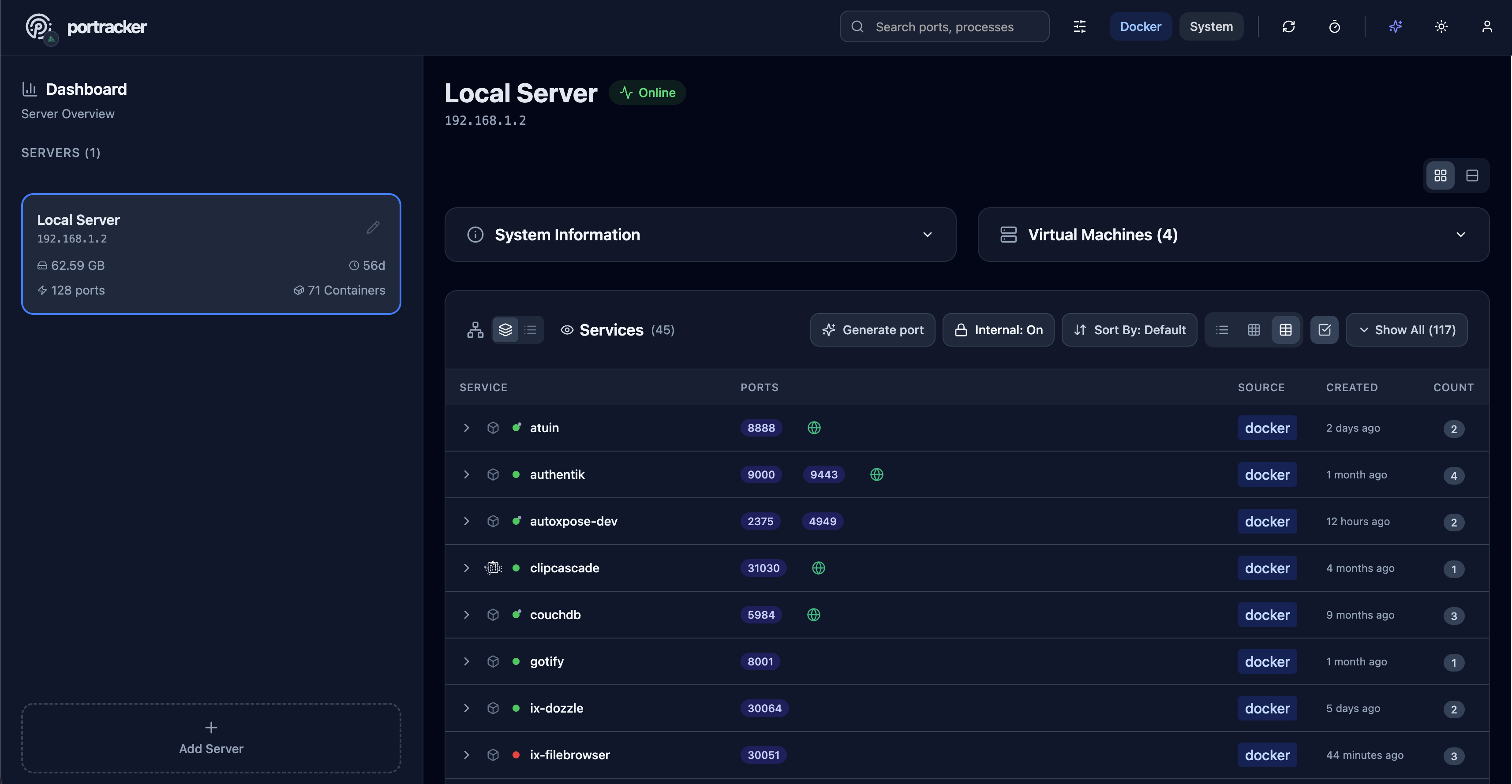
By auto-discovering services on your systems, portracker provides a live, accurate map of your network. It helps eliminate manual tracking in spreadsheets and prevents deployment failures caused by port conflicts.
Key Features
- Automatic Port Discovery: Scans the host system to find and display running services and their ports automatically. No manual data entry is needed.
- Platform-Specific Collectors: Includes specialized collectors for Docker and TrueNAS to gather rich, contextual information from the host.
- Internal Port Detection: Distinguishes between internal container ports and published host ports, providing complete visibility into containerized services.
- Lightweight & Self-Contained: Runs as a single process with an embedded SQLite database. No external database dependencies like PostgreSQL or Redis are required.
- Peer-to-Peer Monitoring: Add other
portrackerinstances as peers to view all your servers, containers, and VMs from a single dashboard. - Hierarchical Grouping: Organize servers in a parent-child structure, perfect for nesting servers, e.g. a VM's
portrackerinstance under its physical host. - Enhanced TrueNAS Discovery: Providing an optional TrueNAS API key allows
portrackerto discover running VMs* and gather enhanced system information like the OS version and uptime. - Modern & Responsive UI: A clean dashboard with light/dark modes, live filtering, and multiple data layout views (list, grid, table).
*Note: VMs discovered on TrueNAS with the optional API key are shown in read-only mode. To enable full monitoring, deploy a portracker instance on each VM and add it as a separate server.
Deployment
Deployment is designed to be simple using Docker.
Docker Desktop on macOS and Windows: Docker containers run inside a Linux VM.
portracker can discover Docker container metadata and ports visible in that Linux
environment, but its Linux namespace tools cannot enumerate native macOS or Windows
process listeners, such as a Node server started directly on the desktop host.
pid: host, SYS_ADMIN, and INCLUDE_UDP do not remove that boundary. This
limitation is not specific to IPv6. See Docker Desktop networking.
Quick Get Started
Using Docker Compose:
Create a docker-compose.yml file:
services:
  portracker:
    image: mostafawahied/portracker:latest
    container_name: portracker
    restart: unless-stopped
    pid: "host"  # Required for port detection
    # Required permissions for system ports service namespace access
    cap_add:
      - SYS_PTRACE     # Linux hosts: read other PIDs' /proc entries
      - SYS_ADMIN      # Linux namespace access, including the Docker Desktop VM
    security_opt:
      - apparmor:unconfined # Required for system ports
    volumes:
      # Required for data persistence
      - ./portracker-data:/data
      # Required for discovering services running in Docker
      - /var/run/docker.sock:/var/run/docker.sock:ro
    ports:
      - "4999:4999"
    # environment:
      # Optional: For enhanced TrueNAS features
      # - TRUENAS_API_KEY=your-api-key-here
Then, run the application:
docker-compose up -d
Using Docker Run:
docker run -d \
  --name portracker \
  --restart unless-stopped \
  --pid host \
  --cap-add SYS_PTRACE \
  --cap-add SYS_ADMIN \
  --security-opt apparmor=unconfined \
  -p 4999:4999 \
  -v ./portracker-data:/data \
  -v /var/run/docker.sock:/var/run/docker.sock:ro \
  mostafawahied/portracker:latest
Enhanced Security with Docker Proxy
For enhanced security, you can run portracker without direct access to the Docker socket by using a proxy. This restricts the Docker API permissions to read-only operations.
Using Docker Compose:
services:
  docker-proxy:
    image: tecnativa/docker-socket-proxy:latest
    container_name: portracker-docker-proxy
    restart: unless-stopped
    environment:
      - CONTAINERS=1
      - IMAGES=1
      - INFO=1
      - NETWORKS=1
      - POST=0
    volumes:
      - /var/run/docker.sock:/var/run/docker.sock:ro
    ports:
      - "2375:2375"

  portracker:
    image: mostafawahied/portracker:latest
    container_name: portracker
    restart: unless-stopped
    pid: "host"
    cap_add:
      - SYS_PTRACE
      - SYS_ADMIN
    security_opt:
      - apparmor:unconfined
    volumes:
      - ./portracker-data:/data
    ports:
      - "4999:4999"
    environment:
      - DOCKER_HOST=tcp://docker-proxy:2375
    depends_on:
      - docker-proxy
Using Docker Run:
docker network create portracker-network

# Start the Docker proxy
docker run -d \
  --name portracker-docker-proxy \
  --restart unless-stopped \
  --network portracker-network \
  -v /var/run/docker.sock:/var/run/docker.sock:ro \
  -e CONTAINERS=1 \
  -e IMAGES=1 \
  -e INFO=1 \
  -e NETWORKS=1 \
  -e POST=0 \
  tecnativa/docker-socket-proxy:latest

# Start portracker
docker run -d \
  --name portracker \
  --restart unless-stopped \
  --network portracker-network \
  --pid host \
  --cap-add SYS_PTRACE \
  --cap-add SYS_ADMIN \
  --security-opt apparmor=unconfined \
  -p 4999:4999 \
  -v ./portracker-data:/data \
  -e DOCKER_HOST=tcp://portracker-docker-proxy:2375 \
  mostafawahied/portracker:latest
Remote Docker API over TLS
For a single Docker API endpoint protected by mutual TLS, add these fields to the portracker service, retaining its data volume and other deployment settings:
environment:
  - DOCKER_HOST=tcp://docker-api.example:2376
  - DOCKER_TLS_VERIFY=1
  - DOCKER_CERT_PATH=/run/docker-certs
volumes:
  - ./docker-certs:/run/docker-certs:ro
The mounted directory must contain ca.pem, cert.pem, and key.pem, readable
by portracker. Use a server certificate valid for the hostname in DOCKER_HOST;
keep the client private key out of source control. The TLS port can be changed
to match your Docker API proxy.
With TLS verification enabled, a missing certificate directory or unreadable file rejects the configuration instead of falling back to unencrypted HTTP. This setting selects one Docker endpoint. It does not configure multiple remote Docker hosts or collect the remote machine's system-process ports. For Docker and system visibility on multiple machines, use portracker peers.
Unpublished Docker Ports
portracker lists unpublished ports declared in Docker container metadata, such as
Dockerfile EXPOSE or Compose expose entries, as internal ports. A host
ports mapping is not required for these entries to appear.
This is metadata discovery, not an active scan of every port inside Docker networks. Attaching portracker to additional networks does not discover undeclared listeners, and an internal-port entry does not prove that the service is reachable from your browser or that a process is listening on it. Do not publish a private service just to make its declared internal ports visible.
The default limit is 100 unpublished ports per container. Above that limit, the
container's internal rows are omitted while published mappings are retained.
Set MAX_INTERNAL_PORTS_PER_CONTAINER to a positive integer to change the limit.
Configuration
Configure portracker using environment variables.
| Variable | Description | Default |
|---|---|---|
PORT* |
The port the web application will run on. | 4999 |
DATABASE_PATH* |
Path inside the container to the SQLite database file. | /data/portracker.db |
TRUENAS_API_KEY |
Optional API key for enhanced TrueNAS data collection. | |
ENABLE_AUTH |
Set to true to enable authentication (v1.2.0+). |
false |
SESSION_SECRET |
Signing secret for browser-session cookies. Does not preserve sessions across app restarts. | random |
CORS_ORIGIN |
Comma-separated browser origins for a separately hosted frontend or a reverse proxy that rewrites Host. Same-origin access needs no setting. |
disabled |
CACHE_TIMEOUT_MS |
Duration in milliseconds to cache scan results. | 60000 |
DISABLE_CACHE |
Set to true to disable all caching. |
false |
INCLUDE_UDP |
Set to true to include UDP ports in scans. |
false |
MAX_INTERNAL_PORTS_PER_CONTAINER |
Maximum unpublished internal ports listed for one container. Containers above the limit keep published ports but omit internal rows. | 100 |
DEBUG |
Set to true for verbose application logging. |
false |
*Required
For a complete list of all environment variables with detailed explanations, see .env.example.
TrueNAS Integration
Click to expand TrueNAS setup guide
Getting Your TrueNAS API Key
- Log into your TrueNAS web interface
- Go to System Settings → API Keys
- Click Add to create a new API key
- Give it a descriptive name (e.g., "portracker")
- Copy the generated key
- Add it to portracker:
- TrueNAS Apps: Edit your portracker app → Add Environment Variable:
TRUENAS_API_KEY=your-api-key-here - Docker Compose: Add to environment section:
environment:
  - TRUENAS_API_KEY=your-api-key-here
- TrueNAS Apps: Edit your portracker app → Add Environment Variable:
What You'll See
With the API key configured, portracker will display:
- ✅ TrueNAS native apps (from Apps catalog)
- ✅ Virtual machines (VMs)
- ✅ LXC containers
- ✅ Enhanced system information (OS version, uptime, etc.)
Without the API key, you'll only see Docker containers and system ports.
For timeout configuration options, see .env.example.
Authentication Setup (v1.2.0+)
portracker includes optional authentication to secure dashboard access:
- Enable Authentication: Set
ENABLE_AUTH=truein your environment variables - First-Time Setup: On first access, you'll see a setup wizard to create the admin account
- Login: Use your admin credentials to access the dashboard
- Session Secret (optional): Set
SESSION_SECRETto keep the cookie-signing secret stable. Sessions are held in memory, so you must sign in again after an application restart.
Example with Authentication:
services:
  portracker:
    image: mostafawahied/portracker:latest
    environment:
      - ENABLE_AUTH=true
      - SESSION_SECRET=your-random-secret-here-change-this
Important Notes:
- Authentication is disabled by default for backward compatibility
- With authentication disabled, anyone who can reach Portracker has administrator-level UI and API control; keep it on a trusted network or protect it with an authenticated reverse proxy
- When enabled, dashboard, settings, and integration endpoints require a signed-in session
- Peer data endpoints accept API key authentication for instance-to-instance communication
- API key authentication for peer-to-peer communication is available in v1.3.0
- Reverse proxies should preserve the public
Hostheader; otherwise setCORS_ORIGINto the exact public origin, includinghttps://
Connecting Another portracker Instance
Each monitored machine runs its own portracker instance. To view server B from server A, add B as a peer on A; you do not need to expose B's Docker API.
- If B has
ENABLE_AUTH=true, sign in to B and open API Key from the account menu. Use your saved key, or select Generate API Key if no key exists. Copy a newly generated key immediately; it is shown once. If authentication is disabled on B, skip this step; the API Key menu is hidden in that mode. - On A, select Add Server, enter a label and B's full HTTP(S) URL,
including its port, for example
http://server-b:4999. - If B has authentication enabled, paste B's key into the API key field. Otherwise, leave the field blank. Save the server; A's backend must be able to reach B. To monitor A from B as well, repeat the steps using A's authentication setting and key.
This is a portracker key, not a TrueNAS key or SESSION_SECRET. Setting
SESSION_SECRET does not create a peer key.
Use Regenerate Key if B already has a key that you no longer have. Regenerating
or revoking B's key invalidates the old key on every connected instance.
Back up each database with its matching encryption key file; see SECURITY.md.
The current Add Server URL check runs in the browser. If it reports a CORS error despite A being able to reach B, Save even if unreachable bypasses that form check, not B's authentication. Do not disable authentication to work around it.
Autoxpose Integration (v1.3.0+)
If you run autoxpose to manage your public-facing services, portracker can display which ports are publicly exposed alongside their internal addresses.
Setup:
- Open Settings (gear icon in header)
- Expand the autoxpose section
- Enter your autoxpose URL (e.g.,
http://autoxpose:3000) - Click Connect
After upgrading to v1.3.11, reconnect an existing autoxpose integration once while signed in. Private LAN and container-DNS addresses remain supported. Loopback, link-local, reserved, credential-bearing, query-bearing, and redirecting destinations are rejected; use the autoxpose service name or LAN address instead of localhost.
What You'll See:
Once connected, exposed services show a public URL chip or globe badge next to the port:
- URL Mode: Full clickable chip showing
🌐 photos.example.com 🔒 - Badge Mode: Compact globe icon with tooltip
Display Options:
- Display Mode: Toggle between URL chip or compact badge
- URL Style: Show subdomain only (compact) or full hostname
SSL Status Indicators:
| Icon | Color | Status |
|---|---|---|
| 🔒 | Green | SSL secured |
| ⚠️ | Amber | SSL pending |
| ❌ | Red | SSL error |
Technical Stack
- Backend: Node.js, Express, WebSocket, better-sqlite3
- Frontend: React, Vite, Tailwind CSS, Shadcn UI
- Containerization: Docker
Roadmap
Future development is focused on improving the application based on community feedback. Key areas include:
- Adding user authentication ✅ Added in v1.2.0 (optional authentication with setup wizard)
- Adding API key authentication for peer-to-peer communication ✅ Added in v1.3.0
- autoxpose integration for public URL visibility ✅ Added in v1.3.0
- Expanding the library of platform-specific collectors for other host systems
- Addressing bugs and incorporating requested changes from the community
Star History
Contributing
Contributions are welcome! Please feel free to open an issue to report a bug or suggest a feature, or submit a pull request with your improvements.
License
This project is licensed under the MIT License - see the LICENSE
Explore related projects
awesome-selfhosted/awesome-selfhosted
A list of Free Software network services and web applications which can be hosted on your own servers
335,961 starsimmich-app/immich
High performance self-hosted photo and video management solution.
118,645 starsStirling-Tools/Stirling-PDF
#1 PDF Application on GitHub that lets you edit PDFs on any device anywhere
96,149 starslouislam/uptime-kuma
A fancy self-hosted monitoring tool
93,425 stars