
momenbasel/pesty
momenbasel/pesty has 160 GitHub stars and 22 forks. GitHot measured +7 in 7 days and +15 in 15 days. Last checked 2026-11-09 13:57 UTC. Last push 2026-10-24.
Free, open-source clipboard manager for macOS a native Paste app alternative with color-coded history, pinboards, search & keyboard paste. Signed, notarized, Homebrew.
What you can do
- Slide-up strip - full-width, translucent bar that springs up from the bottom of the active screen.
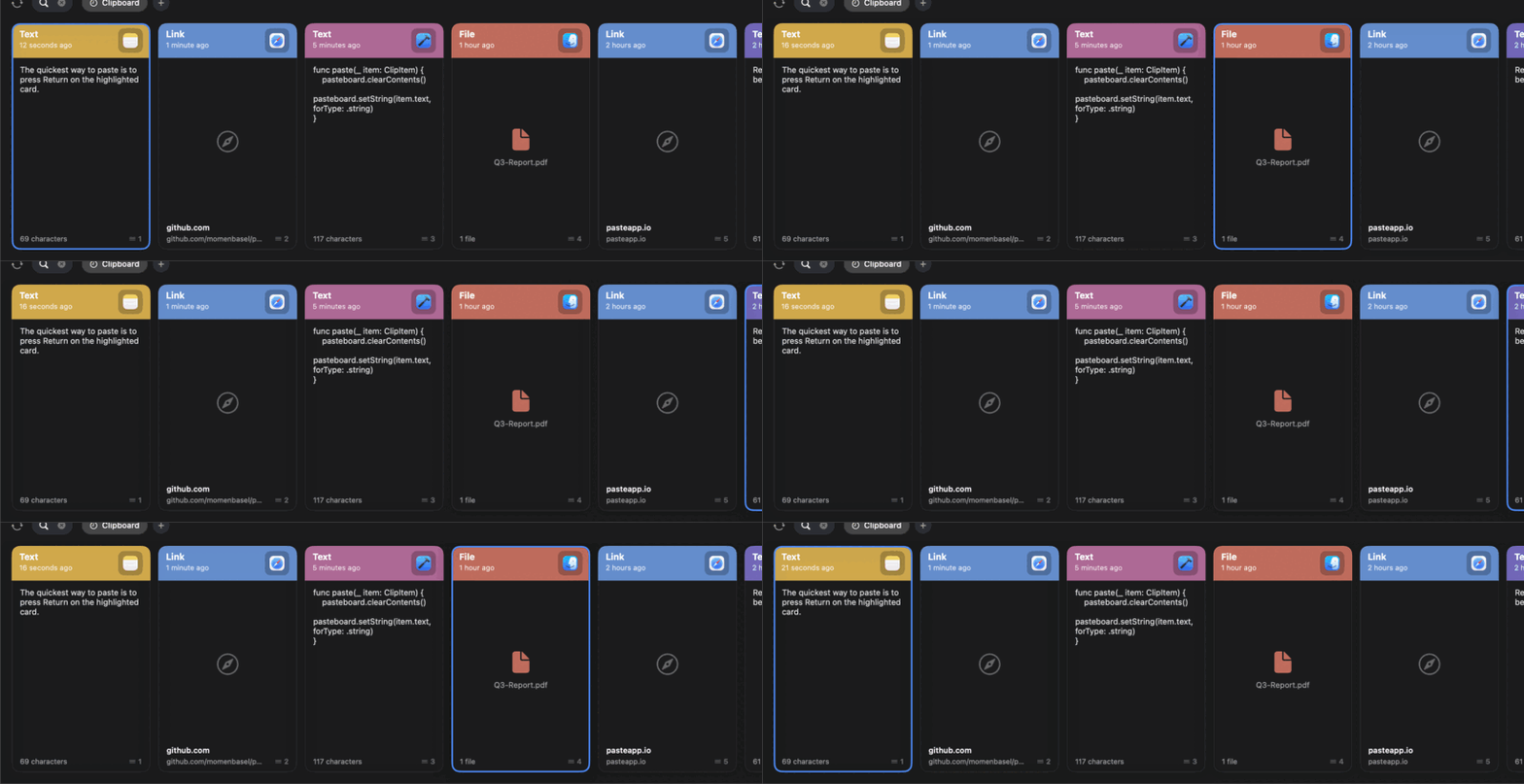
- Color-coded cards - each clip has a header band tinted per source app (consistent per app), with the app icon, type label, when it was copied, a preview, and a footer showing character count and a quick-paste number.
- All content types - plain text, rich text, links, images, files, and colors.
- Pinboards - save clips you reuse into named, color-tagged collections that never expire.
Measured star growth
- in 24h
- Update delayed
- in 7 days
- +7
- in 15 days
- +15
- in 1 month
- Update delayed
Net star changes over overlapping periods, not daily totals. Missing measurements are left blank. Stars measure attention, not software quality.
README.md
Original
Pesty
A free, open-source clipboard manager for macOS - inspired by Paste.
Your clipboard history as a beautiful, color-coded strip that slides up from the bottom of your screen.


Website · Download · Homebrew · Mac App Store
Pesty is free and open source. The one-time fee on the Mac App Store is optional - it only helps cover the yearly Apple Developer Program fee that keeps the app signed and notarized. You never have to pay it: get the exact same app for free via Homebrew or direct download.
⭐ If Pesty saved you money, star the repo - it genuinely helps.
What is Pesty?
Pesty keeps a history of everything you copy and lets you get it back instantly. Hit a global hotkey, the strip slides up, you pick a clip with the arrow keys (or ⌘1–⌘9), press return, and it pastes straight into whatever app you were in.
It is a faithful, native reimplementation of the Paste experience - built in Swift + SwiftUI, with zero third-party dependencies, fully signed and notarized by Apple, and free forever.
Features
- Slide-up strip - full-width, translucent bar that springs up from the bottom of the active screen.
- Color-coded cards - each clip has a header band tinted per source app (consistent per app), with the app icon, type label, when it was copied, a preview, and a footer showing character count and a quick-paste number.
- All content types - plain text, rich text, links, images, files, and colors.
- Pinboards - save clips you reuse into named, color-tagged collections that never expire.
- iCloud sync - optionally keep your history and pinboards in sync across your Macs via iCloud Drive.
- Instant search - start typing to filter your whole history.
- Keyboard-first - arrow keys to move,
returnto paste,⌘1–⌘9to quick-paste,⌫or⌘⌫to delete,escto close. - Paste directly - drops the clip into the app you were using, no manual
⌘Vneeded. - Privacy-aware - ignores clips marked concealed by password managers; history stored with
0600permissions. - Menu-bar app - runs quietly as a menu-bar item, optional launch at login.
- Native & light - a single universal
.app, no Electron, no background web stack.
Install
Homebrew (recommended)
brew install --cask momenbasel/pesty/pesty
Direct download
- Download
Pesty-x.y.z.dmgfrom the latest release. - Open the DMG and drag Pesty to Applications.
- Launch Pesty. It lives in your menu bar.
The build is signed with a Developer ID and notarized by Apple, so it opens without Gatekeeper warnings.
First run
- Press
⌘⇧V(the default shortcut) to open the strip. - Pick a clip and press
return.- Direct-download / Homebrew build: the first time you paste, macOS asks for Accessibility permission - grant it so Pesty can paste directly into other apps. You can change this anytime in Settings → Permissions.
- Mac App Store build: fully sandboxed and requests no permissions - the clip is copied and focus returns to your app, so just press
⌘Vto paste.
Keyboard shortcuts
| Key | Action |
|---|---|
⌘⇧V |
Show / hide the strip (configurable) |
⌘⇧S (with strip open) |
Open Settings |
⌘⇧P (with strip open) |
Pause / resume clipboard monitoring |
← → ↑ ↓ |
Move selection |
return |
Paste selected clip |
⌘1–⌘9 (configurable) |
Quick-paste the Nth clip; add the plain-text modifier (default ⇧) to paste unformatted |
⌫ (search empty) or ⌘⌫ |
Delete selected clip |
| type anything | Search |
esc |
Clear search, then close |
Build from source
Requires macOS 14+ and Xcode 16+ (Swift 6).
git clone https://github.com/momenbasel/pesty.git
cd pesty
swift run            # run in place
# or build a distributable .app:
VERSION=1.0.0 BUILD=1 ./scripts/build_app.sh
open packaging/Pesty.app
To produce a signed + notarized DMG (needs a Developer ID cert and an App Store Connect API key):
SIGN_IDENTITY="Developer ID Application: Your Name (TEAMID)" \
ASC_KEY="$HOME/.appstoreconnect/private_keys/AuthKey_XXXX.p8" \
ASC_KEY_ID="XXXX" ASC_ISSUER="<issuer-uuid>" \
./scripts/release_build.sh
Project structure
Sources/Pesty/
  Main.swift            entry point
  AppController.swift   app delegate, hotkey + menu-bar wiring, paste flow
  Models/               ClipItem, ClipType, Pinboard
  Store/                ClipboardStore (history, pinboards, persistence)
  Monitor/              ClipboardMonitor (pasteboard polling), PasteService (⌘V injection)
  Hotkey/               HotKeyCenter (Carbon global hotkey)
  UI/                   BarView, ClipCardView, PinboardTabs, the sliding panel
  Settings/             Settings store + preferences window + hotkey recorder
  Util/                 icons, color hex, visual-effect view, launch-at-login
scripts/                build, icon, sign + notarize
packaging/              Info.plist, entitlements, generated artifacts
Pesty vs other Mac clipboard managers
| Pesty | Paste | Maccy | |
|---|---|---|---|
| Price | Free (optional one-time fee on the Mac App Store) | Subscription | Free |
| Open source | Yes (MIT) | No | Yes |
| Color-coded strip UI | Yes | Yes | No (list) |
| Pinboards | Yes | Yes | No |
| Source-app color coding | Yes | Yes | No |
| Native (no Electron) | Yes | Yes | Yes |
| Signed & notarized | Yes | Yes | Yes |
Pesty reimplements the parts of Paste people use every day - the slide-up strip, color-coded cards, pinboards, search, and keyboard-driven pasting - as a free, native, open-source app. If you love Paste, buy it; it's excellent. Pesty is for people who want a free, hackable Paste app alternative, or a prettier alternative to Maccy with a strip UI and pinboards.
FAQ
Is Pesty free? Yes - free and open source (MIT) on GitHub and via Homebrew. The Mac App Store build carries a small one-time fee, but that's optional: it only helps cover the yearly Apple Developer Program fee that keeps the app signed and notarized. It's the same app either way.
Is Pesty a good clipboard manager for Mac? It keeps a searchable history of everything you copy (text, links, images, files, colors) and pastes it back with a keystroke - with pinboards and a color-coded strip.
Does it keep my clipboard private? Yes. Everything stays on your Mac - no servers, no analytics, no network calls - and password-manager clips are ignored.
What macOS does it need? macOS 14 (Sonoma) or later, on Apple Silicon or Intel.
Keywords: clipboard manager for Mac, macOS clipboard history, free Paste app alternative, open-source clipboard manager, Maccy alternative, copy-paste history, clipboard pinboards.
🔗 Website: www.moamenbasel.com/pesty
Contributing
PRs welcome - see CONTRIBUTING.md. Good first issues: large preview pane, drag-and-drop out of cards, strip resize handle, iOS/iPad companion, more content-type renderers.
Also try
JMacy - the best and fastest downloader for macOS. Multi-connection segmented downloads that saturate your line, plus browser capture and torrents.
License
MIT © 2026 Moamen Basel.
Disclaimer
Pesty is an independent project and is not affiliated with, endorsed by, or connected to Paste or its makers (Wonder Warp / FIPLAB). "Paste" is referenced only to describe the inspiration. All trademarks belong to their respective owners.
Explore related projects
n8n-io/n8n
Fair-code workflow automation platform with native AI capabilities. Combine visual building with custom code, self-host or cloud, 400+ integrations.
210,025 starslanggenius/dify
Build Agentic workflows, RAG pipelines, with rich AI model and tool support on one collaborative workspace. Deploy on cloud, VPC, or self-hosted, so teams move from prototype to production without rebuilding the stack.
160,773 starsmicrosoft/PowerToys
Microsoft PowerToys is a collection of utilities that supercharge productivity and customization on Windows
140,833 starsstablyai/orca
Orca is the place for working with a fleet of agents (e.g. Grok Bot, Claude Code). Run any coding agent with your own subscription. Available on desktop, mobile and remote runtime.
121,435 stars