
modl-org/modl has 27 GitHub stars and 3 forks. GitHot measured 0 stars in 24 hours, 0 in 7 days, and 0 in 15 days. Last checked 2026-11-14 07:27 UTC. Last push 2026-07-25.
Measured star growth
- in 24h
- 0
- in 7 days
- 0
- in 15 days
- 0
- in 1 month
- Collecting history
Net star changes over overlapping periods, not daily totals. Missing measurements are left blank. Stars measure attention, not software quality.
About
Local-first AI image generation toolkit. Pull models, train LoRAs, generate images. One CLI, no glue code.
AIREADME.md
Originalmodl
Train LoRAs and generate images on your own GPU. Web UI + CLI. Managed runtime. It just works.
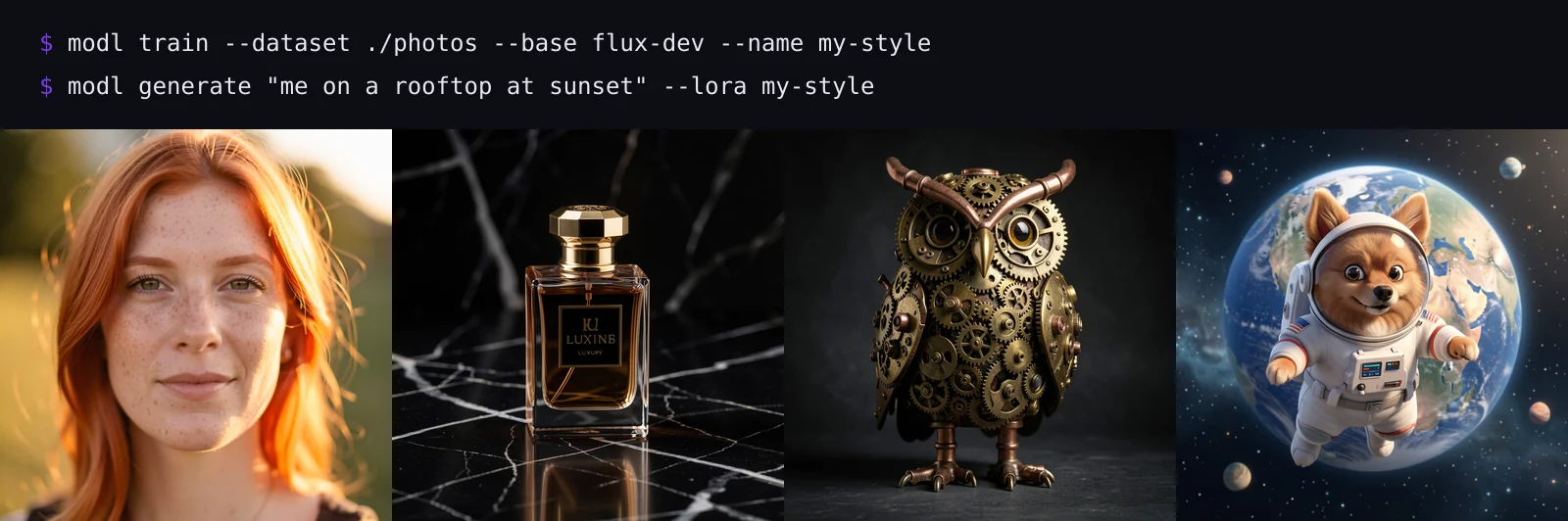
curl -fsSL https://modl.run/install.sh | sh
modl pull z-image-turbo
modl generate "a cat on mars"
Website · Docs · Guides · Model Registry · Changelog
Why modl?
No glue code. One binary handles model downloads, dependency resolution, image generation, LoRA training, and output management. No separate tools to install, no configs to write.
Smart model management. Models are stored once in a content-addressed store. ComfyUI, A1111, and other tools see symlinks — no duplicate 24GB files.
GPU-aware. Automatically picks the right model variant (fp16, fp8, quantized) for your VRAM. A 4090 gets full quality. An 8GB card still works.
Train LoRAs in one command. Point it at a folder of images, pick a base model, and go. Powered by ai-toolkit under the hood, with auto-captioning, dataset prep, and sensible defaults included.
Quick Start
# Install
curl -fsSL https://modl.run/install.sh | sh

# Pull a model (auto-selects variant for your GPU)
modl pull z-image-turbo

# Generate
modl generate "a photo of a mountain lake at sunset"
Or do everything at once:
curl -fsSL https://modl.run/install.sh | sh -s -- --quick
This installs modl, pulls a starter model, and launches the web UI.
Other install methods
You can inspect the install script before running it, or skip it entirely:
# Download binary directly from GitHub Releases
# https://github.com/modl-org/modl/releases
tar -xzf modl-*.tar.gz
sudo mv modl /usr/local/bin/

# Or build from source (Rust 1.85+, Python 3.11+)
git clone https://github.com/modl-org/modl.git
cd modl
cargo build --release
# Binary at target/release/modl
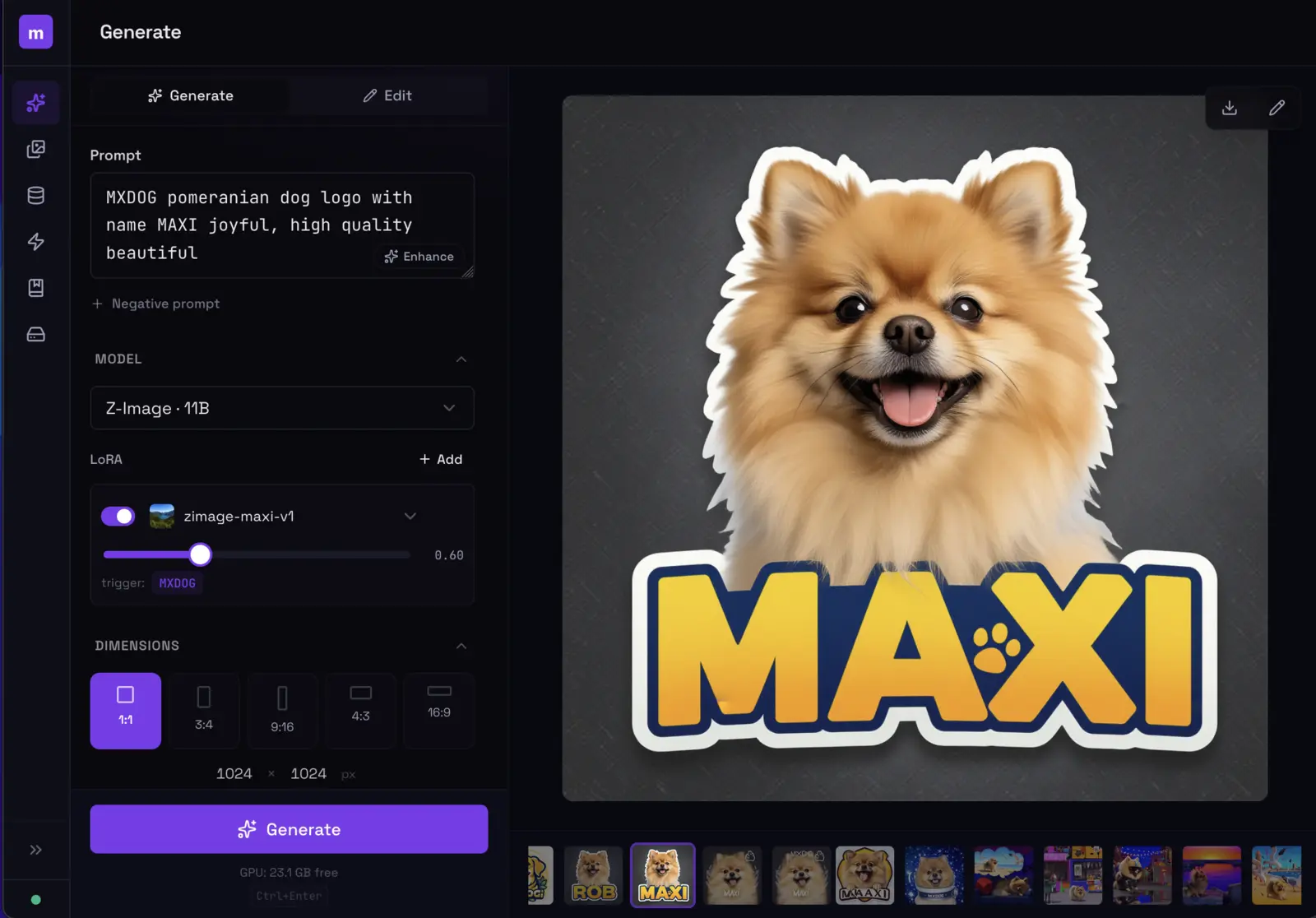
Web UI
modl serve
Generate, train, browse outputs, and manage models from the browser at http://localhost:3939. Same engine as the CLI.
Install as a system service (starts on boot):
modl serve --install-service
Train a LoRA
# Prepare dataset (auto-captions your images)
modl dataset create my-product --from ~/photos/product-shots/
modl dataset caption my-product

# Train
modl train --dataset my-product --base flux-dev --name product-v1 --lora-type object

# Generate with your LoRA
modl generate "a photo of OHWX on marble countertop" --lora product-v1
No GPU? Rent one for the training run
--pod rents a GPU on Vast.ai with your own API key, trains there, syncs the LoRA back to your machine, and destroys the pod when done. No modl account, no hosted service — your key, your pod, your results.
export VASTAI_API_KEY=<your-key>   # from cloud.vast.ai/account (add an SSH key too)

modl train --dataset my-product --base flux2-dev --name product-v1 \
  --lora-type object --pod a100-80gb

modl pod ls          # anything still running (and billing)?
modl pod rm <id>     # destroy a straggler
Train 19B-class models (Flux 2 Dev, Qwen Image) on an A100/H100 for well under a dollar an hour — the trained LoRA lands in your local library like any local run.
Generate on a pod too — your whole rig, rented by the hour
A persistent pod gets its own modl install and behaves like a remote copy of your machine: models are pulled into the pod's store (variant auto-selected for its GPU), workflows run entirely on the pod, and the images sync back when the run finishes.
modl pod up rtx4090 --model flux-schnell     # rent + set up + warm the store (~$0.35/hr)

modl generate "a red apple on a rustic wooden table" --base flux-schnell --pod
modl edit --image photo.png "make it golden" --pod
modl run workflow.yaml --pod                 # multi-step workflows, chained on the pod

modl generate "OHWX on a beach" --base flux-dev --lora product-v1 --pod   # your LoRA, their GPU
modl generate "a red apple" --base qwen-image --fast 4 --pod              # Lightning fast mode

modl pod rm <id>                             # destroy when done — pods bill until destroyed
Runs are fire-and-forget on the pod: close the laptop mid-generation and the job finishes anyway — fetch the results later with modl pod pull <run-id>. Everything moves directly between your machine and the pod over SSH; no cloud storage, no third-party relay. modl run workflow.yaml --pod --dry-run validates a workflow's pod-compatibility without renting anything.
LoRAs work on pods like they do locally: registry LoRAs are pulled on the pod, and your own trained LoRAs are pushed into the pod's store automatically the first time a workflow references them. This closes the loop with pod training — train on a pod, then --lora <name> on a pod, no manual file juggling.
Not yet supported on pods: controlnet/style-ref, inpainting masks.
Supported Models
16 models across 6 families. See the full comparison at modl.run/guides/model-comparison.
| Family | Models | Best for |
|---|---|---|
| Flux 2 | Dev, Klein 4B, Klein 9B | Fast generation (4 steps), editing, best quality/speed |
| Flux 1 | Dev, Schnell, Fill Dev | Largest ecosystem, LoRAs, ControlNet, inpainting |
| Chroma | Chroma | Apache 2.0, negative prompts, 8.9B Flux fork |
| Z-Image | Base, Turbo | Strong quality/size, fast turbo, great ControlNet |
| Qwen Image | Image, Image Edit | Text rendering (Chinese/English), instruction editing |
| Legacy SD | SDXL, SD 1.5 | Low VRAM, massive LoRA library |
Plus 70+ ControlNets, IP-Adapters, VAEs, text encoders, upscalers, and segmentation models. Browse all at modl.run/models.
modl pull flux2-klein-4b    # fast, 4-step generation + editing
modl pull flux-dev          # high quality, best for training
modl pull z-image-turbo     # strong quality, fast, great ControlNet
modl pull chroma            # open-source (Apache 2.0), negative prompts
Image Primitives
Generation & Editing
modl generate "prompt" --base flux-dev          # text to image
modl generate "prompt" --init-image photo.png   # image to image
modl generate "prompt" --init-image img --mask mask.png  # inpainting
modl edit "add sunglasses" --image portrait.png  # instruction editing
ControlNet & Style Reference
modl preprocess canny photo.png                 # extract edges / depth / pose
modl generate "prompt" --controlnet edges.png   # structural control
modl generate "prompt" --style-ref painting.png # style transfer
Vision-Language
modl ground "coffee cup" cafe.png               # find objects → bounding boxes
modl describe photo.png                         # generate captions
modl vl-tag photo.png                           # auto-tag images
Analysis & Post-Processing
modl score photo.png                            # aesthetic quality (1-10)
modl detect photo.png                           # face detection
modl segment photo.png --bbox 120,340,280,500   # create masks (SAM)
modl face-restore photo.png                     # fix AI faces
modl upscale photo.png --scale 4                # 4x resolution
modl remove-bg photo.png                        # transparent PNG
modl compose --bg scene.png --layer subject.png # layer images onto canvas
modl compare ref.png target.png                 # CLIP similarity
Every command supports --json for scripting and agent pipelines.
Already Have Models?
modl system link --comfyui ~/ComfyUI
modl system link --a1111 ~/stable-diffusion-webui
modl scans your model folders, hashes files, and moves recognized models into the store — replacing them with symlinks. Your tools keep working, nothing breaks.
Storage Location
By default, models live in ~/modl/store/. To put them on a bigger disk:
modl config storage.root /srv/disk2/modl-store
Existing models are not moved automatically — set this before pulling, or move the directory and update the config.
Uninstall
sudo rm -rf /usr/local/bin/modl /usr/local/bin/python   # binary + bundled Python runtime
rm -rf ~/modl                                           # model store, configs, DB
If you set a custom storage.root, remove that path too.
Docker
docker run --gpus all -p 3939:3939 -v modl-data:/workspace ghcr.io/modl-org/modl:latest
Set MODEL=flux-schnell to auto-pull a model on first boot. Models persist on the volume across restarts.
Architecture
Single Rust binary for speed and distribution. Managed Python runtime for GPU compute. No external dependencies to install.
Full CLI reference: modl.run/docs
Privacy & Network Access
modl sets HF_HUB_OFFLINE=1 by default — the Python worker does not contact HuggingFace during normal use. Models are downloaded explicitly via modl pull and served from local storage.
Some vision models (Florence-2, BiRefNet) require trust_remote_code from HuggingFace transformers. This means model-specific Python code is downloaded from their HF repos on first use. These are well-known models from Microsoft and verified researchers, and the code is only fetched once and cached locally. Affected commands: modl describe, modl vl-tag, modl segment, modl remove-bg.
Author
Created by Pedro Alonso.
License
Explore related projects
affaan-m/ECC
The agent harness performance optimization system. Skills, instincts, memory, security, and research-first development for Claude Code, Codex, Opencode, Cursor and beyond.
302,610 starsNousResearch/hermes-agent
The agent that grows with you
263,276 starsmultica-ai/andrej-karpathy-skills
A single CLAUDE.md file to improve Claude Code behavior, derived from Andrej Karpathy's observations on LLM coding pitfalls.
232,999 starsfirecrawl/firecrawl
Supercharge your AI agents with data from the web and beyond. Building the library for superintelligence. 🔥
201,661 stars