
mnemosyne-systems/orangu has 58 GitHub stars and 24 forks. GitHot measured 0 stars in 24 hours, +2 in 7 days, and +8 in 15 days. Last checked 2026-11-18 13:05 UTC. Last push 2026-11-18.
Measured star growth
- in 24h
- 0
- in 7 days
- +2
- in 15 days
- +8
- in 1 month
- Collecting history
Net star changes over overlapping periods, not daily totals. Missing measurements are left blank. Stars measure attention, not software quality.
About
Advanced AI platform
Developer ToolsREADME.md
Originalorangu
orangu is a local, workspace-aware, tool-driven coding environment for your terminal.
100% private and offline: after downloading orangu-server and your models, no internet connection is required.
A complete, self-contained AI coding stack: It ships all three layers, written end-to-end in Rust:
orangu- Terminal coding environment, review workstation, and tool coordinator.orangu-coordinator- On-demand model manager and server proxy.orangu-server- Native, pure-Rust GGUF inference engine (no llama.cpp, no ggml, no Python).
Every layer communicates over OpenAI-compatible APIs.
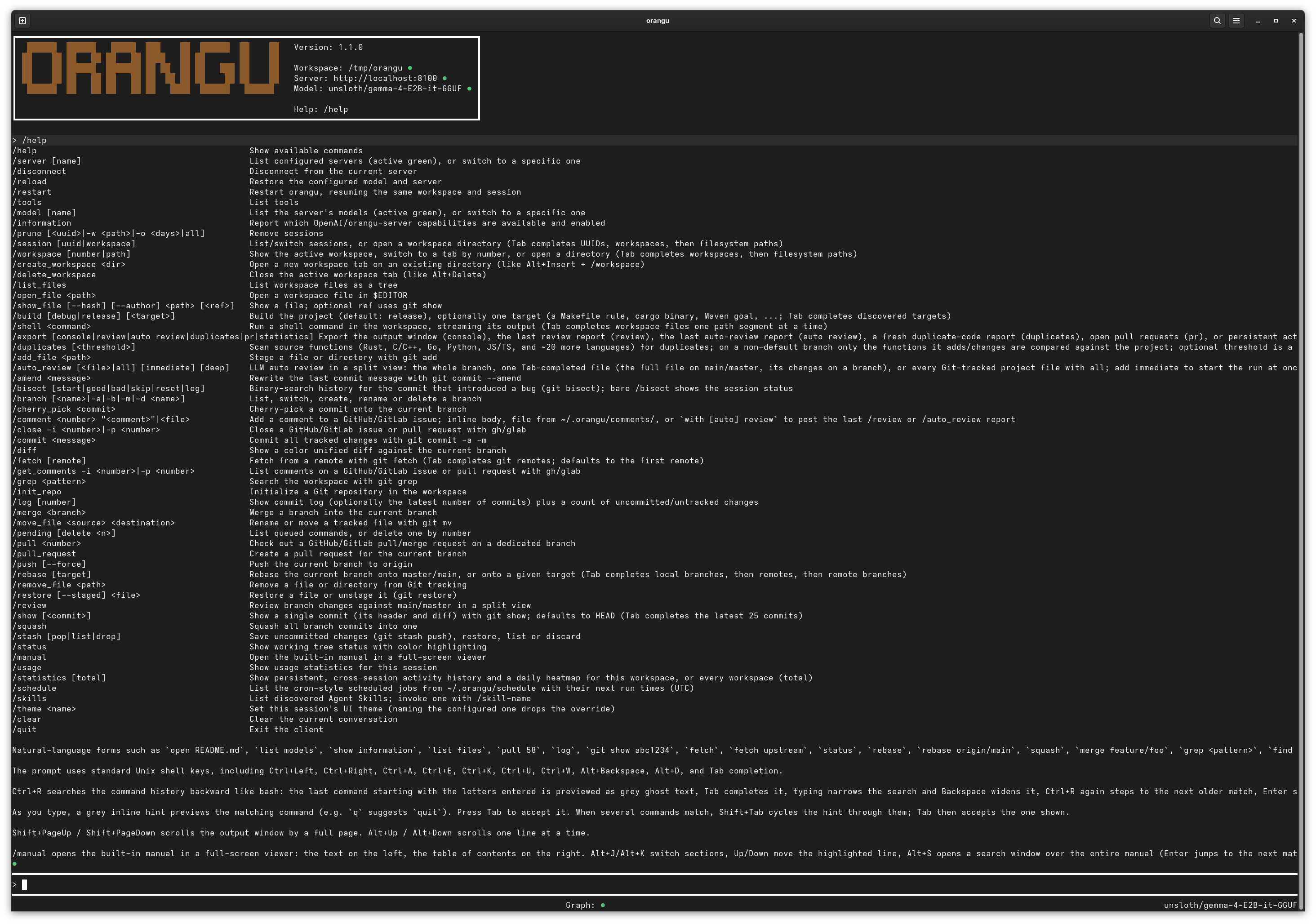
Key Strengths
- Pure-Rust End-to-End Stack - Single toolchain from CLI to transformer forward pass. Fast startup, small footprint, and zero Python/C++ runtime headaches.
- 100% Local & Private - Zero telemetry. Your code, diffs, and prompts never leave your hardware.
- Dual-Mode Code Review - Built-in interactive two-pane diff review (
/review) and automated LLM-driven rubric review with confidence scoring (/auto_review), turning findings into working code with/create_patch. - Model Context Protocol (MCP) - Seamless integration with Streamable HTTP MCP servers for extensible tooling and system integration.
- Text, Image, Video & Speech Generation - Native serving of chat, completion, embedding, text-to-image models (
Qwen-Imagevia/v1/images/generations), text-to-video with sound (LTX-2.5via/v1/videos), and text-to-speech (Qwen3-TTSvia/v1/audio/speech). - Offline Knowledge Graph & Search - Incremental Tree-sitter symbol graphs (
/graph) and semantic code retrieval (/search) powered by local embeddings. - Built-in Build & Git Automation - Full Git loop directly inside the prompt, plus
/builddetecting Cargo, CMake, Make, Go, Maven, and Python.
Install
Linux / macOS (via curl or wget):
curl -fsSL https://mnemosyne-systems.github.io/orangu/install.sh | sh
Windows (PowerShell):
curl -fsSL https://mnemosyne-systems.github.io/orangu/install.cmd -o install.cmd && install.cmd
This installs the full stack (orangu, orangu-coordinator, orangu-server, orangu-bench, and orangu-gguf) into ~/.local/bin (Linux/macOS) or %USERPROFILE%\.local\bin (Windows), and warns if the directory is not in your PATH.
Custom install directory: set INSTALL_DIR before running the script:
# Linux / macOS
curl -fsSL https://mnemosyne-systems.github.io/orangu/install.sh | INSTALL_DIR=/usr/local/bin sh
:: Windows
set "INSTALL_DIR=C:\Tools" && install.cmd
Shell Completions
Run orangu -s to print completion scripts for bash, zsh, fish, or PowerShell (supported by all binaries: orangu, orangu-server, orangu-coordinator, orangu-bench, and orangu-gguf):
# bash
orangu -s >> ~/.bashrc && source ~/.bashrc

# zsh
orangu -s >> ~/.zshrc && source ~/.zshrc

# fish
orangu -s | source

# PowerShell (Windows)
orangu -s | Out-String | Invoke-Expression
for each of the binaries.
Configure
Run the interactive setup wizard:
orangu --init
The wizard prompts for your server endpoint (default http://localhost:8100), auto-detects running models, configures defaults, and writes ~/.orangu/orangu.conf.
Alternatively, copy the sample configuration:
cp doc/etc/orangu.conf ./orangu.conf
for each of the binaries.
Launch
# Start in the current repository
orangu

# Or point to a specific project directory
orangu -w /path/to/project
The Stack at a Glance
Most local AI workflows cobble together disparate clients and engines. orangu unifies the entire workflow into a cohesive Rust architecture:
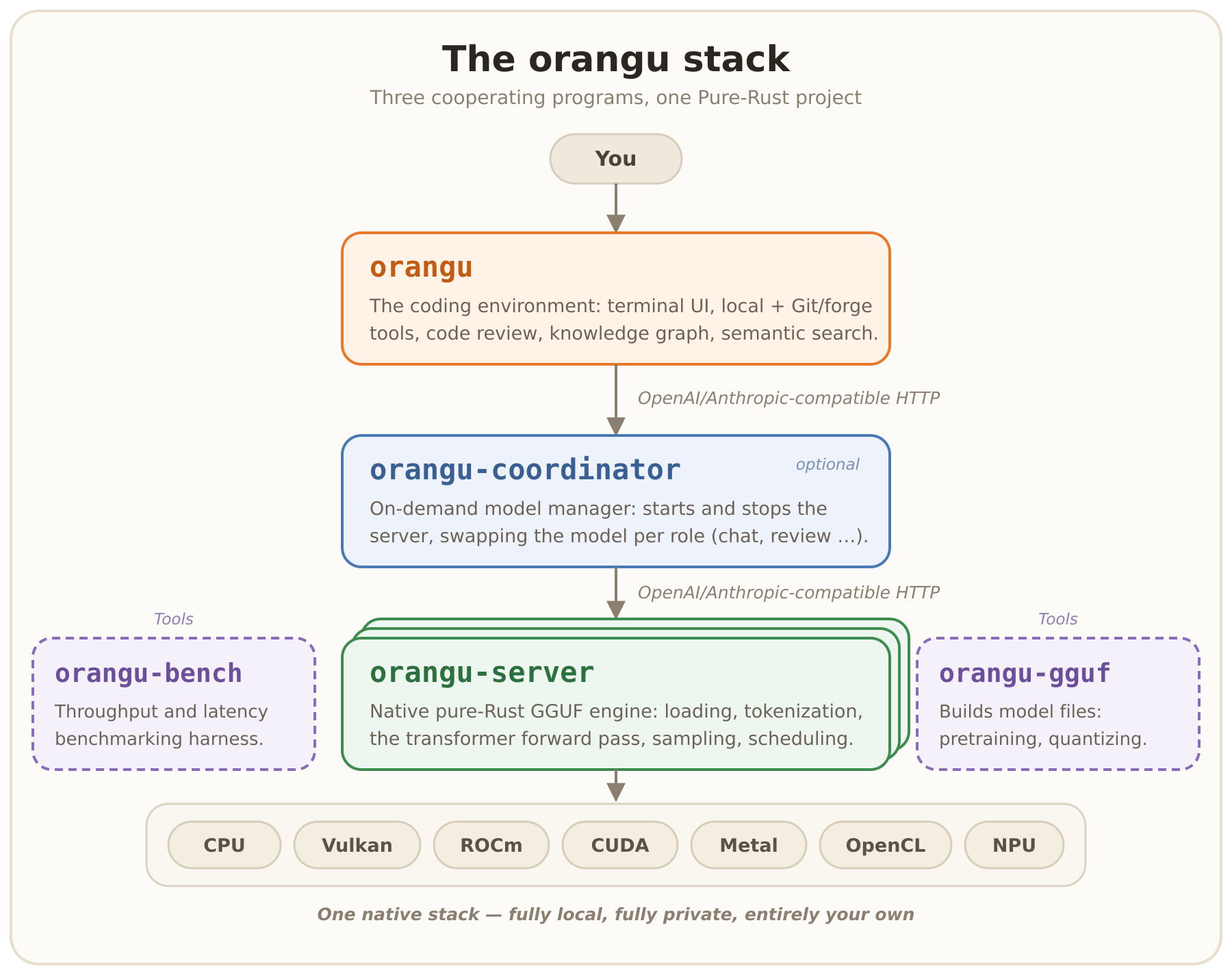
| Component | Role | Documentation |
|---|---|---|
orangu |
Terminal UI, Git & workspace tools, /review, knowledge graph, context compression |
Terminal Reference · Core Tools |
orangu-coordinator |
On-demand proxy that boots/stops orangu-server and swaps models to fit single-GPU VRAM |
Coordinator Guide |
orangu-server |
Native GGUF inference engine (CPU, Vulkan, Metal, CUDA, ROCm), OpenAI API, web console | Server Guide |
orangu-bench |
Throughput & latency benchmarking harness across OpenAI-compatible servers | Benchmarking Manual |
orangu-gguf |
Model pretraining, corpus packing, and GGUF quantization tool (Q6_K down to IQ1) |
Model Building Guide |
Core Features
In-Terminal Code Review Workflows
orangu turns your terminal into a complete code-review workstation against your merge base:
/review(Interactive Review): Full-screen two-pane reviewer (diff vs. checklist). Mark files approved/rejected, add comments categorized by Code, Security, Memory, or Performance, and query the LLM inline on any diff line./auto_review(LLM-Driven Review): Automated pass applying a strict Confidence Scoring Rubric (0-100) to eliminate hallucinations and nitpicks. Generates category breakdowns and approve/reject verdicts. Supports single files (/auto_review <file>), deep cross-file knowledge-graph context (deep), or immediate runs (immediate)./create_patch(Turn Findings into Code): Feeds verified review findings back to the model to generate and apply working patches in your tree without auto-committing. Also resolves Git merge/rebase conflicts.
Read more in the Review Workflows Manual and Core Tools Reference.
Native GGUF Inference Engine (orangu-server)
A high-performance inference engine built entirely in Rust:
- Broad Architecture Coverage: Runs 21 servable model families, including Llama, Mistral, Qwen (dense & MoE), Gemma (including Gemma 4 MoE), DeepSeek-V4, GLM, Kimi-K3, Muse-Spark, Phi, Nemotron-H, text-to-image diffusion models (
Qwen-Image), theLTX-2.5audio-video model, and theQwen3-TTSspeech model. - Hardware Acceleration: CPU, Vulkan (AMD, NVIDIA, Intel), Metal (macOS Apple Silicon native), CUDA, and ROCm.
- Quantization Support: Native dequantization for
F32/F16/BF16,Q4_0-Q8_0, K-quants (Q2_K-Q6_K), I-quants (IQ4_XSto sub-1.5-bitIQ1_XXXS), and Prism's ternaryPQ2_0/PTQ1_0. - Text, Image, Video & Speech Generation: Serves
/v1/chat/completions,/v1/embeddings,/v1/images/generations(with the--imagedeployment role) via Qwen-Image (with transparency support),/v1/videos(with the--videodeployment role) via LTX-2.5: MP4 clips of AV1 video with a FLAC sound track, and/v1/audio/speech(with the--audiodeployment role) via Qwen3-TTS: speech in a voice from a voice pack, as WAV, FLAC or raw PCM. - Single-File Bundles: Package the server and a model into a standalone binary with
orangu-server bundle <model>. - Built-in Web Console: Optional browser chat interface with live tokens/sec, syntax highlighting, and model switching.
See doc/SERVER.md, doc/manual/en/46-server.md, doc/manual/en/48-image.md, doc/manual/en/49-video.md, and doc/manual/en/50-audio.md for architecture internals, image, video and speech generation, and backends.
Extensibility: MCP, Skills & Agent Memory
- Model Context Protocol (MCP): Native client for Streamable HTTP MCP servers, dynamically exposing remote tools to the model with configurable user approval policies (
prompt,writes,auto,deny). - Agent Skills (
SKILL.md): Automatically discovers and registers modular domain skills from~/.orangu/skills/,~/.agents/skills/, and workspace folders. - Cross-Session Memory (
AGENTS.md): Persistent project rules and instructions automatically loaded fromAGENTS.mdin the workspace or home directory.
See the Skills Manual and Tools Reference.
Workspace & Git-Centric Tooling
- Prompt-Driven Git Loop: Commit, amend, rebase, squash, stash, branch, cherry-pick, revert, and bisect without leaving the prompt.
- Forge Integration: Interact with GitHub and GitLab issues, PRs, and review comments directly (
/pull_request,/comment,/issue). - Unified Build Engine (
/build): Auto-detects toolchains (Cargo, CMake, Make, Meson, Maven, Go, Python) and runs format, lint, build, and test pipelines. - Codebase Knowledge Graph (
/graph): Tree-sitter AST dependency graph to map function calls, classes, and hierarchy; inspect symbols (/graph explain), trace dependency paths (/graph path), or export interactive HTML diagrams. - Semantic Search (
/search): Hybrid vector embeddings + call-graph ranking to find code by meaning rather than exact string matches. - Context Compression Engine: AST-aware file downsampling, smart diff compaction, and token window preservation (Compression Manual).
orangu vs. Cloud Coding Assistants
| Feature / Aspect | orangu | Typical Cloud Coding Assistant |
|---|---|---|
| Where your code goes | Stays on your machine - zero telemetry | Sent to third-party cloud servers |
| Offline operation | First-class; fully functional without Internet | Requires continuous Internet access |
| Model choice | Any local GGUF model via pure-Rust orangu-server |
Vendor-restricted models & API keys |
| Running cost | Free forever on your own hardware | Monthly subscriptions or per-token fees |
| Footprint | Single fast Rust binary, instant startup | Heavy editor plugins or electron wrappers |
| Code review | In-terminal interactive (/review) & LLM auto-review |
Often outsourced to browser PR views |
| Git integration | Full Git & forge cycle directly in the prompt | Varies; often limited or external |
| Security & Privacy | Ideal for air-gapped, regulated, or sensitive repos | Subject to cloud provider data policies |
Common Commands & Shortcuts
/help              List all commands and shortcuts
/review            Start interactive 2-pane code review
/auto_review       Run automated LLM review with confidence scoring
/create_patch      Apply review fixes or resolve merge conflicts
/build             Run auto-detected build/test pipeline
/graph             Generate interactive codebase architecture graph (/graph explain, /graph path)
/search <query>    Perform semantic code search
/mcp               Show connected MCP servers and discovered tools
/skills            List available agent skills
/status            Display Git status and workspace context
/usage             View token consumption and session timings
/theme <name>      Switch themes (e.g. tokyonight, modern_dark, classic)
Useful CLI switches:
orangu -p "prompt": Run single prompt or slash command headless and exit.orangu -w <path>: Launch with a specific workspace root.orangu -r [uuid]: Resume a previous session (or launch interactive picker if omitted).orangu -a: Reopen all workspace tabs from your previous session.orangu -s: Output shell completion script for Bash, Zsh, Fish, or PowerShell.
Building from Source
Dependencies
- Fedora / RHEL:
sudo dnf install -y git rust cargo - Debian / Ubuntu:
sudo apt-get install -y git curl && curl --proto '=https' --tlsv1.2 -sSf https://sh.rustup.rs | sh - macOS:
brew install rust
Compilation
git clone https://github.com/mnemosyne-systems/orangu.git
cd orangu
cargo build --release
sudo install -Dm755 target/release/orangu /usr/local/bin/orangu
Documentation & Manuals
orangu includes an embedded offline manual accessible anytime directly from the terminal via /manual (with full-text search using Alt+S).
Additional documentation and guides:
- Getting Started Guide
- Configuration Reference · Configuration Manual
- Inference Server Guide · Server Manual · Server Internals
- Image Generation Manual · Video Generation Manual · Speech Generation Manual
- Coordinator Guide · Coordinator Manual · Coordinator Internals
- Container Image Manual: the coordinator, the server and your models in one Podman or Docker image
- Model Building & Quantization · GGUF Manual · Corpus Manifest
- Core Tools Reference · Git Tools · Workspaces
- Context Compression Details
- HTTP API Reference · Engine Contributor's Map
- Developer Information · Benchmarking Manual
Tested Platforms
CI verifies builds and runs tests on every push across:
| Operating System | CI Runner |
|---|---|
| Linux | ubuntu-latest |
| macOS | macos-latest (Apple Silicon) |
| Windows | windows-latest |
Day-to-day development happens on Fedora.
Community & Contributing
- Discussions: GitHub Discussions
- Issues & Requests: GitHub Issues
- Pull Requests: GitHub Pull Requests
- Please review our Code of Conduct before contributing.