
mmr710/nightmux
mmr710/nightmux has 28 GitHub stars and 4 forks. GitHot measured 0 stars in 24 hours. Last checked 2026-11-14 10:35 UTC. Last push 2026-11-12.
Measured star growth
- in 24h
- 0
- in 7 days
- Collecting history
- in 15 days
- Collecting history
- in 1 month
- Collecting history
Net star changes over overlapping periods, not daily totals. Missing measurements are left blank. Stars measure attention, not software quality.
About
The vendor-neutral night shift for AI coding agents. Claude, Codex, Gemini & more from one phone: fail over when one runs out, loop until your tests pass. Self-hosted, zero deps.
ProductivityREADME.md
Original
🌙 nightmux
Run Claude Code, Codex and Gemini overnight. When one hits its usage limit, the next takes over — until your tests pass.






Website · Live Office Demo · 48s Video · How It Compares · Leaderboard · Guide
- Your test command decides when it is done. After each turn,
--untilruns your shell check (npm test,pytest -q,cargo test); if it fails, the failure output goes straight back to the agent as the next prompt (up to 20 turns, or--max-turns). - Another vendor's agent takes over mid-flight. On a Claude Code usage-limit banner, any agent's exit, or a turn over an hour, nightmux writes a
.nightmux/HANDOFF.mdbrief (the cut-off task, recent actions,git status, diffstat and recent commits) and starts the next agent on the same working tree. - Nothing to set up. One Python stdlib file over
tmuxand your existing agent CLIs. No bot, no API keys, no relay, no daemon required:
uvx nightmux run "fix the failing tests" --until "npm test"
uvx nightmux run "add input validation" --until "pytest -q" --agents claude,codex,gemini --max-turns 10
claude: turn 1 sent
claude: check failed (exit 1)
claude: turn 2 sent
claude: usage limit hit
wrote .nightmux/HANDOFF.md
codex: turn 3 sent
✅ pytest -q passed after 3 turns
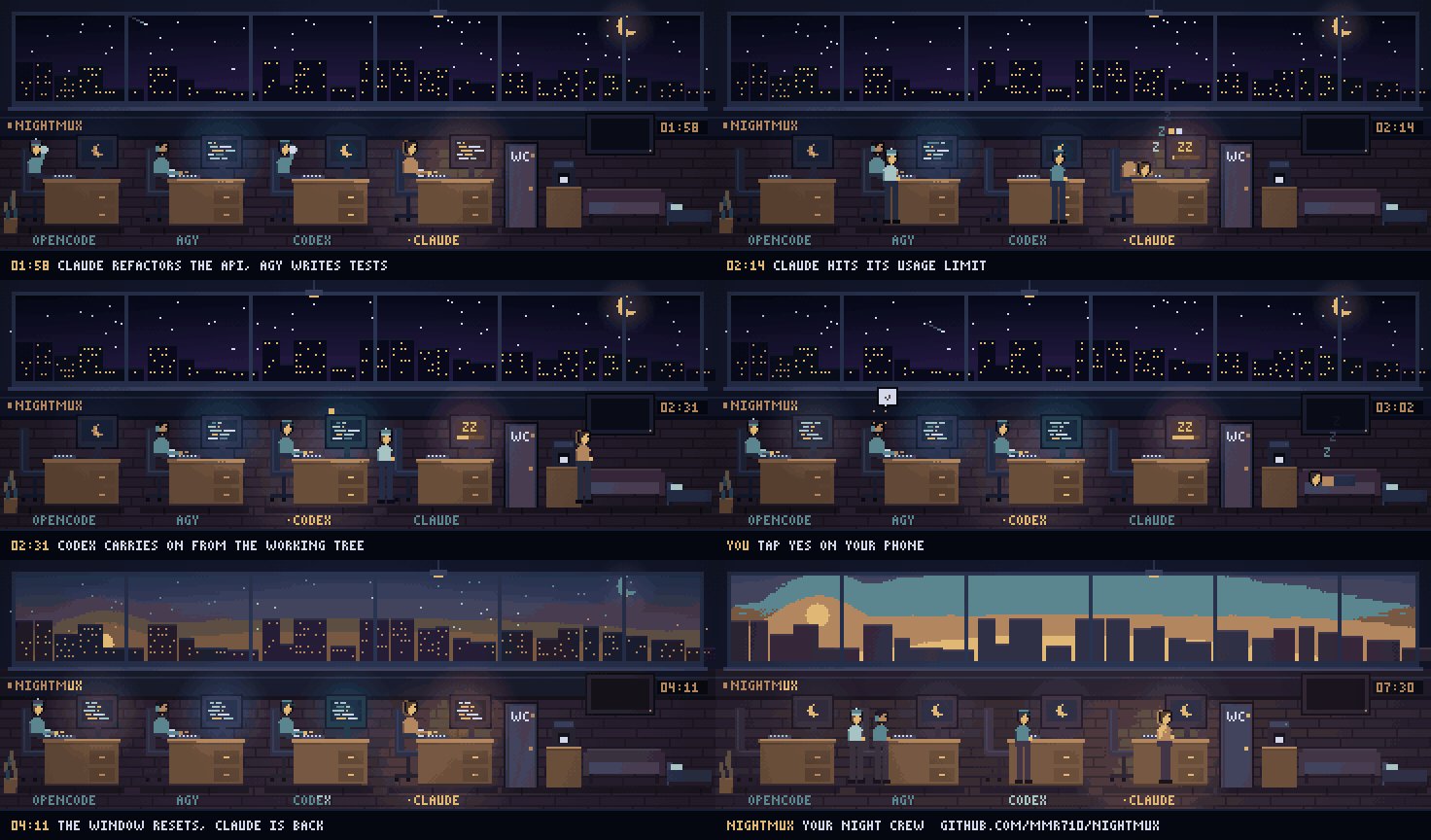
A simulated night in the daemon's 3D / pixel-art office view (what the phone setup below adds; preview locally with
python3 nightmux.py --demo). Open live demo · Watch 48-second video
How
runbehaves: Usage-limit banners are recognised for Claude Code directly; other agents fail over when they exit or a turn exceeds an hour. Permission dialogs in a pane are never auto-answered byrun— it reports the session and waits for you to answer viatmux attach -t =<session>. Exit codes:0check passed,1max turns reached,2bad arguments or no tmux,3no agent left,130interrupted.
See what your agents cost first
Before changing how you work, see what your agents already burned this month:
uvx nightmux wrapped              # 30-day report + two shareable cards (wrapped 7 for a week)
uvx nightmux wrapped 30 --json    # machine-readable JSON for scripts, badges and dashboards
uvx nightmux handoff codex        # write .nightmux/HANDOFF.md and continue this repo in Codex now
wrapped reads the local transcripts Claude Code, Codex, OpenCode and Antigravity already keep in your home directory and calculates what those tokens would cost at public API list prices (a size comparison, not your subscription invoice). Nothing is uploaded. It also writes two card files in the current folder: a private one with project names and nightmux-wrapped-share with counts only, ready to post. Details and custom model pricing in the guide.
Using Claude Code? Add /nightmux:wrapped and /nightmux:handoff inside your session:
/plugin marketplace add mmr710/nightmux
/plugin install nightmux@nightmux
Why sequential failover instead of parallel agent swarms? In our own benchmarks on the same task, multi-agent "teams" cost ~3× the tokens of a single agent. What actually ships code overnight without tripling spend is one agent at a time, a real --until test gate, and automatic failover when a usage window runs out.
From your phone (the full night shift)
run drives one task in one terminal. For multiple projects, overnight queues, 5-hour window auto-resume, tap-button approvals and a morning briefing, install the daemon:
curl -fsSL https://raw.githubusercontent.com/mmr710/nightmux/main/install.sh | sh
- Telegram (or Discord / Slack): Setup creates your bot (scan the terminal QR, or paste a token from @BotFather). One forum topic per project → one
tmuxsession behind it that you can stilltmux attachto anytime. Send!new myproj ~/code/myproj, then type. Permission prompts arrive as tap buttons. - Dashboard only, no Telegram: Run
nightmux upto start the web dashboard, chat PWA and live office athttp://127.0.0.1:9090(python3 nightmux.py --demopreviews a simulated night on:8099with no keys). Nothing is opened to the network; to pair a phone over Tailscale, runtailscale serve --bg 9090and tap + Pair phone.
What the daemon adds on top of run:
| 🌙 Overnight queues & auto-resume | Reads Claude Code's reset clock at 02:14, holds your queue + the cut-off turn, and resumes at 04:11 (!failover codex hands it over immediately) · !at 03:00 / !every 4h schedules · !shift step queues · morning briefing with a GIF reel |
| 🎯 Test gates & autonomous planning | !goal npm test is --until in chat · !po <goal> drafts a roadmap and spins up isolated git worktrees · !brain <mission> nudges multi-step tasks and stops to ask when stuck · !race claude,codex compares two agents in parallel worktrees |
| 👀 Kanban, diffs & 3D/2D office | /board (!kanban) live session columns · /review/<topic> (!review) per-file diff + PR status · /office 3D & pixel-art office · !undo per-turn git checkpoints · Android APK with push alerts and home-screen widget |
| 💸 Token & budget guardrails | Live context % and 5h/weekly windows · auto-compact · !tokens, !cost and !stats · !budget $20 spend caps · !stopall emergency brake · multi-server Tailscale peers (--join) |
!help lists all commands in chat (full reference in docs/COMMANDS.md). Docker, cloud-init VPS and manual setup: install guide.
Agents
Any terminal coding agent works: nightmux types into its tmux pane and reads the screen back.
| Agent | Dialogs it turns into buttons | Usage windows | Tokens and cost | Started every night in CI |
|---|---|---|---|---|
| Claude Code | permissions, menus, folder trust | 5-hour and weekly | ✓ | ✓ |
| Codex | menus | 5-hour and weekly | ✓ | ✓ |
| agy | permissions | ✓ | ✓ | – |
| OpenCode | questions | – | ✓ | ✓ |
| Gemini CLI | folder trust | – | – | ✓ |
| Aider | (Y)es/(N)o questions | – | – | ✓ |
| Qwen Code | not yet | – | – | ✓ |
| Cursor, Amp, Goose | not tested | – | – | – |
The last column is the drift guard: every night CI installs the newest release of each agent and verifies how nightmux classifies its initial screen.
Security
The bot token is a shell on your machine, and allow_users is the only thing between a stranger and your sessions.
- Local by default: The dashboard binds
127.0.0.1only; non-localhost access requires pairing (nm_authcookie) andX-NightmuxCSRF headers. - Strict allowlist: Messages from anyone not in
allow_usersare ignored. - Human-gated risky actions:
!autoyesis off unless enabled per topic (capped at 25/hr) and never approvesrm -rf,sudo,git push,curl | sh,--forceornpm publish(!policycustomises this).!sandbox on(--nm-sandbox) isolates the agent in a rootless Docker container scoped to its project folder. - Zero dependencies: Python 3.8–3.13 standard library only — nothing third-party in your supply chain. The optional QR setup shortcut passes the new bot token once through the maintainer's in-memory relay; paste a @BotFather token directly if you prefer zero external hops. Read SECURITY.md before adding a second user or machine.
More
Guide · Commands · How it compares · Architecture · Cookbook · Changelog · Contributing · Roadmap · Website · Telegram community · Donate
MIT License · Python 3.8+, tmux, and any terminal coding agent. If nightmux saved your night, a ⭐ star on GitHub helps other builders find it.
Explore related projects
n8n-io/n8n
Fair-code workflow automation platform with native AI capabilities. Combine visual building with custom code, self-host or cloud, 400+ integrations.
210,453 starslanggenius/dify
Build Agentic workflows, RAG pipelines, with rich AI model and tool support on one collaborative workspace. Deploy on cloud, VPC, or self-hosted, so teams move from prototype to production without rebuilding the stack.
161,141 starsmicrosoft/PowerToys
Microsoft PowerToys is a collection of utilities that supercharge productivity and customization on Windows
140,970 starsstablyai/orca
Orca lets you run a fleet of coding agents (e.g. Claude Code, Codex) with your own subscription. Available on desktop, mobile and remote runtime.
124,610 stars