
misakuo/svgtoandroid
About
Converting SVG to VectorDrawable
Creative & MediaMeasured star growth
- in 24h
- 0
- in 7 days
- 0
- in 15 days
- Collecting history
- in 1 month
- Collecting history
Net star changes over overlapping periods, not daily totals. Missing measurements are left blank. Stars measure attention, not software quality.
readme_en.md
OriginalSVG2VectorDrawable
About
SVG2VectorDrawable, an plugin to Intellij platform, provides an automatic tool to convert svg file to Android VectorDrawable.
Features
- Graphical user interface
- Parse Android Project and list all Modules
- Support the parsing from SVG into VectorDrawable of different dpi
- Support SVG transform attribute
- Support batch operations of SVG convertion in a specified directory
Attributes Contrast
| SVG Attribute | VectorDrawable Attribute |
|---|---|
| id | android:name |
| fill | android:fillColor |
| fill-opacity | android:fillAlpha |
| stroke | android:strokeColor |
| stroke-opacity | android:strokeAlpha |
| stroke-width | android:strokeWidth |
| stroke-linejoin | android:strokeLineJoin |
| stroke-miterlimit | android:strokeMiterLimit |
| stroke-linecap | android:lineCap |
| transform | android:{scaleX/Y | translateX/Y | pivotX/Y | rotation} |
Useage
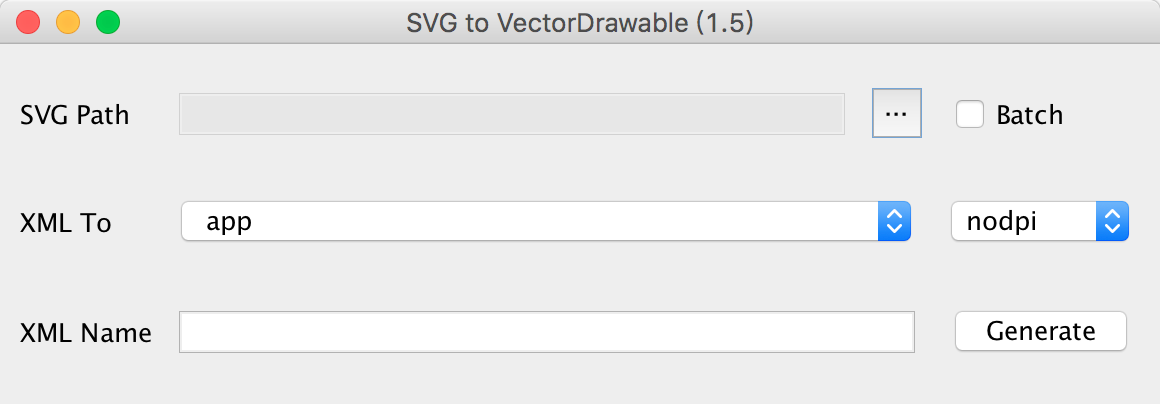
Install
This plugin is supporting to Intellij IDEA and Android Studio, need JDK1.6 and higher.
Installing from jar file
Click to download file svg2android.zip, open Preferences -> Plugins -> Install plugin from disk... in IDE, choosing svg2android.zip, you can find plugin's icon in toolbar after restart IDE.
Installing from plugin repo
In IDE,open Preferences -> Plugins -> Browse Repositories, search SVG2VectorDrawable, install and restart IDE.
Under GUI
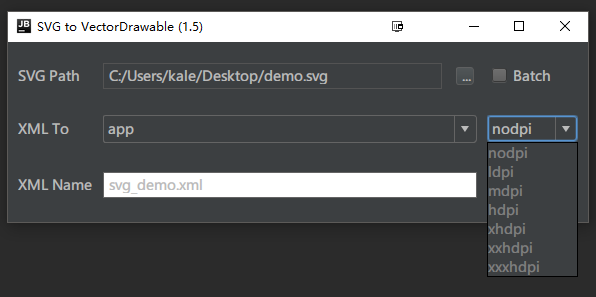
- Click
...and select SVG source file or selec batch and select a directory with SVG files in it - Choose module from which you want to generate XML file in the first combobox. If the dpi dir (like
drawable-xxhdpi) is already exists, the fontcolor in combox is BLACK, else the fontcolor is GRAY. If choosed dir not exists, plugin will creating the dir - Choose DPI for VectorDrawable to be generated in the second combobox
- Fill the name of the xml to be generated and file name is
{vector_drawable+SVG_NAME}by default - Click
Generateand this plugin will create VectorDrawabble and open it in an editor(if xml file existed before generating,the content will be overwitten)
Under Generate
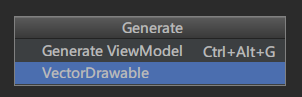
Call Generate Menu in any main code editor. Example, control+enter in macOS
.This plugin will convert SVG file under specified directory into drawable directory of current module skipping files with the same name.
Welcome to commit issue & PR :)
Explore related projects
Loading…