
mihsergeev/amnezia-control
mihsergeev/amnezia-control has 41 GitHub stars and 2 forks. GitHot measured 0 stars in 24 hours and +3 in 7 days. Last checked 2026-11-13 04:33 UTC. Last push 2026-11-05.
Self-hosted web panel to manage AmneziaVPN servers: AmneziaWG (incl. 3.1), OpenVPN over Cloak and XRay/REALITY. Two-server cascades (enter in one country, exit in another) over GRE or VLESS, client configs, traffic and node monitoring, Telegram alerts, 2FA. FastAPI + React, Docker.
What you can do
- Add servers with one-command onboarding (auto-setup over SSH password, or a copy-paste root script)
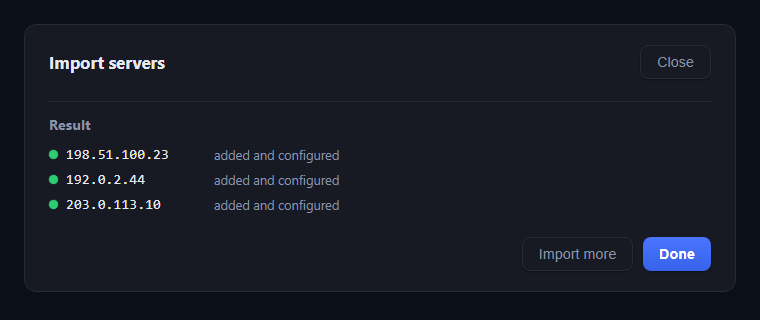
- Import already-deployed servers from an AmneziaVPN "full access" vpn:// link or a bulk host list
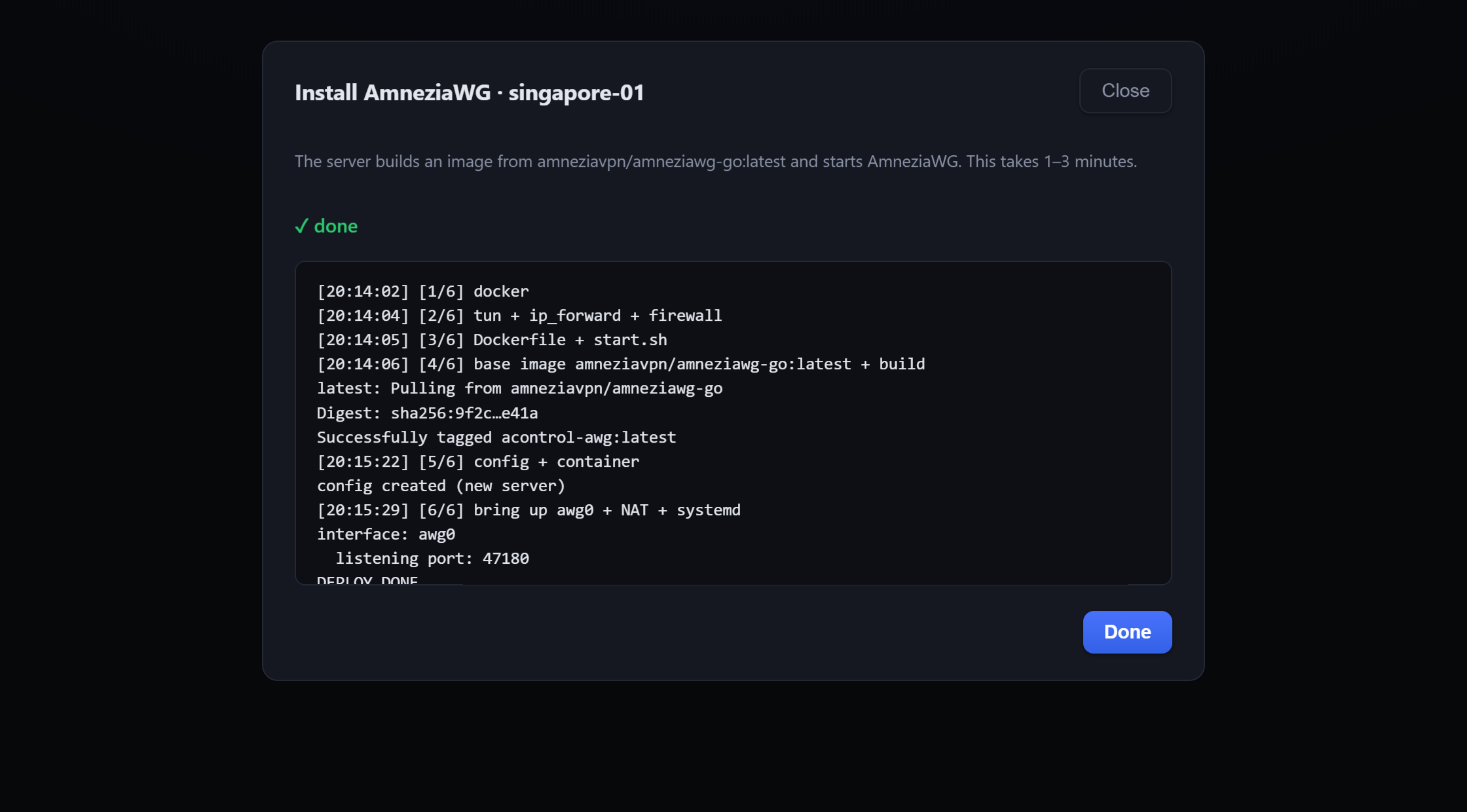
- Deploy AmneziaWG / AmneziaWG 3.1 / XRay / OpenVPN-over-Cloak to a clean server (build-on-target, config-preserving); a busy port is caught before the install starts, and the install window offers another one
- AmneziaWG 3.1 as a separate protocol next to 2.0 and legacy: own container, port and subnet, so both versions run on one node. The AmneziaVPN app labels these connections "version 3.1"
Measured star growth
- in 24h
- 0
- in 7 days
- +3
- in 15 days
- Collecting history
- in 1 month
- Collecting history
Net star changes over overlapping periods, not daily totals. Missing measurements are left blank. Stars measure attention, not software quality.
README.md
Original

Self-hosted web panel to manage a fleet of VPN servers — deploy nodes, issue and revoke client configs, watch traffic and server health, all from one place. A replacement for managing servers by hand through the AmneziaVPN desktop client.
English · Русский





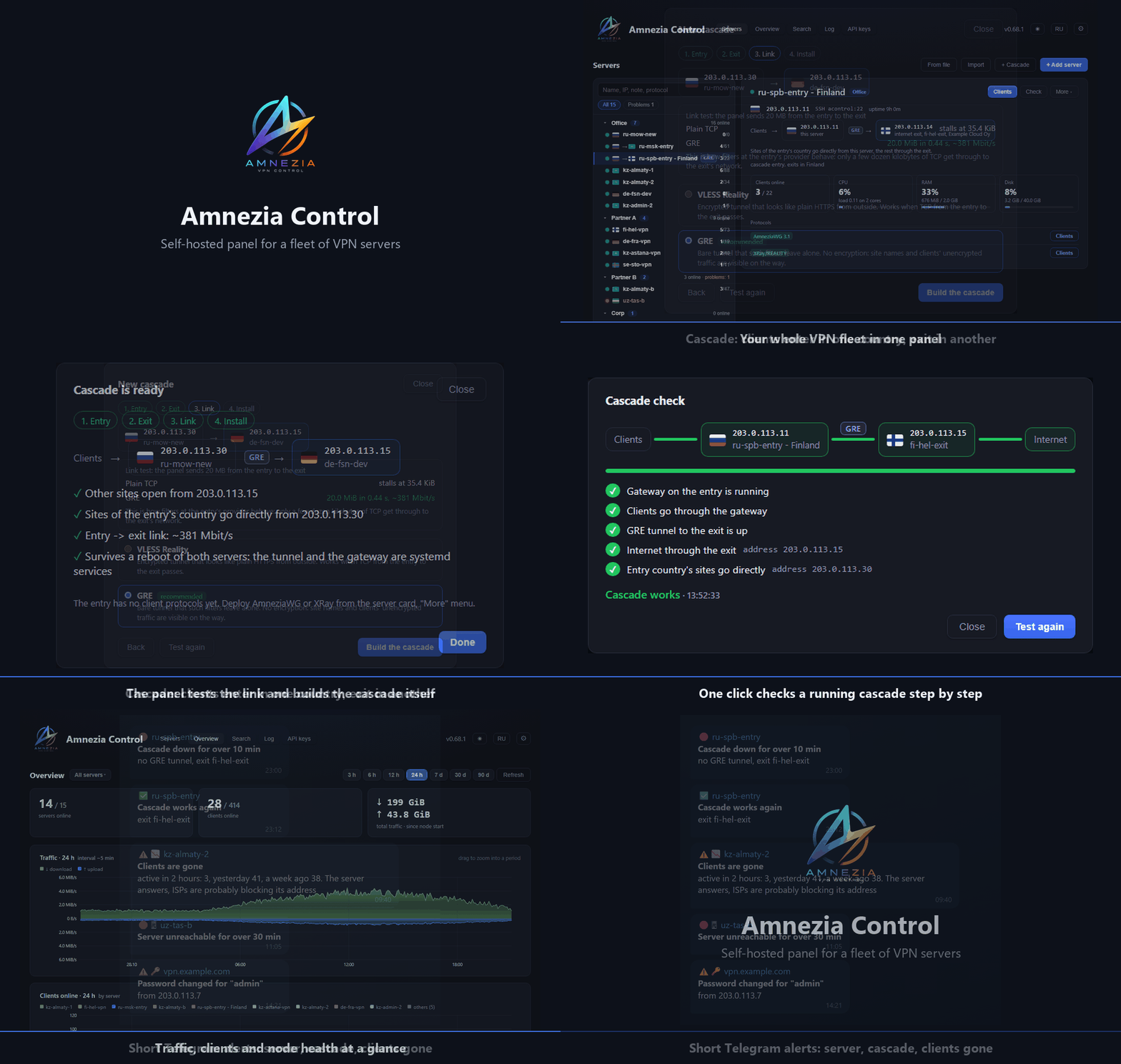
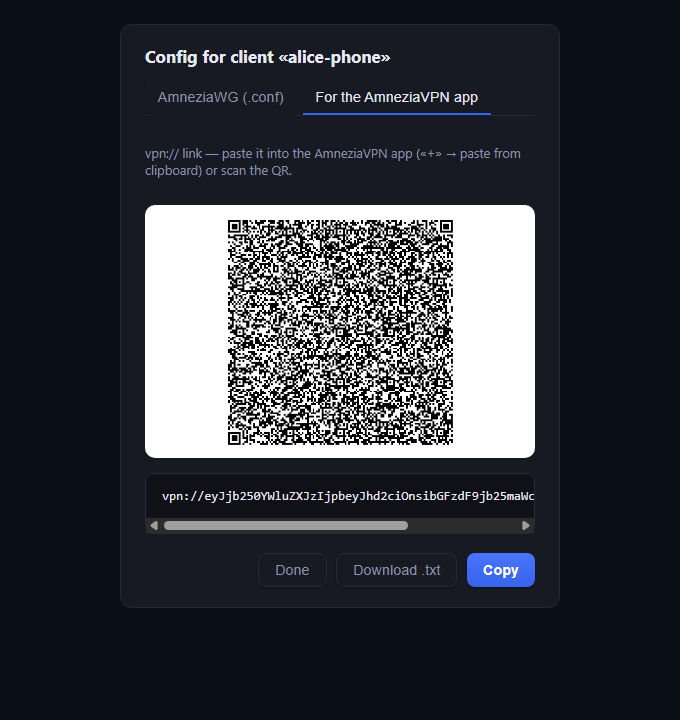
Nodes are managed over plain SSH (no agent installed on them). Four protocols are supported side by side: AmneziaWG, AmneziaWG 3.1, OpenVPN over Cloak, and XRay / REALITY. Clients are issued in the AmneziaVPN vpn:// format (with a scannable animated QR) and, for WireGuard, as a plain .conf.
Why Amnezia Control
The AmneziaVPN desktop client is great for personal use — set up a server, connect, share access. Amnezia Control is for when you run several nodes for a team and doing it by hand stops scaling.
| Capability | Desktop AmneziaVPN | Amnezia Control |
|---|---|---|
| Manage a whole server fleet | Partial | ✅ |
Import existing servers (vpn:// or bulk) |
❌ | ✅ |
| Clients from a single interface | ❌ | ✅ |
| Auto-expiring access | ❌ | ✅ |
| Pause & resume a client (keep the slot) | ❌ | ✅ |
| Traffic & node-health monitoring | ❌ | ✅ |
| Two-server cascade: enter in one country, exit in another | ❌ | ✅ |
| Encrypted AWG / REALITY cascades with link checks | ❌ | ✅ |
| Telegram & webhook alerts (server, cascade, clients gone, disk) | ❌ | ✅ |
| Config snapshots & one-click rollback | ❌ | ✅ |
| Scheduled backups & restore | ❌ | ✅ |
| Audit log & panel 2FA | ❌ | ✅ |
What sets it apart
- Made for networks with DPI filtering. The cascade wizard tests AmneziaWG 3.1, VLESS Reality and GRE independently through temporary tunnels and shows each result as it completes. Encrypted AmneziaWG 3.1 over UDP is the default; VLESS Reality over TCP is another encrypted option. Bare GRE remains an explicit unencrypted option. Sites of the entry's own country go straight from the entry by geo databases, the rest leaves through the exit in another country, and if the exit is down nothing leaks past it.
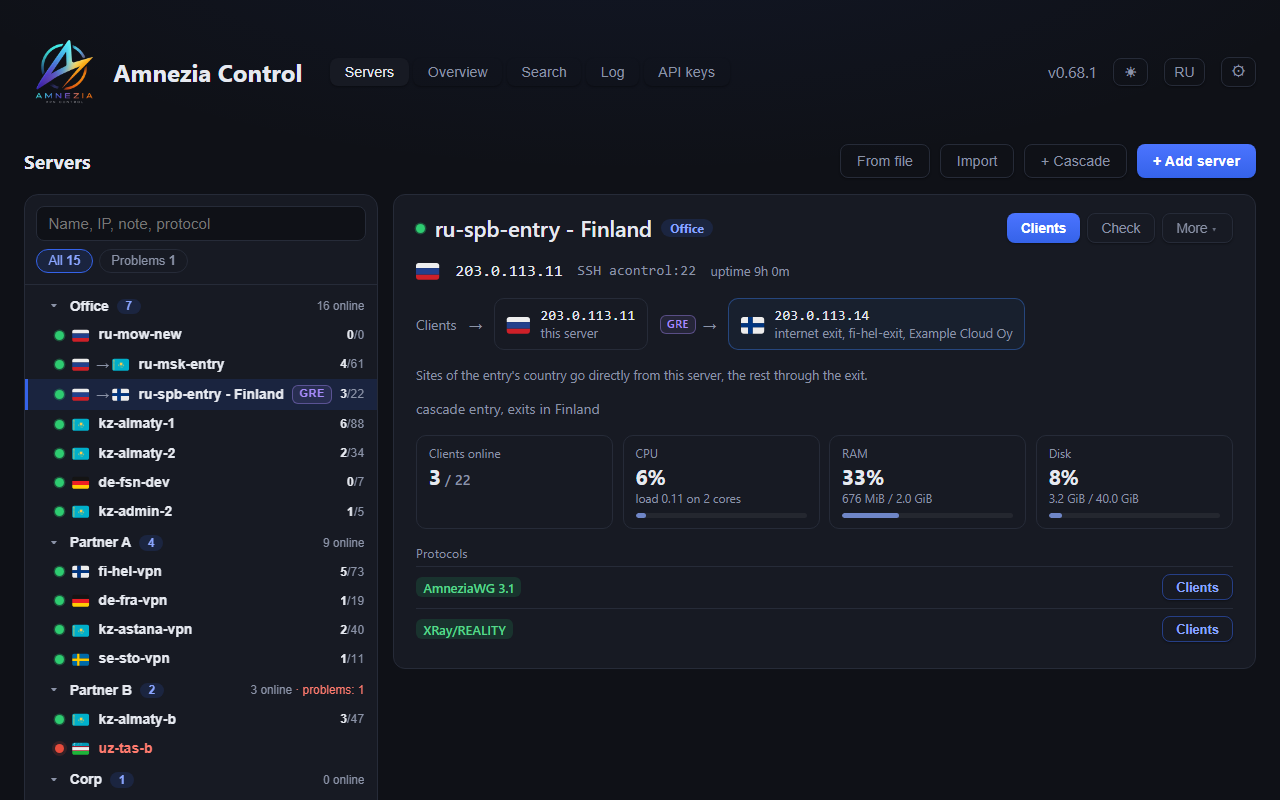
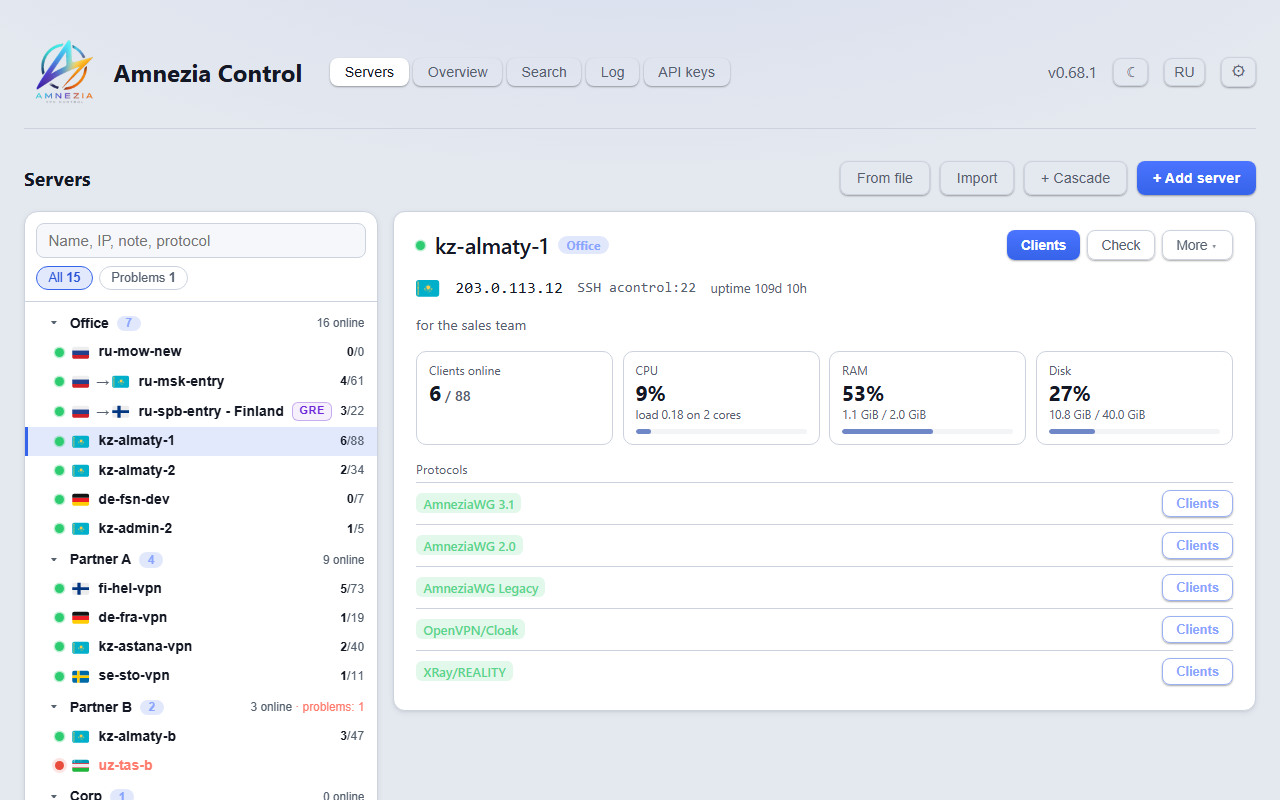
- One screen for the whole fleet. Groups, search by name, address, note or protocol, a problems filter, node load and disk right in the server card. A cascade exit is part of its entry and does not clutter the list.
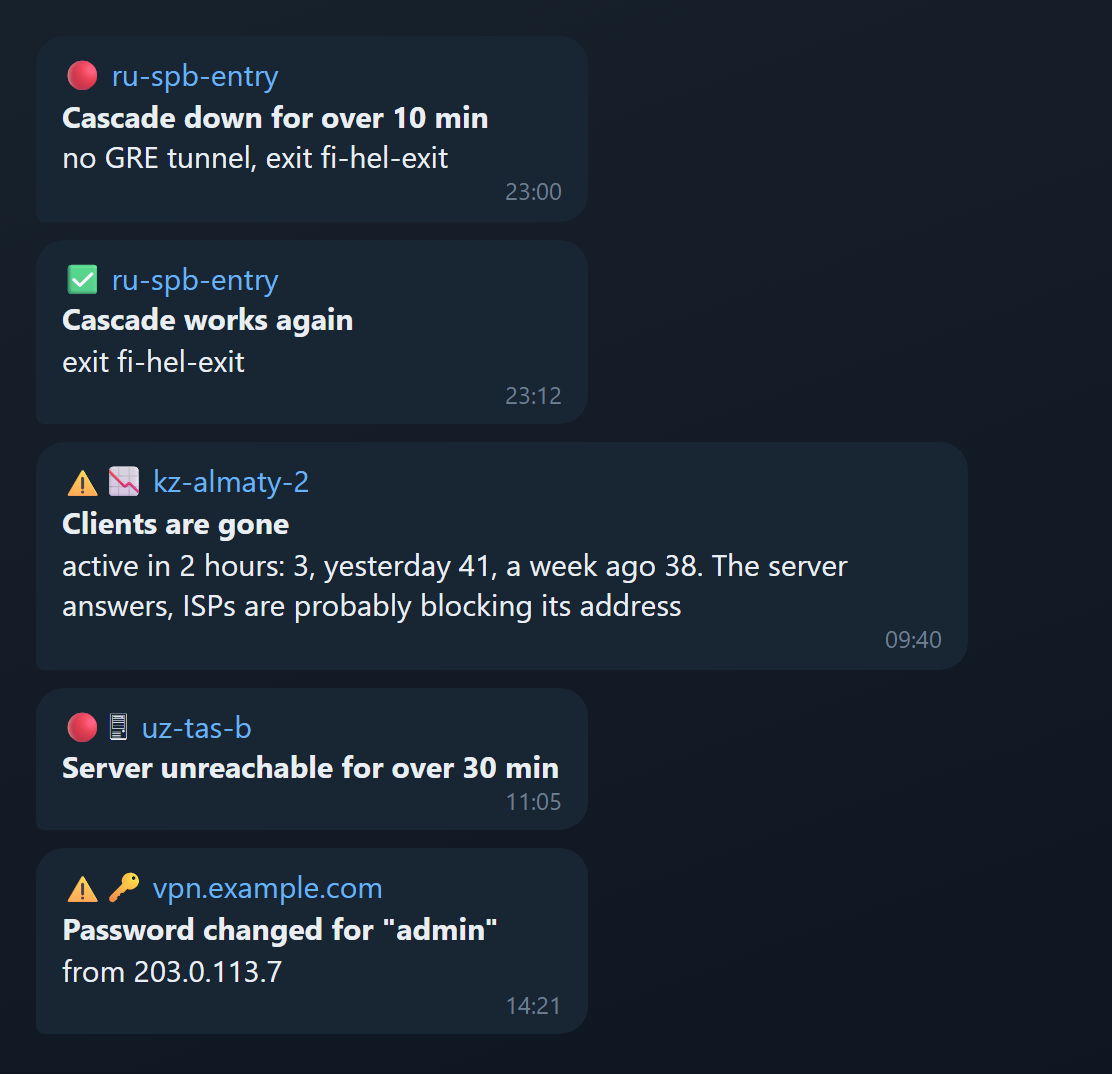
- Alerts you act on. Short Telegram cards: what, where and why in three lines. Short blips are filtered out, one alert per outage and a message when it is over. Besides a dead server the panel catches what plain monitoring misses: a cascade that stopped passing traffic, clients disappearing from a node whose address is being blocked, a changed SSH host key.
- Nothing extra on the nodes. The panel works over plain SSH, with no agent. What it installs (protocol containers, cascade services) is removed from the same menu.
- Safe to operate. Config snapshots and rollback, scheduled backups with a self-test, an audit log, 2FA, and a password prompt for destructive actions.
- Integration API with per-key server scopes for issuing and revoking clients from your own systems.
Independent open-source project — not affiliated with or endorsed by AmneziaVPN.
Features
Servers & nodes
- Add servers with one-command onboarding (auto-setup over SSH password, or a copy-paste root script)
- Import already-deployed servers from an AmneziaVPN "full access"
vpn://link or a bulk host list - Deploy AmneziaWG / AmneziaWG 3.1 / XRay / OpenVPN-over-Cloak to a clean server (build-on-target, config-preserving); a busy port is caught before the install starts, and the install window offers another one
- AmneziaWG 3.1 as a separate protocol next to 2.0 and legacy: own container, port and subnet, so both versions run on one node. The AmneziaVPN app labels these connections "version 3.1"
- In-place upgrade from 2.0 to 3.1 ("Upgrade to 3.1" on the 2.0 tab): same container, port, server key and subnet, with a snapshot taken first for rollback. 2.0 clients stop connecting afterwards and have to be reissued. Nodes installed back on 3.0 move to 3.1 with Rebuild
- AmneziaWG 3.1 is built from source at pinned tags and installs on old Docker too (19.03 and early 20.10)
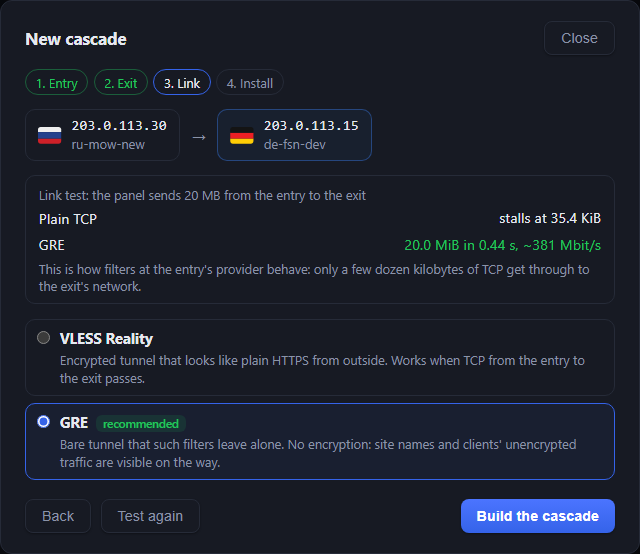
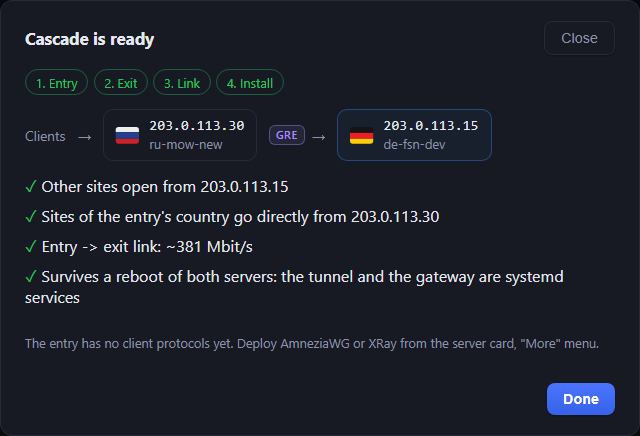
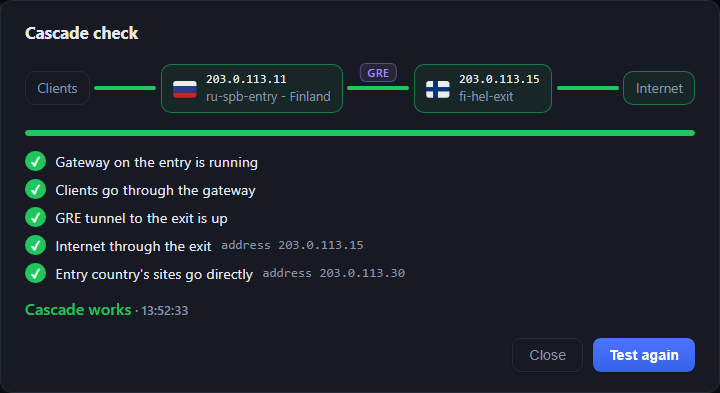
- Cascade of two servers (+ Cascade): clients connect to the entry in one country and reach the internet from the exit server in another. Sites of the entry's country (its national domains and IP ranges) open from the entry directly, everything else leaves through the exit server's address. For Russia the entry also sends sites blocked there through the exit. The wizard picks both servers (or adds new ones), tests the link between them and defaults to encrypted AmneziaWG 3.1 with separate tunnel keys and optional UDP ports on each node. VLESS Reality is another encrypted option; bare GRE is explicitly marked unencrypted. Each transport has its own temporary tunnel and receiver-confirmed byte/time measurement. Missing prerequisites are reported as unavailable; the wizard does not install images for a probe or change existing clients. Successful AWG test ports are reused during installation. The panel then sets up both sides itself: a gateway with geo databases on the entry, the tunnel and internet access on the exit, all as systemd services. If the exit goes down, clients' traffic does not leak past it. The card shows the route with a Check the cascade button that walks it (gateway, tunnel, internet through the exit, the address clients really go out from) and marks each step; a click on the exit in the route opens the exit server, and on the exit's card the entry opens the entry. Remove the cascade is in More. A cascade set up by hand (the panel only sees that clients go out in another country) gets the same button: it checks the clients' path from inside a VPN container, the exit address and country, and whether Google, Telegram, Instagram and YouTube open, with response times. The list shows each managed cascade once, with both server names and country flags. Open either node from the route to manage its own clients and protocols. For manually installed VLESS cascades the panel detects the configured peer, uses its inventory name when available, and accepts a custom name in server settings. Encryption and current link health are reported separately. Updating the panel preserves existing transports and client configurations; externally configured GRE-over-AWG links are protected from destructive reinstallation or removal
- Update the server core in one click; live deploy log
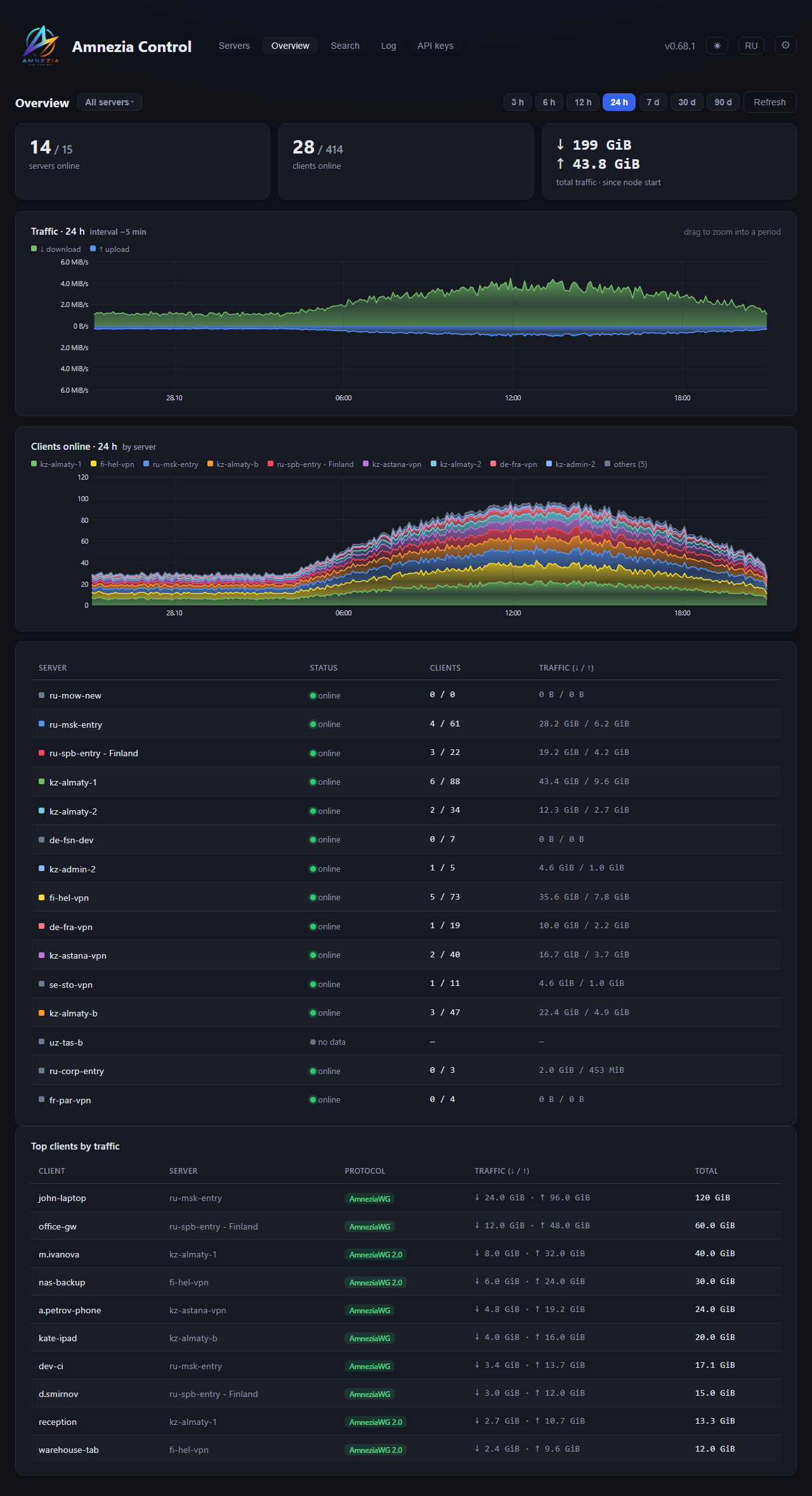
- Per-node resource monitoring: real CPU usage (with load average shown separately), RAM, disk, uptime - right on the card
- Organize servers into collapsible groups (folders) — by company, location, etc.
Clients
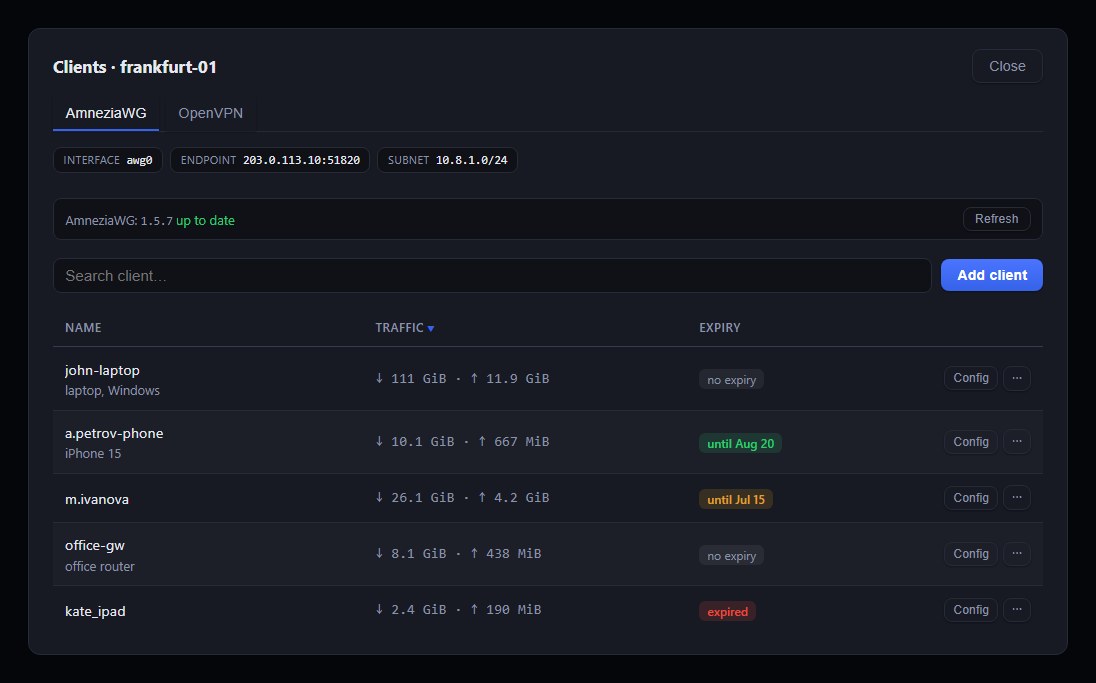
- Issue / revoke / reissue configs per protocol, with search, sorting and notes
- Rename a client from its menu; the new name is written to the node too, so the AmneziaVPN app shows it
- Bulk revoke: tick clients in the list and revoke them in one go
- Paused clients across the fleet: the Search page has a Paused button that lists every paused client on all servers with the time it was paused, and resumes them right there; regular search marks paused clients too. A click on a found client opens it: the server's Clients window shows just this client with all its actions
- Remove a protocol from a node with all its clients: in the server card under More, away from issuing configs (password required; a config snapshot is kept on the node)
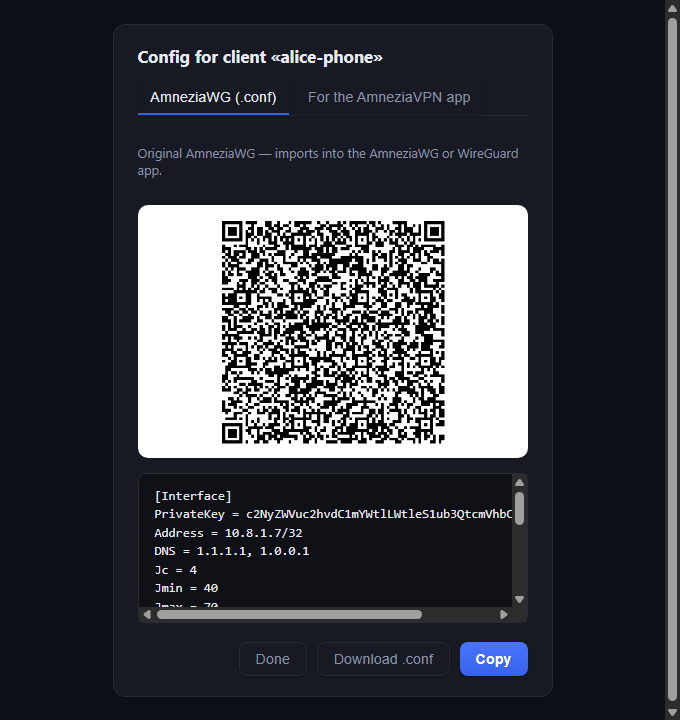
- Animated QR in the exact AmneziaVPN format the app scans, plus plain
.conffor WireGuard - Send a config as a one-time link instead of a file in a messenger: host sup3rS3cretMes5age or Password Pusher yourself, add its address under ⚙ → Config links, and the config window gets a Link button. The link opens once and expires by itself in 7 days; the audit log records who sent which client, not the config
- Expiry: set a lifetime per client (7 / 30 / 90 days or a custom date) — a background task auto-revokes on the node when it lapses
- Per-client traffic history (AmneziaWG & OpenVPN) with a speed chart and cumulative totals
- Top clients by traffic across all servers on the dashboard
- Torrent blocking per server (a checkbox in "Edit server"): AmneziaWG and OpenVPN containers drop clients' torrent traffic (peer handshake, DHT, HTTP and UDP trackers). Whoever downloads gets a "torrent" mark in the client list and an alert with the client's name, at most once a day. Optionally the panel pauses such a client by itself. Encrypted torrents and HTTPS trackers may get through, XRay clients are not covered
Monitoring & alerts
Server alerts are off by default, including existing servers after upgrading to 0.82.0. Enable "Send alerts for this server" in "Edit server" for each server you want to monitor. Cascade alerts are enabled when either endpoint is opted in. Torrent blocking works independently. Panel security and backup alerts are global and use the configured channels.
- Overview dashboard: aggregate traffic and online-clients charts (24 h), per-server breakdown
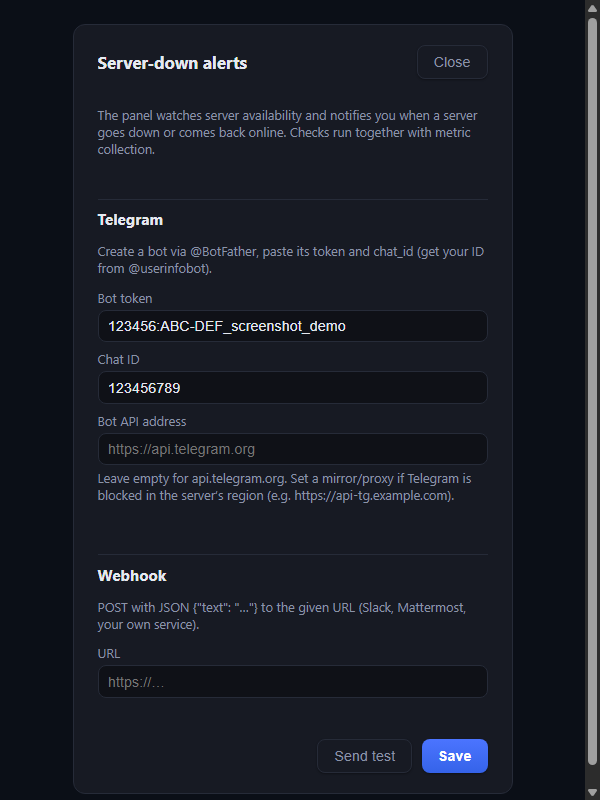
- Server-down alerts and low-disk alerts to Telegram and/or a webhook, configured from the UI. Every alert is a short card: level, server, what happened, one line of detail. Alerts come in English or Russian, set in ⚙ > Alerts
- "Clients gone" alert: the node still answers, but far fewer clients are active than at the same time yesterday and a week ago. This is what it looks like when ISPs start blocking a node's address. One alert per drop, at most once a day per server, and no "clients are back" message
- "Cascade down" alert: the panel checks every cascade from its entry every 2 minutes and alerts with the reason when traffic has not gone through the exit for 10 minutes, then says when it works again
Operations & security
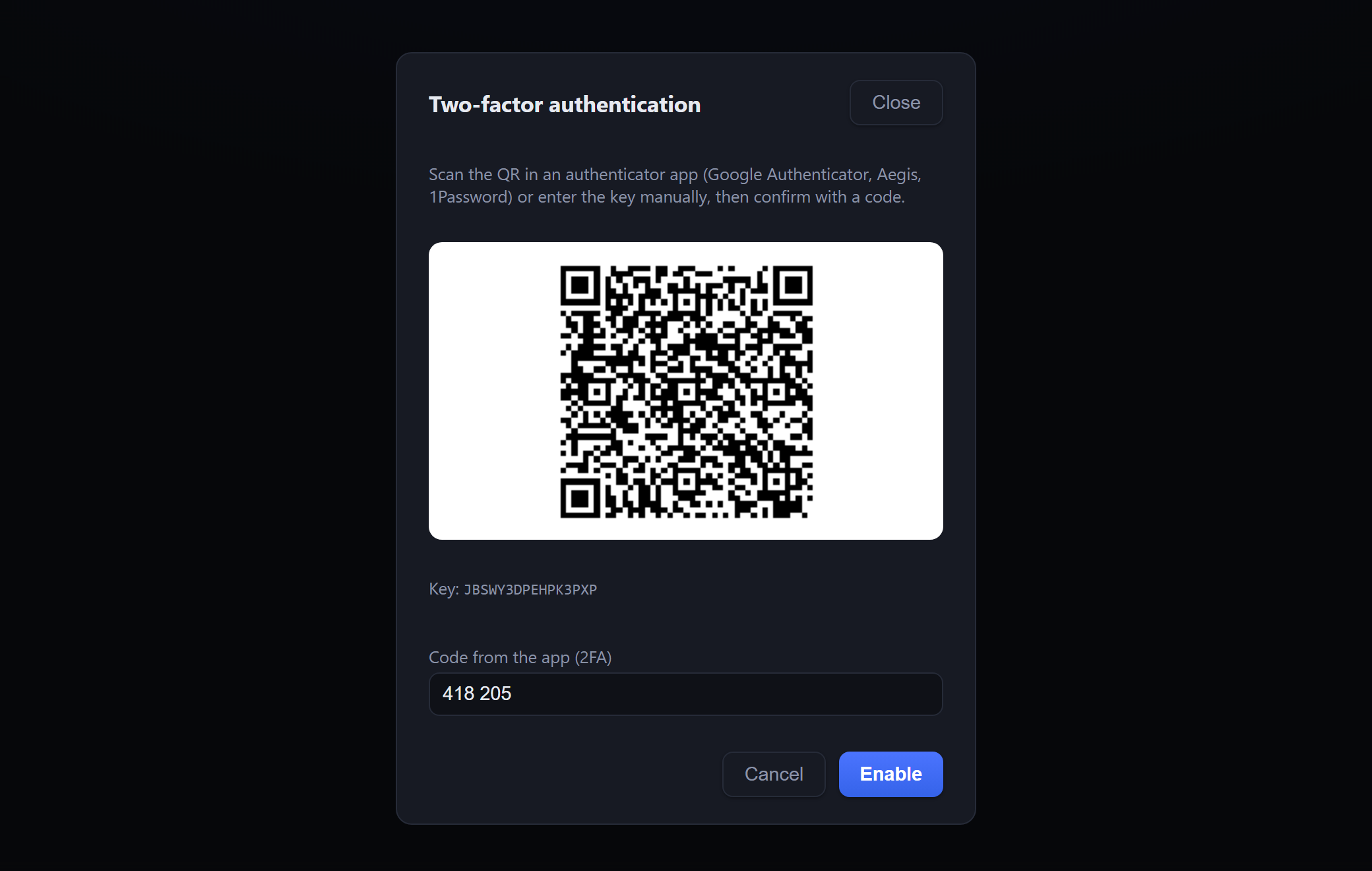
- Two-factor auth (TOTP) for panel login
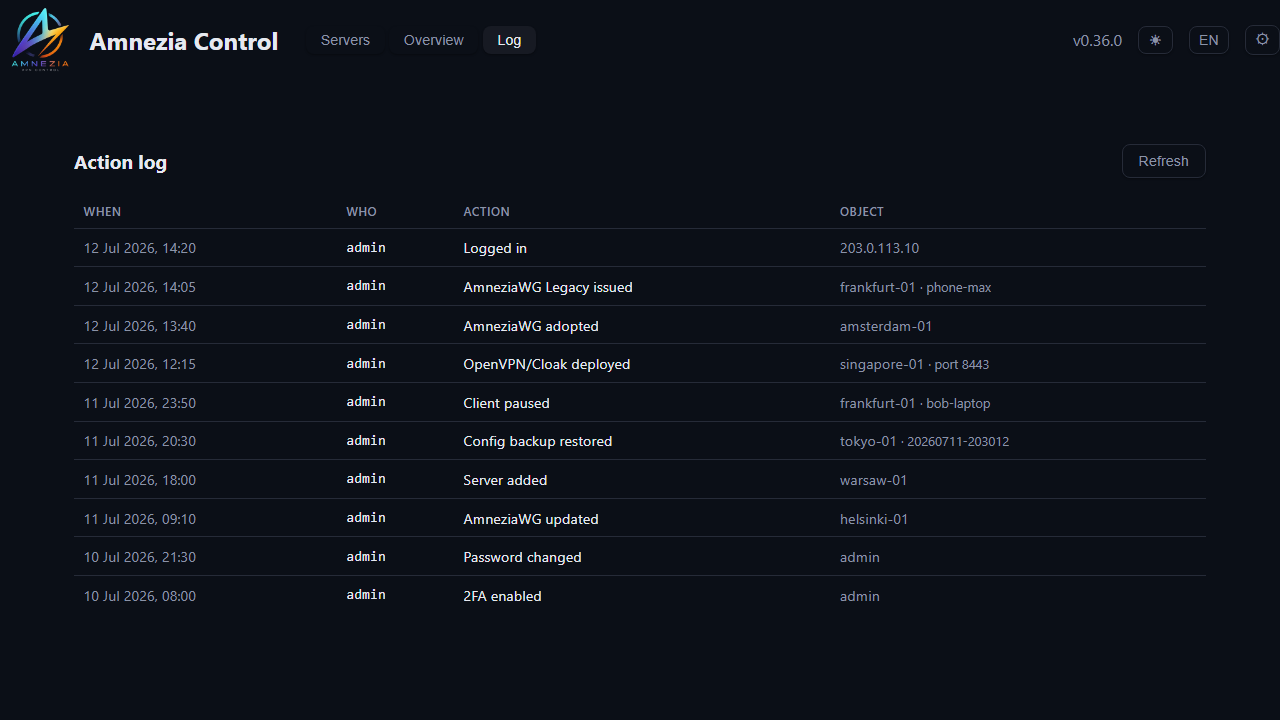
- Action audit log (who issued / revoked / deployed / deleted, and when)
- DB backup & restore (download an archive, or restore from one) + scheduled auto-backups with rotation
- Dark / light theme and English / Russian UI
- Edge TLS + IP allow-list via
caddy-docker-proxylabels (or bring your own reverse proxy)
Screenshots
| Servers (dark) | Servers (light) |
|---|---|
 |
 |
Cascade wizard (earlier version shown): current versions default to encrypted AWG and also offer REALITY or explicitly unencrypted GRE:
| Link test | Cascade ready |
|---|---|
 |
 |
Checking a running cascade (the Check the cascade button next to the route) walks the route and marks each step, up to the address clients really go out from (asked from inside a VPN container on the entry); a broken part turns red and the verdict names the reason:
Alerts in Telegram:
| Clients | Server-down alerts | Two-factor auth |
|---|---|---|
 |
 |
 |
| Deploy a protocol | Action log | Import servers |
|---|---|---|
 |
 |
 |
Issuing a client config — an animated QR in the exact format the AmneziaVPN app scans, plus a plain .conf for the AmneziaWG / WireGuard apps:
AmneziaWG .conf |
AmneziaVPN app (vpn://) |
|---|---|
 |
 |
Architecture
- Backend — Python 3.14, FastAPI, SQLAlchemy (async) + Alembic, node management over SSH via
asyncssh - Database — PostgreSQL 18 (SQLite in tests)
- Frontend — React + Vite + TypeScript, hand-rolled SVG charts, no UI framework
- Delivery — Docker Compose on a single host; the panel builds protocol images on the target node from the official
amneziavpn/*base images, so only a tiny script travels over SSH
The panel holds its own SSH keypair and connects to each node as an unprivileged acontrol user (docker access via group or sudo). Client private keys for WireGuard/OpenVPN are generated on the panel — only the public key / CSR ever reaches a node.
Requirements
- A Linux host for the panel with Docker and Docker Compose (v2)
- A reverse proxy for HTTPS (nginx / Caddy / Traefik) — an optional caddy-docker-proxy override is included
- VPN nodes: Linux with Docker; reachable over SSH from the panel
Quick start
Requires Docker Engine + the Compose plugin. On a fresh server:
curl -fsSL https://get.docker.com | sh.
Prebuilt images (fastest) — multi-arch (amd64/arm64) images are published to GHCR on every release, so no local build:
git clone https://github.com/mihsergeev/amnezia-control.git acontrol && cd acontrol
cp .env.example .env
# edit .env: set ACONTROL_ADMIN_PASSWORD, ACONTROL_DB_PASSWORD,
# ACONTROL_JWT_SECRET (openssl rand -hex 32) and ACONTROL_PANEL_IP
docker compose pull && docker compose up -d
Build from source — same, but build the images yourself:
docker compose up -d --build
This is standalone: the panel is published on the host at ACONTROL_BIND (default 127.0.0.1:8080). Open it at http://127.0.0.1:8080, or set ACONTROL_BIND=0.0.0.0:8080 to expose it on all interfaces. Generate the JWT secret with openssl rand -hex 32. Pin a version with ACONTROL_VERSION= in .env (default latest).
HTTPS / reverse proxy
The panel serves plain HTTP — put a reverse proxy with TLS in front. It's a login-protected control panel, so don't expose it over plain HTTP on the internet.
HTTPS in one step (recommended) — bundled Caddy + a free sslip.io domain. No domain of your own needed: sslip.io turns your server's IP into a hostname (dashes for dots — 203.0.113.10 → 203-0-113-10.sslip.io), and a bundled Caddy fetches a real Let's Encrypt certificate for it automatically.
# in .env — use YOUR server's public IP with dashes:
#   ACONTROL_DOMAIN=203-0-113-10.sslip.io
#   ACONTROL_ALLOW_IPS=          # empty = open to everyone (login + 2FA guard it)
docker compose -f compose.yml -f compose.tls.yml up -d
Open https://<your-ip-dashed>.sslip.io. Ports 80 and 443 must be reachable (Let's Encrypt validates over them). To lock it to specific IPs (everyone else gets 403), set an allow-list — no whitelist needed to just get going:
# in .env:
ACONTROL_ALLOW_IPS=203.0.113.10 198.51.100.0/24
(or put COMPOSE_FILE=compose.yml:compose.tls.yml in .env and just run docker compose up -d).
Advanced — existing caddy-docker-proxy. If you already run caddy-docker-proxy — the label-reading proxy — an override joins its network and configures TLS + an IP allow-list via labels:
# in .env: set ACONTROL_DOMAIN, ACONTROL_ALLOW_IPS, and
# ACONTROL_CADDY_NETWORK (the network your caddy-docker-proxy watches), then:
docker compose -f compose.yml -f compose.caddy.yml up -d --build
(or put COMPOSE_FILE=compose.yml:compose.caddy.yml in .env). The panel's frontend must share the same Docker network as caddy-docker-proxy — set ACONTROL_CADDY_NETWORK if it isn't named caddy. Leave ACONTROL_ALLOW_IPS empty to allow from any IP (rely on the login + 2FA).
IPv6 and the allow-list. On a host with a public IPv6 address, Docker hands IPv6 connections to a container through its userland proxy whenever the Docker network the ports are published from has no IPv6. Caddy then sees the network gateway (172.x.0.1) instead of the client, so with an allow-list set every IPv6 client is refused, even one that is on the list. Do not work around that by adding Docker subnets (172.16.0.0/12) or private ranges to ACONTROL_ALLOW_IPS: every IPv6 client arrives from that gateway, and the panel opens to the whole IPv6 internet with only the login in front. Give the network IPv6 instead, and Docker forwards IPv6 with the real client address. For caddy-docker-proxy (Docker 27+ picks the IPv6 subnet itself):
docker network create --ipv6 caddy
An existing network can't be switched: stop the stacks attached to it, docker network rm caddy, create it again with --ipv6 and bring the stacks back. If something on the same host must reach the panel through the proxy (a local health check), allow only that network's gateway as a /32, and only once the network has IPv6:
docker network inspect caddy -f '{{(index .IPAM.Config 0).Gateway}}'
The bundled Caddy (compose.tls.yml) publishes its ports from the panel's own network, which has no IPv6: with an allow-list set, IPv6 clients get 403. Reach the panel over IPv4, or enable IPv6 on that network in a compose override (networks: internal: enable_ipv6: true, Docker 27+).
Any other proxy (plain Caddy with a Caddyfile, nginx, Traefik) doesn't read these labels — use standalone mode instead: publish the port (ACONTROL_BIND) and point your proxy at it, or attach your proxy to the acontrol_internal network and proxy to acontrol-frontend-1:80.
Adding a VPN node
Add the server in the panel (name, host, SSH port, SSH user) and pick a setup method:
- With a script (recommended for a fresh node) — save, then run the shown script as root on the node (SSH in and paste it). It creates the SSH user, installs the panel's key and opens the firewall for the panel IP. Nothing to prepare by hand. Then click Check on the card. Also works when a firewall blocks inbound SSH from the panel, since the script opens access itself.
- Auto-setup by SSH password — the panel connects once with the given user's password, installs its key and opens the SSH port for the panel IP only (password not stored). The user must already exist with a password, and the node needs
PasswordAuthentication yes.
You can also import existing AmneziaVPN servers via their "full access" vpn:// link, or add many at once from a host:port user password list.
Firewall: the panel only opens the SSH port for its own IP (via ufw / firewalld /
hosts.allow). The VPN port is opened to the world by the deploy step (Docker publish + ufw / firewalld), because clients need it — nothing else is exposed.
Configuration
Set in .env (see .env.example):
| Variable | Default | Meaning |
|---|---|---|
ACONTROL_ADMIN_USER / ACONTROL_ADMIN_PASSWORD |
admin / — |
Panel login |
ACONTROL_DB_PASSWORD |
— | PostgreSQL password (internal) |
ACONTROL_JWT_SECRET |
— | JWT signing secret (32+ random bytes) |
ACONTROL_PANEL_IP |
— | Public IP of the panel (written into node firewall rules) |
ACONTROL_BIND |
127.0.0.1:8080 |
Host address and port the panel is published on in standalone mode (0.0.0.0:8080 = all interfaces, plain HTTP) |
ACONTROL_VERSION |
latest |
Image tag for prebuilt GHCR images; pin an exact version (e.g. 0.55.7) for reproducible deploys |
ACONTROL_DOMAIN |
(empty) | Panel domain for edge TLS (compose.tls.yml / compose.caddy.yml); leave empty in standalone mode |
ACONTROL_ALLOW_IPS |
(empty) | Edge IP allow-list, space-separated IPs/CIDRs (empty = open to everyone) |
ACONTROL_CADDY_NETWORK |
caddy |
Docker network of an existing caddy-docker-proxy (compose.caddy.yml only) |
ACONTROL_PANEL_URL |
https://<ACONTROL_DOMAIN> |
Public URL of the panel for links in alerts and the watchdog heartbeat; empty when no domain is set |
ACONTROL_API_DOCS |
1 |
Swagger/OpenAPI at /api/docs (0 = off) |
ACONTROL_TRUSTED_PROXIES |
(empty) | Proxies trusted in X-Forwarded-For; empty = loopback and Docker networks. Add your own proxy if it reaches the panel from another network |
ACONTROL_DEFAULT_SSH_USER |
acontrol |
Prefilled SSH user for new servers |
ACONTROL_STATS_INTERVAL |
300 |
Metrics/monitoring interval, seconds (0 = off) |
ACONTROL_EXPIRY_INTERVAL |
300 |
Expired-client auto-revoke scan, seconds (0 = off) |
ACONTROL_DISK_ALERT_PERCENT |
90 |
Low-disk alert threshold, % (0 = off) |
ACONTROL_ONLINE_DROP_PERCENT |
35 |
"Clients gone" alert: active clients in the last 2 h at or below this % of the same hours yesterday and a week ago, node still answering (0 = off) |
ACONTROL_ONLINE_DROP_MIN_CLIENTS |
8 |
Check only nodes that had at least this many active clients yesterday and a week ago |
ACONTROL_BACKUP_INTERVAL_HOURS |
24 |
Auto-backup interval (0 = off) |
ACONTROL_BACKUP_KEEP |
14 |
Auto-backups to keep |
ACONTROL_BACKUP_INCLUDE_TRAFFIC |
0 |
1 = include traffic history in backups (can be hundreds of MB) |
ACONTROL_PG_SHARED_BUFFERS / ACONTROL_PG_EFFECTIVE_CACHE |
256MB / 1536MB |
PostgreSQL shared_buffers / effective_cache_size |
ACONTROL_PG_WORK_MEM / ACONTROL_PG_MAINT_MEM |
16MB / 128MB |
PostgreSQL work_mem / maintenance_work_mem |
ACONTROL_ADMIN_PASSWORD_RESET |
0 |
Break-glass reset of the admin password and 2FA (see Security notes) |
COMPOSE_FILE |
(empty) | Compose files a plain docker compose uses, e.g. compose.yml:compose.tls.yml |
The ACONTROL_PG_* defaults suit a small cloud VM; raise them on a bigger host. Telegram / webhook alert channels are configured from the UI (⚙ > Alerts) and stored in the DB.
Integration API
Other systems (a billing panel, your own portal) can manage AmneziaWG clients over
a versioned HTTP API at /api/v1. Interactive docs: /api/docs (set
ACONTROL_API_DOCS=0 in .env to turn off Swagger/OpenAPI; the API itself keeps working).
Create a key in the panel under API keys. It is shown once — store it right
away, only a hash is kept. A key can read private client configs, so use
Edit in the key list to limit it to the servers it needs and give it an expiry
date; other servers return 404 for it. Send it in the X-API-Key header:
curl -H "X-API-Key: ack_..." https://panel.example.com/api/v1/servers

# issue a client -> returns the .conf text and a vpn:// link
curl -X POST -H "X-API-Key: ack_..." -H "Content-Type: application/json"   -d '{"name": "alice"}'   https://panel.example.com/api/v1/servers/1/clients

# revoke (public key is base64 -> url-encode it)
curl -X DELETE -H "X-API-Key: ack_..."   "https://panel.example.com/api/v1/servers/1/clients?public_key=abc%2Fdef%3D"
A key's permissions are deliberately narrow: it may list servers and issue,
fetch, revoke, pause and resume clients — it cannot deploy or delete servers,
change settings, export full access, or create further keys. Revoke a key at any
time from the same page; everything it did is in the audit log as apikey:<name>.
Rolling back AmneziaWG 3.1
Installing 3.1 is additive: it brings up a separate container
(amnezia-awg3) with its own port, subnet and config directory. Running
2.0/legacy containers are neither recreated nor reconfigured. Verified on a live
production node: after the install the 2.0 container kept the same container ID,
the same config hash, the same clients and live handshakes.
Before installing, the panel snapshots every AmneziaWG container on the node
(~/.acontrol/snapshots/...), and the target port is checked up front: if another
container or a host process already holds it, the deploy refuses to start
(otherwise the script would remove whoever occupies that port).
To roll 3.1 back completely, on the node:
sudo docker rm -f amnezia-awg3
sudo systemctl disable --now awg3-up.service && sudo rm -f /etc/systemd/system/awg3-up.service && sudo systemctl daemon-reload
sudo rm -rf /opt/amnezia/awg3 /opt/acontrol/build-awg3 /opt/acontrol/awg3-version
sudo docker rmi acontrol-awg3
sudo ufw delete allow <3.1 port>/udp   # if you use ufw
None of this touches 2.0 clients. To restore a config (rather than remove the protocol), use "Roll back" on the protocol tab in the panel — it lists snapshots.
Security notes
- Set a strong
ACONTROL_JWT_SECRET(openssl rand -hex 32) and admin password — the panel refuses to start on empty/default values. - Change the admin password from the UI (⚙ > Change password); it invalidates all existing sessions. Enable 2FA (⚙ > Two-factor authentication).
- The panel pins each node's SSH host key on first connect (TOFU) and verifies it after. If you rebuild a node, delete its line from
data/ssh/known_hostsso the new key can be pinned. - Keep the edge IP allow-list tight (Caddy labels) — an empty
ACONTROL_ALLOW_IPSmeans "allow all", leaving only the login in front. - Never put Docker subnets (
172.16.0.0/12) or private ranges intoACONTROL_ALLOW_IPS. On a host with IPv6 they let every IPv6 client in (see IPv6 and the allow-list above). - Put HTTPS in front (Caddy edge or your own proxy) — the full-access link and QR configs are secrets in transit.
- The "Full access" export produces a
vpn://link containing a private SSH key that is root-equivalent on the node — treat it like a secret. It uses a dedicated key; regenerating invalidates the old one. - DB backups (
db.json) contain secrets (password hash, client private keys, panel SSH key) — store them safely; the auto-backups dir is0700. - Security events — brute-force lockout, a node's host key changing (possible MITM), and password change are written to the audit log and sent to your Telegram/webhook alerts (⚙ > Alerts) if configured. Watch for them.
- Lost the password and 2FA? Set
ACONTROL_ADMIN_PASSWORD_RESET=1(with a newACONTROL_ADMIN_PASSWORD) and rundocker compose up -donce to reset the password and disable 2FA, then set it back to0and rundocker compose up -dagain. A plaindocker compose restartdoes not re-read.env, so it won't apply the flag.
Backups
All backup actions are in the ⚙ menu in the header.
- ⚙ > Download backup grabs a
tar.gzwith a JSON dump of all tables plus the panel's SSH key. - ⚙ > Restore from file replaces the current state from such an archive.
- Scheduled auto-backups are written to
./data/backupswith rotation; browse and download them from ⚙ > Auto backups.
Updating
Grab a DB backup first (⚙ > Download backup) as a restore point, and read the CHANGELOG for the versions you skip.
Prebuilt images (default). Update the checkout so the compose files match the release, then pull the new images. With ACONTROL_VERSION=latest in .env this takes the newest release; if you pinned a version, change ACONTROL_VERSION to the one you want first:
cd acontrol
git pull
docker compose pull && docker compose up -d
Build from source. Check out the release tag and rebuild:
cd acontrol
git fetch --tags && git checkout vX.Y.Z
docker compose up -d --build
Database migrations run automatically on backend startup.
- Overrides. If you run the panel with
compose.tls.ymlorcompose.caddy.yml, keep it inCOMPOSE_FILEin.env(e.g.COMPOSE_FILE=compose.yml:compose.tls.yml), otherwise a plaindocker compose up -dbrings the panel up fromcompose.ymlalone, without the proxy. Or pass the files every time:docker compose -f compose.yml -f compose.tls.yml .... - PostgreSQL major upgrades. A new PostgreSQL major version can't open the old data directory as is. Before an update that changes the
dbimage major version, read the CHANGELOG entry for it and follow its migration steps.
Development
# backend
cd backend
python -m venv .venv
.venv/bin/pip install -e ".[dev]"
.venv/bin/python -m uvicorn app.main:app --reload   # http://localhost:8000/api/docs
.venv/bin/python -m pytest

# frontend (proxies /api to :8000)
cd frontend
npm install
npm run dev                                          # http://localhost:5173
DB migrations (Alembic) run automatically on backend startup.
The backend image installs its dependencies only from backend/requirements.lock
(pinned, with hashes). After changing dependencies in pyproject.toml, or to pick
up library updates, regenerate it for the image's platform:
cd backend
docker run --rm -v "$PWD:/w" -w /w python:3.14-slim sh -c \
  "pip install -q pip-tools && pip-compile -q --generate-hashes --strip-extras \
   --allow-unsafe --no-header -U -o requirements.lock pyproject.toml"
Contributing
Issues and pull requests are welcome.
- Fork, create a branch.
- Backend:
cd backend && pytestmust pass; keep it typed and minimal. - Frontend:
cd frontend && npm run buildmust pass (tsc+vite). - Keep the UI bilingual — add both the Russian source string and its English translation in
frontend/src/i18n.tsx.
For larger changes, open an issue first to discuss the direction.
License
GNU AGPL-3.0 — see LICENSE. You may self-host and modify it freely; if you run a modified version as a network service, you must make your source available to its users (AGPL §13).
Explore related projects
freeCodeCamp/freeCodeCamp
freeCodeCamp.org's open-source codebase and curriculum. Learn math, programming, and computer science for free.
459,069 starsdonnemartin/system-design-primer
Learn how to design large-scale systems. Prep for the system design interview. Includes Anki flashcards.
377,738 starsreact/react
The library for web and native user interfaces.
252,567 starsvuejs/vue
This is the repo for Vue 2. For Vue 3, go to https://github.com/vuejs/core
212,527 stars