
miguelgrinberg/flask-celery-example
miguelgrinberg/flask-celery-example has 1,210 GitHub stars and 314 forks. GitHot measured +1 in 7 days. Last checked 2026-11-10 21:58 UTC. Last push 2023-01-03.
This repository contains the example code for my blog article Using Celery with Flask.
Measured star growth
- in 24h
- Update delayed
- in 7 days
- +1
- in 15 days
- Collecting history
- in 1 month
- Collecting history
Net star changes over overlapping periods, not daily totals. Missing measurements are left blank. Stars measure attention, not software quality.
README.md
OriginalUsing Celery with Flask
This repository contains the example code for my blog article Using Celery with Flask.
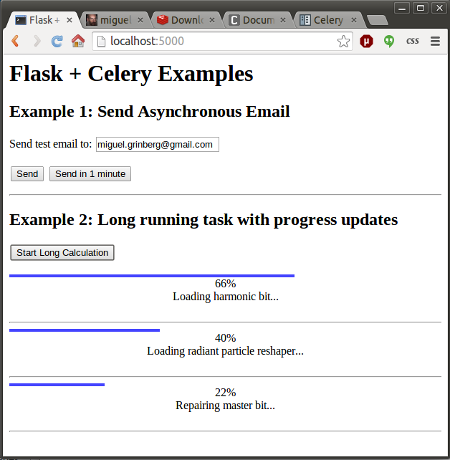
The application provides two examples of background tasks using Celery:
- Example 1 sends emails asynchronously.
- Example 2 launches one or more asynchronous jobs and shows progress updates in the web page.
Here is a screenshot of this application:
Quick Setup
- Clone this repository.
- Create a virtualenv and install the requirements.
- Open a second terminal window and start a local Redis server (if you are on Linux or Mac, execute
run-redis.shto install and launch a private copy). - Open a third terminal window. Set two environment variables
MAIL_USERNAMEandMAIL_PASSWORDto a valid Gmail account credentials (these will be used to send test emails). Then start a Celery worker:venv/bin/celery -A app.celery worker --loglevel=info. - Start the Flask application on your original terminal window:
venv/bin/python app.py. - Go to
http://localhost:5000/and enjoy this application!
For details on how this all works, see my article Using Celery with Flask.
Explore related projects
codecrafters-io/build-your-own-x
Master programming by recreating your favorite technologies from scratch.
561,654 starspublic-apis/public-apis
A collective list of free APIs
498,045 starsmorluto/rea
Reverse engineer anything with agents, from app behavior down to native binaries.
450,694 starsopenclaw/openclaw
The AI that really does things. Any OS. Any Platform. The lobster way. 🦞
394,314 stars