
michael-smao/git-cowork
michael-smao/git-cowork has 38 GitHub stars and 4 forks. GitHot measured 0 stars in 24 hours. Last checked 2026-11-14 21:58 UTC. Last push 2026-11-13.
What you can do
- Tabs - Every repo or worktree is a tab in the row beside the traffic lights, always shown, like GitKraken. Click to switch, drag sideways to move, × or middle-click to close, + or ⌘T for a new one. They open again at the next launch.
- Toolbar - Repository, worktree and branch pickers (recent repos; switch or add worktrees, shown with more than one; checkout), History / Board / Reviews, Fetch (all remotes), Pull ▾ (fetch all, ff-only, rebase, merge), Push ▾ (sets upstream; force-with-lease asks first), Branch, Worktree, Stash, Pop, Terminal, Editor, Inbox.
- Sidebar - Local, remote, worktrees, tasks, reviews, stashes, tags and team, with counts. Branch folders (claude/…, codex/…) open by default. Filter with ⌥⌘F. Click a stash to see its files and diffs. Right-click a remote to fetch, rename or remove it or change its URL; + adds another.
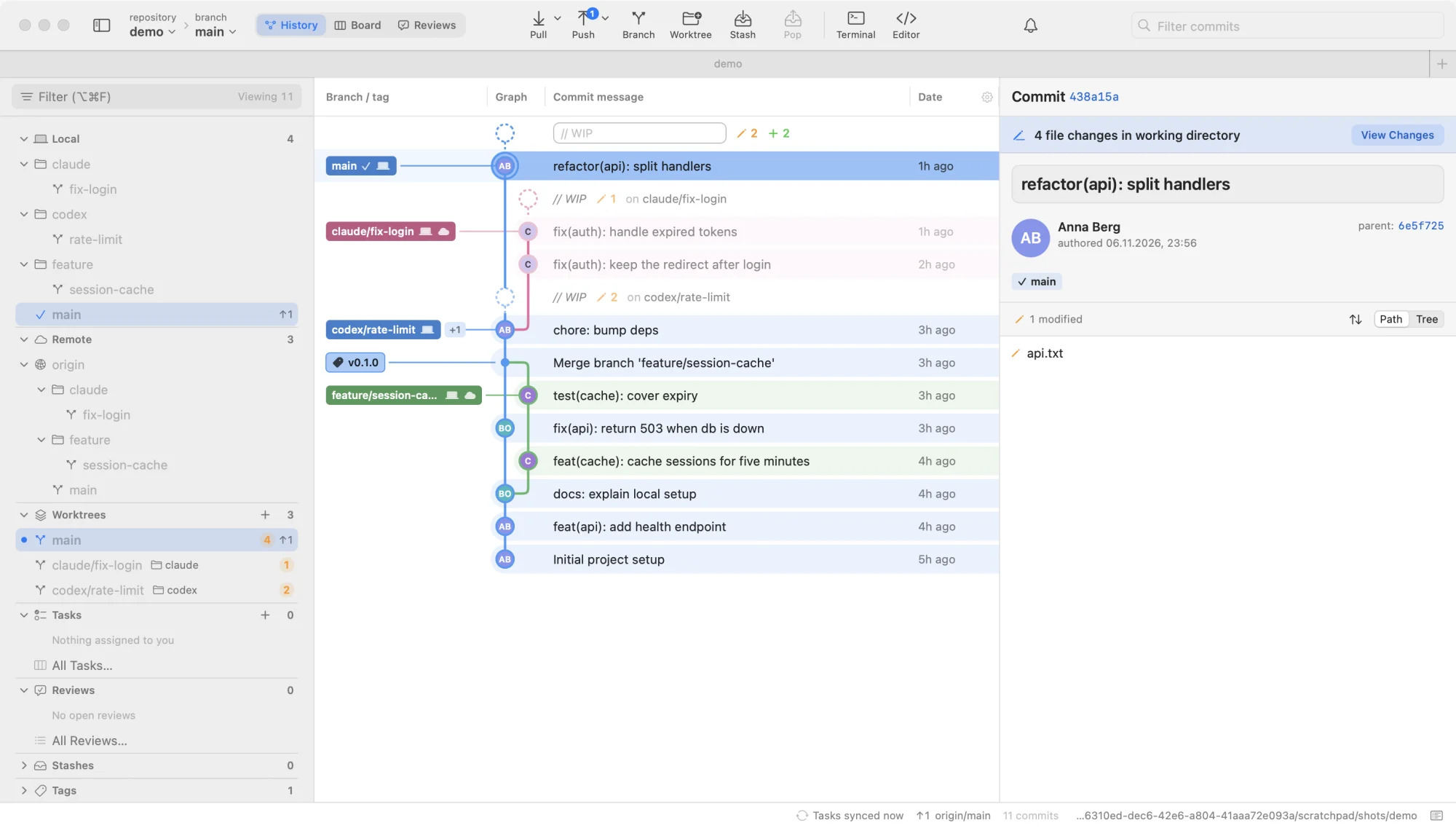
- Graph - Lane-colored rows, author initials in nodes, branch badges connected to their commit, commits outside the current branch dimmed. A // WIP row above HEAD, plus one for every other worktree with uncommitted changes.
Measured star growth
- in 24h
- 0
- in 7 days
- Collecting history
- in 15 days
- Collecting history
- in 1 month
- Collecting history
Net star changes over overlapping periods, not daily totals. Missing measurements are left blank. Stars measure attention, not software quality.
About
Small, fast, native Mac git client with a mini Jira built in: task board and code reviews that live in your repo. No sign-up, no server.
Developer ToolsREADME.md
Original

git-cowork
A small, fast, native Mac git client with a mini Jira built in: a task board and code reviews that live inside your repo.
No sign-up. No server. No telemetry. Just git.





Why
Most git GUIs are either heavy Electron apps or thin wrappers that hide what
git is doing. git-cowork is a native SwiftUI + AppKit app (about 8 MB) that
runs plain git underneath and shows you every command it runs.
We built it because we wanted a fast, clear git client without a per-seat subscription, and gave it away. It's made for how many teams work now: lots of branches and worktrees in parallel. You see all of them in one graph, with their uncommitted changes, and you can hand out and review work without leaving the repo.
- Fast and light. ~80 MB memory and 0% CPU when idle, measured on a repo with 8.7k commits and 27 worktrees.
- Just git. Every action is a normal git command, visible in the command log (⌘J). Your SSH keys, credential helpers, hooks and commit signing work exactly as in the terminal.
- Always current. Fetches every open repository in the background every 5 minutes while the app is in front, so remote branches and ahead/behind are up to date before you pull. It never asks for a password; turn it off in Settings (⌘,) › Git.
- Worktrees first. Every worktree shows in the sidebar and the graph, with live uncommitted counts and ahead/behind.
- Tasks and reviews in the repo. A built-in board
and review requests, stored on a hidden git ref and synced with plain
git push/fetch. Works with GitHub, GitLab, Gitea, Forgejo or any git server.
A mini Jira inside your repo
Every repository gets its own task board, right next to your commits. There's no second tool to switch to, no workspace to set up and no seats to pay for. Whoever can push to the repo can use the board.
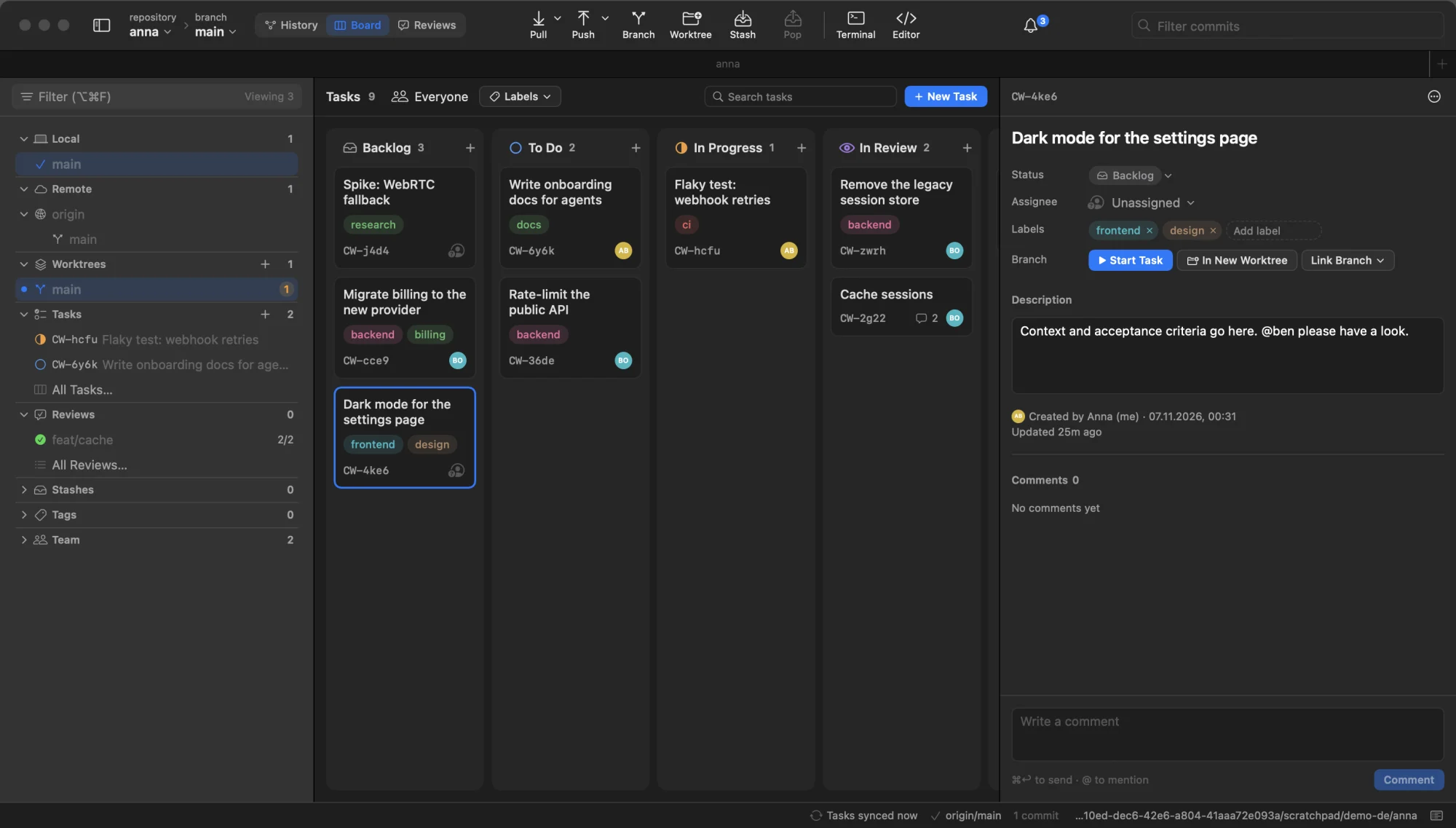
- A proper board. Backlog, To Do, In Progress, In Review and Done. Drag cards between columns, filter by person or label, search titles and descriptions.
- Tasks with context. Assignee, labels, description, comments and @mentions.
- Tied to your code. Start Task checks out the task's branch (or gives it its own worktree), assigns it to you if nobody has it, and moves the card to In Progress. Request a review for it and the card moves to In Review, with the verdict right on it.
- You hear about it. An inbox and macOS notifications for assignments, review requests, verdicts, @mentions and comments.
- Yours, in git. Each task is a small Markdown file on a hidden ref, and
every change is a commit, so
git log refs/cowork/mainis the full history. It works offline, and two people editing the same task are merged field by field. - In the terminal too.
git coworklists, creates, starts and comments on tasks.
It's deliberately small: one board per repository, with no sprints, estimates, due dates or attachments. Tasks show up in git-cowork and with plain git, not in your host's web UI. How it works.
Install
Apple Silicon Mac, macOS 14 or newer. One line in Terminal:
curl -fsSL https://raw.githubusercontent.com/michael-smao/git-cowork/main/install.sh | bash
It downloads the newest release, checks it, installs git-cowork.app and
the git cowork command. No Xcode, no Gatekeeper warning. Updates: the
app checks once a day and shows "Update to x.y.z" in the status bar; click it,
then Update Now and Restart. Or run the same line again.
Please don't download the zip from the release page by hand. macOS blocks apps that were downloaded in a browser. Already got the message that Apple can't check the app? Run the line above; it replaces the blocked copy.
With Homebrew:
brew install --cask michael-smao/tap/git-cowork
Update with brew upgrade --cask git-cowork.
From source (to change the code or follow main), with Xcode Command
Line Tools and Swift 6:
git clone https://github.com/michael-smao/git-cowork.git && cd git-cowork
make install                    # builds and copies git-cowork.app to /Applications
make update                     # later: pull, rebuild, reinstall
INSTALL.md has the details: requirements, installing just for your user, a specific version, uninstalling, and troubleshooting.
Versions
Releases follow Semantic Versioning and are tagged
vX.Y.Z; see Releases and
CHANGELOG.md. About git-cowork shows your version and
the commit it was built from, e.g. "Version 0.1.0 (1448777)".
Open a repo from the terminal
open -a git-cowork .
Or add alias gk='open -a git-cowork' to ~/.zshrc and run gk ..
If the front tab is empty it opens there, otherwise in a new tab. You can
also drop a folder onto any window.
Features
| Area | |
|---|---|
| Tabs | Every repo or worktree is a tab in the row beside the traffic lights, always shown, like GitKraken. Click to switch, drag sideways to move, × or middle-click to close, + or ⌘T for a new one. They open again at the next launch. |
| Workspaces | Several repositories as one tree (folders › repositories › worktrees) on the left of a tab, like a solution in an IDE. Click one to show it in the same tab; each tab can hold its own workspace. Scan Folder (⌥⌘O) finds the repositories in a folder, one level deep by default (Settings › Workspaces); add more by hand or scan again later. Reopened at the next launch. |
| Toolbar | Repository, worktree and branch pickers (recent repos; switch or add worktrees, shown with more than one; checkout), History / Board / Reviews, Fetch (all remotes), Pull ▾ (fetch all, ff-only, rebase, merge), Push ▾ (sets upstream; force-with-lease asks first), Branch, Worktree, Stash, Pop, Terminal, Editor, Inbox. |
| Sidebar | Local, remote, worktrees, tasks, reviews, stashes, tags and team, with counts. Branch folders (claude/…, codex/…) open by default. Filter with ⌥⌘F. Click a stash to see its files and diffs. Right-click a remote to fetch, rename or remove it or change its URL; + adds another. |
| Graph | Lane-colored rows, author initials in nodes, branch badges connected to their commit, commits outside the current branch dimmed. A // WIP row above HEAD, plus one for every other worktree with uncommitted changes. |
| Commit panel | Message, author and co-authors, parents, refs, file list as path or tree. |
| Search | ⌘F filters the loaded commits by message, author or SHA. file:name finds the commits that changed a file, and change:text the ones that added or removed that text, across every branch and the whole history. |
| Changes panel | Unstaged / staged / conflicts, stage per file or all, discard, commit, amend. Right-click a new file to ignore it, its file type or its folder (adds to .gitignore). |
| Diff | Hunk or split view, intra-line highlights, stage / unstage / discard single hunks. |
| Merge / rebase | Banner with Continue / Skip / Abort, conflicted files, "use mine / theirs". |
| Hosts | "Create pull/merge request" and "Open on …" for GitHub, GitLab, Gitea and Forgejo, including self-hosted. |
| Pull requests and CI | With an account for the host: open pull/merge requests in the sidebar, #12 on their branches in the graph, CI passed/failed/running on branches and commits, which checks failed in the commit panel, and Create Pull Request from the app (pushes the branch first if needed). Requests from forks are listed but aren't matched to your branches; if you work from a fork, requests on the parent repository aren't shown. |
| Clone | Paste a URL, or, with an account added, pick from a filterable list of your repositories and your organizations' or groups'. |
| Undo | ⌘Z takes back the last commit, amend, reset, checkout or branch delete, with plain git commands. Not offered once you've pushed. |
| Accounts | Optional. Paste an access token for GitHub, GitLab, Gitea or Forgejo, and HTTPS push and pull just work. Browser sign-in (OAuth device flow) needs an OAuth app registered for your host; Settings > Accounts explains how. Tokens stay in the Keychain and only git-cowork uses them. For SSH remotes, Create SSH Key makes a key, adds it to your GitHub or GitLab account and uses it in git-cowork without touching ~/.ssh/config. Several accounts on one server work too: each repository uses the one you pick in its status bar. |
| Board | Shared tasks in Backlog / To Do / In Progress / In Review / Done, with assignee, labels, linked branch and comments. "Start Task" creates the branch here; the task's "In New Worktree" / "Start in New Worktree" gives it its own folder and tab (handy for agents). Filter by person or label; ⌘← / ⌘→ move the selected task. |
| Reviews | Review requests for a branch: reviewers, verdicts (approved / changes requested), comments, and the branch's changes. |
| Inbox | Tasks assigned to you, review requests, verdicts, @mentions and replies — also as macOS notifications. |
Right-click works almost everywhere: branches, commits, worktrees, files.
The app speaks English and German and follows your Mac's language. To use a different one for git-cowork only: Settings › Language.
How tasks and reviews work
Tasks, the backlog, review requests and comments are small Markdown files on
a hidden ref, refs/cowork/main, in the repository itself. They're pushed
and fetched with plain git like any other ref — no extra service, token or
account.
- Teammates get it by opening the repo in git-cowork. Nothing to set up.
- Sync runs about once a minute while the app is in front, every 3 minutes in the background (so notifications still arrive), and when you switch back to it. Click "Tasks synced …" in the status bar to sync now. Notifications need the app to be running; there is no push server.
- Your identity is
git config user.email. Repository › Edit Team… gives people names and @handles for mentions. - It never touches your work. The ref is written with git plumbing into a
temporary index: no checkout, no change to your branches, index or working
tree, and it doesn't show up in
git branch -a. - Readable without the app:
git fetch origin refs/cowork/mainandgit show refs/cowork/main:tasks/<id>.md. - Settings (⌘,) › Cowork picks the remote to sync with and can turn automatic sync off.
Custom refs aren't shown in your host's web UI, so tasks are visible in git-cowork and with plain git only.
From the terminal: git cowork
The install (one-line or make install) also puts a small command-line tool
on your PATH, linked into ~/.local/bin (make install-cli BINDIR=… for
another folder). It works on the same tasks as the app, so people and coding
agents can use it side by side. Changes sync right away; add --json for
scripts and agents. It runs your own git, so pushing needs your usual git
sign-in (SSH key or credential helper); accounts added in the app's Settings
are only used by the app.
git cowork list --mine                   # my open tasks
git cowork new "Rate-limit the API" --assign me --label backend
git cowork start CW-a3f9 --worktree      # branch + own folder, task → In Progress
git cowork comment CW-a3f9 "Done, see branch"
git cowork review CW-a3f9-rate-limit --to [email protected]
git cowork reviews --waiting             # reviews asked of me
git cowork approve R-7k2p "Looks good"
git cowork inbox --sync
git cowork help lists everything. Reads use what's already fetched; add
--sync to fetch teammates' changes first. Titles and comments need no
quotes (git cowork new Fix login bug), and teammates can be named by
handle (--to anna) once they appear in the tasks.
Tasks sync with the remote in git config cowork.remote <name>, the same
one for the app and the tool. Without it, both pick a remote that already has
tasks, else origin; the app saves that choice in the repository's config.
Keyboard shortcuts
| ⌘O / ⇧⌘O | Open / clone repository |
| ⌥⌘O | Scan a folder into a workspace |
| ⌃⌘P | Show or hide the workspace |
| ⌘T | New tab |
| ⌘1 / ⌘2 / ⌘3 | History / Board / Reviews |
| ⇧⌘T | New task |
| ⇧⌘R | Request review of the current branch |
| ⌘F / ⌥⌘F | Filter commits / filter branches |
| ⌘R | Refresh |
| ⇧⌘F | Fetch all |
| ⇧⌘L / ⇧⌘P | Pull / push |
| ⇧⌘B | New branch |
| ⇧⌘S / ⌥⇧⌘S | Stash / pop |
| ⌘0 | Uncommitted changes |
| ⌘↩ | Commit |
| Esc | Close the diff |
| ⌥⌘T / ⌥⌘E | Open in Terminal / editor |
| ⌘Z | Undo the last git action |
| ⌘← / ⌘→ | Move the selected task to the previous / next column |
| ⌘J | Command log |
| ⌃⌘S | Show or hide the sidebar |
| N / arrow keys | Board: new task / move the selection |
Editor and terminal apps are set in Settings (⌘,).
FAQ
Intel Macs or Linux/Windows? Not supported. The app targets Apple Silicon and macOS 14+.
Does it use AI? No. It's a plain git client.
Why the Terminal line instead of a download button? macOS blocks apps
downloaded in a browser unless they went through Apple's paid program, and
git-cowork is free. The install line and Homebrew avoid that block. The install
line downloads with curl, which macOS doesn't flag, and checks that the file
arrived intact (checksum and code signature) before installing. Those prove the
download isn't damaged, not who made it: the app is signed ad-hoc, without a
paid Apple certificate. Building from source works too.
Is it free? Yes. MIT license, no subscription, no seat limit.
Dark mode? Yes. It follows macOS by default; Settings (⌘,) › Appearance sets it to always light or always dark.
Is my data sent anywhere? No telemetry, no server of ours. The app talks
to your git remotes through your own git. If you add an account, it also
calls that host's API (GitHub, GitLab, Gitea or Forgejo) to check the token,
list your repositories, read pull requests and CI results while the app is in
front, create a pull request when you ask, and upload an SSH key you create.
Once a day it asks
api.github.com for the newest git-cowork release (Settings › Updates turns this
off); that request carries nothing about you or your repositories. Tokens stay
in your Keychain.
Does browser sign-in work out of the box? Not yet: it needs an OAuth app registered on the host, and git-cowork doesn't ship one yet. Use an access token, or register your own app as Settings > Accounts describes.
Development
make run        # debug build, run from the terminal
make test       # unit tests (parsers, graph layout, diff, host links, cowork)
make app        # build dist/git-cowork.app
make version    # print the version
make check-translations   # UI text without a German translation
Builds with the Command Line Tools only; no Xcode project, no dependencies.
Sources/GitCoworkCore/   pure logic: parsers, graph lane layout, diff, host links,
                         cowork file format, merge and inbox (tested)
Sources/CoworkKit/       reads, writes and syncs refs/cowork/main; the edits (new task,
                         comment, review, verdict); shared by the app and the tool (tested)
Sources/GitCoworkCLI/    the `git cowork` command-line tool
Sources/GitCowork/
  App/                   entry point, windows/tabs, menus, settings, welcome screen
  Git/                   GitRunner (process + env), RepoModel (state, refresh, file watching),
                         actions, undo, CoworkStore (on-screen state on top of CoworkKit), notifier
  Accounts/              tokens in the Keychain, browser sign-in, SSH keys, host APIs
  Views/                 Theme (design tokens), Components, History (NSTableView graph),
                         Diff, Inspector, Sidebar, Chrome, Sheets, Cowork (board, reviews, inbox)
Scripts/                 build-app.sh, make-icon.swift, release, update, check-translations
Resources/               Info.plist, translations (de.lproj)
How it stays light:
- No polling of the working tree. FSEvents watches the worktrees and the git dir; refreshes are debounced and merged.
GIT_OPTIONAL_LOCKS=0, so the app's owngit statusdoesn't rewrite the index and trigger another refresh.- History reloads only when refs, HEAD or stashes actually change.
- Heavy lists (graph, diff) are AppKit views that draw directly.
Contributing
Bug reports, ideas and pull requests are welcome. See CONTRIBUTING.md for guidelines and debug flags, and PLAN.md for the design and roadmap. Please follow the code of conduct, and report security problems privately as described in SECURITY.md.
License
MIT © 2026 smao GmbH
git-cowork is a free project by smao, made in Berlin.