
miaoxworld/openclaw-manager
miaoxworld/openclaw-manager has 1,681 GitHub stars and 314 forks. GitHot measured 0 stars in 24 hours. Last checked 2026-11-06 05:24 UTC. Last push 2026-03-27.
高性能跨平台 AI 助手管理工具,基于 Tauri 2.0 + React + TypeScript + Rust 构建。
What you can do
- 📊 Dashboard - Real-time service status monitoring, process & memory stats, one-click start/stop/restart
- 🤖 AI Config - 14+ AI providers, custom API endpoints, quick model switching
- 📱 Channels - Telegram, Discord, Slack, Feishu, WeChat, iMessage, DingTalk
- ⚡ Service Management - Background service control, live logs, auto-start on boot
Measured star growth
- in 24h
- 0
- in 7 days
- Update delayed
- in 15 days
- Update delayed
- in 1 month
- Update delayed
Net star changes over overlapping periods, not daily totals. Missing measurements are left blank. Stars measure attention, not software quality.
README_EN.md
Original🦞 OpenClaw Manager
A high-performance cross-platform AI assistant management tool, built with Tauri 2.0 + React + TypeScript + Rust.



📸 Screenshots
📊 Dashboard
Real-time service monitoring with one-click AI assistant management.
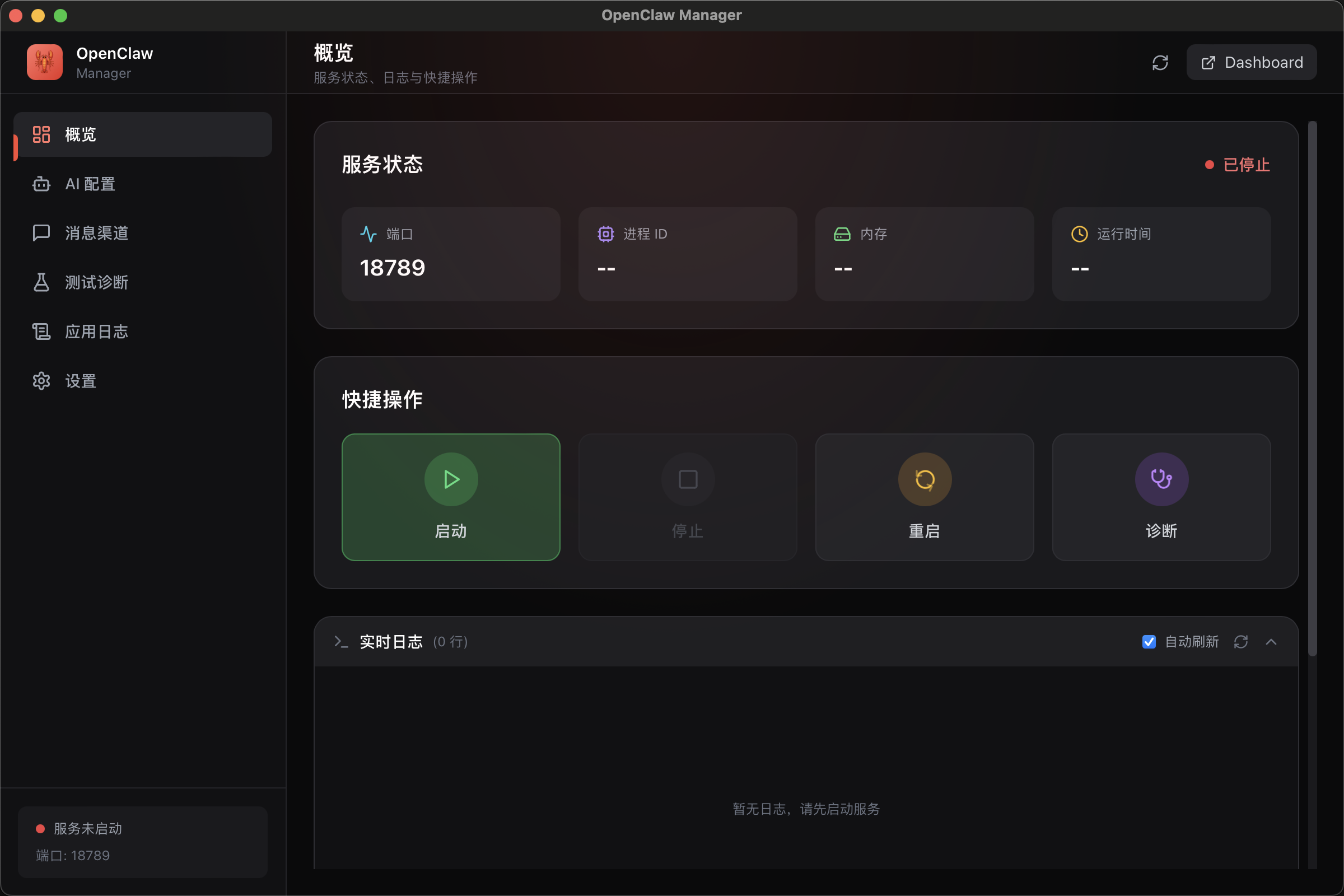
- Live service status (port, PID, memory, uptime)
- Quick actions: Start / Stop / Restart / Diagnose
- Real-time log viewer with auto-refresh
🤖 AI Model Configuration
Flexible multi-provider AI configuration with custom API endpoint support.
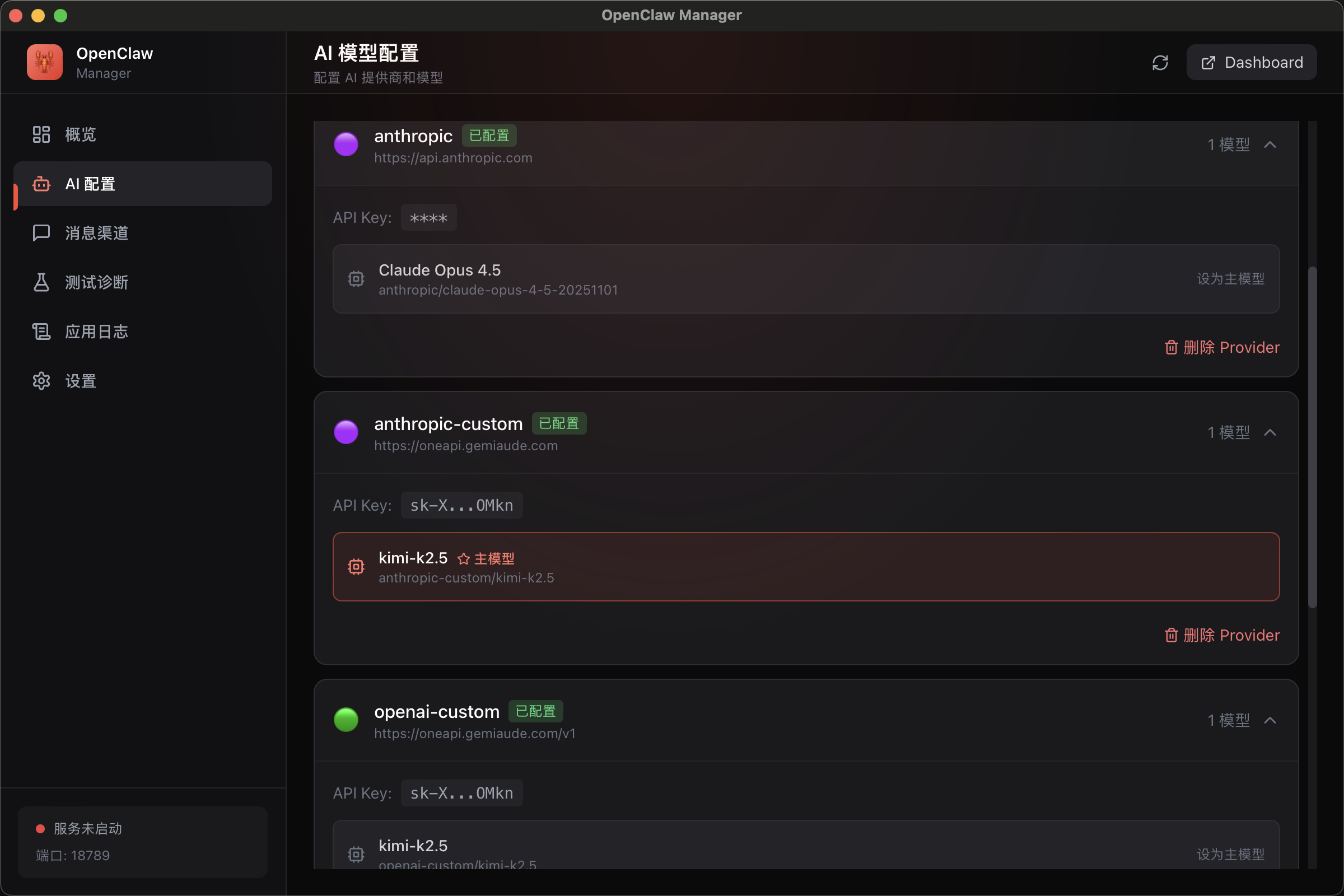
- 14+ AI providers (Anthropic, OpenAI, DeepSeek, Moonshot, Gemini, etc.)
- Custom API endpoints, compatible with OpenAI-format third-party services
- One-click primary model selection and quick switching
📱 Messaging Channels
Connect to multiple messaging platforms to build an omni-channel AI assistant.
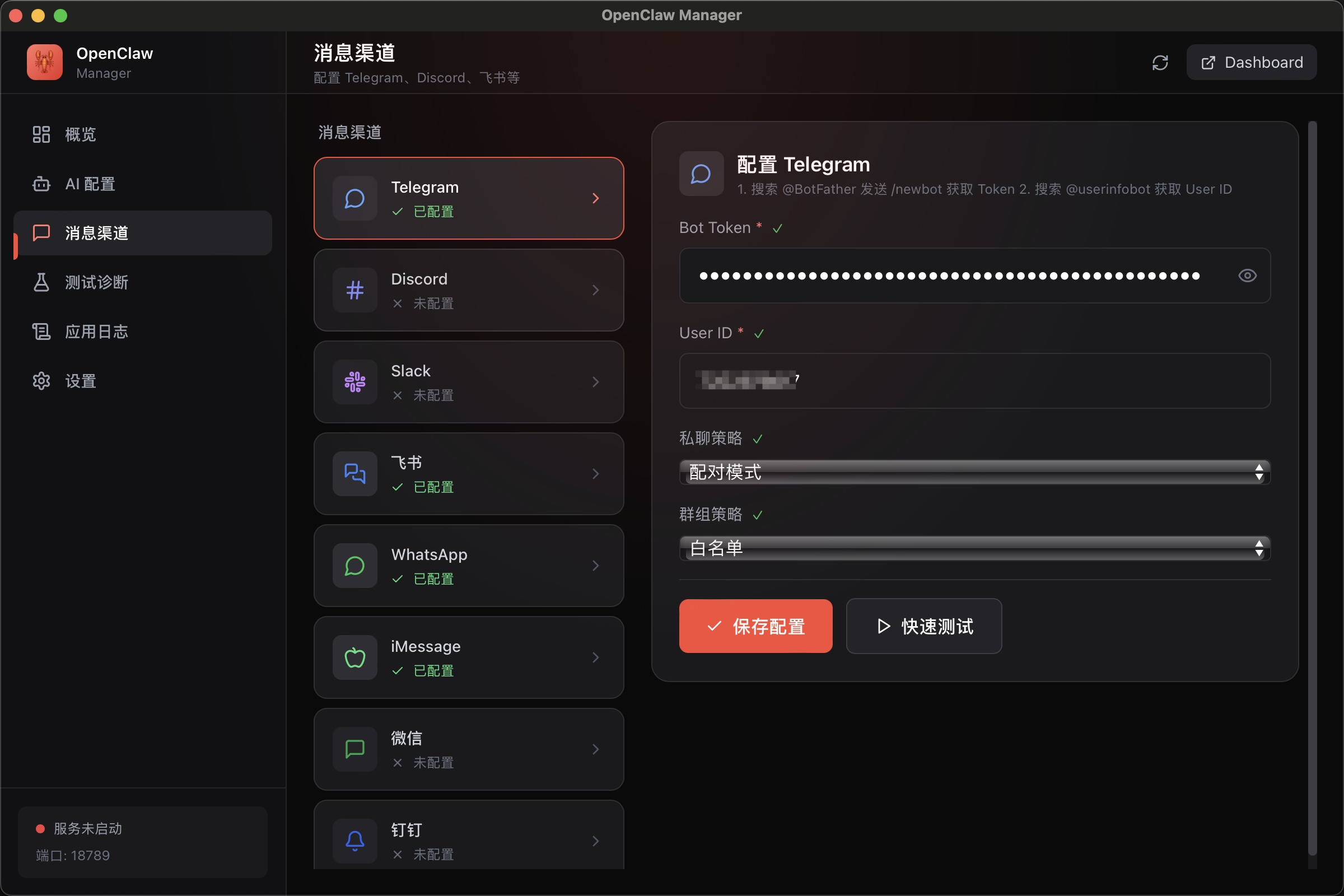
Telegram Bot |
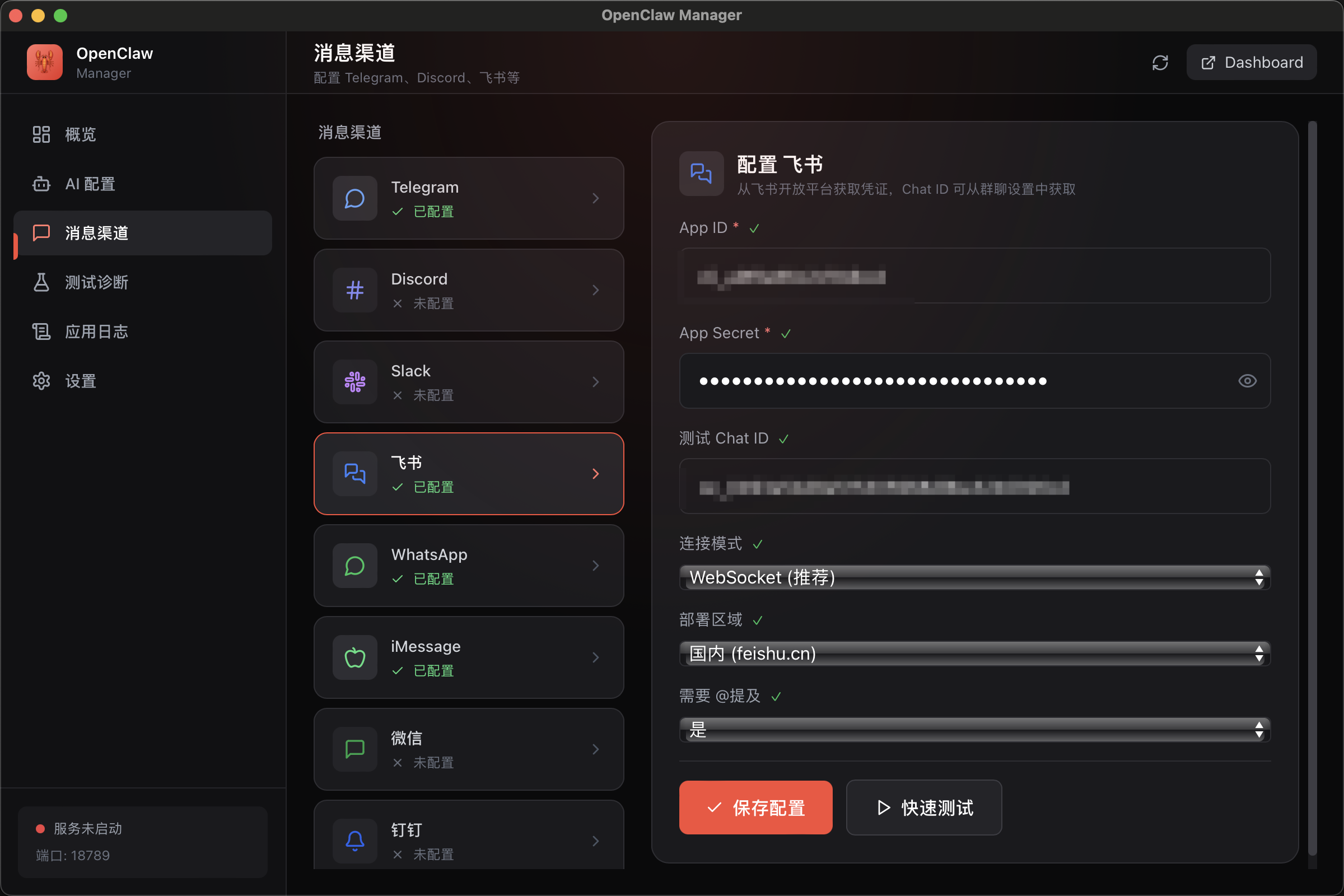
Feishu (Lark) Bot |
- Telegram — Bot Token, private/group chat policies
- Feishu (Lark) — App ID/Secret, WebSocket, multi-region deployment
- More channels — Discord, Slack, WhatsApp, iMessage, WeChat, DingTalk, QQ
- Setup Guides — Each channel includes a link to official documentation
🤝 Agent Management
Multi-agent system with independent identity, model, and channel assignments.
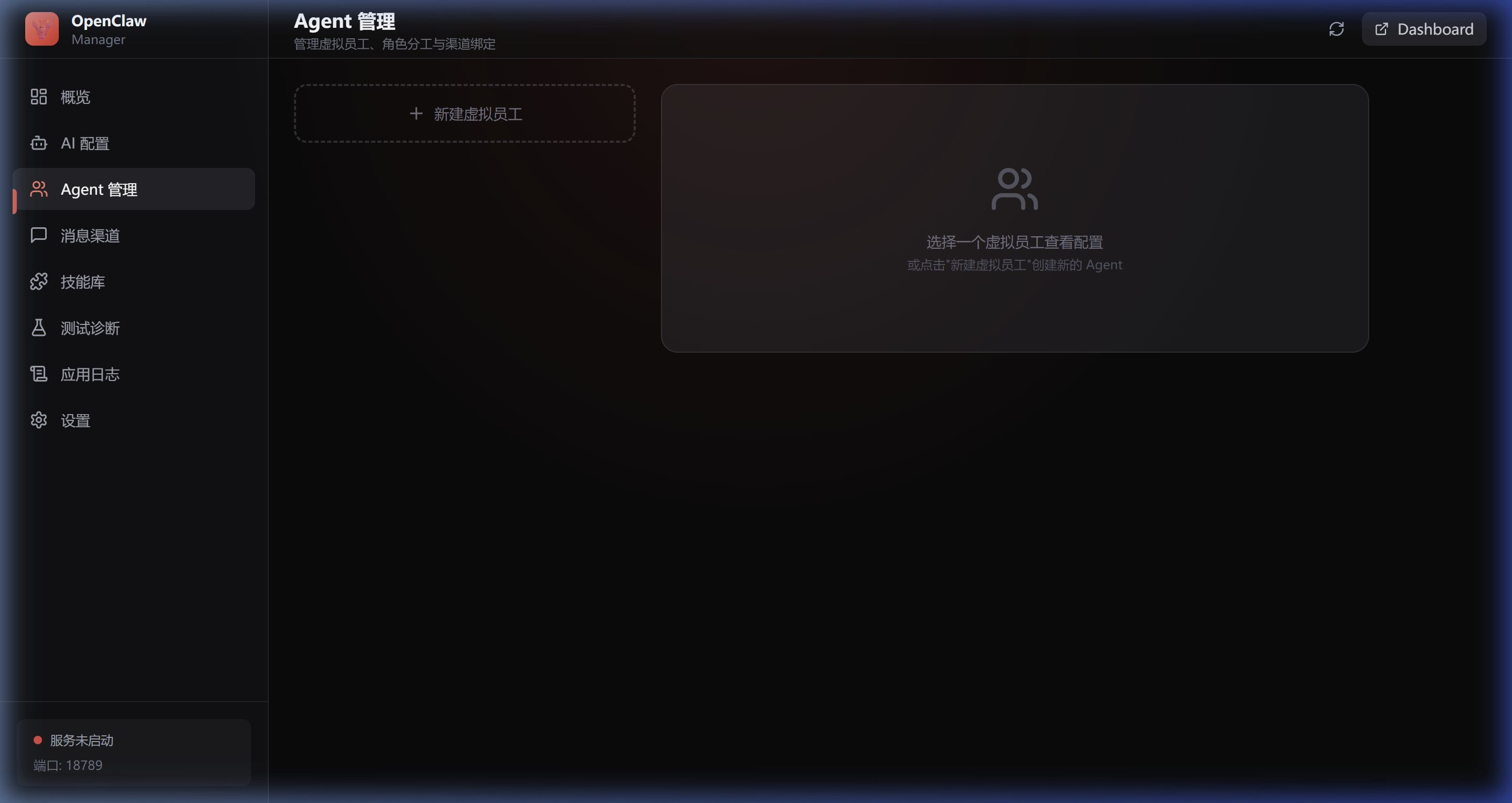
- Create and manage multiple virtual employees (Agents) with custom names, emoji identifiers, and role descriptions
- Each Agent can independently configure AI models, bind messaging channels, and set tool permissions
- Sandbox mode, workspace isolation, @mention mode, and sub-agent permission control
- One-click primary Agent designation for handling unbound channel messages
🧩 Skill Library
Unified management for built-in, official, community, and custom skill plugins.
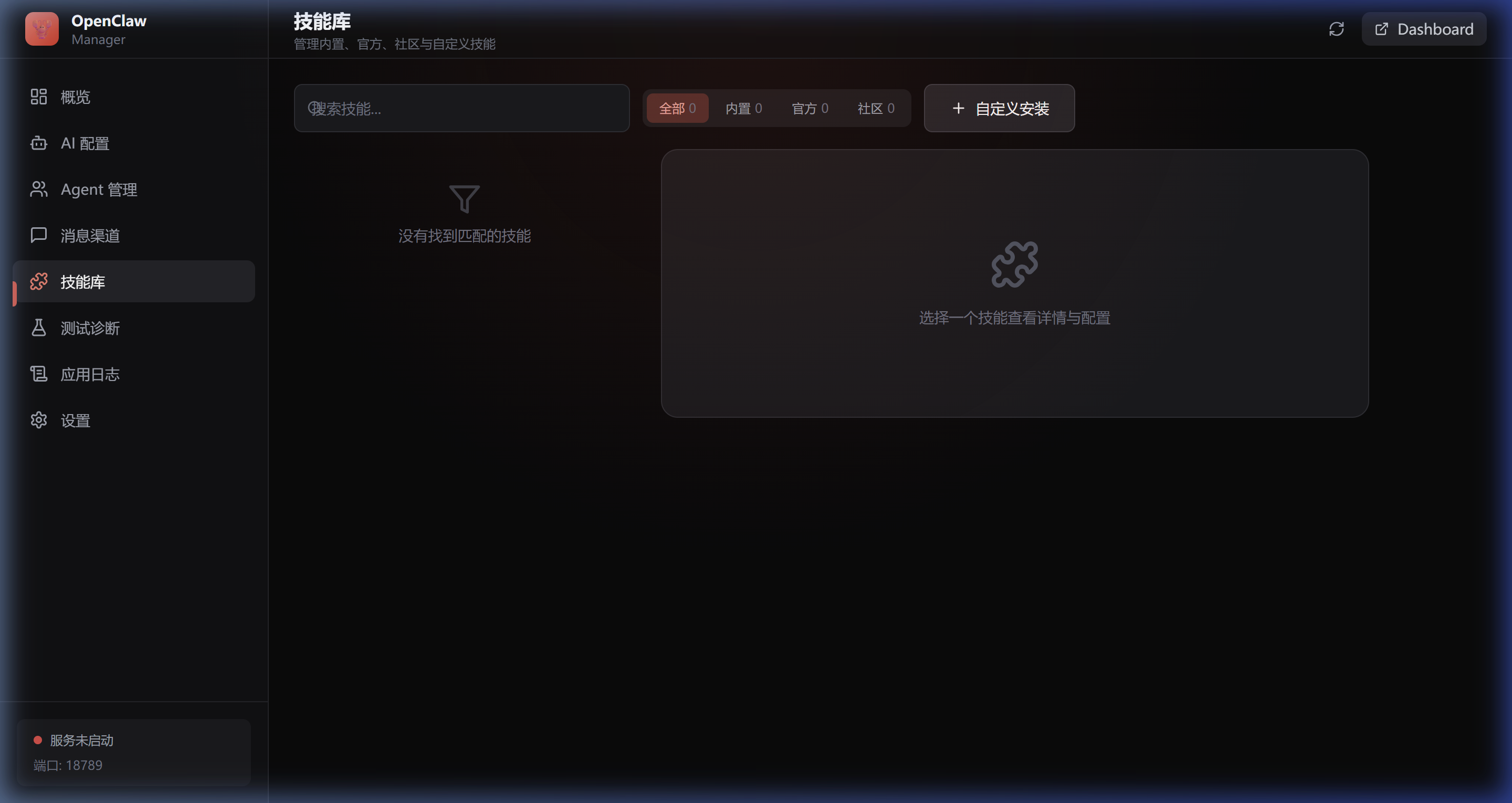
- Browse and search all skills, filter by source (Built-in / Official / Community)
- One-click install, uninstall, enable, and disable
- Visual parameter configuration (text, password, dropdown, toggle)
- Custom installation via npm packages or local paths
🛡️ Security Protection
Comprehensive security risk detection and one-click remediation.
- Security Alerts — Prominent risk warnings about AI over-permissions that could lead to file loss, email mishaps, or data leaks
- One-click Security Scan — Auto-detect IP exposure, port binding, Gateway Token, skill permissions, config file permissions
- Risk Prioritization — High/Medium/Low severity ranking with checkbox list
- One-click Fix — Auto-remediate fixable issues; manual guidance provided for others
🎨 Theme Switching
Light/Dark dual-theme support, defaulting to light mode.
- Light Mode — Apple-style soft white design, clean and comfortable
- Dark Mode — Dark theme, easy on the eyes for extended use
- One-click Toggle — 🌙/☀️ button in the top navigation bar
- Persistent State — Theme preference preserved across refreshes and restarts
✨ Features
| Module | Description |
|---|---|
| 📊 Dashboard | Real-time service monitoring, process stats, one-click start/stop/restart |
| 🤖 AI Configuration | 14+ AI providers, custom API endpoints, quick model switching |
| 📱 Messaging Channels | Telegram, Discord, Slack, Feishu, WeChat, iMessage, DingTalk, QQ — each with setup docs |
| 🤝 Agent Management | Multi-agent system, role assignment, model override, channel binding, sandbox isolation |
| 🧩 Skill Library | Browse, install, configure, and manage skill plugins |
| 🛡️ Security | IP exposure detection, port security, token auth, skill permission scan, one-click fix |
| ⚡ Service Control | Background service management, real-time logs, auto-start on boot |
| 🧪 Diagnostics | System health check, AI connectivity test, channel connectivity test |
| 🎨 Themes | Light / Dark mode with persistent preference |
🚀 Quick Start
Option 1: Download Pre-built Binaries
Download the installer for your platform from GitHub Releases — no development environment required.
| Platform | Format | Installation |
|---|---|---|
| macOS | .dmg |
Open the DMG and drag the app to Applications |
| Windows | .msi / .exe |
Run the installer wizard |
| Linux | .deb / .AppImage |
sudo dpkg -i *.deb or run the AppImage directly |
⚠️ macOS users: If you see a "damaged, can't be opened" warning, run:
xattr -cr /Applications/OpenClaw\ Manager.appOr go to System Preferences > Privacy & Security and click Open Anyway.
Option 2: Build from Source
Prerequisites
- Node.js >= 18.0
- Rust >= 1.70
- npm or pnpm
Platform-specific Dependencies
macOS
xcode-select --install
Windows
Linux (Ubuntu/Debian)
sudo apt update
sudo apt install libwebkit2gtk-4.1-dev build-essential curl wget file \
  libxdo-dev libssl-dev libayatana-appindicator3-dev librsvg2-dev \
  libgtk-3-dev libsoup-3.0-dev libjavascriptcoregtk-4.1-dev
Build & Run
# Clone the repository
git clone https://github.com/miaoxworld/openclaw-manager.git
cd openclaw-manager

# Install dependencies
npm install

# Development mode (with hot reload)
npm run tauri dev

# Build production release
npm run tauri build
Build Output
After running npm run tauri build, installers are generated in src-tauri/target/release/bundle/:
| Platform | Format |
|---|---|
| macOS | .dmg, .app |
| Windows | .msi, .exe |
| Linux | .deb, .AppImage |
📁 Project Structure
openclaw-manager/
├── src-tauri/                 # Rust backend
│   ├── src/
│   │   ├── main.rs            # Entry point
│   │   ├── commands/          # Tauri Commands
│   │   │   ├── service.rs     # Service management
│   │   │   ├── config.rs      # Configuration management
│   │   │   ├── process.rs     # Process management
│   │   │   └── diagnostics.rs # Diagnostics + Security scan
│   │   ├── models/            # Data models
│   │   └── utils/             # Utility functions
│   ├── Cargo.toml
│   └── tauri.conf.json
│
├── src/                       # React frontend
│   ├── App.tsx
│   ├── lib/
│   │   └── ThemeContext.tsx    # Theme switching
│   ├── components/
│   │   ├── Layout/            # Layout (Sidebar + Header)
│   │   ├── Dashboard/         # Dashboard
│   │   ├── AIConfig/          # AI configuration
│   │   ├── Channels/          # Channel configuration
│   │   ├── Agents/            # Agent management
│   │   ├── Skills/            # Skill library
│   │   ├── Security/          # Security protection
│   │   ├── Testing/           # Test & diagnostics
│   │   ├── Logs/              # Application logs
│   │   └── Settings/          # Settings
│   └── styles/
│       └── globals.css        # Theme variables + global styles
│
├── package.json
├── vite.config.ts
└── tailwind.config.js
🛠️ Tech Stack
| Layer | Technology | Purpose |
|---|---|---|
| Frontend | React 18 | User interface |
| Styling | TailwindCSS + CSS Variables | Theme switching + utility CSS |
| Animation | Framer Motion | Smooth transitions |
| Icons | Lucide React | Beautiful icon set |
| Backend | Rust | High-performance system calls |
| Cross-platform | Tauri 2.0 | Native app wrapper |
🔧 Development Commands
npm run tauri dev        # Dev mode (hot reload)
npm run dev              # Frontend only
npm run build            # Build frontend
npm run tauri build      # Build full application
cd src-tauri && cargo check   # Check Rust code
🤝 Contributing
- Fork the repository
- Create a feature branch (
git checkout -b feature/amazing-feature) - Commit your changes (
git commit -m 'Add amazing feature') - Push to the branch (
git push origin feature/amazing-feature) - Open a Pull Request
📄 License
MIT License — see LICENSE
🔗 Links
- OpenClaw — OpenClaw core project
- OpenClawInstaller — CLI installer
- Tauri Documentation
Made with ❤️ by OpenClaw Community
Explore related projects
codecrafters-io/build-your-own-x
Master programming by recreating your favorite technologies from scratch.
560,431 starspublic-apis/public-apis
A collective list of free APIs
496,755 starsmorluto/rea
Reverse engineer anything with agents, from app behavior down to native binaries.
437,929 starsopenclaw/openclaw
The AI that really does things. Any OS. Any Platform. The lobster way. 🦞
394,066 stars