
miaowmiaow/fragmject
miaowmiaow/fragmject has 1,467 GitHub stars and 249 forks. GitHot measured +1 stars in 24 hours and +1 in 7 days. Last checked 2026-11-10 04:09 UTC. Last push 2026-10-28.
fragmject is a learning project prepared for Kotlin and Jetpack Compose. | fragmject 是一个为初学者准备的上手项目。 通过对 Kotlin 和 Compose 的系统运用,实现的一个功能完备符合主流市场标准 App。 fragmject 没有复杂的业务和多余的封装, 完全依照 Android Developer 官方的写法。 代码简单,内容全面,快速上手,对理解其他项目设计思想和封装技巧也很有帮助。
Measured star growth
- in 24h
- +1
- in 7 days
- +1
- in 15 days
- Update delayed
- in 1 month
- Update delayed
Net star changes over overlapping periods, not daily totals. Missing measurements are left blank. Stars measure attention, not software quality.
README.EN.md
OriginalLocales & Contributors
- de_en English by DeepSeek-V4-Pro
Preface
At first glance learning Kotlin was quite difficult, tutorials and videos focused on knowledge points but lacked practical project examples. To overcome this hurdle I created fragmject which provides an example app that demonstrates core features of both Kotlin and Jetpack Compose while keeping things simple enough for beginners to grasp quickly. Special thanks goes out to Wan Android who provide their open API for use with this project!
Introduction
Fragmject is designed as an easy starting point for those new to programming with Kotlin and Jetpack Compose. By leveraging these technologies we are able to create a fully featured production ready application that adheres strictly to best practices outlined by Google themselves. Fragmject avoids complex business logic or unnecessary layers of abstraction; it simply implements everything according to how you would do so in real life projects following official guidelines provided by Android Developers website. Code is concise yet comprehensive making it straightforward even for someone without any prior experience. It will help you understand design patterns employed elsewhere alongside various techniques used for dependency injection and view binding.
Tech Stack
- Language: Kotlin 2.4.x + Compose
- Architecture: MVVM / MVI hybrid, multi-module (
core+feature+app) - Navigation: Navigation 3 (
NavBackStack+NavDisplay) - UI: Material 3 + WindowSizeClass adaptive layout
- DI: Hilt
- Database: Room 3
- Network: Retrofit + OkHttp
- Build: Gradle Kotlin DSL + Version Catalog + Convention Plugins
By working through this project you'll gain valuable insights into several areas such as:
- Kotlin + Compose declarative UI
- Navigation 3 (type-safe navigation + List-Detail side-by-side)
- WindowSizeClass adaptive layout for tablets / foldables
- MVVM, MVI
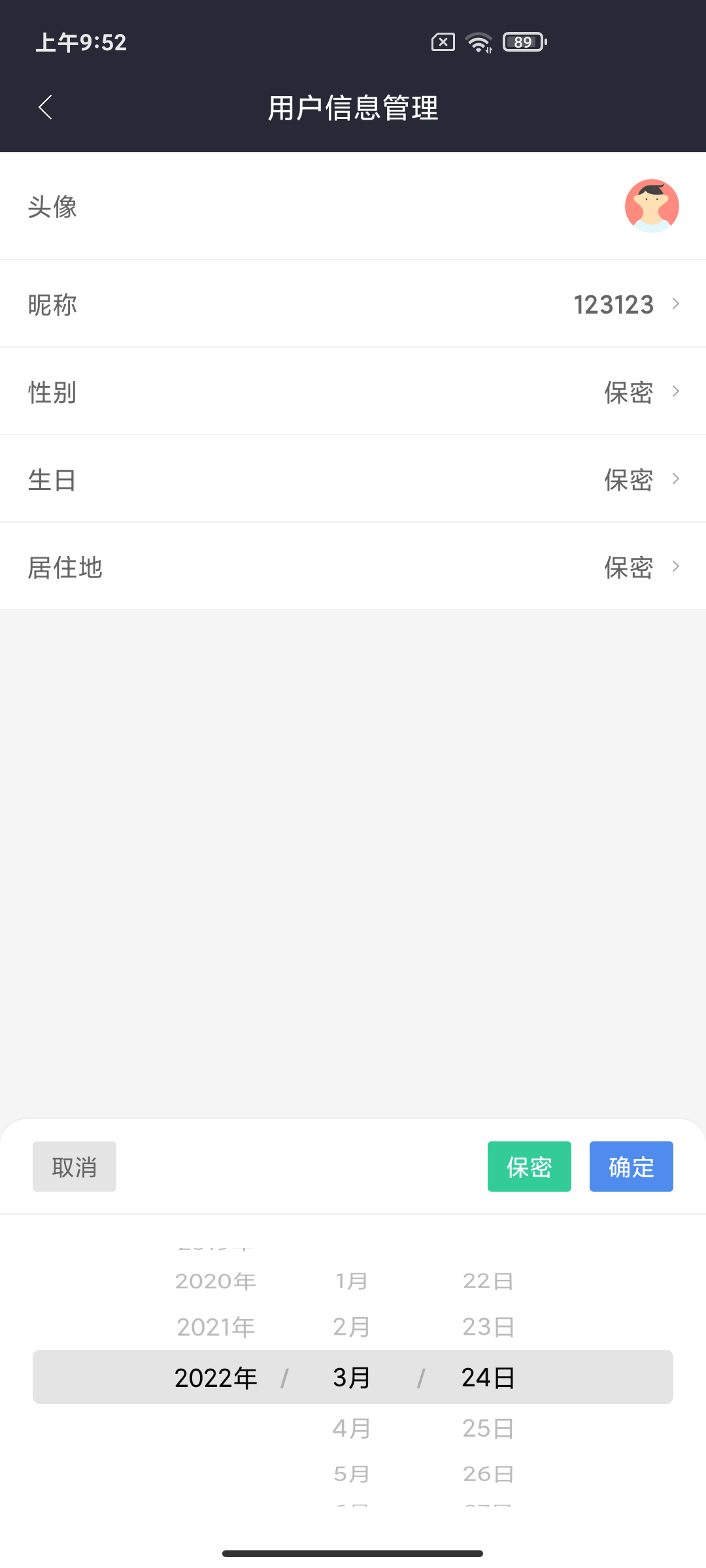
- Custom views built from scratch including image pickers, editors, datepickers etc...
- Advanced topics like bytecode manipulation via ASM library
Development Environment
- JDK 21 or newer is required. The convention plugins in
build-logictarget JVM 21, so Gradle must run on JDK 21+. Older JDKs fail at configuration time withrequires at least JVM runtime version 21. In Android Studio, chooseAndroid Studio default JDKunderSettings > Build Tools > Gradle(the bundled JBR qualifies); on the command line, pointJAVA_HOMEat JDK 21+. The project does not configure toolchain auto-download and does not pin an exact version. - Signing:
keystore.properties/keystore.keyin the repository are test-only keys and are committed on purpose. Use a separate private keystore for real releases. - CI (
.github/workflows/ci.yml) runs the module dependency guard, the Compose stability check and all unit tests (includingArchitectureTest) on pull requests and the main branch.
In order for you to run this project normally, please use the latest preview version of Android Studio. You can download it at the following address: Download Android Studio | Android Developer
Pre knowledge
Before diving into this project, here are some basic concepts you might want to familiarize yourself with:
- Learn the Kotlin programming language | Android Developer
- Learn Kotlin by Example | Android Developer
- ViewModel | Android Developer
- Coroutines | Android Developer
- Room | Android Developer
- Compose | Android Developer
Beginner's Advice
If you prefer a codebase with less abstraction and more straightforward code to get started quickly, we recommend switching to the v1.4.0 tag, which keeps a simpler implementation without the complex architectural layering and wrappers, making it easier to understand and learn.
Screenshot display
 |
 |
 |
|---|
Project Directory Structure
├── app                                             app shell module
|  └── src
|     └── main
|     |   ├── assets                                assets (HTML/JS/JSON mock data)
|     |   └── java                                  source code
|     |      ├── MainActivity.kt                    single Activity
|     |      ├── FragmjectApplication.kt            Application (Hilt entry)
|     |      └── AppNavGraph.kt                     navigation graph (Navigation 3 + WindowSizeClass)
|     |
|     ├── build.gradle.kts                          module build config
|     ├── dictionary                                custom obfuscation dictionary
|     └── proguard-rules.pro                        code obfuscation config
|
├── core                                            core layer (foundation, no business dependencies)
|  ├── android-platform                             platform & process-level utilities (AppScope / BaseContentProvider / File* / CacheUtils / UriPathUtils)
|  ├── data-contract                                data port contracts (remote/local DataSource + HTTP protocol models)
|  ├── data-repository                              data implementation (RepositoryImpl / PagingSource / Hilt bindings)
|  ├── database                                     database (Room 3)
|  ├── designsystem                                 design system (AppTheme / WindowSizeClass / colors / spacing, no components)
|  ├── domain                                       domain layer (Repository interfaces + UseCase + DomainResult)
|  ├── image-editor                                 image editing engine (canvas / crop / encode / save)
|  ├── model                                        data models
|  ├── navigation-contract                          navigation contracts (semantic Navigator, cross-feature decoupling)
|  ├── navigation-runtime                           navigation capability (Navigation 3 type-safe routes)
|  ├── network                                      network layer (Retrofit + OkHttp)
|  ├── qrscanner                                    scanning capability (CameraX / ML Kit)
|  ├── ui                                           UI component library (FeedCard / PagingSwipeRefreshBox etc.)
|  └── webview                                      WebView capability (pooling / caching / CookieStore)
|
├── feature                                         feature modules (each contains api / impl submodules)
|  ├── article                                      article module (WebView detail / download)
|  |  ├── api                                       API layer (NavKey definitions)
|  |  └── impl                                      implementation layer (Screen / ViewModel)
|  ├── auth                                         login / signup
|  ├── authenticator                                OTP (account management / Keystore-encrypted secret)
|  ├── collection                                   favorites / shares
|  ├── demo                                         component demos (calendar / wheel picker / scanning / nested scroll etc.)
|  ├── home                                         home (Home / Nav / Project / System / My)
|  ├── picture                                      picture module (picker / preview / editor)
|  ├── search                                       search
|  └── user                                         user (profile / points / ranking / settings / history)
|
├── build-logic                                     build logic (Gradle Convention Plugins)
|  └── convention
|     └── src/main/kotlin
|        ├── FragmjectAndroidApplicationPlugin      application convention plugin
|        ├── FragmjectAndroidComposePlugin          compose convention plugin
|        ├── FragmjectKotlinParcelizePlugin         Kotlin Parcelize capability plugin
|        ├── FragmjectKotlinSerializationPlugin     Kotlin Serialization capability plugin
|        ├── FragmjectAndroidHiltPlugin             Hilt convention plugin
|        ├── FragmjectAndroidLibraryPlugin          library convention plugin
|        ├── FragmjectAndroidDependencyGuardPlugin  dependency guard plugin
|        └── FragmjectAndroidRoomPlugin             Room convention plugin
|
├── gradle
|  └── libs.versions.toml                           version catalog
|
├── build.gradle.kts                                project build config
├── config.properties                               project config
├── gradle.properties                               gradle config
└── settings.gradle.kts                             module dependency config
Adaptive Layout (WindowSizeClass)
The project implements full adaptive layout for tablets and foldables using material3-window-size-class.
Layout Strategy
| Window Size | Width | Navigation Component | Detail Display |
|---|---|---|---|
| Compact | < 600dp | NavigationBar (bottom bar) |
full-screen push |
| Medium | 600–840dp | NavigationDrawerItem + Surface (left nav) |
full-screen push |
| Expanded | ≥ 840dp | PermanentNavigationDrawer (persistent rail) |
side-by-side panel |
List-Detail
In Expanded mode (tablet landscape / desktop), tapping articles, user profiles, settings, etc. renders in the right-side panel instead of full-screen navigation:
graph LR
    A["List (50%)"] --> B["DetailPane (50%)"]
    B --> C["WebScreen"]
    B --> D["UserScreen"]
    B --> E["SettingScreen"]
    B --> F["..."]
Key Files
- LocalWindowSizeClass.kt —
CompositionLocalinjection + helper extensions - AppNavGraph.kt — intercepts
NavKeyin Expanded mode, forwards toDetailPane - MainScreen.kt — three-layout dispatch +
DetailPanerouting
Usage
val windowSizeClass = LocalWindowSizeClass.current
when (windowSizeClass.widthSizeClass) {
    WindowWidthSizeClass.Compact -> CompactLayout()
    WindowWidthSizeClass.Medium  -> MediumLayout()
    WindowWidthSizeClass.Expanded -> ExpandedLayout()
}
Jetpack Compose
Less code
Using Compose instead of the traditional Android View system enables us to accomplish more with less code, leading to fewer lines of code needing testing and debugging, and lower likelihood of bugs occurring. This makes maintenance easier for reviewers and maintainers alike, reducing the amount of code that needs to be read, understood, approved, and maintained.
Composereflects a simpler concept in itslayout system,whereallcodeiswritten in one language and located within thesamefile,eliminating theneedfor back-and-forth switching between Kotlin andXML.
Intuitive
User's Question: Compose uses declarative APIs which mean that you only have to define the interface without worrying about how to implement each step.
By leveraging Compose, you can create smaller statelesscomponents that aren't attached to any particular activity or fragment.
In Compose, state is explicit and passed down tocomposable elements allowing them to maintain their integrity while being isolated from other parts of the app. When the statechanges, the UI updates automatically.
Mutually compatible
Compose is compatible with all your existing code: you can call Compose code from View or call View from Compose. Most commonly used libraries, such as Navigation, ViewModel, and Kotlin coroutine, are suitable for Compose, so you can start adopting them anytime, anywhere.
SharedFlowBus
Quick access
// send message
SharedFlowBus.with(objectKey: Class<T>).tryEmit(value: T)

// send sticky message
SharedFlowBus.withSticky(objectKey: Class<T>).tryEmit(value: T)

// subscribe message
SharedFlowBus.on(objectKey: Class<T>).observe(owner){ it ->
    println(it)
}

// subscribe sticky message
SharedFlowBus.onSticky(objectKey: Class<T>).observe(owner){ it ->
    println(it)
}
Picture editor(feature/picture)
Screenshot display
 |
 |
 |
|---|
Quick access
PictureEditorDialog.newInstance()
    .setBitmapPath(path)
    .setEditorFinishCallback(object : EditorFinishCallback {
        override fun onFinish(path: String) {
            val bitmap = BitmapFactory.decodeFile(path, BitmapFactory.Options())
        }
    })
    .show(childFragmentManager)
If you feel that PictureEditorDialog cannot meet the requirements, you can also customize the style through PictureEditorView.
Custom usage
<com.example.miaow.picture.editor.PictureEditorView
    android:id="@+id/pic_editor"
    android:layout_width="match_parent"
    android:layout_height="match_parent" />
picEditor.setBitmapPath(path)
picEditor.setMode(PictureEditorView.Mode.STICKER)
picEditor.setGraffitiColor(Color.parseColor("#ffffff"))
picEditor.setSticker(StickerAttrs(bitmap))
picEditor.graffitiUndo()
picEditor.mosaicUndo()
picEditor.saveBitmap()
That's all for PictureEditorView. For specific usage, please refer to PictureEditorDialogs.
Picture cropping
<com.example.miaow.picture.editor.PictureClipView
    android:id="@+id/clip"
    android:layout_width="match_parent"
    android:layout_height="match_parent" />
clip.setBitmapResource(bitmap)
clip.rotate()
clip.reset()
clip.saveBitmap()
That's all for PictureClipView. For specific usage, please refer to PictureClipDialogs.
Picture selection
if (context is AppCompatActivity) {
    PictureSelectorDialog.newInstance()
        ...
        .show(context.supportFragmentManager)
}
Calendar

Source location
└── feature
    └── demo
       └── impl
          └── ui
             └── calendar
                └── CalendarScreen.kt
Quick access
val calendarState = rememberCalendarState()
calendarState.addSchedule(text)

Calendar(
    state = calendarState,
    modifier = Modifier.padding(vertical = 15.dp),
    onSelectedDateChange = { y, m, d ->
        println("CalendarScreen: $y - $m - $d")
    }
)
Main open-source libraries
Gitee
About me
- QQ群 : 389499839
- JueJin:miaowmiaow
Thanks
Thank you to all outstanding open source projects^_^
If you like it, I hope to give it to Star or Fork^_^
Thank you~~
Explore related projects
affaan-m/ECC
The agent harness performance optimization system. Skills, instincts, memory, security, and research-first development for Claude Code, Codex, Opencode, Cursor and beyond.
300,844 starsNousResearch/hermes-agent
The agent that grows with you
262,478 starsmultica-ai/andrej-karpathy-skills
A single CLAUDE.md file to improve Claude Code behavior, derived from Andrej Karpathy's observations on LLM coding pitfalls.
231,901 starsfirecrawl/firecrawl
Supercharge your AI agents with data from the web and beyond. Building the library for superintelligence. 🔥
200,444 stars