
metakirby5/codi.vim
metakirby5/codi.vim has 3,055 GitHub stars and 84 forks. GitHot measured 0 stars in 24 hours. Last checked 2026-11-08 17:49 UTC. Last push 2023-02-28.
:notebook_with_decorative_cover: The interactive scratchpad for hackers.
Measured star growth
- in 24h
- 0
- in 7 days
- Collecting history
- in 15 days
- Collecting history
- in 1 month
- Collecting history
Net star changes over overlapping periods, not daily totals. Missing measurements are left blank. Stars measure attention, not software quality.
README.md
Originalcodi.vim 

The interactive scratchpad for hackers.
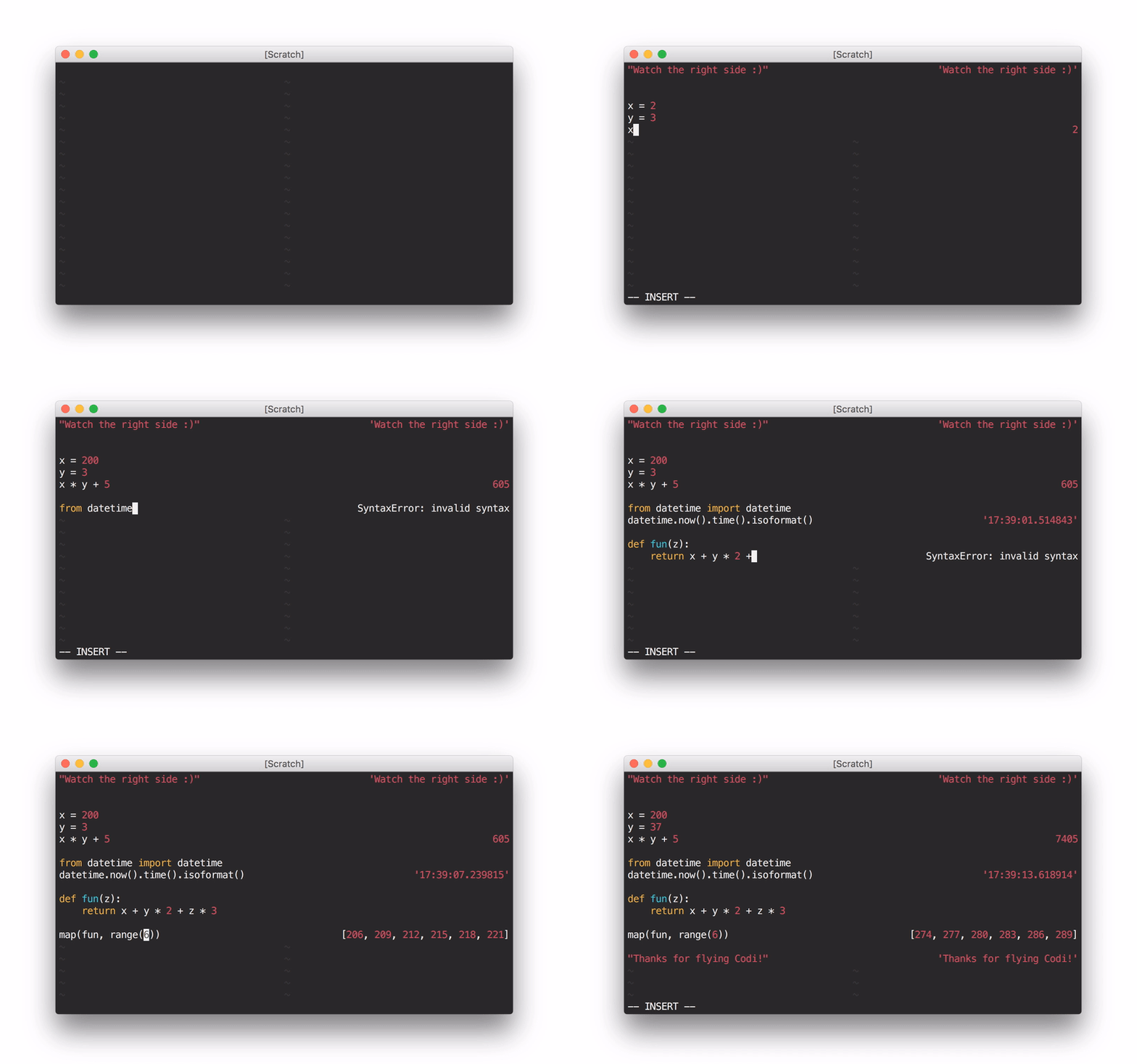
Using Codi as a Python scratchpad through the shell wrapper
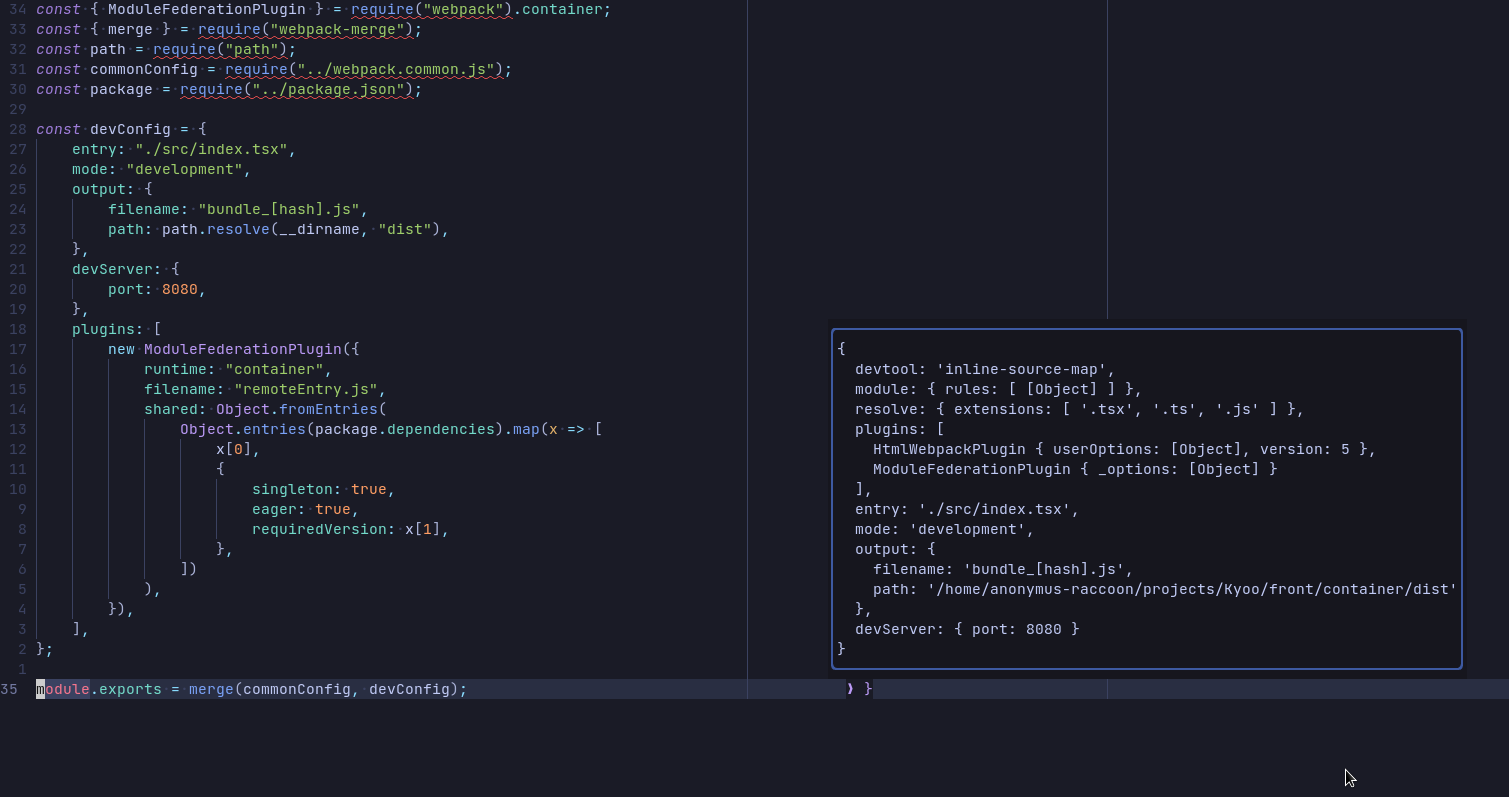
Using :CodiExpand on a javascript object
Codi is an interactive scratchpad for hackers, with a similar interface to
Numi. It opens a pane synchronized to your main buffer
which displays the results of evaluating each line as you type (with NeoVim
or Vim with +job and +channel, asynchronously). It's extensible to nearly
any language that provides a REPL (interactive interpreter)!
Languages with built-in support: Python, JavaScript, CoffeeScript, Haskell, PureScript, Ruby, OCaml, R, Clojure/ClojureScript, PHP, Lua, C++, Julia, Elm, Elixir, TypeScript, Mathjs, Haxe
Pull requests for new language support welcome!
Note: without async support, evaluation will trigger on cursor hold rather than text change.
For more information, check out the documentation.
Installation
Use your favorite package manager (vim-plug, Vundle, pathogen.vim), or add this directory to your Vim runtime path.
For example, if you're using vim-plug, add the following line to ~/.vimrc:
Plug 'metakirby5/codi.vim'
Dependencies
- OS X, Linux and limited Windows support
- Vim 7.4 (with
+joband+channelfor asynchronous evaluation) or NeoVim (still in its infancy - please report bugs!) uname- If not using NeoVim,
script(BSD or Linux, man page should say at least
Each interpreter also depends on its REPL. These are loaded on-demand. For
example, if you only want to use the Python Codi interpreter, you will not
need ghci.
Default interpreter dependencies:
- Python:
python(Note: Python 3 requires config - see:h codi-configuration) - JavaScript:
node - CoffeeScript:
coffee - Haskell:
ghci(be really careful with lazy evaluation!) - PureScript
pulp psci - Ruby:
irb - OCaml:
ocaml - R:
R - Clojure:
planck - PHP:
psysh - Lua:
lua - C++:
cling - Julia:
julia - Elm:
elm - Elixir:
iex - TypeScript:
tsun - Mathjs:
mathjs - Haxe:
ihx(installed withhaxelib install ihx)
Usage
Codi [filetype]activates Codi for the current buffer, using the provided filetype or the buffer's filetype.Codi!deactivates Codi for the current buffer.Codi!! [filetype]toggles Codi for the current buffer, using the provided filetype or the buffer's filetype.CodiNew [filetype]creates a new scratch buffer with Codi in it.CodiSelectopens a select menu and creates a new scratch buffer with the selected filetype and Codi in it. Only available on neovim.CodiExpandexpands the output of the current line in a popup menu to display multi-line content. Only available on neovim.
Shell wrapper
A nice way to use Codi is through a shell wrapper that you can stick in your
~/.bashrc:
# Codi
# Usage: codi [filetype] [filename]
codi() {
  local syntax="${1:-python}"
  shift
  vim -c \
    "let g:startify_disable_at_vimenter = 1 |\
    set bt=nofile ls=0 noru nonu nornu |\
    hi ColorColumn ctermbg=NONE |\
    hi VertSplit ctermbg=NONE |\
    hi NonText ctermfg=0 |\
    Codi $syntax" "$@"
}
Options
g:codi#interpretersis a list of user-defined interpreters. See the documentation for more information.g:codi#aliasesis a list of user-defined interpreter filetype aliases. See the documentation for more information.
The below options can also be set on a per-interpreter basis via
g:codi#interpreters:
g:codi#autocmddetermines what autocommands trigger updates. See the documentation for more information.g:codi#widthis the width of the Codi split.g:codi#rightsplitis whether or not Codi spawns on the right side.g:codi#rightalignis whether or not to right-align the Codi buffer.g:codi#autocloseis whether or not to close Codi when the associated buffer is closed.g:codi#rawis whether or not to display interpreter results without alignment formatting (useful for debugging).g:codi#syncis whether or not to force synchronous execution. No reason to touch this unless you want to compare async to sync.
Autocommands
CodiEnterPre,CodiEnterPost: When a Codi pane enters.CodiUpdatePre,CodiUpdatePost: When a Codi pane updates.CodiLeavePre,CodiLeavePost: When a Codi pane leaves.
FAQ
- Why doesn't X work in Codi, when it works in a normal source file?
- Codi is not meant to be a replacement for actually running your program;
it supports nothing more than what the underlying REPL supports. This is
why Haskell language pragmas don't work and OCaml statements must end with
;;.
- Codi is not meant to be a replacement for actually running your program;
it supports nothing more than what the underlying REPL supports. This is
why Haskell language pragmas don't work and OCaml statements must end with
- Codi leaves a bunch of old processes running, what's going on?
- The cause of this issue is still unknown, but it happens infrequently. See
:h codi-introduction-warningsfor more information.
- The cause of this issue is still unknown, but it happens infrequently. See
- Codi doesn't seem to work on my setup.
- Check
:h codi-introduction-gotchas.
- Check
Thanks to
- @DanielFGray and @purag for testing, feedback, and suggestions
- @Joaquin-V for helping me discover critical bugs with vanilla settings
- Everyone who has reported an issue or sent in a pull request :)
Explore related projects
codecrafters-io/build-your-own-x
Master programming by recreating your favorite technologies from scratch.
561,054 starspublic-apis/public-apis
A collective list of free APIs
497,292 starsmorluto/rea
Reverse engineer anything with agents, from app behavior down to native binaries.
443,448 starsopenclaw/openclaw
The AI that really does things. Any OS. Any Platform. The lobster way. 🦞
394,206 stars