
medhiclb/HelixAI
medhiclb/HelixAI has 36 GitHub stars and 4 forks. GitHot measured 0 stars in 24 hours. Last checked 2026-11-09 23:10 UTC. Last push 2026-11-03.
Your own AI workspace on your own machines: chat, agents, coding, knowledge bases (RAG) and fine-tuning with local models. Open source (AGPL-3.0).
What you can do
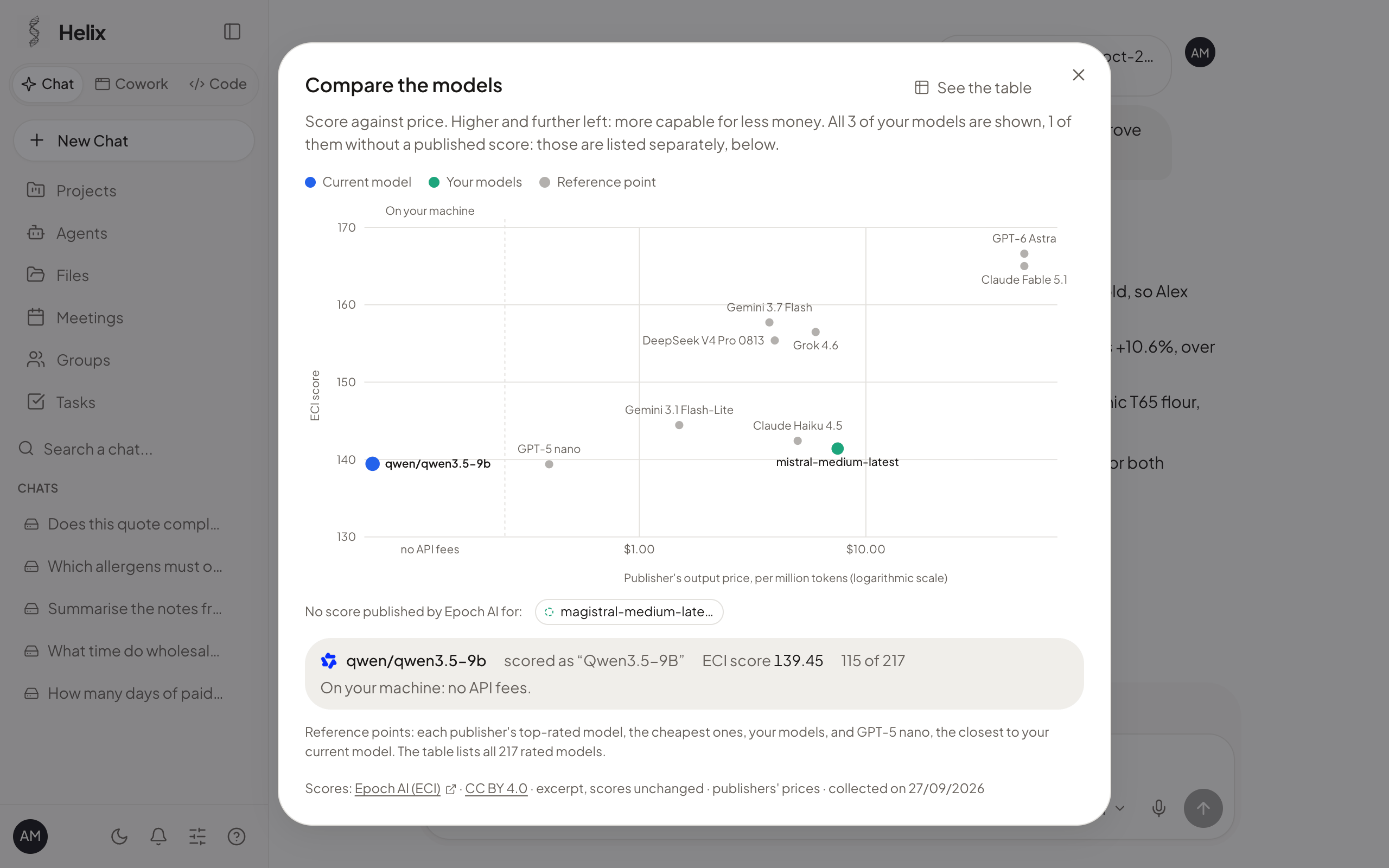
- Compare the models: every model you can use, placed by capability score against the price its publisher charges, so a local model and a cloud one can be weighed on one chart.
- Web search in the Chat: turn it on from the « + » menu and it stays as a chip until you remove it. Questions go to DuckDuckGo, your instance opens the pages found, and the answer lists its sources as links. Pages are read as data, never as instructions; an administrator can switch it off for the whole instance.
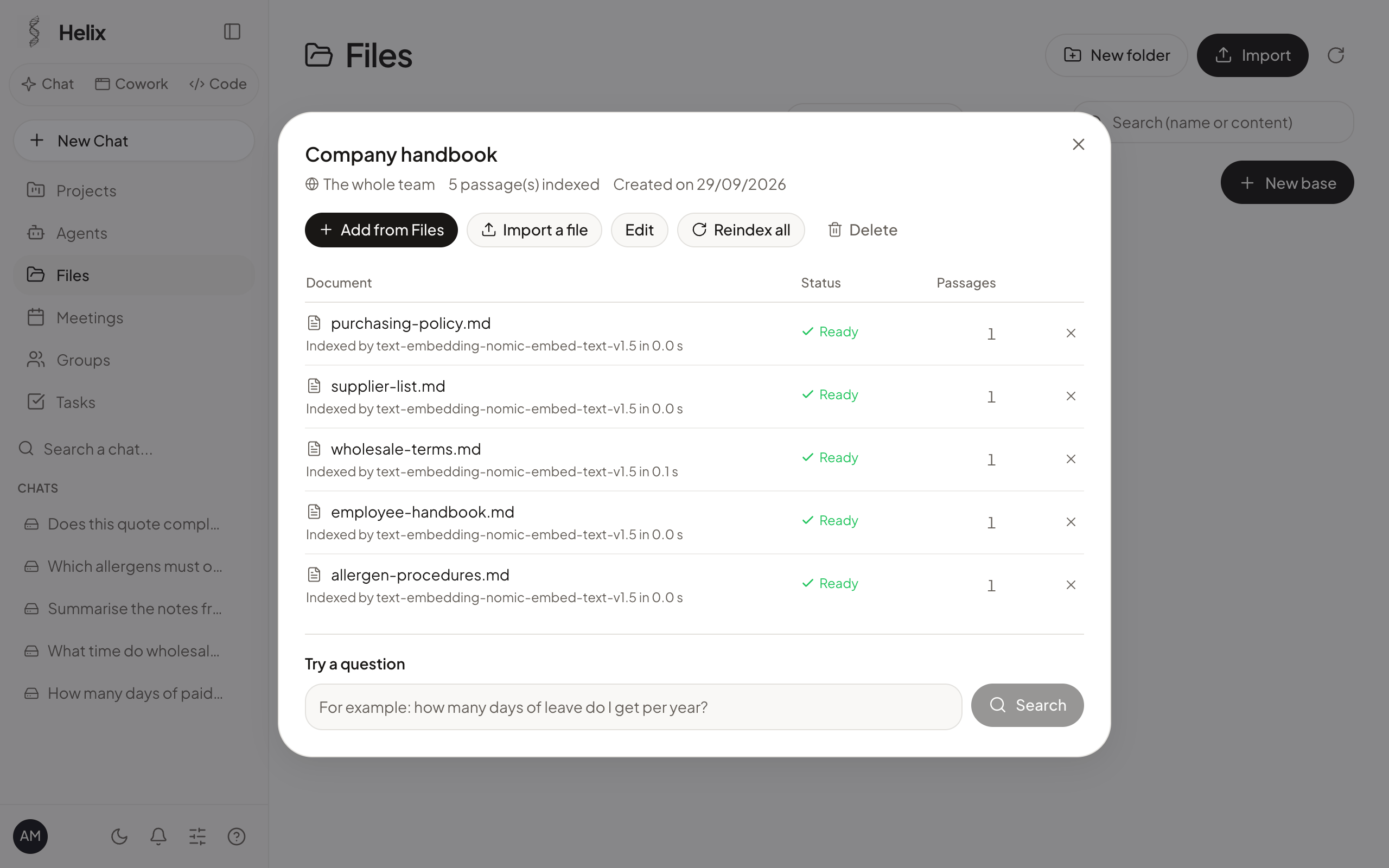
- Knowledge bases (RAG): gather documents, the instance indexes them on the machine, and answers cite the passages they use. Everyone only finds the documents they are allowed to see.
- Cowork: an agent that works on your files and, with your approval, on a virtual desktop (LibreOffice, browser) to produce Word, Excel, PowerPoint and PDF documents.
Measured star growth
- in 24h
- 0
- in 7 days
- Collecting history
- in 15 days
- Collecting history
- in 1 month
- Collecting history
Net star changes over overlapping periods, not daily totals. Missing measurements are left blank. Stars measure attention, not software quality.
README.md
Original

Helix AI
Your own AI workspace, on your own machines.
Chat, agents, coding, knowledge bases and fine-tuning in one open-source desktop app,
for teams and organisations that want to keep their documents and conversations at home.
Français · English · Español · Deutsch · العربية · 中文 · 日本語










Installation · Screenshots · Features · Build from source · Contributing
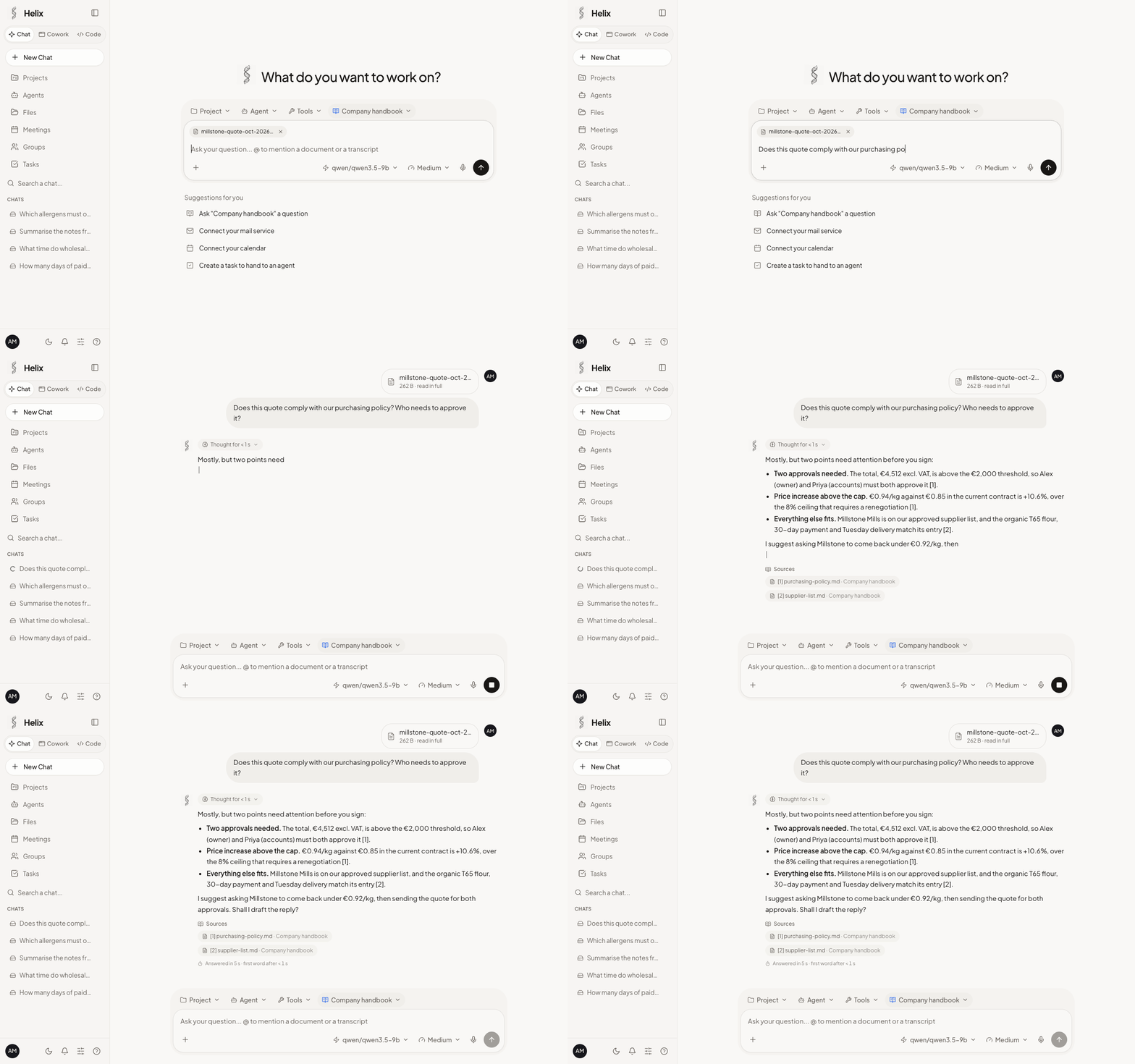
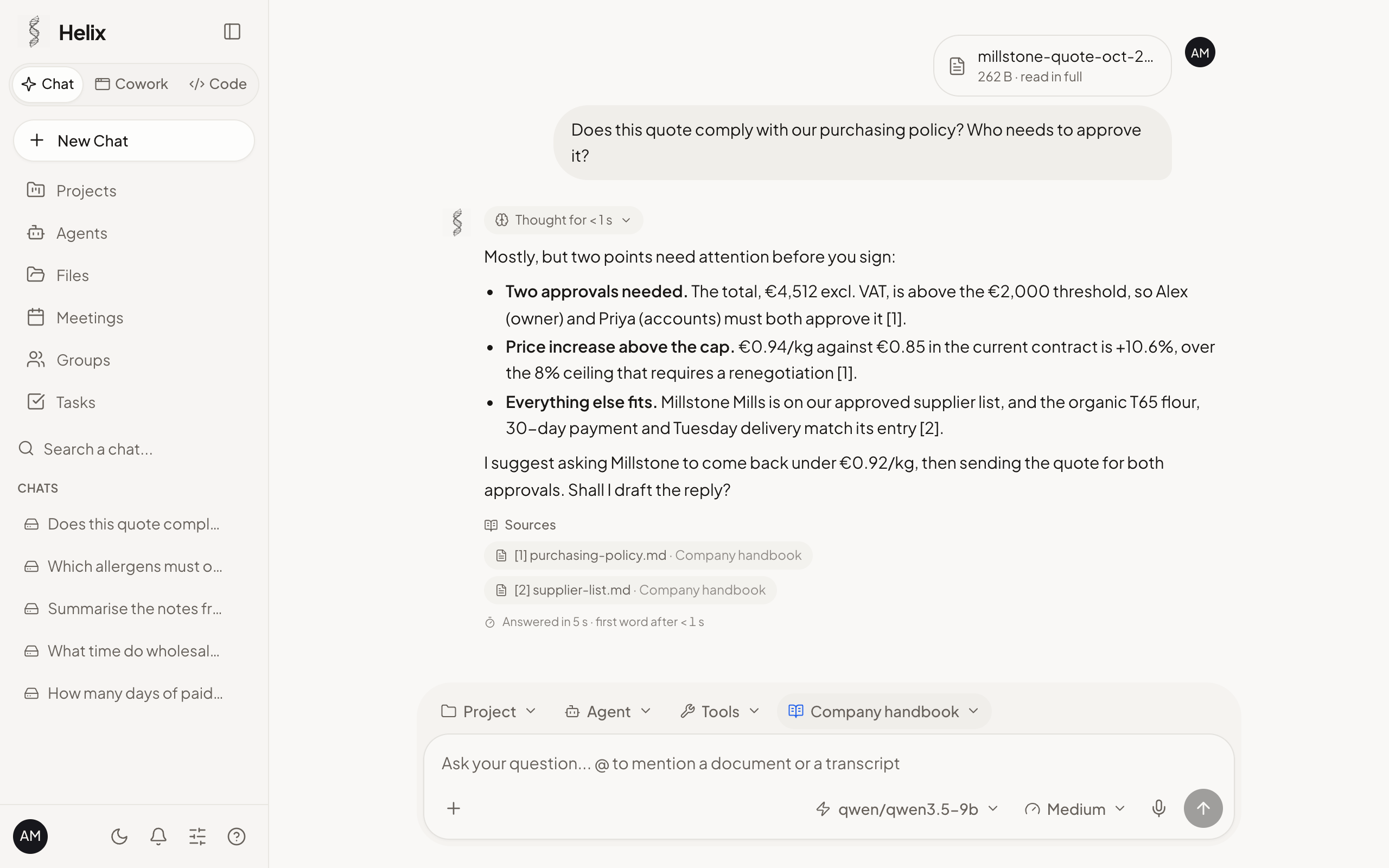
A question about an attached supplier quote, answered from the company's knowledge base, with its sources.
Why Helix AI
- Local by default. Models run on your machine or on your organisation's server, through LM Studio's engine, which Helix AI installs with the model that fits the machine's memory. No cloud model is ever selected for you.
- Nothing leaves without a key you plug in. A conversation goes to a cloud provider only if you add that provider's API key and pick one of its models; the model picker says where each model runs. Apart from the services you connect yourself (a cloud key, a mailbox, Drive, Slack…) and the Chat's web search when you turn it on (your questions then go to DuckDuckGo), the app goes online only to download what it installs (engine, models, tools) and to look up new versions (of Helix AI on GitHub, of OpenClaw on npm).
- Open source, nothing to buy. AGPL-3.0, no account with us, no telemetry. Each organisation installs and runs its own instance.
- macOS, Windows and Linux. One app for the three systems, in English, French, Chinese, Japanese, Spanish, German and Arabic.
- Agents that keep working. Agents with their own knowledge bases and scheduled missions run while the window is closed and leave a report of each run; anything that changes something waits for a person's approval, unless you decide otherwise.
- Fine-tuning from the app. Teach a small open model your company's facts from question and answer examples, compare it with the original, then use it in the Chat (MLX on Apple Silicon).
- Built for teams. Accounts, groups, knowledge bases shared by group, two-factor authentication, an audit log and data encrypted at rest.
Screenshots
 |
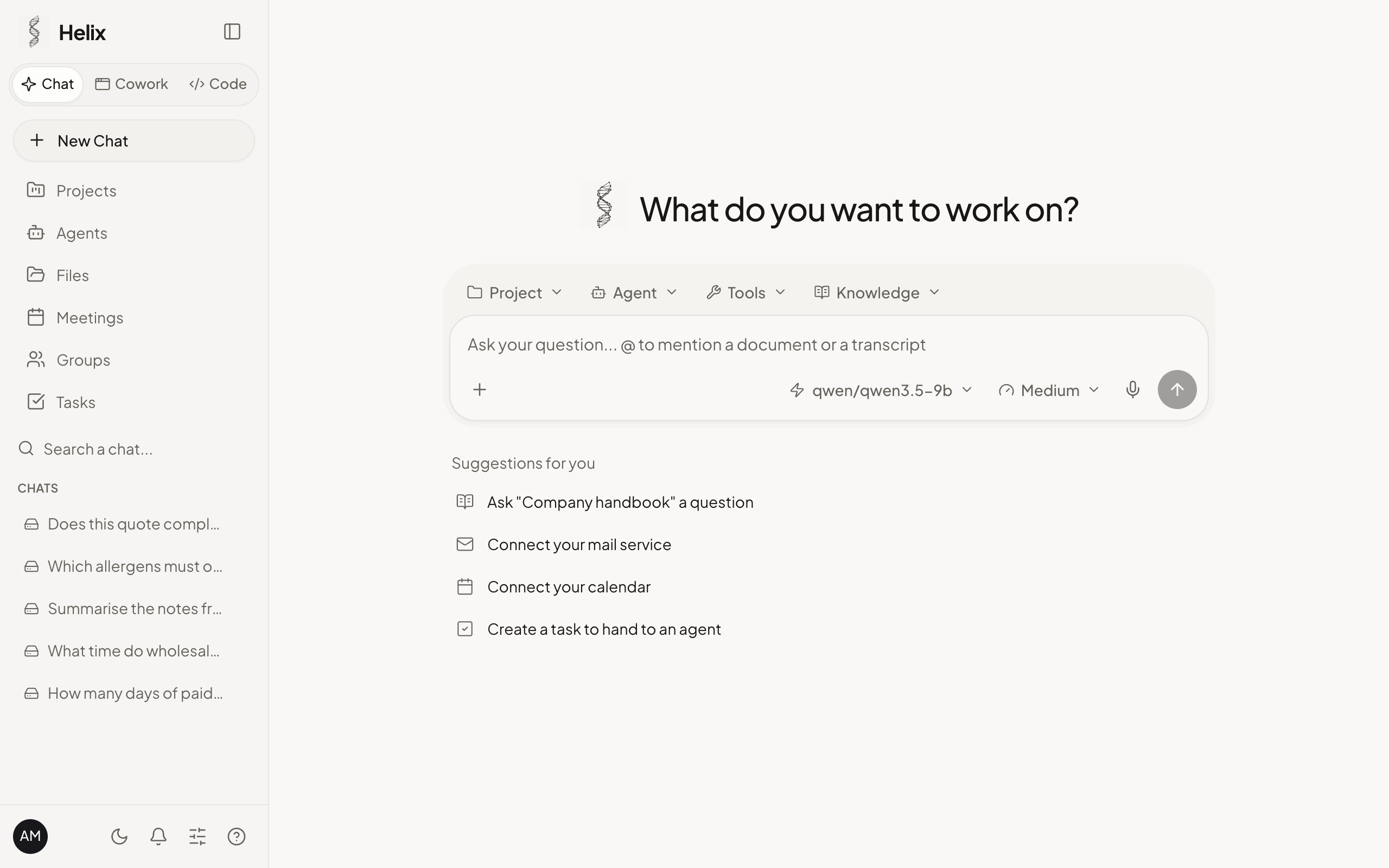 |
| Chat with a knowledge base, an attachment and its sources | Home |
 |
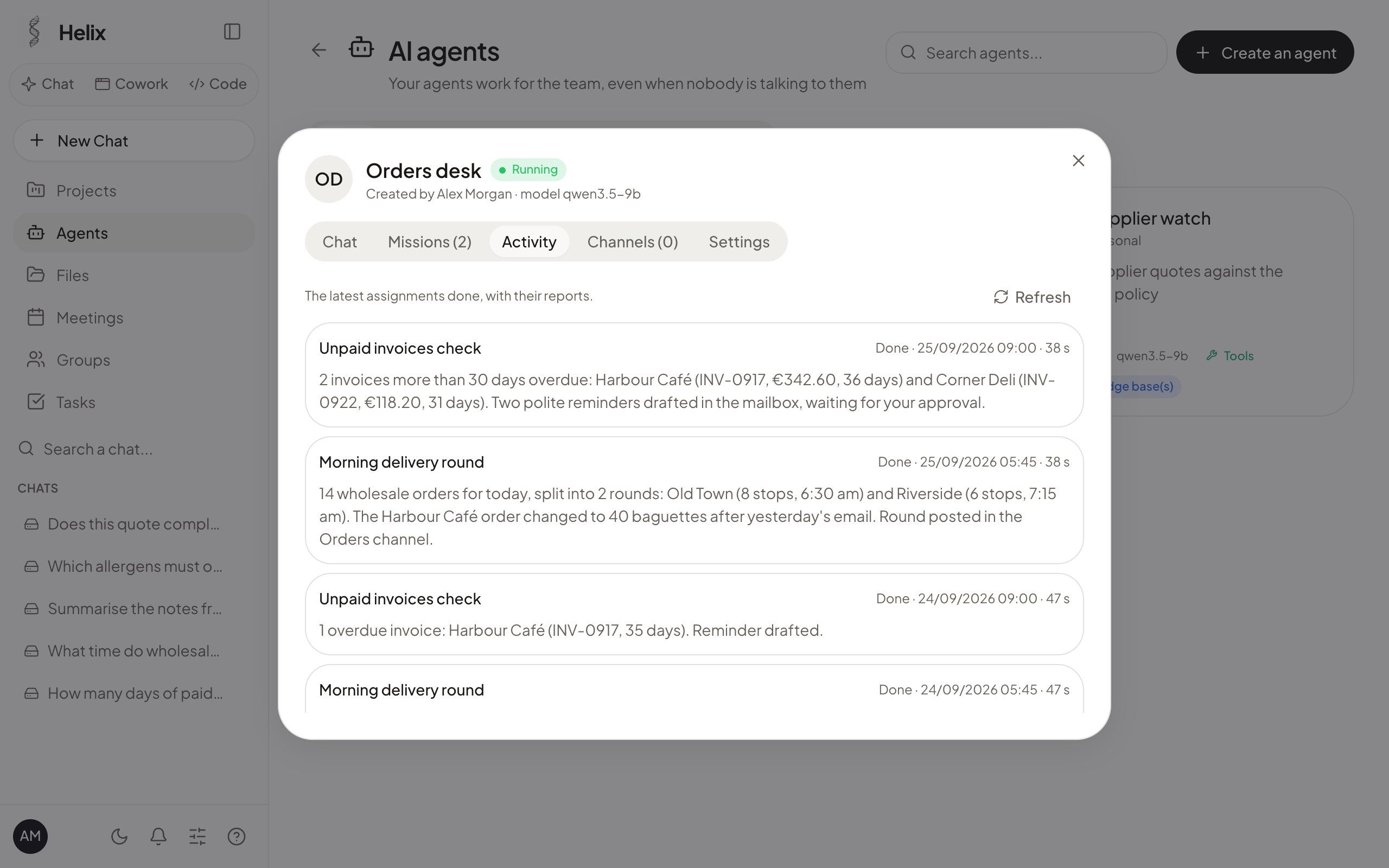 |
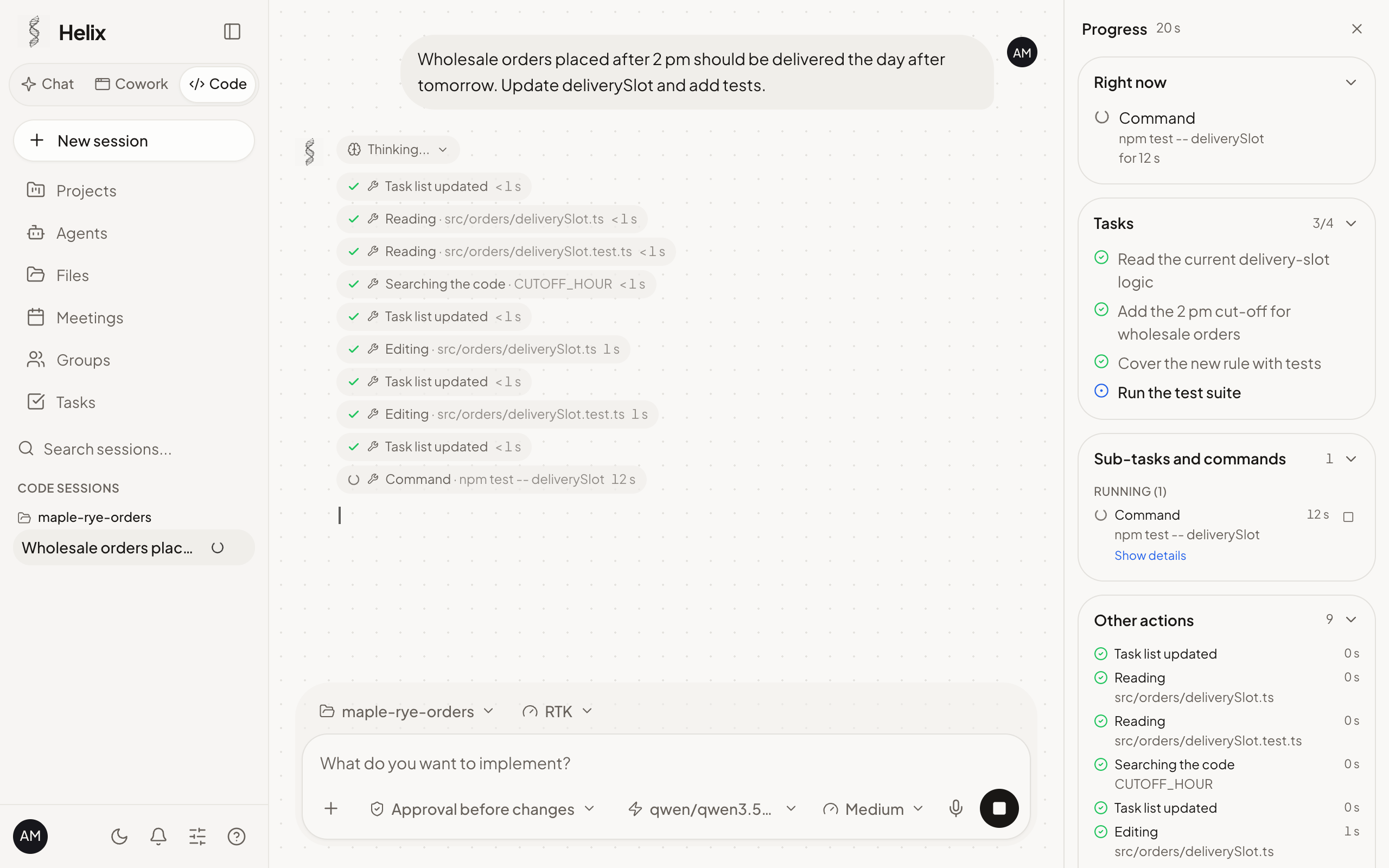
| Helix Code at work | Always-on agents and their mission reports |
 |
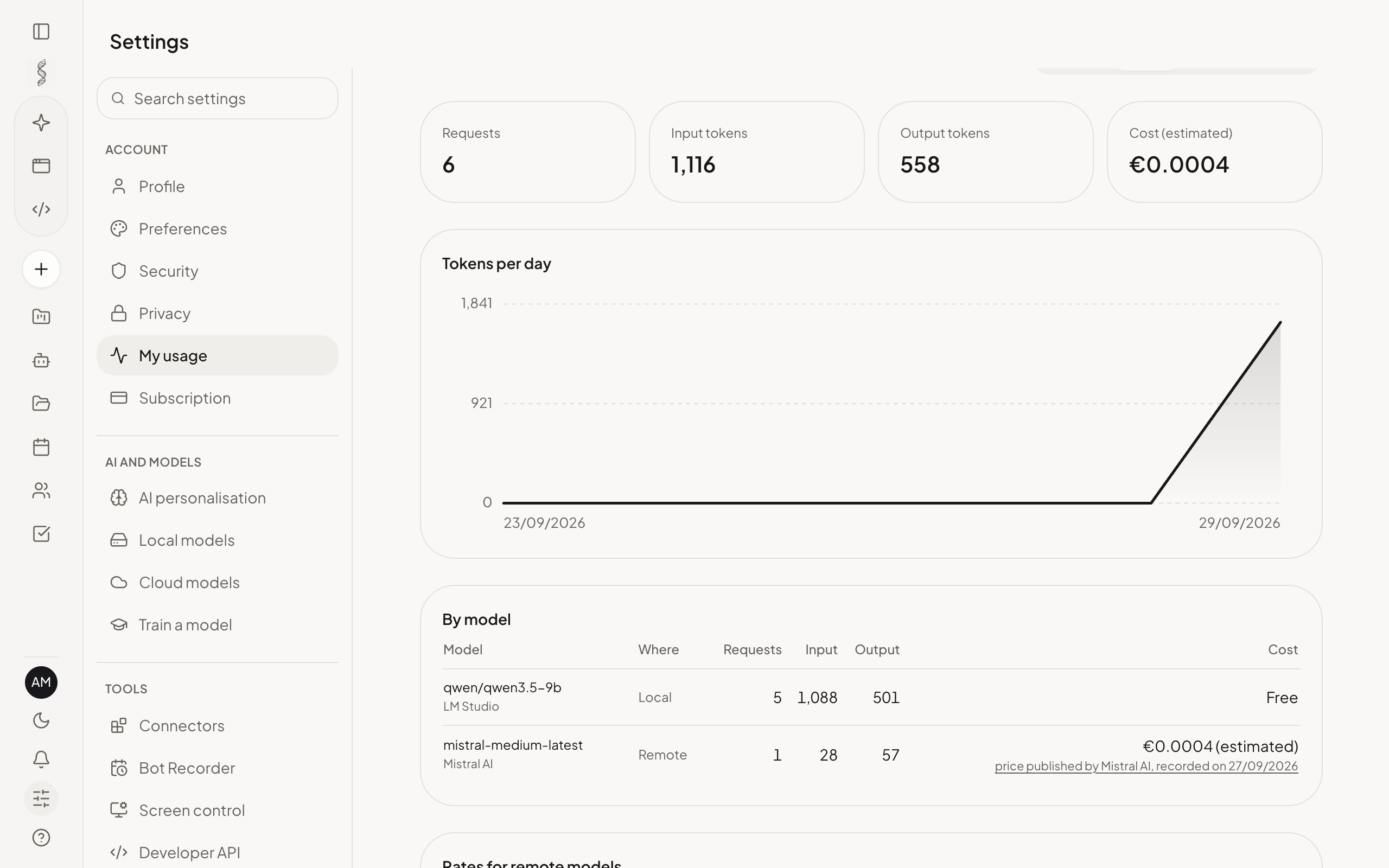 |
| Compare the models (score against price) | My usage |
 |
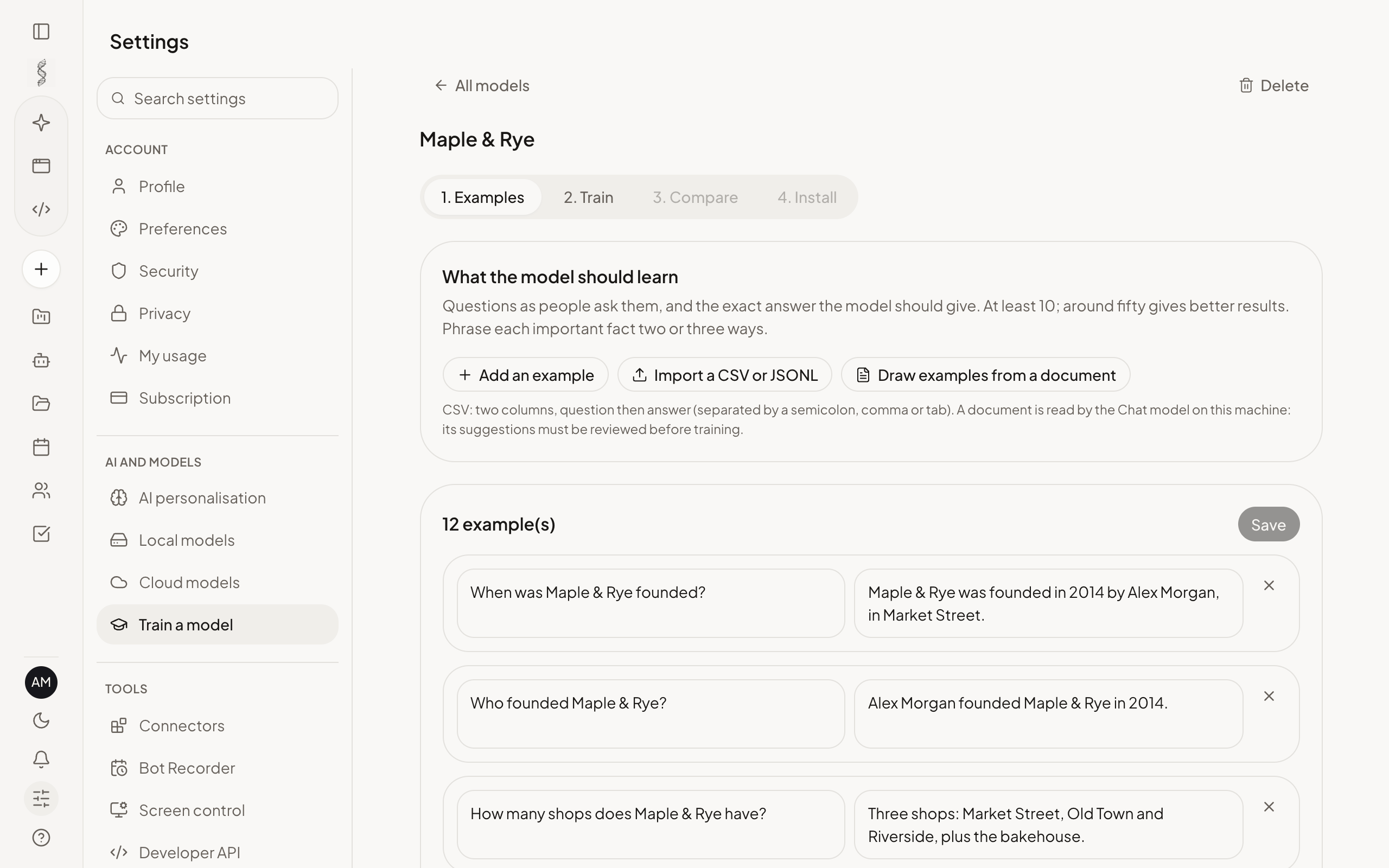 |
| Knowledge bases | Train a model |
Installation
Download the package for your system from the
v2026.1102.4 release.
SHA-256 checksums: SHA256SUMS.txt.
| Platform | Download | Installation |
|---|---|---|
| macOS (Apple Silicon) | Helix-2026.1102.4-arm64.dmg | Open the disk image and drag Helix to Applications. On first launch: System Settings › Privacy & Security › "Open Anyway" |
| macOS (Intel) | Helix-2026.1102.4-x64.dmg | Same as above. Local models run on llama.cpp, which Helix installs itself. |
| Windows 10/11 (x64) | Helix-Setup-2026.1102.4-x64.exe | Run the installer (no administrator rights needed). If SmartScreen appears: "More info" › "Run anyway" |
| Ubuntu, Debian (x64) | helix-plateforme_2026.1102.4_amd64.deb | sudo apt install ./helix-plateforme_2026.1102.4_amd64.deb |
| Other Linux (x64) | Helix-2026.1102.4.AppImage | chmod +x Helix-2026.1102.4.AppImage, then run it. On Ubuntu 24.04, prefer the .deb |
macOS, in one command (recommended): the app installs without the Gatekeeper prompt, after
checking the disk image against SHA256SUMS.txt and its code signature:
curl -fsSL https://raw.githubusercontent.com/medhiclb/HelixAI/main/scripts/installer-macos.sh | sh
On first launch, Helix AI sets up what it needs: LM Studio's headless engine (pinned version, verified checksum), or the LM Studio app if it is already in use on the machine, and the model best suited to the machine. 16 GB of memory is recommended; on smaller machines a lighter model is picked. Python, Node and, for Helix Code, OpenCode are installed in one click when missing (pinned versions, verified checksums); the chat model comes from LM Studio's catalogue, at the version LM Studio serves.
New versions are announced in the app: one click on macOS; on Windows and Linux, the new package is offered and installs over the previous one, and your data is kept. Until the app is notarised, macOS asks once after each new version for Helix to access its keychain item ("Helix Safe Storage"): choose "Always Allow". On Windows 11, Smart App Control, when active, blocks unsigned apps and does not offer to run them anyway.
On Windows, the commands of an always-on agent at the "Free" level go through PowerShell.
Features
- Chat with local models picked for each machine: Helix AI installs the best-rated open model (Apache 2.0 or MIT) that fits its memory, from a small laptop to a workstation, and suggests the others it can run. The catalogue covers Qwen, Mistral (Magistral, Ministral), OpenAI gpt-oss, Z.ai GLM, IBM Granite, Ai2 OLMo, Meta and DeepSeek. Cloud models work with your own API key. Attachments, dictation (Whisper, on the machine), image generation (Z-Image Turbo, FLUX.2 klein) and short videos (Wan 2.1 and 2.2), also on the machine. A message sent while an answer is still being written waits its turn instead of cutting it.
- Compare the models: every model you can use, placed by capability score against the price its publisher charges, so a local model and a cloud one can be weighed on one chart.
- Web search in the Chat: turn it on from the « + » menu and it stays as a chip until you remove it. Questions go to DuckDuckGo, your instance opens the pages found, and the answer lists its sources as links. Pages are read as data, never as instructions; an administrator can switch it off for the whole instance.
- Knowledge bases (RAG): gather documents, the instance indexes them on the machine, and answers cite the passages they use. Everyone only finds the documents they are allowed to see.
- Cowork: an agent that works on your files and, with your approval, on a virtual desktop (LibreOffice, browser) to produce Word, Excel, PowerPoint and PDF documents.
- Helix Code: a coding agent on your project folder (built on OpenCode), with a live panel of
its tasks, commands and edited files; also in VS Code (the extension is attached to every
release; install it with "Install from VSIX…") and in the
terminal with the
helixcommand line. On macOS and Linux, with a cloud model, the output of its commands goes through RTK first, to spend fewer tokens; the approval card still shows the command as written. - Connectors: mail, Google Calendar (read and write), Google Drive, Slack, Notion and MCP servers, behind an approval gate: nothing that changes something happens without your go-ahead. LinkedIn connects a profile and, through a second LinkedIn app, a company Page; Palmier Pro, a video editor for Apple silicon Macs, lets agents edit on its timeline while it is open on the instance's Mac. Roblox Studio (macOS, Windows) and Blender (macOS, Windows, Linux) let agents read and build a place or a 3D scene open on the instance's machine; running code, editing and generating always ask for your approval. Unreal Engine (5.8 or later) connects through the MCP server Epic ships in the editor, one action at a time, each one approved. An administrator can also add their own MCP server, a program on the machine or an address: each of its tools asks for approval, except those marked read-only.
- Scheduled tasks: an instruction and a rhythm (every day, Monday to Friday, a day of the week or of the month), run with your tools, even with the window closed, by the agent you choose.
- Always-on agents: scheduled missions, replies to incoming mail and messaging apps, with their own knowledge bases and photo. A received email is handled with reduced rights: on the web, the agent only opens addresses it has already seen.
- Train a model: examples, training, comparison with the original, then installation in LM Studio (MLX on Apple Silicon, Unsloth on NVIDIA cards).
- My usage: requests and tokens per model, read from each engine's answers; local models cost no API fees, cloud ones are priced from your rate or the provider's published price, dated.
- Developer API: personal API keys for the instance's OpenAI-compatible API (
/v1/models,/v1/chat/completions, knowledge bases included), in your name and nothing more, revocable at once. - Meetings: record or import, transcription and minutes on the machine, meeting bot.
- Import your history from ChatGPT, Claude, Gemini (Google Takeout), Claude Code, Codex and Cursor.
- Teams: accounts, groups, sharing, two-factor authentication, audit log, GDPR export, data encrypted at rest.
- White label: the product name, logo and colours come from one configuration file.
Build from source
Prerequisites: macOS (Apple Silicon or Intel), Windows 10/11 or Linux (x64), Node.js 22.18 or later and npm. Node is only needed to build and develop: the gateway runs its TypeScript directly, and the installed app needs neither Node nor Python.
git clone https://github.com/medhiclb/HelixAI
cd HelixAI
npm install
npm run app
npm run app builds the gateway and opens the desktop app, which starts its own local gateway.
The web interface alone runs with npm run gateway and npm run dev in two terminals.
npm run package      # macOS: .dmg and .zip in release/
npx electron-builder --win nsis --x64            # Windows installer (after npm run build)
npx electron-builder --linux AppImage deb --x64  # Linux packages (after npm run build)
npm run typecheck    # interface and gateway
npm run securite     # security checks against a throwaway instance
Signing and notarisation are ready and only wait for an Apple certificate: see SIGNATURE.md.
Command line
The desktop app ships the helix command. Set it up from Settings › Install the apps › CLI
(on Windows, then open a new PowerShell or Command Prompt), then:
helix connexion          # sign in once with your instance account
helix chat               # a Chat in the terminal
helix chat --outils      # with your connectors, behind the approval gate
helix code               # the coding agent on the current folder
Documentation
The technical documentation is written in French: docs/GUIDE.md (gateway, routes, connectors, deployment, rebranding), ARCHITECTURE.md, SECURITE.md, SCREENS.md (every screen and what it really does) and PROJET.md (intentions, decisions, current state).
Contributing
Contributions are welcome, from a typo to a new connector.
- Read CONTRIBUTING.md, and sign the CLA before your first pull request.
- Questions and ideas: Discussions.
- Bugs and feature requests: Issues, or from the app: Settings › Report a problem, which prepares an issue or an email that you review and send yourself.
- Security vulnerabilities: report them privately, see SECURITY.md.
- Code of conduct.
License
GNU AGPL-3.0. You may use, modify, redistribute and sell Helix AI. Whoever distributes it, or offers it as an online service, must publish the code of their version under the same licence. Details in COPYRIGHT.md.
LM Studio, the default model engine, is closed-source software whose terms allow personal use and an organisation's internal use, not a service provided to others: read PROJET.md § 3.9 before hosting an instance for others.
Acknowledgements
Model scores in "Compare the models" come from Epoch AI, Capabilities & benchmarking (Epoch Capabilities Index), licensed under CC BY 4.0, retrieved on 27 September 2026. Prices come from the publishers' own pricing pages, recorded the same day.
Built with open-source work, among others: OpenCode, RTK, OpenClaw, stable-diffusion.cpp, MLX, Unsloth, Whisper, Qwen, LangChain.js (text splitter), AnythingLLM (design of the knowledge bases), UI UX Pro Max, Lume, Electron, React and Vite.
Explore related projects
affaan-m/ECC
The agent harness performance optimization system. Skills, instincts, memory, security, and research-first development for Claude Code, Codex, Opencode, Cursor and beyond.
300,285 starsNousResearch/hermes-agent
The agent that grows with you
262,103 starsmultica-ai/andrej-karpathy-skills
A single CLAUDE.md file to improve Claude Code behavior, derived from Andrej Karpathy's observations on LLM coding pitfalls.
231,413 starsfirecrawl/firecrawl
Supercharge your AI agents with data from the web and beyond. Building the library for superintelligence. 🔥
200,178 stars