
me-abhinav/NumberMorphView
me-abhinav/NumberMorphView has 1,581 GitHub stars and 113 forks. GitHot measured 0 stars in 24 hours. Last checked 2026-11-08 04:03 UTC. Last push 2017-12-04.
A label view for displaying numbers which can transition or animate using a technique called number tweening or number morphing.
Measured star growth
- in 24h
- 0
- in 7 days
- Update delayed
- in 15 days
- Update delayed
- in 1 month
- Update delayed
Net star changes over overlapping periods, not daily totals. Missing measurements are left blank. Stars measure attention, not software quality.
README.md
OriginalNumberMorphView


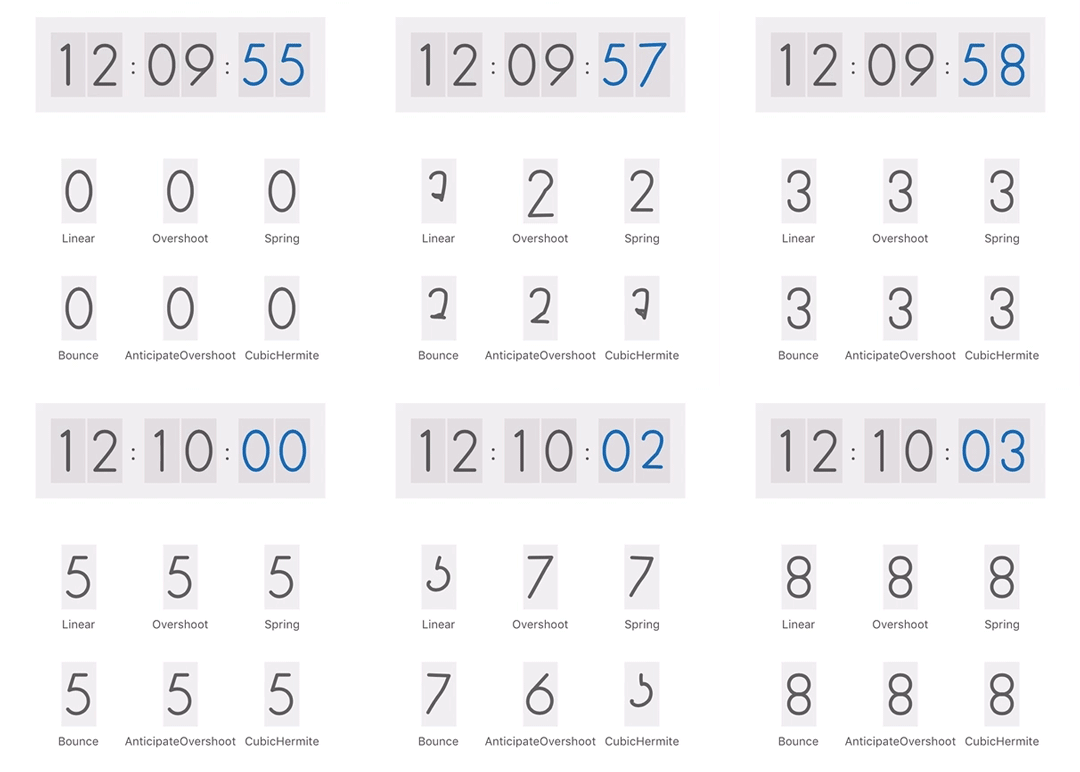
NumberMorphView a view like label for displaying numbers which animate with transition using a technique called number tweening or number morphing.
Usage
To run the example project, clone the repo, and run pod install from the Example directory first.
Interface builder
- Drag a UIView into your view controller.
- Change the class to
NumberMorphViewin the identity inspector. - Change intrinsic size from default to placeholder in the size inspector.
- Create an IBOutlet in your view controller.
Set the digit of number view as shown below:
numberView.currentDigit = 5;
Animate to nextDigit as shown below.
numberView.nextDigit = 8;
From code
NumberMorphView can be used with or without auto layout. Usage of intrinsic content size is recommended.
Preferred aspect ratio of the view is 13 : 24.
let numberView = NumberMorphView();
numberView.fontSize = 64;
numberView.currentDigit = 5;
let preferedSize = numberView.intrinsicContentSize();
numberView.frame = CGRect(x: 10, y: 10, width: preferedSize.width, height: preferedSize.height);
self.view.addSubview(numberView);

dispatch_after(5, dispatch_get_main_queue()) {
    numberView.nextDigit = 7;
}
Note: Intrinsic content size is changed after setting fontSize.
Customizing animations
- To set the animation duration:
numberView.animationDuration = 4;
- To change the type of animation, set the interpolator.
numberView.interpolator = NumberMorphView.SpringInterpolator();
Already available interpolators are LinearInterpolator, OvershootInterpolator, SpringInterpolator, BounceInterpolator, AnticipateOvershootInterpolator, and CubicHermiteInterpolator. Also you can add new interpolators. The interpolator class needs to conform to InterpolatorProtocol as shown below:
class MyLinearInterpolator: InterpolatorProtocol {
    func getInterpolation(x: CGFloat) -> CGFloat {
        return x;
    }
}
Requirements
- iOS 8.0+
- Swift 2.2
Installation
NumberMorphView is available through CocoaPods. To install it, simply add the following line to your Podfile:
use_frameworks!
pod 'NumberMorphView', '0.2.0'
Author
Abhinav Chauhan
License
NumberMorphView is available under the MIT license. See the LICENSE file for more info.
Explore related projects
codecrafters-io/build-your-own-x
Master programming by recreating your favorite technologies from scratch.
561,006 starspublic-apis/public-apis
A collective list of free APIs
497,250 starsmorluto/rea
Reverse engineer anything with agents, from app behavior down to native binaries.
443,088 starsopenclaw/openclaw
The AI that really does things. Any OS. Any Platform. The lobster way. 🦞
394,194 stars