
maximpri/mlxtop
maximpri/mlxtop has 148 GitHub stars and 15 forks. Star changes are not measured yet. Last checked 2026-11-09 17:44 UTC. Last push 2026-11-03.
A top for local LLMs: memory, paging, GPU and tokens/s for oMLX, Ollama, llama.cpp, vLLM and more
Measured star growth
- in 24h
- Update delayed
- in 7 days
- Update delayed
- in 15 days
- Update delayed
- in 1 month
- Update delayed
Net star changes over overlapping periods, not daily totals. Missing measurements are left blank. Stars measure attention, not software quality.
README.md
Originalmlxtop
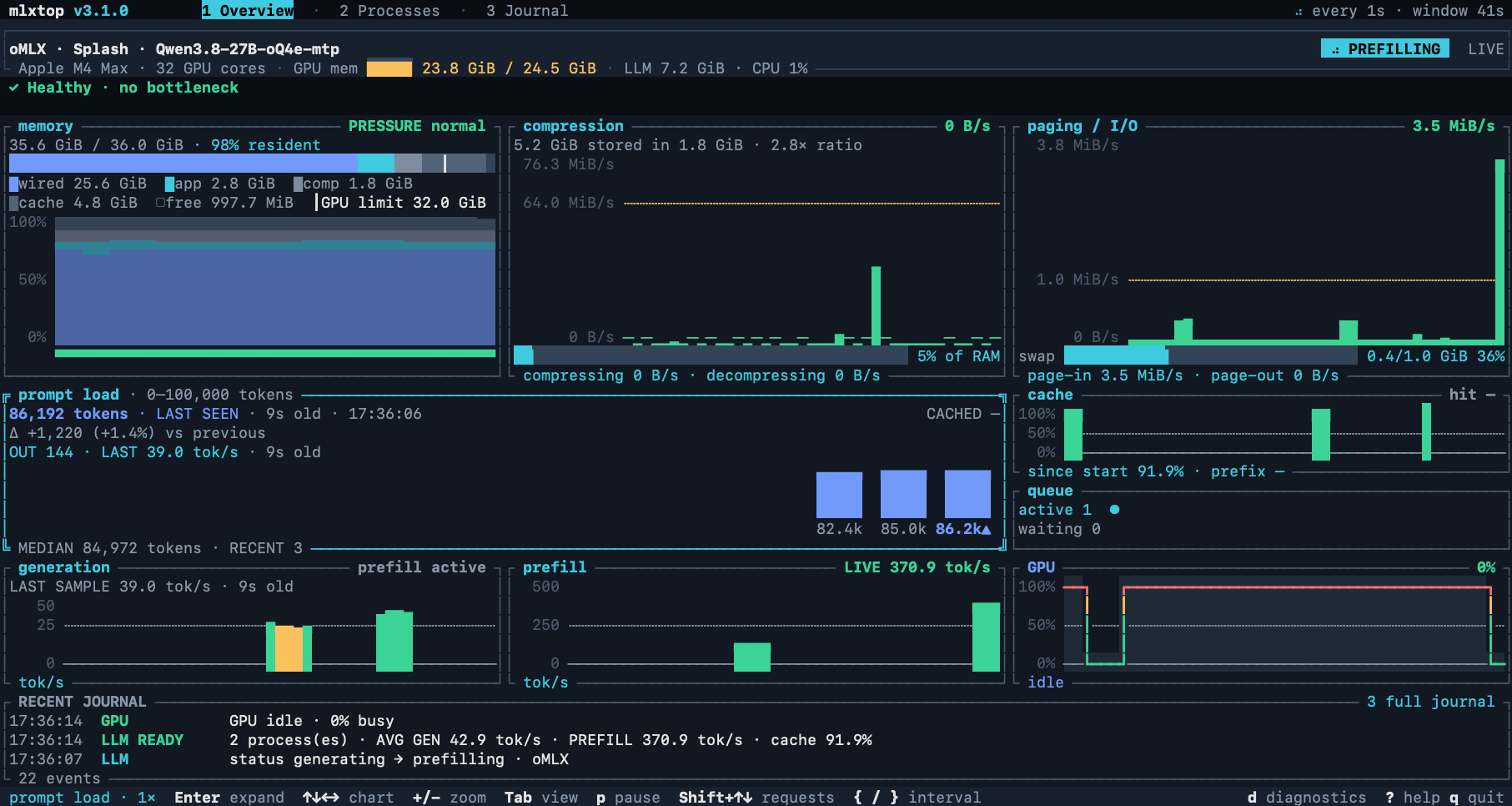
top for local LLMs. See whether memory, paging or the GPU is what's slowing your model down.



Install · Quick start · Runtimes · User guide · Changelog
When a local model slows down, the cause is usually the machine: memory pressure, swapping, a full GPU or a throttled card. mlxtop shows those readings next to your runtime's own numbers, such as tokens per second, prefill progress, queued requests and cache reuse, so you can see which one changed when the model slowed.
- Memory first: what RAM holds (wired, app, compressed, cache), OS pressure, compression and paging, each judged against its warning rate.
- Live inference: generation and prefill speed, prompt sizes, cached tokens, queues and prefill progress from the runtime itself, never estimated from CPU or GPU use.
- A plain verdict: a single line reads
✓ Healthy, or names the problem, such as heavy paging, a model partly on the CPU, a full card or heat throttling. - 15 runtimes: oMLX, Splash, mlx-serve, vLLM, SGLang, llama.cpp, Ollama, LM Studio, KoboldCpp, TensorFold, Strata and more, detected automatically.
- Local and read-only: no sudo, no account, no analytics. It never sends prompts or touches your models or runtime settings.
What's new in 3.2.1: a bug fix brings the prefill progress bar and its time-left readout back to prompt load. 3.2.0 added Strata and TensorFold, dashboard panels that resize with your terminal, and the Journal recording overhaul. 3.1.2 gave running requests their own generation speeds and Linux AMD detection without ROCm. Release notes →
Install
Homebrew (macOS and Linux):
brew install maximpri/tap/mlxtop
Install script (macOS on Apple Silicon, Linux x86_64 and ARM64), installs
to ~/.local/bin without sudo:
curl -fsSL https://raw.githubusercontent.com/maximpri/mlxtop/main/scripts/install.sh | sh
Windows (x86_64, PowerShell, no administrator rights needed):
irm https://raw.githubusercontent.com/maximpri/mlxtop/main/scripts/install.ps1 | iex
Both scripts verify the download's SHA-256 checksum. Linux builds are static
binaries with no runtime dependencies. You can also download a macOS
installer (.dmg, unsigned) or an archive from the
latest release.
To update, run mlxtop update (--rc for release candidates), or
brew upgrade mlxtop if you installed with Homebrew.
Build from source
You'll need Rust 1.88 or newer:
git clone https://github.com/maximpri/mlxtop.git
cd mlxtop
cargo install --path . --locked
Quick start
mlxtop            # open the dashboard
mlxtop --once     # print a text report and exit (works over SSH)
mlxtop doctor     # check the runtime connection and which readings are available
Memory and GPU readings appear straight away, even with no model loaded. Start your runtime, send it a prompt, and watch Overview while it answers.
| View | What it shows |
|---|---|
| 1 · Overview | The verdict, memory, compression, paging, prompt load, generation, prefill, GPU, cache, queue and recent events |
| 2 · Processes | Model processes and the CPU, memory and page-ins each one uses |
| 3 · Journal | Requests and resource changes during the session |
| 4 · Settings | Every config option, edited in place and applied without a restart |
| Key | Action |
|---|---|
1–4 / Tab |
Switch view |
Arrows / click, Enter / double-click |
Select a chart, enlarge or restore it |
+ - / wheel |
Zoom chart history |
p / Space |
Pause sampling |
[ ] |
Select a GPU card |
d |
Diagnostics and setup help for the current runtime |
? / q |
Help / quit (Esc asks first) |
The user guide explains every chart, its thresholds and where each reading comes from.
Supported runtimes
| Runtime | Live speed | What you get |
|---|---|---|
| oMLX | ✓ | Models, prompt and generation speed, requests with prefill progress, cache activity; follows oMLX serving through Splash |
| Splash | ✓ | Running and waiting requests, prefill progress, decode and prefill speed, prefix-cache reuse, Metal memory, DFlash acceptance, TTFT |
| mlx-serve | ✓ | Generation and prefill rates, running requests with their own speeds, prefix-cache reuse, MLX memory (start it with --metrics; sushi's sushi: gauges are read too) |
| vLLM, SGLang | ✓ | Active and waiting queues, server token rates, KV-cache occupancy, mean first-token time |
| Strata | ✓ | Live engine decode and prefill rates, active and waiting queues, KV-cache occupancy, prefix-cache reuse, mean first-token time, engine GPU memory |
| llama.cpp | ✓ | Active slots, output counts and live generation speed; average rates and queues when /metrics is enabled |
| KoboldCpp | last request | Input and output counts and rates |
| Ollama | after completion | Loaded models, VRAM, context size, CPU/GPU placement |
| LM Studio | after completion | Loaded instances and context size |
| TensorFold | after completion | Model catalogue, active/queued requests, sampled completion throughput, prefix-cache reuse and device memory |
| MLX-LM, LocalAI, Jan, GPT4All | after completion | Process detection and model catalogue |
"After completion" means the speed of each finished request, recorded by the usage recorder or the included Python helper. mlxtop monitors one server at a time; see provider endpoints for ports, custom URLs and authentication.
Platforms
| macOS (Apple Silicon) | Linux (x86_64, ARM64) | Windows (x86_64) | |
|---|---|---|---|
| Memory pressure | Native | MemAvailable and PSI |
Commit charge |
| Compression | ✓ | — | — |
| Paging | ✓ | ✓ | Not available from Windows |
| GPU | Apple GPU | NVIDIA via nvidia-smi, AMD via amdgpu sysfs |
NVIDIA via nvidia-smi |
macOS 11 or later is required. Intel Macs aren't supported.
Configuration
mlxtop works without configuration. To change the refresh rate, history length,
oMLX endpoint, alarms or warning thresholds, press 4 for Settings: changes
apply at once and are saved to ~/.config/mlxtop/config.json. You can also edit
that file by hand:
{
  "interval": 2,
  "omx": { "host": "127.0.0.1", "port": 8080 }
}
Every field and default is listed in the configuration reference.
Limits
- GPU activity covers the whole system, not a single model.
- Polling is sampled, so a request that starts and finishes between two samples can be missed.
- mlxtop shows what changed when a model slowed down; it can't prove the cause.
- History is kept for the current session only.
Privacy
mlxtop reads system counters, process information and your runtime's local APIs. It has no analytics, doesn't upload anything, and by default sends provider credentials only to endpoints on your own machine. Its local diagnostic log never contains prompts, model output or API keys. See data sources and privacy and the security policy.
Contributing
Bug reports, documentation fixes and new runtime adapters are welcome. Please
read CONTRIBUTING.md first, and open an issue before starting
a large change. When you report a bug,
include the output of mlxtop --version and mlxtop doctor, plus your OS and
runtime.
mlxtop was developed with the Duet coding agent.
Credits
External contributions are credited here, with thanks.
- Samuel Reed (@STRML) — the mlx-serve runtime support, per-request decode speeds, prefill progress with time left, sushi gauge support, and the Journal recording overhaul (#15, #37, #38, #43, #44).
- David (@sandbranch) — AMD GPU monitoring on Linux from amdgpu sysfs, and live llama.cpp generation rate and slot readings (#40, #41, #42).
- Minoru Mizutani (@mmizutani) — the TensorFold runtime support (#45).
- Sumit Chaudhary (@EduardoSaverin) — the configuration file support (#1).
- Prashant (@prashant11235) — Linux monitoring via nvidia-smi (#2).
License
MIT. Dependencies keep their own licenses. mlxtop is an independent project and isn't affiliated with Apple.
Explore related projects
affaan-m/ECC
The agent harness performance optimization system. Skills, instincts, memory, security, and research-first development for Claude Code, Codex, Opencode, Cursor and beyond.
300,829 starsNousResearch/hermes-agent
The agent that grows with you
262,464 starsmultica-ai/andrej-karpathy-skills
A single CLAUDE.md file to improve Claude Code behavior, derived from Andrej Karpathy's observations on LLM coding pitfalls.
231,882 starsfirecrawl/firecrawl
Supercharge your AI agents with data from the web and beyond. Building the library for superintelligence. 🔥
200,444 stars