
maxgfr/csv-ai-analyzer
maxgfr/csv-ai-analyzer has 86 GitHub stars and 10 forks. GitHot measured 0 stars in 24 hours, 0 in 7 days, and -1 in 15 days. Last checked 2026-11-15 04:58 UTC. Last push 2026-11-02.
Measured star growth
- in 24h
- 0
- in 7 days
- 0
- in 15 days
- -1
- in 1 month
- Collecting history
Net star changes over overlapping periods, not daily totals. Missing measurements are left blank. Stars measure attention, not software quality.
About
A self-hosted, browser-based AI CSV analyzer
AIREADME.md
Original📊 CSV AI Analyzer


App preview:
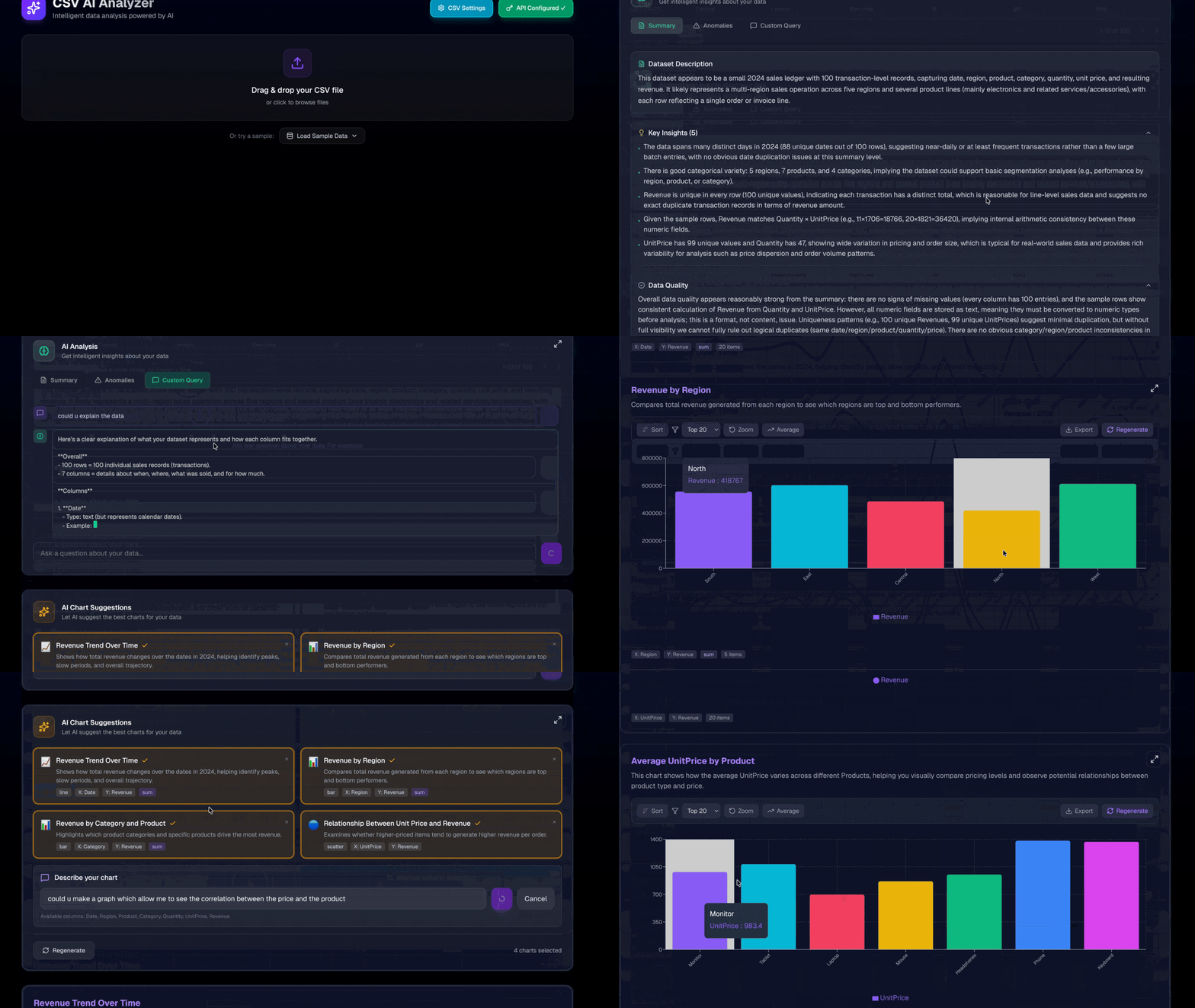
A modern, elegant application to analyze your CSV and Excel (.xlsx) files with Artificial Intelligence using multiple AI providers (OpenAI, Anthropic, Google, Mistral, and more). Privacy-first: the app does not store your data. Use a self-hosted/custom endpoint to keep processing entirely local; otherwise API calls go to the selected provider. Self-hostable with Docker.
✨ Features
📁 File Upload & Parsing
- Drag & Drop or file selection — supports CSV and Excel (.xlsx) files
- Automatic detection of delimiters (comma, semicolon, tab) for CSV files
- Configurable settings: delimiter, header row, encoding
- Type inference for columns (text, number, date)
📋 Data Visualization
- Interactive table with sorting and pagination
- Data preview with automatic formatting
- Smooth navigation for large datasets
🤖 AI-Powered Analysis
- Multiple AI providers: OpenAI, Anthropic Claude, Google Gemini, Mistral, and more
- Custom endpoint support: Connect to Ollama, LM Studio, vLLM, or any OpenAI-compatible API
- Intelligent analysis of your data with AI-generated insights
- Markdown rendering: AI responses rendered with full Markdown support (headings, lists, tables, syntax-highlighted code blocks)
- Streaming with Markdown: Real-time streaming responses are rendered progressively as formatted Markdown
- Smart chart suggestions tailored to your dataset
- Chart types: Bar, Line, Pie, Scatter, Area
🔒 Privacy
- Local or direct-to-provider: the app does not store your data. Processing can happen in your browser when using a self-hosted/custom endpoint; otherwise API calls go directly to the chosen AI provider.
- API keys stored locally and encrypted in your browser (AES-GCM, non-extractable key), never in clear text
- No tracking or third-party cookies
🐳 Self-Hostable
- Docker ready: Deploy in seconds with a single command
- Custom AI endpoints: Use your own LLM server (Ollama, LM Studio, vLLM, etc.)
- Full control: Host on your own infrastructure
🚀 Installation
Option 1: Local Development
# Clone the repo
git clone https://github.com/maxgfr/csv-ai-analyzer.git
cd csv-ai-analyzer

# Install dependencies
pnpm install

# Run in development
pnpm dev
The application will be accessible at http://localhost:3000
The models catalog
The settings build the catalog in the browser when they open, from models.dev and OpenRouter: the providers the app can call and their non-deprecated models, with a recommended model per provider (llm-models, loaded on demand by llm-connect's liveCatalog). Nothing to commit or schedule.
public/models.json is the offline fallback. It is not committed: pnpm build writes it first (prebuild), and a failure there does not stop the build. To write it by hand:
pnpm run fetch-models
Option 2: Docker (Self-Hosting)
# Build the Docker image
docker build -t csv-ai-analyzer .

# Run the container
docker run -p 3000:3000 csv-ai-analyzer
Or use Docker Compose:
# docker-compose.yml
version: '3.8'
services:
  csv-ai-analyzer:
    build: .
    ports:
      - "3000:3000"
    restart: unless-stopped
docker compose up -d
The application will be accessible at http://localhost:3000
Or use the live version directly!
🎮 Usage
1. Upload a File
Drag and drop your CSV or Excel (.xlsx) file, or click to select a file.
2. Configure Parsing (Optional)
If automatic detection doesn't work perfectly, adjust the settings:
- Custom delimiter
- Header row choice
- File encoding
3. Configure your AI Provider
Click the ⚙️ icon to configure your AI provider:
- Choose a provider: OpenAI, Anthropic, Google, Mistral, or others
- Enter your API key: Each provider has its own API key format
- Custom Endpoint: Enable "Use Custom Endpoint" to connect to local/self-hosted OpenAI-compatible APIs (Ollama, LM Studio, vLLM, etc.)
Using Custom Endpoints (Ollama, LM Studio, vLLM, etc.)
- Toggle "Use Custom Endpoint" in settings
- Enter your API Base URL (e.g.,
http://localhost:11434/v1for Ollama) - Enter your model name (e.g.,
llama3.2,mistral,codellama) - API key is optional for most local servers
Example configurations:
| Provider | Base URL | Model Examples |
|---|---|---|
| Ollama | http://localhost:11434/v1 |
llama3.2, mistral, codellama |
| LM Studio | http://localhost:1234/v1 |
Model name from LM Studio |
| vLLM | http://localhost:8000/v1 |
Your loaded model name |
| OpenRouter | https://openrouter.ai/api/v1 |
openai/gpt-4o, anthropic/claude-3 |
4. Analysis & Charts
Click "Run Complete Analysis" and the AI will analyze your data, detect anomalies, and suggest relevant visualizations.
📦 csv-charts-ai — Standalone Library
The core of this project is published as a standalone npm package csv-charts-ai — a full-featured library for AI-powered CSV analysis, chart generation, and interactive visualization. It works with any LLM provider (OpenAI, Anthropic, Google, Mistral, Ollama, or any OpenAI-compatible endpoint).
Use it in React apps, Node.js scripts, APIs, or CLI tools.
Installation
pnpm add csv-charts-ai
Core utilities are bundled. AI providers are pluggable — install only the ones you need (@ai-sdk/openai, @ai-sdk/anthropic, etc.). Optional peer dependencies (for React chart components only): react, recharts.
Quick Start — Full AI Analysis
import { registerProvider, fromSDK, parseCSV, analyzeData } from "csv-charts-ai";
import { createOpenAI } from "@ai-sdk/openai";

// 1. Register your AI provider(s) — once, at app startup
registerProvider("openai", fromSDK(createOpenAI));

// 2. Parse any CSV string (auto-detects delimiter, infers types)
const data = parseCSV(csvString);

// 3. Run full analysis: summary + anomalies + charts in parallel
const result = await analyzeData({
  model: { apiKey: "sk-...", model: "gpt-4o" },
  data,
});

console.log(result.summary.keyInsights);
console.log(`Found ${result.anomalies.length} anomalies`);
console.log(`Generated ${result.charts.length} chart suggestions`);
React Components
Chart components live in a separate entry point (csv-charts-ai/charts) so the core stays React-free:
import { ChartDisplay, defaultDarkTheme } from "csv-charts-ai/charts";

// Display AI-generated charts with interactive toolbar (zoom, sort, trendline, export)
<ChartDisplay data={data} charts={charts} theme={defaultDarkTheme} />

// Unstyled mode — strip all Tailwind classes and style it yourself
<ChartDisplay data={data} charts={charts} unstyled className="my-charts" />
Multi-Provider Support
Register only the providers you use, then pass config objects or LanguageModel instances:
import { registerProvider, fromSDK } from "csv-charts-ai";
import { createOpenAI } from "@ai-sdk/openai";
import { createAnthropic } from "@ai-sdk/anthropic";

registerProvider("openai", fromSDK(createOpenAI));
registerProvider("anthropic", fromSDK(createAnthropic));

// OpenAI (default)
{ apiKey: "sk-...", model: "gpt-4o" }

// Anthropic
{ apiKey: "sk-ant-...", model: "claude-sonnet-4-20250514", provider: "anthropic" }

// Ollama / vLLM / LM Studio (local, uses openai provider)
{ apiKey: "", model: "llama3", baseURL: "http://localhost:11434/v1" }

// Any Vercel AI SDK LanguageModel instance (no registration needed)
const anthropic = createAnthropic({ apiKey: "sk-ant-..." });
suggestCharts({ model: anthropic("claude-sonnet-4-20250514"), data });
AI Functions Reference
| Function | Description |
|---|---|
analyzeData() |
Full pipeline: summary + anomalies + charts in parallel |
suggestCharts() |
Generate 2–4 chart suggestions from data |
suggestCustomChart() |
Generate a single chart from a text prompt |
repairChart() |
Fix a chart config that failed to render |
summarizeData() |
AI-generated data summary with key insights |
detectAnomalies() |
Find outliers, missing values, type mismatches |
askAboutData() |
Ask natural-language questions about data |
streamAskAboutData() |
Streaming version with onChunk callback |
suggestQuestions() |
Suggest interesting questions to ask about the data |
React Components Reference (csv-charts-ai/charts)
| Component | Description |
|---|---|
ChartDisplay |
Multi-chart container with optional card wrapper and theme |
SingleChart |
Individual chart with toolbar (sort, zoom, trendline, CSV/PNG export) |
ChartToolbar |
Standalone toolbar component |
ChartThemeProvider |
React context for chart theming |
ChartIconProvider |
React context for pluggable icons (default: built-in SVGs) |
defaultDarkTheme / defaultLightTheme |
Built-in themes |
Utilities Reference
| Utility | Description |
|---|---|
parseCSV(csv, options?) |
Parse CSV string into TabularData with auto-delimiter detection |
parseXLSX(file, options?) |
Parse XLSX file into TabularData (browser) |
computeDiff(dataA, dataB, options) |
Compare two datasets (index, key, or content matching) |
generateDataSummary(data) |
Detailed human-readable data summary |
registerProvider() / fromSDK() |
Register AI providers (pluggable) |
createModel() / createAppModel() |
Create a LanguageModel from config |
processChartData() |
Process and aggregate chart data |
COLORS |
Default 8-color palette |
Chart types: bar, line, area, scatter, pie. Aggregations: sum, avg, count, min, max, none. Multi-series supported via groupBy.
See the full documentation with all options and examples in packages/csv-charts-ai/README.md.
🛠️ Tech Stack
| Technology | Usage |
|---|---|
| Next.js | React Framework with App Router |
| TailwindCSS | Styling and design system |
| PapaParse | Client-side CSV parsing |
| read-excel-file | Lightweight XLSX parsing (~35 KB) |
| Recharts | React charting library |
| react-markdown | Markdown rendering for AI responses |
| rehype-highlight | Syntax highlighting in code blocks |
| Lucide React | Modern icons |
| js-cookie | Secure local persistence |
| tsup | Package bundling for csv-charts-ai |
| semantic-release | Automated npm publishing via CI |
📁 Project Structure
csv-ai-analyzer/
├── src/                          # Next.js application
│   ├── app/_components/          # React components
│   ├── lib/                      # Services, parsers, stores
│   └── styles/                   # Global CSS
├── packages/
│   └── csv-charts-ai/            # csv-charts-ai npm package
│       ├── src/                   # Package source (ChartDisplay, SingleChart, etc.)
│       ├── dist/                  # Built output (ESM + .d.ts)
│       └── package.json
├── pnpm-workspace.yaml           # Monorepo workspace config
└── package.json                  # Root app
📝 License
MIT - Use as you wish!
Data exploration and reliability
Imports now show the first 20 rows before confirmation. Choose a CSV delimiter, encoding and header mode, or select an Excel sheet. The original file stays in memory so Reimport with different settings can re-read it; reimport resets transforms, comparison, charts and AI results. CSV imports preserve extra cells using generated headers and report irregular row widths and renamed headers.
The table previews the transformed data. Search visible columns searches all its rows before pagination and only changes the preview; exports and AI analyses continue to use the complete transformed dataset. Local data quality counts missing values, inferred-type mismatches and repeated rows without contacting AI. Types are inferred from up to 100 rows; quality checks scan the full dataset.
Manual column selection creates charts without an API key. Numeric operations
accept complete finite numbers, grouped thousands (1,234.50, 1 234.50) and
decimal commas (12,50). A comma followed by exactly three digits is interpreted
as a thousands separator. Ambiguous local dates use day/month/year; Excel dates
are converted to ISO strings. Normalize ambiguous input before analysis.
Stop controls cancel active AI requests and retry delays. Changing the dataset invalidates dependent results, and late responses cannot populate the new analysis. Completed parts of a cancelled analysis remain available. Failed parts can be retried individually. Custom OpenAI-compatible endpoints use Chat Completions; configuring a local endpoint still requires that server's CORS policy to allow this application.
Catalog providers using @ai-sdk/openai-compatible, including Z.ai/GLM and
Zhipu, use their catalog API URL and Chat Completions. Structured analyses send
the expected schema as instructions with JSON-object mode, then validate the
returned JSON locally. A missing catalog API URL produces a configuration error.
Z.ai's public API was observed rejecting browser preflight requests from GitHub
Pages (2026-09-08). Its catalog entry therefore warns that a server relay is
required. The relay must be hosted separately and controlled by the user; this
static application does not include a hosted relay. Network errors cannot
determine whether an API key is valid.
Import, quality checks and comparisons run in Web Workers. Table operations and transforms use workers from 10,000 rows. The tested large-file scenario contains 100,000 rows; very wide files still require proportionally more browser memory.
Verification
pnpm install --frozen-lockfile
pnpm test:all
pnpm typecheck
pnpm lint
pnpm exec playwright install chromium
pnpm test:e2e
pnpm build
pnpm benchmark
Development, production build and application tests build the workspace library automatically. Browser tests cover desktop and mobile layouts and use simulated AI responses, without credentials or billable requests. See the verification report for measured results and compatibility notes.