
mattlianje/layoutz
mattlianje/layoutz has 372 GitHub stars and 13 forks. GitHot measured 0 stars in 24 hours. Last checked 2026-11-10 04:44 UTC. Last push 2026-11-04.
Simple, beautiful CLI output
What you can do
- Scala 2.12, 2.13, 3+ (JVM, JS, Native)
- (No component library limitations)
- Layout primitives: tables, trees, lists
- Colors, ANSI styles, rich formatting
Measured star growth
- in 24h
- 0
- in 7 days
- Collecting history
- in 15 days
- Collecting history
- in 1 month
- Collecting history
Net star changes over overlapping periods, not daily totals. Missing measurements are left blank. Stars measure attention, not software quality.
README.md
Original c6

layoutz
Declarative + composable ANSI strings, plots & Elm-style TUIs in Scala
Zero deps · JVM · JS · Native
Philosophy · Reference · Examples
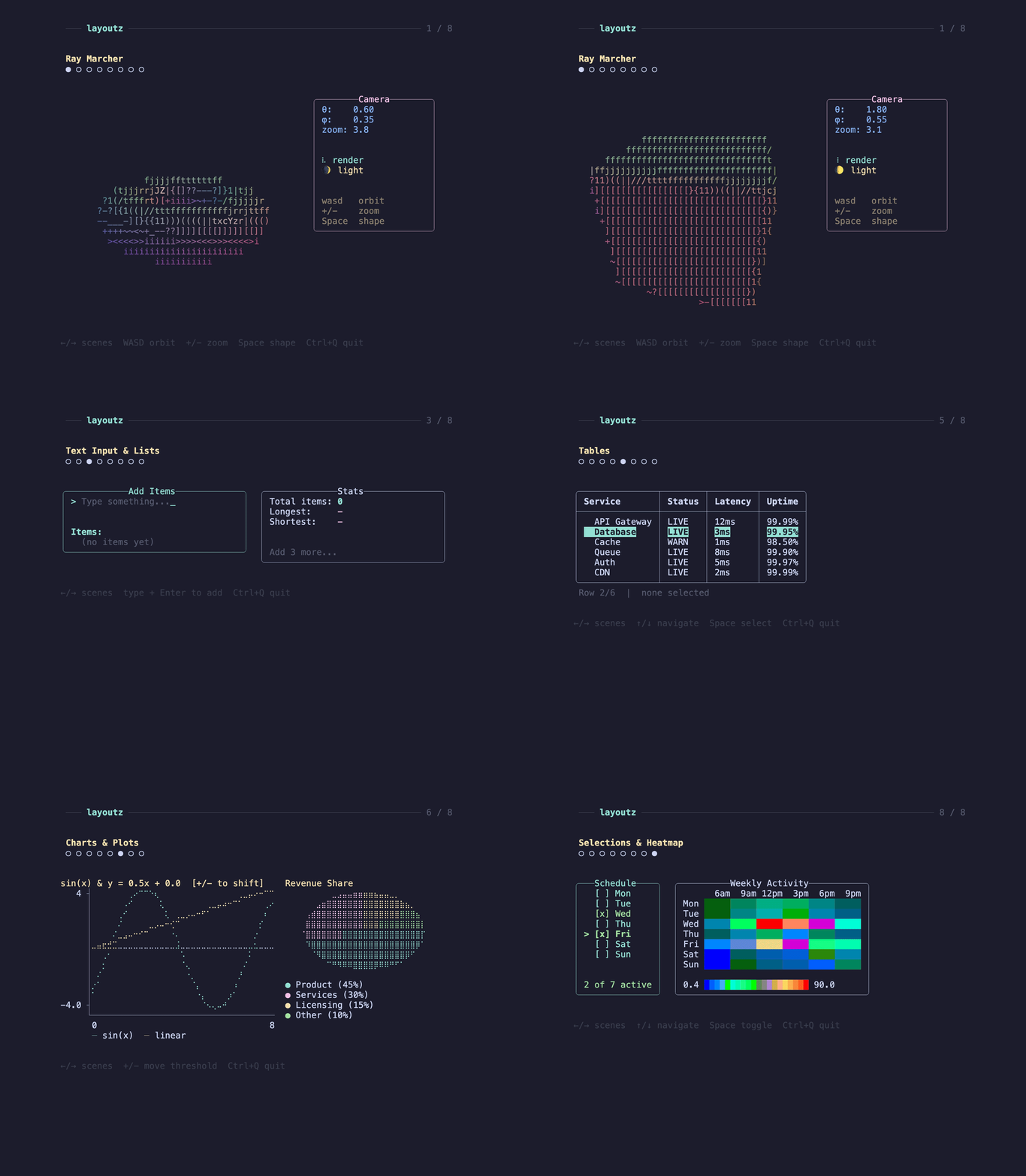
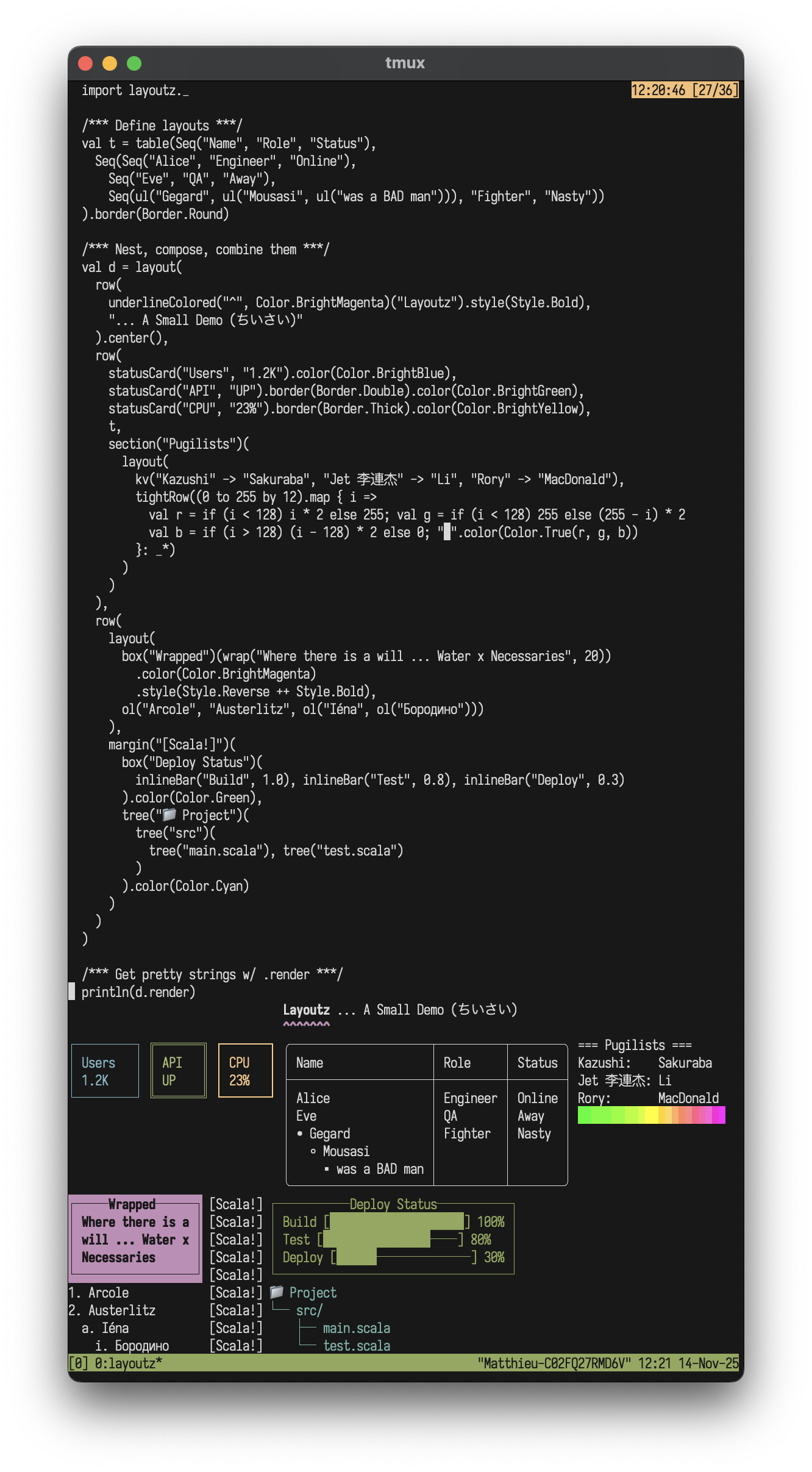
No component library lock-in: implement Element and compose your own frags with the built-ins
Features
- Scala 2.12, 2.13, 3+ (JVM, JS, Native)
- Extend Element and easily create new primitives
- (No component library limitations)
- Elm-style TUIs
- Layout primitives: tables, trees, lists
- CJK widths
- Colors, ANSI styles, rich formatting
- Terminal charts and plots
- Widgets: text input, spinners, progress bars
- Kitty graphics support
- Built-in commands (file I/O, HTTP requests, clipboard handling)
Installation

"xyz.matthieucourt" %% "layoutz" % "0.8.0"
Or try it in a REPL:
scala-cli repl --dep xyz.matthieucourt::layoutz:0.8.0
All you need is one import:
import layoutz._
Philosophy
- With LLM's, boilerplate code that formats & "pretty-prints" is cheaper than ever...
- Thus, more than ever, "string formatting code" is spawning, and polluting domain logic.
- Around 2023 I was getting greatly dismayed by LLM string interpolation in enterprise code.
- Ultimately, layoutz is just a tiny, declarative DSL to combat these AI slop strings.
- The lib has zero-deps... and the belief is you shouldn't be beholden to a framework, deps or an ideology to render lively ANSI.
- On the side, layoutz also has an Elm-style runtime to bring these arbitrary Elements to life: much like a flipbook.
- The runtime has some little niceties built-in like common cmd's for file I/O, HTTP-requests, and a key input handler.
- But at the end of the day, you can use layoutz merely to structure Strings (without any of the TUI stuff).
TUIs
Just implement LayoutzApp, then call .run:
trait LayoutzApp[State, Message] {
  def init: (State, Cmd[Message])
  def update(msg: Message, state: State): (State, Cmd[Message])
  def subscriptions(state: State): Sub[Message]
  def view(state: State): Element
}
You have built-in Cmd/Sub for file I/O, HTTP, clipboard, timers and file watching...
Plots
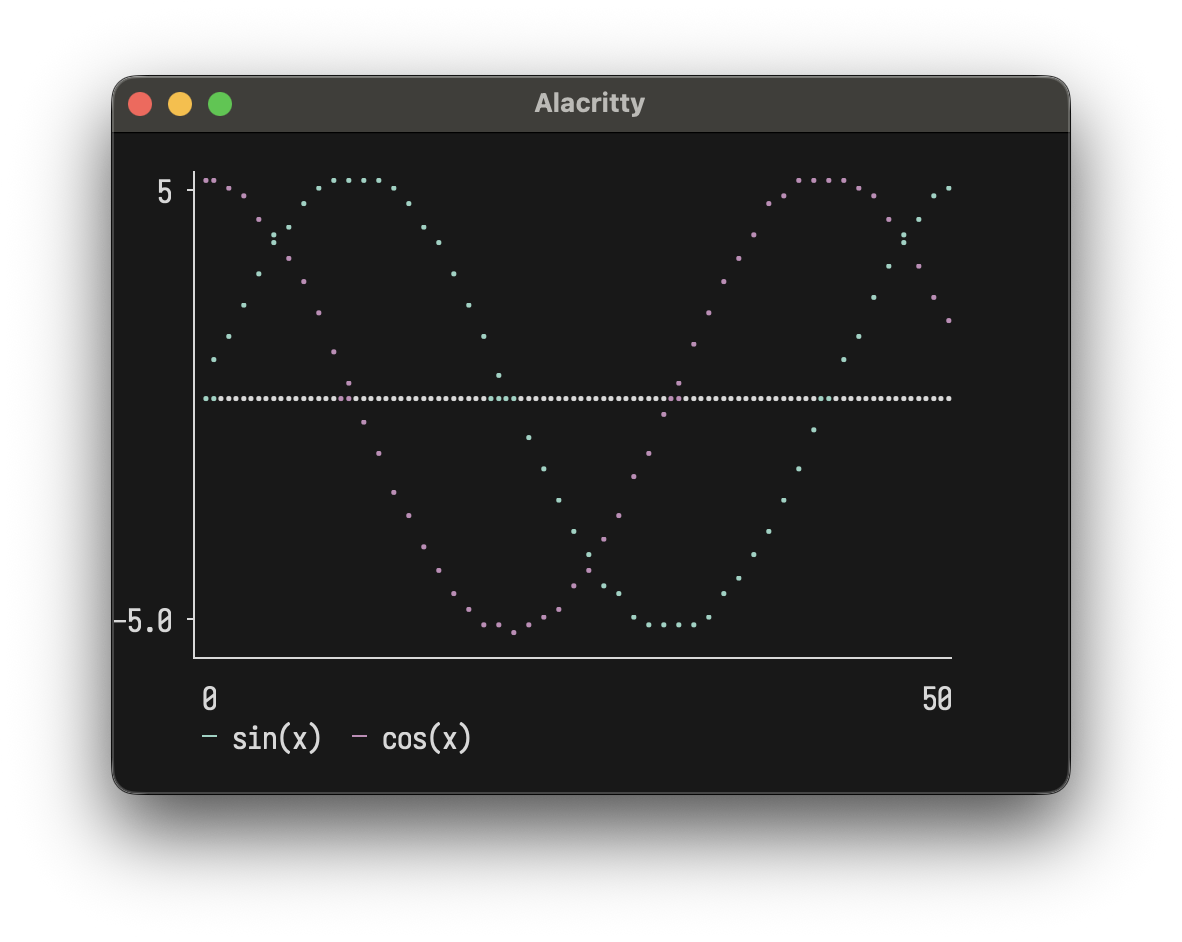
val sin = (0 to 50).map(i => (i.toDouble, math.sin(i * 0.15) * 5))
plot(width = 50, height = 12)(Series(sin, "sin(x)").color(Color.BrightCyan))
Prompts
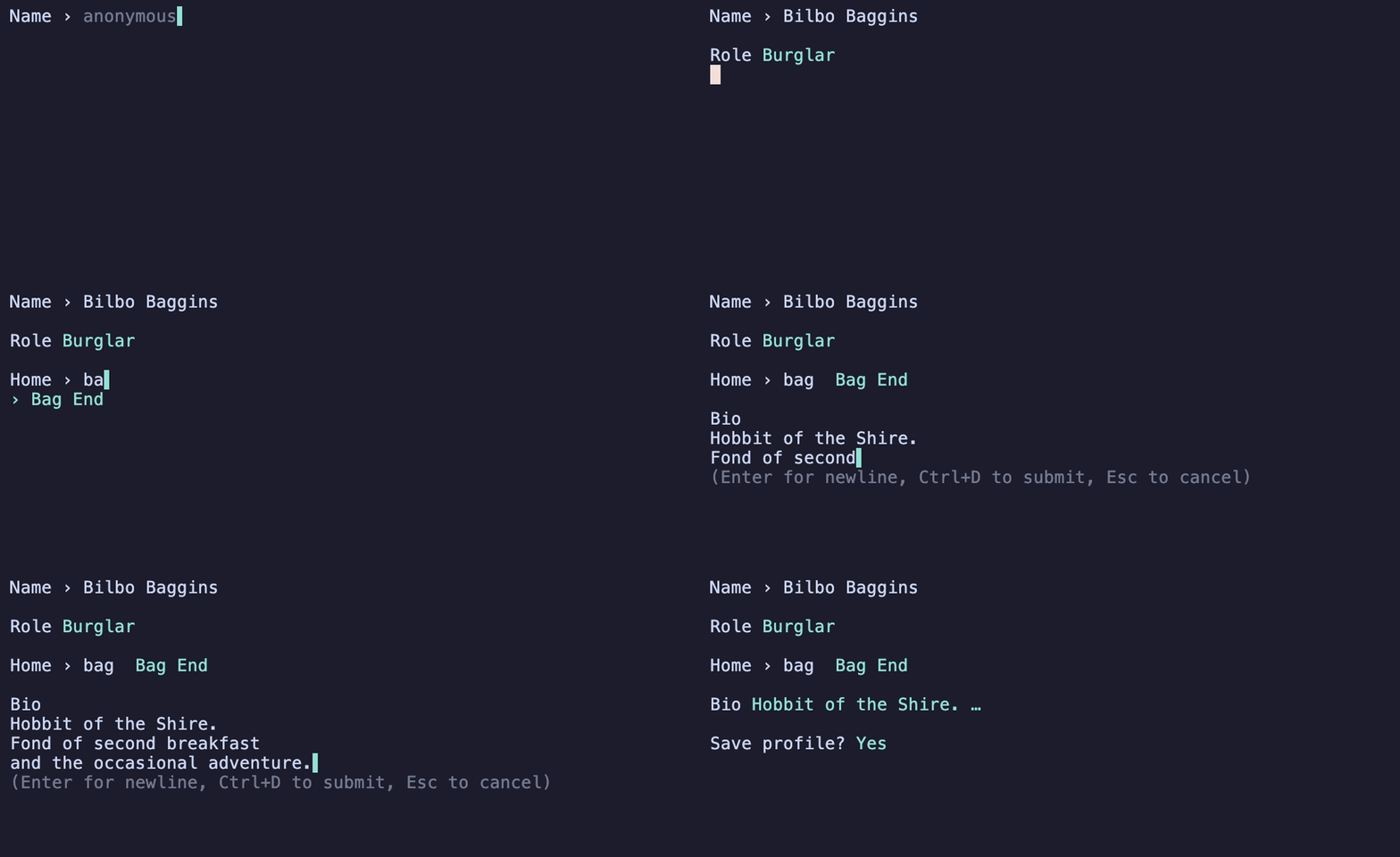
You often want one-shot CLI prompts with pickers, file pickers, fuzzy-finders, pagers, etc... without dropping
down into Elm-territory to make them. This is why layoutz has the Ask helpers.
val places = Seq(
  "Bag End", "Bree", "Rivendell", "Erebor",
  "Edoras", "Lake-town", "Minas Tirith", "Hobbiton"
)

val name = Ask.input("Name › ", placeholder = "anonymous")
val role = Ask.choose("Role", Seq("Burglar", "Wizard", "King under the Mountain"))
val home = Ask.filter("Home › ", places)
val bio  = Ask.write("Bio")
val ok   = Ask.confirm("Save profile?")
Progress
Wrap any Iterable for a live bar, any Iterator for a spinner. Works in any script that writes to stdout.
for (file <- loader("Resizing", files)) resize(file)
for (line <- loader.stream("Tailing", logLines())) index(line)
val n = Ask.spin("Awaking Smaug…") { Thread.sleep(1500); 42 }

Reference
- Core Concepts
- Border Styles
- Elements
- Custom Elements
- Collections
- Colors
- Styles
- Charts & Plots
- Interactive Apps
- Prompts (Ask)
- Progress (loader)
Core Concepts
Every piece of content is an Element. Elements are immutable and composable.
elem.render     // gives a String
elem.putStrLn   // prints to console
Implement Element to create custom components that compose with all built-ins.
Fluent API
Some typesetting elements work as both nouns ("an underline") and verbs ("to underline something"). For these, layoutz offers a fluent syntax with transformations available in infix position via dot-completion. Both styles produce the same case classes and render identically:
/* Nested style */
margin(">>")(underline()("Hello\nWorld!"))

/* Fluent style */
"Hello\nWorld!".underline.margin(">>")

// Both render:
// >> Hello
// >> World!
// >> ──────
Available methods:
.center()
.pad()
.wrap()
.truncate()
.underline()
.margin()
.color()
.colorBg()
Border Styles
Applied via .border() to any element with the HasBorder typeclass (box, statusCard, table):
box("Title")("content").border(Border.Round)
table(h, r).border(Border.Thick)

/* HasBorder typeclass for generic code */
def makeThick[T: HasBorder](element: T): T = element.border(Border.Thick)
Border.Single                              // ┌─┐ (default)
Border.Double                              // ╔═╗
Border.Thick                               // ┏━┓
Border.Round                               // ╭─╮
Border.Ascii                               // +-+
Border.Block                               // ███
Border.Dashed                              // ┌╌┐
Border.Dotted                              // ┌┈┐
Border.InnerHalfBlock                      // ▗▄▖
Border.OuterHalfBlock                      // ▛▀▜
Border.Markdown                            // |-|
Border.Custom(corner = "+", horizontal = "=", vertical = "|")
Border.None                                // no borders
Elements
Layout
Stacking & rows
vstack("First", "Second", "Third")
// First
// Second
// Third

row("Left", "Middle", "Right")
// Left Middle Right

columns(layout("A", "B"), layout("C", "D"))
// A  C
// B  D
Spacing & rules
layout("Line 1", br, "Line 2")

hr                         // ──────────────...
hr.char("~")               // custom char
hr.width(10).char("=")     // ==========

vr(3)
space(10)
empty
Text transforms
"TITLE".center(20)     // │        TITLE       │
"Left".leftAlign(20)   // │Left                │
"Right".rightAlign(20) // │               Right│

"Spread this out".justify(30)
// │Spread         this        out│

"Long text here that should wrap".wrap(20)
// Long text here that
// should wrap

"Very long text that will be cut off".truncate(15)    // Very long te...
"Custom ellipsis example text here".truncate(20, "…") // Custom ellipsis exa…

"content".pad(2)
// │           │
// │           │
// │  content  │
// │           │
// │           │

"Title".underline()
// Title
// ─────
"Custom".underline("=")
// Custom
// ══════

layout(
  "Ooops!",
  row("val result: Int = ", underline("^")("getString()")),
  "Expected Int, found String"
).margin("[error]")
// [error] Ooops!
// [error] val result: Int =  getString()
// [error]                    ^^^^^^^^^^^
// [error] Expected Int, found String
Content
Basics
"Simple text"

section("Config")(kv("env" -> "prod"))
// === Config ===
// env: prod

kv("name" -> "Alice", "role" -> "admin")
// name: Alice
// role: admin
Boxes, cards & banners
box("Summary")(kv("total" -> "42"))
// ┌──Summary──┐
// │ total: 42 │
// └───────────┘

box("Fancy")("content").border(Border.Double)
// ╔══Fancy══╗
// ║ content ║
// ╚═════════╝

box("Smooth")("content").border(Border.Round)
// ╭──Smooth──╮
// │ content  │
// ╰──────────╯

row(statusCard("CPU", "45%"), statusCard("MEM", "2.1G"))
// ┌───────┐ ┌────────┐
// │ CPU   │ │ MEM    │
// │ 45%   │ │ 2.1G   │
// └───────┘ └────────┘

banner("System Dashboard").border(Border.Double)
// ╔══════════════════╗
// ║ System Dashboard ║
// ╚══════════════════╝
Lists & trees
ul("Backend", ul("API", ul("REST", "GraphQL"), "DB"), "Frontend")
// • Backend
//   ◦ API
//     ▪ REST
//     ▪ GraphQL
//   ◦ DB
// • Frontend

ol("Setup", ol("Install deps", ol("npm", "pip"), "Configure"), "Deploy")
// 1. Setup
//   a. Install deps
//     i. npm
//     ii. pip
//   b. Configure
// 2. Deploy

tree("Project")(
  tree("src")(
    tree("main")(tree("App.scala")),
    tree("test")(tree("AppTest.scala"))
  )
)
// Project
// └── src/
//     ├── main/
//     │   └── App.scala
//     └── test/
//         └── AppTest.scala
Table
table(
  headers = Seq("Name", "Age", "City"),
  rows = Seq(
    Seq("Alice", "30", "New York"),
    Seq("Bob", "25"),
    Seq("Charlie", "35", "London")
  )
)
// ┌─────────┬─────┬──────────┐
// │ Name    │ Age │ City     │
// ├─────────┼─────┼──────────┤
// │ Alice   │ 30  │ New York │
// │ Bob     │ 25  │          │
// │ Charlie │ 35  │ London   │
// └─────────┴─────┴──────────┘
Progress & spinners
inlineBar("Download", 0.75)
// Download [███████████████─────] 75%

spinner("Loading", frame, SpinnerStyle.Dots)   // ⠋ ⠙ ⠹ ⠸ ⠼ ⠴ ⠦ ⠧ ⠇ ⠏
spinner("Loading", frame, SpinnerStyle.Line)   // | / - \
spinner("Loading", frame, SpinnerStyle.Clock)  // 🕐 🕑 🕒 🕓 🕔 🕕 🕖 🕗 🕘 🕙 🕚 🕛
spinner("Loading", frame, SpinnerStyle.Bounce) // ⠁ ⠂ ⠄ ⠂
spinner("Loading", frame, SpinnerStyle.Earth)  // 🌍 🌎 🌏
spinner("Loading", frame, SpinnerStyle.Moon)   // 🌑 🌒 🌓 🌔 🌕 🌖 🌗 🌘
spinner("Loading", frame, SpinnerStyle.Grow)   // ▏ ▎ ▍ ▌ ▋ ▊ ▉ █ ▉ ▊ ▋ ▌ ▍ ▎
spinner("Loading", frame, SpinnerStyle.Arrow)  // ← ↖ ↑ ↗ → ↘ ↓ ↙
Inline Images
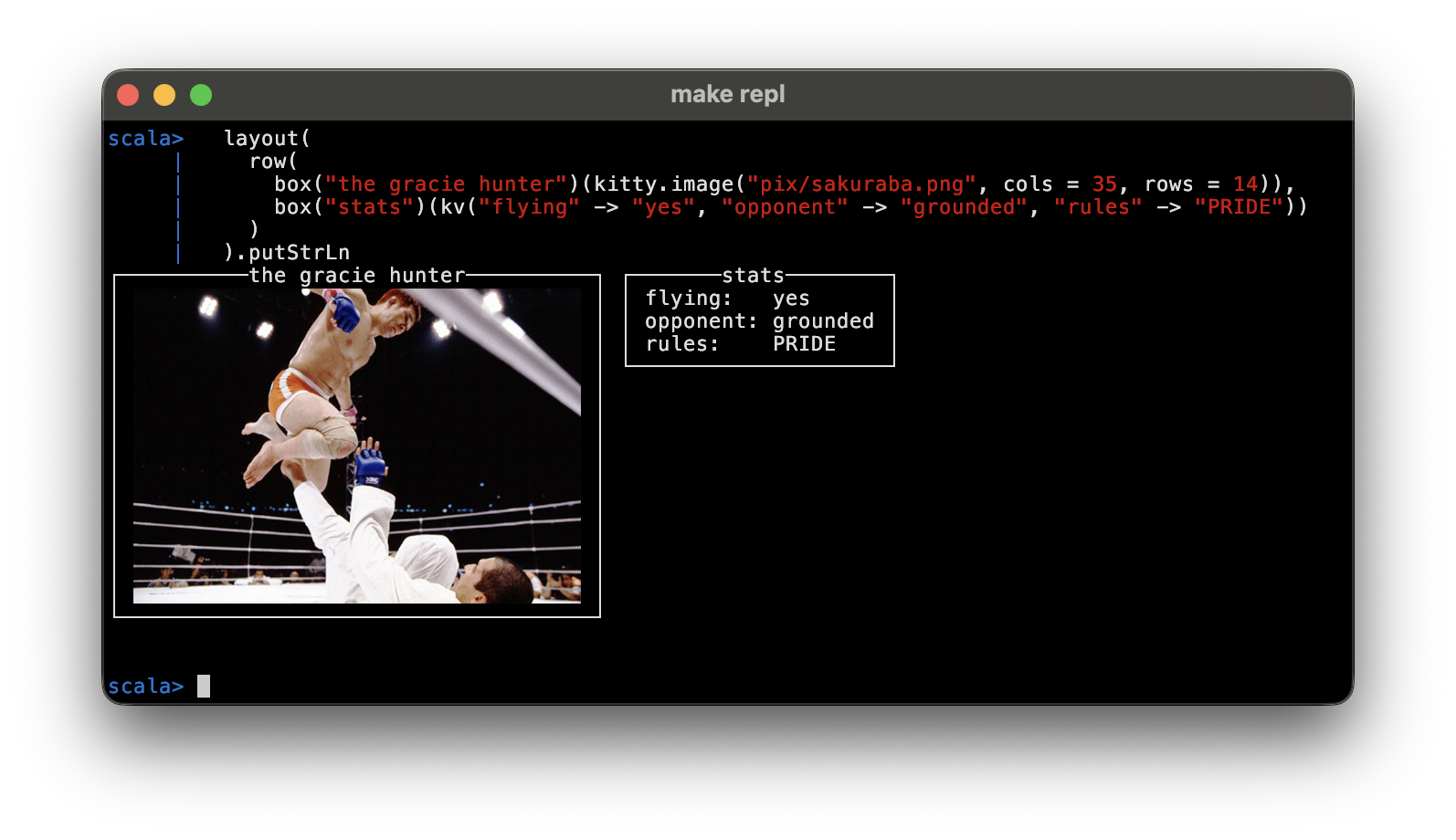
You can inline raster images via the kitty graphics protocol.
Layoutz KittyImage s compose with all the other built in elements so you can drop them into boxes, tables etc.
vstack(
  row(
    box("the gracie hunter")(kitty.image("pix/sakuraba.png", cols = 35, rows = 14)),
    box("stats")(kv("flying" -> "yes", "opponent" -> "grounded", "rules" -> "PRIDE"))
  )
).putStrLn
You can also build an image straight from raw RGBA pixels with kittyRGBA:
val (w, h) = (96, 96)
val pixels = Array.tabulate(w * h * 4) { i =>
  val p = i / 4; val x = p % w; val y = p / w
  (i % 4 match {
    case 0 => x * 255 / w
    case 1 => y * 255 / h
    case 2 => 255 - (x * 255 / w)
    case _ => 255
  }).toByte
}

val pic = kittyRGBA(pixels, pxW = w, pxH = h, cols = 18, rows = 9)

box("gradient")(pic).putStrLn
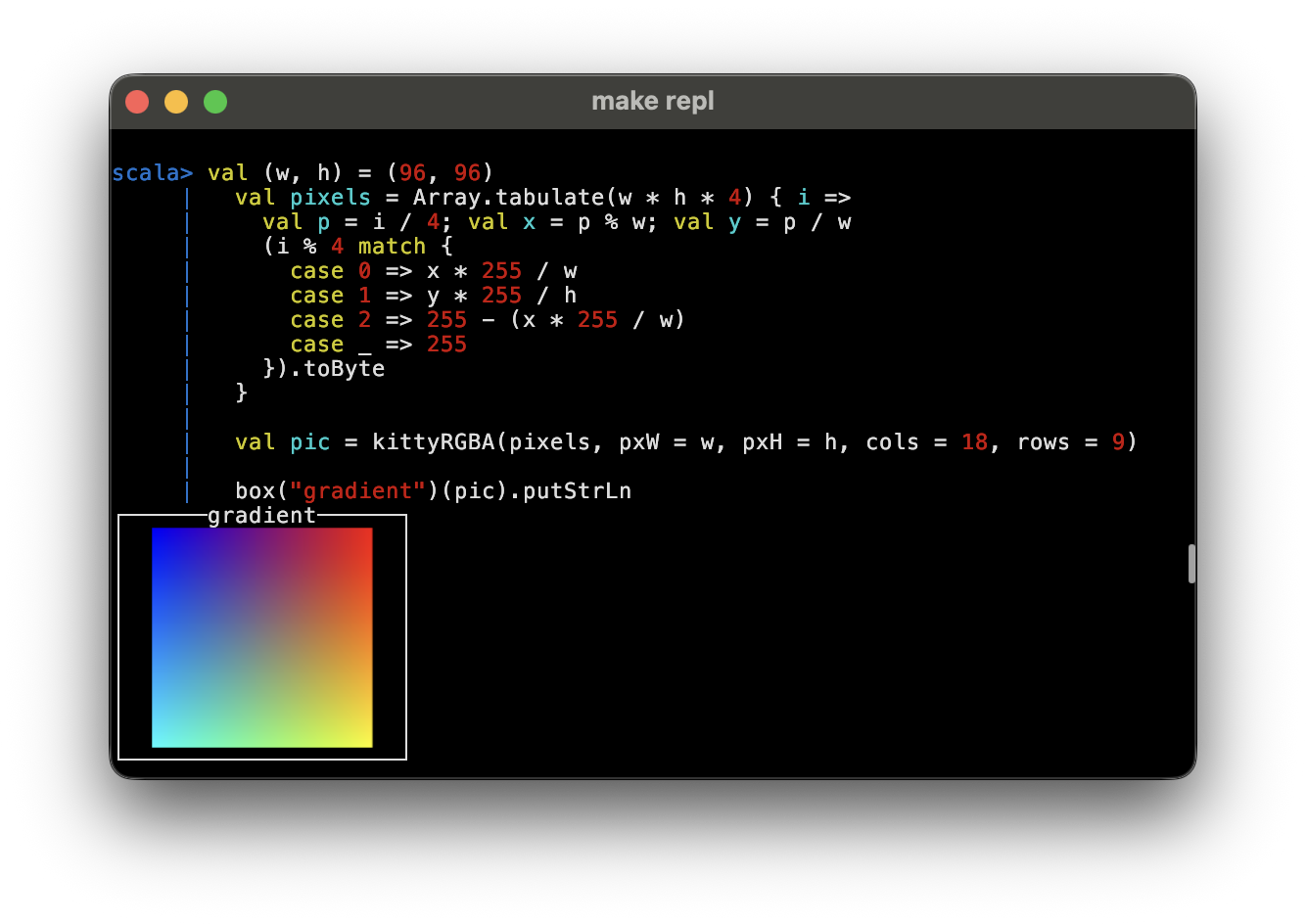
You needs a kitty-graphics-capable terminal (kitty, WezTerm, Ghostty)..
Widgets
Form Widgets
textInput("Username", "alice", "Enter name", active = true)
SingleChoice("Mood?", Seq("great", "okay", "meh"), selected = 0, active = true)
MultiChoice("Colors?", Seq("Red", "Blue"), selected = Set(0), cursor = 1, active = true)
// > Username: alice_
// > Mood?
//   ► ● great
//     ○ okay
//     ○ meh
Custom Elements
Implement Element to create reusable components:
case class Square(size: Int) extends Element {
  def render: String = {
    if (size < 2) return ""
    val width = size * 2 - 2
    val top = "┌" + ("─" * width) + "┐"
    val middle = (1 to size - 2).map(_ => "│" + (" " * width) + "│")
    val bottom = "└" + ("─" * width) + "┘"
    (top +: middle :+ bottom).mkString("\n")
  }
}

row(Square(2), Square(4), Square(6))
// ┌──┐ ┌──────┐ ┌──────────┐
// └──┘ │      │ │          │
//      │      │ │          │
//      └──────┘ │          │
//               │          │
//               └──────────┘
Collections
Fuly leverage Scala's functional collection to generate frags of Elements:
case class User(name: String, role: String)
val users = Seq(User("Alice", "Admin"), User("Bob", "User"), User("Tom", "User"))

section("Users by Role")(
  layout(
    users.groupBy(_.role).map { case (role, roleUsers) =>
      box(role)(ul(roleUsers.map(u => Text(u.name)): _*))
    }.toSeq: _*
  )
)

// === Users by Role ===
// ┌──Admin──┐
// │ • Alice │
// └─────────┘
// ┌──User──┐
// │ • Bob  │
// │ • Tom  │
// └────────┘
Colors
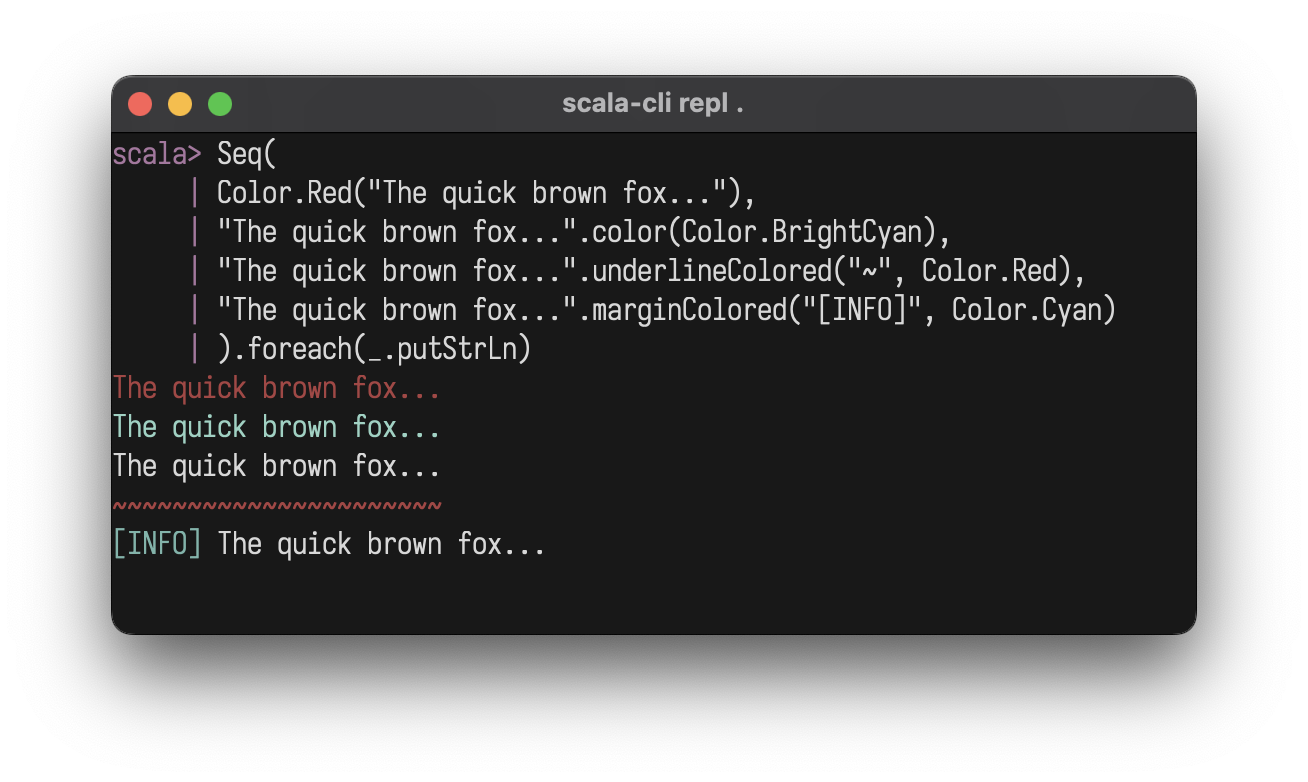
Foreground with .color, background with .bg:
Color.Red("Error!")
"text".color(Color.BrightCyan)
"Error!".bg(Color.Red)
Color.Red.bg("Error!")
"ALERT".bg(Color.Red).color(Color.White).style(Style.Bold)
box()("warning").bg(Color.Yellow)
Color.Black
Color.Red
Color.Green
Color.Yellow
Color.Blue
Color.Magenta
Color.Cyan
Color.White
Color.BrightBlack
Color.BrightRed
Color.BrightGreen
Color.BrightYellow
Color.BrightBlue
Color.BrightMagenta
Color.BrightCyan
Color.BrightWhite
Color.Full(196)               // 256-color palette (0-255)
Color.True(255, 128, 0)       // 24-bit RGB
Color.NoColor                 // Conditional no-op
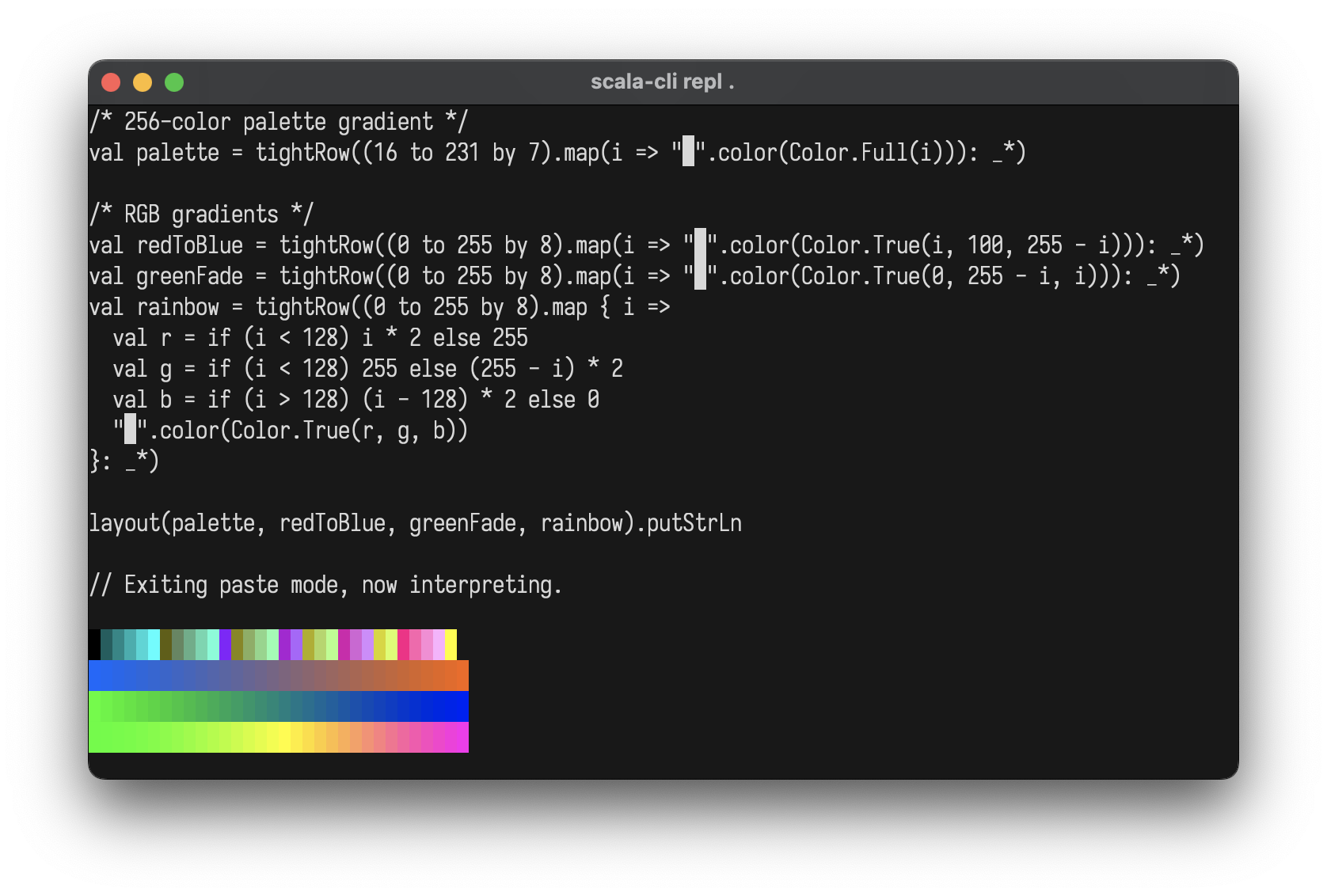
import layoutz._

val palette   = tightRow((16 to 231 by 7).map(i => "█".color(Color.Full(i))): _*)
val redToBlue = tightRow((0 to 255 by 8)
   .map(i => "█".color(Color.True(i, 100, 255 - i))): _*)
val greenFade = tightRow((0 to 255 by 8)
   .map(i => "█".color(Color.True(0, 255 - i, i))): _*)
val rainbow   = tightRow((0 to 255 by 8).map { i =>
  val r = if (i < 128) i * 2 else 255
  val g = if (i < 128) 255 else (255 - i) * 2
  val b = if (i > 128) (i - 128) * 2 else 0
  "█".color(Color.True(r, g, b))
}: _*)

layout(palette, redToBlue, greenFade, rainbow)
Styles
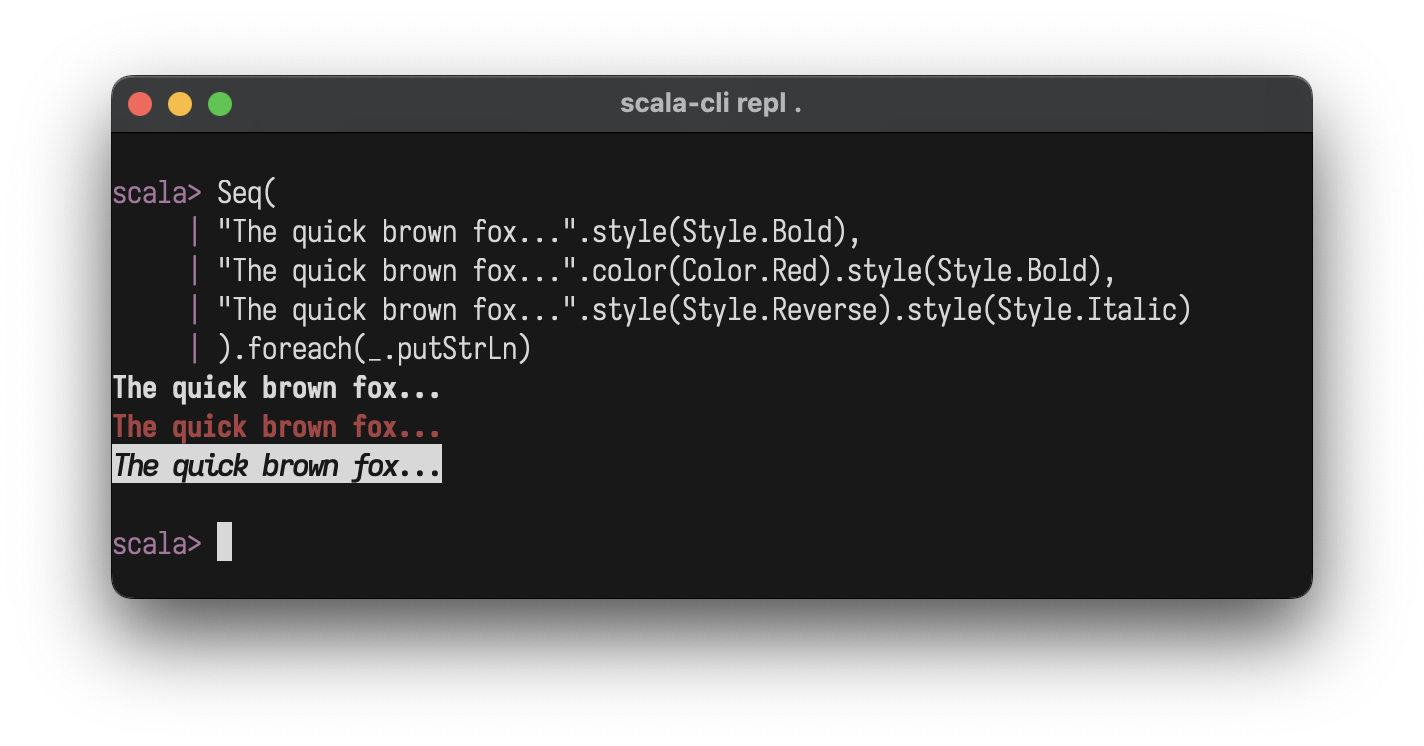
"text".style(Style.Bold)
"text".color(Color.Red).style(Style.Bold)
"text".style(Style.Bold ++ Style.Italic ++ Style.Underline)
Style.Bold
Style.Dim
Style.Italic
Style.Underline
Style.Blink
Style.Reverse
Style.Hidden
Style.Strikethrough
Style.NoStyle
Style.Bold ++ Style.Italic  // combine with ++
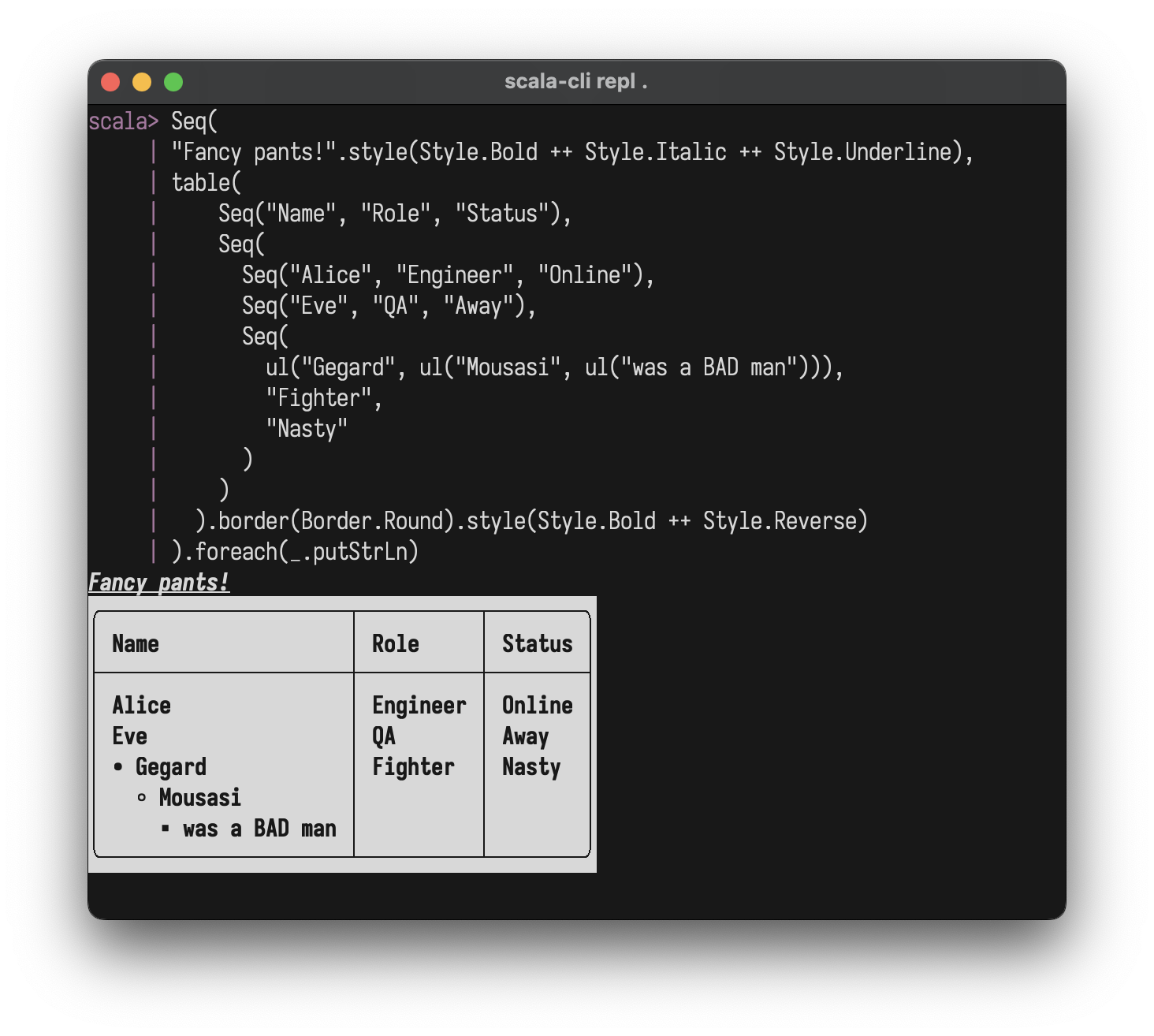
Charts & Plots
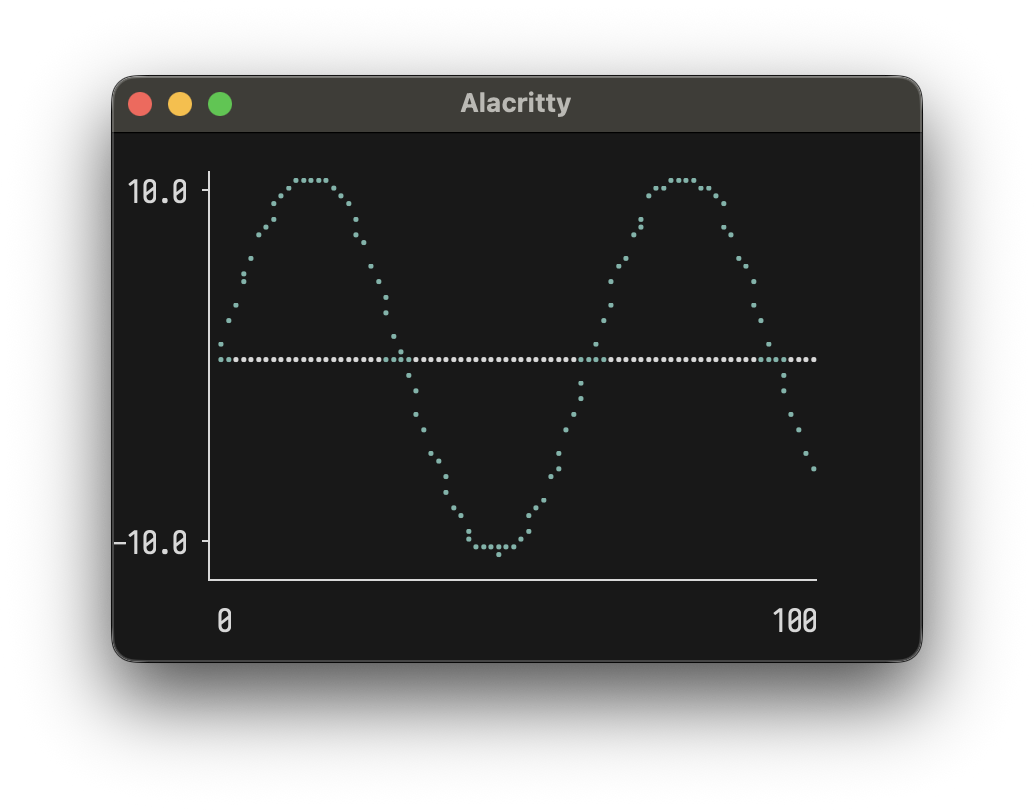
Line Plot
val sinePoints = (0 to 100).map(i => (i.toDouble, math.sin(i * 0.1) * 10))
plot(width = 40, height = 10)(
  Series(sinePoints, "sine").color(Color.Cyan)
)
Multiple series:
val sin = (0 to 50).map(i => (i.toDouble, math.sin(i * 0.15) * 5))
val cos = (0 to 50).map(i => (i.toDouble, math.cos(i * 0.15) * 5))

plot(width = 50, height = 12)(
  Series(sin, "sin(x)").color(Color.BrightCyan),
  Series(cos, "cos(x)").color(Color.BrightMagenta)
)
Options: width, height, showAxes, showOrigin
Horizontal Chart
chart("Web" -> 10, "Mobile" -> 20, "API" -> 15)
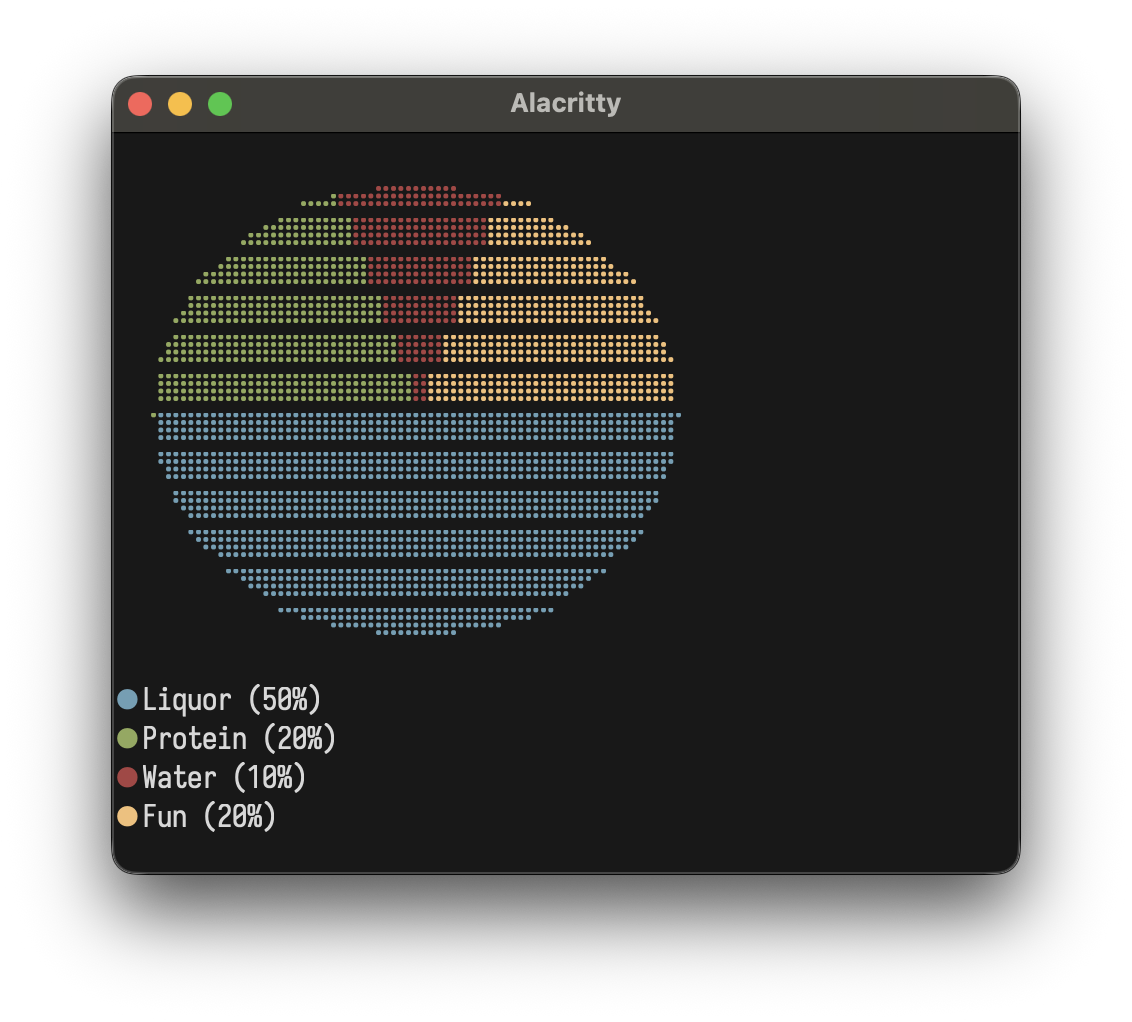
Pie Chart
pie()(
  Slice(50, "Liquor"),
  Slice(20, "Protein"),
  Slice(10, "Water"),
  Slice(20, "Fun")
)
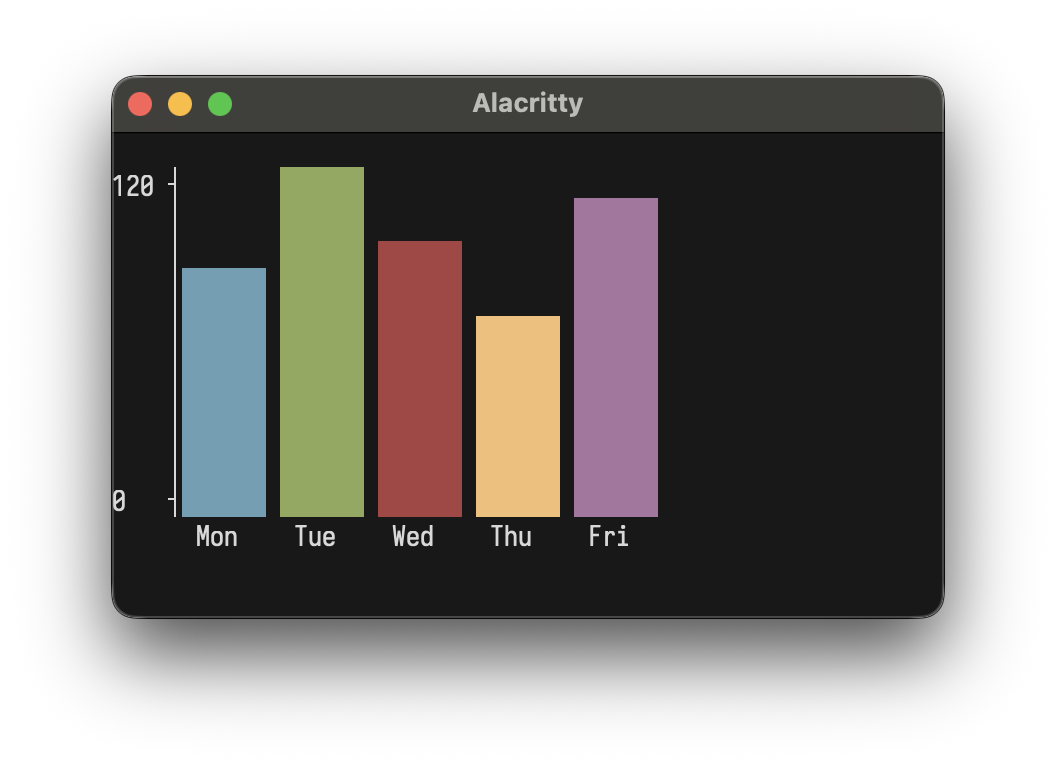
Bar Chart
bar(width = 40, height = 10)(
  Bar(100, "Mon"), Bar(120, "Tue"), Bar(110, "Wed"),
  Bar(85, "Thu"), Bar(115, "Fri")
)
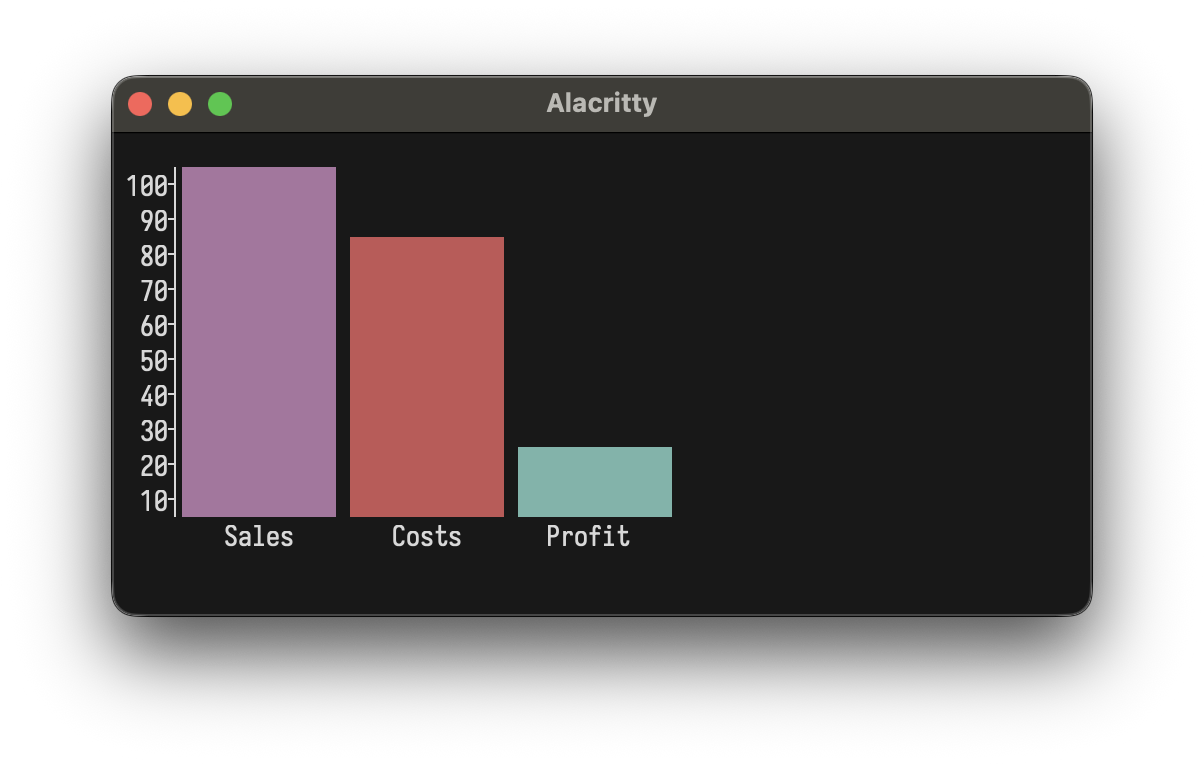
Custom colors:
bar()(
  Bar(100, "Sales").color(Color.Magenta),
  Bar(80, "Costs").color(Color.BrightRed),
  Bar(20, "Profit").color(Color.Cyan)
)
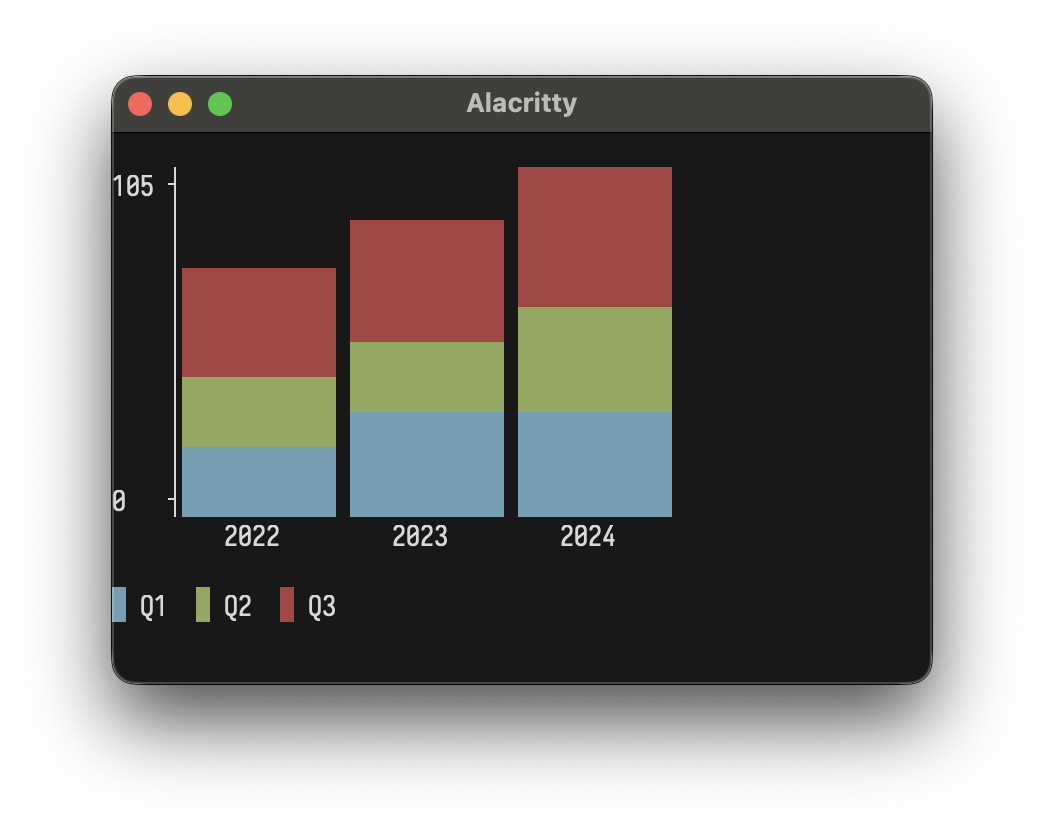
Stacked Bar Chart
stackedBar(width = 40, height = 10)(
  StackedBar(Seq(Bar(30, "Q1"), Bar(20, "Q2"), Bar(25, "Q3")), "2022"),
  StackedBar(Seq(Bar(35, "Q1"), Bar(25, "Q2"), Bar(30, "Q3")), "2023"),
  StackedBar(Seq(Bar(40, "Q1"), Bar(30, "Q2"), Bar(35, "Q3")), "2024")
)
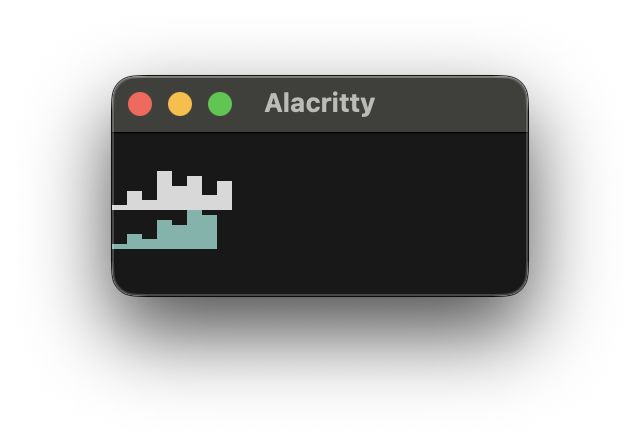
Sparkline
sparkline(Seq(1, 4, 2, 8, 5, 7, 3, 6))
sparkline(Seq(10, 20, 15, 30, 25, 40, 35)).color(Color.Cyan)
Box Plot
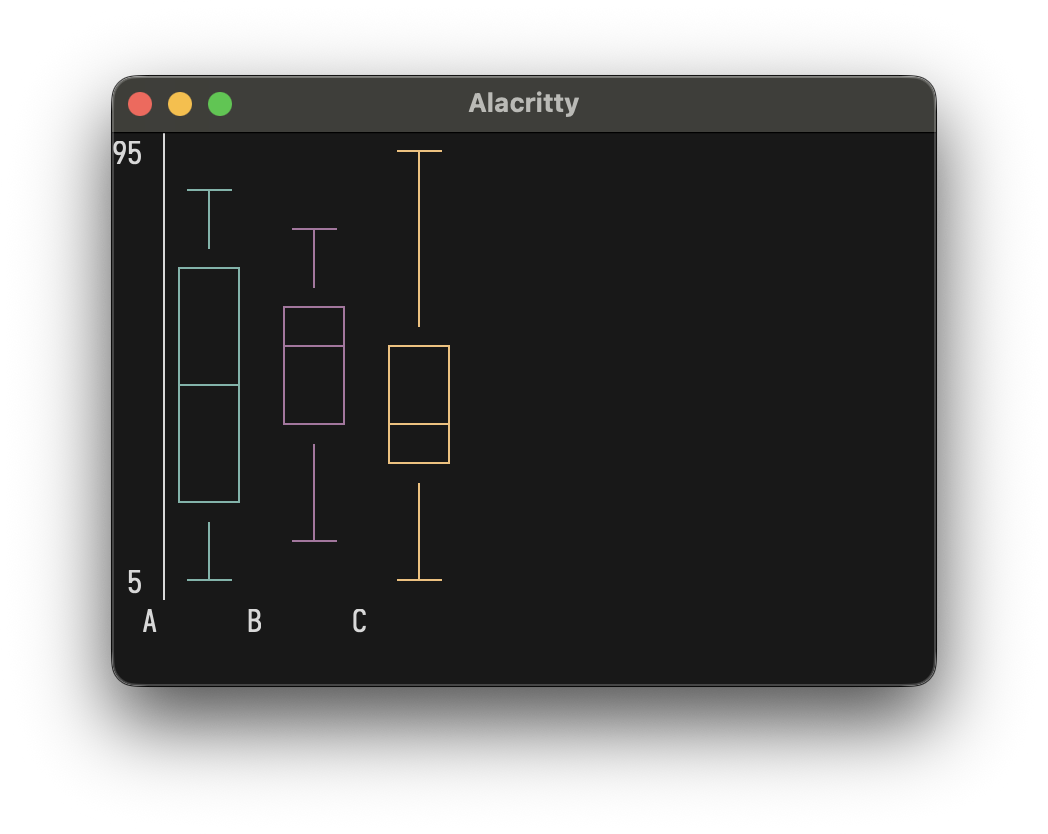
boxPlot(height = 12)(
  BoxData("A", min = 10, q1 = 25, median = 50, q3 = 75, max = 90).color(Color.Cyan),
  BoxData("B", min = 20, q1 = 40, median = 55, q3 = 70, max = 85).color(Color.Magenta),
  BoxData("C", min = 5, q1 = 30, median = 45, q3 = 60, max = 95).color(Color.Yellow)
)
Heatmap
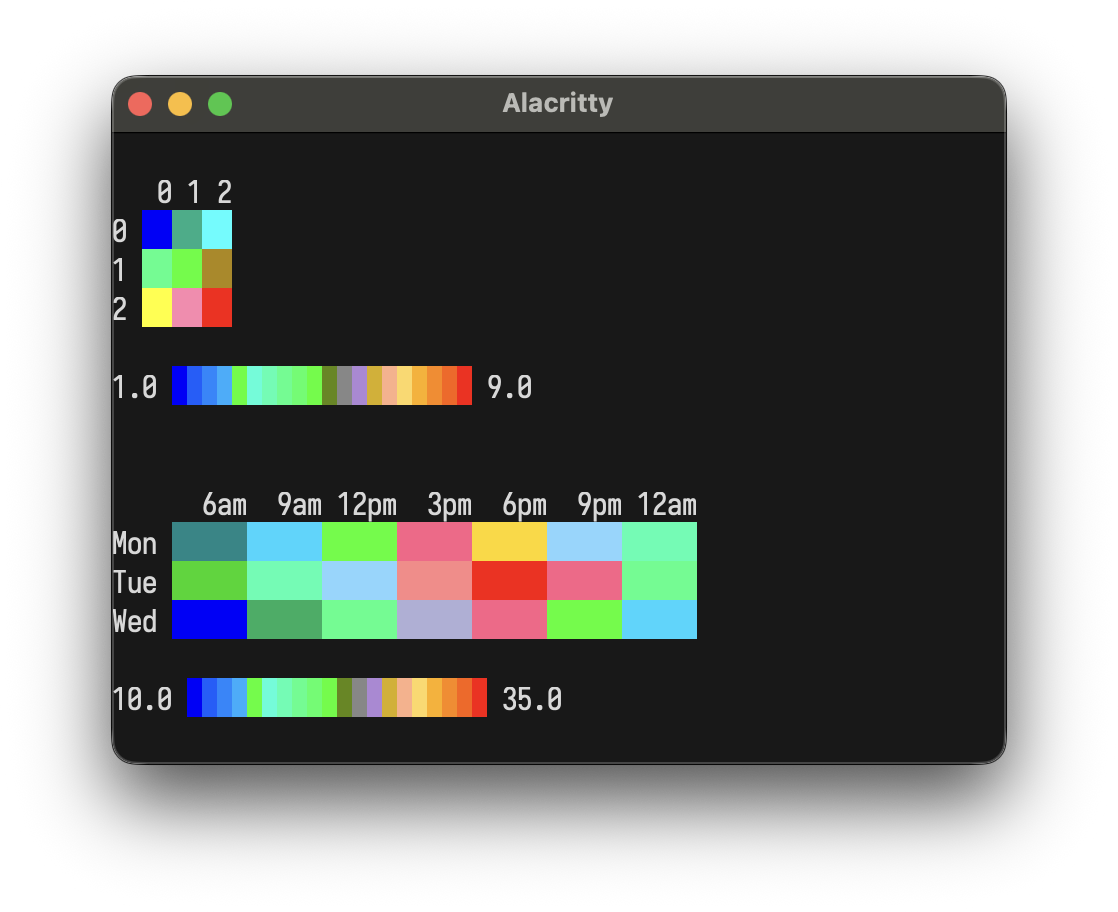
heatmap(Seq(
  Seq(1.0, 2.0, 3.0),
  Seq(4.0, 5.0, 6.0),
  Seq(7.0, 8.0, 9.0)
))

Heatmap(
  HeatmapData(
    rows = Seq(
      Seq(12.0, 15.0, 22.0, 28.0, 30.0, 25.0, 18.0),
      Seq(14.0, 18.0, 25.0, 32.0, 35.0, 28.0, 20.0),
      Seq(10.0, 13.0, 20.0, 26.0, 28.0, 22.0, 15.0)
    ),
    rowLabels = Seq("Mon", "Tue", "Wed"),
    colLabels = Seq("6am", "9am", "12pm", "3pm", "6pm", "9pm", "12am")
  ),
  cellWidth = 5
)
Interactive Apps
LayoutzApp uses the Elm Architecture where your
view is a layoutz.Element
[!NOTE]
LayoutzAppis currently JVM + Native only
trait LayoutzApp[State, Message] {
  def init: (State, Cmd[Message])
  def update(msg: Message, state: State): (State, Cmd[Message])
  def subscriptions(state: State): Sub[Message]
  def view(state: State): Element
}
Three daemon threads coordinate rendering (~50ms), tick/timers, and input capture. State updates flow through update synchronously. Rendering uses incremental line-diffing: only changed lines are redrawn, eliminating flicker.
app.run(
  tickIntervalMs   = 100,  // Subscription polling rate
  renderIntervalMs = 50,   // Screen refresh rate
  clearOnStart     = true,
  clearOnExit      = true,
  showQuitMessage  = false,
  quitMessage      = "Ctrl+Q to quit",
  quitKey          = Key.Ctrl('Q'),
  alignment        = Alignment.Left
)
Implicit conversion: return just state instead of (state, Cmd.none):
def update(msg: Msg, state: State) = msg match {
  case Increment => state.copy(count = state.count + 1)
  case LoadData  => (state.copy(loading = true), Cmd.file.read("data.txt", DataLoaded))
}
Key Types
/* Printable */
Key.Char(c: Char)

/* Editing */
Key.Enter
Key.Backspace
Key.Tab
Key.Escape
Key.Delete

/* Navigation */
Key.Up
Key.Down
Key.Left
Key.Right
Key.Home
Key.End
Key.PageUp
Key.PageDown

/* Modifiers */
Key.Ctrl(c: Char)        // Ctrl+A, Ctrl+S, etc.
Key.Unknown(code: Int)   // Unrecognized input
Subscriptions
Sub.none                                           // No subscriptions
Sub.onKeyPress { case Key.Char('q') => Some(Quit)  // Keyboard input
                 case _ => None }
Sub.time.everyMs(intervalMs, msg)                  // Periodic ticks
Sub.file.watch(path, onChange)                     // File changes
Sub.http.pollMs(url, intervalMs, onResponse)       // HTTP polling
Sub.batch(sub1, sub2, ...)                         // Combine multiple
def subscriptions(state: State) = Sub.batch(
  Sub.time.everyMs(100, Tick),
  Sub.file.watch("config.json", ConfigChanged),
  Sub.onKeyPress { case Key.Char('q') => Some(Quit); case _ => None }
)
Commands
Cmd.none                                         // No-op (default)
Cmd.exit                                         // Exit the application
Cmd.batch(cmd1, cmd2, ...)                       // Execute multiple commands
Cmd.task(expr)(toMsg)                            // Async task, result as Either
Cmd.fire(effect)                                 // Fire and forget
Cmd.afterMs(delayMs, msg)                        // One-shot delayed message
Cmd.showCursor                                   // Show terminal cursor
Cmd.hideCursor                                   // Hide terminal cursor
Cmd.setTitle(title)                              // Set terminal window title
Cmd.file.read(path, onResult)                    // Read file
Cmd.file.write(path, content, onResult)          // Write file
Cmd.file.ls(path, onResult)                      // List directory
Cmd.file.cwd(onResult)                           // Get working directory
Cmd.http.get(url, onResult, headers)             // HTTP GET
Cmd.http.post(url, body, onResult, headers)      // HTTP POST
Cmd.clipboard.read(onResult)                     // Read clipboard
Cmd.clipboard.write(content, onResult)           // Write clipboard
Prompts (Ask)
You often want to have one-shot CLI prompts, spinners, filters, file pickers etc in your Scala programs ... and dropping down into "Elm-territory" and thinking about things as a flipbook each time can get a bit tedious.
This is why layoutz offers one-shot CLI actions with Ask.*
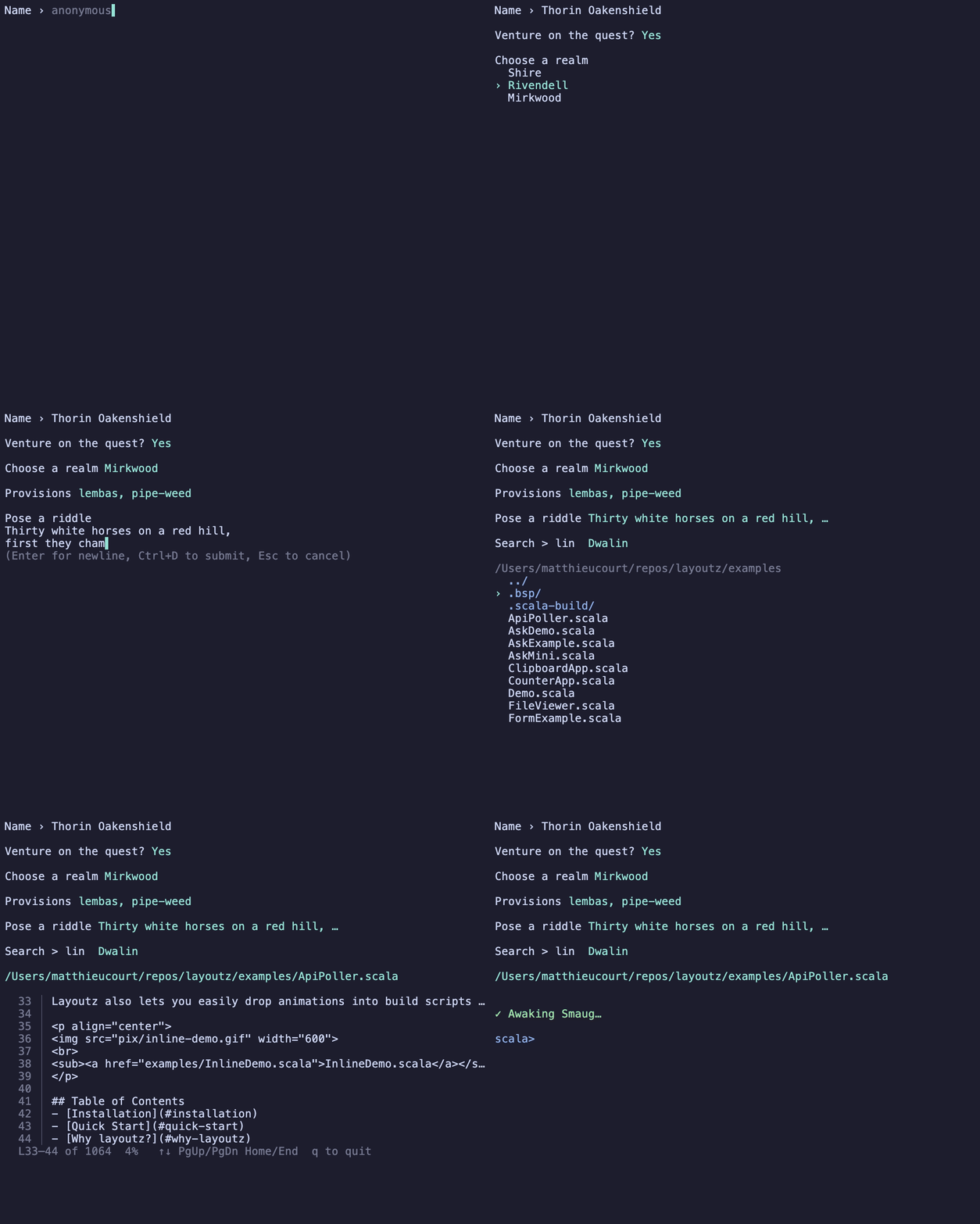
import layoutz._

val name   = Ask.input("Name › ", placeholder = "anonymous")
val ok     = Ask.confirm("Venture on the quest?", default = true)
val realm  = Ask.choose("Choose a realm", Seq("Shire", "Rivendell", "Mirkwood"))
val packs  = Ask.chooseMany("Provisions", Seq("lembas", "pipe-weed", "rope"), limit = 3)
val riddle = Ask.write("Pose a riddle", placeholder = "All things it devours…")
val member = Ask.filter("Search > ", Seq("Bilbo", "Balin", "Dwalin", "Thorin"))
val path   = Ask.file(start = ".")
Ask.pager(longString)
val answer = Ask.spin("Awaking Smaug…") { Thread.sleep(1500); 42 }
Each Ask.* returns its result directly:
Ask.input(prompt, placeholder, initial)  : Option[String]
Ask.confirm(q, default)                  : Boolean
Ask.choose(prompt, items)                : Option[A]
Ask.chooseMany(prompt, items, limit)     : Option[Seq[A]]
Ask.write(prompt, placeholder)           : Option[String]
Ask.filter(prompt, items)                : Option[A]
Ask.file(start, height)                  : Option[String]
Ask.pager(content, height, lineNumbers)  : Unit
Ask.spin(label) { task }                 : A
Progress (loader)
You often want to simply want to be able to wrap Ìterables and Iterator`s as you
are processing collections like below.
for (file <- loader("Resizing", imageFiles)) resize(file)
for (row  <- loader(rows)) insert(row)
for (line <- loader.stream("Tailing", logLines())) index(line)
Iterable gets a live bar, an unbounded Iterator gets a spinner with a running count.
Chain a style to change the look like so:
.blocks (default)
.bar
.ascii
.dots
.line
.pipe
.styled(...) (for custom bars)
for (id <- loader("Reindexing", docIds).ascii) reindex(id)

val crawling = loader("Crawling", urls)
  .styled(fill = '▰', empty = '▱', color = Color.BrightMagenta)
for (url <- crawling) fetch(url)
Every built-in style, then an unbounded stream:
import layoutz._

for (_ <- loader("Blocks ", 1 to 60).blocks) Thread.sleep(16)
for (_ <- loader("Dots   ", 1 to 60).dots)   Thread.sleep(16)
for (_ <- loader("Line   ", 1 to 60).line)   Thread.sleep(16)
for (_ <- loader("Pipes  ", 1 to 60).pipes)  Thread.sleep(16)
for (_ <- loader("Bar    ", 1 to 60).bar)    Thread.sleep(16)
for (_ <- loader("Ascii  ", 1 to 60).ascii)  Thread.sleep(16)

val it = Iterator.from(1).take(90)
for (_ <- loader.stream("Streaming", it).styled(spinner = SpinnerStyle.Dots)) Thread.sleep(45)
Contributing
You need Mill and a JDK (11+).
make test
make compile
make repl
API suggestions are most welcome!
Inspiration
Explore related projects
codecrafters-io/build-your-own-x
Master programming by recreating your favorite technologies from scratch.
561,398 starspublic-apis/public-apis
A collective list of free APIs
497,679 starsmorluto/rea
Reverse engineer anything with agents, from app behavior down to native binaries.
447,495 starsopenclaw/openclaw
The AI that really does things. Any OS. Any Platform. The lobster way. 🦞
394,261 stars