
matthewdcage/llm-swarm-router
matthewdcage/llm-swarm-router has 27 GitHub stars and 2 forks. GitHot measured 0 stars in 24 hours and 0 in 7 days. Last checked 2026-11-24 19:54 UTC. Last push 2026-11-11.
Measured star growth
- in 24h
- 0
- in 7 days
- 0
- in 15 days
- Collecting history
- in 1 month
- Collecting history
Net star changes over overlapping periods, not daily totals. Missing measurements are left blank. Stars measure attention, not software quality.
About
Run the LLM Swarm Router on machines to distribute Local Ai to the Swarm - More Machines - MORE SPEED
AIREADME.md
Original ███████╗██╗ ██╗ █████╗ ██████╗ ███╗ ███╗ ██╗ ██╗ ███╗ ███╗
██╔════╝██║ ██║██╔══██╗██╔══██╗████╗ ████║ ██║ ██║ ████╗ ████║
███████╗██║ █╗ ██║███████║██████╔╝██╔████╔██║█████╗██║ ██║ ██╔████╔██║
╚════██║██║███╗██║██╔══██║██╔══██╗██║╚██╔╝██║╚════╝██║ ██║ ██║╚██╔╝██║
███████║╚███╔███╔╝██║ ██║██║ ██║██║ ╚═╝ ██║ ███████╗███████╗██║ ╚═╝ ██║
╚══════╝ ╚══╝╚══╝ ╚═╝ ╚═╝╚═╝ ╚═╝╚═╝ ╚═╝ ╚══════╝╚══════╝╚═╝ ╚═╝
· s w a r m r o u t e r ·
llm-swarm-router









Put every machine's GPU to work without babysitting your infrastructure.
The mesh router for local LLM backends. Run a lightweight agent on each computer. It finds oMLX, Ollama, LM Studio, and vLLM on localhost (plus custom OpenAI-compatible server URLs), discovers sibling agents on your LAN, distributes agent and API calls across every available machine to spread inference load and boost throughput, and exposes one stable endpoint for every editor and tool.
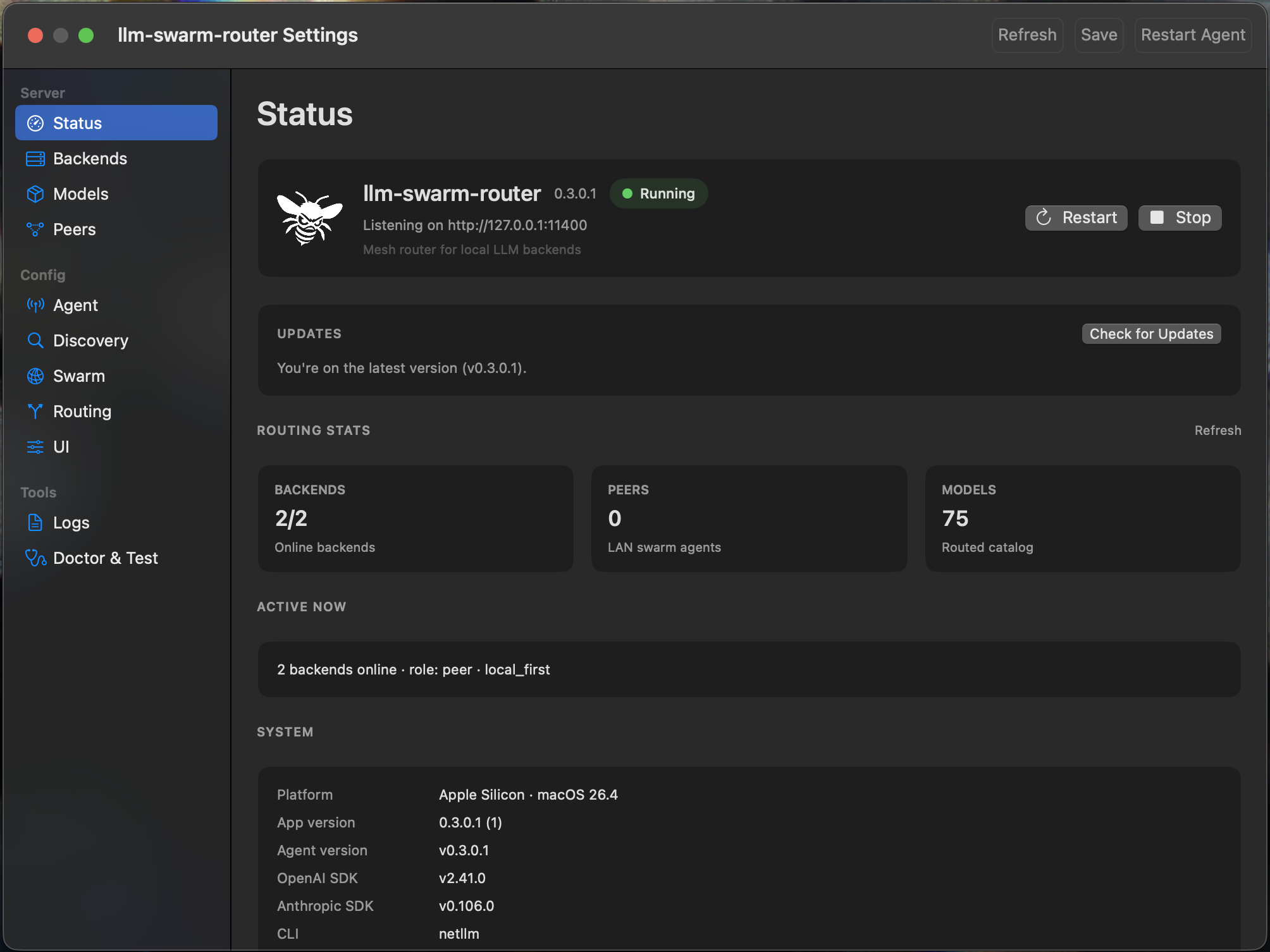
Settings (v0.3.0.1): backends, peers, and routed models at a glance.
Why I built it
Local AI API servers are excellent on a single machine. oMLX on Apple Silicon, Ollama on a Mac mini, LM Studio on a laptop, each is optimized for its own hardware. But they do not naturally form a mesh across a diverse home lab. Promising projects are on the horizon; I wanted reliable performance today, my hardware working for local coding agents 24/7, without me continuously managing ports, failover lists, and per-repo infrastructure.
I had compute sitting idle and no simple way to log in and use it. Every editor wanted a different base_url. Every machine was an island. That is why I built llm-swarm-router.
Who it is for
If you already run local inference or point tools at a base_url, this is for you.
- oMLX, Ollama, LM Studio, and vLLM users — on one machine or many, including custom OpenAI-compatible backends you configure yourself.
- OpenAI- and Anthropic-compatible clients — Cursor, Claude Code, Codex, Honcho, Continue, Cline, custom scripts, or your own app; one stable URL instead of per-machine ports and failover lists.
- Multi-machine home labs — MacBook + Mac mini + Linux box + Windows workstation, each running different backends on different ports.
- People who want throughput to scale with hardware — add a node, install the app, and the mesh picks up more models and capacity without re-wiring every project.
What it is
A simple-to-install, simple-to-use LLM mesh coordinator for macOS, Linux, and Windows. Each node runs independently and with every other node: auto-detects oMLX (macOS), Ollama, LM Studio, and vLLM (custom server URLs supported), advertises itself on the network, discovers remote agents and their models, and distributes inference requests across the swarm.
| API | Base URL |
|---|---|
| OpenAI-compatible | http://<host>:11400/v1 |
| Anthropic Messages | http://<host>:11400 (translated to local backends) |
Point Cursor, Claude Code, Codex, Honcho, or any compatible client at that URL. No cloud hop, no per-repo failover URLs, no lock-in to a single backend.
Two machines, three commands
# Machine A — secured swarm: generates a cluster token, prints the join command
./netllm init --swarm --secure && ./netllm serve
# prints: netllm join http://<machine-A-ip>:11400 --token <generated>

# Machine B — paste the join command from machine A
./netllm join http://<machine-A-ip>:11400 --token <generated> && ./netllm serve
Both machines now share one model catalog, authenticate with the generated cluster token, and spread same-model load automatically (local_spillover: serve locally while idle, spill to the least-loaded peer when busy). Verify with ./netllm peers and ./netllm models. On a trusted home LAN you can skip the token: run ./netllm init --swarm && ./netllm serve on both machines (no join needed) and they mesh via mDNS.
What's new in v0.5.1
GET /netllm/v1/status/quick— Enriched status payload without deep scan/probe, returns in ~5s (22 keys vs 60-70s for full status). Includesmodel_pools,model_aliases, andpeer_healthfor LAN mesh awareness.cloud_priorityconfig field alongside existingcloud.fallback— controls cloud-first vs local-first mesh behavior. Values:cloud,local,none,auto.model_pools— Per-agent model pools with host allowlists and model allowlists, synced via heartbeats for cross-agent pool substitution.model_aliases— Canonical model name aliases (e.g.,qwen3.6-35b→nemotron-3.5-lightning-30b), exposed in status for dashboard and SDK resolution.cloud_priorityUI — macOS menubar and web dashboard now render a selector for cloud priority values: cloud, local, none, auto.--mode open|securedfornetllm swarm-token— distinguish open trusted LAN vs secured swarm with cluster token.
| Audience | Start here |
|---|---|
| Installing on your machine | docs/platform-matrix.md · docs/README.md |
| Agent or developer in this repo | AGENTS.md |
| Opening a PR | CONTRIBUTING.md |
| Help / triage | SUPPORT.md · ./netllm doctor |
Platform docs
| Platform | Status | Install | Troubleshooting |
|---|---|---|---|
| macOS | Stable: menubar app + CLI | docs/macos-install.md (build + install script on macOS 26+) | docs/macos-troubleshooting.md |
| Linux | Alpha: deb/rpm + systemd | docs/linux-install.md | docs/linux-troubleshooting.md |
| Windows | Alpha: zip + Windows service | docs/windows-install.md | docs/windows-troubleshooting.md |
| All (dev/CI) | Source: uv sync + ./netllm serve |
CLI / source below | ./netllm doctor · http://127.0.0.1:11400/ui/ |
Overview: docs/platform-matrix.md · Full doc index: docs/README.md
Latest release: v0.4.5.0: unified telemetry API, web Serving tab, macOS System/Serving Stats menus; v0.4.1.0: embeddings endpoint and capability-aware routing. All releases.
macOS: install (recommended)
On macOS 26 (Tahoe)+: GitHub release DMGs are ad-hoc signed until Apple notarization is enabled — Gatekeeper may block them. Build from source and run the install script (tested path):
git clone https://github.com/matthewdcage/llm-swarm-router.git
cd llm-swarm-router && git checkout v0.4.5.0
uv sync && uv pip install venvstacks
apps/netllm-mac/Scripts/build.sh release
packaging/scripts/macos-app-install.sh --source apps/netllm-mac/build/Stage/llm-swarm-router.app
Launch from Applications. The bee icon appears in the menu bar. Complete the welcome wizard (optional LAN mode, auto-start agent).
CLI only (no menubar): uv sync && ./netllm init && ./netllm serve — dashboard at http://127.0.0.1:11400/ui/
Full steps: docs/macos-install.md
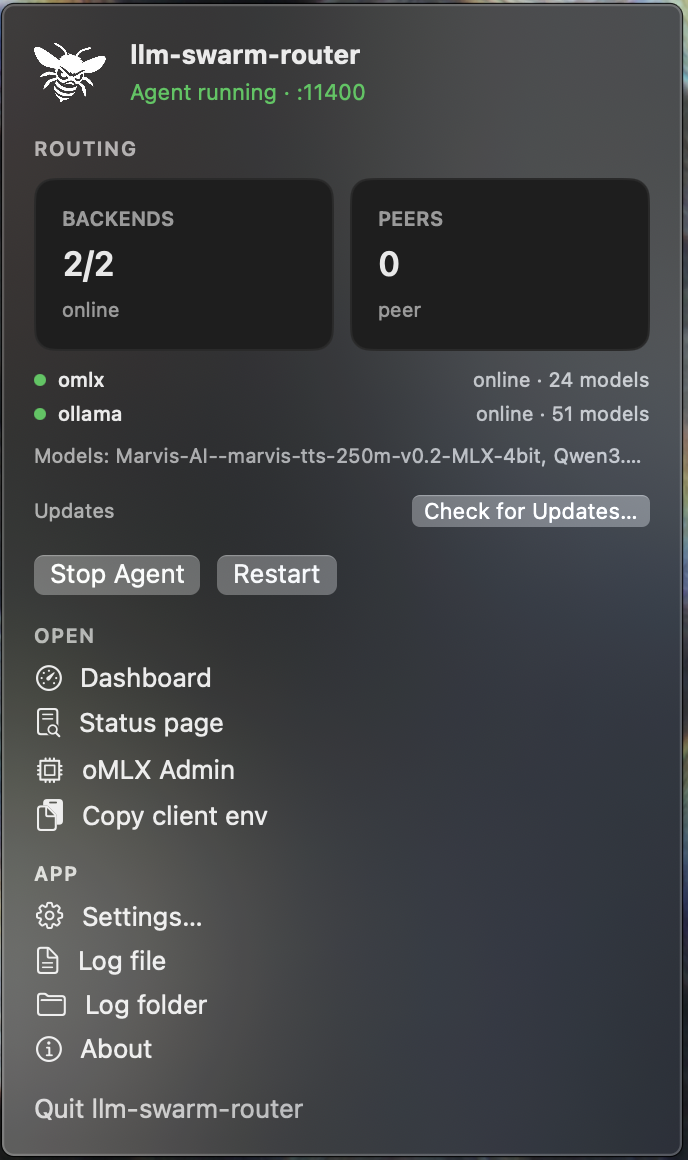
MenuBarExtra popover: agent status, routing stats, Open Dashboard, Copy Client Env, and Settings.
The app starts the agent automatically, scans for local providers (oMLX, Ollama, LM Studio), and persists discovered URLs to ~/.config/netllm/config.toml. You do not need to run netllm discover manually.
If macOS blocks the first launch: right-click the app in Applications → Open once.
Terminal: After first launch, a CLI shim is available at ~/.config/netllm/bin/netllm (netllm status, netllm models, etc.).
Install: docs/macos-install.md · Troubleshooting: docs/macos-troubleshooting.md
Optional: Homebrew
brew tap matthewdcage/netllm https://github.com/matthewdcage/llm-swarm-router
brew install netllm
brew services start netllm
Linux: install
Recommended: download from GitHub Releases:
| Asset | Install |
|---|---|
netllm_*_amd64.deb |
sudo dpkg -i netllm_*_amd64.deb |
netllm-*.rpm |
sudo rpm -Uvh netllm-*.rpm |
Then enable the systemd user service:
netllm init
systemctl --user daemon-reload
systemctl --user enable --now netllm
netllm status · dashboard http://127.0.0.1:11400/ui/
Full steps: docs/linux-install.md · Issues: docs/linux-troubleshooting.md
Windows: install
Recommended: download netllm-*-windows-x64.zip from GitHub Releases.
- Extract to a folder (e.g.
%LOCALAPPDATA%\netllm). - Open PowerShell as Administrator in that folder.
- Run
.\install-service.ps1(addsScripts\to user PATH; also registers theNetllmAgentservice, see the caveat below). netllm init, then start the agent withnetllm serve.
Known issue (F-34): the
NetllmAgentservice does not start. It is registered as a plain console program, with none of the Windows Service Control Manager handshake a real service needs, sonetllm startandsc start NetllmAgentboth fail with error 1053 ("the service did not respond in a timely fashion"). Until this is fixed, run the agent withnetllm servein a terminal (add it to Task Scheduler at logon if you want it to start automatically). PATH setup from the install script is unaffected, and everything else on Windows works normally.
netllm status · dashboard http://127.0.0.1:11400/ui/
Full steps: docs/windows-install.md · Issues: docs/windows-troubleshooting.md
CLI / source install (all platforms)
For development, CI, or running without packaged installers:
git clone https://github.com/matthewdcage/llm-swarm-router.git
cd llm-swarm-router
uv sync
./netllm init
./netllm serve          # agent on http://127.0.0.1:11400
The ./netllm wrapper works immediately from the repo, no global install required.
Verify (second terminal, while serve is running):
scripts/agent-verify-setup.sh
export OPENAI_BASE_URL=http://127.0.0.1:11400/v1
export OPENAI_API_KEY=netllm-local
Global CLI (optional): ./netllm install → netllm on PATH via uv tool install.
Agent-assisted setup (Cursor, Codex, Claude Code in this repo): /netllm-setup and /netllm-connect, see AGENTS.md and docs/editor-integration.md.
Wire your editor
Point any compatible client at netllm once. Keep your model IDs; configure oMLX, Ollama, LM Studio, and swarm peers in ~/.config/netllm/config.toml only (not per-client URL lists). LAN peers distribute automatically after ./netllm peers.
export OPENAI_BASE_URL=http://127.0.0.1:11400/v1
export OPENAI_API_KEY=netllm-local
Claude Code / native Anthropic clients:
export ANTHROPIC_BASE_URL=http://127.0.0.1:11400
export ANTHROPIC_API_KEY=netllm-local
Pick a model ID from ./netllm models (or the app Settings → Models tab). Full client table and per-editor steps: docs/editor-integration.md. Honcho connectors: docs/honcho-integration.md. Hermes Agent: docs/hermes-agent-integration.md.
What you get
| Native macOS app | Build from source + install script on macOS 26+ (menubar supervisor, welcome wizard, Settings UI). GitHub DMG returns when notarized. Embeds the Python agent. |
| Linux & Windows packages (alpha) | .deb / .rpm with systemd user unit, or Windows zip + NetllmAgent service, first packaged release for these platforms. Same agent core as macOS. Install from GitHub Releases. |
| Web dashboard (all platforms) | http://127.0.0.1:11400/ui/, status, models, peers, discover, copy client env. macOS menubar adds Open Dashboard; Linux/Windows use browser + netllm env. |
| Zero-touch local discovery | Agent scans on every start, oMLX (:8080+, macOS), Ollama (:11434), LM Studio (:1234), vLLM (:8000). Per-machine overrides in Settings or discovery.provider_urls. Found URLs persist automatically. |
| Network-wide model catalog | See local and LAN models in one place (netllm models --lan or Settings → Models). Peers advertise what they can run; routing follows your strategy. |
| Throughput that grows with the mesh | Each node is an independent peer. local_spillover (swarm default) serves locally while idle and spills to the least-loaded peer when busy; round_robin, least_load, latency_weighted, and batch_shard cover other workloads. Agent-hops are loop-guarded. |
| Mixed-fleet model aliases | [routing.model_aliases] maps one canonical name to per-provider IDs (oMLX vs Ollama vs LM Studio naming) so the same weights spread across providers; unknown models return a clear 404 with the live catalog. |
| Host catch-all model pools | [routing.model_pools.<name>] lets specific hosts accept any requested model name, bypassing alias matching entirely, as long as the host serves one of the pool's allowed models — useful for a big-model box that should absorb overflow/misnamed requests instead of 404ing. |
| Dual API surface | OpenAI chat/models/embeddings/streaming plus Anthropic Messages API with translation to local backends, one URL for every editor. /v1/embeddings routes to embedding-capable backends (Ollama, oMLX, LM Studio, vLLM, peers) with the same failover and spillover as chat. |
| LAN swarm | mDNS (_netllm._tcp), subnet scan, and static swarm.peers for home labs, guest Wi‑Fi, and fixed IPs. |
| Pre-configured cloud providers | Moonshot AI (Kimi), Z.ai (GLM), OpenAI, Anthropic, and OpenRouter — enable/disable per provider, pick which direction fallback goes (netllm cloud fallback cloud|local|none), and sign in to OpenRouter with OAuth (netllm cloud connect openrouter) or set a key (netllm cloud set-key). Same controls in the macOS app's Settings → Cloud and the web dashboard's Cloud tab. Master switch always wins: cloud.enabled = false disables cloud entirely. |
| Set-and-forget operation | Auto-start on launch, health cache, circuit breaker, netllm doctor, Prometheus /metrics, built to run 24/7 without hand-holding. |
| Honcho-ready | Drop-in mesh router for Honcho deriver/dialectic flows, Honcho integration. |
| Agent-native docs | AGENTS.md, skills, Claude Code slash commands for setup, connect, swarm, and troubleshoot. |
How the swarm fits together
Each node runs the same agent (macOS menubar app, Linux systemd package, Windows service, or ./netllm serve). Peers discover each other on the LAN and share a unified model catalog.
  ┌──────────────┐   mDNS (_netllm._tcp)   ┌──────────────┐
  │  Mac / Linux │◄───────────────────────►│  Windows /   │
  │  netllm      │                         │  Mac mini    │
  │  :11400      │                         │  :11400      │
  └───┬──────┬───┘                         └───┬──────┬───┘
      │      │                                 │      │
   backends  Ollama                        vLLM   LM Studio
      │      │                                 │      │
      └──────┴─────────── :11400/v1 ───────────┴──────┘
                         │
              Cursor · Claude Code · Honcho · curl
| Discovery | When |
|---|---|
| Automatic | Agent scans on every start (app or netllm serve) |
| mDNS | Default on home/office LAN (init --swarm, join, or serve --host 0.0.0.0) |
| Subnet scan fallback | LAN-bound agents auto-probe the /24 once when mDNS finds no peers in 10s |
| Subnet scan (manual) | netllm peers --subnet-scan when multicast is blocked |
| Manual | swarm.peers in config, Settings, or peers --save |
Loopback-bound agents (single-machine default) show up in netllm peers as found but unreachable with the exact rebind fix — no more silent non-meshing. Firewall blocking discovery? netllm doctor prints per-platform UDP 5353 / TCP 11400 commands.
Config: ~/.config/netllm/config.toml, see config.example.toml.
CLI quick reference
./netllm init              # guided setup (asks: single machine or LAN swarm?)
./netllm init --swarm      # LAN bind + load spreading (open trusted LAN, no token)
./netllm init --swarm --secure  # same + cluster token, prints join cmd
./netllm join URL --token T     # join this machine to a secured swarm
./netllm swarm-token       # show (or --rotate) the pairing token
./netllm serve             # foreground agent (dev/CI/Linux)
./netllm serve --host 0.0.0.0   # LAN bind without re-init
./netllm start|stop|restart     # background (app / Homebrew / systemd / Windows service)
./netllm status            # backends, health, peers
./netllm models            # routed catalog
./netllm models --local    # local providers only (agent not required)
./netllm models --lan      # include remote LAN agents
./netllm models --lan --subnet-scan   # probe the /24 when mDNS is blocked
./netllm peers             # mDNS browse (flags unreachable loopback-bound agents)
./netllm discover          # manual rescan (optional; agent auto-discovers)
./netllm test              # 1-token latency probe
./netllm test --api anthropic
./netllm gateway           # promote to LAN entrypoint
./netllm doctor            # PATH, mDNS, firewall, port, backend checks
Build the macOS app (developers)
Requirements: macOS 15+, Apple Silicon, uv, Xcode CLT or full Xcode (actool optional, iconutil fallback on CLT-only Macs).
uv sync
uv pip install venvstacks
apps/netllm-mac/Scripts/build.sh release
packaging/scripts/macos-app-install.sh --source apps/netllm-mac/build/Stage/llm-swarm-router.app
# Optional maintainer DMG (ad-hoc until notarized): packaging/scripts/create-dmg.sh
Test like an end user (build → Applications → launch):
./scripts/emulate-user-install-mac.sh # build + macos-app-install.sh --source
Python layer packaging (venvstacks): packaging/README.md
Build Linux packages (developers)
On Ubuntu or Debian (x86_64):
uv sync
NETLLM_VERSION=0.0.0-dev ./packaging/linux/build-deb.sh
NETLLM_VERSION=0.0.0-dev ./packaging/linux/build-rpm.sh
# → dist/*.deb and dist/*.rpm
Rehearse end-user install: ./scripts/emulate-user-install-linux.sh
Build Windows zip (developers)
On Windows (PowerShell):
.\packaging\windows\build-zip.ps1 -Version 0.0.0-dev
# → dist/netllm-0.0.0-dev-windows-x64.zip
Rehearse end-user install (Admin): .\scripts\emulate-user-install-windows.ps1
Packages
| Package | Role |
|---|---|
| netllm-core | Routing, health cache, config |
| netllm-sdk-openai | OpenAI SDK upstream adapter |
| netllm-sdk-anthropic | Anthropic SDK upstream adapter |
| netllm-discovery | Local scan, swarm registry, mDNS |
| netllm-agent | FastAPI: /v1/*, /netllm/v1/*, /metrics |
| netllm-cli | Typer CLI |
| netllm-mac | Native macOS menubar app (apps/netllm-mac/) |
Architecture and package roles: AGENTS.md
Development
./scripts/ci.sh
Optional pre-commit hooks (ruff lint + format on staged files, ~3s):
uv run pre-commit install
uv run pre-commit run --all-files   # optional; CI uses ./scripts/ci.sh
After editing agent skills: scripts/sync-agent-skills.sh
Human contributor guide: CONTRIBUTING.md · Agent context: AGENTS.md
If this helps you
If llm-swarm-router saves you time in your home lab, consider starring the repo, sharing it with others who run local LLMs, and opening issues or PRs when you hit gaps. Every star and share helps more people find a path off single-machine base_url juggling.
Contributing
llm-swarm-router is an open-source community project. We welcome bug reports, documentation improvements, platform fixes, and feature PRs.
| Action | Link |
|---|---|
| Report a bug | Bug report template |
| Suggest a feature | Feature request template |
| Development setup & PR workflow | CONTRIBUTING.md |
| Code of conduct | CODE_OF_CONDUCT.md |
| Security disclosure | SECURITY.md |
| Help & docs index | SUPPORT.md |
Quick start for contributors:
git clone https://github.com/matthewdcage/llm-swarm-router.git
cd llm-swarm-router
uv sync
./netllm init
./scripts/ci.sh
Fork → branch → PR against main. Use Conventional Commits (feat:, fix:, docs:). CI runs lint on Ubuntu, then tests and packaging smoke on Ubuntu and Windows (./scripts/ci.sh; see CONTRIBUTING.md).
License
MIT, see LICENSE. Copyright (c) netllm contributors.
Explore related projects
Loading…