
matheus-git/systemd-manager-tui
matheus-git/systemd-manager-tui has 1,605 GitHub stars and 25 forks. GitHot measured -1 stars in 24 hours. Last checked 2026-11-08 03:33 UTC. Last push 2026-10-18.
A TUI application for managing systemd services.
Measured star growth
- in 24h
- -1
- in 7 days
- Update delayed
- in 15 days
- Update delayed
- in 1 month
- Update delayed
Net star changes over overlapping periods, not daily totals. Missing measurements are left blank. Stars measure attention, not software quality.
README.md
OriginalSystemd manager tui

A TUI application for managing systemd services.
This tool allows you to manage systemd services with ease. You can view logs, list services, view properties, edit unit files, and control their lifecycle: start, stop, restart, mask, unmask, enable, and disable using the D-Bus API. It also supports Vim-like navigation. It is possible to navigate between system and user units and choose to list only running services or all units.
Quick Preview
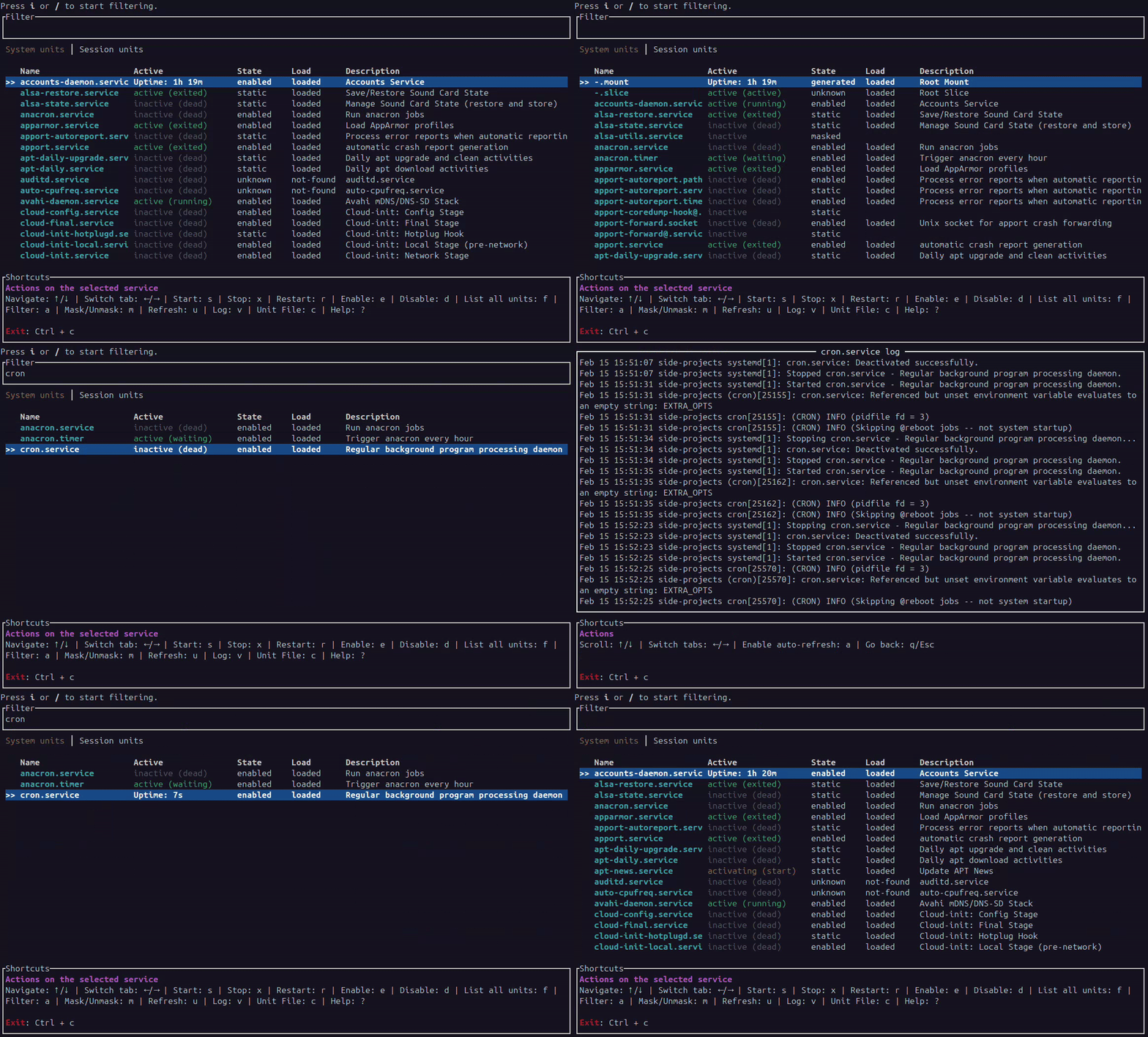
View screenshots
Usage
systemd-manager-tui

# With a filter
systemd-manager-tui -f docker

# Without watching system and user units for failure notifications
systemd-manager-tui -n
# or: systemd-manager-tui --no-notifications

# With a configuration file from somewhere else
systemd-manager-tui --config ./keys.toml
Configuration
Every keybind can be remapped in ~/.config/systemd-manager-tui/config.toml
(or $XDG_CONFIG_HOME/systemd-manager-tui/config.toml). The file is optional:
without it, the defaults below apply. --config <PATH> reads another file
instead.
To start from a complete, commented file with every action at its default key:
mkdir -p ~/.config/systemd-manager-tui
systemd-manager-tui --print-default-config > ~/.config/systemd-manager-tui/config.toml
A binding is a single key or a list of keys, and anything you leave out keeps its default:
# Applies in every view
[keybindings]
quit = "ctrl+q"
move_down = ["down", "n"]

# The service list
[keybindings.list]
start = "S"
stop = "K"
restart = "ctrl+r"

# The log view
[keybindings.log]
back = ["b", "esc"]

# The unit-file view
[keybindings.unit_file]
edit = "E"
Key names are single characters ("s", "?", "/", "+"), named keys (up,
down, left, right, pageup, pagedown, home, end, insert,
delete, backspace, enter, tab, backtab, esc, space, f1-f12)
and modifiers joined with + (ctrl, alt, shift, super), as in
"ctrl+c" or "alt+f".
How overrides are applied:
- Rebinding an action replaces the character keys it had, so
start = "S"frees upsfor another action. - Named keys stay bound unless you take them away, so
move_down = "n"addsnand keeps↓. - Binding a named key explicitly somewhere else takes it from its default
action, so
page_down = "down"moves the down arrow. unbind = ["key", ...]in a section drops keys entirely, andaction = []leaves an action with no key at all.- Binding one key to two actions in the same view, or taking over a key that another action still relies on, is reported at startup and the program exits without starting.
- A global action bound to a plain character (
quit = "Q") is suppressed while the filter input or the instance-name prompt has focus, so the character can still be typed. Chords such asctrl+calways apply.
The same key can mean different things in different views, which is why a
cycles the list filter but toggles auto-refresh in the log view. The shortcut
bar and the ? help popup are generated from the active configuration, so they
always show your own keys.
Actions
| Section | Action | Default | Description |
|---|---|---|---|
[keybindings] |
quit |
ctrl+c |
Quit |
suspend |
ctrl+z |
Suspend to the shell | |
move_up / move_down |
up/k, down/j |
Move the selection, scroll the log and unit-file views | |
page_up / page_down |
pageup, pagedown |
Jump 10 items | |
nav_left / nav_right |
left/h, right/l |
Switch system/user tab; switch between the log and unit-file views | |
[keybindings.list] |
start |
s |
Start the selected unit |
stop |
x |
Stop the selected unit | |
restart |
r |
Restart the selected unit | |
enable |
e |
Enable the selected unit | |
disable |
d |
Disable the selected unit | |
toggle_mask |
m |
Mask/unmask the selected unit or template | |
refresh |
u |
Refresh the service list | |
list_all_units |
f |
Toggle all units/services only | |
cycle_state_filter |
a |
Cycle all → active → inactive → failed | |
view_log |
v |
Open the log view | |
view_unit_file |
c |
Open the unit-file view | |
focus_filter |
i, / |
Start filtering | |
clear_filter |
esc |
Clear the filter | |
help |
? |
Toggle the help popup | |
[keybindings.log] |
toggle_auto_refresh |
a |
Toggle log auto-refresh |
back |
q, esc |
Return to the list | |
[keybindings.unit_file] |
edit |
e |
Edit the unit file |
back |
q, esc |
Return to the list |
Text editing inside the filter input (ctrl+a, ctrl+e, ctrl+k, ctrl+u,
ctrl+w, alt+b, alt+f, …) and the instance-name prompt are fixed and not
configurable.
Install
After installation, you can create an alias to make it easier to use.
Ubuntu (recommended)
sudo dpkg -i ./systemd-manager-tui_x.x.x-x_amd64.deb
Download the .deb file from Releases
Fedora (recommended)
sudo dnf install ./systemd-manager-tui_x.x.x-x_x86_64.rpm
Download the .rpm file from Releases
Arch linux
yay -S systemd-manager-tui
https://aur.archlinux.org/packages/systemd-manager-tui
NixOS
nix run github:matheus-git/systemd-manager-tui
NixOS with flakes Read here
Binary
chmod +x systemd-manager-tui
./systemd-manager-tui
Download binary from Releases
Cargo
cargo install --locked systemd-manager-tui
Main libraries
- ratatui - 0.29.0
- zbus - 5.5.0
Testing
Run the regular test suite with:
cargo test
The regular suite includes unit, application-flow, and Ratatui rendering tests using TestBackend, so it does not require an interactive terminal or a running systemd instance.
Real integration tests against the system and user D-Bus buses are available as an opt-in suite. Run them on a systemd-based Linux host where the current user has an active user manager and both systemctl and systemd-run are available:
cargo test infrastructure::systemd_service_adapter::tests -- --ignored --test-threads=1
The integration suite reads real system units and creates an isolated transient user service to exercise lifecycle operations. The temporary service is stopped and cleaned up automatically. These tests are ignored during a regular cargo test so environments without systemd, such as many CI containers, continue to work.
Contributing
Contributions are welcome! Please open an issue or submit a pull request for any improvements or bug fixes.
📝 License
This project is open-source under the MIT License.
Explore related projects
codecrafters-io/build-your-own-x
Master programming by recreating your favorite technologies from scratch.
561,011 starspublic-apis/public-apis
A collective list of free APIs
497,254 starsmorluto/rea
Reverse engineer anything with agents, from app behavior down to native binaries.
443,104 starsopenclaw/openclaw
The AI that really does things. Any OS. Any Platform. The lobster way. 🦞
394,194 stars