
mariusgm/newfile
mariusgm/newfile has 87 GitHub stars and 5 forks. GitHot measured +4 stars in 24 hours, +9 in 7 days, and +13 in 15 days. Last checked 2026-11-15 20:35 UTC. Last push 2026-11-05.
Measured star growth
- in 24h
- +4
- in 7 days
- +9
- in 15 days
- +13
- in 1 month
- Update delayed
Net star changes over overlapping periods, not daily totals. Missing measurements are left blank. Stars measure attention, not software quality.
About
The missing 'New File' button for macOS Finder — customizable file types, per-type starter templates. Free, open-source Finder Sync Extension. brew install --cask mariusgm/newfile/newfile or DMG.
ProductivityREADME.md
OriginalNewFile — New File button for macOS Finder
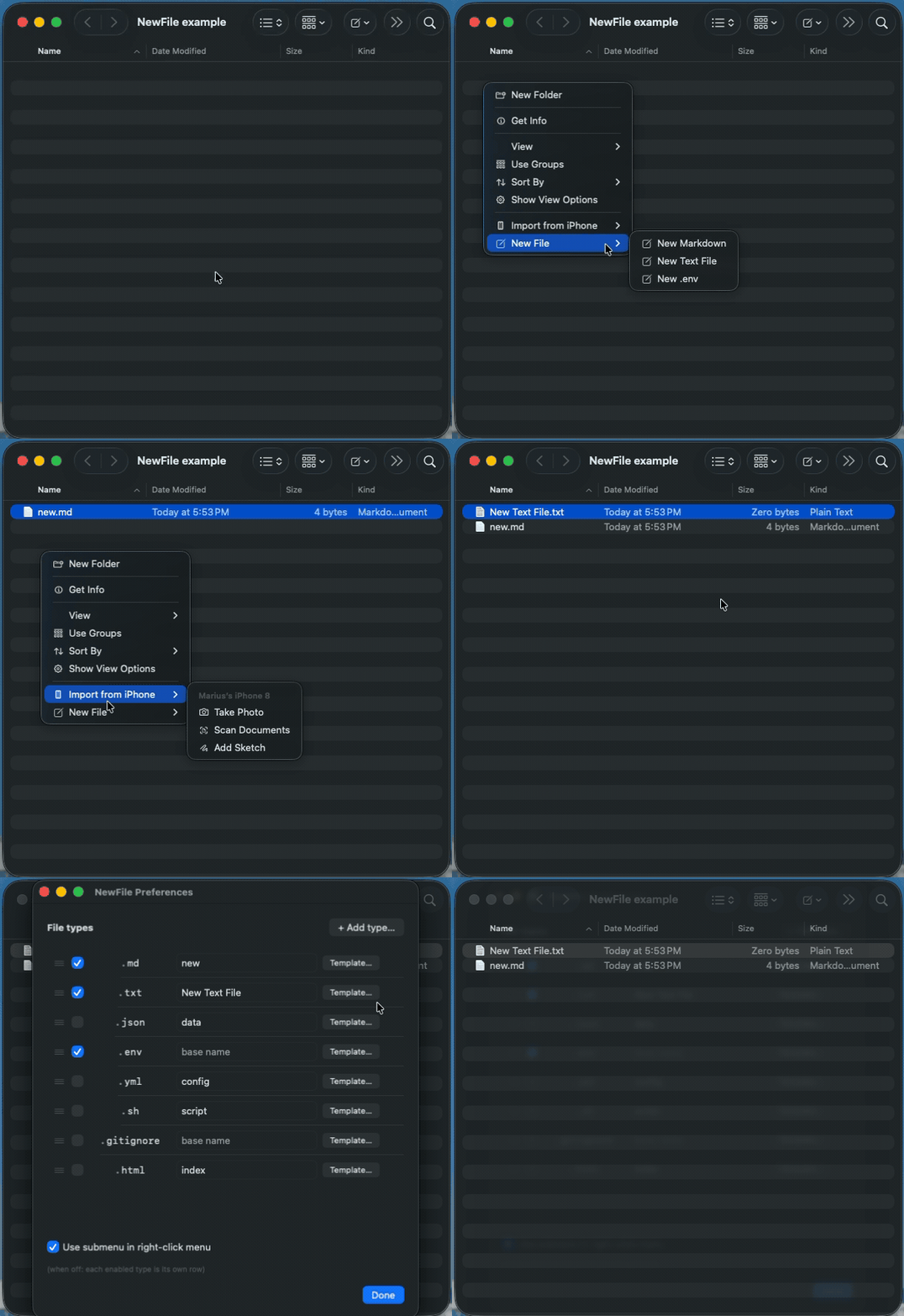
Free, open-source, native. A small Finder Sync Extension that adds the missing "New File" button to macOS Finder — right-click menu and toolbar. No Automator, no shell scripts, no setup beyond enabling the extension once.
- Any file type —
.txtenabled by default, plus 7 built-in presets (.md,.json,.sh,.env,.yml,.gitignore,.html). Add your own (.tsx,.toml, whatever you need). - Starter templates — pre-fill new files with frontmatter, shebang lines, a JSON skeleton, or any boilerplate you reuse.
- Drag-to-reorder — set the menu order in Preferences; the first enabled type is the toolbar's one-click action.
- Submenu mode — optionally collapse all types under a single "New File ▸" right-click entry.
- Auto-incrementing names —
New Text File.txt, thenNew Text File 2.txt, and so on. Reveals and selects the new file. - Auto-updates via Sparkle — no need to re-download.
macOS Finder lets you create a New Folder but not a New File. NewFile fixes that — the way it should have shipped.
Install
Homebrew (recommended)
brew install mariusgm/newfile/newfile
Then launch NewFile once (open -a NewFile). macOS only registers the Finder extension after the app's first launch — until then the toggle below won't appear.
Manual
- Download the latest
NewFile.dmgfrom Releases. - Drag
NewFile.appto/Applications. - Launch it once. Follow the in-app instructions to enable the Finder extension.
Enable the Finder extension (one time)
NewFile must have been launched at least once first.
Open System Settings → General → Login Items & Extensions, then:
- macOS 27 "Golden Gate": under Extensions, choose By Category, click the ⓘ next to File Providers, and turn on NewFile. macOS lists NewFile there rather than under Finder.
- macOS 26 and earlier: scroll to Added Extensions and toggle NewFile Extension.
On macOS Sequoia 15.0 and 15.1 the Extensions UI was buggy — update to 15.2 or later if NewFile Extension doesn't appear in the toggle list.
If NewFile doesn't appear under File Providers on macOS 27, please open an issue.
Add the toolbar button
In any Finder window: View → Customize Toolbar… → drag the NewFile icon into the toolbar where you want it.
Use it
- Toolbar button: click → menu pops with "New Text File" → click → file created and selected.
- Right-click: anywhere in a Finder window background → "New Text File".
The created file is named New Text File.txt. If that name exists, it becomes New Text File 2.txt, then New Text File 3.txt, and so on.
iCloud Drive: use the toolbar button
On recent macOS versions, Finder doesn't show right-click items from third-party Finder extensions inside iCloud Drive folders — including Desktop and Documents when they sync to iCloud. Finder Sync extensions were designed around a folder each extension owns, and iCloud Drive manages these folders itself (Apple Developer Forums). Other Finder Sync apps report the same behavior. We haven't identified a supported Finder Sync workaround that restores the right-click menu there. The toolbar button works in iCloud Drive — add it once (above) and use it there.
Customize
Open NewFile.app → ⌘, (or click the toolbar dropdown → Customize…) to manage file types, templates, menu order, and submenu mode. Each type has an editable menu label (what Finder shows) and a default filename; leave the filename empty for dotfile-style names (.env, .gitignore). A Rich Text (.rtf) type ships with a minimal RTF header so the file opens in TextEdit; an empty .rtf isn't a valid RTF document. The Add…/Edit… button per row manages that type's starter template.
Build from source
git clone https://github.com/mariusgm/newfile.git
cd newfile
brew install xcodegen
xcodegen generate
open NewFile.xcodeproj
In Xcode: select the NewFile scheme, ⌘R to build & run. See setup.md for code signing and notarization notes if you want to distribute your own build.
Project layout
newfile/
├── App/                 SwiftUI host app — onboarding window only
├── Extension/           FIFinderSync subclass — toolbar + context menu + file creation
├── project.yml          xcodegen project definition (regenerable)
├── README.md
└── setup.md             codesigning + notarization + release notes
The host app (NewFile.app) is intentionally minimal — its only job is to embed the Finder Sync extension and present onboarding. All the work happens in Extension/FinderSync.swift.
Uninstall
Quitting NewFile doesn't stop the Finder extension — Finder keeps it running as its own process, which is why macOS can say the app is "in use" when you try to delete it.
Homebrew: brew uninstall --cask newfile (add --zap to also remove your saved file types).
Manual (DMG install):
- Quit NewFile (⌘Q).
- Turn off NewFile in System Settings → General → Login Items & Extensions. The toggle's location depends on your macOS version: see Enable the Finder extension.
- Drag NewFile.app from Applications to the Trash.
- Optional — remove saved settings: delete
~/Library/Group Containers/Q7VD7MTRL8.dev.newfile.NewFile.
How it works
NewFile is implemented as a Finder Sync Extension (FIFinderSync) — Apple's supported way to add toolbar buttons and context menus to Finder. It runs sandboxed under macOS's app extension model. No private APIs, no SIMBL, no Finder injection.
When you click the toolbar button or context menu item:
- The extension reads the targeted folder via
FIFinderSyncController.targetedURL(). - It picks a unique filename (
New Text File.txt, thenNew Text File 2.txt, etc.). - It creates an empty file with
FileManager.createFile. - It calls
NSWorkspace.activateFileViewerSelectingto reveal and select the file.
License
MIT — do whatever, no warranty.
Support
NewFile is free and stays free. If it saves you time, you can sponsor its development.
Related
- MacNewFile — older Objective-C implementation of the same idea
- New File Menu — paid MAS alternative ($2.99)
- iBoysoft MagicMenu — paid right-click utility ($19.99/yr) that bundles new-file