
mapleafgo/singcast
mapleafgo/singcast has 1,033 GitHub stars and 146 forks. GitHot measured +1 stars in 24 hours. Last checked 2026-11-09 11:53 UTC. Last push 2026-10-13.
Multi-platform proxy client powered by sing-box, with full Clash, sing-box & v2ray subscription support
What you can do
- Full support for Clash, sing-box and v2ray subscriptions and config files (yaml/yml/json/txt, unified to sing-box on import)
- System proxy and TUN mode (transparent proxy)
- Proxy node selection and latency testing
- Real-time traffic statistics
Measured star growth
- in 24h
- +1
- in 7 days
- Collecting history
- in 15 days
- Collecting history
- in 1 month
- Collecting history
Net star changes over overlapping periods, not daily totals. Missing measurements are left blank. Stars measure attention, not software quality.
README.md
Original
Singcast
Multi-platform proxy client powered by sing-box, with full Clash, sing-box & v2ray subscription support (unified to sing-box config on import)

Singcast is an open-source multi-platform proxy client built with Flutter and powered by a customized sing-box core. It fully supports Clash, sing-box and v2ray subscriptions — config files in yaml/yml/json/txt as well as v2ray base64/URI list subscriptions are all unified to sing-box config on import. Just import and go.
Available on Windows, Linux, macOS, and Android. iOS is not supported.
Desktop: Core runs as an independent privileged process communicating via JSON-RPC (IPC), keeping the UI sandboxed and stable.
Android: Core is loaded as a native library via FFI, integrated with Android VPN service.
TUN mode: Transparent proxy with automatic route management — no manual system proxy setup needed.
Preview
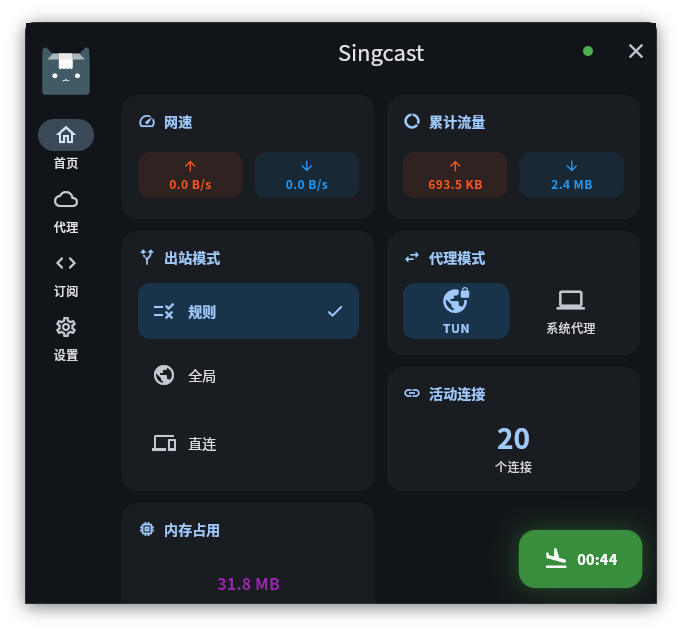
Features
- Full support for Clash, sing-box and v2ray subscriptions and config files (yaml/yml/json/txt, unified to sing-box on import)
- System proxy and TUN mode (transparent proxy)
- Proxy node selection and latency testing
- Real-time traffic statistics
- Subscription management, import and update subscription links
- Log viewer with export
- System tray on desktop
Usage
Linux
Make sure to install the following dependencies before using
sudo apt-get install libayatana-appindicator3
Download
Build
Install
Flutter v3.41+Follow the Flutter official documentation to set up the environment for your target platform. For example, Android development requires Android SDK.
Download core
Download the core for your platform from singcast-cli Releases and place it at:
# Desktop (IPC standalone process)
windows/core/singcast-core.exe
linux/core/singcast-core
macos/Frameworks/singcast-core

# Mobile (FFI native library)
 android/app/libs/libsingcast.aar
Build and run
# Install dependencies
flutter pub get
# Generate code
dart run build_runner build
# Run
flutter run -d linux
FAQ
Subscription fetch / update failed
If the subscription keeps loading or returns an error, the provider may be restricting certain User-Agent strings. Try changing the UA in Settings → General → Subscription User-Agent (e.g. clash-verge/v2.0.0, clash-meta), then update the subscription again.
Tech Stack
Explore related projects
codecrafters-io/build-your-own-x
Master programming by recreating your favorite technologies from scratch.
561,328 starspublic-apis/public-apis
A collective list of free APIs
497,576 starsmorluto/rea
Reverse engineer anything with agents, from app behavior down to native binaries.
446,581 starsopenclaw/openclaw
The AI that really does things. Any OS. Any Platform. The lobster way. 🦞
394,247 stars