
manbearwiz/youtube-dl-server
manbearwiz/youtube-dl-server has 935 GitHub stars and 293 forks. GitHot measured +1 stars in 24 hours and +1 in 7 days. Last checked 2026-11-11 01:09 UTC. Last push 2026-11-03.
Web / REST interface for downloading youtube videos onto a server.
Measured star growth
- in 24h
- +1
- in 7 days
- +1
- in 15 days
- Update delayed
- in 1 month
- Update delayed
Net star changes over overlapping periods, not daily totals. Missing measurements are left blank. Stars measure attention, not software quality.
README.md
Original



youtube-dl-server
Very spartan Web and REST interface for downloading youtube videos onto a server. starlette + yt-dlp.
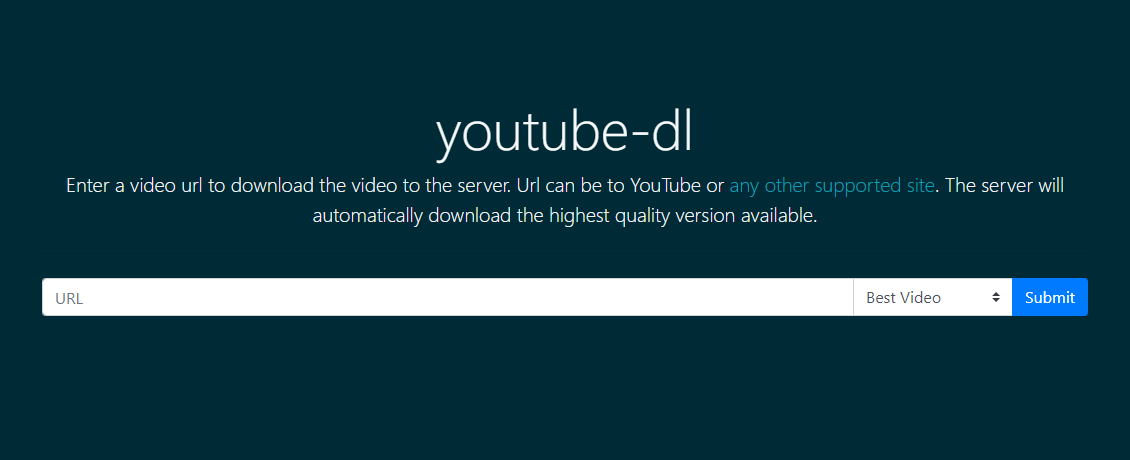
Running
Docker CLI
This example uses the docker run command to create the container to run the app. Here we also use host networking for simplicity. Also note the -v argument. This directory will be used to output the resulting videos
docker run -d --net="host" --name youtube-dl -v /home/core/youtube-dl:/youtube-dl kmb32123/youtube-dl-server
To provide custom yt-dlp configuration (e.g., authentication, custom options), mount a config directory:
docker run -d --net="host" --name youtube-dl \
  -v /home/core/youtube-dl:/youtube-dl \
  -v /home/core/yt-dlp-config:/root/.config/yt-dlp \
  kmb32123/youtube-dl-server
Place your config file in /home/core/yt-dlp-config/ with yt-dlp options (one per line). See yt-dlp configuration documentation for details.
Docker Compose
A minimal example lives in docker-compose.example.yml. This is an example service definition that could be put in docker-compose.yml. This service uses a VPN client container for its networking.
  youtube-dl:
    image: "kmb32123/youtube-dl-server"
    network_mode: "service:vpn"
    volumes:
      - /home/core/youtube-dl:/youtube-dl
      - /home/core/yt-dlp-config:/root/.config/yt-dlp  # optional: custom yt-dlp config
    restart: always
Python
If you have Python 3.12+ installed in your PATH you can simply run like this, providing optional environment variable overrides inline.
YDL_UPDATE_TIME=False python3 -m uvicorn youtube-dl-server:app --port 8123
In this example, YDL_UPDATE_TIME=False is the same as the command line option --no-mtime.
Configuration
All behavior is controlled by environment variables (or a .env file read from the working directory). The process environment wins over the .env file, and an empty value means "not set". Booleans accept true/1/false/0 (case-insensitive); an unparseable value is logged as a warning and the documented default is used, so a typo cannot stop the app from starting. See .env.example for the full list with defaults: YDL_FORMAT, YDL_EXTRACT_AUDIO_FORMAT, YDL_EXTRACT_AUDIO_QUALITY, YDL_RECODE_VIDEO_FORMAT, YDL_OUTPUT_TEMPLATE, YDL_ARCHIVE_FILE, YDL_PROXY, YDL_COOKIE_FILE, YDL_UPDATE_TIME, YDL_LOG_LEVEL, YDL_UPDATE_CHECK, YDL_UPDATE_CHECK_INTERVAL, and the opt-in media options YDL_WRITE_SUBTITLES, YDL_SUBTITLES_LANGS, YDL_WRITE_THUMBNAIL, YDL_EMBED_METADATA.
YDL_FORMAT is yt-dlp's format selector. The format field of a download request is a separate thing: it names a postprocessor (mp3 extracts audio, mp4 recodes), and an explicit request format wins for that download. YDL_EXTRACT_AUDIO_FORMAT and YDL_RECODE_VIDEO_FORMAT apply when the request names no codec or container.
The container includes a health check that probes http://127.0.0.1:8080/healthz — it verifies the app responds and that the output volume is writable (the most common operational failure). It makes no external network calls.
YDL_UPDATE_CHECK reports a newer yt-dlp version without installing anything. It is off by default, so startup makes no network request; when enabled, the first check runs at startup and then every YDL_UPDATE_CHECK_INTERVAL seconds (floor 60). GET /youtube-dl/update returns {current, latest, checked_at, update_available} and the queue page shows the available version. A failed check is logged and not reported, so a deployment without outbound access looks like an up-to-date one. Installing an upgrade is still an explicit PUT /youtube-dl/update.
Usage
Start a download remotely
Downloads can be triggered by supplying the {{url}} of the requested video through the Web UI or through the REST interface via curl, etc.
HTML
Just navigate to http://{{host}}:8080/youtube-dl and enter the requested {{url}}.
Curl
curl -X POST --data-urlencode "url={{url}}" http://{{host}}:8080/youtube-dl/q
Fetch
fetch(`http://${host}:8080/youtube-dl/q`, {
  method: "POST",
  body: new URLSearchParams({
    url: url,
    format: "bestvideo"
  }),
});
Bookmarklet
Add the following bookmarklet to your bookmark bar so you can conveniently send the current page url to your youtube-dl-server instance.
javascript:!function(){fetch("http://${host}:8080/youtube-dl/q",{body:new URLSearchParams({url:window.location.href,format:"bestvideo"}),method:"POST"})}();
Implementation
The server uses starlette for the web framework and yt-dlp to handle the downloading. The integration with yt-dlp makes use of their python api.
This docker image is based on the official python alpine image, pinned in the Dockerfile and kept current by Dependabot.
Explore related projects
ytdl-org/youtube-dl
Command-line program to download videos from YouTube.com and other video sites
141,539 starsexcalidraw/excalidraw
Virtual whiteboard for sketching hand-drawn like diagrams
135,492 starsgodotengine/godot
Godot Engine – Multi-platform 2D and 3D game engine
120,003 starsmrdoob/three.js
JavaScript 3D Library.
118,122 stars