
manasseh-fikadu/bield has 64 GitHub stars and 1 forks. GitHot measured +1 stars in 24 hours and +18 in 7 days. Last checked 2026-11-15 08:41 UTC. Last push 2026-11-07.
Measured star growth
- in 24h
- +1
- in 7 days
- +18
- in 15 days
- Collecting history
- in 1 month
- Collecting history
Net star changes over overlapping periods, not daily totals. Missing measurements are left blank. Stars measure attention, not software quality.
About
A simple, self-hosted control plane for every machine on your tailnet.
Self-hostedREADME.md
OriginalBield
Bield is a self-hosted control plane for the machines on your tailnet. It's one binary. Run it on a server, and it joins your Tailscale tailnet (or a Headscale one) and shows every machine in one place: how healthy it is, what's wrong with it, what runs on it. From the same page, you can open a terminal on it, browse its files and restart its containers. There's no password and no account to make, because your tailnet is the login.
Website and demo · Documentation · Releases
What it does
- Devices. Every machine on the tailnet, on a live map, with how traffic reaches it (direct, through a relay) and the round-trip time.
- Health. CPU, memory, disk, network and what's using them, for each machine, with charts of CPU, memory and network for up to 90 days. The machine Bield runs on is measured by Bield itself, if it's Linux, and the others by a small bash agent.
- Checks. Website, port and DNS checks, and a ping of every device, rolled up into a health score.
- AI usage. Tokens, estimated cost and limits for Claude Code, Codex, OpenCode and Pi on each machine, read from the files they already write, with nothing but counts leaving the machine (AI usage).
- Alerts. For offline machines, full disks, expiring Tailscale keys, failing checks, crashed containers and failed services. They reach your phone through ntfy, Telegram, email, Discord, Slack or any webhook (Notifications).
- Docker. Containers, logs, live stats, images, volumes and networks on any machine Bield can reach, and start, stop and restart.
- Terminal and files. A shell in the browser, which keeps running in tmux after you close the tab, and a file manager that edits and previews (SSH access).
- Roles and a log. Admins and read-only viewers, decided by tailnet identity, and an activity log of who did what.
- A command line.
bield devices,bield alerts ack 5and the rest, for people, scripts and AI agents, with--jsoneverywhere and the same roles as the web app (The command line).
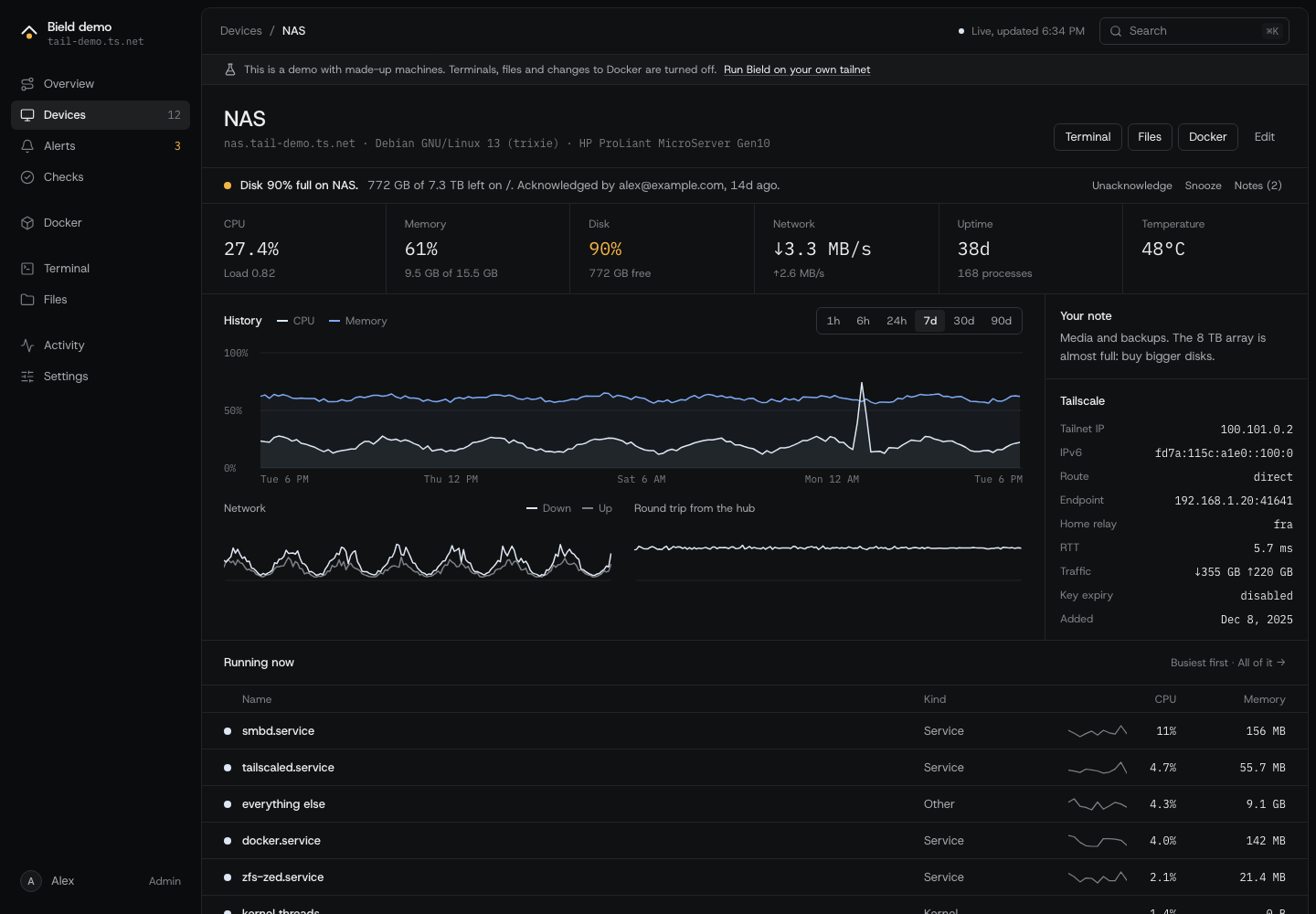
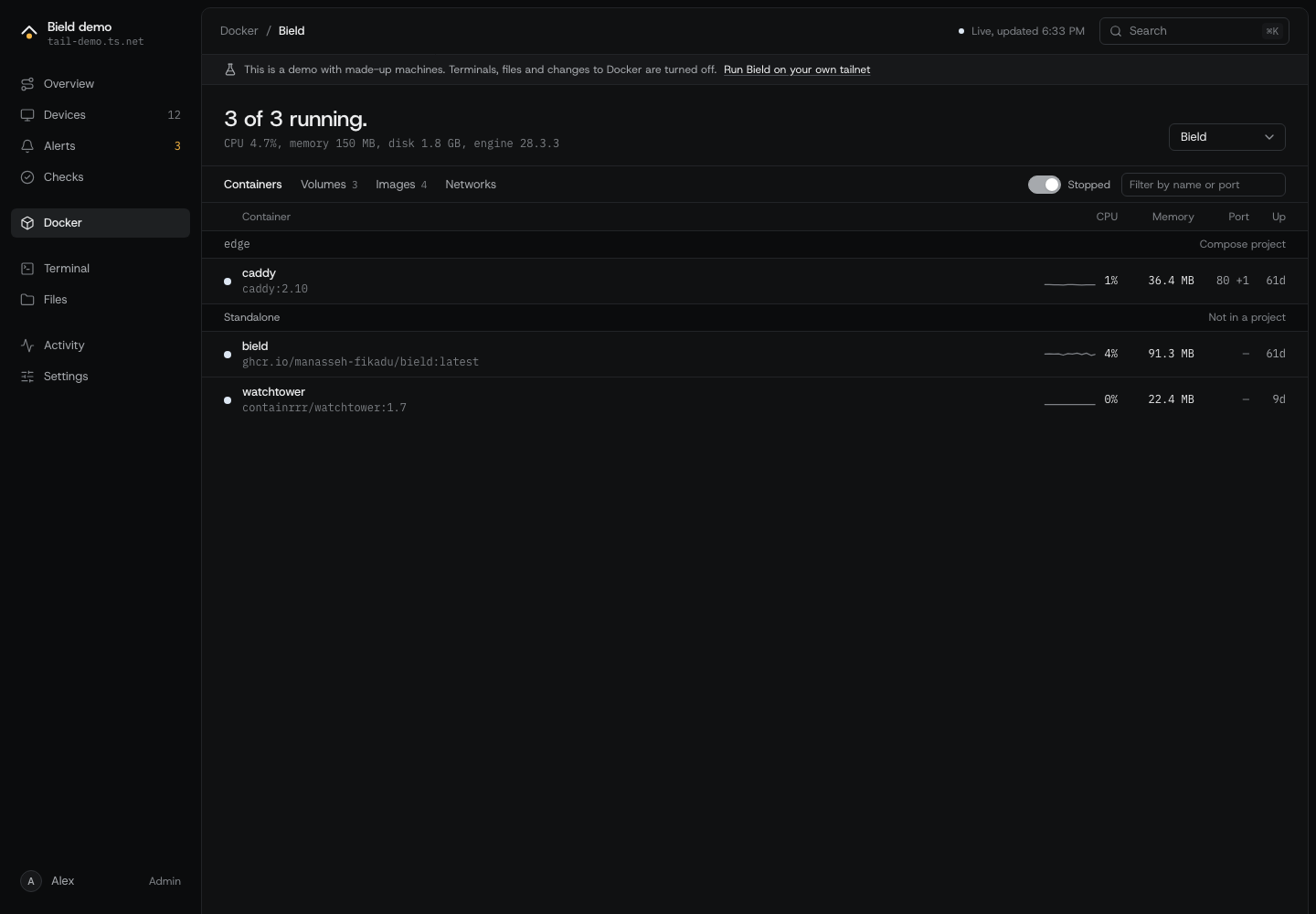
It works on a phone, and it's keyboard-friendly: Ctrl+K (⌘K on a Mac) searches pages, devices and actions, and ? lists the shortcuts.
Try the demo
The demo is a made-up tailnet with 12 machines and a week of history. It needs no Tailscale and touches nothing on your machine. To click through it in your browser without installing anything, open the website.
Download the release archive for your system (Linux or macOS, amd64 or arm64), unpack it and run it:
tar -xzf bield_*.tar.gz
./bield serve --demo  # then open http://127.0.0.1:4700
Or run it in Docker, which leaves nothing behind:
docker run --rm -p 127.0.0.1:4700:4700 ghcr.io/manasseh-fikadu/bield serve --demo --demo-listen 0.0.0.0:4700
To build it yourself, make build makes ./bield, as under Build from source. See Demo mode. Every screenshot, and the clip at the top, comes from it, which make screenshots and make recording retake.
Quickstart
Bield needs a tailnet and a machine to run on. It takes about two minutes.
With Docker, which works on any host:
curl -fsSLO https://raw.githubusercontent.com/manasseh-fikadu/bield/main/compose.yaml
docker compose up -d
docker compose logs bield    # open the link in it, to log Bield in to Tailscale
On a Linux server with systemd, one command installs Bield and runs it as a service:
curl -fsSL https://raw.githubusercontent.com/manasseh-fikadu/bield/main/install.sh | sudo bash
Then open http://127.0.0.1:4700 on that machine, and log Bield in to Tailscale. To skip the login, give the command or the .env file an auth key as TS_AUTHKEY.
On a Mac, or Linux without systemd, download the release archive for your system, check it against checksums.txt, and run ./bield serve.
After that, Bield is at https://bield.<your-tailnet>.ts.net (plain http:// until you turn on HTTPS certificates for the tailnet), and whoever logged it in is its first admin. With an auth key for a tagged node, nobody owns it, so set BIELD_ADMINS too. Its machines are there already. Next:
- Open a machine, and Install the agent for its CPU, memory and disk.
- Set up SSH on it, for the terminal, the files and Docker.
- Add a notification channel in Settings, so alerts find you.
Bield opens a setup page the first time, which walks through the same steps. The options for each way of installing are in Installing Bield and Bield in Docker. Bield and Tailscale says how it joins the tailnet, with the policy it needs. Bield's data is in ~/.config/bield, /var/lib/bield or /data, depending on how you run it.
The pages
| Page | What it does |
|---|---|
| Overview | The tailnet at a glance: a map, the health score, open alerts, every machine |
| Devices | Every machine, with its metrics, history, connection and notes. Agents installs and removes agents |
| Alerts | What's wrong now: acknowledge, snooze and add notes. Resolved alerts too |
| Checks | Website, port and DNS checks, plus pings, and the health score they make |
| Docker | Containers, volumes, images and networks of a machine, and their logs and stats |
| Terminal | A shell on a machine, in the browser |
| Files | A file manager for a machine's disk |
| Activity | Devices coming and going, alerts, and what people did |
| Settings | Thresholds, notifications, watched services, retention, and who has a role |
A tour of Bield describes each one.
The security model
Bield logs in to your machines, so whoever controls Bield controls them. These are the rules it follows, in plain words:
- Only your tailnet can reach it. Bield serves the app on the tailnet and nowhere else, apart from a login page that answers on the machine itself, and it has no passwords. For each connection, it asks Tailscale which device it comes from and which user owns that device. Nothing in a request can claim to be someone else.
- Two roles. Admins can do everything, including opening a shell on every machine with SSH access, so treat the admin list like sudoers. Viewers get a read-only dashboard, without logs, files, commands or secrets. Anyone else gets nothing. A device Tailscale can't name, such as a tagged server, is anonymous.
- It's hard to trick a browser into acting. Anything that changes something needs a header that other websites can't send, and a strict content security policy keeps scripts and frames out.
- Machines are untrusted. An agent gets a secret of its own that only works from its own machine, and it can report metrics and do nothing else. Everything a machine says is shown as text. Bield's SSH key only works from Bield's addresses, and it pins each machine's host key.
- Docker is limited on purpose. Bield can list, read, start, stop and restart containers. It can't create, exec or prune.
- It keeps a log. Terminals opened, files changed, containers restarted, settings and roles changed: each is a line in the activity log.
- What it holds is sensitive. The database has notification tokens, unencrypted, and Bield's data directory has its SSH key. Both are readable only by Bield's user. Keep the machine as you would a bastion host.
Bield has had an outside review, and v0.1.1 fixes what it found. It's a young project, and more people trying to break it is welcome. SECURITY.md has the full threat model and says how to report a problem privately.
Documentation
| Installing Bield, Docker | The ways to run it |
| Tailscale, Headscale | Joining the tailnet, signing in, admins and viewers |
| The agent | Per-machine metrics |
| SSH access | Terminals, files and Docker on other machines |
| The command line | bield devices, bield alerts ack, for people, scripts and AI agents |
| Notifications | Where alerts go, and when |
| Settings | Every setting, with its default |
| Configuration reference | Every flag and environment variable |
| Upgrading and backups, Uninstalling | Keeping it running, and removing it |
| FAQ | Questions, and what to check when something's wrong |
The full list is in docs/. The same pages are on the documentation site, with search.
Build from source
You need Go 1.27.3 or newer, Node 22.17 or newer, and Bun.
make build      # builds ./bield with the web UI inside
./bield serve   # joins your tailnet as a new machine named bield
The first time, open http://127.0.0.1:4700 on the same machine to log Bield in to Tailscale. After that, Bield is at https://bield.<your-tailnet>.ts.net. To use the machine's own Tailscale instead, run ./bield serve --tailscale host. To use Headscale, add --control-url https://headscale.example.com.
There's no password: Bield asks Tailscale who each connection comes from. Whoever logs Bield in to Tailscale becomes its first admin, and bield admin add <login> adds more. Viewers get a read-only dashboard: add them with bield admin add-viewer <login>, or let anyone on the tailnet view with bield admin who-can-view tailnet. See Signing in and Admins and viewers.
Bield keeps its data in ~/.config/bield (~/Library/Application Support/bield on macOS). To put it somewhere else, use --data-dir or set BIELD_DATA_DIR.
Develop
make dev     # runs Vite, and the Go server, which proxies the web UI to it
make demo    # the same, against the made-up tailnet
make test    # Go and web tests, then svelte-check
make lint    # golangci-lint, shellcheck and prettier
make types   # regenerates the web app's API types after you change internal/api/types.go
Open the URL that the Go server logs (bield is running url=...), which is on your tailnet, not Vite's, from a device that belongs to one of Bield's admins. The Go server doesn't reload on changes yet, so restart make dev after editing Go code.
| Path | What's in it |
|---|---|
cmd/bield |
The bield command |
internal/ |
The hub's packages |
web/ |
The SvelteKit app, which make build embeds in the binary |
agent/ |
The bash agent that devices run to report their metrics |
site/ |
The landing page, and the documentation site in site/docs-site, which builds docs/ |
install.sh |
Installs Bield as a systemd service |
Dockerfile, compose*.yaml |
The Docker image, which GoReleaser builds, and examples that run it |
docs/ |
The documentation, and the screenshots in it, which bield serve --demo made |
.goreleaser.yaml |
How a release is built |
Contribute
See CONTRIBUTING.md. Please report security problems privately, as described in SECURITY.md.
License
Bield is licensed under the GNU Affero General Public License v3.0. The agent in agent/ is under the MIT License, so you can reuse it anywhere.