
madebyzan/knovum
madebyzan/knovum has 56 GitHub stars and 6 forks. GitHot measured 0 stars in 24 hours. Last checked 2026-11-15 06:36 UTC. Last push 2026-11-13.
What you can do
- Bring everything into one place. Collect notes, webpages, videos, recordings, PDFs, Office files, images, and code in a Space.
- See how ideas connect. Arrange material on an infinite canvas, connect claims with evidence, and keep related questions and decisions close to their sources.
- Ask questions and check the answer. Search by keyword or meaning, ask a connected AI model about your material, and follow citations back to the exact source location.
- Create from what you know. Turn selected material into documents, images, videos, subtitles, or voice output, with a record of the inputs and model used.
Measured star growth
- in 24h
- 0
- in 7 days
- Collecting history
- in 15 days
- Collecting history
- in 1 month
- Collecting history
Net star changes over overlapping periods, not daily totals. Missing measurements are left blank. Stars measure attention, not software quality.
About
Local-first desktop AI workspace for research, learning, and creation. Organize your materials, ask questions with source-linked answers, and keep your knowledge on your device.
AIREADME.md
Original
Bring your knowledge together. Make it useful.
A local-first AI workspace for research, learning, and creation.




Download Knovum · What you can do · Privacy · FAQ · Build from source · 简体中文
What is Knovum?
Knovum is a local-first desktop workspace for gathering, exploring, and creating with your own knowledge.
Bring your notes, saved webpages and videos, meeting recordings, PDFs, Office documents, images, and code into one visual space. Organize them on an infinite canvas, discover connections, search across your library, and ask questions with answers that link back to the source passage, page, or timestamp.
Turn the material you have collected into documents and media without losing the trail back to the sources behind them.
Your library lives on your machine. There is no Knovum account or Knovum cloud. Search, transcription, OCR, and other supported AI capabilities can run locally; when you choose a cloud model for an answer or generation task, Knovum sends only the context needed for that task to the provider you selected.
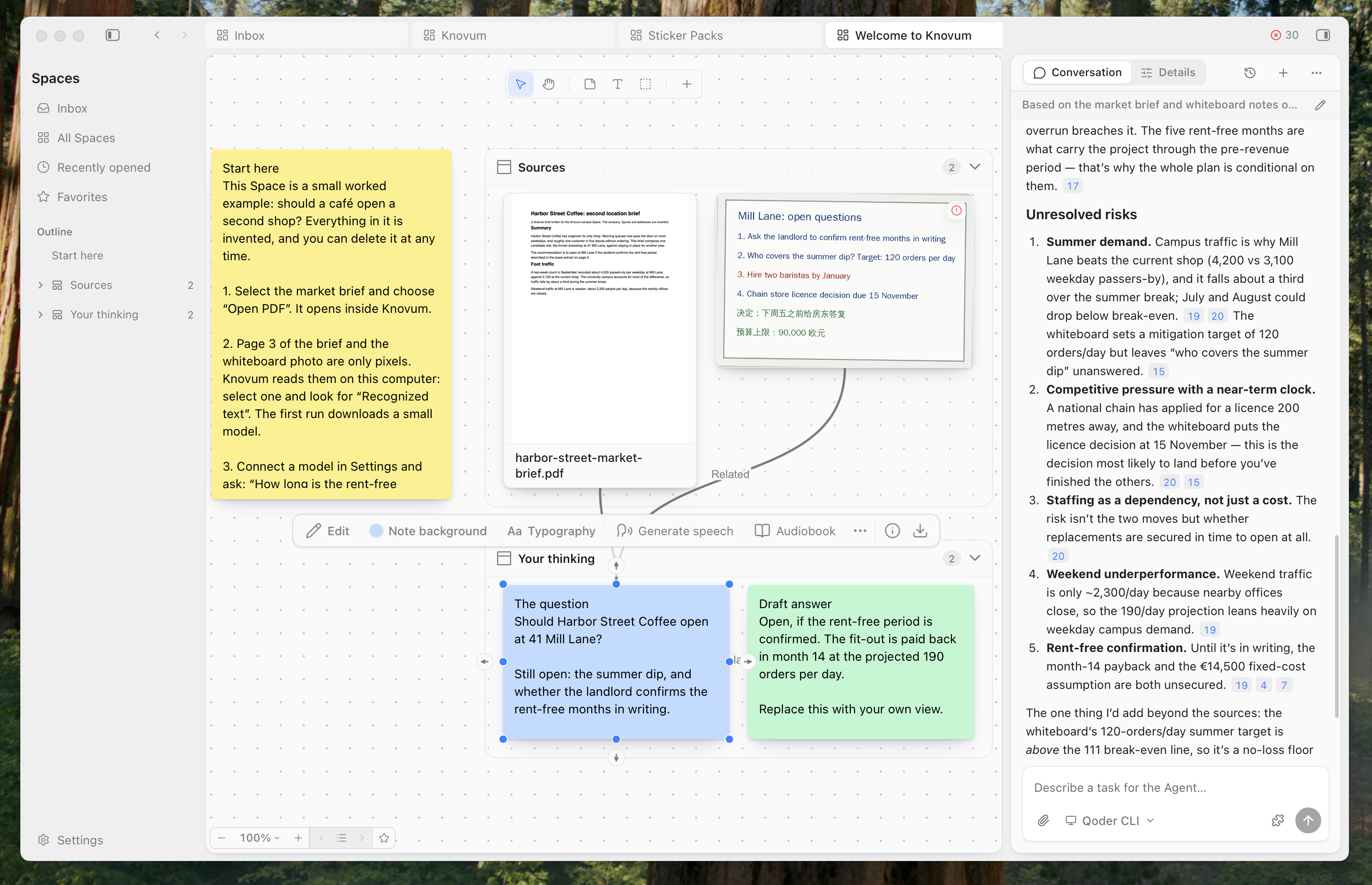
What you can do
- Bring everything into one place. Collect notes, webpages, videos, recordings, PDFs, Office files, images, and code in a Space.
- See how ideas connect. Arrange material on an infinite canvas, connect claims with evidence, and keep related questions and decisions close to their sources.
- Ask questions and check the answer. Search by keyword or meaning, ask a connected AI model about your material, and follow citations back to the exact source location.
- Create from what you know. Turn selected material into documents, images, videos, subtitles, or voice output, with a record of the inputs and model used.
- Keep control of your data and AI. Store your library locally, use supported on-device capabilities, and choose the model provider or compatible desktop Agent for each task.
How it works
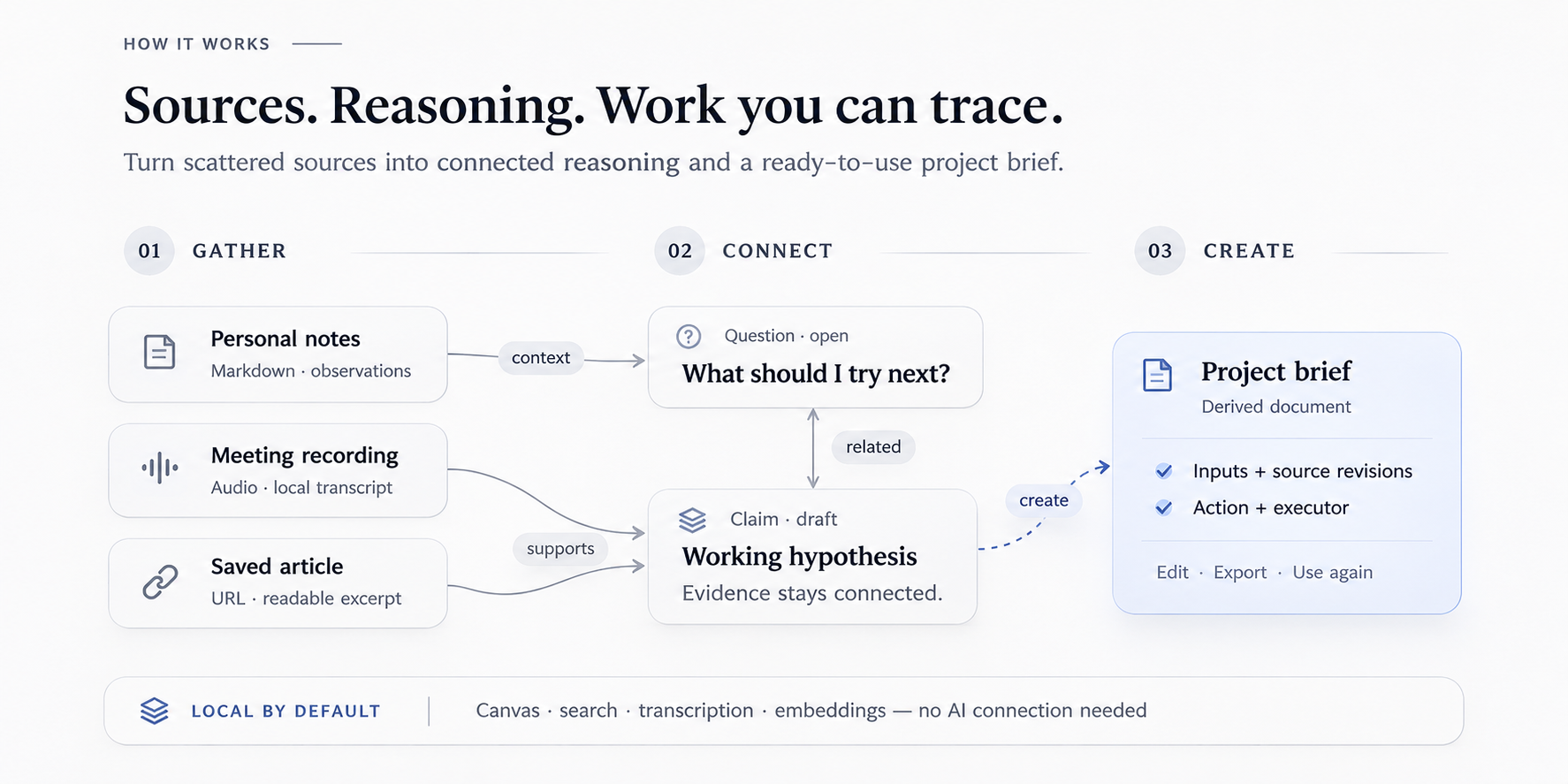 From scattered sources to connected knowledge and work you can trace.
- Collect. Paste a link to save a webpage or a YouTube, Bilibili, TikTok, or Vimeo video. Add recordings, PDFs, Office files, images, code, and notes. Recordings can be transcribed locally with timestamps and speaker labels.
- Organize. Arrange material in sections and groups. Add claims, evidence, questions, and decisions as knowledge objects, then connect them with meaningful relationships.
- Explore. Search one Space or your whole library by keyword or meaning. Ask questions about your sources and follow each citation to its original location.
- Create. Select the material you need and create a document, image, video, or voice track. Export your work while keeping a record of the sources and revisions behind it.
Explore the features
Spaces: one canvas for all kinds of material
Rich notes, Markdown, webpages, PDFs, Office documents, images, audio, video, code, and ordinary files share one infinite canvas. Organize content with sections, groups, tags, and Saved Views; navigate with an outline; and undo the last 100 edits. A system Inbox gives new material a place to land before you organize it.
Knovum supports the open JSON Canvas format (.canvas) for exchanging canvases with compatible tools. You can also move a complete Space — including its content, assets, relations, derivations, and citations — as a portable .knovumspace package.
Ask questions and follow the sources
Ask questions about your own material with a connected model. Answers cite the passages they rely on, and each citation keeps its location in the source: a page in a PDF, a time range in a recording, or a heading in a note.
Citations are tied to the source revision they quote. When a source changes, a citation can become detached instead of silently pointing to content that has moved. A PDF citation opens the original in the built-in reader at the relevant page, with the passage highlighted.
Find information across your library
Hybrid keyword and vector search runs on your machine using Qwen3 embeddings and LanceDB. Search within one Space or across all Spaces, and find related material by meaning as well as exact terms.
Connect ideas into structured knowledge
Use six built-in knowledge object types — Concept, Question, Claim, Evidence, Experiment, and Decision — or create your own. Connect them with relationships such as supports, contradicts, answers, depends on, supersedes, and derives from.
Knowledge checks can surface unsupported or contested claims, evidence without grounding, answered questions, and notes whose sources have changed. You can use as much or as little structure as your work needs.
Create from selection, with a record of where it came from
Turn a selection into a new resource without losing its context. Create documents, generate images or videos, remove backgrounds, split image layers, or add subtitles. Each run records the engine, model, inputs, and input revisions, so you can trace a result back to the material used to create it.
Work with documents, media, and voice
- Editors: Rich notes and Markdown with tables, images, find and replace, and inline citations.
- Export: Notes and captures to DOCX, PDF, PPTX, HTML, Markdown, and TXT; image and audio conversion.
- Video workbench: An absolute-time timeline, proxy playback, and burned-in subtitles.
- Speech studio: Audiobooks with roles and a pronunciation lexicon, narration, dubbing, vocal/accompaniment separation, voice cloning, and voice design.
- System-wide dictation: Hold a global shortcut, speak, and release. Whisper transcribes locally and inserts the text into the app currently in front.
Connect compatible AI agents
Knovum includes a Builtin Agent that can plan with todos, research your Space read-only, and make changes through validated, atomic change sets. You can also use desktop Agents already installed on your machine through the Agent Client Protocol (ACP), with their own sign-in and tools.
Knovum exposes your Space to compatible desktop Agents through a loopback-only MCP server, and can connect outbound MCP servers as Agent extensions. Skills, plugins, connectors, and apps can be managed in one place.
Local-first by design
Your knowledge library is stored on your device: Spaces, files, extracted text, search indexes, and backups stay in local application data. Knovum does not require an account and does not run a Knovum cloud service.
The distinction between local and cloud AI is explicit:
- Local by default for supported capabilities. Editing, keyword and semantic search, transcription, speaker recognition, OCR, speech synthesis, and the listed image tools run on your machine after their models are downloaded.
- Your choice for answers and generation. Connect a provider you already use, run a compatible local endpoint, or hand a task to a desktop Agent.
- Only the task context is sent to a cloud provider. When you choose a cloud model, the action sends the selection and context it needs to the provider you chose. Provider-side handling is governed by that provider's terms and settings.
Model files are downloaded only when a feature needs them, verified against pinned SHA-256 digests, and can be removed from Settings. Download progress and cancellation are available in the Task Center.
Use your own AI provider
Canvas editing, keyword and semantic search, transcription, and the on-device capabilities below work without an AI account.
For AI answers and generation, connect a provider you already use:
OpenAI · Anthropic · Google Gemini · DeepSeek · Qwen · Zhipu · Moonshot · Doubao · MiniMax · StepFun · SiliconFlow · Mistral · Groq · Grok · Together · OpenRouter · Kling · Ollama · any OpenAI-compatible endpoint
You can also hand a task to a desktop Agent that brings its own credentials. Keys are stored in a dedicated local secrets database and are never written to logs.
Download and get started
| Platform | Requirement | Installer |
|---|---|---|
| macOS | macOS 14 or later, Apple Silicon | Knovum_<version>_aarch64.dmg |
| macOS | macOS 14 or later, Intel | Knovum_<version>_x64.dmg |
| Windows | Windows 10 version 2004 or later, x64 | Knovum_<version>_x64-setup.exe |
Builds are not yet notarized by Apple or Authenticode-signed, so macOS and Windows ask you to confirm the first launch. Updates after that are delivered in the app and verified against the release signature. Linux and Windows on ARM are not supported yet.
A simple way to start: create a Space, add two or three sources you are already working with, and write down one question you want to answer. Add an AI connection in Settings when you want AI-generated answers or content.
FAQ
Does Knovum work offline?
Yes. Editing, organizing, keyword and semantic search, transcription, speaker recognition, OCR, speech synthesis, and the listed image tools run on your machine once their models are downloaded. Only actions you send to a cloud model need an internet connection.
Where is my data stored? Does anything get uploaded?
Your library is stored in local application data: SQLite keeps the structure, LanceDB stores the semantic index, and managed files store assets. A separate local database stores secrets. Content is not uploaded to a Knovum cloud. When you ask a cloud model to perform an action, only the context needed for that action is sent to the provider you selected.
Do I need an AI account to use Knovum?
No account is needed to use Knovum or its local editing, organization, search, transcription, OCR, and other listed on-device capabilities. AI answers and generation require a model connection, which can be a cloud provider or a compatible local endpoint.
How is Knovum different from NotebookLM, Obsidian Canvas, or Heptabase?
Knovum brings source-grounded AI answers, a visual canvas for thinking, and structured knowledge into one local-first desktop workspace. It also works with audio and video, supports on-device AI capabilities, and keeps track of the sources and revisions behind generated results.
Can I use local models with Ollama?
Yes. Ollama and any OpenAI-compatible endpoint can be connected as a model for answers and the Builtin Agent. The on-device capabilities listed below do not need Ollama or another model server.
What should I do if local model downloads fail or time out?
On-device capabilities such as OCR, Whisper transcription, and image processing download their model weights on first use. If your network has restricted access to huggingface.co, configure the standard HF_ENDPOINT environment variable to use a mirror, for example https://hf-mirror.com.
- Windows: Set a persistent user environment variable. Press
Win + R, entersysdm.cpl, then open Advanced → Environment Variables. AddHF_ENDPOINTwith the valuehttps://hf-mirror.com. Alternatively, runsetx HF_ENDPOINT "https://hf-mirror.com"in Command Prompt and restart Knovum. - macOS / Linux: Add the following to your shell configuration, such as
~/.zshrcor~/.bashrc:
echo 'export HF_ENDPOINT="https://hf-mirror.com"' >> ~/.zshrc
source ~/.zshrc
Downloaded model files are verified against pinned SHA-256 digests.
Can I bring in my existing notes and canvases?
Import Markdown, documents, and media files directly. Import and export canvases through the open JSON Canvas format (.canvas). A complete Space can also be exported as a portable .knovumspace package.
Is Knovum open source and free?
Yes. Knovum is free and open-source software under the MIT License. You can use, read, build, modify, and distribute it under the terms of the license.
On-device AI capabilities
The following capabilities run locally. Models are downloaded on first use, verified against pinned SHA-256 digests, and can be removed from Settings.
| Capability | Model | Runtime |
|---|---|---|
| Speech transcription | Whisper (default) / Qwen3-ASR 1.7B + Silero VAD | whisper.cpp / audio.cpp |
| Speaker diarization | Pyannote 3.0 + ERes2Net | sherpa-onnx |
| Vocal / accompaniment separation | HTDemucs | audio.cpp |
| Speech synthesis, voice cloning & design | MOSS-TTS-Nano, VoxCPM2, IndexTTS2, Qwen3-TTS, Fun-CosyVoice3 | audio.cpp |
| Word-level transcript alignment | Qwen3 Forced Aligner | audio.cpp |
| Semantic-search embeddings | Qwen3-Embedding-0.6B | Candle |
| Background removal | BiRefNet, BEN2, IS-Net Anime | ONNX Runtime |
| Image upscaling | Real-ESRGAN | ONNX Runtime |
| Inpainting / repair | Big LaMa | ONNX Runtime |
| Smart selection | MobileSAM, SAM 2.1 Hiera-Tiny | ONNX Runtime |
| Relative depth | Depth Anything V2 | ONNX Runtime |
| Text recognition (scans, screenshots) | PP-OCRv6 small | ONNX Runtime |
Embeddings and transcription use Metal on Apple Silicon. None of the capabilities above requires Ollama or another model server.
Build from source
You need Node.js 22.13+ with Corepack, the Rust toolchain pinned in rust-toolchain.toml, and the native tooling used by the desktop build: uv, CMake, Protobuf, and LLVM/libclang. See docs/installation.md for exact versions.
git clone https://github.com/madebyzan/knovum.git
cd knovum
corepack enable
pnpm install --frozen-lockfile
pnpm desktop:dev
The first build compiles the native inference worker and takes longer; later starts are faster.
| Command | Purpose |
|---|---|
pnpm desktop:dev |
Run the desktop app with the Agent environment prepared |
pnpm check |
Full quality gate: web, Rust, and Python |
pnpm check:web |
Typecheck, oxlint, dependency-cruiser, Vitest, knip, jscpd, and oxfmt |
pnpm check:rust |
cargo fmt, clippy (-D warnings), and workspace tests |
pnpm check:python |
ruff, mypy (strict), and pytest for the Agent runtime |
pnpm e2e |
WebdriverIO end-to-end run against a debug build |
pnpm package |
Build desktop bundles for the current platform |
CI runs these checks on macOS (Apple Silicon and Intel) and Windows. Pushing a v* tag builds the macOS and Windows packages into a draft GitHub Release.
Architecture
A Rust core owns data, inference, and OS integration; a Vue 3 renderer owns interaction; generated contracts connect the two. Local models run in a separate inference worker, and the Builtin Agent runs in a bundled Python runtime.
Tauri 2 · Rust · Vue 3 · TypeScript · SQLite (sqlx) · LanceDB · Candle · ONNX Runtime · whisper.cpp · Konva · Tailwind CSS v4
Read more in docs/system-architecture.md, the documentation map, and the product design contract in DESIGN.md.
Contributing
Bug reports, focused feature proposals, translations, and documentation fixes are welcome. See CONTRIBUTING.md and the Code of Conduct.
When opening an issue, include your platform, Knovum version, and steps to reproduce. Remove credentials from logs. Report security issues privately as described in SECURITY.md.
If Knovum is useful to you, a ⭐ helps other people find it.
License
Knovum is released under the MIT License. Third-party components retain their own licenses.