
m4heshd/ufc-ripper
m4heshd/ufc-ripper has 64 GitHub stars and 8 forks. GitHot measured 0 stars in 24 hours. Last checked 2026-11-15 06:30 UTC. Last push 2026-11-04.
Measured star growth
- in 24h
- 0
- in 7 days
- Collecting history
- in 15 days
- Collecting history
- in 1 month
- Collecting history
Net star changes over overlapping periods, not daily totals. Missing measurements are left blank. Stars measure attention, not software quality.
About
📹 Video downloader tool for UFC Fight Pass 🥊
Creative & MediaREADME.md
Original

 UFC Ripper: 📹 Video downloader tool for UFC Fight Pass 🥊


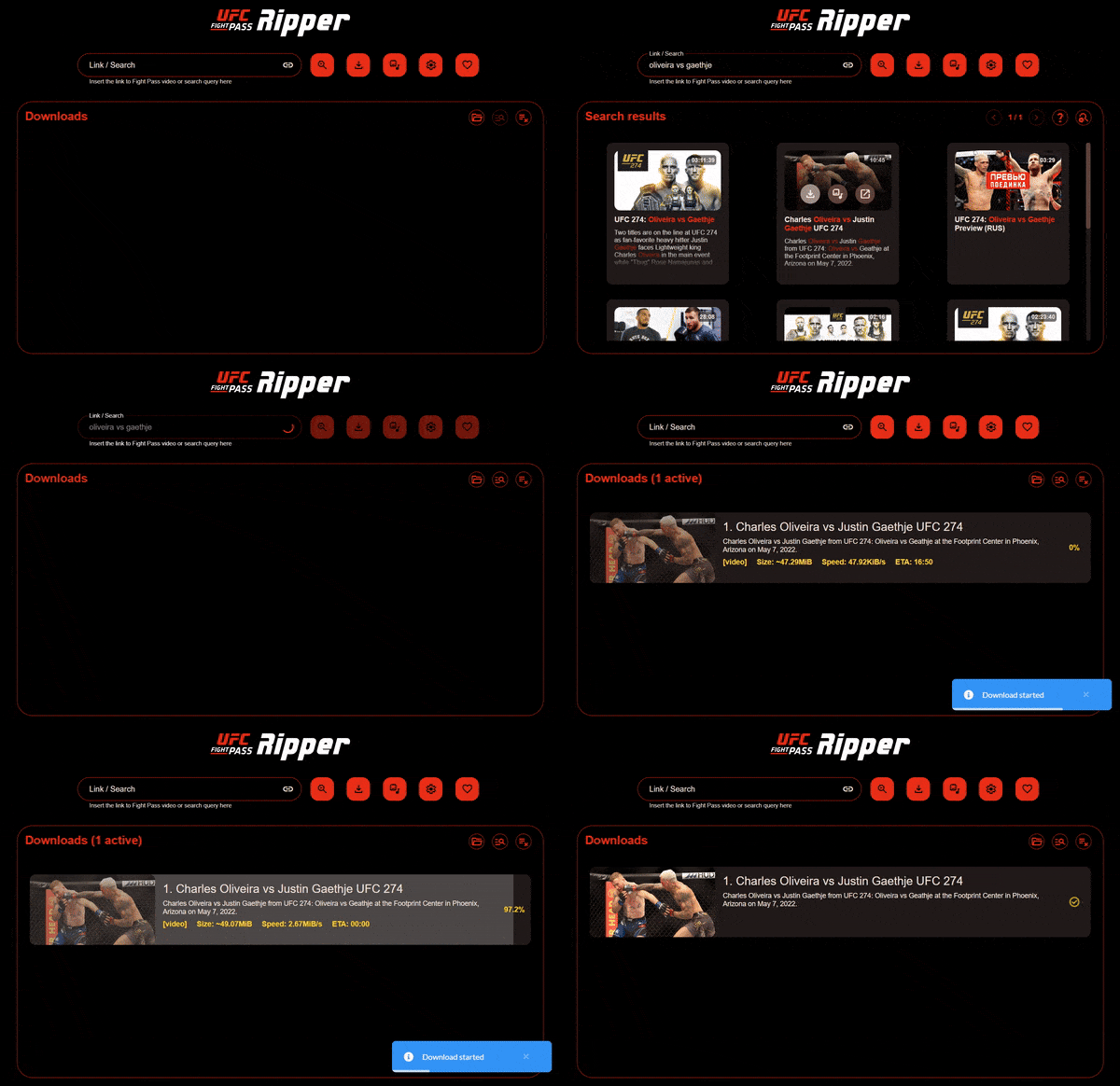
What is UFC Ripper?
An open-source video downloader tool for UFC Fight Pass, powered by Rust and Vue, that can run on both the desktop and the cloud. The only thing it can't do is STEAL videos free of charge for you. A paid Fight Pass subscription is required for this tool to work.
👉🏻 Read about UFC Ripper on TorrentFreak.
[!WARNING]
Intellectual property (DISCLAIMER) ⚠️
The UFC logo and the UFC Fight Pass logo used in this project are intellectual properties of Zuffa LLC.
The user will be responsible for any content downloaded through this tool. Redistribution of that content in any form is illegal, and this application or I (the developer) will not be liable for that.
Dear Dana White,
This isn't a tool created for pirating your copyrighted content. This tool requires a PAID FIGHT PASS SUBSCRIPTION to function. This merely eliminates the need to stream a massive amount of data through metered connections every time you want to go back and watch your favorite fighters. I want your fighters to be paid more. Not less. This tool is not in any way meant to rob you or them of any revenue coming in.
The whole reason for me to create this tool is for my own needs. I live in a third-world country that was destroyed by politicians. That made internet services more of a luxury than a right for the people of this country. Our internet connections are very spotty and extremely limited. 1GB of data here costs more than a meal. Imagine that. I also travel, and the only thing that can keep me entertained is some UFC. But how do I watch UFC if I can hardly find 4G coverage in my messed-up land? 🤷🏽
The thing about Fight Pass is, you can't control how much of your quota it's going to burn. Also, repeated viewings waste a ton of data. But my love for MMA and UFC is unconditional. So I decided to whip up this tool to eliminate all of these mentioned issues. Then I thought, "Why not share this with the world? There might be a ton of other people like me around the world". So here we are. Hope you'd understand, Dana. 🙂
Support this project 🙏🏽
I get it, this isn't a perfect tool. There could be a few missing features and some bugs here and there. But this COULD improve a lot. Working on this project and testing on all targets requires a lot of time and energy.
You can help me by buying me a few coffees ☕, so I'm all buzzed up and got time to work on this further. Or you can send a few monies my way to simply say thanks for the work that's already been done.
The best way for you to support me is via GitHub Sponsors, even for one-time donations, because they don't keep a share. Everything you donate goes to the developer.


Other donation methods:
PayPal is not a preferred method of donation because they take a huge chunk (~22%) off of every donation (ko-fi also uses PayPal).


Join the conversation 💬
We have two social groups dedicated to any discussion regarding UFC Ripper.
Discord:
Telegram:
How to use?
Installation
[!NOTE] UFC Ripper is available on all major platforms (Windows, Linux, macOS), in both
x64andarm64targets. It can also run on the cloud as a Docker container.
Desktop
UFC Ripper is available on desktop, both as an Installer (Windows) and a portable app.
Download the latest release corresponding to your system,
Run the installer or extract the content of the zip file to anywhere you like
Run the executable file (
ufc-ripper.exeorufc-ripper) (Installer version should have a shortcut on the start menu)Open the browser and visit the URL shown in the console window. (it should automatically open on the default browser)
The first run might ask you to download some third-party tools used by UFC Ripper. Click yes, and it will automatically download the latest versions from media-tools repo.
[!NOTE] For macOS users:
The first launch of the application may give you an error saying
"ufc-ripper" is damaged and can't be opened. This is because the build is not signed. Nothing to worry there.Simply right-click on the UFC Ripper folder, open up a new Terminal at the folder, and run
xattr -c ufc-ripper.Now you should be able to double-click on the
ufc-ripperexecutable, and it should run perfectly fine.
Docker
[!NOTE] The Docker image is available in
linux/amd64andlinux/arm64targets, which means it can natively run on ARM-based systems like the Raspberry Pi, Snapdragon, and Apple Silicon devices.
You can either build the Docker image locally and run using docker-compose.yaml or use the
published official image.
To build and run locally, simply run npm run docker:up. This is a standalone Dockerfile where both the app-building
process and the runtime is done inside a multi-stage build, so the host will not require any build tools or libraries
installed.
Here's a docker-compose template for you lazies out there.
services:
  ufc-ripper:
    image: m4heshd/ufc-ripper:latest # Using the latest version of the official image
    container_name: ufc-ripper
    restart: unless-stopped
    volumes:
      - ./config:/ufcr/config # Any configuration files will be stored here
      - ~/Downloads/ufc-ripper:/downloads # Downloaded videos will be stored here
    ports:
      - "8383:8383" # Web UI port
That's it.
[!NOTE] Using Gluetun (VPN container) with Docker?
If Fight Pass blocks login or token refreshes with "Login was blocked because of the IP address your UFC Ripper backend is bound to" (
403 badLocation) even though the same VPN server works in the desktop app, check Gluetun's DNS settings.By default, Gluetun routes DNS queries through Cloudflare DNS-over-TLS (
1.1.1.1), whereas VPN desktop apps typically use the VPN provider's own internal DNS servers. Disabling Gluetun's built-in DoT resolver and pointing DNS to your VPN provider's resolver resolves thebadLocationblock:environment: - DOT=off # Disable Gluetun's default Cloudflare DNS-over-TLS - DNS_ADDRESS=103.86.96.100 # Use your VPN provider's internal DNS (e.g., NordVPN)
Usage
[!IMPORTANT] You need to have a UFC Fight Pass account with a paid subscription, and to be logged into that account to use UFC Ripper.
Open up the GUI in the browser and go into Configuration (⚙️ button) and log in with your UFC Fight Pass account using the "Fight Pass account" section.
Once successfully logged in, you can search for videos and download them, or copy and paste a link to a UFC Fight Pass video in the "Link" input and hit the download button.
Optionally, look through the configuration to change any download settings (video quality, audio quality, etc..) to your needs
How to update?
The application will automatically notify you of any available updates on launch. You can visit the download URL and download your preferred build.
On portable builds, you pretty much only have to replace the primary executable file (ufc-ripper.exe or ufc-ripper).
[!IMPORTANT] Do not replace the
config.jsonfile if you would like to preserve your existing configuration, including the logged-in session. UFC Ripper will migrate your existing configuration automatically into any new version on the next launch of the app.
If you're using the installed version on Windows, simply run the new installer, and it will update your existing build. The update installation will preserve your existing configuration by default. Just like the portable version, it will migrate your existing configuration automatically on the next launch.
Mention-worthy features
Advanced search
If you have ever used UFC Fight Pass search, you know how difficult it is to find the video you're actually looking for on there. But not to worry, because UFC Ripper supports much more advanced and precise searching of the Fight Pass library than UFC Fight Pass itself.
You can restrict the search algorithm to only look inside the event titles, which would result in way more accurate results, or you can use advanced query syntax like double quotes and negative symbol, like you would on Google search.
Streaming
UFC Ripper can stream videos directly, right from the search results. The advantage of streaming in UFC Ripper is that you're the one in control. You can force the player to stream the video in your preferred settings, unlike the UFC Fight Pass. You choose how much of your data quota you'll be burning to watch a video.
Concurrent multi-fragment downloads
UFC Fight Pass streams are very heavily limited to slower bandwidths. But these streams are broken down into little fragments. This feature allows you to download a given number of fragments concurrently, which multiplies the speed of downloads by the number of allowed concurrent fragment downloads. You can set the amount in the configuration as you wish.
Proxy support
This might come in handy when you run UFC Ripper as a Docker container in the cloud because the service blocks any requests initiated using a datacenter IP address.
If you set up a proxy, UFC Ripper will forward all API requests through that proxy server. Remember, only the API requests will go through the proxy. Not the downloads. This also means that your proxy server will hardly have to transfer any data through it.
File numbering
UFC Ripper can automatically number each download incrementally. Let's say you discovered a fighter you haven't watched before and are interested in watching all of their fights in order. This feature would be beneficial in an event like that.
Development
You need to have the Rust compiler, platform build tools, and Node.js (>=22) installed locally to develop, compile, and package this project yourself.
Run
git clone https://github.com/m4heshd/ufc-ripper.gitcdinto theufc-ripperdirectory and runnpm install
That's it. Now you're ready to go.
To run for development,
In development mode, the backend is configured to run on port 8383 and the frontend is set to run on port 8384.
You can change this behavior by editing the port in config.json, frontend/.env and vite.config.mjs
Run
npm run devto start the frontend and the backend with Vue HMR supportOpen the browser and visit
http://localhost:8384/(if you visithttp://localhost:8383/, you'll be viewing the production version of the frontend without the HMR support instead)
To package the application for production,
Run
npm run build:backend:win32,npm run build:backend:linuxornpm run build:backend:macosto build both the frontend and the backendRun
npm run pack:win32,npm run pack:linuxornpm run pack:macos(packaging process is NOT cross-platform compatible)
To build and run the Docker container,
- Run
npm run docker:up
The Dockerfile used for this build (build.Dockerfile) is a multi-stage build file that builds
both the application and the runtime image. If you're planning on testing only inside the Docker image, your host will
not need any compilers or platform build tools.
All Rust compilation steps will also be cached in the initial build, which makes any subsequent builds significantly faster.
Future improvements planned
- Rewrite the backend in Rust
- Ability to search the Fight Pass library right from UFC Ripper
- Migrate to Vite (dev)
- Support for concurrent multi-fragment download
- Ability to restart failed/canceled downloads
- Support for downloading custom formats
- Support for streaming VODs
- Support for more architectures, including ARM-based systems
- Support for macOS hosts
- Mobile-responsive Web UI
- Make completed files downloadable right from the UFC Ripper Web UI (hosted)
- Authentication support using username and password for the Web UI (hosted)
Attribution
UFC Ripper utilizes several third-party open-source tools to function. Following is a list.
Thank you to all the developers of these projects for their hard work. 🙏🏽
License
This project is licensed under MIT License. Use and alter at your wish.