
lxe/llavavision
lxe/llavavision has 500 GitHub stars and 34 forks. GitHot measured +1 stars in 24 hours and +1 in 7 days. Last checked 2026-11-09 10:14 UTC. Last push 2023-11-28.
A simple "Be My Eyes" web app with a llama.cpp/llava backend
Measured star growth
- in 24h
- +1
- in 7 days
- +1
- in 15 days
- Update delayed
- in 1 month
- Update delayed
Net star changes over overlapping periods, not daily totals. Missing measurements are left blank. Stars measure attention, not software quality.
README.md
OriginalLLaVaVision
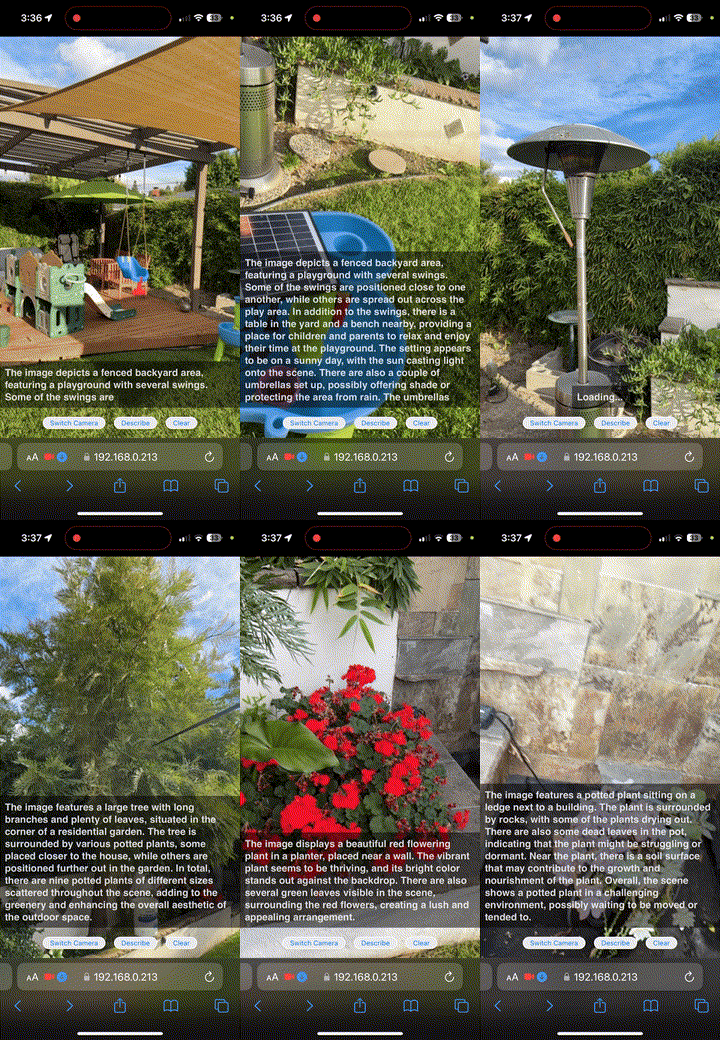
A simple "Be My Eyes" web app with a llama.cpp/llava backend created in about an hour using ChatGPT, Copilot, and some minor help from me, @lxe. It describes what it sees using SkunkworksAI BakLLaVA-1 model via llama.cpp and narrates the text using Web Speech API.
Inspired by Fuzzy-Search/realtime-bakllava.
Getting Started
You will need a machine with about ~5 GB of RAM/VRAM for the q4_k version.
Set up the llama.cpp server
(Optional) Install the CUDA toolkit:
sudo apt install nvidia-cuda-toolkit
Build llama.cpp (build instructions for various platforms at llama.cpp build):
git clone https://github.com/ggerganov/llama.cpp
cd llama.cpp
mkdir build
cd build
cmake .. -DLLAMA_CUBLAS=ON # Remove the flag if CUDA is unavailable
cmake --build . --config Release
Download the models from ggml_bakllava-1:
wget https://huggingface.co/mys/ggml_bakllava-1/resolve/main/mmproj-model-f16.gguf
wget https://huggingface.co/mys/ggml_bakllava-1/resolve/main/ggml-model-q4_k.gguf # Choose another quant if preferred
Start the server (server options detailed here):
./bin/server -m ggml-model-q4_k.gguf --mmproj mmproj-model-f16.gguf -ngl 35 -ts 100,0 # For GPU-only, single GPU
# ./bin/server -m ggml-model-q4_k.gguf --mmproj mmproj-model-f16.gguf # For CPU
Launch LLaVaVision
Clone and set up the environment:
git clone https://github.com/lxe/llavavision
cd llavavision
python3 -m venv venv
. ./venv/bin/activate
pip install -r requirements.txt
Create dummy certificates and start the server. HTTPS is required for mobile video functionality:
openssl req -newkey rsa:4096 -x509 -sha256 -days 365 -nodes -out cert.pem -keyout key.pem
flask run --host=0.0.0.0 --key key.pem --cert cert.pem --debug
Access https://your-machine-ip:5000 from your mobile device. Optionally, start a local tunnel with ngrok or localtunnel:
npx localtunnel --local-https --allow-invalid-cert --port 5000
Acknowledgements and Inspiration
Explore related projects
affaan-m/ECC
The agent harness performance optimization system. Skills, instincts, memory, security, and research-first development for Claude Code, Codex, Opencode, Cursor and beyond.
300,271 starsNousResearch/hermes-agent
The agent that grows with you
262,100 starsmultica-ai/andrej-karpathy-skills
A single CLAUDE.md file to improve Claude Code behavior, derived from Andrej Karpathy's observations on LLM coding pitfalls.
231,393 starsfirecrawl/firecrawl
Supercharge your AI agents with data from the web and beyond. Building the library for superintelligence. 🔥
200,178 stars