
luongnv89/rex-extensions
About
Extensions for the Rex terminal multiplexer: PR/issue panel, Claude usage panel, tab locations, same-machine ssh tabs
Developer ToolsMeasured star growth
- in 24h
- 0
- in 7 days
- +1
- in 15 days
- Collecting history
- in 1 month
- Collecting history
Net star changes over overlapping periods, not daily totals. Missing measurements are left blank. Stars measure attention, not software quality.
README.md
Originalrex-extensions


Extensions for Rex, the terminal multiplexer. Each one is a folder with a Lua file that Rex's init.lua loads, plus whatever the extension runs, and an install.js that adds it to your config.
| Extension | What it does | Default key |
|---|---|---|
| github | The open pull requests and issues of the repo you're in, from GitHub or GitLab, in a side pane. Resolve an issue or review a pull request with an agent, from a button on each row, with the agent profile and prompt you choose, merge a pull request from its own Merge button, close an issue from its own Close button, and run one agent on the issues you check with Auto-pilot. | cmd+shift+g |
| mcc | The 5-hour and weekly Claude Code usage of every mcc account, and the spend of its API-key profiles, in a strip along the bottom of the tab, with a button to look them up live, and the machine's CPU, memory, disk space, network speed and disk read/write speed. | cmd+shift+u |
| tabs | The machine in each session's name and the folder in each tab's name, such as devbox over skills · claude, so the sidebar shows where every tab is. Works over ssh. |
cmd+shift+l |
| sshtab | A new tab or split pane opened from one that's ssh'd into a machine connects to that machine too, with the same ssh options, from the + button, the menu, the command palette or the keys. After Rex restarts, the Claude Code, Codex and other agent sessions that were running come back in their panes and folders. | cmd+alt+t |
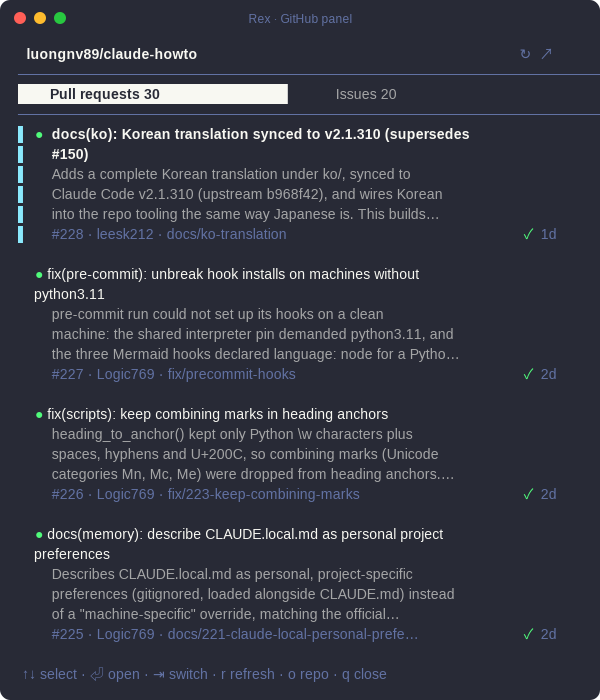
The github panel. The other extensions show their output in their own READMEs.
Quick start
git clone https://github.com/luongnv89/rex-extensions ~/.config/rex/rex-extensions
node ~/.config/rex/rex-extensions/github/install.js
Then press cmd+shift+g in a Rex pane inside a GitHub or GitLab repo, or the key install.js says it picked. The github panel needs gh or glab, logged in, plus Rex and Node 20 or later (see Needs). Install explains each step.
Features
Each extension's README explains every feature in full. This is the list.
github: pull requests and issues in a side pane
- Lists the 50 most recent open pull requests and issues of the repo in the focused pane, from GitHub, GitHub Enterprise, GitLab or a self-hosted GitLab, with each row's author, branch, Draft chip, review state, checks, labels in their colors and age. The panel follows you when you
cdor change pane, and refreshes every 2 minutes. (Use) - Resolve and Review buttons on GitHub start an agent in a new pane beside yours: Resolve hands an issue to the
issue-resolverskill, Review hands a pull request toissue-pr-review. The panel checks the skill is installed first, and leaves your own agent and focus alone. (Resolve and review with an agent) - Agent profiles choose the agent, model, thinking level and launch arguments, for seven harnesses: Claude Code via
mcc run, Claude Code, Codex, Pi, OpenCode, Mistral Vibe and Devin. A menu picks the profile at each start, and each action keeps a default. (Agent profiles)- Built-in model lists for each harness, plus models you add yourself. (Models)
- A Test button checks a profile's agent and model can start, without starting it or spending tokens. (Test a profile)
- Import from mcc turns mcc's Claude Code profiles into panel profiles, several at once, with each one's model and thinking level. (Import from mcc)
- Custom prompts and button labels replace the skill a button sends with a prompt of your own, and rename the button to match, such as Fix with tests #N. (Custom prompts, Button labels)
- Auto-pilot puts a checkbox on every issue and runs one agent on the ones you check, with the IDD
auto-pilotskill or your own prompt. GitHub only. (Auto-pilot several issues) - Merge a pull request from its row, on GitHub and GitLab, with a second press to confirm. It uses the method the repo allows, refuses if the branch moved since you looked, and shows its progress on the button. (Merge a pull request)
- After a merge it deletes the branch, or keeps it, as you set. When it deletes it, your checkout ends on an up-to-date default branch with the local copy gone. (Delete the branch)
- Close an issue from its row, on GitHub and GitLab, with a second press to confirm. (Close an issue)
- Settings in tabs: profiles, each button's label and prompt, and the merge mode. (Edit them)
- Works without a mouse: every button has a key,
?lists the keys of the view you're in, and the profile menu opens at the bottom of the pane where a phone over remote access can see it. (Use) - Remembers the list you chose and the width you dragged it to, across restarts, and runs in sessions on remote Rex servers. (Remote hosts)
mcc: Claude Code usage and machine stats in a bottom strip
- Usage bars for the 5-hour and weekly window of every mcc account, with the time to each reset, ordered by weekly use. Devin shows its daily window and overage balance. (mcc README)
- API-key profiles show this month's estimated spend, and a bar against the budget when one is set.
- The
►mark shows which profilemcc runwould start in the folder of the pane you work in, and moves with you. - Login warnings: a ⚠ marks an account whose login has ended, ends soon or whose last lookup failed, with the
mcc logincommand that fixes it. - Details (
d) shows each account's last use, login end, how old its numbers are and its reset times as clock times. - Live refresh looks every account up on demand; between refreshes the panel rereads mcc's cache every 30 seconds, including accounts on other machines mcc reaches over SSH. (Use)
- Machine stats: every 5 seconds, on two lines: CPU, memory and disk space, then network speed and disk read/write speed. A narrow pane fits them on one line, with an online dot and a disk activity dot after the percents.
- Fits itself to its accounts, collapses to one summary line, and opens under the github panel when the tab has one.
tabs: where every tab is, in the sidebar
- Machine in the session name, such as
devbox,Laptop:deploy, and folder in the tab name, such asapi · claude. (tabs README) - Follows ssh: a tab running
ssh,mosh,etorautosshshows the remote machine and folder. - Keeps your names: rename a session or tab as usual and the machine or folder is added back.
- Turns off cleanly: the key puts every name back as it was, and off is remembered across restarts.
sshtab: new tabs follow ssh, agents come back after a restart
- Same-machine tabs and splits: a new tab or split pane opened from one that's ssh'd into a machine connects to that machine, from the + button, the menu, the palette or
cmd+t. (sshtab README) - Carries the ssh options (
-p,-i,-J,-oand the rest) and drops what would break a shell: the remote command, port forwards and flags such as-Nand-f. - Leaves scripts alone: tabs and panes made by
rexcommands, scripts and agents are never touched. Each decision goes to a log. - Agent sessions after a Rex restart: a pane that ran an agent resumes the same session in the same folder. Claude Code always comes back; Codex, OpenCode, Cursor Agent and pi come back when they were started with a session id; Gemini, Amp, Qwen, Copilot and Kimi don't. A palette action turns this part off on its own. (Agent sessions after a restart)
Install
Rex has no plugin manager. An extension is enabled when the init.lua Rex reads loads its Lua file and binds a key to its action. Each extension's install.js makes that edit for you.
1. Clone the repo once
git clone https://github.com/luongnv89/rex-extensions ~/.config/rex/rex-extensions
Any folder works. init.lua loads the extensions from where you cloned them, so keep the clone there.
2. Install and enable the extensions you want
Run each extension's install.js:
node ~/.config/rex/rex-extensions/github/install.js
node ~/.config/rex/rex-extensions/mcc/install.js
node ~/.config/rex/rex-extensions/tabs/install.js
node ~/.config/rex/rex-extensions/sshtab/install.js
Each one:
- adds three lines to
init.lua: a comment, adofilethat loads the extension, and arex.bindfor its key; - checks the result with
rex config check, and puts the old file back if the check fails; - saves the old file as
init.lua.bak-rex-<extension>; - runs
rex config reload, so the key works at once, with no restart.
The file it edits is REX_CONFIG when that's set, else $XDG_CONFIG_HOME/rex/init.lua, else ~/.config/rex/init.lua. It's created if it doesn't exist. Running install.js again when the extension is already there changes nothing.
For mcc, the lines look like this:
-- rex-mcc: the mcc usage panel (https://github.com/luongnv89/rex-extensions/tree/main/mcc)
dofile("/Users/you/.config/rex/rex-extensions/mcc/rex-mcc.lua")
rex.bind("cmd+shift+u", "mcc_usage")
3. Use it
Press the extension's key in any Rex pane:
| Extension | Key | Action | In the command palette |
|---|---|---|---|
| github | cmd+shift+g |
github_panel |
PR and Issue Panel |
| mcc | cmd+shift+u |
mcc_usage |
mcc Usage Panel |
| tabs | cmd+shift+l |
tab_locations |
Tab Locations (turns it off or on; it runs on its own) |
| sshtab | cmd+alt+t |
same_host_tabs |
Same-Machine Tabs (turns it off or on; it runs on its own). restore_agent_sessions, Restore Agent Sessions, turns agent session restore alone off or on. |
Without the key, pick the extension in Rex's command palette, or run its action from a shell with rex do ACTION, such as rex do mcc_usage.
To check that an extension is enabled:
rex config check                  # init.lua loads without errors
rex keymap | grep mcc_usage       # the key is bound to the action
Pick another key
When the default key is already bound in your init.lua, install.js takes the first free key from its own list and says which one it picked. To choose a key yourself, pass it:
node ~/.config/rex/rex-extensions/mcc/install.js ctrl+alt+u
It refuses a key your init.lua already binds. It can't see the shortcuts built into the Rex app, so if the key does something else there, remove the extension and install it again with another key.
Enable it by hand
To skip install.js, add the dofile and rex.bind lines above to init.lua yourself, using the path of your clone, then run rex config check and rex config reload.
Update, disable or remove
- Update: run
git pullin the clone. Every extension updates at once. A change to a pane's script shows the next time the pane opens; a change to an extension's Lua file needsrex config reload. - Disable or remove:
node ~/.config/rex/rex-extensions/mcc/install.js --removetakes the extension's lines out ofinit.luaand reloads the config. Runinstall.jsagain to bring it back.
Configuration
Each extension is configured by its key, which you pass to install.js, and by a few environment variables:
| Variable | Used by | What it does |
|---|---|---|
REX_CONFIG |
every install.js |
The init.lua to edit. Else $XDG_CONFIG_HOME/rex/init.lua, else ~/.config/rex/init.lua. |
XDG_STATE_HOME |
github and mcc panels | Where the panel keeps its state files. Default ~/.local/state. |
MCC_BIN |
mcc and github panels | The full path to mcc, when it isn't on PATH or in the usual install folders. |
REX_GITHUB_STARTUP_MS |
github panel | How long Resolve/Review waits for the agent to start, in ms. Default 3000. |
docs/DEVELOPMENT.md lists the rest, which are mostly for tests.
Needs
- Rex on macOS or Linux.
- Node 20 or later, as
nodeon thePATHyour login shell sets. - Whatever an extension lists in its own README.
Layout
rex-extensions/
  github/ mcc/ tabs/ sshtab/   one folder per extension
  docs/                        architecture, development guide, changelog index
  .github/                     CI workflow, issue and pull request templates
Each extension folder holds:
<extension>/
  rex-<name>.lua  the actions init.lua loads with dofile
  install.js      adds the extension to init.lua, or --remove takes it out
  test/           node --test tests, run by CI
  README.md       what it does, its keys, what it runs
  CHANGELOG.md
An extension is self-contained: no npm packages, nothing shared between folders, so each one can be installed, removed and versioned on its own.
Develop
git clone https://github.com/luongnv89/rex-extensions
cd rex-extensions/github
node --test
rex do ./rex-github.lua --action github_panel
rex do FILE --action NAME runs an extension's action from your clone without installing it.
Documentation
- docs/ARCHITECTURE.md: how Rex loads an extension, the shared install flow, and the panel and watcher patterns.
- docs/DEVELOPMENT.md: requirements, tests, environment variables and debugging.
- docs/CHANGELOG.md: where each extension's changelog is.
- Each extension's README: github, mcc, tabs, sshtab.
Contributing
Bug reports, fixes and new extensions are welcome. Read CONTRIBUTING.md first, and follow the Code of Conduct. Report security issues privately, as SECURITY.md explains, not in a public issue.
License
Acknowledgments
- Built on Rex, the terminal multiplexer, and its Lua config and
rexCLI. - The mcc panel is the Rex twin of mcc-herdr-plugin, the same panel for Herdr.
- The github panel uses
ghandglab; the mcc panel uses mcc.
Explore related projects
Loading…