
lpgera/dirigera-web
lpgera/dirigera-web has 36 GitHub stars and 2 forks. GitHot measured 0 stars in 24 hours. Last checked 2026-11-14 21:15 UTC. Last push 2026-11-13.
Measured star growth
- in 24h
- 0
- in 7 days
- Collecting history
- in 15 days
- Collecting history
- in 1 month
- Collecting history
Net star changes over overlapping periods, not daily totals. Missing measurements are left blank. Stars measure attention, not software quality.
About
A progressive web app for controlling Dirigera smart home devices.
Web & AppsREADME.md
OriginalDirigera web
Dirigera web is a web-based interface for controlling smart home devices connected to the IKEA Dirigera gateway. The app is designed to be run on a home server (such as a Raspberry Pi) on the same network as the gateway. It provides a user-friendly interface for controlling your smart home devices, and can be accessed from any device with a web browser.
Screenshots 📸
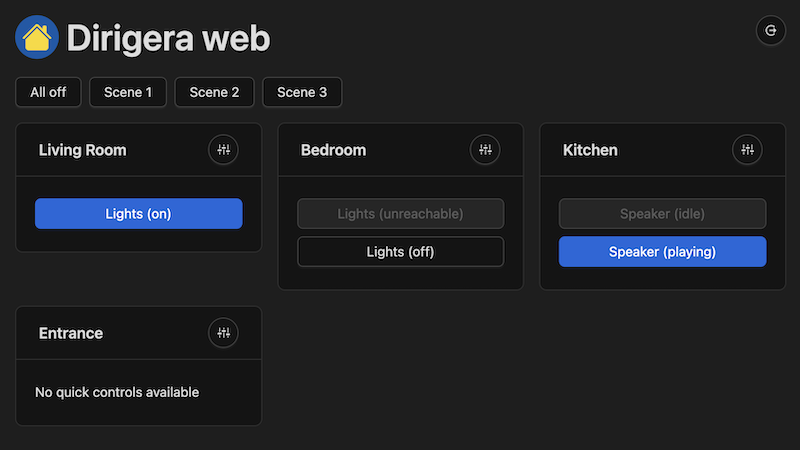
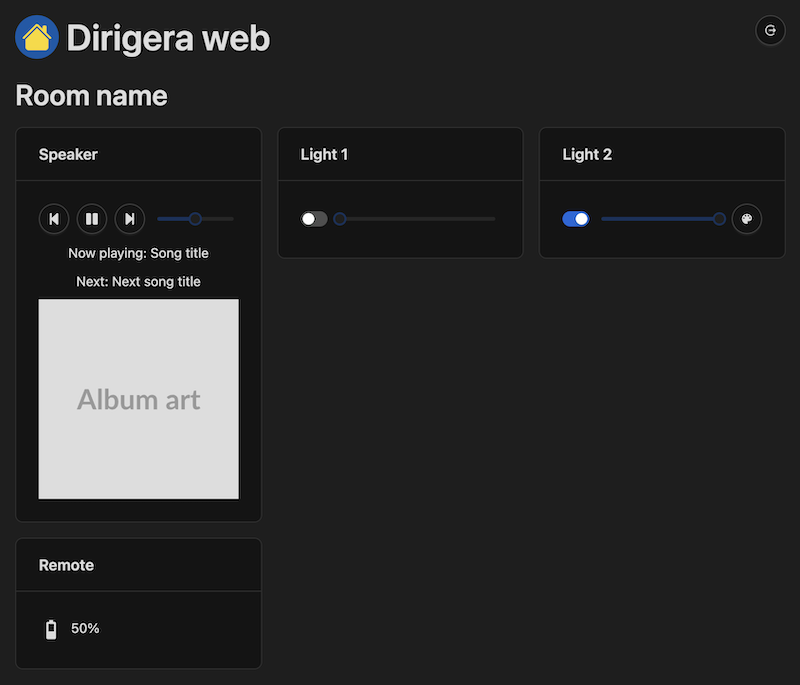
Check out the latest storybook build to see the UI here.
Are you looking for the old Tradfri web ui? Switch to the tradfri branch.
Environment Variables
The app uses environment variables to configure its behavior. You can set these variables in a .env file located in
the project directory:
GATEWAY_IP(optional) - The IP address of the Dirigera gateway. If not specified, the app will attempt to discover the gateway automatically.ACCESS_TOKEN- Your access token for the Dirigera gateway. You can obtain this token using the dirigera CLI tool by runningnpx dirigera authenticateand following the instructions.JWT_SECRET- A secret key used to sign JSON web tokens (JWTs) for user authentication.JWT_EXPIRY(optional) - The expiration time for JWTs. Defaults to "1 day".PASSWORD- The password for the web interface.PORT(optional) - The port on which the app will listen for incoming connections. Defaults to 4000.
Your .env file should look something like this:
GATEWAY_IP=192.168.1.2
ACCESS_TOKEN=your-gateway-access-token
JWT_SECRET=your-random-secret-key
JWT_EXPIRY=7 days
PASSWORD=your-password
PORT=4000
Replace the values with your own.
Running with Docker
To run the app with Docker, you can use the following command:
docker run \
  -p 4000:4000 \
  --env-file .env \
  --name dirigera-web \
  --restart unless-stopped \
  --detach \
  ghcr.io/lpgera/dirigera-web
This command tells Docker to run the app in a container, with port 4000 on the container mapped to port 4000 on the host
system. It also specifies the .env file containing the required environment variables.
Running with Docker Compose
To run the app with Docker Compose, create a docker-compose.yml file with the following contents:
version: "3"

services:
  dirigera-web:
    image: ghcr.io/lpgera/dirigera-web
    container_name: dirigera-web
    env_file: .env
    ports:
      - "4000:4000"
    restart: unless-stopped
Then run the following command:
docker-compose up -d
This command tells Docker Compose to run the app in a container, with port 4000 on the container mapped to
port 4000 on the host system. It also specifies the .env file containing the required environment variables.
Running with Node.js natively
git clone https://github.com/lpgera/dirigera-web.git
Then navigate to the cloned directory and install dependencies:
cd dirigera-web
npm install
Then build the project:
npm run build
Finally, start the server:
npm start
Contributions
The app was created mainly to serve my own needs, but I'm happy to accept contributions. If you have a device which is not supported, feel free to open a pull request. If you have any questions, please open an issue.
License
This project is licensed under the terms of the MIT license. See the LICENSE file for details.