
lordmathis/llamactl
lordmathis/llamactl has 161 GitHub stars and 33 forks. GitHot measured 0 stars in 24 hours. Last checked 2026-11-10 01:24 UTC. Last push 2026-11-07.
Unified management and routing for llama.cpp, MLX and vLLM models with web dashboard.
What you can do
- Built-in Model Downloader: Download GGUF and Safetensors models directly from HuggingFace for llama.cpp, vLLM, and MLX backends
- Dynamic Multi-Model Instances: llama.cpp router mode - serve multiple models from a single instance with on-demand loading
- Smart Resource Management: Automatic idle timeout, LRU eviction, instance groups with per-group limits, and configurable instance limits
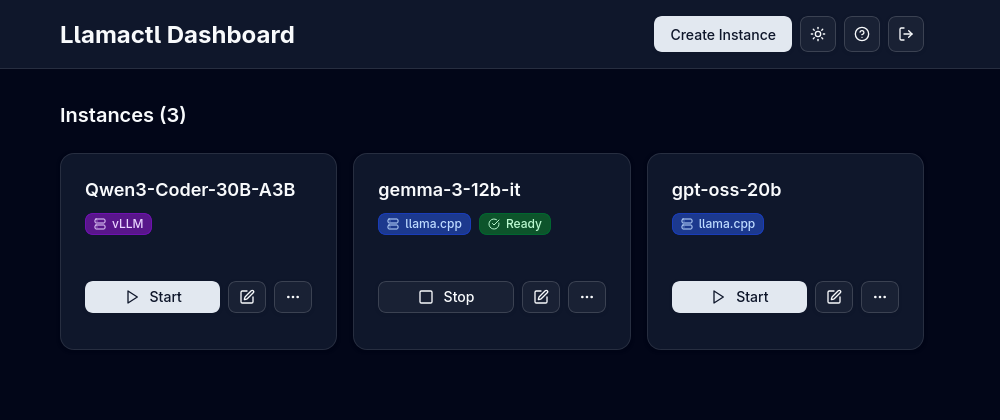
- Web Dashboard: Modern React UI for managing instances, monitoring health, and viewing logs
Measured star growth
- in 24h
- 0
- in 7 days
- Collecting history
- in 15 days
- Collecting history
- in 1 month
- Collecting history
Net star changes over overlapping periods, not daily totals. Missing measurements are left blank. Stars measure attention, not software quality.
README.md
Originalllamactl


Unified management and routing for llama.cpp, MLX and vLLM models with web dashboard.
Features
🚀 Easy Model Management
- Built-in Model Downloader: Download GGUF and Safetensors models directly from HuggingFace for llama.cpp, vLLM, and MLX backends
- Dynamic Multi-Model Instances: llama.cpp router mode - serve multiple models from a single instance with on-demand loading
- Smart Resource Management: Automatic idle timeout, LRU eviction, instance groups with per-group limits, and configurable instance limits
- Web Dashboard: Modern React UI for managing instances, monitoring health, and viewing logs
🔗 Flexible Integration
- API Compatible: OpenAI chat completions and resources endpoints, Anthropic messages endpoint (depending on backend) - route requests to different models by instance name
- Multi-Backend Support: Native support for llama.cpp, MLX (Apple Silicon optimized), and vLLM, plus any OpenAI-compatible server via configurable custom backends
- Docker Ready: Run backends in containers with full GPU support
🌐 Distributed Deployment
- Remote Instances: Deploy instances on remote hosts
- Central Management: Manage everything from a single dashboard with automatic routing
Quick Start
- Install a backend (llama.cpp, MLX, or vLLM) - see Prerequisites below
- Download llamactl for your platform
- Run
llamactland open http://localhost:8080 - Create an instance and start inferencing!
Prerequisites
Backend Dependencies
For llama.cpp backend:
You need llama-server from llama.cpp installed:
# Homebrew (macOS)
brew install llama.cpp

# Or build from source - see llama.cpp docs
# Or use Docker - no local installation required
For MLX backend (macOS only): You need MLX-LM installed:
# Install via pip (requires Python 3.8+)
pip install mlx-lm

# Or in a virtual environment (recommended)
python -m venv mlx-env
source mlx-env/bin/activate
pip install mlx-lm
For vLLM backend: You need vLLM installed:
# Install via pip (requires Python 3.8+, GPU required)
pip install vllm

# Or in a virtual environment (recommended)
python -m venv vllm-env
source vllm-env/bin/activate
pip install vllm

# Or use Docker - no local installation required
Docker Support
llamactl can run backends in Docker containers, eliminating the need for local backend installation:
backends:
  llama-cpp:
    docker:
      enabled: true
  vllm:
    docker:
      enabled: true
Installation
Option 1: Download Binary (Recommended)
# Linux/macOS - Get latest version and download
LATEST_VERSION=$(curl -s https://api.github.com/repos/lordmathis/llamactl/releases/latest | grep '"tag_name":' | sed -E 's/.*"([^"]+)".*/\1/')
curl -L https://github.com/lordmathis/llamactl/releases/download/${LATEST_VERSION}/llamactl-${LATEST_VERSION}-$(uname -s | tr '[:upper:]' '[:lower:]')-$(uname -m).tar.gz | tar -xz
sudo mv llamactl /usr/local/bin/

# Or download manually from the releases page:
# https://github.com/lordmathis/llamactl/releases/latest

# Windows - Download from releases page
Option 2: Docker (No local backend installation required)
# Clone repository and build Docker images
git clone https://github.com/lordmathis/llamactl.git
cd llamactl
mkdir -p data/llamacpp data/vllm models

# Build and start llamactl with llama.cpp CUDA backend
docker-compose -f docker/docker-compose.yml up llamactl-llamacpp -d

# Build and start llamactl with vLLM CUDA backend
docker-compose -f docker/docker-compose.yml up llamactl-vllm -d

# Build from source using multi-stage build
docker build -f docker/Dockerfile.source -t llamactl:source .
Note: Dockerfiles are configured for CUDA. Adapt base images for other platforms (CPU, ROCm, etc.).
Option 3: Build from Source
Requires Go 1.24+ and Node.js 22+
git clone https://github.com/lordmathis/llamactl.git
cd llamactl
cd webui && npm ci && npm run build && cd ..
go build -o llamactl ./cmd/server
Usage
- Open http://localhost:8080
- Click "Create Instance"
- Choose backend type (llama.cpp, MLX, or vLLM)
- Configure your model and options (ports and API keys are auto-assigned)
- Start the instance and use it with any OpenAI-compatible client
Configuration
llamactl works out of the box with sensible defaults. Configuration is loaded with the following precedence:
Defaults < .env file < Configuration file < LLAMACTL_* environment variables
Config files support ${VAR} and ${VAR:-default} placeholders, and a .env file is automatically loaded.
server:
  host: "0.0.0.0"                # Server host to bind to
  port: 8080                     # Server port to bind to
  allowed_origins: ["*"]         # Allowed CORS origins (default: all)
  allowed_headers: ["*"]         # Allowed CORS headers (default: all)
  enable_swagger: false          # Enable Swagger UI for API docs

backends:
  llama-cpp:
    command: "llama-server"
    args: []
    environment: {}               # Environment variables for the backend process
    docker:
      enabled: false
      image: "ghcr.io/ggml-org/llama.cpp:server"
      args: ["run", "--rm", "--network", "host", "--gpus", "all", "-v", "~/.local/share/llamactl/llama.cpp:/root/.cache/llama.cpp"]
      environment: {}             # Environment variables for the container

  vllm:
    command: "vllm"
    args: ["serve"]
    environment: {}               # Environment variables for the backend process
    docker:
      enabled: false
      image: "vllm/vllm-openai:latest"
      args: ["run", "--rm", "--network", "host", "--gpus", "all", "--shm-size", "1g", "-v", "~/.local/share/llamactl/huggingface:/root/.cache/huggingface"]
      environment: {}             # Environment variables for the container

  mlx:
    command: "mlx_lm.server"
    args: []
    environment: {}               # Environment variables for the backend process

data_dir: ~/.local/share/llamactl  # Main data directory (database, instances, logs), default varies by OS

instances:
  port_range: [8000, 9000]                        # Port range for instances
  logs_dir: ~/.local/share/llamactl/logs          # Logs directory (platform dependent)
  auto_create_dirs: true                          # Auto-create data/config/logs dirs if missing
  max_instances: -1                               # Max instances (-1 = unlimited)
  max_running_instances: -1                       # Max running instances (-1 = unlimited)
  enable_lru_eviction: true                       # Enable LRU eviction for idle instances
  default_idle_timeout: 30                        # Default idle timeout in minutes (0 = no timeout)
  default_auto_restart: true                      # Auto-restart new instances by default
  default_max_restarts: 3                         # Max restarts for new instances
  default_restart_delay: 5                        # Restart delay (seconds) for new instances
  default_on_demand_start: true                   # Default on-demand start setting
  on_demand_start_timeout: 120                    # Default on-demand start timeout in seconds
  group_limits: {}                                # Per-group instance limits (e.g., large: 1, small: 3)
  timeout_check_interval: 5                       # Idle instance timeout check in minutes
  log_rotation_enabled: true                      # Enable log rotation (default: true)
  log_rotation_max_size: 100                      # Max log file size in MB before rotation (default: 100)
  log_rotation_compress: false                    # Compress rotated log files (default: false)

database:
  path: ~/.local/share/llamactl/llamactl.db  # Database file path (platform dependent)
  max_open_connections: 25                   # Maximum open database connections
  max_idle_connections: 5                    # Maximum idle database connections
  connection_max_lifetime: 5m                # Connection max lifetime

auth:
  require_inference_auth: true   # Require auth for inference endpoints, API keys are created in web UI
  require_management_auth: true  # Require auth for management endpoints
  management_keys: []            # Keys for management endpoints
For detailed configuration options including environment variables, file locations, and advanced settings, see the Configuration Guide.
License
MIT License - see LICENSE file.
Explore related projects
affaan-m/ECC
The agent harness performance optimization system. Skills, instincts, memory, security, and research-first development for Claude Code, Codex, Opencode, Cursor and beyond.
300,257 starsNousResearch/hermes-agent
The agent that grows with you
262,089 starsmultica-ai/andrej-karpathy-skills
A single CLAUDE.md file to improve Claude Code behavior, derived from Andrej Karpathy's observations on LLM coding pitfalls.
231,379 starsfirecrawl/firecrawl
Supercharge your AI agents with data from the web and beyond. Building the library for superintelligence. 🔥
199,847 stars